.png)
 AWS
AWS Microsoft Azure
 Google Cloud


You are paying for the physical host, not simply the virtual machines placed on it. Microsoft’s Azure Dedicated Host overview confirms that Azure charges per dedicated host regardless of how many VMs are deployed. Software licensing, storage, and network usage are billed separately.
That makes a standard VM commitment analysis incomplete.
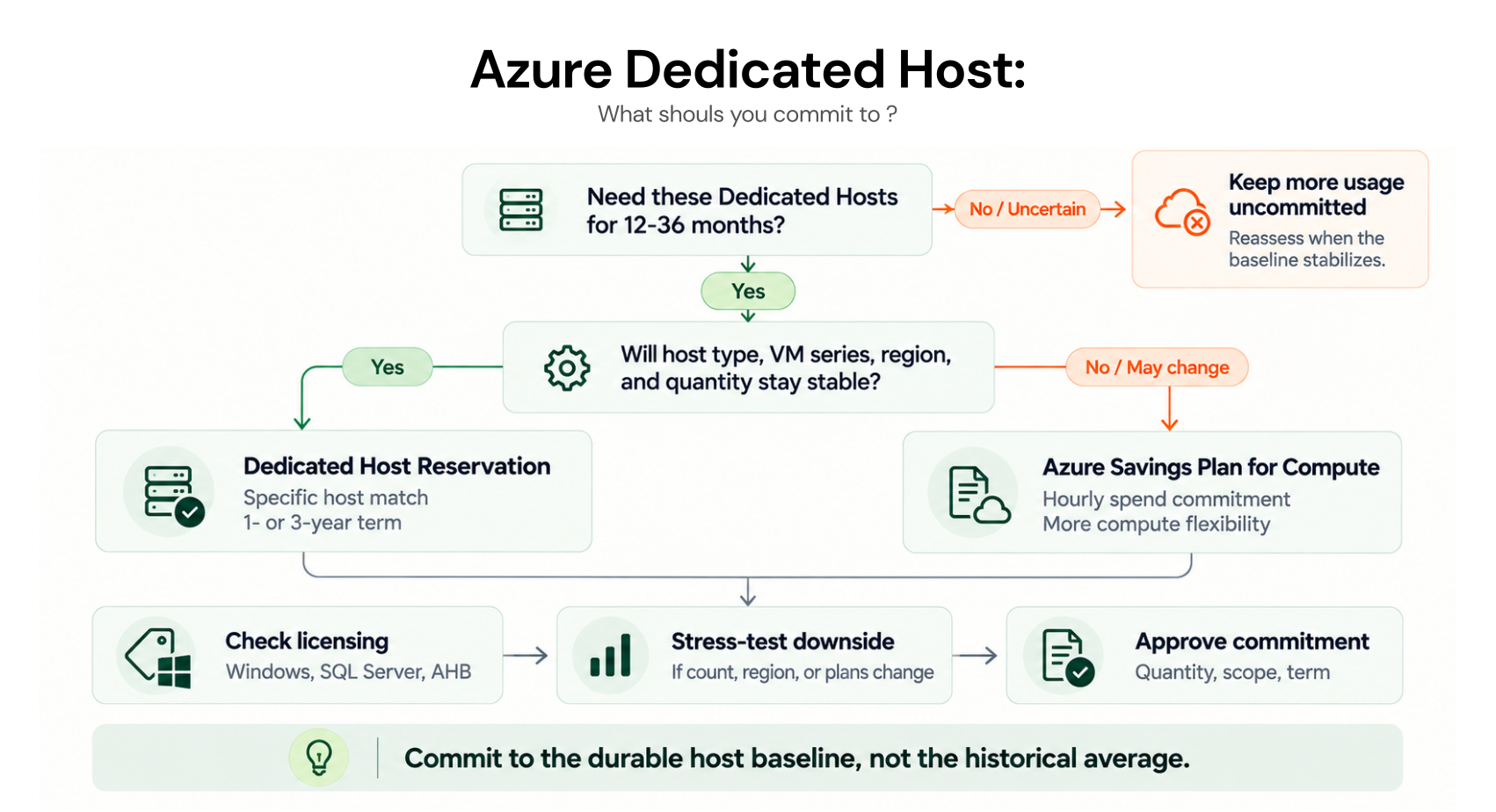
Before committing for one or three years, you need to know whether the host itself will remain necessary, whether future usage will continue matching the reservation, how software licensing changes the economics, and whether an Azure Savings Plan for compute gives you more useful flexibility.
That means reviewing the physical host requirement, hourly baseline, reservation matching, commitment option, licensing, scope, and term together.
The following checklist walks through those decisions in the order a buyer should evaluate them.
1. Start with the physical host requirement
The first question is not, “How large a discount can we get?” It is, will we still need these physical hosts throughout the commitment term?Dedicated Hosts are commonly used when organizations need dedicated physical infrastructure, greater control over host placement or maintenance, or specific licensing arrangements.
But a reservation only improves the rate on infrastructure you continue to need.
Before committing, review whether the fleet could change because of:
workload retirement
consolidation
region migration
host-family changes
architecture modernization
temporary isolation requirements
2. Measure host-hour stability, not VM utilization
VM utilization can be useful for deciding how efficiently a host is being used. It is not enough for sizing the host reservation.Azure charges for the Dedicated Host even when only part of its VM capacity is occupied.
For the reservation decision, look at the number of matching hosts that remain provisioned hour after hour.
Suppose a fleet normally runs between 8 and 12 matching hosts and rarely falls below 8. Those eight persistent hosts are a more defensible starting point for analysis than either the peak of 12 or a monthly average of 10.
Microsoft’s guidance on how Dedicated Host reservation discounts are applied describes the benefit as use-it-or-lose-it. If there is no matching resource for an hour, the unused reservation quantity for that hour cannot be carried forward.
3. Check exactly what the reservation will match
An Azure Reserved Dedicated Host Instance is more specific than a general compute-spend commitment.Microsoft automatically applies the reservation discount to Dedicated Hosts that match the reservation attributes and quantity within the selected scope.
Before buying, verify:
Azure region
Dedicated Host size and supported VM series
required host quantity
reservation scope
term
existing commitment coverage
Microsoft’s Dedicated Host reservation guidance notes that some host SKUs supporting the same VM series can use the same reservation benefit, but the reservation does not simply move across unrelated VM series.
If a host-generation or VM-series migration is already on the roadmap, model that change before committing.
For broader Azure reservation mechanics, including scope and utilization, see our Azure Reservations guide rather than duplicating those details here.
4. Compare a reservation with Azure Savings Plan for compute
Dedicated Host reservations are not the only commitment option.Microsoft currently includes Azure Dedicated Host among the infrastructure services eligible for Azure Savings Plan for compute. Savings Plans use a fixed dollar-per-hour commitment and can apply across eligible compute services and regions within the plan’s scope.
That creates a different risk profile.
| Decision factor | Dedicated Host reservation | Savings Plan for compute |
|---|---|---|
| Commitment basis | Matching Dedicated Host infrastructure | Fixed eligible compute spend per hour |
| Term | 1 or 3 years | 1 or 3 years |
| Host configuration dependence | Higher | Lower |
| Cross-service flexibility | Limited | Broader |
| Useful when | Matching host fleet is stable | Eligible compute spend is stable but infrastructure may change |
| Unused hourly benefit | Lost | Lost |
A Savings Plan is not automatically the better choice. Greater flexibility may come with different economics for the workload.
What does the reservation cost for the stable matching host fleet versus what would a Savings Plan cost for the same eligible usage and expected infrastructure changes?
5. Keep licensing outside the reservation calculation
This is one of the easiest places to overstate the value of the reservation.A Dedicated Host reservation discounts eligible compute infrastructure. Microsoft states that licensing, networking, and storage are not covered by that reservation.
Windows Server and SQL Server therefore need their own licensing analysis.
For Windows Server, qualifying licenses with active Software Assurance or qualifying subscriptions can use Azure Hybrid Benefit. Microsoft also allows Windows Server Datacenter customers with qualifying rights to license all available physical cores on an Azure Dedicated Host and use unlimited virtualization rights on that host.
SQL Server has separate rules. Microsoft documents both VM-level SQL licensing and Dedicated Host licensing, including host-level Azure Hybrid Benefit for qualifying SQL Server Enterprise licenses.
Before approving the commitment, identify:
which hosts run Windows Server workloads
whether Azure Hybrid Benefit applies
whether SQL Server is present
whether licensing is handled at VM or eligible host level
whether the required Software Assurance or subscription rights remain valid
6. Choose scope for utilization, not convenience
Azure supports reservation scopes including a single resource group, single subscription, management group, and shared scope. Microsoft also allows reservation scope to be changed after purchase without restarting the reservation term.The narrowest scope is not automatically the safest choice.
A narrow scope can make ownership easier to understand, but it also limits which matching hosts can consume the discount.
If matching Dedicated Hosts exist across several subscriptions, compare governance requirements with utilization risk before deciding the scope.
7. Check the term and downside before approval
Azure reservations generally use one-year or three-year terms for Dedicated Host purchases. Microsoft allows reservations to be paid upfront or monthly and states that the total reservation cost is the same under either billing frequency, subject to considerations such as exchange-rate movement for some agreements.Term choice should still follow the infrastructure roadmap.
Ask what could happen during those 12 or 36 months:
Could hosts be consolidated?
Could the workload move regions?
Could the VM series change?
Could a licensing change alter the Dedicated Host requirement?
Could the application retire?
Microsoft’s current reservation exchange policy says that beginning February 1, 2027, reservations purchased on or after that date are not exchangeable when the corresponding service is supported by Savings Plans.
Reservations purchased before that date retain one final exchange after the policy change. Microsoft continues to support eligible reservation trade-ins to Savings Plans under the applicable rules.
That makes downside modeling more important, not less.
Azure Dedicated Host commitment checklist
Before you commit, confirm these five things:Stable host baseline: Identify the number of matching Dedicated Hosts that stay provisioned consistently, not just the monthly average.
Reservation matching: Verify the host type, VM series, region, quantity, and scope the reservation must match.
Commitment alternative: Compare the Dedicated Host reservation with Azure Savings Plan for compute using the same eligible usage.
Licensing impact: Model Windows Server and SQL Server licensing separately, including Azure Hybrid Benefit where eligible.
Downside and approval: Test what happens if host demand falls, then confirm the term, purchase authority, and utilization-review owner.
How Usage.ai Handles Azure Commitments
For teams evaluating Azure Dedicated Host commitments, we provide an operating layer for analyzing usage, reviewing recommendations, approving purchases, and tracking commitments. We analyze Azure billing data, surface commitment opportunities, and show projected savings before a purchase is made.For Azure Dedicated Host usage, our current Azure workflow documents Savings Plan for compute recommendations and approved purchases in manual mode. Our broader Azure commitment optimization guide explains where manual management and managed automation fit across the wider Azure commitment portfolio.
At Usage.ai, we help teams manage the commitment layer as usage changes. With Flex Insured Commitments, teams can get the Up to 65% savings of a 1- or 3-year commitment with none of the commitment risk.
If an eligible Flex Commitment costs more than equivalent pay-as-you-go usage, we provide cashback protection to help cover the difference. See our cashback documentation for details.
Our goal is to help manage the commitment layer after you have established an appropriate Azure compute baseline, particularly when usage is stable enough to benefit from commitment pricing but may change over time.
Review your host baseline, coverage, licensing, and savings options before committing.
Frequently asked questions
Does Azure Savings Plan for compute cover Azure Dedicated Host?
Yes. Microsoft currently lists Azure Dedicated Host as an eligible compute service under Savings Plan for compute.
What does an Azure Dedicated Host reservation cover?
It covers eligible Dedicated Host compute infrastructure. Licensing, networking, and storage remain separate costs.
Should I use a reservation or Savings Plan for Dedicated Host?
It depends on the shape of the workload. A reservation is more tightly matched to stable host infrastructure. Savings Plan for compute provides broader flexibility when eligible compute spend remains durable but the infrastructure mix may change.
Do unused Dedicated Host reservation hours roll over?
No. If there is no matching resource for an hour, the unused reservation quantity for that hour is lost.
Does the reservation include Windows Server or SQL Server licensing?
No. The reservation covers the host compute infrastructure. Windows Server and SQL Server licensing must be evaluated separately, including whether the organization qualifies for Azure Hybrid Benefit.