AWS
AWS Microsoft Azure
 Google Cloud

That matters when comparing Databricks cost optimization tools. You need to know which workloads each supports, what it can do automatically, and whether the savings justify its fees.
We compare 5 tools, including our own platform, Usage.ai, across AWS, Azure, and Google Cloud, identifying each product’s supported scope, automation, pricing, and limitations. For Azure billing fundamentals, our Databricks pricing guide explains the DBU and infrastructure charges to include.
Reviewed October 26, 2026. Disclosure: We publish this guide at Usage.ai and include our own platform in the comparison.
What Can Databricks Cost Optimization Tools Change?
Databricks cost optimization tools fix different parts of your bill. Some help you understand spending, others tune workloads, and commitment managers improve rates for eligible usage.Start with the problem you want to solve, then check what each tool can actually change. When comparing costs, include both DBU and separate infrastructure charges for classic compute.
For serverless compute, Databricks manages the underlying compute and bills serverless DBU consumption; evaluate applicable connectivity and data-transfer charges separately.
Databricks Cost Optimization Tools at a Glance
| Tool | Best for | Actions and execution controls | Pricing basis | Key limitation |
|---|---|---|---|---|
| Unravel Data | Workload cost and performance troubleshooting | Supported code and compute changes through approval-based or AutoApply modes | Published DBU-based model; request a quote for rates | Automated changes depend on workload eligibility and permissions |
| Usage.ai | Eligible Azure VM commitment savings | Eligible commitment purchases through CoPilot approval or Autopilot controls | Share of realized savings | Manages purchasing rather than changing workload configurations |
| SELECT | Cost visibility with compute tuning | Reporting, alerts, and automatic adjustments for supported All-Purpose Compute and SQL warehouses | Advertised starting price of $1,499/month; scoped quote required | Monitoring coverage does not imply automation for every workload |
| Capital One Slingshot | Job-cluster optimization | Job-cluster recommendations with optional auto-application | Quote-only for the Databricks scope reviewed | Optimization cost estimates can differ from discounted billing |
| Altimate AI | Compute tuning with approval controls | Supported classic job-cluster tuning with enablement controls, monitoring, and automatic reversion | Published per-account model; request a quote for rates | Changes operate within supported configurations and performance thresholds |
How We Compared Databricks Cost Optimization Tools
We reviewed each tool’s official documentation and pricing pages to compare supported workloads, automation, pricing, and limitations.We distinguish between showing costs and alerts, recommending changes, applying changes after approval, and acting automatically within agreed controls. A tool may monitor a workload without being able to modify it.
Support also varies by cloud, region, and compute type, so check the linked sources and confirm any gaps with the vendor.
“Best for” on this databricks cost optimization tools list reflects our assessment of documented capabilities, not hands-on testing of all 5 products. Pricing reflects published information checked October 26, 2026; where terms depend on your environment, we recommend requesting a scoped quote.
We include our own platform, Usage.ai, and apply the same criteria to its profile.
1. Unravel Data
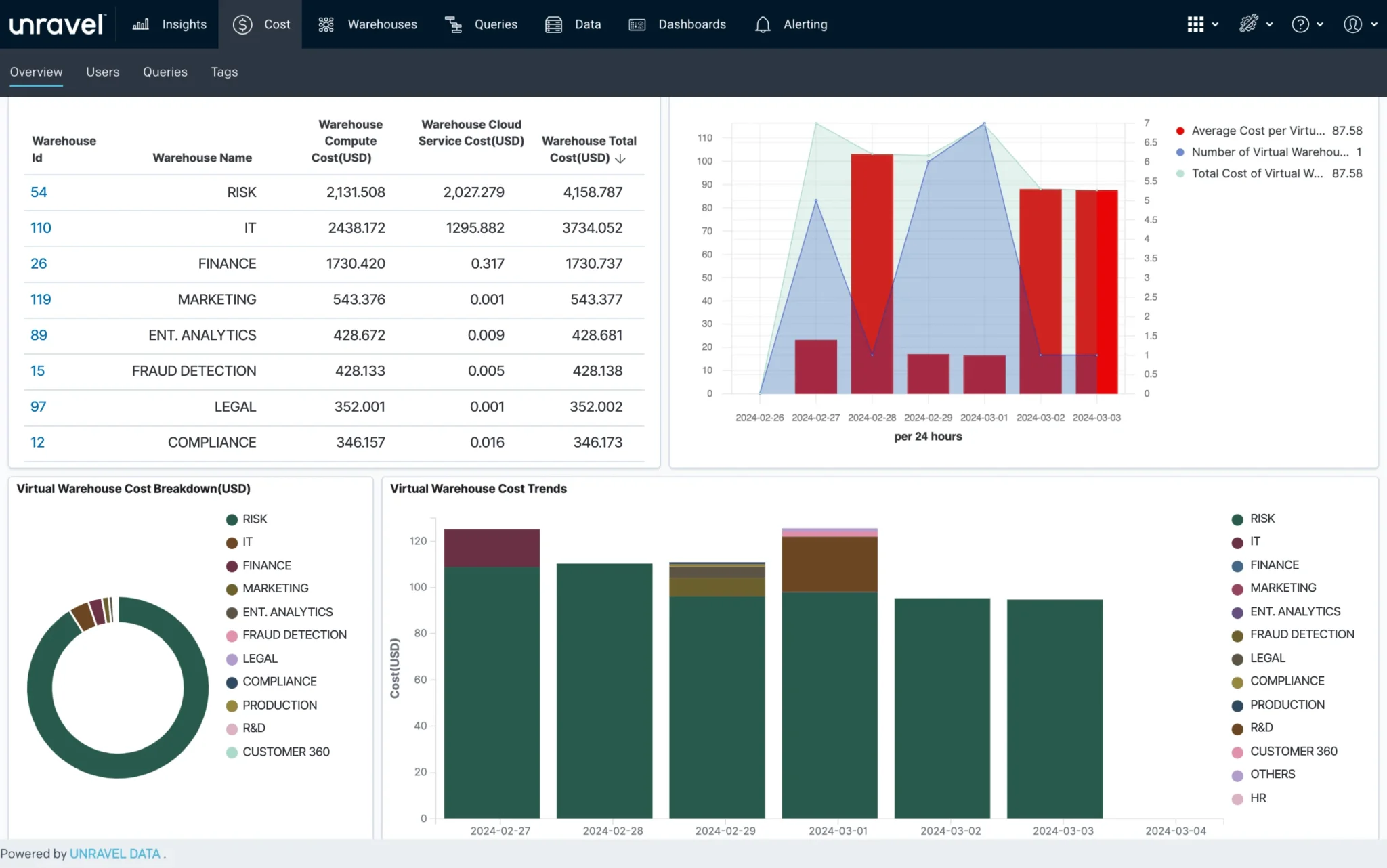
Unravel Data combines cost visibility, performance troubleshooting, and optimization across Databricks jobs, SQL warehouses, interactive clusters, streaming, and machine-learning workloads. It fits teams that need to trace spending to inefficient code or compute configurations and act on those findings.
Its Arvix AI engine examines jobs, notebooks, and individual commands, proposes code changes, and shows the differences for review. Unravel Data also supports compute rightsizing and idle-resource detection, with automation ranging from manual approval to automatic execution for supported changes.
Among Databricks cost optimization tools, Unravel Data is worth evaluating when your priority is engineering efficiency: understanding why workloads cost too much and improving how they run.
Pricing: Its pricing is based on monthly DBU consumption, with annual subscription or pay-as-you-go arrangements. Request a quote for your monitored scope.
Key limitation: Visibility and automated execution have different scopes. Ask Unravel Data to demonstrate the supported actions, permissions, approval process, and performance checks for your workloads.
2. Usage.ai
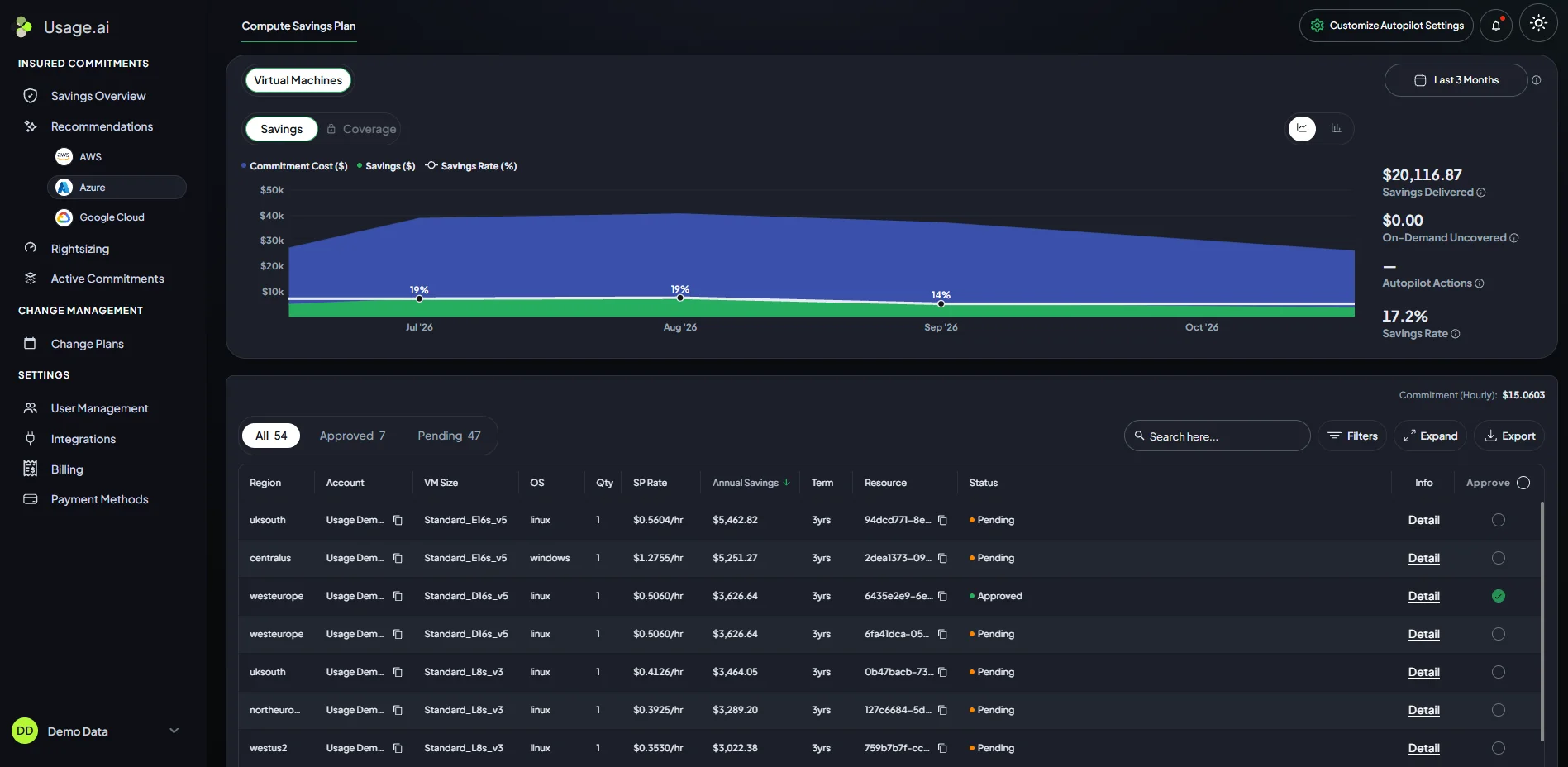
We built Usage.ai to help you pay less for cloud usage your business needs. For Azure Databricks classic compute, we analyze eligible VM usage and existing commitments, forecast demand, and decide how much to purchase, when to buy, and when to wait. DBU charges and serverless usage require separate evaluation.
Our Autopilot executes purchases within your configured controls. With Copilot, your team reviews and approves recommendations. As demand changes, we adjust future purchasing.
Commitments stay in your Azure account. Analysis uses read-only billing access, while purchases require scoped permissions. No agents, code changes, or infrastructure modifications are required.
Our Flex Insured Commitment Program provides Cashback protection for eligible Flex Insured Commitments, subject to applicable program terms. The Cashback guide explains covered losses and payout timing.
Pricing: A share of realized savings, with no upfront platform fee.
Key limitation: We manage commitments rather than tune workloads. Confirm eligible charges using our Databricks commitment coverage checklist.
3. SELECT
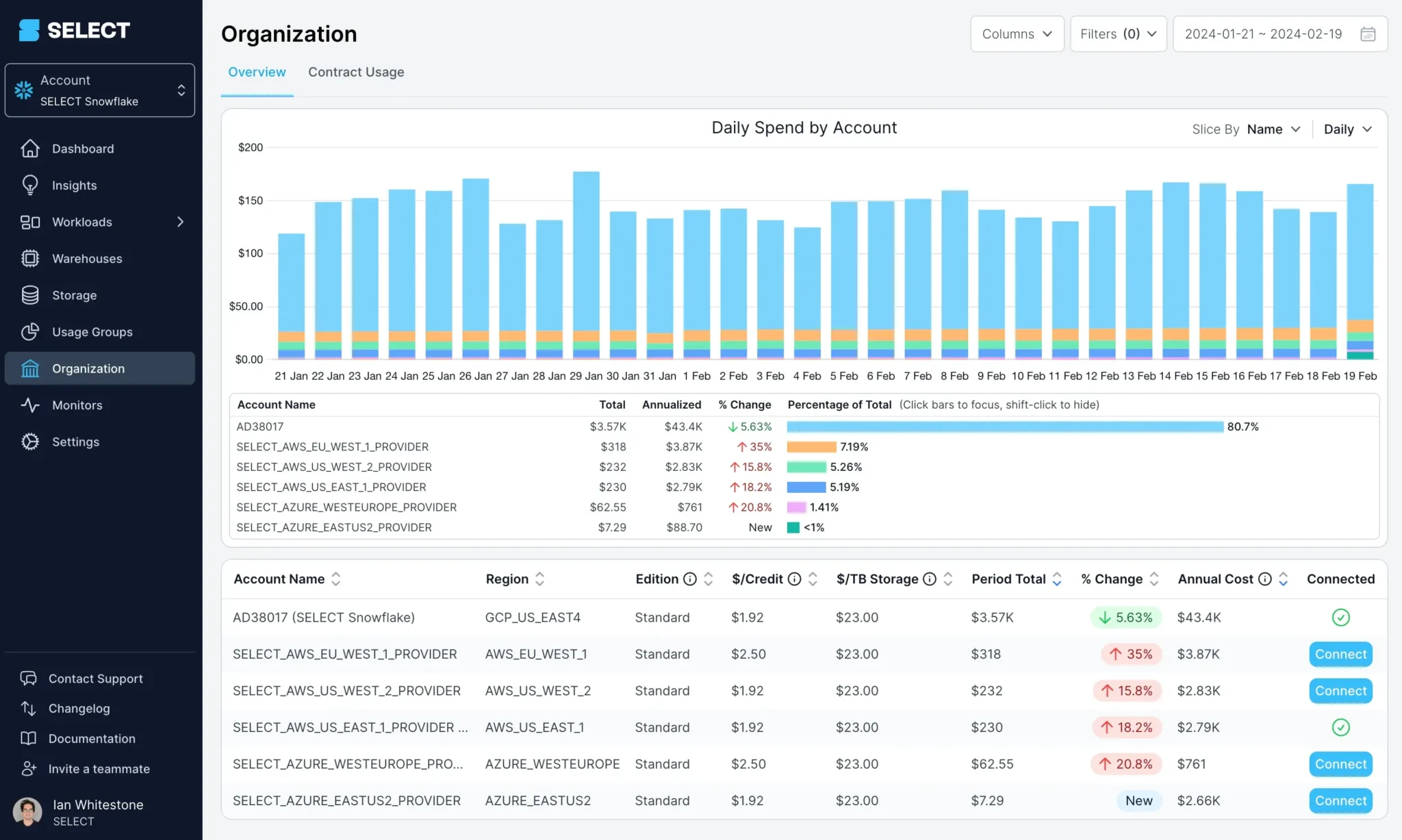
SELECT brings cost attribution, anomaly monitoring, and compute optimization into one platform. It helps teams trace spending across jobs, pipelines, warehouses, and clusters, then allocate those costs to teams, projects, or departments.
Its Automated Savings feature continuously adjusts supported All-Purpose Compute and SQL warehouses to improve utilization. Alongside those changes, SELECT surfaces optimization opportunities and sends alerts when spending behaves unexpectedly.
For teams comparing Databricks cost optimization tools, SELECT fits when cost investigation and ongoing compute tuning need to happen in the same workflow.
Pricing: Its pricing page advertises custom quotes starting at $1,499 per month, depending on environment and usage. Confirm the Databricks features included in your proposal.
Key limitation: Cost visibility and automated changes have different coverage. Infrastructure cost reporting also requires attention.
SELECT documents an AWS billing connection in Private Preview. Confirm equivalent coverage for your cloud before treating dashboard totals as your complete Databricks cost.
4. Capital One Slingshot
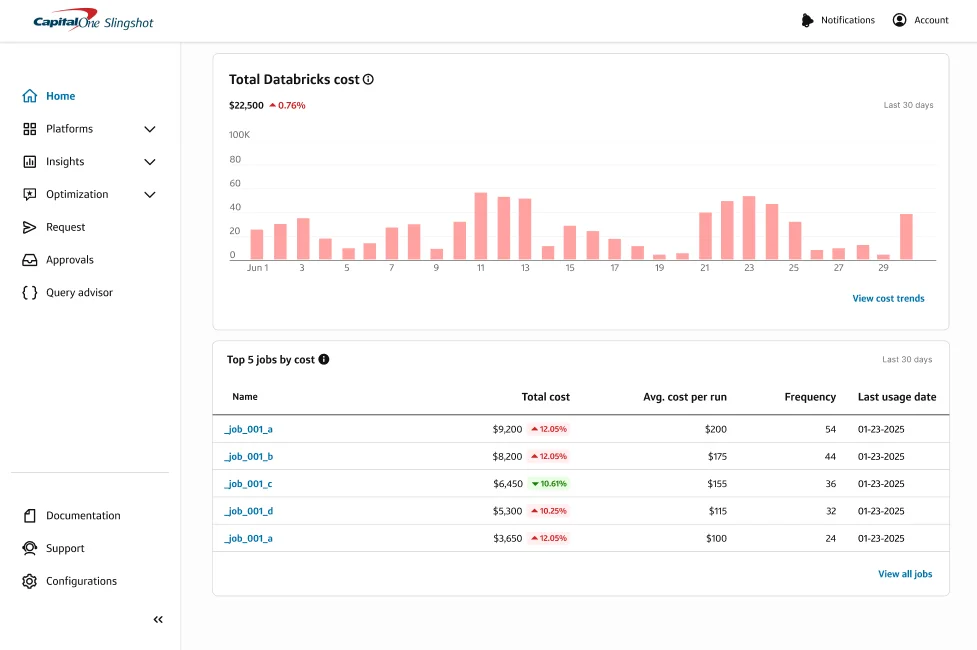
Capital One Slingshot combines Databricks cost visibility with machine-learning-based job-cluster optimization. It fits teams that want to investigate expensive jobs and manage compute recommendations for selected workloads.
Each optimization project has configurable settings for service-level requirements, worker-instance recommendations, and whether recommendations apply automatically. This lets engineers choose which job clusters to optimize and retain control over execution.
Its cloud coverage includes selected AWS and Azure regions. Check your deployment against that list before shortlisting it.
Pricing: Request a quote for your Databricks environment and required capabilities.
5. Altimate AI
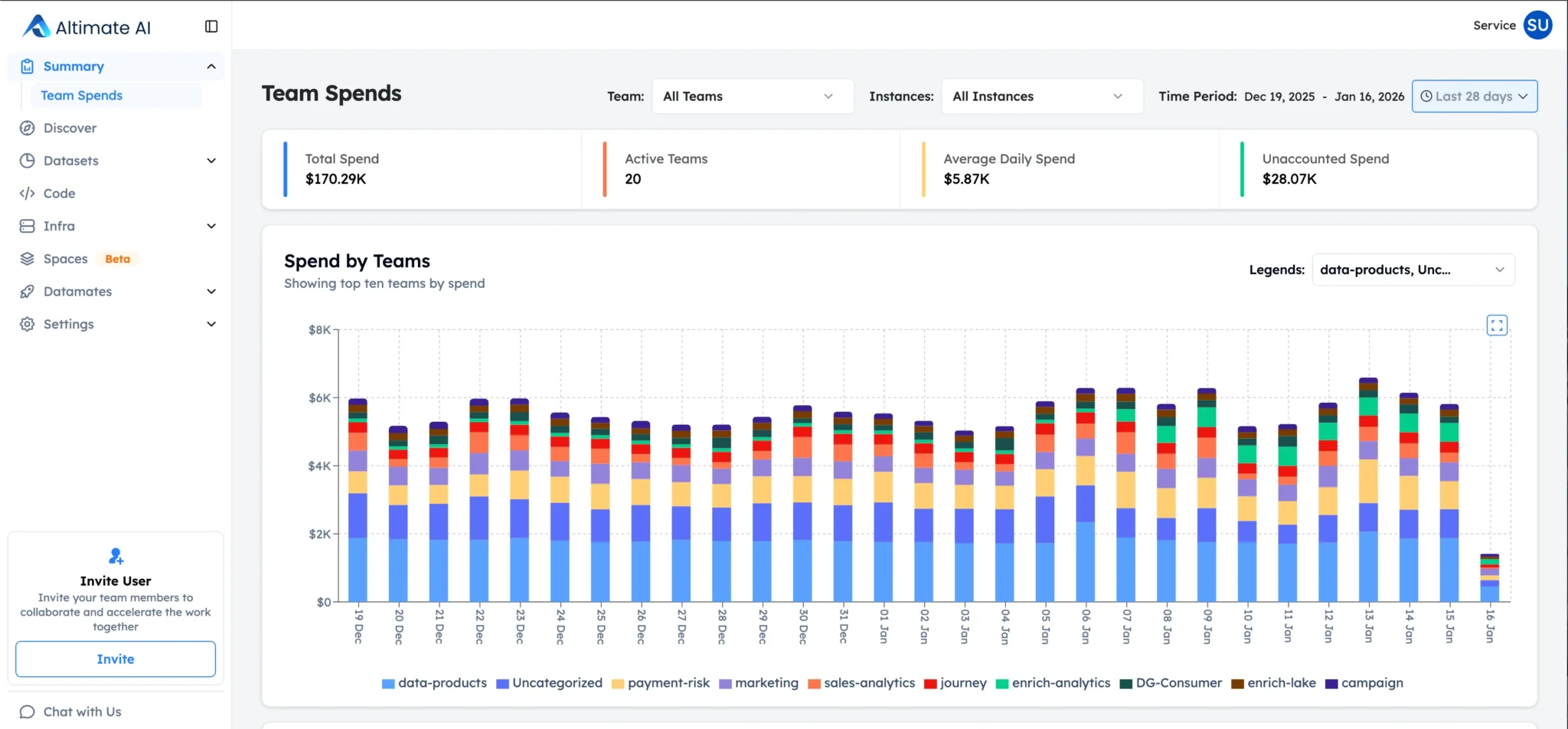
Altimate AI combines Databricks compute tuning with cost attribution, forecasting, and workload recommendations. Its Auto Tune agents rightsize supported classic job clusters within configured performance bounds.
Teams choose which resources Auto Tune can modify. Configuration changes apply between runs, with monitoring against the previous performance baseline. Altimate documents automatic restoration of the prior configuration when a run fails or runtime exceeds 1.5 times the recent baseline.
Alongside automated tuning, it identifies Spark inefficiencies and assigns savings opportunities to owners. This makes it relevant when comparing Databricks cost optimization tools that combine resource changes with engineering follow-through.
Pricing: The Databricks product page specifies per-account pricing with no per-seat fee. Request a quote for the required scope.
Key limitation: Unity Catalog is required. Auto Tune changes configurations on enabled resources; it does not modify code, schedules, or data. Recommendations outside that execution scope still need an implementation owner.
Native Databricks Tools
If you’re not looking for a paid platform yet, Databricks’ built-in cost tools offer a practical starting point.Its usage dashboards help you see which workloads consume the most. Once you know where spending is concentrated, budget alerts help you track it, while compute policies let you set boundaries on the resources your team can create.
Governance Hub is another native option, currently in Beta. It brings spending trends and cost drivers into a central view, making it easier to investigate which products and workspaces are driving the bill. Its cost figures use list prices, so they may differ from what you actually pay.
These capabilities give your team a foundation for managing costs. A third-party platform becomes useful when investigating findings and applying changes takes too much time, or when you need deeper workload tuning or eligible commitment management.
For a broader shortlist beyond Databricks, explore our best cloud cost optimization tools comparison.
How to Choose Databricks Cost Optimization Tools
Start with the work you need the tool to handle. If your team cannot explain spending, prioritize cost attribution. If you already know which jobs are expensive, look for workload analysis and tuning. For predictable usage, evaluate eligible commitment savings.Then test your shortlist against a workload you actually run:
Confirm coverage. Ask the vendor to demonstrate support for your cloud, compute type, and workload.
Follow one change through. See what the tool recommends, who approves it, what it changes, and how you restore the previous configuration.
Compare equivalent results. Measure total cost per successful run alongside completion time, failures, and retries.
Calculate savings after costs. Include software fees, implementation, ongoing engineering work, and existing commitments.
Let Us Find Your Next Cloud Savings Opportunity
We help teams identify and manage eligible cloud commitment opportunities across AWS, Azure, and Google Cloud. Bring us your cloud cost goals, and we will show you how our commitment analysis, approval controls, and Cashback protection for eligible Flex Insured Commitments work, subject to program terms.Explore our cloud optimization platform. For a personalized assessment, we review your billing and usage data and walk you through the opportunities we find.
15-minute demo of automation, controls, and pricing.
Frequently asked questions
Which Databricks cost optimization tools support Azure?
Options include Unravel, SELECT, Capital One Slingshot, and Usage.ai for eligible Azure VM infrastructure commitments. Their roles differ as workload optimization changes how resources run, while commitment management addresses purchasing.
Confirm support for your regions and compute types before choosing.
How do Databricks optimization tools differ from optimization techniques?
Techniques are changes engineers make, such as improving data layout, reducing unnecessary processing, or choosing appropriate compute. Tools help identify, recommend, or automate those changes.
Check which actions a product actually performs and which remain with your team.
What is Databricks predictive optimization?
Predictive optimization automates table maintenance for supported Unity Catalog managed tables. It runs OPTIMIZE, VACUUM, and ANALYZE to improve data layout, remove eligible unused files, and maintain statistics.
It uses billable serverless jobs compute and does not replace a broader cost management platform.
What is the difference between OPTIMIZE and VACUUM in Databricks?
Does faster Databricks performance always mean lower costs?
No. A faster configuration may use more expensive resources. Compare the total cost of completing the same successful workload, including applicable DBU and infrastructure charges.
When evaluating a paid tool, include its fees and check that improvements preserve required performance and reliability.
If you notice any material information that is incorrect, outdated, or no longer applicable, please contact us at [email protected]. We’ll review it and update the article where appropriate.