
 AWS
AWS Microsoft Azure
 Google Cloud

Key Takeaways
|
EC2 Auto Scaling Groups and Savings Plan get along just fine. AWS applies the discount at the billing layer, so it genuinely doesn’t matter whether an instance was launched by a human, a CloudFormation template, or an ASG scaling policy firing at 3 AM. Compatibility isn’t the issue.
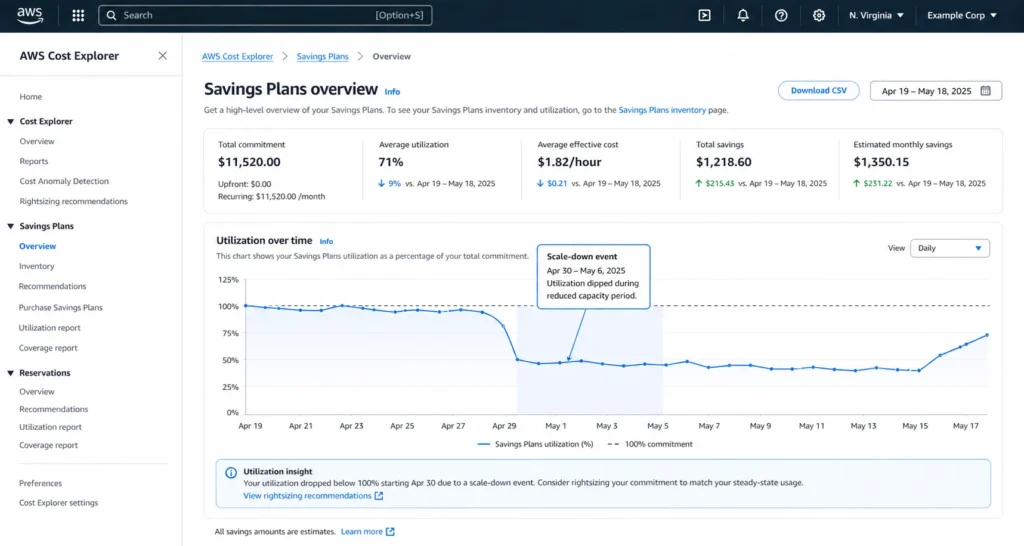
The issue is what happens after that; when your fleet runs 15 instances at 2 AM and 90 at peak, and you’ve committed to a number somewhere in the middle.
- Every night, you’re paying for Savings Plan hours that produce no discount because the fleet has scaled below your commitment level.
- Every morning, scale-out absorbs your SP buffer and keeps climbing on On-Demand.
You end up simultaneously over-committed during quiet hours and under-covered during busy ones and the gap often goes unnoticed, because AWS Cost Explorer recommendations don’t re-evaluate on their own. They sit static until someone manually triggers a refresh.
If that sounds familiar, this guide is for you. It is for FinOps engineers who already know how Auto Scaling works, so we’ll skip the basics and focus on how SP discounts apply to ASG-launched instances, how to calculate a safe commitment level for a fleet that never stays the same size, and what to do when your baseline shifts.
Do EC2 Savings Plans Actually Work with Auto Scaling Groups?
Yes, EC2 Savings Plans apply to instances launched by Auto Scaling Groups without any additional configuration. AWS applies Savings Plan discounts at the billing layer after the fact, scanning all eligible EC2 usage within each billing hour and matching the highest-discount Savings Plan to each usage line. The launch source, be it manual, ASG, Spot Fleet, ECS, or whatever, is irrelevant to this matching process.
An m5.large instance spun up by an ASG policy at 9:14 AM receives the same SP discount as an m5.large you launched manually at 9:00 AM. There is no opt-in, no tagging requirement, and no ASG-specific setting.
| Rule of Thumb
If an instance type is eligible for a Savings Plan, it doesn’t matter whether a human or an Auto Scaling Group launched it. AWS bills compute hours, not launch sources. |
How AWS Applies Savings Plan Discounts at the Billing Layer
AWS doesn’t apply Savings Plan discounts at the instance level. It applies them at the billing layer, after the fact. That one detail changes everything about how you should size a commitment on a dynamic fleet.
What “Billing-Layer Application” Actually Means
AWS Savings Plans work as a $/hr commitment you make in exchange for discounted rates on eligible compute usage. Each billing hour, AWS calculates your total On-Demand-equivalent EC2 usage, applies your committed $/hr at the discounted SP rate first, and charges the remainder at On-Demand rates.
Critically, the commitment is consumed whether or not you have enough usage to absorb it. If you commit $10/hr and your actual usage in a given hour is only $4/hr of eligible compute valued at Savings Plans rates, you’ve paid $10 and saved nothing on $6 worth of commitment. The SP hours don’t roll over.
This is the mechanism behind scale-down waste. When Auto Scaling terminates instances during off-peak hours, your SP commitment continues running. It just stops producing discounts because there’s nothing to apply it to.
Does the Instance Type Launched by the ASG Affect SP Coverage?
This depends on which Savings Plan type you’ve purchased, and it’s a critical decision for teams using Auto Scaling with mixed instance policies.
- Compute Savings Plans cover any EC2 instance family, size, region, tenancy, and OS. An ASG that launches m5.large during normal load and switches to c5.xlarge during CPU-intensive scale-out events will have both instance types covered by a Compute SP.
- EC2 Instance Savings Plans are locked to a specific instance family in a specific region. An EC2 Instance SP covering m5 in us-east-1 will not apply to c5 instances, even if they’re running in the same account in us-east-1.
| Feature | Compute Savings Plan | EC2 Instance Savings Plan |
| Instance family | Any | One family only |
| Region | Any | One region only |
| Covers mixed-instance ASG | Yes | Partial only |
| Discount vs On-Demand | Up to 66% (source: aws.amazon.com/savingsplans/faqs) | Up to 72% (source: aws.amazon.com/savingsplans/faqs) |
| Risk with Auto Scaling | Lower | Higher if ASG changes families |
(Source: Amazon Docs. Verify current rates as AWS periodically updates pricing)
| Rule of Thumb
If your ASG uses a mixed instance policy or is configured to substitute instance families during scale-out, Compute Savings Plans are the correct choice. The slightly lower discount is offset by the coverage flexibility,which is an EC2 Instance SP that doesn’t cover your scale-out instance type is worth zero during scale-out. |
What Is EC2 Auto Scaling and How Does It Affect Your Billing?
EC2 Auto Scaling is a managed AWS service that automatically adjusts the number of EC2 instances in an Auto Scaling Group (ASG) based on defined policies. The three core components are:
- Launch Template: The instance blueprint with AMI, instance type, security groups, and other configuration parameters
- Auto Scaling Group (ASG): The logical container with minimum, maximum, and desired capacity settings
- Scaling Policies: The rules that trigger scale-out or scale-in events
For billing purposes, every instance running in an ASG is an EC2 instance charged at the applicable rate (On-Demand, Savings Plan, or Spot) for every full or partial hour it runs. EC2 Auto Scaling itself carries no additional service fee.
The billing complexity arises from scaling behavior: your instance count, and therefore your per-hour EC2 spend, is constantly changing. This is what makes manual Savings Plan sizing unreliable.
Dynamic Scaling vs. Predictive Scaling:Which Is Harder to Optimize?
The three main scaling approaches create very different commitment sizing challenges:
Dynamic Scaling reacts to real-time metrics (CPU utilization, request count, custom CloudWatch metrics). Fleet size can change within minutes. This is the most volatile pattern for SP sizing where your baseline must be calculated from weeks of historical data, not from any single day.
Predictive Scaling uses ML to forecast demand based on historical patterns and pre-warms capacity before expected peaks. This is easier to optimize because peak times are known in advance. You can size commitments around the predicted trough rather than flying blind.
Scheduled Scaling adjusts capacity at fixed times, adding instances at 8 AM, removing them at 8 PM. This is the most predictable pattern and the easiest to commit against safely.
Predictive and Scheduled scaling let you plan commitments around known peaks. Dynamic scaling requires a conservative floor commitment plus On-Demand headroom for spikes. Never size a Dynamic scaling commitment against your average, rather size it against your minimum sustained floor. If you’re managing commitments across multiple accounts, see how Savings Plans apply across consolidated accounts.
The Real Problem: Sizing Your Savings Plan Commitment When Your Fleet Is Never the Same Size
Sizing a Savings Plan commitment on a static fleet is pretty easy. But, sizing one on a fleet that scales 6× between midnight and noon is where most teams leak money.
The instinct is to calculate average EC2 spend and commit to that. The math seems reasonable: if you average $500/hr over the past 30 days, buy a $500/hr Savings Plan. But averages include peaks. During the nights and weekends when your fleet runs at minimum capacity, you’re paying $500/hr for discounts you can’t consume because there’s not enough usage to absorb the commitment.
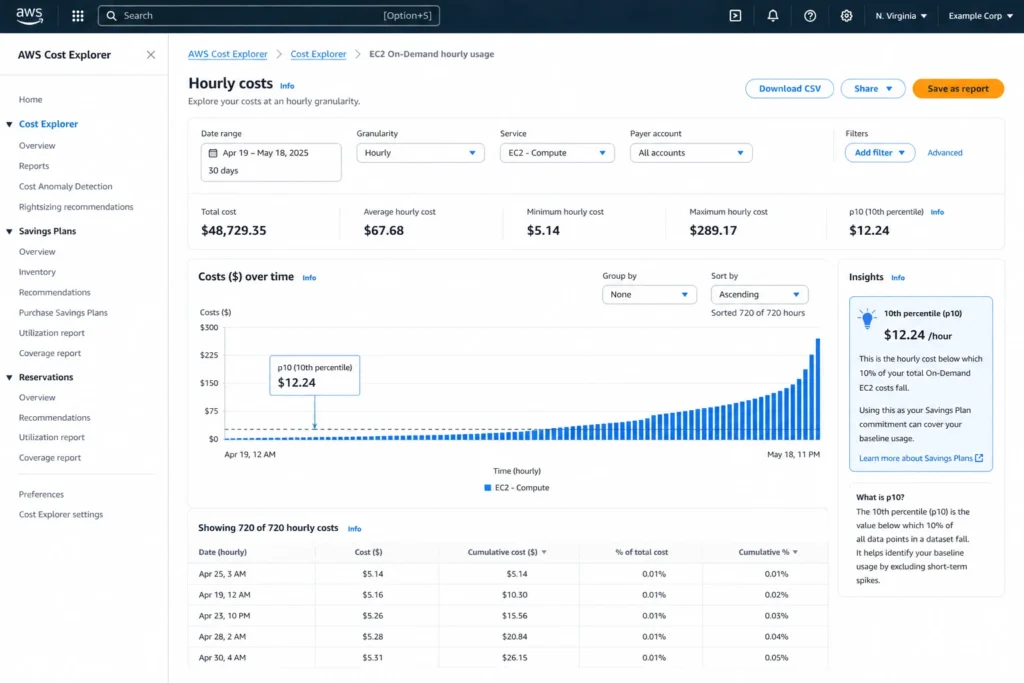
Start with a sustained baseline after accounting for existing Reserved Instances and Savings Plans. Value remaining eligible usage at the rates of the plan you intend to buy. A 30-day p10 can help identify quiet hours, but it is not a minimum or a guarantee against underutilization. Review lower-usage hours, planned shutdowns, rightsizing and migrations before choosing a commitment.
| Unused commitment in an hour = max(0, hourly commitment − eligible usage valued at Savings Plans rates).
Illustrative example: a $500/hr commitment with only $120/hr of eligible usage at Savings Plans rates leaves $380 unused in that hour. If $120 is an On-Demand figure, convert it to the applicable Savings Plans rates first. |
The same method applies to small and large fleets, but the rates depend on the workload mix, plan type, term and payment option.
How to Calculate Baseline Usage Across a Variable Fleet
- Pull 30 days of hourly EC2 usage from AWS Cost Explorer. Filter to the instance types covered by the Savings Plan you’re considering. Export as CSV.
- Sort by hourly spend, ascending. Identify p10 and inspect the hours below it. Include planned changes and do not treat this percentile as a guaranteed usage floor.
- Convert to $/hr commitment. Price eligible usage at the selected Savings Plans rates, after existing commitment coverage. Do not use the On-Demand dollar amount directly or assume a fixed 34% discount.
- Model the savings. Use the AWS Pricing Calculator to estimate annual savings at your commitment level before purchasing.
- Set a review cadence. Revisit the commitment level quarterly or after any significant architectural change that shifts your baseline.
The Risk of Over-Committing with Aggressive Scale-Out Policies
Example verified October 15, 2026: Linux, shared-tenancy m5.large in US East (N. Virginia). On-Demand is $0.096 per instance-hour; a one-year, No Upfront Compute Savings Plan is $0.071 per instance-hour. These are compute-only rates, excluding storage, transfer and tax.
| Fleet level | Instances | On-Demand equivalent per hour | Usage valued at the Savings Plans rate per hour |
|---|---|---|---|
| Minimum | 10 | $0.96 | $0.71 |
| Average | 40 | $3.84 | $2.84 |
| Peak | 80 | $7.68 | $5.68 |
A commitment sized to cover 40 instances is $2.84/hr. When the fleet falls to 10, it uses only $0.71/hr of that commitment. Ten hours at minimum capacity waste 10 × ($2.84 − $0.71) = $21.30 per night. If this happens every night for 365 days, unused commitment totals $7,774.50 per year.
A $0.71/hr commitment covers the ten-instance baseline, assuming it runs continuously and is not already covered by another commitment. Scale-out usage above it is billed separately. The $0.96/hr On-Demand baseline is not the correct Savings Plans commitment amount.
Sources: AWS EC2 On-Demand pricing, AWS Savings Plans pricing, and how Savings Plans apply. Rates were checked against AWS’s current public price lists.
What Happens to Your Savings Plan When Auto Scaling Terminates Instances?
When Auto Scaling scales in and terminates instances, your Savings Plan commitment doesn’t pause. AWS applies the $/hr commitment to whatever eligible EC2 usage exists in that billing hour. If your terminations reduce usage below your commitment level, the uncommitted portion is consumed without producing a discount.
Instances terminated mid-hour are still billed for the partial hour at the applicable rate. The SP discount applies to the eligible usage within the hour regardless of when the termination occurred, AWS doesn’t prorate commitments against instance lifetime within a billing hour.
The practical implication is short-burst scaling events where Auto Scaling launches and terminates instances within a single hour are poor SP targets. Those instances are better covered by On-Demand or Spot, not by Savings Plan commitments. Reserve your SP commitment for the instances that run for sustained, predictable periods. Also see which EC2 Savings Plan Payment Option Costs Less.
Compute Savings Plans vs. EC2 Instance Savings Plans: Which Is Safer for Auto Scaling Workloads?
The full comparison table appeared earlier, but the decision framework matters more than the table:
Choose Compute Savings Plans when:
- Your ASG uses a mixed instance policy (multiple instance families)
- You scale across multiple regions
- Your workload may shift instance families over the commitment term
- You’re not 100% certain your instance family will stay fixed
Choose EC2 Instance Savings Plans when:
- Your ASG runs a single, consistent instance family in one region
- You’re optimizing for the deepest possible discount and can accept the family lock-in
- Your scaling behavior is predictable and well-understood
For most teams running Auto Scaling in production, Compute Savings Plans are the lower-risk choice. The advertised maximum discounts are six percentage points apart (66% and 72%); that is not a fixed price difference for a particular workload. Compare the actual rates and the value of being able to change instance families.
| Rule of Thumb
When in doubt between Compute and EC2 Instance SPs on an Auto Scaling workload, take the flexibility. A Compute SP that always applies beats an EC2 Instance SP that occasionally misses. |
How Stale Commitment Recommendations Compound Waste in Auto Scaling Environments
By this point, the mechanics are clear: Savings Plans work with Auto Scaling, but sizing them correctly requires accurate, recent data about your fleet’s actual usage patterns.
This is where the tooling gap matters.
Why Manual-Only Recommendation Refresh Fails Dynamic Fleets
AWS Cost Explorer does generate Savings Plan recommendations and as of December 2022, they can be manually refreshed on demand via a 1-click button in the console. That’s an improvement. The problem is that manual refresh requires someone to remember to do it, know it’s necessary, and act on the output. For a fleet running Dynamic Scaling, this gap between real-world usage and acted-upon recommendations is where money leaks:
- A traffic event can change your fleet composition in minutes and no one opens Cost Explorer
- A new service deployment permanently shifts your baseline instance count while the old recommendation is still in the console
- A seasonal pattern shift makes last week’s recommendation wrong this week with no alert fires
At $6–12K/day in uncovered EC2 spend (a realistic figure for mid-sized AWS environments), even a week of acting on stale recommendations exposes $42K–$84K to suboptimal pricing. For teams actively scaling infrastructure, it’s the default operating condition when relying on reactive, manual tooling.
What Automated Daily Re-Evaluation Actually Changes
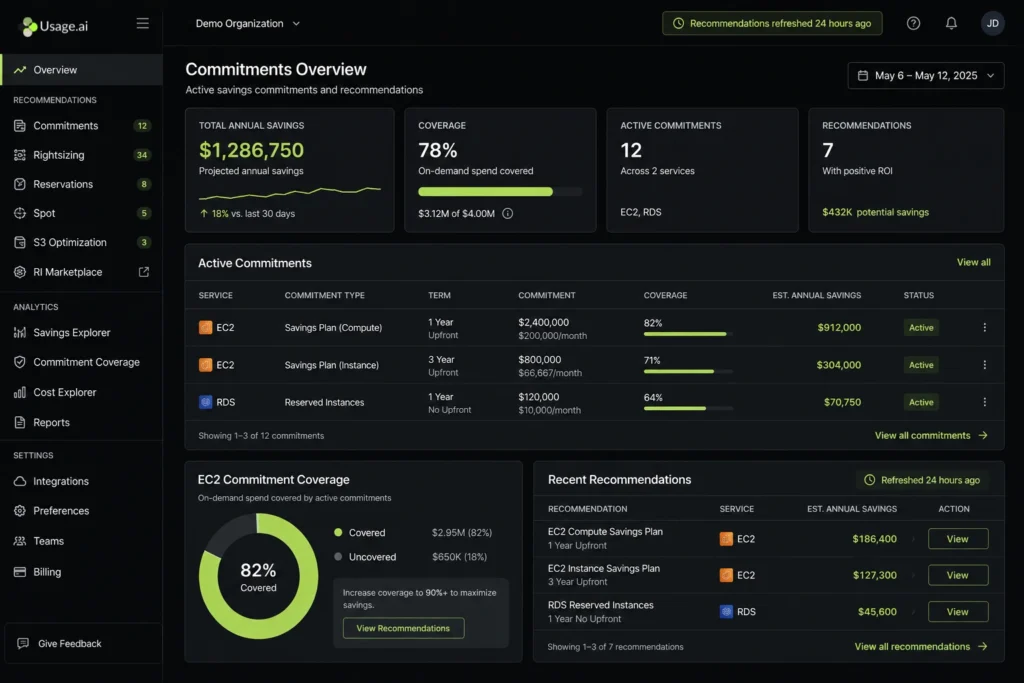
Usage.ai re-evaluates commitment recommendations every 24 hours automatically with no manual trigger, or human dependency. For Auto Scaling workloads, this means fleet composition changes are reflected in commitment recommendations within one business day, not whenever someone remembers to click refresh.
The commitment logic is also structured differently: Usage.ai commits only to verified baseline usage, i,e., the sustained floor, not the average. Spikes ride On-Demand as designed. This directly addresses the over-commitment problem described earlier.
If any commitment purchased through Usage.ai goes underutilized, you receive cashback (real money), not just AWS account credits.
EVGo (NASDAQ: EVGO) achieved $5.2M in annual savings. Motive reached $2.3M. Secureframe saved $1.8M. These outcomes were built on the same baseline-first commitment approach described in this guide, applied at scale with automated daily monitoring.
Setup takes 30 minutes, requires billing-layer access only, and involves no infrastructure changes. The ASGs continue running exactly as configured.
Stop Guessing Your Baseline. Let Usage.ai Calculate It.
Managing EC2 Savings Plans on a dynamic fleet?. You need accurate, daily visibility into your true spend floor before you can commit safely.
Usage.ai analyzes your Auto Scaling fleet every 24 hours, identifies your verified baseline, and purchases only the commitments your usage supports. It is also backed by cashback protection if anything goes underutilized.
300+ enterprise customers. $91M+ in verified savings. 30-minute setup. No infrastructure changes.
Frequently Asked Questions
1. Do EC2 Savings Plans apply to Auto Scaling instances?
Yes. EC2 Savings Plans apply to any eligible instance, including those launched by Auto Scaling Groups. AWS applies the discount at the billing layer after the fact, matching your committed $/hr to eligible EC2 usage within each billing hour. There is no tagging requirement, no ASG-specific setting, and no opt-in. The launch source is irrelevant to how AWS applies Savings Plan discounts.
2. What happens to my Savings Plan when Auto Scaling scales down?
Your Savings Plan commitment continues running regardless of instance count. When Auto Scaling terminates instances and reduces your fleet below your committed $/hr level, AWS consumes the remaining commitment without producing a discount. Those hours are effectively wasted. This is why committing to average usage instead of minimum baseline is the primary source of SP waste in Auto Scaling environments.
3. Should I use Compute or EC2 Instance Savings Plans?
Compute Savings Plans are safer for most Auto Scaling workloads. They cover any instance family, size, region, and OS, so they apply regardless of what your ASG launches during scale-out. EC2 Instance Savings Plans offer a deeper discount (up to 72% vs 66%) but lock to one instance family and region. Mixed instance policies should always use Compute SPs.
4. How do I calculate the right SP commitment?
Use hourly eligible usage after existing commitment coverage, priced at the selected Savings Plans rates. Inspect quiet hours and planned changes. A 30-day p10 is a starting point for analysis, not a safe minimum: roughly 10% of hours may be lower. Model unused commitment and savings before buying.
5. Can I combine Spot Instances with Savings Plans?
Yes. Spot Instances are not covered by Savings Plans, and Spot spend doesn’t draw down your SP commitment. The two mechanisms are fully independent. A common pattern is to use Savings Plans to cover your On-Demand baseline and Spot for scale-out bursts. This reduces both commitment risk and peak-hour spend. Mixed instance policies in ASGs support this natively.
6. What is the risk of over-committing Savings Plans with Auto Scaling?
The risk is paying for SP hours that produce no discount. When your fleet scales below your committed $/hr level, AWS still charges the commitment rate, it just doesn’t have eligible usage to apply it to. The waste fraction depends on the commitment and the eligible usage remaining each hour; a minimum-to-peak scale ratio alone cannot determine it. The waste is permanent as unused SP hours do not roll over.
7. Is EC2 Auto Scaling free?
EC2 Auto Scaling itself carries no service fee. You pay only for the EC2 instances (and CloudWatch metrics) that the service provisions. The ASG orchestration layer with the policies, health checks, and scaling logic is free. Costs are determined entirely by instance type, runtime, and the pricing tier (On-Demand, Savings Plan, Spot) under which those instances run.
8. AWS Auto Scaling vs EC2 Auto Scaling?
EC2 Auto Scaling manages instance count within an Auto Scaling Group. AWS Auto Scaling is broader and it scales EC2, ECS tasks, DynamoDB tables, Aurora replicas, and more from a single interface. For EC2 workloads, both services overlap significantly; AWS Auto Scaling uses EC2 Auto Scaling under the hood. For FinOps purposes, billing behavior is identical regardless of which service launched the instance.




