
 AWS
AWS Microsoft Azure
 Google Cloud

If you’ve ever searched for an AWS cost optimization savings calculator, you’ve probably landed on one of two things.
The first is AWS’s own pricing calculator, a forward-looking tool that estimates what you will spend based on resources you configure manually. Useful for architecture planning, but not that much for understanding what you’re already overpaying.
The second is third-party tools that ask you to know your RI coverage percentage, your Savings Plan utilization, your instance family mix, and your committed use rate before it will give you a number. In other words, it assumes you are already the FinOps expert the problem requires.
Neither of these is what most engineering and finance teams actually need. What they need is simple: tell me how much I’m overpaying AWS right now, based on what I’m already spending.
And, that’s exactly what we built.
Introducing the Usage.ai AWS Cost Optimization Savings Calculator
Today we’re launching a free AWS savings calculator that returns your overspend number in under 60 seconds, with no account access, no login, and no sales call required.
It works backward from your real bill, not forward from your assumptions. Upload what you already have and it tells you what you’re leaving on the table.
How the Usage.ai AWS Savings Calculator Works
The calculator offers three input methods, ranked by precision:
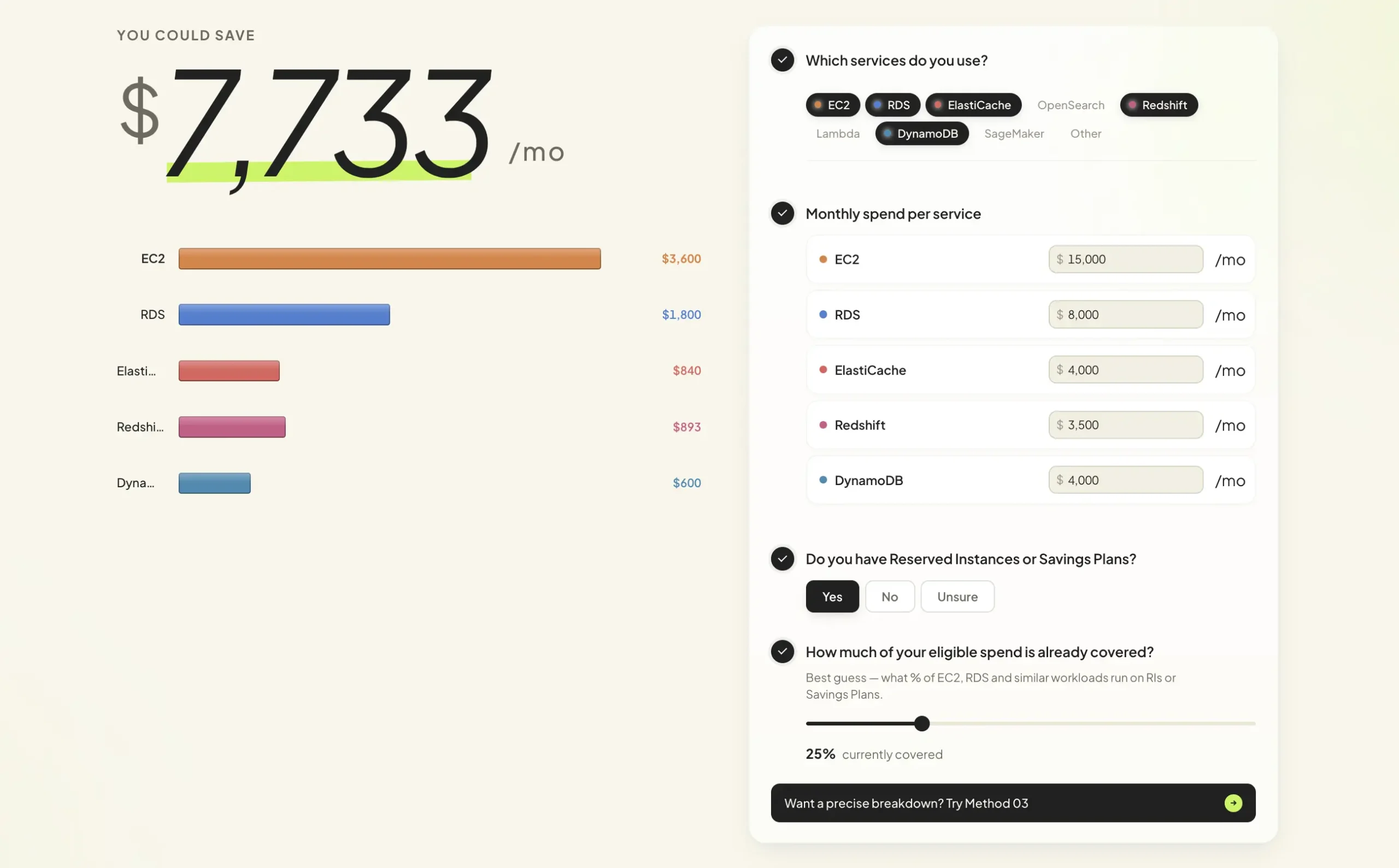
Method 1: Live Calculator (Benchmark Estimate)
Use the slider-based calculator if you want a directional number in under a minute. It uses industry benchmarks to estimate your savings based on approximate monthly AWS spend. Fast, rough, and useful for a first internal conversation.
Best for: CFOs who need a ballpark before deciding whether to investigate further.
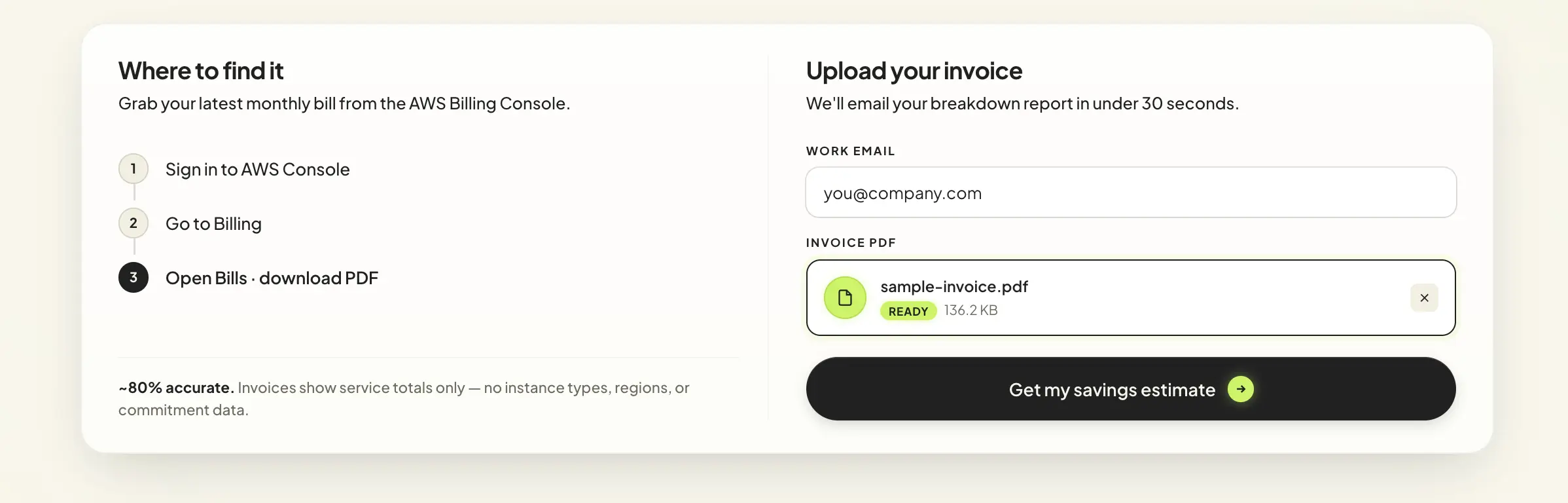
Method 2: Drop Your Invoice (Bill-Based Estimate)
Upload your AWS PDF invoice and the calculator analyzes your actual spend patterns, not industry averages. No account access needed. Results reflect where your money is actually going, which makes the output meaningfully more accurate than any benchmark tool.
Best for: VP Engs who want a real number without opening up account access to a new vendor.
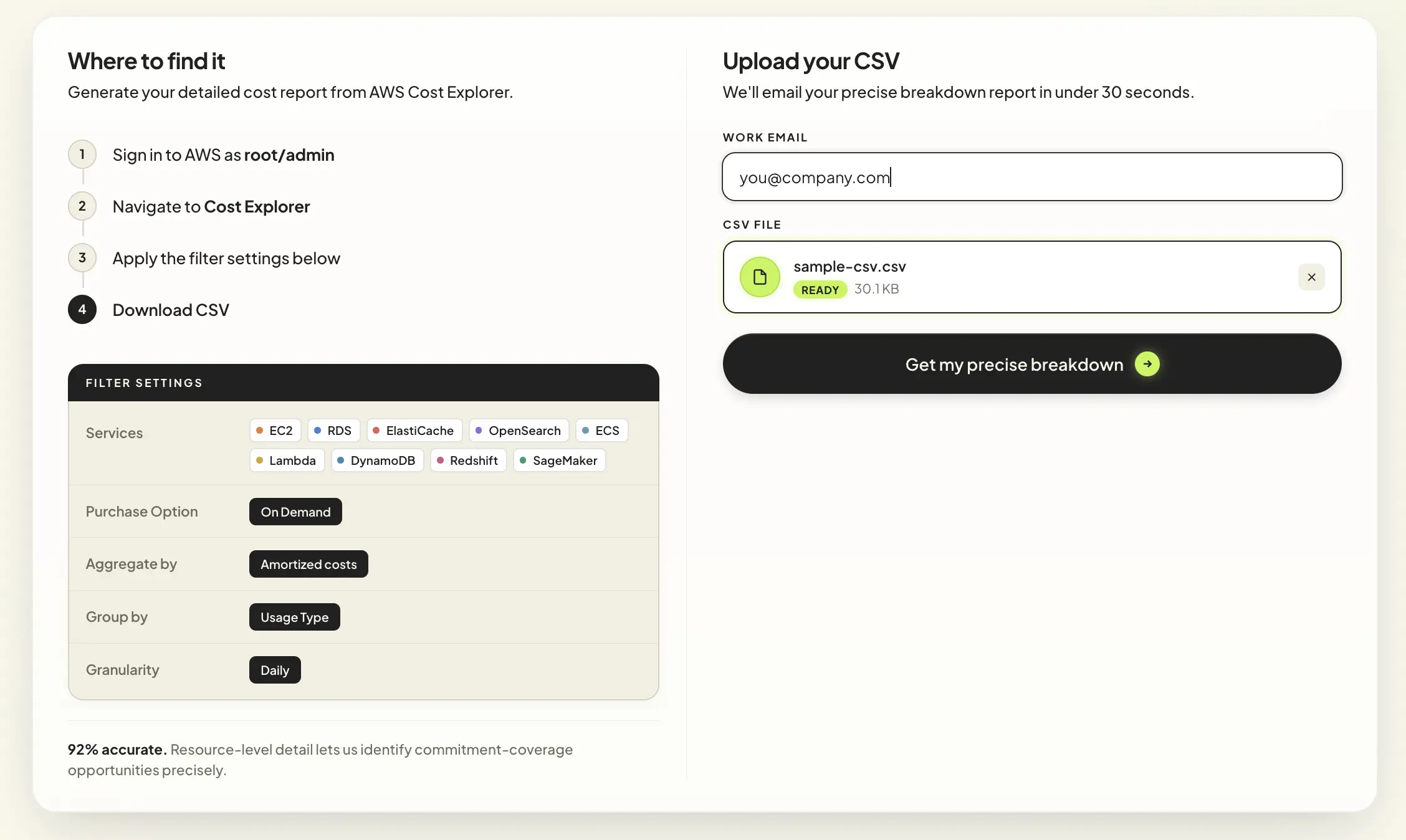
Method 3: Cost Explorer CSV (Recommended)
Upload an appropriately grouped AWS Cost Explorer CSV for a detailed savings estimate. Available service, Region and usage detail depends on the export. Validate eligibility, existing discounts, fees and utilization assumptions before presenting the estimate as a purchasing case.
Best for: FinOps practitioners who need a precise, defensible savings figure to drive a commitment strategy.
All three methods are free. None require connecting your AWS account.
What Does the AWS Cost Optimization Savings Calculator Actually Calculate?
The calculator identifies the gap between what you’re currently paying and what you could pay with the right commitment strategy applied to your actual usage.
Most AWS teams run on-demand pricing for workloads that are predictable enough to qualify for Reserved Instance or Savings Plan discounts. The gap between on-demand rates and committed pricing is where 30 to 40 percent of the average AWS bill disappears every month, silently, with no alert and no easy way to quantify it without a purpose-built tool.
The calculator surfaces that gap. The number it returns is not a projection of future savings based on what you plan to do. It is a reflection of what you are already paying that you don’t need to.
Why This Is Different From an AWS Savings Plan Calculator
An AWS savings plan calculator, including the native AWS tool, asks you to define your commitment upfront. You choose a compute type, a term length, a payment option, and a coverage amount. The calculator tells you what that commitment would save.
That is a useful tool for teams who have already decided to commit and want to model the specifics.
The Usage.ai AWS cost optimization savings calculator is for the moment before that decision, when the question is not “which savings plan should I buy?” but “how much is it costing me right now not to have one?”
It answers the earlier, harder question. The one most teams never get a clean answer to.
| AWS Savings Plan Calculator | Usage.ai AWS Savings Calculator | |
| Direction | Forward-looking | Backward-looking |
| Input required | Manual configuration | Your actual bill or CSV |
| Expertise needed | High | None |
| What it answers | What would I save if I committed? | What am I already overpaying? |
| Account access | Required | Not required |
| Accuracy | Projection-based | Depends on input detail and validation |
| Cost | Free | Free |
| Time to result | 15–30 min | Under 60 seconds |
Also read: Best AWS Cloud Optimization Tools: Every Major Option Evaluated for 2026
What Happens After You Get Your Number?
The calculator gives you a savings estimate. What you do with it is up to you.
Usage.ai can evaluate billing and usage through read-only permissions. Approved RI and Savings Plans purchases require separately granted financial permissions; read-only access cannot make purchases. Review the proposed commitments before enabling automation. Workload changes are not required for that purchasing workflow.
Managed offers can change payment and protection arrangements, but the underlying provider commitment remains subject to its term.
For changing usage, eligible Flex commitments may receive cashback when commitment cost exceeds equivalent On-Demand cost for the same usage, subject to the agreement. This is not a refund of every unused dollar or cancellation of the provider obligation. Published documentation describes payout 90 days after accrual. Cashback documentation.
Pricing is a percentage of savings generated. No setup fees, no minimums, no subscription. If the platform doesn’t save you money, you don’t pay.
Who the AWS Savings Calculator Is Built For
CFOs and finance leads who need a credible, bill-based savings number to bring to a budget conversation. Not a vendor estimate, or an industry average, but a figure with methodology they can explain and defend.
VP Engs and DevOps leaders who know their team is probably overpaying AWS but have never had a fast, zero-commitment way to quantify it without triggering a full procurement process.
FinOps practitioners who want a second opinion on current coverage without exposing full account data to another platform and who need a number precise enough to build a commitment strategy around.
Founders and CEOs at growth-stage companies where the cloud bill is starting to hurt the runway and the answer cannot be “hire a FinOps engineer to figure it out first.”
If any of that sounds like you, your number is one upload away. Try the free AWS savings calculator at usage.ai.
Frequently Asked Questions
1. Do you need access to my AWS account to use the calculator?
No. The calculator works entirely from data you provide: a manual input, an uploaded invoice, or a Cost Explorer CSV export. No account connection, no IAM role, no credentials of any kind are required to get your savings number.
2. How accurate is the savings estimate?
Reliability depends on the input data, export grouping, rates, existing discounts and assumptions about future utilization. Benchmarks are directional, while invoices and detailed CSV exports provide more billing context. No validated methodology is supplied here for a universal percentage accuracy guarantee.
3. What does the calculator cost?
Nothing. The calculator is completely free to use with no login required. Usage.ai’s platform pricing, if you decide to go further, is a portion of realized savings, billed monthly. Confirm current fees, minimums and contract terms in the applicable offer.
4. How is this different from the AWS Pricing Calculator?
The public AWS calculator estimates manually configured resources. The in-console AWS Pricing Calculator can import historical usage and model bill changes, including commitment scenarios. Usage.ai’s calculator estimates potential savings from data you supply without an account connection.
5. What if we already have Reserved Instances or Savings Plans?
The calculator still works. Usage.ai layers on top of your existing commitments and identifies uncovered spend where additional optimization is possible. Existing RIs and Savings Plans are accounted for in the analysis.
6. Is my bill data secure?
Review Usage.ai’s current security documentation and data-handling terms before uploading billing information. Do not assume invoices are never retained or shared without an explicit policy. Evaluation can use read-only access; approved purchase automation needs separate financial permissions. Security and compliance documentation.
7. What if our usage drops after we commit?
Eligible Flex commitments may qualify for cashback under the applicable agreement if their cost exceeds equivalent On-Demand cost for the same usage. Cashback does not necessarily equal the unused portion, and it does not cancel the underlying provider commitment. Published payout timing is 90 days after accrual.
8. How long does it take to go from calculator to actual savings?
The calculator takes under 60 seconds. If you connect your AWS account to the platform, the first live savings recommendations appear within 15 minutes. Full coverage typically builds over the first billing cycle as the platform learns your usage patterns.




