.png)
 AWS
AWS Microsoft Azure
 Google Cloud


This guide explains how Spot pricing and eviction work, which workloads fit, how to prepare for interruption, and where Spot belongs alongside standard VMs and Azure commitments.
The Short Answer
Azure Spot VMs are discounted virtual machines for workloads that can stop and recover without harming users or losing important data. Prices vary by SKU and region, and Azure can evict the VM because capacity is needed or its Spot price exceeds your configured maximum.Use Spot for retryable batch work, CI/CD workers, checkpointed training, and replicated stateless services. Keep dependable baseline capacity on standard VMs, and treat the eviction notice as an opportunity for graceful shutdown rather than a guarantee.
How Azure Spot VM Pricing Works
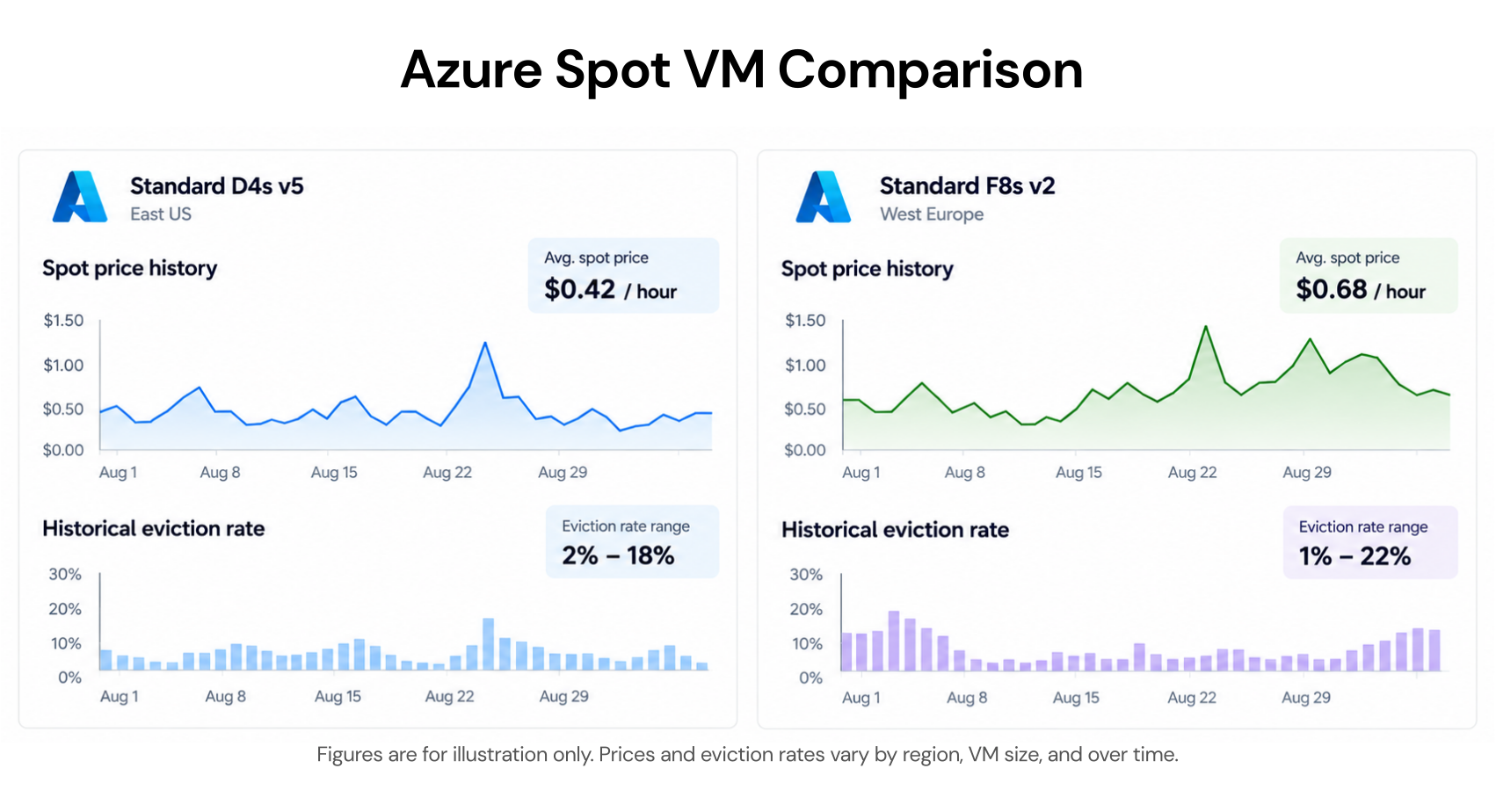
Azure Spot pricing is variable and specific to the VM SKU and region. The discount can change as supply and demand for unused capacity change, so the advertised maximum of up to 90% is not a forecast for every VM.You can view the current price while creating a Spot VM in the Azure portal. You can also retrieve Spot prices through the Azure Retail Prices API or query pricing history and eviction data with Azure Resource Graph.
The portal shows historical prices and eviction rates for a selected VM size and region. Microsoft quotes portal eviction rates per hour: a 10% rate means a VM has a 10% historical chance of eviction within the next hour, based on the preceding seven days—not an availability promise.
Azure Resource Graph uses different reporting windows: up to 90 days of pricing history and eviction rates for the trailing 28 days. Check that distinction when comparing portal figures with programmatic reports.
When Should You Use Azure Spot VMs?
The deciding question is whether a workload can be interrupted and recovered without unacceptable data loss or service impact.Strong Spot candidates
Batch and ETL jobs: Break work into retryable units, keep inputs and outputs outside the VM, and return interrupted work to a queue. Azure Batch can automatically requeue interrupted tasks and attempt to restore target Spot capacity.
CI/CD workers: Ephemeral build agents can be replaced when the build system can retry interrupted jobs and does not depend on unique local state.
Machine learning training: Training can use Spot when its framework or code is configured to save frequent checkpoints to durable external storage.
Replicated stateless services: Spot instances can provide inexpensive burst capacity when standard instances retain enough capacity to protect the service baseline.
Poor Spot candidates
Stateful services whose important data exists only on the VM or cannot be recovered safely.
User-facing services that cannot tolerate dropped connections, reduced capacity, or replacement delays.
Long-running jobs without checkpoints or idempotent retry behavior.
Any workload whose interruption cost can exceed the compute saving.
Why Azure Spot VMs Are Evicted
Azure Spot VMs have no availability guarantee after allocation. Two conditions can cause eviction.Capacity eviction
Azure can reclaim the underlying hardware when regular workloads need capacity for a particular VM size and location. This can happen regardless of the Spot price or maximum price setting.Reduce exposure through multiple acceptable VM sizes or locations, historical eviction rates, and the Spot placement score when appropriate.
Price eviction
Azure evicts a Spot VM if its current price rises above the maximum price configured for that VM. If the price later drops below the maximum, the VM does not restart automatically; you must restart or replace it, and allocation is not guaranteed.Setting the maximum price to -1 prevents price-based eviction. In that mode, the VM is charged the current Spot price or the corresponding standard VM price, whichever is lower, while capacity and quota remain available.
Use -1 when your priority is avoiding a separate price trigger. Set a lower ceiling only when the workload must not run above a specific hourly price.
Choose Deallocate or Delete
The eviction policy controls what Azure does with the VM after eviction.| Decision | Deallocate | Delete |
|---|---|---|
| Eviction result | VM enters stopped-deallocated state | VM and underlying disks are deleted |
| Compute billing | Stops | Stops |
| Disk billing | Continues at applicable storage rates | Stops for the deleted disks |
| Recovery | Restart the same VM if capacity returns | Provision a replacement VM |
| Best fit | Disk state or lengthy installation must be retained | Stateless, automated deployments |
| Main risk | Idle disks continue costing money and the VM uses quota | Local state is permanently removed |
Deallocate can fit workloads requiring the same VM, size, zone, or retained disk state. The VM must wait for capacity in its existing location, and allocation can still fail.
Handle Azure Spot VM Eviction Notices
Azure exposes Spot eviction notifications through Scheduled Events. An application running inside the VM polls the metadata endpoint at the static, non-routable address 169.254.169.254 and checks for a Preempt event.The endpoint is not exposed outside the VM, and it can be queried as often as once per second. In a containerized workload, use a continuously running application process or sidecar, not a regular init container, to poll it and trigger shutdown or checkpointing.
Microsoft describes notification delivery as the best effort and up to 30 seconds before eviction. Frequent polling can leave more response time, but the usable interval is not fixed.
Use the available time to:
Stop accepting new work and drain connections.
Flush logs and metrics to an external system.
Save a final checkpoint to durable storage.
Return unfinished work to a queue or signal replacement automation.
Immediate eviction is possible before the workload starts. External health checks and automation must detect it without relying on the VM’s Preempt event.
Test this behavior before production with Azure’s simulateEviction action. A successful test should prove that polling, shutdown, checkpointing, health detection, and replacement work together.
Scale Sets and Spot Priority Mix
Virtual Machine Scale Sets provide a foundation for fleet orchestration, but replacement still requires appropriate configuration and available capacity.Autoscale rules can adjust the scale set’s instance count after capacity changes. Alternatively, when Autoscale is not enabled, the Try & restore feature can attempt to restore Spot instances evicted because of capacity and maintain the target count, although successful allocation is not guaranteed.
Spot Priority Mix is available for flexible scale sets. It maintains a configured base of standard VMs and uses a chosen mix of standard and Spot VMs above that base, creating a reliability floor without giving up all Spot savings.
For Kubernetes-specific design, keep the system and dependable application baseline on regular capacity and use Spot only for suitable user workloads. Our AKS cost optimization guide covers node-pool sizing, autoscaling, commitments, and Spot patterns in context.
Azure Spot VM Limits Before Deployment
Confirm these constraints before building deployment automation:Select Spot priority when creating the VM; Azure does not directly convert an existing standard VM to Spot or a Spot VM to standard.
Choose the eviction type, maximum price, and Deallocate or Delete policy during deployment.
B-series and promotional versions of VM sizes are not supported.
Spot VMs are available in Azure regions except Microsoft Azure operated by 21Vianet, subject to SKU capacity and subscription eligibility.
Spot has a separate quota pool shared by individual VMs and scale-set instances.
Changing the maximum price requires deallocating the VM first.
Spot VMs, Savings Plans, and Reservations
Spot fits interruptible demand, pay-as-you-go fits uncertain demand requiring availability, and commitments fit eligible, dependable baseline usage.Azure commitment discounts do not apply to Spot VM charges. Do not include Spot usage when sizing a Savings Plan or Reservation, because that would overstate the commitment-eligible baseline and could leave part of the commitment unused.
For a mixed fleet, keep fault-tolerant jobs and burst capacity on Spot while applying commitments only to eligible standard usage you expect to sustain. Our Azure VM cost optimization guide explains how to rightsize that baseline and choose between Reservations and Savings Plans.
How Usage.ai Fits Your Strategy
Spot VMs already use a separate discounted pricing model, so we do not apply commitments to them. We help with the eligible standard Azure usage that remains after you separate the interruptible Spot layer from the stable baseline.With Flex Insured Commitments, teams can get up-to-65% savings available from an eligible three-year Azure Savings Plan for compute with none of the commitment risk.
We analyze usage at the billing layer, recommend commitments, purchase only approved commitments through the Azure API, and manage them through the Flex Insured Commitment Program.
If eligible usage drops and a qualifying Flex Commitment costs more than equivalent on-demand usage, we provide cashback protection for the covered difference, subject to program terms.
Our fee is a percentage of realized savings, so if we do not generate savings, you do not pay a savings-based fee.
Separate interruptible Spot usage from commitment-eligible standard compute and identify where long-term discounts may fit.
Frequently asked questions
How much can Azure Spot VMs save?
Microsoft advertises discounts of up to 90% compared with pay-as-you-go VM prices. Actual prices vary by SKU, region, operating system, and available capacity.
How much eviction notice does Azure provide?
Azure attempts to deliver an in-VM Scheduled Events notification on a best-effort basis up to 30 seconds before eviction. Design the workload to recover even when it receives no usable warning.
Does -1 prevent every eviction?
No. A maximum price of -1 prevents price-based eviction, but Azure can still reclaim the VM when it needs the capacity.
Can commitments discount Spot VMs?
No. Apply Azure Savings Plans or Reserved VM Instances only to eligible standard usage, not to the Spot portion of the fleet.