.png)
 AWS
AWS Microsoft Azure
 Google Cloud


Short Answer
Consider an App Service reservation for a persistent number of matching plan instances whose size and region are likely to stay stable. Consider an Azure Savings Plan for compute when eligible spend remains dependable but the mix of App Service instances, regions, or other covered compute may change.Do not size either option from the App Service bill alone. First confirm eligible meters and actual prices, account for existing commitments, then test quiet hours and planned engineering changes before purchasing.
Which App Service Spend Is Eligible?
Start with the App Service plan, not the number of apps it hosts. In dedicated tiers, Azure charges for the plan’s provisioned instances, which several apps and deployment slots can share. Even when per-app scaling limits where an individual app runs, capacity and billing remain at the plan level. Microsoft explains this in its App Service plan billing and scaling guidance.For compute Savings Plans, Microsoft’s Savings Plan product information specifically names upgraded Premium v3 and upgraded Isolated v2 App Service plans. Isolated v2 runs in an App Service Environment. Do not count Basic and other tiers simply because their charges appear under App Service.
Microsoft’s App Service pricing page also lists commitment prices for newer tiers, while the general Savings Plan eligibility note still names v3 and v2. For any newer SKU, confirm the exact meter in your current account price sheet and purchase experience before including it in the baseline.
Keep related charges separate. A compute Savings Plan discounts qualifying infrastructure usage; it does not make networking, storage, certificates, or other connected-service charges eligible App Service compute. Microsoft’s App Service cost guidance identifies charges that can sit alongside the plan.
Buyer Checklist: Establish the Baseline Before Purchase
Use these four checks as a joint review between FinOps and the team that owns the applications.Azure recommendations are a starting point, but engineering must confirm that yesterday’s configuration will still exist next year.
- Confirm each plan and billable meter. Record the plan’s SKU, region, subscription, billed instance count, and meter. Compare the meter with your agreement’s Savings Plan price sheet.
For a reservation, check the offered size, region, quantity, term, and benefit scope. The discount applies to matching running instances, not a named web app. - Check the hours beneath the average. Chart the instance count by hour and note the minimum, scheduled changes, seasonal peaks, and autoscale behavior. Ask engineering about planned rightsizing, SKU upgrades, regional moves, or consolidation.
Reserving today’s configuration is less attractive if it is about to change. Microsoft’s App Service reservation guidance confirms that unmatched reserved hours are lost. - Remove usage already covered. Inspect active App Service reservations and compute Savings Plans in the relevant scope.
Azure applies a compatible reservation first, so test a new hourly commitment against the remaining eligible usage, including other compute that may consume it. When considering a new reservation, also model which existing Savings Plan usage it would displace and whether other eligible usage can consume that freed commitment.
High overall Savings Plan utilization does not reveal how much App Service usage it covered. - Price the actual choice. Compare pay-as-you-go, reservation, and Savings Plan rates for the same workload, term, and expected hours. Model each option’s benefit scope and other eligible usage separately. Test one- and three-year options against the workload roadmap.
Microsoft’s recommendations simulate historical usage, but the portal’s current Savings Plan recommendations use a 30-day lookback. Challenge that window if demand recently changed.
Our Azure Savings Plan sizing guide explains the hourly mechanics in more detail.
App Service Reservation, Savings Plan, or Both?
The key difference is what must remain steady. An App Service reservation requires matching plan instances within its selected region and scope.A compute Savings Plan requires enough eligible discounted usage within its scope to consume its fixed hourly spend. Azure applies the reservation first when both could benefit the same usage
| Option | Commitment | Strongest fit | Main risk to test |
|---|---|---|---|
| App Service reservation | Matching instance size, region, quantity, term, and scope | A durable, configuration-stable instance baseline | If instances shrink, change size, or leave the region, reserved hours go unused unless other matching instances in scope consume them |
| Compute Savings Plan | Fixed hourly spend for one or three years | Durable eligible compute spend whose service or configuration mix may change | Quiet hours or narrower-than-expected scope leave part of the payment unused |
| Both | Reservation for the matching core; Savings Plan for remaining eligible spend | Stable App Service core plus a dependable flexible compute remainder | Buying the Savings Plan for bursts that occur too rarely to use it consistently |
| No new commitment yet | None | Eligibility, sizing, or workload plans remain uncertain | Continued on-demand charges while the decision is deferred |
Starting February 1, 2027, App Service reservations purchased after that date cannot be exchanged because App Service is supported by Azure Savings Plans; reservations purchased before that date retain one final exchange.
Microsoft’s reservation trade-in policy is unchanged. Savings Plans cannot be cancelled or refunded, and their hourly commitment cannot be changed after purchase, although their benefit scope can. For the general Azure-wide comparison, see our Savings Plan versus reservation guide.
Test the Decision Across Quiet and Peak Hours
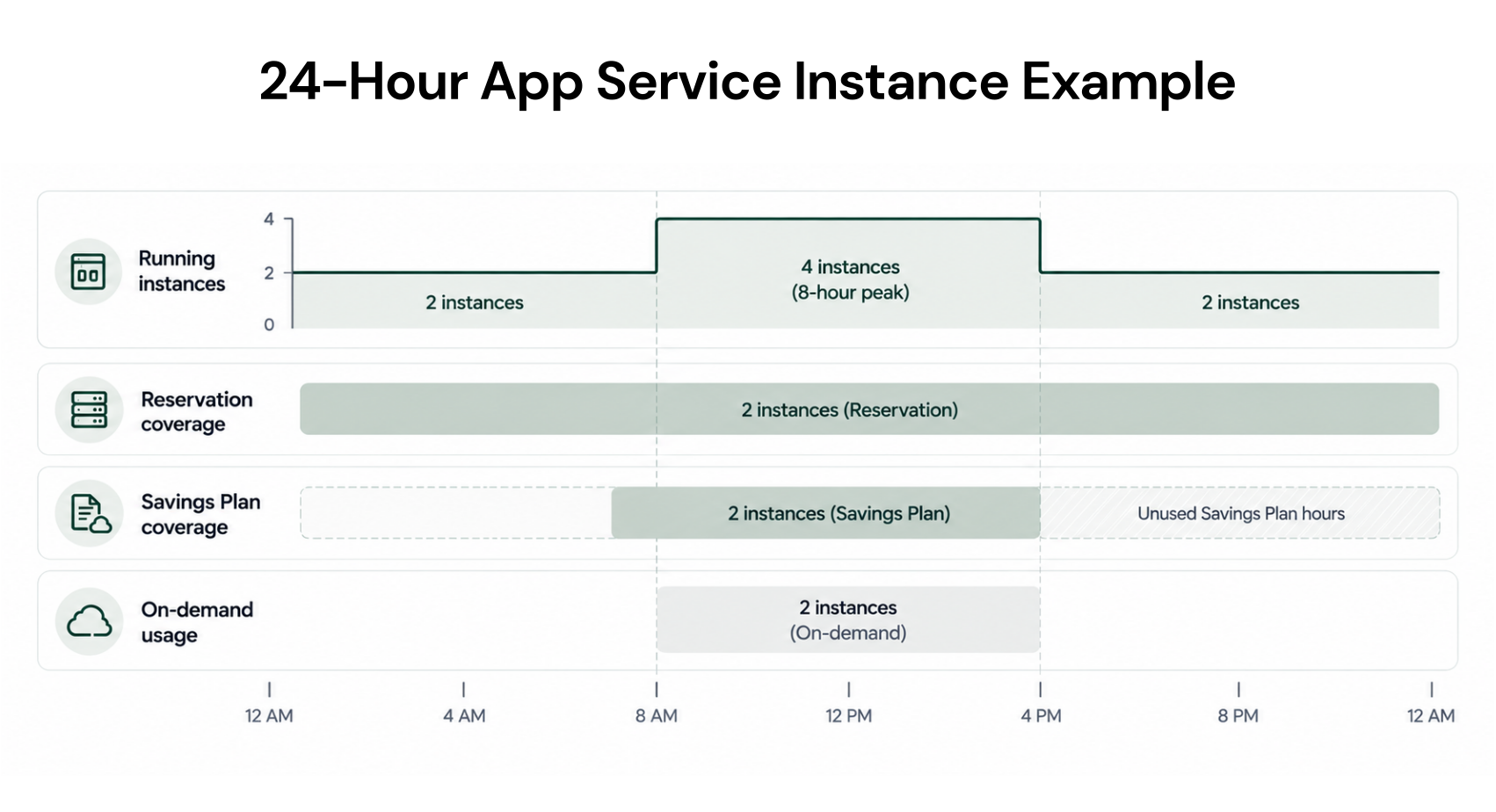
Consider a purely illustrative Premium v3 plan with two instances running all day and two additional matching instances running for eight hours. That totals 64 instance-hours: 48 baseline hours plus 16 burst hours.Assume no existing commitments, no other eligible compute in scope, and these invented rates for the same instance and term: $1.00 per on-demand hour, $0.65 per reserved instance-hour, and $0.75 per Savings Plan-covered instance-hour.
| Purchase path | Illustrative daily cost | What happens |
|---|---|---|
| No new commitment | $64.00 | All 64 instance-hours remain on demand |
| Reserve the two-instance baseline | $47.20 | 48 hours cost $31.20; 16 burst hours cost $16 on demand |
| Savings Plan at $1.50/hour | $52.00 | It covers the two-instance baseline for $36 daily; burst usage above the hourly commitment costs $16 on demand |
| Two reservations and a new $1.50/hour Savings Plan | $67.20 | Reservations cover the baseline first; the plan costs $36 daily but finds eligible App Service usage only during eight peak hours |
That is why you need both an App Service-only chart and a whole-scope billing view. These figures demonstrate benefit application; they are not Azure price quotes or projected Usage.ai savings.
Who Will Own the Commitment After Purchase?
Before approving the purchase, name the person who will verify that its assumptions still hold. Engineering should flag plan-size changes, migrations, and autoscale adjustments. FinOps or the billing owner should review which resources consumed the benefit, whether hours went unused, and when the term renews.Azure exposes reservation utilization and consuming resources. For Savings Plans, use amortized cost to see benefit costs allocated to resources and unused commitment; actual cost records the purchase charge. This distinction prevents a plan instance with a zero discounted usage price from being mistaken for free compute.
A team with reliable owners and a review cadence can manage this internally. If recommendations stall between engineering, finance, and purchase approval, the operating process may need attention too.
Our Azure managed automation guide covers that broader decision.
How Usage.ai Helps Review Eligible App Service Spend
As App Service demand changes, a purchase review must account for existing commitments and other eligible Azure compute usage within the plan’s scope. We analyze usage at the billing layer and surface recommendations for eligible App Service compute Savings Plan spend.In manual mode, your team approves a recommendation before we execute the supported purchase through Azure’s API. Autopilot can make supported purchases within configured controls.
With Flex Insured Commitments, teams can get the up to 65% savings of an eligible three-year Azure compute Savings Plan with none of the commitment risk.
If a covered Flex Commitment costs more than equivalent on-demand usage, cashback covers the qualifying difference under program terms. Cashback does not cancel the Azure commitment or automatically protect commitments you purchased independently. We cannot start, stop, or resize production resources.
Our fee is an agreed percentage of realized savings, billed monthly in arrears after provider billing data is finalized.
Final Verdict: Commit Only to the Baseline You Can Defend
Reserve App Service instances when the workload plan supports their matching size, region, and persistent quantity. Use a compute Savings Plan when the remaining eligible hourly spend is dependable even if the resources producing it may change.If neither baseline is clear, resolve eligibility and scaling plans before adding an obligation.
Review eligible plan spend, current commitments, and hourly usage before choosing a new Azure commitment.
Frequently asked questions
Does a compute savings plan cover every App Service tier?
No. Microsoft specifically identifies upgraded Premium v3 and Isolated v2 in its compute Savings Plan eligibility information. Check the exact meter and current price sheet for the plan you intend to cover, particularly for newer SKUs.
What happens to commitment coverage when an App Service plan scales?
Scaling out adds instance usage. A reservation covers matching usage up to its quantity; a Savings Plan can discount remaining eligible usage until its hourly commitment is consumed. Scaling the plan to a different size can also affect reservation matching, so test planned SKU changes before purchase.
Does stopping an app stop App Service plan charges?
Generally, no. Billing in dedicated tiers follows the provisioned App Service plan instances, and even a plan with no apps can continue to incur charges. Review the plan’s tier and allocated capacity rather than assuming a stopped or deleted app removed its compute cost.