.png)
 AWS
AWS Microsoft Azure
 Google Cloud

High utilization shows that the previous commitment matched historical demand. It does not prove that the same workload, quantity, configuration, or commitment product makes sense for the next term.
Microsoft’s Reservation renewal guidance says that renewal creates a new Reservation when the existing one expires. Auto-renewal is enabled by default when a Reservation is initially purchased, and the renewal price becomes available 30 days before expiration.
For details on matching, scope, and discount mechanics, see our Azure Reservations guide. To learn how we approach Azure commitment optimization across Reservations and Savings Plans, visit our Azure Cost Optimization product page.
Short answer
Renew when the matching workload, configuration, and current economics support another Reservation. Reduce the quantity when only part of the historical baseline will remain. Evaluate Azure savings plan for compute when durable eligible compute spend continues but VM families, services, or regions may change.Use both when you have a stable core and flexible eligible compute usage. Defer the next purchase when migration, retirement, rightsizing, or demand uncertainty makes the future baseline difficult to defend.
Azure savings plan for compute is an hourly commitment against eligible compute spend. Microsoft also offers a separate savings plan for databases, so do not apply compute-plan assumptions to database commitments.
Get the renewal decision under control before expiry
Do not wait until the renewal date to decide what should replace the commitment.| Renewal control | What to record |
|---|---|
| Before the renewal window | Expiration date, auto-renew status, decision owner, current SKU/family, region, quantity, and go/no-go date |
| 30 days before expiry | Current renewal price and confirmed workload changes |
| Before approval | Existing applicable coverage, future baseline, downside case, eligibility, and alternatives |
If existing Reservations have high utilization but pay-as-you-go (PAYG) spend remains significant, distinguish genuinely uncovered demand from usage already covered elsewhere before buying more.
Rebuild the baseline from what will remain
The old Reservation reflected assumptions about workload life, configuration, quantity, and demand. Test those assumptions again for the next term.Look for region moves, VM-family changes, service migrations, modernization, consolidation, rightsizing, retirements, and commitments that already cover part of the usage.
For VM-heavy estates, our Azure VM cost optimization guide explains why rightsizing should happen before approving the next commitment baseline.
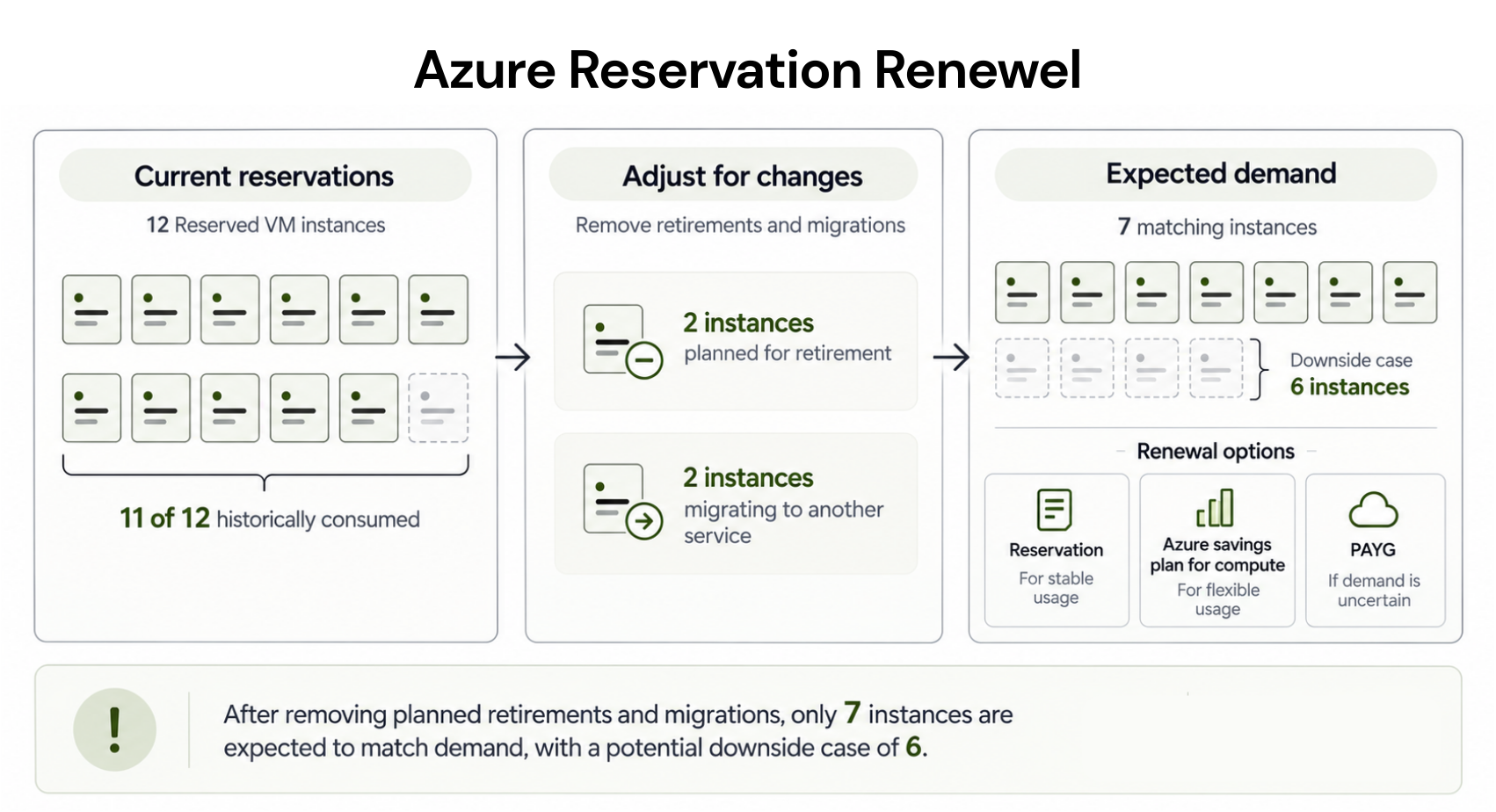
Suppose 12 Reserved VM Instances are approaching expiration, and 11 have historically been consumed.
Engineering confirms that two distinct, continuously matching instance-equivalents will be retired. Two others will migrate to a different architecture.
Rather than carrying 11 units into the next purchase, the expected matching baseline falls to seven units.
If another matching workload could realistically shrink, also test a six-unit downside case.
This example assumes the retirements and migrations affect four distinct matching units. In a real environment, model usage hourly and account for applicable instance-size-flexibility and matching rules rather than subtracting resources mechanically.
Compare economics using the same future scenario
Before comparing new commitments, remove usage already covered by applicable Reservations and savings plans. Azure applies compatible Reservation benefits before savings-plan benefits, so the benefit order can change how much incremental usage remains for another commitment. Microsoft’s savings-plan benefit application guidance explains this order.Then model each option against the same usage over the same period.
For a new Reservation, total the Reservation charges and any remaining PAYG usage. Separately track Reserved capacity that would go unused if matching demand falls.
For Azure savings plan for compute, total the hourly commitment charges and eligible usage above the commitment. Separately track any unused hourly commitment.
For PAYG, calculate what the same modeled workload would cost without a new commitment.
Then compare total costs. Keep unused commitment, avoided PAYG charges, Usage.ai fees where applicable, and eligible cashback separate so each driver remains visible.
Illustrative priced example
Assume a hypothetical 720-hour month. These figures are illustrative, not Azure prices.Suppose PAYG costs $1.00 per matching unit-hour, while a candidate seven-unit Reservation has an effective charge of $0.60 per unit-hour.
At seven continuously matching units, the Reservation would cost $3,024 for the month. The same usage at PAYG would cost $5,040.
Now assume downside demand falls to five matching units. The Reservation still costs $3,024, while those five units would cost $3,600 at the hypothetical PAYG rate.
The Reservation is still $576 cheaper than PAYG in that downside scenario, even though two reserved unit-equivalents are unused.
That distinction matters. Underutilization does not automatically mean the commitment produced a net loss. Finance should compare each option’s complete cost under the same workload scenario.
Decide what deserves the next commitment
Microsoft’s Reservation versus savings plan guidance positions Reservations for stable matching usage and Azure savings plan for compute for durable eligible compute spend that may move across supported regions, instance families, or compute services.| What remains predictable? | Option to evaluate | Validate before buying |
|---|---|---|
| Matching workload and configuration | Reservation | Durable quantity, stable matching attributes, current economics |
| Same workload, lower baseline | Smaller Reservation | Known reductions already reflected |
| Eligible compute spend, changing infrastructure | Azure savings plan for compute | Eligible hourly spend remains durable |
| Stable core plus flexible remainder | Both | Existing coverage removed before sizing each layer |
| Quantity or architecture still uncertain | PAYG / defer | Resolve uncertainty first |
Right-size first, address existing underutilized commitments, model stable Reservation coverage, and then evaluate a savings plan against remaining eligible compute usage.
Check whether renewal is still available
If your expiring Reserved VM Instance belongs to an affected legacy series, renewal may no longer be available.Starting July 1, 2026, Microsoft stopped new purchases and renewals for specified previous-generation VM Reservation series. Existing Reservations continue through their current terms.
Before modeling a replacement, confirm the exact VM family and term against Microsoft’s current legacy VM Reservation guidance.
Recheck exit options for purchases after February 1, 2027
This policy does not apply universally.Microsoft says Reservations purchased after February 1, 2027, are no longer exchangeable when the corresponding service is supported by savings plans. Reservations purchased before that date retain one final exchange. Cancellation rules remain separate. See Microsoft’s current Reservation exchange and refund policy.
Azure savings plans have a different constraint: once purchased, they cannot be canceled or exchanged.
Eligible Reservations may be traded in for a corresponding savings plan before the new savings-plan commitment is made, subject to Microsoft’s current trade-in eligibility rules.
Keep benefit flexibility separate from exit flexibility.
The purchase should survive three approvals
Engineering validates the workload roadmap, including migrations, retirements, configuration changes, and expected lifetime.
FinOps validates existing coverage, commitment sizing, hourly utilization, eligibility, and expected and downside scenarios.
Finance validates total cost, expected savings, downside exposure, commercial fees, and approval.
Validate the renewal against live usage
At Usage.ai, we help teams evaluate Azure Reservations and Azure savings plans to compute current usage and planned changes.Our Savings Test uses read-only evaluation access, so we can assess the opportunity without purchasing authority. Purchasing is a separate step that your team must authorize.
Our Azure Cost Optimization product page explains how we analyze Azure usage, model commitment opportunities, and support commitment management across eligible Azure services.
With our Flex Insured Commitments, teams can get up to 65% savings with an eligible three-year Azure compute Savings Plan, plus cashback protection for eligible Flex Commitments and qualifying economic downside, subject to the applicable program terms.
If an eligible Flex Commitment costs more than equivalent pay-as-you-go usage, we provide cashback protection for the qualifying difference under the program terms. Our protection does not cancel the underlying Azure commitment, and we do not automatically protect existing customer-owned commitments as Flex Commitments.
If you are also deciding whether ongoing Azure commitment management should remain manual, our Azure commitment optimization guide covers that separate decision.
What should actually renew?
Renew only when the future baseline, matching configuration, product fit, and economics support another commitment. If demand has fallen, reduce the quantity. If durable eligible compute spend remains but infrastructure will change, evaluate Azure savings plan for compute.If the business case depends on uncertain growth or an unfinished migration, preserve PAYG flexibility and reassess before committing.
Review Azure Reservation expirations, coverage, and workload changes before your next commitment.
Frequently asked questions
Should I renew an Azure Reservation with high utilization?
Not automatically. High utilization supports the historical business case, but the next purchase should reflect future matching demand, current pricing, and confirmed workload changes.
Can I reduce the quantity at renewal?
Yes. Microsoft says you can change the quantity, billing frequency, and term for the replacement Reservation before renewal.
Can an Azure Reservation be moved to a savings plan?
Eligible Reservations can be traded in for corresponding savings-plan products under Microsoft's trade-in rules. Check the exact Reservation type and eligibility before proceeding.
Can Reservations and Azure savings plan for compute be used together?
Yes. Compatible Reservation benefits apply first. Savings-plan benefits then apply to remaining eligible usage up to the hourly commitment.
Can I cancel an Azure savings plan for compute if usage falls?
No. Microsoft says savings plans cannot be canceled or exchanged after purchase. Size the hourly commitment against durable eligible compute spend rather than peak demand.