.png)

DynamoDB Contributor Insights costs $0.50 per rule per month plus $0.03 per one million DynamoDB events matched. Enabling the feature on a single table automatically creates four rules, setting your base cost at $2.00/month before any events are counted. At 500 million read/write events per month, that becomes $17.00/month total. At 5 billion events, it reaches $152.00/month.
That is the pricing math. Whether the spend is justified depends entirely on your table's traffic volume, whether you have hot key patterns, and what throttling is costing you in wasted provisioned throughput.
Contributor Insights for DynamoDB is a CloudWatch monitoring feature that identifies the top partition keys driving read and write traffic on a DynamoDB table, enabling teams to diagnose throttling root causes and hot key patterns without code-level instrumentation or custom application logging.
The feature analyzes DynamoDB request traffic in near real-time and publishes results as CloudWatch graphs. For tables with partition key skew, it answers the specific question a FinOps engineer needs: "Which partition key is causing throttling?" -- without requiring any changes to application code or infrastructure.
Contributor Insights charges are split into a fixed component that does not change with traffic and a variable component that scales directly with your table's request volume -- understanding both is what makes the cost predictable.
Contributor Insights billing has exactly two line items on your CloudWatch invoice:
These are separate charges. The rule fee is flat regardless of traffic. The event fee scales linearly with your table's total request volume.
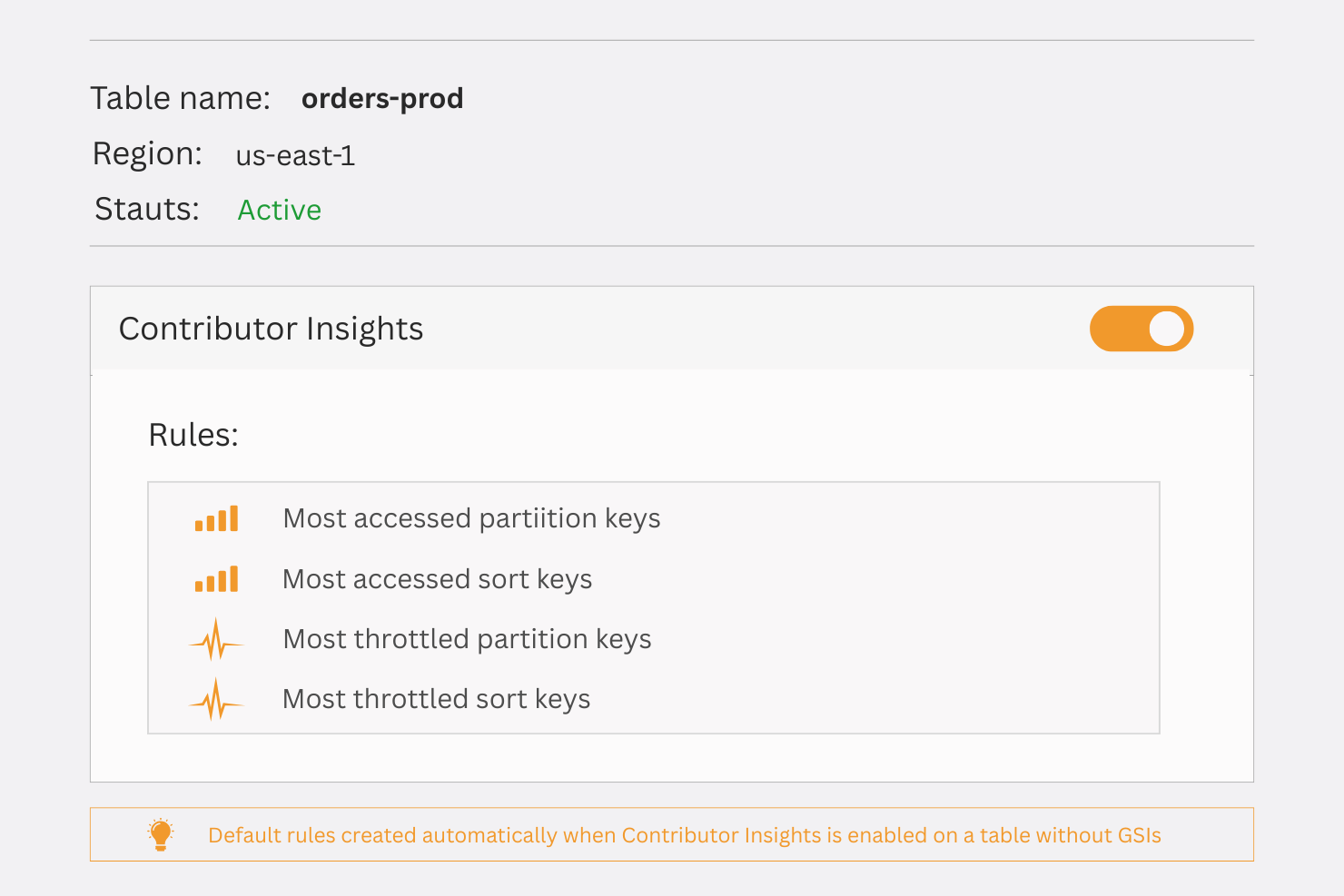
Enabling Contributor Insights on a single DynamoDB table automatically creates four rules:
The rule count increases if your table has multiple GSIs. A table with three GSIs creates eight rules: two base-table rules plus two rules per GSI.
Rule count formula: 2 + (2 x number of GSIs)
At $0.50 per rule, a table with no GSIs costs $2.00/month in rule fees. A table with three GSIs costs $4.00/month in rule fees, before any events are counted.
Every read and write operation against your DynamoDB table counts as a matched event. This includes:
Operations against GSIs are counted separately from base table operations when rules are active on both.
For most workloads, the event fee is the variable that matters. The rule fee is essentially fixed overhead.
As of August 2025, AWS added a throttle-only mode for Contributor Insights. When enabled, the rules only activate for events that result in throttling -- read/write requests that exceeded your provisioned capacity or on-demand burst limits.
In throttle-only mode, you still pay the $0.50/rule/month rule fee. However, the event fee drops dramatically because only throttled requests are counted. On a well-provisioned table with a 0.1% throttle rate, a table processing 2 billion events per month would match approximately 2 million throttled events -- an event cost of $0.06/month instead of $60.00/month.
Yes. As of August 2025, DynamoDB Contributor Insights supports a throttle-only mode that restricts event matching to requests that result in throttling errors. In this mode, the per-rule monthly fee still applies ($0.50/rule/month), but the $0.03 per million events cost is near-zero for tables with low throttle rates.
This mode is the recommended starting configuration for teams that want passive DynamoDB hot keys monitoring without incurring event costs on healthy, well-provisioned tables. (Verify current availability at docs.aws.amazon.com/amazondynamodb/latest/developerguide -- feature availability and pricing may change.)
Contributor Insights costs $2 to $62 per month, depending on your traffic volume. The cost of not having it is harder to see on an invoice -- but it shows up in your provisioned capacity bill every single month.
DynamoDB provisioned capacity is distributed across partitions. If your table is configured for 10,000 RCUs per second and 90% of your reads go to three partition keys, the capacity on your other partitions sits idle while those three keys throttle.
This is not a theoretical problem. It is a common pattern in tables that:
The financial impact: you pay for provisioned capacity you cannot use, and you still get throttled on the hot partitions.
A concrete scenario: A table provisioned at 5,000 WCUs/second at $0.00065/WCU-hour (verify at aws.amazon.com/dynamodb/pricing -- rates change) costs approximately $2,847/month in write capacity alone. If hot key throttling means 30% of that capacity is effectively wasted on underutilized partitions, you are paying $854/month for capacity that produces no throughput.
Contributor Insights at $17/month to identify which keys to redesign your partition strategy around: that is a 50:1 return on the monitoring spend, in the month you act on it.
This is where hot key detection directly connects to cost optimization strategy.
DynamoDB Reserved Capacity commitments (available at Usage.ai) deliver 30-40% savings on provisioned throughput. But those savings assume your provisioned capacity is being utilized effectively. A table with undetected hot key patterns has two compounding problems:
A team that discovers via Contributor Insights that three keys are generating 80% of their traffic can restructure their partition key schema, right-size their provisioned capacity, and then apply Reserved Capacity. The result: smaller commitment, higher utilization rate, 30-40% off the right-sized number.
CloudWatch already provides DynamoDB metrics by default, at no additional charge. The key difference:
Standard CloudWatch metrics tell you "you have 50,000 throttled requests this hour." Contributor Insights tells you "partition key user#12345 accounts for 48,000 of those throttled requests."
For teams doing active troubleshooting or capacity planning, that distinction is the difference between guessing and acting.
The decision is straightforward once you run the numbers for your workload.
Prerequisites:
Step 1: Navigate to your table in the DynamoDB console: Open the AWS Console, go to DynamoDB, and select your target table.
Step 2: Select the "Monitor" tab: The Contributor Insights section is located under the Monitor tab, not the main table settings.
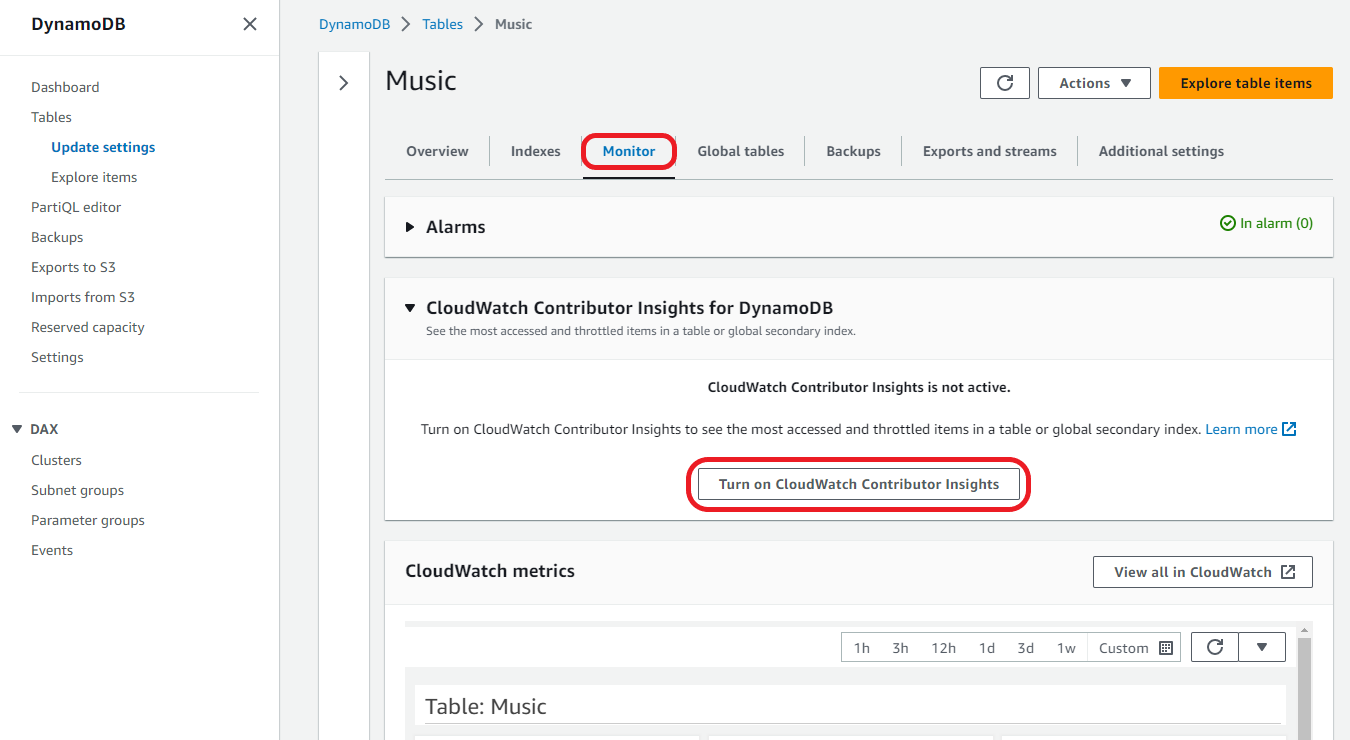
Step 3: Click "Manage Contributor Insights": Toggle the feature on. Select either "All Requests" (full mode) or "Throttled Requests Only" (throttle-only mode) introduced in August 2025.
Step 4: Confirm the rules created After enabling, navigate to CloudWatch > Contributor Insights to confirm the four rules (or more, if you have GSIs) are in "Enabled" state.
Step 5: Verify the graphs are populating: Allow 15-30 minutes for data to appear. CloudWatch will generate graphs showing the top N partition keys by request volume. The default view shows the top 10 keys.
What to do if this does not work: If rules appear in "Error" state, the most common cause is insufficient IAM permissions. Verify the execution role includes cloudwatch:EnableInsightRules, cloudwatch:PutInsightRule, and dynamodb:DescribeTable. Recheck the exact policy syntax in the AWS CloudWatch documentation.
How do you know it worked: Navigate to CloudWatch > Contributor Insights, select the table-level rule, and confirm the time-series graph is plotting key-level activity. If the graph is flat or empty after 30 minutes of table traffic, verify your table has active read/write traffic and recheck the rule configuration.
Also read: How to Choose Between 1-Year and 3-Year AWS Commitments
Identifying hot keys is a prerequisite to maximizing Reserved Capacity ROI. Here is how the two fit together in practice.
DynamoDB Reserved Capacity, available through Usage.ai's Flex Reserved Instances, delivers 30-40% savings on provisioned DynamoDB throughput. Usage.ai manages the commitment on your behalf -- no upfront payment, no multi-year lock-in, and a cashback guarantee if utilization falls short.
The connection to Contributor Insights: Before recommending a Reserved Capacity commitment on a DynamoDB table, Usage.ai's AI-powered recommendations analyze utilization patterns. A table with hot key throttling shows a deceptive utilization signal: total consumed capacity may look high, but actual table-level efficiency is low because hot partitions throttle while cold partitions sit idle.
The workflow for teams managing high-value DynamoDB tables:
Teams that skip steps 1 and 2 often find their Reserved Capacity commitments are sized to the over-provisioned number, locking in waste. The $2-17/month Contributor Insights spend is insurance that your reservation covers real utilization, not throttling-driven over-provisioning.
Usage.ai refreshes DynamoDB recommendations every 24 hours, compared to the 72+ hour refresh cycle on AWS native tools. At DynamoDB pricing, that 3-day gap in detecting newly-emerged hot key patterns or provisioning changes can represent meaningful daily waste before any action is taken.
Book a savings assessment at usage.ai to see how much your DynamoDB Reserved Capacity can be optimized.
1. How much does DynamoDB Contributor Insights cost per month?
DynamoDB Contributor Insights costs $0.50 per rule per month plus $0.03 per million DynamoDB events matched. Enabling it on a single table with no GSIs creates four rules, setting the base monthly cost at $2.00. Event costs scale with traffic: a table processing 500 million events adds $15.00, for a total of $17.00/month. Tables with GSIs create additional rules at $0.50 each. Verify current pricing at aws.amazon.com/pricing -- rates change.
2. How many rules does enabling DynamoDB Contributor Insights create?
Enabling Contributor Insights on a DynamoDB table creates two rules for the base table (most-accessed keys and most-accessed keys causing errors) plus two rules per Global Secondary Index. A table with zero GSIs creates four rules totaling $2.00/month in rule fees. A table with three GSIs creates eight rules totaling $4.00/month. Rules are managed by CloudWatch and appear in the CloudWatch Contributor Insights console after enabling.
3. What is the throttle-only mode for DynamoDB Contributor Insights?
Throttle-only mode, available as of August 2025, restricts event matching to DynamoDB requests that result in throttling errors. The per-rule monthly fee still applies, but the $0.03 per million events cost drops near-zero on well-provisioned tables because only throttled requests are counted. For a table with a 0.1% throttle rate processing 2 billion events per month, event costs fall from $60.00 to approximately $0.06. Use throttle-only mode for passive hot key monitoring with minimal cost. (Verify at docs.aws.amazon.com/amazondynamodb.)
4. What are AWS Contributor Insights?
AWS Contributor Insights is a CloudWatch feature that analyzes log data or DynamoDB request traffic to identify which values -- partition keys, IP addresses, user IDs -- are contributing most to overall activity. For DynamoDB, it surfaces the specific partition keys driving the most reads, writes, or throttling errors on a table or GSI. It replaces the need to aggregate application-level logs or add custom metrics to identify hot key patterns. Rules are priced at $0.50 each per month, plus $0.03 per million events matched.
5. What is DynamoDB used for?
DynamoDB is AWS's fully managed NoSQL key-value and document database, designed for single-digit millisecond performance at any scale. Common use cases include session management, user profile storage, gaming leaderboards, shopping cart data, IoT telemetry, and any workload requiring consistent low-latency reads and writes at high throughput. DynamoDB charges separately for read capacity units (RCUs), write capacity units (WCUs), storage, and optional features like Contributor Insights, Streams, and Global Tables. Reserved Capacity on DynamoDB reduces provisioned throughput costs by 30-40% with a one-year commitment.
6. Does DynamoDB support a CloudWatch Contributor Insights mode specifically for throttled keys?
Yes. As of August 2025, DynamoDB Contributor Insights includes a throttle-only mode that matches only DynamoDB events that result in a throttling error. The rule fee of $0.50/rule/month still applies, but the per-event charge becomes negligible for tables with low throttle rates. This mode is suited for passive monitoring: it stays cost-minimal during healthy operation and activates when throttling actually occurs, pinpointing the exact partition keys involved. Full mode continues to track all read/write keys regardless of throttling status.
7. Is DynamoDB Contributor Insights the same as CloudWatch Contributor Insights?
DynamoDB Contributor Insights is a specific implementation of the broader CloudWatch Contributor Insights feature. CloudWatch Contributor Insights can analyze any structured CloudWatch Logs data using custom rules. DynamoDB-specific Contributor Insights creates managed rules automatically when enabled on a table -- you do not write rule logic manually. The pricing model is the same ($0.50/rule/month + $0.03/million events), but DynamoDB Contributor Insights rules are auto-configured by AWS and tied directly to DynamoDB's internal event stream rather than CloudWatch Logs.
8. Should I enable Contributor Insights before buying DynamoDB Reserved Capacity?
Enabling Contributor Insights before committing to Reserved Capacity is a sound practice for any table with significant traffic. Hot key patterns cause artificial over-provisioning -- teams add capacity to compensate for throttled partitions rather than fixing the partition key design. Committing to Reserved Capacity on an over-provisioned table locks in the waste. At $2-17/month for Contributor Insights, identifying and resolving a hot key pattern before sizing your Reserved Capacity commitment can mean the difference between committing to the right number and committing to an inflated one. Once the table is right-sized, Reserved Capacity delivers 30-40% savings on that optimized baseline.
Share this post


.svg)
.svg)

