
 AWS
AWS Microsoft Azure
 Google Cloud

Amazon DocumentDB charges across four dimensions. Understanding all four — and how they interact — is the only way to accurately estimate your monthly bill. The instance line is the most obvious, but I/O is often the largest cost surprise: for a write-heavy document workload, I/O under Standard storage frequently exceeds the instance cost. This guide covers every billing dimension with exact rates, the Standard vs I/O-Optimized decision, the AWS official worked example, and the Extended Support trap for version 3.6 users.
See exactly what you’re overpaying in under 60 seconds. Try the Calculator for free →
The Four Billing Dimensions
All rates: US East (N. Virginia), October 15, 2026. Source: AWS official DocumentDB pricing page. Verify at aws.amazon.com/documentdb/pricing/ — rates change.
| Billing Dimension | Rate | Notes |
| On-demand instances | Per second, 10-min min | Primary and all replica instances billed at the same per-second rate. 10-minute minimum after any billable status change. |
| Database I/O (Standard only) | $0.20/million I/O requests | Read: 8K pages = 1 I/O. Write: 4K transaction log units = 1 I/O. Not charged under I/O-Optimized. |
| Database storage | $0.10/GB-month | Includes 3-AZ replication. You pay for one logical copy. Auto-scales. Covers data, indexes, change stream data. |
| Backup storage (above free tier) | $0.021/GB-month | Free up to 100% of cluster storage. For a 50 GB cluster: first 50 GB of backup is free. |
| T3/T4g CPU credit overage | $0.09/vCPU-hr | Only when 24-hr rolling average CPU exceeds instance baseline. Same rate all T3/T4 sizes and regions. |
| Inter-AZ cluster data transfer | $0.00 | Data transferred between primary and replica instances across AZs is free. |
| Encryption, monitoring (CloudWatch) | No separate DocumentDB feature fee | Customer-managed KMS keys and requests, optional CloudWatch logs, custom metrics and alarms can incur their own charges. |
| Database Savings Plans | Eligible | Up to 35% program maximum on eligible usage with a 1-year commitment. Generation 7 and newer instances and DocumentDB Serverless qualify; r5 and r6g do not. |
Source: AWS official DocumentDB pricing page (aws.amazon.com/documentdb/pricing/), October 15, 2026.
Dimension 1: Instance Pricing
DocumentDB instances are billed per second from the moment an instance enters Available state until it is stopped or deleted. The billing applies to both the primary (writer) instance and every read replica in the cluster. A two-instance cluster (one primary, one replica) is billed at twice the per-instance rate. A three-instance cluster (one primary, two replicas) is billed at three times the per-instance rate. Source: AWS official pricing page.
The 10-minute minimum applies after any billable status change: creating, modifying, or deleting an instance. This prevents the per-second billing from creating economics favorable to rapid instance cycling.
Selected on-demand rates for common instance types (US East, October 15, 2026):
db.r5.large (2 vCPU, 16 GB) — $0.277/hr. Source: AWS official: ‘$0.277 per hour’ for db.r5.large.
db.r6g.large (2 vCPU, 16 GiB, Graviton2): $0.26315/hr under Standard storage, 5% below db.r5.large at $0.277/hr. These are public US East (N. Virginia) On-Demand rates.
db.r6g.xlarge (4 vCPU, 32 GiB, Graviton2): $0.5263/hr under Standard storage. The I/O-Optimized rates are $0.3047/hr for r5.large, $0.2895/hr for r6g.large, and $0.5789/hr for r6g.xlarge. Source: AWS public DocumentDB price list.
For the full current instance price list: verify at aws.amazon.com/documentdb/pricing/ — rates change.
T3/T4g burstable instances run in Unlimited mode. If your average CPU utilization over a rolling 24-hour period exceeds the baseline of the instance (for example, 20% baseline on a t3.medium), you are charged $0.09/vCPU-hr for the excess CPU credit consumption. For development clusters with occasional bursts, t3/t4g instances are cost-effective. For any production cluster with consistent CPU above baseline, the credit overage charges erode the cost savings versus an r-family instance. Source: AWS official pricing page.
Dimension 2: Database I/O (Standard Storage Only)
I/O is the billing dimension that surprises teams most. Under Standard storage, every read and write operation against the storage volume is billed at $0.20 per million I/O requests. This can exceed your instance cost for write-heavy document workloads. Source: AWS official pricing page.
Read I/O Mechanics
Read operations are charged at 8K page granularity: one I/O per 8K page read from storage. Once a page has been read from storage and loaded into memory, subsequent reads of the same data do not incur additional I/Os. The implication: a properly sized instance where the working set (frequently accessed documents and indexes) fits entirely in memory generates very few read I/Os. An undersized instance where the working set constantly evicts from memory generates high read I/Os as documents are re-read from storage on every access cycle. Right-sizing the instance is the primary lever for reducing read I/O costs. Source: AWS official pricing page.
Write I/O Mechanics
Write I/Os are billed in 4K transaction log units. A transaction log record of 1,024 bytes counts as one I/O. A record of 4,097 bytes counts as two I/Os. Concurrent write operations with transaction logs under 4K can be batched by the DocumentDB engine, reducing write I/O consumption. DocumentDB never pushes modified document pages to storage (unlike traditional database engines that write both the log and the modified page), which reduces write I/O compared to conventional RDBMS systems. Source: AWS official pricing page.
Garbage Collection I/O
DocumentDB uses MVCC (multi-version concurrency control) and creates a new versioned document for every update operation. When old document versions are no longer needed by active queries, a garbage collector reclaims them — generating read I/Os to load old versions into memory and write I/Os to delete them. For workloads with high update rates on the same documents, garbage collection I/O can be a significant share of total I/O. The mitigation: remove unused indexes (each unused index extends the time old versions must be retained and increases GC work) and ensure the instance is large enough that indexes fit in memory. Source: AWS official pricing page.
Standard vs I/O-Optimized: The Configuration That Shapes Your Bill
DocumentDB offers two storage configurations. The choice determines whether I/O appears as a separate, variable cost or is absorbed into higher instance and storage rates.
Standard (Pay-Per-Use I/O)
Standard storage is $0.10/GB-month plus $0.20 per million I/O requests. Memory-resident reads can lower storage I/O, but estimate from measured billed I/O. AWS’s 25%-of-total-spend guidance is a screening heuristic, not the exact break-even for every cluster.
I/O-Optimized (I/O Included)
I/O-Optimized storage is $0.30/GB-month, with higher instance rates and no separate read/write I/O charges. Compare the avoided I/O charge with the actual compute and storage premium. Write-heavy workloads may benefit, but the result depends on measured usage and the selected instance.
Quick check: use billed I/O from Cost and Usage Reports, or aggregate the cluster’s VolumeReadIOPs and VolumeWriteIOPs with the documented metric statistics and periods. Compare the I/O charge with (I/O-Optimized compute minus Standard compute) plus $0.20 × average stored GB per month. Do not multiply a metric that already reports a count by seconds again.
Also read: DynamoDB Serverless: A Complete Guide
Dimension 3: Database Storage
DocumentDB storage is billed at $0.10/GB-month for Standard configuration. Source: AWS official: ‘storage as low as $0.10 GB/month.’ Billable storage includes all data in your cluster volume: document data, indexes, and change stream data.
Key storage facts from AWS official pricing page: (1) Replication across three Availability Zones is included in the storage price — you pay for one logical copy, not three. (2) Storage scales automatically in 10 GB increments as your data grows. You are billed for consumed storage, not allocated storage. (3) You do not need to pre-provision storage capacity.
At Standard pricing, a measured average 100 GB costs $10/month; 1,024 billable GB costs $102.40 and 10,240 GB costs $1,024. Storage, I/O and compute remain separate line items. I/O-Optimized storage is three times the Standard storage rate in this Region.
Dimension 4: Backup Storage
DocumentDB automated backup storage is free up to 100% of your total cluster storage. A cluster storing 50 GB of data gets 50 GB of backup storage at no charge. If your backup storage exceeds the cluster data size — because of long retention windows or frequent snapshots — the excess is charged at $0.021/GB-month. Source: AWS official pricing page.
Backup usage depends on change volume, snapshots and retention; a 30-day retention setting alone does not establish a 3–5× footprint. For 200 GB of chargeable excess backup, the checked $0.021/GB-month rate gives $4.20/month. Use measured backup consumption after the applicable free allocation.
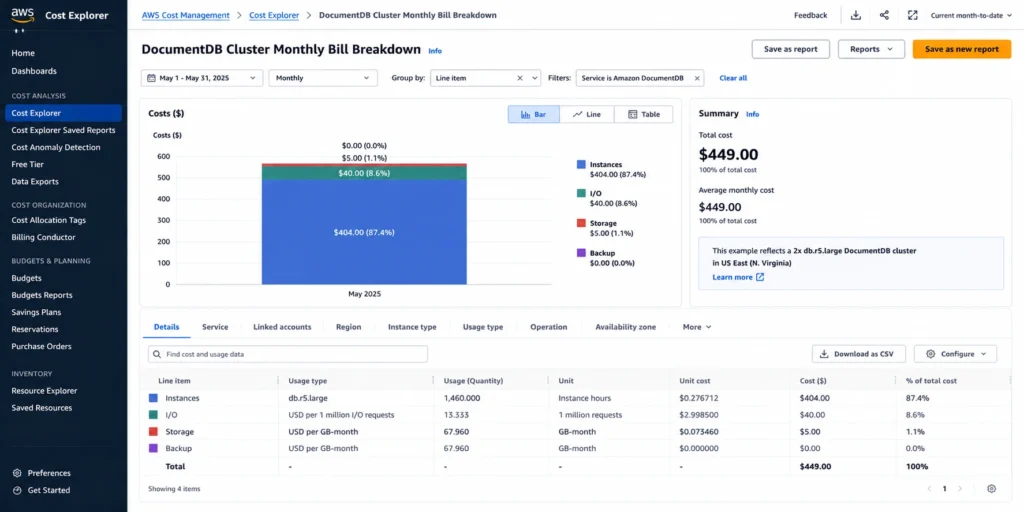
AWS Official Worked Example: Full Bill Calculation
Source: AWS official DocumentDB pricing page (aws.amazon.com/documentdb/pricing/), Standard storage configuration, US East (N. Virginia), October 15, 2026.
Scenario: two-instance db.r5.large cluster (one primary, one replica), on-demand pricing. 50 GB of data stored. 50 GB backup (within free tier). 200 million I/O operations per month.
| Cost component | Calculation | Monthly cost |
| Instances (2x db.r5.large, on-demand) | $0.277/hr x 730 hrs x 2 instances | $404.42 |
| Storage (Standard, 50 GB) | $0.10/GB-month x 50 GB | $5.00 |
| Database I/O (200M requests) | $0.20/million x 200 million | $40.00 |
| Backup storage (50 GB — within free tier) | 50 GB backup = 50 GB cluster storage (100% free) | $0.00 |
| Total monthly | $404.42 + $5.00 + $40.00 + $0.00 | $449.42 |
Source: AWS official DocumentDB pricing page. Exact figures reproduced from the AWS official worked example. I/O cost ($40) represents 8.9% of total spend — well below the 25% threshold where I/O-Optimized would apply. Source: aws.amazon.com/documentdb/pricing/.
For the same two r5.large instances and 50 GB, I/O-Optimized costs 2 × $0.3047 × 730 + 50 × $0.30 = $459.86/month. Standard costs $409.42 before I/O. Break-even is $50.442 of monthly I/O charges, or 252.21 million I/Os. At 200 million I/Os, Standard remains cheaper ($449.42 versus $459.86). At 2 billion I/Os, Standard costs $809.42; I/O-Optimized saves $349.56/month (43.2%). Calculations use unrounded amounts before displaying cents and exclude identical backup and ancillary charges.
Extended Support for DocumentDB Version 3.6: Billing Began July 1, 2026
Extended Support billing for version 3.6 began July 1, 2026. As of this October 15, 2026 price check, affected clusters are already accruing the surcharge.
For r5 instances in US East (N. Virginia), the catalog rate is $0.1108 per vCPU-hour for years 1–2 (through March 31, 2028), then $0.2216 for year 3 (April 1, 2028–March 31, 2029). On a two-vCPU r5.large, this adds $0.2216/hr initially: $0.277 + $0.2216 = $0.4986/hr, an 80% increase. The year-3 total is $0.7202/hr, a 160% increase.
At 730 hours, the first-period surcharge is $161.77 per instance or $323.54 for two instances. The two-instance compute total becomes $727.96/month, before storage and I/O. Upgrade to a supported version after compatibility testing to stop this version’s future Extended Support charges; the upgrade does not reverse charges already incurred. Rates differ by family and Region.
Sources: AWS DocumentDB pricing and the current public price list. AWS’s Ohio worked example must not be substituted for the exact N. Virginia rate.
Database Savings Plans for DocumentDB
Database Savings Plans provide a one-year, no-upfront commitment for eligible database usage. AWS limits instance eligibility to Generation 7 and newer; DocumentDB Serverless is also eligible. The program maximum is 35%, and the actual discount depends on usage. Source: AWS Savings Plans eligibility and pricing FAQ.
The r5.large worked example above is not eligible for Database Savings Plans, so the earlier claimed $1,698.60 annual saving does not apply. For eligible usage, size the hourly commitment at the discounted Savings Plans rate, not at its On-Demand equivalent. Storage, I/O, backups and Extended Support are separate charges; validate covered usage before purchasing.
Usage.ai added native Database Savings Plans support in January 2026. The platform analyzes historical DocumentDB instance spend and identifies the consistent floor spend level for DSP commitment sizing. For clusters with stable instance configurations, the DSP commitment is the primary available discount lever.
AWS Database Savings Plans: The Complete Guide
How to Reduce Your DocumentDB Bill
Right-size instances to keep the working set in memory
Measure read I/O, cache hit rate, memory pressure and query latency before resizing. FreeableMemory above 40% does not prove the complete working set is cached, and a larger instance does not eliminate write I/O. Compare the extra instance charge with the measured I/O reduction after testing.
Migrate to Graviton2 (r6g) instances
The checked db.r6g.large Standard rate is $0.26315/hr, 5% below r5.large. Two instances at 730 hours cost $384.20 versus $404.42, saving $20.22/month ($242.65 over 8,760 hours), before other charges. Test performance and migration compatibility; the price difference alone does not establish equal workload performance.
Evaluate I/O-Optimized if I/O exceeds 25% of total spend
Compare measured billed I/O with the exact extra compute and storage charge for I/O-Optimized. For the two-r5.large, 50-GB example, break-even is 252.21 million I/Os per modeled month. AWS’s 25% guidance is not a universal break-even.
Apply Database Savings Plans to stable instance spend
Evaluate Savings Plans only for eligible Generation 7+ instances or serverless usage. A no-upfront plan still creates a one-year payment obligation and can waste money when underused. Use the stable eligible usage floor and the actual discounted rate to size the commitment.
Upgrade affected version 3.6 clusters
Extended Support billing for 3.6 began July 1, 2026. Check current version and charges, then test and plan an upgrade to stop future surcharges.
How Usage.ai Handles DocumentDB Costs
Usage.ai analyzes DocumentDB costs for rightsizing, instance-generation changes, I/O configuration and eligible commitment opportunities. Validate each recommendation against current AWS rates and measured usage: the r5.large-to-r6g.large price difference here is 5%, and the I/O-Optimized decision depends on the actual compute and storage premium.
See exactly what you’re overpaying in under 60 seconds. Try the Calculator for free →
For DocumentDB version 3.6 clusters, include the Extended Support charge already effective from July 1, 2026 in the cost review. Use the exact family, Region and vCPU count to quantify the upgrade opportunity.
If any DSP commitment becomes underutilized — because a cluster is decommissioned or migrated to Serverless — Usage.ai provides cashback on the unused commitment in real money. Fee: percentage of realized savings only.
Start your free DocumentDB savings analysis with Usage.ai

Frequently Asked Questions
1. How much does Amazon DocumentDB cost?
In US East (N. Virginia), Standard r5.large is $0.277/hr and r6g.large is $0.26315/hr. Standard storage is $0.10/GB-month, I/O is $0.20/million, and chargeable excess backup is $0.021/GB-month. Two r5.large instances, 50 GB and 200 million I/Os cost $449.42 over 730 hours, before applicable ancillary charges.
2. What is the difference between DocumentDB Standard and I/O-Optimized?
Standard bills I/O separately; I/O-Optimized charges more for compute and storage and includes I/O. Compare the exact premium with avoided I/O charges. Two r5.large instances and 50 GB break even at 252.21 million I/Os per 730-hour month at the checked rates.
3. How does DocumentDB I/O work?
Read I/O: 8K storage pages = 1 I/O. Once a page is in memory, repeat reads cost nothing. Write I/O: 4K transaction log units = 1 I/O. DocumentDB never writes modified document pages to storage (only the transaction log), reducing write I/O vs traditional databases. MVCC garbage collection generates additional I/Os for updating versioned documents. Right-size instances so the working set fits in memory to minimize read I/O. Source: AWS official pricing page.
4. What is DocumentDB Extended Support for version 3.6?
Version 3.6 Extended Support billing began July 1, 2026. For N. Virginia r5 instances, years 1–2 add $0.1108 per vCPU-hour, and year 3 adds $0.2216. A two-vCPU r5.large adds $161.77 over 730 hours initially. Upgrade after compatibility testing to stop future charges.
5. Do Database Savings Plans cover DocumentDB?
Yes, for eligible Generation 7 and newer instances and DocumentDB Serverless. The r5 and r6g examples in this guide do not qualify. Plans have a one-year obligation, apply at discounted hourly rates, and offer up to 35% across the program; the exact discount varies. Storage, I/O and backup are separate.
6. Is inter-AZ data transfer free for DocumentDB?
Cluster replication across Availability Zones is free. Application-to-database traffic across AZs can incur $0.01/GB on each applicable side; do not treat that as a single all-in transfer charge. Confirm the path and endpoints in AWS pricing.




