.png)


How Much Does DynamoDB Export to S3 Cost?
DynamoDB Export to S3 charges $0.10 per GB of table data exported in US East (N. Virginia) as of April 2026 (verify at aws.amazon.com/dynamodb/pricing — rates change). This rate applies to both full exports and incremental exports. The billing unit is the size of the table data (table items plus local secondary indexes) at the point in time you specified, not the size of the output files on S3.
That $0.10/GB line item is not the total cost. Every export workflow has four cost components running in parallel:
| Cost Component | How It’s Billed | Approximate Rate (US East, April 2026) |
|---|---|---|
| DynamoDB Export Fee | Per GB of table data at point in time | $0.10 per GB |
| PITR (Continuous Backup) | Per GB-month of current table size | $0.20 per GB-month |
| S3 Storage | Per GB-month stored in S3 | $0.023 per GB-month (Standard) |
| S3 PUT Requests | Per 1,000 PUT requests | $0.005 per 1,000 requests |
Note: Athena query costs apply separately if you query the exported data — $5.00 per TB scanned (US East, April 2026 — verify at aws.amazon.com/athena/pricing). Data transfer between DynamoDB and S3 within the same AWS Region is $0.00. Cross-region transfers incur standard data transfer fees.
What Changed From Last Year: November 2024 DynamoDB Price Cut
AWS reduced DynamoDB on-demand throughput pricing by 50% in November 2024. Export pricing ($0.10/GB) was not changed. PITR pricing ($0.20/GB-month) was not changed. For teams evaluating whether to switch from on-demand to provisioned capacity in light of the price cut, the backup and export cost stack remains identical — only the throughput component of your bill changed.
The practical implication: at higher table sizes, PITR cost is now proportionally larger relative to throughput cost than it was before November 2024. A 500 GB table with PITR enabled costs $100/month in PITR fees alone. That cost is unchanged and should be weighed carefully when deciding whether to keep PITR enabled solely to unlock the export feature.
Also read: DynamoDB Reserved Capacity: Pricing for Read & Write Throughput
Full Export vs Incremental Export: Cost Comparison at Every Scale
Full Export: Exports the entire table state at a specified point in time within your PITR window. Billed on total table size. Each full export creates a complete snapshot in S3.
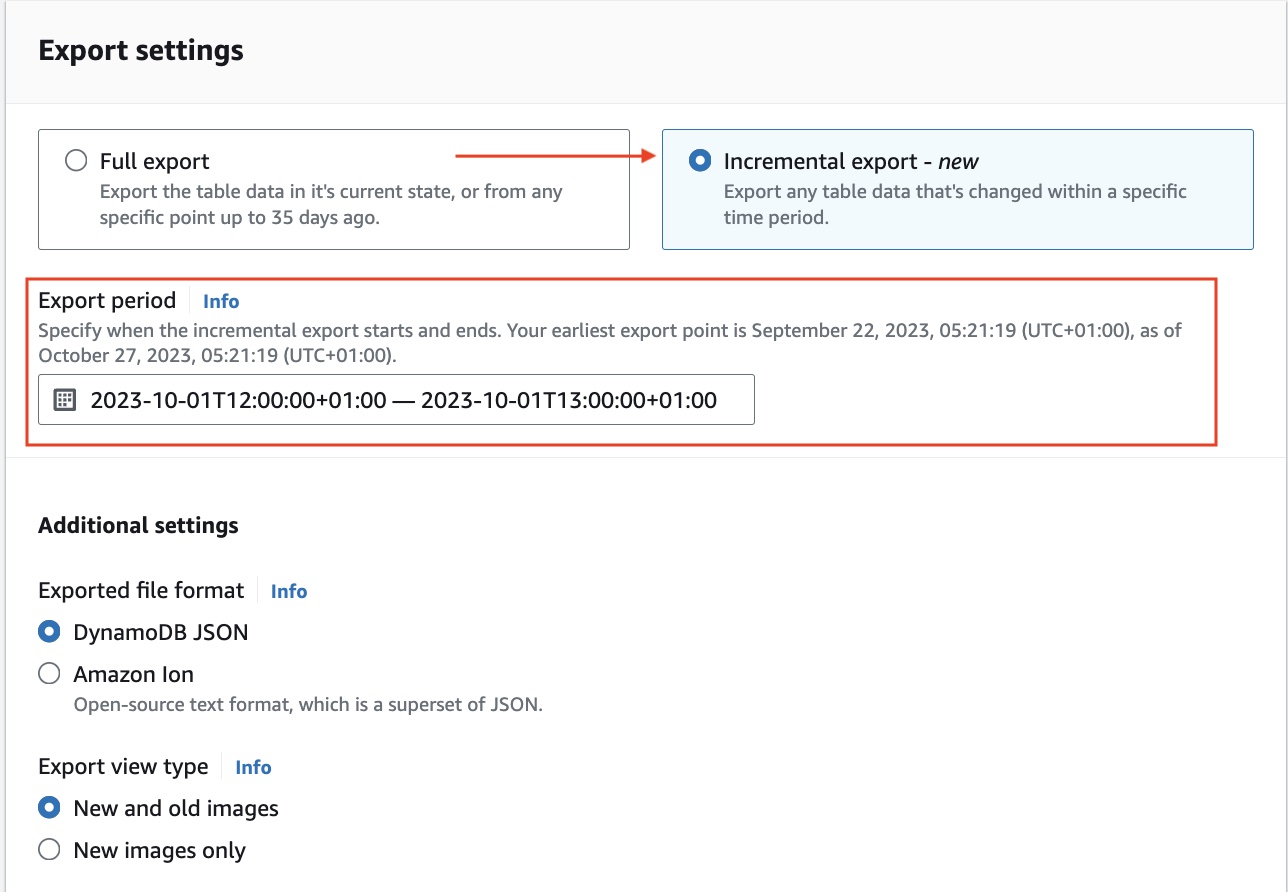
Incremental Export: Exports only the changes (inserts, updates, deletes) between two specified timestamps. The time window must be between 15 minutes and 24 hours. Billed on the size of change data processed from PITR backups. Has a minimum charge of 10 MB per export.
The correct choice depends on how much of your table changes between export runs. A table where 5% of items change per day looks very different from an append-only event table where 100% of data is new each day.
Worked Example: 100 GB Table, Daily Export Frequency
Scenario A: 5% daily change rate (5 GB changes per day)
Full export approach (daily):
- Export fee: 100 GB x $0.10 = $10.00 per export
- Monthly export fee (30 runs): $300.00
- S3 storage growth: 100 GB/export x 30 days = 3,000 GB cumulative (if retaining all) = $69.00/month
- S3 PUT requests: negligible (approximately 100 files per export x 30 exports = 3,000 PUTs = $0.015)
- PITR: 100 GB x $0.20 = $20.00/month
- Total monthly (export + PITR + S3): approximately $389.00
Incremental export approach (daily):
- Export fee: 5 GB changes x $0.10 = $0.50 per export
- Monthly export fee (30 runs): $15.00
- S3 storage growth: 5 GB/day x 30 days = 150 GB cumulative = $3.45/month
- PITR: $20.00/month (same — required regardless)
- Total monthly (export + PITR + S3): approximately $38.45
Savings from switching to incremental: approximately $350.55 per month on a 100 GB table with 5% daily change rate.
Scenario B: 80% daily change rate (80 GB changes per day — high-velocity event table)
Incremental export fee: 80 GB x $0.10 = $8.00 per export x 30 = $240.00/month Full export fee: 100 GB x $0.10 = $10.00 per export x 30 = $300.00/month
At 80% daily change rate, the incremental cost is only 20% cheaper on the export fee itself. Once S3 storage accumulation is included, incremental still wins on total cost, but the gap narrows.
Cost Crossover Rule: Incremental exports are cheaper than full exports whenever your daily change rate is below 100% of the table size. The lower the change rate, the larger the savings.
PITR Is Required: What It Costs and What You’re Actually Paying For
PITR (Point-In-Time Recovery) is a prerequisite for DynamoDB Export to S3. You cannot export without it. PITR is billed at $0.20 per GB-month based on the current size of your table (table data plus local secondary indexes) as of April 2026. This is a continuous charge — it runs every second your table exists with PITR enabled.
For teams considering PITR purely as the mechanism to unlock S3 export, the economics look like this:
| Table Size | Monthly PITR Cost | Annual PITR Cost |
|---|---|---|
| 10 GB | $2.00 | $24.00 |
| 50 GB | $10.00 | $120.00 |
| 100 GB | $20.00 | $240.00 |
| 500 GB | $100.00 | $1,200.00 |
| 1 TB | $200.00 | $2,400.00 |
| 5 TB | $1,000.00 | $12,000.00 |
For large tables where PITR is enabled only for the export capability — not for actual disaster recovery use, this cost deserves scrutiny. If you are running weekly exports on a 1 TB table but have no intention of using PITR for table restoration, you are paying $200/month for the PITR feature to be available.
The alternative for scheduled archival without PITR is on-demand backups ($0.10/GB for the backup storage, billed on total backup size), but on-demand backups do not support the native export to S3 feature. The export API exclusively uses PITR. If cost management is the goal, the decision is: $0.20/GB-month for PITR versus the engineering cost of building a custom export pipeline using DynamoDB Streams.
At table sizes below 100 GB, PITR cost is typically immaterial and the convenience of native export wins. Above 500 GB, the $100/month-plus PITR cost becomes a line item worth tracking.
How to Export Data from DynamoDB to S3
Prerequisites:
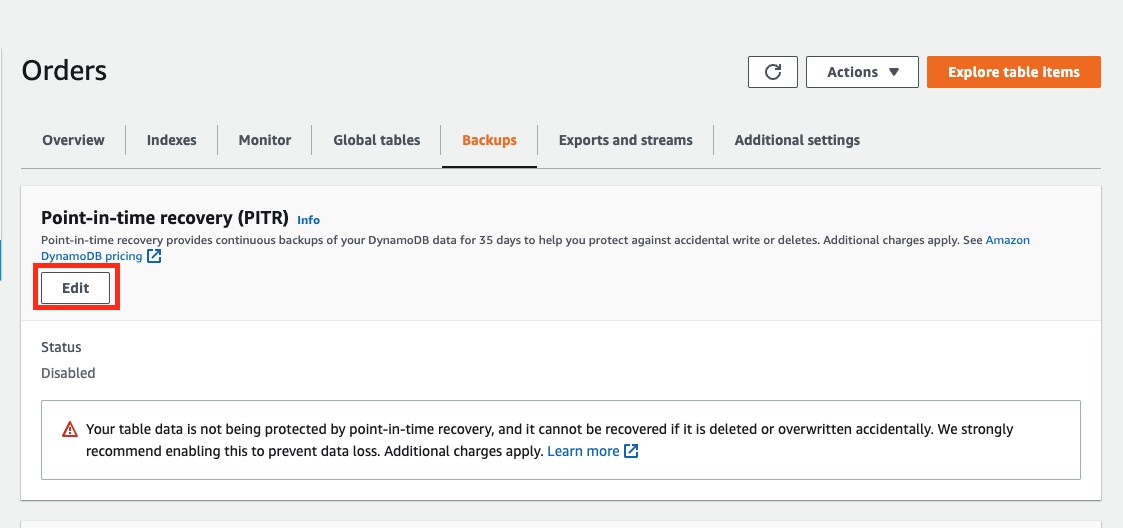
- PITR must be enabled on the source DynamoDB table
- An S3 bucket in the same AWS account or a target account
- IAM permissions: dynamodb:ExportTableToPointInTime and s3:PutObject, s3:AbortMultipartUpload, s3:PutObjectAcl on the destination bucket
- The S3 bucket does not need to be in the same region as the DynamoDB table, but cross-region transfers incur data transfer fees
Step 1: Enable PITR on the table (if not already enabled)
–table-name YOUR_TABLE_NAME \
–point-in-time-recovery-specification PointInTimeRecoveryEnabled=true
Step 2: Initiate a full export
–table-arn arn:aws:dynamodb:us-east-1:123456789012:table/YOUR_TABLE_NAME \
–s3-bucket your-export-bucket \
–s3-prefix dynamodb-exports/your-table/ \
–export-time “2026-04-01T00:00:00Z” \
–export-format DYNAMODB_JSON
Supported export formats: DYNAMODB_JSON and ION. Use ION if you intend to query the data with Amazon Athena using the Ion SerDe, it produces more compact output and parses faster in Athena. Use DYNAMODB_JSON for compatibility with AWS Glue, SageMaker, and custom processing pipelines.
Step 3: Initiate an incremental export
–table-arn arn:aws:dynamodb:us-east-1:123456789012:table/YOUR_TABLE_NAME \
–s3-bucket your-export-bucket \
–s3-prefix dynamodb-exports/your-table/incremental/ \
–incremental-export-specification ‘{
“ExportFromTime”: “2026-04-01T00:00:00Z”,
“ExportToTime”: “2026-04-02T00:00:00Z”,
“ExportViewType”: “NEW_AND_OLD_IMAGES”
}’
The ExportViewType parameter accepts two values: NEW_IMAGE (only the item state after the change) and NEW_AND_OLD_IMAGES (both the before and after state). Use NEW_AND_OLD_IMAGES for CDC-style analytics pipelines where you need to track what changed and what the previous value was. Use NEW_IMAGE for simpler data lake ingestion where only current state matters, this produces smaller output files and lower S3 storage costs.
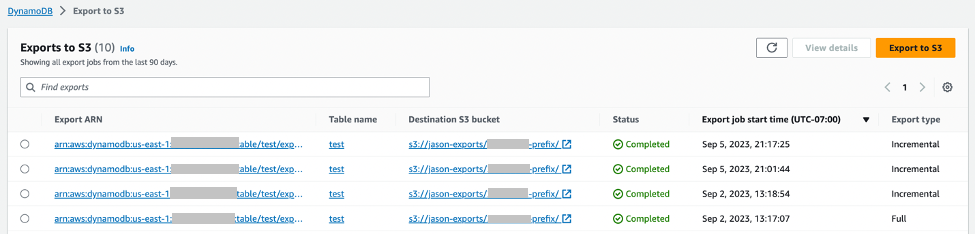
Step 4: Verify the export completed successfully
–export-arn arn:aws:dynamodb:us-east-1:123456789012:table/YOUR_TABLE_NAME/export/01234567890123-abc12345
A successful export returns “ExportStatus”: “COMPLETED” with “ExportedItemCount” and “ItemCount” fields. If the export fails, the “FailureCode” and “FailureMessage” fields contain the error detail.
What to do if the export fails:
The most common failure is INVALID_S3_PREFIX: verify your bucket exists, is in a supported region, and that the IAM role has s3:PutObject on the specific prefix. The second most common failure is POINT_IN_TIME_RECOVERY_NOT_ENABLED: PITR must be active at the time of the export, not just at the time you run the command. If PITR was disabled and re-enabled between your last export and the current one, you will lose the continuous backup window and must run a full export before incremental exports can resume.
How Long Does It Take to Export DynamoDB to S3?
Export duration scales with table size and is handled asynchronously by AWS infrastructure; you do not pay for compute while the export runs. The export does not consume your table’s read capacity units during this time. Based on AWS documentation and community reporting (verify with your own workloads):
| Table Size | Approximate Full Export Duration |
|---|---|
| Under 1 GB | 2 to 10 minutes |
| 10 GB | 5 to 20 minutes |
| 100 GB | 20 to 60 minutes |
| 500 GB | 1 to 3 hours |
| 1 TB | 2 to 5 hours |
| 5 TB | 5 to 12 hours |
These are estimates based on AWS blog posts and community reports. Actual duration depends on partition count, item size distribution, and current AWS regional capacity. AWS does not publish an SLA for export duration.
Incremental exports over short time windows (15 minutes to a few hours) complete significantly faster than full exports, typically within 2 to 15 minutes, regardless of overall table size, because they only process the changed data volume.
If your use case requires near-real-time data in S3: latency under 15 minutes, DynamoDB Streams with a Kinesis Data Firehose delivery stream is the correct architecture. Export to S3 is a batch mechanism, not a streaming one.
Also read: AWS Savings Plan Buying Strategy: Layering, Timing & Right-Sizing Commitment
S3 Export Output Format and What It Costs to Query with Athena
Each DynamoDB Export to S3 lands as gzip-compressed files in your S3 bucket. Output files are organized under a prefix structure: s3://your-bucket/prefix/AWSDynamoDB/ExportId/data/
Each file contains one DynamoDB item per line in JSON or Ion format. Files are partitioned by DynamoDB table partition- on-demand capacity tables have a minimum of 4 partitions, each producing one output file. Larger tables with more partitions produce more files.
S3 PUT request cost: For a 100 GB table with 100 partitions, you get approximately 100 files per export. At $0.005 per 1,000 PUT requests, 100 files = $0.0005 per export, effectively zero. S3 PUT costs are negligible for DynamoDB exports.
Athena query cost: Athena charges $5.00 per TB scanned (US East, April 2026, verify at aws.amazon.com/athena/pricing). Because DynamoDB exports are gzip-compressed, Athena reads compressed bytes, which reduces the scan cost relative to uncompressed data.
For a 100 GB uncompressed DynamoDB table exported as gzip, expect roughly 40 to 60 GB of compressed output (DynamoDB JSON compresses at approximately 40 to 60% of the original size for typical workloads). An Athena query scanning all output files costs approximately 0.05 TB x $5.00 = $0.25 per full-table query.
Using columnar formats (Parquet via AWS Glue conversion after export) reduces Athena scan costs by 60 to 90% for column-selective queries, relevant for large tables with wide schemas where analytics only touches a few attributes.
Total Cost of Ownership: DynamoDB Export vs DynamoDB Scan vs Custom Stream Pipeline
FinOps teams often evaluate three architectures for moving DynamoDB data to an analytics layer. The correct choice depends on table size, update frequency, and acceptable data latency.
| Architecture | Export Fee | PITR Required | RCU Impact | Data Freshness | Monthly Cost (100 GB table, daily refresh) |
|---|---|---|---|---|---|
| Native Export to S3 (full) | $0.10/GB | Yes ($20/mo) | Zero | Up to 35 days ago, batch | $30 + S3 |
| Native Export to S3 (incremental daily) | $0.10/GB on changes | Yes ($20/mo) | Zero | Daily batch | $20 + S3 (5% change rate) |
| DynamoDB Scan via Glue/EMR | None | No | Full RCU consumption | Real-time to hours | High — RCU costs dominate |
| DynamoDB Streams + Kinesis Firehose | Stream read units | No | Reads from stream | Sub-minute | Variable by write rate |
For most analytics use cases where daily-to-hourly data freshness is acceptable, native export to S3 with incremental mode is the lowest-cost architecture. The only scenario where DynamoDB Scan beats export is for one-time historical migrations of tables smaller than 10 GB on on-demand capacity, where PITR enablement overhead is not worth adding.
For sub-15-minute data freshness requirements, DynamoDB Streams with Kinesis Firehose is the correct architecture. Export to S3 is asynchronous and batch: it cannot substitute for streaming.
What Is Cheaper, DynamoDB or S3?
This is a frequently asked question that conflates two very different services. DynamoDB is a low-latency NoSQL database billed per read and write operation plus storage. S3 is object storage billed per GB-month plus request count. They serve different purposes and the cost comparison depends entirely on the use case.
For storing data that needs millisecond-latency key-based lookup: DynamoDB is the correct choice. For storing data that will be read in large batches, infrequently, or by analytics services: S3 at $0.023/GB-month is dramatically cheaper than DynamoDB storage at $0.25/GB-month. Exporting historical or infrequently accessed DynamoDB data to S3 and querying it with Athena reduces storage cost by more than 90% on the data that moves.
This is precisely the cost optimization pattern that DynamoDB Export to S3 enables: keep hot data in DynamoDB for low-latency access, move cold or historical data to S3, query it cheaply with Athena. A 1 TB historical dataset stored in DynamoDB costs $250/month in storage alone. The same dataset in S3 Standard costs $23/month, a $227/month reduction per terabyte, before any query cost savings.
DynamoDB Reserved Capacity and Its Relationship to Export Costs
DynamoDB Reserved Capacity (DynamoDB Reserved Instances, available through Usage.ai’s platform) reduces the cost of provisioned read and write capacity units by 30 to 40% depending on term. Export costs, PITR costs, and S3 costs are entirely separate and are not covered by Reserved Capacity commitments.
The strategic interaction matters: teams running large provisioned DynamoDB tables should evaluate their export and PITR costs as part of their total DynamoDB cost picture, not just their throughput costs. At 1 TB, your monthly cost stack might look like this before any optimization:
- Throughput (provisioned): $X per month (depends on WCU/RCU levels)
- Storage: $250/month
- PITR: $200/month
- Export to S3 (weekly full): $400/month (1 TB x $0.10 x 4 runs)
- S3 storage (export archive): $23/month per TB retained
Switching to incremental exports on a table with 10% daily change rate reduces the weekly export cost from $400 to approximately $40, saving $360/month without any change to throughput or storage architecture.
Usage.ai’s platform covers DynamoDB throughput cost via Flex Reserved Instances, delivering 30 to 40% savings on provisioned capacity with no multi-year lock-in and cashback protection on underutilized commitments. If your DynamoDB provisioned throughput spend exceeds $3,000 per month, that is a higher-magnitude cost reduction than export optimization — but both should be in your FinOps playbook.
See DynamoDB Reserved Capacity: Pricing for Read and Write Throughput for the throughput cost analysis.
For teams evaluating whether to move cold data out of DynamoDB entirely, the backup and export cost stack is often the trigger. A 5 TB table paying $1,000/month in PITR plus $2,000/month in storage has a strong economic case for cold-tier migration. See DynamoDB Standard vs Standard-IA Table Class: When to Switch for the storage class cost analysis.
Worked Example: Full Monthly Cost for a 500 GB Table with Weekly Exports
- Table size: 500 GB
- PITR: enabled
- Export frequency: weekly full export
- Export format: DynamoDB JSON to S3 Standard
- Retention: keep 4 weeks of exports (4 x 500 GB = 2,000 GB in S3)
- Athena queries: 10 full-table queries per week
- Region: US East (N. Virginia)
Monthly cost breakdown:
| Line Item | Calculation | Monthly Cost |
|---|---|---|
| DynamoDB Export Fee | 500 GB x $0.10 x 4 exports | $200.00 |
| PITR | 500 GB x $0.20 | $100.00 |
| S3 Storage (export archive) | 2,000 GB x $0.023 | $46.00 |
| S3 PUT requests | ~500 files x 4 exports = 2,000 PUTs | $0.01 |
| Athena queries | 40 queries x 500 GB x 50% compression x $5/TB = 40 x 1.25 TB x $5 | $250.00 |
| Total | $596.01 |
Same scenario with incremental daily exports (10% daily change rate = 50 GB/day changes):
| Line Item | Calculation | Monthly Cost |
|---|---|---|
| DynamoDB Export Fee | 50 GB changes x $0.10 x 30 incremental exports | $150.00 |
| PITR | 500 GB x $0.20 | $100.00 |
| S3 Storage (incremental accumulation) | 50 GB/day x 30 days = 1,500 GB x $0.023 | $34.50 |
| Athena queries | Same 40 queries, but scanning smaller incremental files | $25.00 (estimated, scanning change sets only) |
| Total | $309.50 |
Monthly savings from switching to incremental exports: approximately $286.51 for this scenario.
Note: These are illustrative examples. Use the AWS Pricing Calculator at calculator.aws.amazon.com with your actual table size and change rate for precise projections.