
 AWS
AWS Microsoft Azure
 Google Cloud

Expect throttling when traffic outruns scale-out, a GSI becomes constrained, requests concentrate on hot keys, or demand reaches a configured maximum.
How DynamoDB auto scaling works
DynamoDB auto scaling uses AWS Application Auto Scaling and CloudWatch to change provisioned read capacity units (RCUs) and write capacity units (WCUs) so actual utilization stays near the target. AWS explains this behavior in its DynamoDB auto scaling documentation.Three controls define the operating range:
| Control | What it does | FinOps implication |
|---|---|---|
| Minimum capacity | Lowest provisioned RCU or WCU level | Establishes the paid throughput floor |
| Maximum capacity | Highest level auto scaling may provision | Limits scale-out and can become a throttling ceiling |
| Target utilization | Consumed capacity divided by provisioned capacity | Balances headroom against provisioned cost |
Scale-out is not instantaneous. DynamoDB publishes consumed throughput in one-minute periods, and auto scaling can trigger after consumed capacity exceeds the target for two consecutive minutes. CloudWatch can add a short delay before DynamoDB updates provisioned capacity.
For scale-in, AWS states that a scale-down event can occur when utilization remains below the target for 15 consecutive one-minute periods.
Why throttling still happens
Auto scaling reduces capacity mismatch. It does not remove every throttling path.Traffic outruns the scaling loop. A sudden sustained jump can consume available headroom and burst capacity before new provisioned capacity becomes available.
The configured maximum is too low. When auto scaling reaches your maximum, it cannot continue raising provisioned throughput. Requests beyond available capacity can throttle.
A GSI is the bottleneck. GSIs have separate provisioned throughput from the base table. Apply auto scaling to relevant indexes, but use index-specific settings when access patterns differ materially.
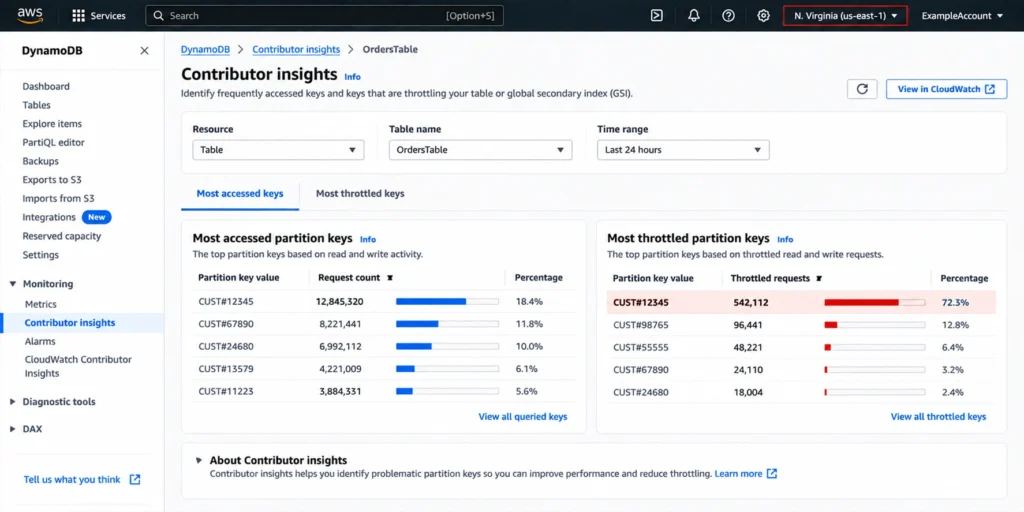
The problem is a hot key. Raising table-level throughput does not necessarily fix concentrated traffic against one partition key or key range.
Inspect ThrottlingReasons to identify the affected table or index, the read or write operation, and the exceeded limit.
Review the matching CloudWatch metric on that resource to distinguish capacity, quota, maximum-throughput, and partition-level causes.
For key-range throttling, use Contributor Insights to identify hot keys, then fix key distribution rather than simply adding table capacity.
On-demand vs provisioned auto scaling
The right throughput mode depends on traffic shape, operational tolerance, and unit economics.| Dimension | On-demand | Provisioned with auto scaling |
|---|---|---|
| Billing | Per request unit | Per provisioned capacity-unit hour |
| Capacity planning | Minimal | Minimum, maximum, and target required |
| Sudden growth | Adapts automatically, but can throttle if traffic exceeds 2x the previous peak within 30 minutes or a configured maximum | Can throttle while scale-out catches up |
| Idle traffic | No throughput charge when no requests occur | Minimum provisioned capacity still bills |
| Reserved Capacity | Not eligible | Eligible for Standard table class |
| Database Savings Plans | Eligible | Eligible; Reserved Capacity applies first when both exist |
On-demand also has a growth rule worth planning around. A new on-demand table can sustain up to 4,000 writes per second and 12,000 reads per second, and AWS says on-demand instantly accommodates up to twice the previous peak. Throttling can occur when traffic exceeds twice the previous peak within 30 minutes. See AWS’s on-demand scaling properties.
For a known high-growth event, pre-warm the table or space traffic growth over at least 30 minutes. Increasing warm throughput can prepare for launches or migrations, but proactive increases are charged.
Configure provisioned auto scaling
Baseline reads and writes separately. Review consumed and provisioned RCU/WCU metrics, throttling, and representative business cycles.
Set the minimum around durable demand. The floor should cover normal low-period traffic without forcing frequent scale-out.
Set the maximum from demand and risk. Include expected peaks, account and table quotas, and the cost boundary your team can tolerate.
Choose target utilization deliberately. Seventy percent is a useful starting point because AWS uses it as a default in DynamoDB examples. Lower targets create more headroom but raise average provisioned capacity.
Review every GSI. Apply auto scaling where required and choose shared or index-specific values based on each index's traffic pattern.
Schedule predictable changes. Application Auto Scaling supports scheduled actions. For launches, campaigns, and batch jobs, raise capacity early enough for the update to finish before traffic arrives.
Reserved Capacity and auto scaling
Auto scaling controls how much provisioned throughput exists. Reserved Capacity changes the price of eligible provisioned throughput. Keep those decisions separate.DynamoDB Reserved Capacity applies to provisioned Standard tables. It is Region-specific, purchased in blocks of 100 RCUs or 100 WCUs, and unavailable for replicated WCUs, Standard-IA tables, and on-demand mode. AWS currently advertises savings of up to 54% for one year and up to 77% for three years, with three-year availability limited to select Regions.
Evaluate Reserved Capacity against the stable floor, not the peak. If a workload rarely drops below 500 WCU, ask how much is durable enough to commit to. Capacity above the reserved amount is billed at standard provisioned rates.
Our DynamoDB Reserved Capacity guide covers eligibility, pricing, sizing, and the relationship between reservations and Database Savings Plans.
Database Savings Plans use a one-year hourly spend commitment that can apply across eligible AWS database services and Regions. For DynamoDB, AWS currently advertises up to 18% savings on on-demand throughput and up to 12% on provisioned throughput on the DynamoDB pricing page.
The discounts do not stack on the same usage. If an account has both DynamoDB Reserved Capacity and a Database Savings Plan, AWS applies Reserved Capacity first. Remaining eligible provisioned usage can then receive Database Savings Plans coverage.
Our AWS Database Savings Plans guide explains the broader cross-service commitment model.
Which commitment option fits?
Choose Reserved Capacity when you have a durable, eligible provisioned Standard-table floor in a specific Region and are comfortable committing capacity units for the term.
Choose Database Savings Plans when you value a one-year spend commitment that can move across eligible database services and Regions.
Use both carefully when separate eligible usage justifies both commitment types. Do not model them as stacking on the same usage.
Choose neither yet when the baseline is uncertain, rapidly changing, or likely to move outside the relevant eligibility rules.
The right DynamoDB cost framework
Treat DynamoDB optimization as three layers:Capacity mode: choose on-demand or provisioned from traffic shape and measured economics.
Auto scaling: tune provisioned capacity so sustained demand is covered without turning the maximum into a reliability trap.
Commitment discount: apply Reserved Capacity or Database Savings Plans only to usage you can defend as durable.
How Usage.ai helps manage commitment risk
Once you have separated stable DynamoDB demand from variable traffic, the next challenge is deciding how much AWS usage is safe to commit.We analyze your usage data and recommend qualifying commitments sized to stable eligible throughput.
With Flex Insured Commitments, teams can get the 30–40% savings of a 1-year commitment with none of the commitment risk.
If eligible usage drops and a qualifying DynamoDB Flex Commitment ends up costing more than the on-demand rate for that usage, we provide cashback protection on that difference, subject to program terms.
Our fee is a percentage of realized savings only. If we don’t save you money, you don’t pay anything.
This operates at the pricing and commitment layer. It does not change DynamoDB auto scaling, partition-key design, throughput limits, or application performance. Those operational controls should still be configured and monitored independently.
Get up to 57% AWS savings with less long-term commitment exposure.
Frequently asked questions
What triggers DynamoDB auto scaling?
For provisioned throughput, scale-out can trigger after consumed capacity stays above target for two consecutive one-minute periods. CloudWatch evaluation and the subsequent capacity update add further delay.
Does auto scaling prevent DynamoDB throttling?
No. Throttling can still result from scale-out delay, a configured maximum, a GSI bottleneck, partition-level hot keys, or service and account limits. Start with ThrottlingReasons to identify the exact cause.
Should I use 70% target utilization?
Seventy percent is a reasonable starting point because AWS uses it as the default in DynamoDB examples, but targets from 20% to 90% are supported. Lower targets create more headroom at a higher provisioned cost.
Do GSIs need auto scaling too?
GSIs have separate provisioned throughput and can throttle independently of the base table. Apply auto scaling to relevant indexes and set values according to their traffic patterns.
Can Reserved Capacity and Database Savings Plans stack?
Not on the same usage. AWS applies eligible DynamoDB Reserved Capacity first. Remaining eligible provisioned usage can then receive Database Savings Plans coverage if a plan is available.




