
 AWS
AWS Microsoft Azure
 Google Cloud

The Short Answer
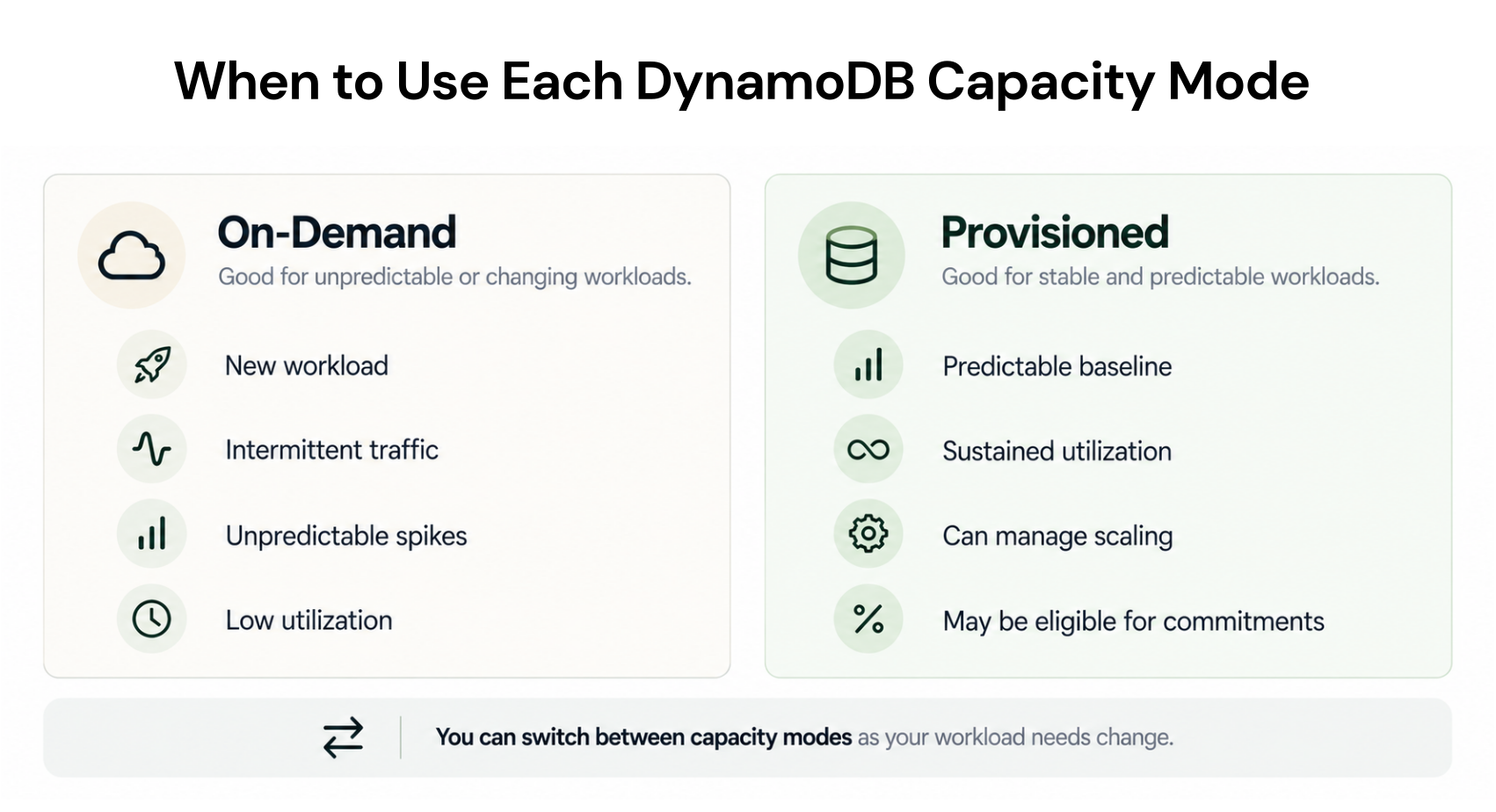
DynamoDB On-Demand is generally better for new, unpredictable, spiky, or intermittently idle workloads because it charges for requests instead of provisioned throughput. It also removes most capacity planning, although rapid growth beyond its documented scaling envelope can still cause throttling.Provisioned capacity is generally better for steady, predictable traffic when you can keep allocated capacity well utilized. Auto scaling reduces manual work, while reserved capacity or Database Savings Plans may lower eligible costs further without changing the table’s underlying capacity mode.
DynamoDB On-Demand vs Provisioned: Quick Comparison
Both modes provide the same DynamoDB latency, SLA, security, and most table features. However, some capabilities differ; for example, DynamoDB vector search is available only in On-Demand capacity mode.| Dimension | On-Demand | Provisioned |
|---|---|---|
| Billing basis | Read and write request units consumed | Read and write capacity provisioned per hour |
| Capacity planning | No manual throughput provisioning | Set capacity manually or use auto scaling |
| Best fit | New, variable, spiky, or idle workloads | Steady, predictable, well-utilized workloads |
| Scaling | Automatically adapts within documented limits | Adjusts through manual changes or auto scaling |
| Idle throughput | No throughput charge at zero traffic | Provisioned capacity continues billing |
| Commitment options | Database Savings Plans | Database Savings Plans or reserved capacity |
| Primary risk | Higher cost at sustained volume; throttling beyond limits | Paying for unused capacity or throttling when underprovisioned |
How Each Capacity Mode Is Billed
With On-Demand, AWS charges for read request units (RRUs) and write request units (WRUs). In US East (N. Virginia), the Standard-table rates are $0.125 per million RRUs and $0.625 per million WRUs. These are the rates after AWS’s November 2024 price reduction; the earlier $0.25 and $1.25 rates are outdated.With provisioned mode, you specify read capacity units (RCUs) and write capacity units (WCUs). The same Region’s Standard-table rates are $0.00013 per RCU-hour and $0.00065 per WCU-hour.
At full utilization over a 730-hour month, that is approximately $0.0361 per million strongly consistent reads, $0.0181 per million eventually consistent reads, and $0.1806 per million writes.
These units are not interchangeable. In On-Demand mode, one strongly consistent read of an item up to 4 KB consumes one RRU, while an eventually consistent read consumes half an RRU. A standard write up to 1 KB consumes one WRU.
In provisioned mode, one RCU supports one strongly consistent read per second or two eventually consistent reads per second for items up to 4 KB, while one WCU supports one standard write per second for an item up to 1 KB. Larger items, transactions, and indexes can consume more.
Normalize item size, consistency, transactions, index traffic, and traffic distribution before comparing rates. The examples exclude storage, backups, streams, transfer, free-tier allowances, taxes, commitments, and table-class differences; check current DynamoDB pricing for your Region.
Zero traffic removes On-Demand throughput charges, but it does not make the table entirely free. Storage and any separately billed features continue to incur their applicable charges.
What Is the Break-Even Point?
One WCU running for 730 hours costs: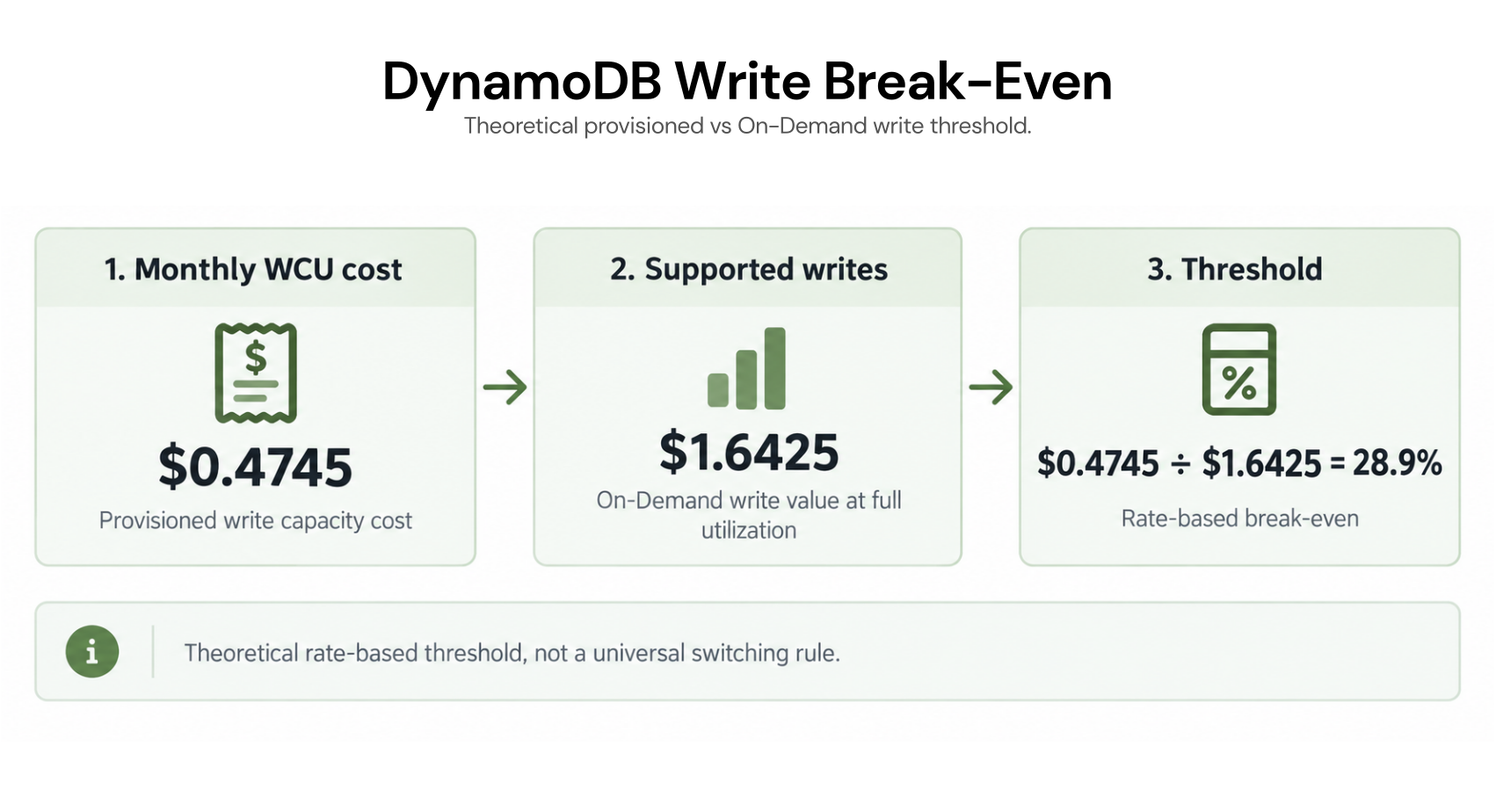
That mathematical boundary is not a universal switching rule. Provisioned capacity must serve requests when they arrive, so headroom, minimums, uneven traffic, hot partitions, and scaling delays can favor On-Demand even above 28.9% average utilization.
AWS’s capacity-mode guidance says On-Demand costs less when average provisioned utilization is below 35% and can remain preferable above that level when low-activity periods mix with peaks. Treat 28.9% as the rate-based starting point and validate the result against observed traffic.
Costs at Different Workload Scales
The following simplified examples assume a 50/50 split between one-KB writes and eventually consistent reads of items up to 4 KB. Provisioned capacity targets 70% utilization, traffic is uniform, capacity units are rounded up to whole units, and the exclusions listed above still apply.| Monthly requests | On-Demand | Provisioned at 70% | Lower-cost mode |
|---|---|---|---|
| 1 million | $0.3438 | $0.5694 | On-Demand |
| 100 million | $34.3750 | $14.6146 | Provisioned |
| 1 billion | $343.7500 | $141.9704 | Provisioned |
This is not a universal volume threshold. Bursts, larger items, strong consistency, or index writes can change the result at the same monthly volume.
Scaling, Throttling, and Operational Tradeoffs
DynamoDB On-Demand automatically accommodates traffic up to twice a table’s previous peak.If traffic exceeds twice that peak within 30 minutes, throttling can occur; AWS recommends pre-warming the table or spreading growth over at least 30 minutes. Default table-level throughput quotas, configured maximum throughput, and partition-level limits caused by uneven access patterns can also throttle requests.
Provisioned mode can throttle requests beyond the capacity available to the table or its indexes. Teams must set suitable limits and utilization targets or adjust capacity manually.
DynamoDB auto scaling uses target tracking for provisioned capacity. Scale-out begins only after the target is exceeded for two consecutive minutes, CloudWatch alarms may add a short delay, and applying the capacity update can take several more minutes.
Scale-in is intentionally slower, which can leave paid capacity elevated after demand falls.
Auto scaling does not make provisioned mode behave like On-Demand. Scheduled changes or a higher minimum can protect known spikes; On-Demand is easier when peaks are irregular. See our guide to DynamoDB auto scaling with provisioned capacity.
How Commitments Change the Comparison
Commitments reduce eligible rates without changing how a table scales. Choose the capacity mode for workload behavior first, then decide whether a stable spend or capacity baseline supports a commitment.Database Savings Plans use a one-year hourly spend commitment with no upfront payment. Eligible DynamoDB Standard throughput receives up to 18% off On-Demand or 12% off provisioned usage, depending on usage type and Region. Coverage can follow eligible database usage across supported services and Regions.
DynamoDB reserved capacity applies to eligible provisioned RCUs and WCUs in blocks of 100 units. AWS advertises savings up to 54% for one year and 77% for three years, with a partial upfront fee and discounted hourly charges during the term. Three-year terms are limited to certain Regions; Standard-IA tables and replicated writes are ineligible.
Database Savings Plans and reserved capacity cannot discount the same usage. You can use them for separate workloads, but describing them as stacked discounts would overstate the savings. See the AWS Database Savings Plans pricing and DynamoDB pricing pages before purchasing.
For deeper treatment, compare DynamoDB Database Savings Plans with our guides to DynamoDB reserved capacity and one-year versus three-year terms.
How to Measure and Choose
Use at least two weeks of fine-grained data covering normal cycles, planned events, and quiet periods. Seasonal businesses may need longer.Normalize demand. Separate reads from writes and account for item size, consistency, transactions, table and GSI consumption, and known growth.
Measure provisioned utilization correctly. For each CloudWatch metrics period, divide the Sum of consumed capacity units by the period’s seconds, then divide that rate by the Average provisioned capacity. Perform this calculation separately for the base table and each GSI because metrics returned with only the TableName dimension exclude global secondary indexes. Evaluate reads and writes separately rather than combining their percentages.
Model cost and risk. Compare On-Demand charges with the provisioned capacity required to serve each interval, including minimums and scaling headroom. Review throttled requests and test whether scheduled scaling or pre-warming changes the result.
The decision is reversible. AWS permits capacity-mode switching from provisioned to On-Demand up to four times in a rolling 24-hour window and from On-Demand to provisioned at any time, although you should model the new settings and commitment coverage before switching.
How Usage.ai Supports DynamoDB Savings
We analyze eligible DynamoDB usage at the billing layer and recommend qualifying commitments against a stable provisioned baseline. After approval, we call the provider API to purchase and manage the commitment under our Flex Insured Commitment Program.With Flex Insured Commitments, teams can get the 30–40% savings of a one-year commitment with none of the commitment risk.
If eligible usage drops and a qualifying DynamoDB Flex Commitment costs more than equivalent On-Demand usage, we provide cashback protection for the covered difference, subject to current eligibility and program terms.
Our fee is an agreed percentage of realized savings, billed monthly in arrears after the provider finalizes its billing data. If we do not generate savings, there is no savings-based fee.
Review your throughput baseline, capacity-mode fit, and eligible commitment savings with a FinOps expert.
Frequently asked questions
Is provisioned DynamoDB cheaper than On-Demand?
Provisioned capacity can be cheaper when the capacity allocated is consistently used. Under the current US East rates, the theoretical break-even for equivalent throughput is about 28.9%, but traffic variability and scaling headroom can move the practical decision.
Can DynamoDB On-Demand still throttle requests?
Yes. Throttling can occur when traffic exceeds twice the previous peak too quickly, when a hot partition exceeds its key-range throughput limit, when an account-level quota is reached, or when a table- or index-specific maximum throughput setting is exceeded.
Does DynamoDB On-Demand have idle charges?
It has no throughput charge when a table receives no traffic. Storage and separately billed features can still generate charges.
Can commitments cover both capacity modes?
Database Savings Plans can cover eligible On-Demand or provisioned DynamoDB usage. DynamoDB reserved capacity applies only to eligible provisioned capacity, and the two discounts cannot apply to the same usage.
Can I switch DynamoDB capacity modes?
Yes. You can switch from provisioned to On-Demand up to four times in a rolling 24-hour window and return from On-Demand to provisioned at any time.




