.png)



Most AWS teams either over-commit (locking in spend that later sits unused) or under-commit (paying on-demand rates for baseline workloads that will never go away). Both failures trace back to the same root cause and it is treating a Savings Plan purchase as a one-time event rather than a structured, ongoing portfolio decision.
Compute Savings Plans deliver discounts of up to 66% on EC2, Fargate, and Lambda. EC2 Instance Savings Plans go up to 72% on specific instance families in specific regions. Database Savings Plans cover RDS, ElastiCache, and DocumentDB at 20–35% off on-demand rates. The gap between a well-layered portfolio and a poorly timed single purchase is routinely 10–20 percentage points of realized savings.
This blog covers the mechanics of building that portfolio correctly. It explains how to layer plan types, how to sequence purchases over time, and how to size commitments without locking in waste.
What is an AWS Savings Plan Buying Strategy and Why Does It Matter?
An AWS Savings Plan buying strategy is the deliberate approach to deciding which plan types to buy, how much hourly commitment to enter for each, when to purchase, and how to sequence renewals to maintain coverage without overexposure.
The stakes are concrete. A $2M/month AWS bill with 60% eligible workloads carries $1.2M/month in commitment-eligible spend. Getting the commitment level wrong by 15% in either direction means either $180K/month in wasted commitments or $180K/month in foregone savings. Over a 1-year term, that’s a $2.16M swing.
Three variables control outcomes:
- Plan type selection (which SP covers which workloads)
- Commitment sizing (hourly $ amount; too low leaves savings on the table, too high creates waste)
- Purchase timing (when you buy relative to your usage cycle, expiration staggering)
Each is covered below.
Also Read: AWS Savings Plans Explained: Types, Pricing & How They Work
How Do the Three AWS Savings Plan Types Differ and Which Goes First?
(All figures: verify at aws.amazon.com/savingsplans/pricing as rates change)
Here’s a buying order for most organizations:
- Compute Savings Plan first: It offers the highest flexibility, broadest coverage, absorbs workload shifts between instance families and services. This is your baseline layer.
- EC2 Instance SP second: Only after you have ≥90 days of stable, proven usage on a specific instance family (e.g., m6i in us-east-1). The higher discount justifies the tighter constraint.
- Database SP third: if you have meaningful, stable RDS, ElastiCache, or DocumentDB spend. These plans do not overlap with Compute SPs.
A common mistake is reversing this order by committing to an EC2 Instance SP on a specific family before validating that the usage pattern is genuinely stable.
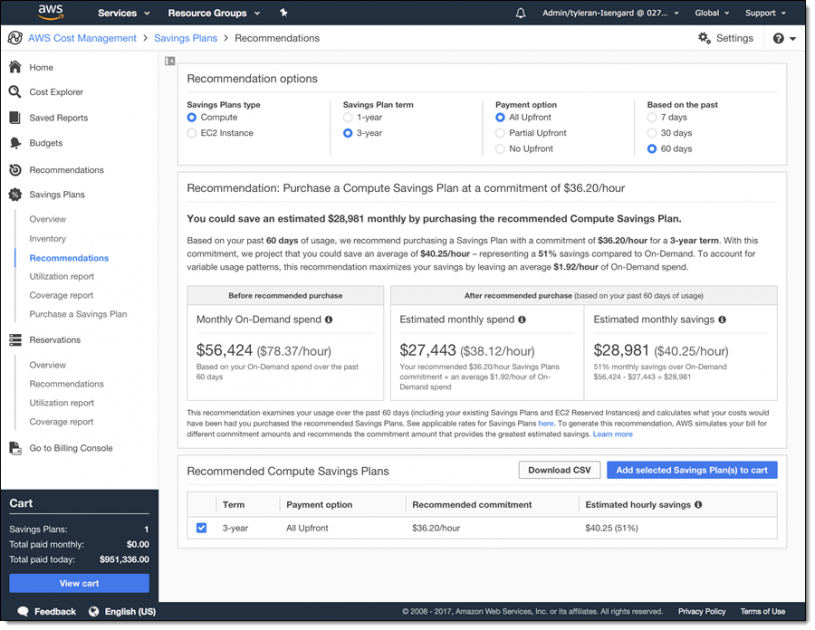
How Much Should You Commit? The Right-Sizing Framework
1. Never commit to average usage, but to minimum baseline
Average hourly spend includes spikes. If your EC2 usage averages $8/hour but drops to $4/hour on weekend nights, a commitment based on the average produces waste 30%+ of the time.
The correct approach:
- Pull 90 days of hourly EC2 usage data from Cost Explorer (adjust the view to hourly granularity)
- Sort by hour. Identify the true floor, not the average
- Commit to 70–80% of that floor
- Leave the remaining 20–30% as buffer for measurement error and seasonal variation
Example:
- 90-day minimum hourly EC2 spend: $12.50/hour
- 75% of minimum = $9.38/hour commitment
- At a 40% Compute SP discount, this produces ~$3.75/hour in savings, or ~$32,850/year
The 75% rule exists because AWS Cost Explorer recommendations are calculated on historical data refreshed every 72+ hours. Any spend pattern change that occurred in the last three days is invisible to those recommendations. Committing to 100% of the recommendation means you are betting on 72-hour-old data.
2. Rightsizing before committing is non-negotiable
An AWS Savings Plan on an overprovisioned instance locks in the waste at a discount. An m5.4xlarge running at 12% CPU utilization, discounted 40% via a Compute SP, still costs 88% of what the right-sized instance at full utilization would cost without any commitment.
Pre-commitment rightsizing checklist:
- Pull Compute Optimizer recommendations for all instances covered by the planned commitment
- Resize or accept recommendations for any instance with <30% average CPU utilization
- Wait 14 days post-resize before purchasing the AWS Savings Plan (allow new baseline to stabilize)
- Re-pull the minimum-baseline calculation on the post-resize usage data
Skipping this step is the single largest source of over-commitment waste we see in FinOps audits.
Also read: Why Cloud Resource Optimization Alone Doesn’t Fix Cloud Costs
What Is Layering and How Do You Build an AWS Savings Plan Portfolio?
Layering is the practice of holding multiple AWS Savings Plans simultaneously, each covering a different segment of your workload, with purchase dates and expiration dates deliberately offset from each other.
A layered portfolio looks like this:
Why this structure outperforms a single large plan:
- Expiration staggering: If all plans expire on the same day, you face a cliff. Full on-demand rates for however long it takes to analyze and repurchase. Offset expirations mean you’re always partially covered.
- Risk isolation: If a workload shrinks, only one tranche of commitment is at risk, not the entire portfolio.
- Rolling optimization: Each renewal cycle is an independent decision point. Usage patterns from 12 months ago are incorporated into a fresh sizing exercise for that specific tranche.
The staggering rule of thumb: No two plan expirations should fall within 60 days of each other, and no single plan should represent more than 40% of total committed spend.
When Is the Right Time to Buy an AWS Savings Plan?
Timing matters in three ways: day of the month, quarter of the year, and relative to workload changes.
Avoid purchasing at the end of the month
AWS bills in calendar months. A plan purchased on the 29th of the month gives you 2–3 days of savings before the bill closes, but the commitment clock starts ticking immediately. For a 1-year plan, you lose 2–3 days of the discount period. Buy on or before the 5th of the month.
Post-change waiting periods
If your team has recently:
- Migrated workloads to new instance families
- Deployed significant new capacity
- Completed a rightsizing exercise
- Moved from EC2 to Fargate or Lambda
Then, wait at least 45 days before purchasing Savings Plans. Your Cost Explorer data will reflect the old workload mix for 30–45 days after the change, and recommendations calculated on that data will oversize (or undersize) the commitment.
Seasonality awareness
If your workload is seasonal (e-commerce traffic spikes in Q4, for example), your minimum baseline will be skewed if calculated during a peak period. Pull the usage floor from your lowest historical quarter, not the most recent 90 days.
Q1 purchasing: timing the re:Invent pricing window
AWS typically announces pricing changes at re:Invent (late November/early December). Plans purchased before a pricing change lock in old rates. New plans purchased after take advantage of any favorable changes. If you have plans expiring in Q1, check whether any re:Invent pricing announcements affect your instance families before renewing at the old commitment level.
The practical rule: Never buy a 3-year plan for a workload you have not observed for at least 12 months. The 20-point discount improvement from 1-year to 3-year does not offset a usage drop of more than 15% if you’re committed for 36 months.
If you want the 3-year discount without 3-year lock-in risk, that’s the structural problem that alternative commitment models (covered below) are designed to solve.
Also read: How to Choose Between 1-Year and 3-Year AWS Commitments
What Is the Payment Option Strategy?
AWS offers three payment options for all AWS Savings Plans:
- All Upfront: Largest upfront cash outlay, lowest effective hourly rate, highest total discount
- Partial Upfront: Split 50% upfront and 50% monthly, moderate discount improvement over No Upfront
- No Upfront: Highest flexibility, lowest discount, effectively a monthly expense
When to choose All Upfront: Your finance team can absorb the cash outlay, you are highly confident in the commitment level (validated minimum baseline, not average), and the workload has 12+ months of stable history. The NPV advantage of All Upfront vs No Upfront on a $100K/year commitment can exceed $8,000 over the plan term.
When to choose No Upfront: You are in a high-growth environment, the infrastructure is changing, or you are buying your first AWS Savings Plan and want to limit downside. The lower discount is the price of optionality.
The partial upfront case: Useful when you want meaningful savings but finance limits the capital available for upfront cloud commitments. Run the break-even math for your specific commitment size before selecting. The improvement over No Upfront varies by plan type and term.
How Do AWS Savings Plans Apply Across AWS Organizations?
AWS Savings Plans purchased in the payer (management) account apply automatically across all linked member accounts in the Organization. Plans purchased in a member account apply only to that account unless the payer account enables Savings Plans sharing.
Some key mechanics include:
- The payer account’s billing consolidation applies Savings Plan discounts to the member account usage that best maximizes utilization.
- If a member account’s workload shrinks, the payer account’s other member accounts absorb the excess commitment, reducing (not eliminating) waste.
- Member accounts cannot see or control which payer-purchased Savings Plans are covering their usage unless the payer enables visibility in Cost Explorer.
Here’s a FinOps implication. If you manage a multi-account Organization, purchase Savings Plans from the payer account. Purchasing from member accounts creates fragmented coverage and prevents portfolio-level optimization.

What Happens If You Over-Commit?
Over-commitment is an operational reality. Infrastructure gets decommissioned, products get sunset, workloads migrate to different services. When it happens, these are the levers available to you:
1. AWS Marketplace (EC2 Reserved Instances only, not Savings Plans): Standard RIs can be listed on the AWS Marketplace. Savings Plans cannot. This is a structural limitation.
2. Convertible RI exchange: Convertible RIs can be exchanged for different instance families, regions, or tenancy at any time. Savings Plans are not exchangeable.
3. Wait for natural expiration: For Savings Plans specifically, the recovery path is to let the plan expire without renewal, or to reduce the renewal commitment. The plan continues to apply to any eligible usage you do have. It only produces waste when usage falls below the commitment level.
4. Platform-level buyback (Usage.ai Flex Commitments): The structural problem with standard AWS Savings Plans is that over-commitment waste has no recovery mechanism. This is the gap that Flex Commitment models are built to address: the platform holds the commitment on your behalf and provides cashback on underutilization, so the financial risk of a usage drop does not transfer to your AWS bill.
For teams managing $1M+/month in commitment-eligible spend, the cost of a single over-commitment event can exceed the platform fee many times over.
Also read: AWS Reserved Instances: Complete Guide to Pricing, Types & Savings
The Recommendation Data Problem: Why 72-Hour Lag Matters at Scale
AWS Cost Explorer’s Savings Plan recommendations are based on your historical usage with a 72+ hour data refresh cycle. That means the recommendation you see today reflects usage from at least three days ago.
The compounding math:
- At $6,000–$12,000/day in uncovered on-demand spend, a 3-day lag in recommendation data means your commitment sizing is based on a usage picture that may already be $18,000–$36,000 out of date.
- If you size a commitment to 90% of recommended coverage based on that stale data, and actual usage has already shifted, you are either over- or under-committed from day one.
Here’s what the precision gap looks like in practice:
24-hour refresh cycle catches the same waste problem 3 days earlier. For an organization running $500K+/month in commitment-eligible spend, the precision improvement pays for itself repeatedly.
Usage.ai’s automated commitment platform refreshes recommendations daily, purchases commitments on your behalf, and provides cashback on any underutilization, so the financial exposure of the recommendation lag doesn’t transfer to your AWS bill. The fee model is a percentage of realized savings only; if no savings are generated, no fee applies.

How to Monitor AWS Savings Plan Utilization and Coverage After Purchase
Purchasing an AWS Savings Plan is not the end of the workflow. Two metrics matter post-purchase:
- Utilization rate: The percentage of your hourly commitment that is actually being consumed by eligible usage. A Savings Plan with 100% utilization means you committed exactly right (or slightly under). Below 80% utilization means you over-committed for that period.
- Coverage rate: The percentage of your eligible on-demand spend that is being covered by Savings Plans. Below 80% coverage means you have significant on-demand spend that could be covered by additional commitments.
- The relationship between them: High utilization + low coverage = under-committed (left savings on the table) Low utilization + high coverage = over-committed (paying for unused commitment) High utilization + high coverage = optimal
Pull both reports from Cost Explorer > Savings Plans > Utilization Report and Coverage Report weekly during the first 90 days after a new purchase. After 90 days, monthly monitoring is sufficient for stable workloads.
Also read: AWS Budgets vs Cost Explorer: Key Differences Explained
AWS Savings Plan Buying Strategy for Specific Workload Types
EC2 heavy workloads (>70% of bill)
Lead with a Compute SP covering 70% of minimum EC2 baseline. After 90 days of stable data, layer an EC2 Instance SP for the single highest-spend instance family. Do not purchase EC2 Instance SPs across more than 2 instance families simultaneously. The monitoring overhead and fragmentation risk outweigh the incremental discount improvement.
Container workloads (ECS/Fargate)
Compute Savings Plans are the only SP type that covers Fargate. If Fargate is a significant portion of your bill, your Compute SP sizing should incorporate Fargate hourly spend into the baseline calculation, not just EC2. Many teams miss this and under-commit their Compute SP because they calculated the floor using EC2 data only.
Serverless / Lambda
Lambda is also covered by Compute SPs. The discount is modest (~17% on Compute Savings Plans), but for high-invocation-volume Lambda workloads the absolute dollar impact is material. Include Lambda spend in your Compute SP commitment baseline.
Database-heavy workloads (RDS, ElastiCache, DocumentDB)
Database SPs are entirely separate from Compute SPs. They do not compete for the same commitment budget. If you spend $50K/month on RDS and $200K/month on EC2, you need a $200K-scale Compute SP and a $50K-scale Database SP. Many teams mistakenly assume one type of SP covers everything.
Also read:AWS Database Savings Plans: Save Across Aurora, RDS, DynamoDB & 7 More
Multi-account Organizations
Purchase all Savings Plans from the payer account. Coordinate purchase timing to avoid staggering collisions (two plans expiring in the same month). Enable Savings Plans sharing for all member accounts in the Organization settings.
Also read: An Introduction to Cloud Unit Economics
A Practical Example: Building a Layered Portfolio from Scratch
Here’s a scenario: A FinOps team at a mid-size SaaS company.
- AWS bill: $350K/month
- Breakdown: $220K EC2 (70% eligible for SPs), $60K RDS, $40K Fargate, $30K Lambda + other.
Step 1: Pull 90-day minimum baseline
- EC2 minimum floor: $14.00/hour
- Fargate minimum: $3.50/hour
- Lambda (consistent): $1.20/hour
- Total Compute-eligible floor: $18.70/hour
Step 2: First purchase (Compute SP)
- Commit to 75% of Compute floor = $14.03/hour
- Payment: No Upfront (first purchase, validating the model)
- At ~34% Compute SP discount: saves approximately $5.33/hour → ~$46,700/year
Step 3: Database SP
- RDS minimum floor: $7.50/hour (from Cost Explorer hourly data)
- Commit to 75% = $5.63/hour
- At ~30% Database SP discount: saves approximately $1.69/hour → ~$14,800/year
Step 4: 90-day review
- Utilization on Compute SP: 94%
- Coverage: 68%
- Coverage gap indicates room to increase commitment
- Pull new 90-day minimum, calculate incremental tranche: $3.00/hour additional Compute SP
Step 5: Layer 2 purchase (staggered by 90 days)
- $3.00/hour Compute SP, purchased 90 days after Layer 1
- Expiration date is now 90 days offset from Layer 1
Total annual savings from this portfolio: approximately $61,500/year, with no single expiration date representing more than 55% of committed spend.
(All pricing estimates require verification at amazon-pricing. This example is illustrative.)
Frequently Asked Questions
1. What is the safest commitment level to start with for a first AWS Savings Plan?
Start at 70% of your minimum 90-day baseline hourly spend. The minimum floor accounts for the lowest points in your usage curve, including nights and weekends. A 70% commitment against that floor gives you meaningful savings while preserving a buffer for usage pattern shifts. Increase the commitment level after 90 days of monitoring utilization data, adding tranches incrementally rather than trying to reach optimal coverage in a single purchase.
2. How many Savings Plans should you hold at the same time?
Most organizations with $500K–$2M/month in AWS spend benefit from 3–5 simultaneous Savings Plans with 1–2 Compute SPs (staggered expirations), 1 Database SP, and optionally 1 EC2 Instance SP for a high-volume, proven instance family. More than 5–7 simultaneous plans creates monitoring overhead without proportional savings improvement. Fewer than 3 typically means you are either relying on a single plan expiration date or missing database workload coverage.
3. Can you buy a Savings Plan mid-year and have it still make sense financially?
Yes. Savings Plans are priced as hourly commitments, not as calendar-year products. A plan purchased on June 15 runs for exactly 1 year (or 3 years) from the purchase date. The savings begin immediately on eligible usage. There is no penalty for buying outside of a calendar year, though you should avoid purchasing at the end of a billing month (lose 2–3 days of coverage before the first bill cycle closes).
4. What is the difference between Savings Plan utilization rate and coverage rate?
Utilization rate measures how much of your purchased commitment is being used by eligible workloads. 100% means zero waste. Coverage rate measures how much of your eligible on-demand spend is protected by Savings Plans. Here 100% means nothing is paying on-demand rates unnecessarily. You want both high. If utilization is high but coverage is low, you are under-committed. If coverage is high but utilization is low, you are over-committed. Monitor both in AWS Cost Explorer > Savings Plans > Utilization and Coverage reports.
5. Should you buy All Upfront, Partial Upfront, or No Upfront?
All Upfront maximizes the total discount and is the right choice when the commitment size is validated against a stable minimum baseline, finance can absorb the upfront cash, and the workload has 12+ months of history. No Upfront is appropriate for first purchases, high-growth environments, or workloads where patterns are still stabilizing. Partial Upfront sits between both on discount and flexibility.
6. How do Savings Plans work in AWS Organizations with multiple accounts?
Savings Plans purchased in the payer (management) account automatically share across all linked member accounts. AWS applies the discount to whichever member account’s usage produces the highest utilization of the commitment, maximizing effective coverage. Member accounts purchasing their own Savings Plans only cover their own usage. For most multi-account organizations, centralized purchasing from the payer account is the correct approach. It prevents fragmentation and allows the commitment to float across accounts as workload patterns shift.
7. What happens to unused Savings Plan commitment?
Unused hourly commitment expires at the end of each billing hour. If you committed $10/hour and only consumed $7/hour of eligible usage, $3 of that commitment produced no discount and is effectively wasted spend. There is no carry-forward, no exchange mechanism (unlike Convertible RIs), and no partial refund. This is why commitment sizing against the minimum baseline rather than average usage is critical. The downside is permanent, not recoverable.
8. How does Usage.ai handle Savings Plan purchasing differently than buying directly on AWS?
Usage.ai purchases Savings Plan-equivalent commitments on your behalf through its Flex Commitment model, delivering 40–60% discounts on EC2, Fargate, and Lambda without requiring the customer to own the multi-year commitment. Recommendations refresh every 24 hours (vs 72+ hours on AWS native tools), catching usage pattern changes 3 days earlier. If commitments go underutilized, Usage.ai provides cashback, which is real money, not credits. The fee is a percentage of realized savings; if nothing is saved, nothing is charged.