A reserved instance discount reduces what you pay per hour on a given database instance. Right-sizing reduces the hourly cost of the instance itself. The order of operations matters: right-size first, then reserve. If you reserve before right-sizing, you lock your savings into the wrong baseline. A 33% discount on an instance you only need half of is worse than the same 33% discount on the correctly-sized instance.
This guide covers the four CloudWatch metrics that determine the correct MySQL instance size, the MySQL-specific sizing formulas that most guides omit, the instance family selection decision, how size flexibility works after you reserve, and what to do if you realize you over-provisioned after buying an RI.
Why Right-Sizing Before Reserving Matters More Than the RI Discount Itself
Consider two teams both running a production MySQL database on a db.r8g.xlarge ($0.478/hr on-demand, US East, May 2026, source: Vantage.sh). Team A purchases a 1-year No Upfront RI before right-sizing: $0.320/hr effective rate ($2,803/year). Team B right-sizes first, determines the db.r8g.large is sufficient, and purchases a 1-year No Upfront RI on the large: $0.160/hr effective rate ($1,401/year).
Team B pays $1,402/year less than Team A. The RI discount is identical (33%) for both. The entire difference comes from right-sizing before reserving. Team B captured both the right-sizing savings (50% cheaper base instance) and the RI discount (33% off that base). Team A captured only the RI discount. Over a 3-year term, the difference compounds to approximately $4,200 per instance.
The practical implication: every dollar of over-provisioning costs you full on-demand rate without right-sizing. With an RI, it costs you the reserved rate — still the wrong rate, now locked for 1-3 years.
What Are the Four CloudWatch Metrics That Determine the Correct MySQL Instance Size?
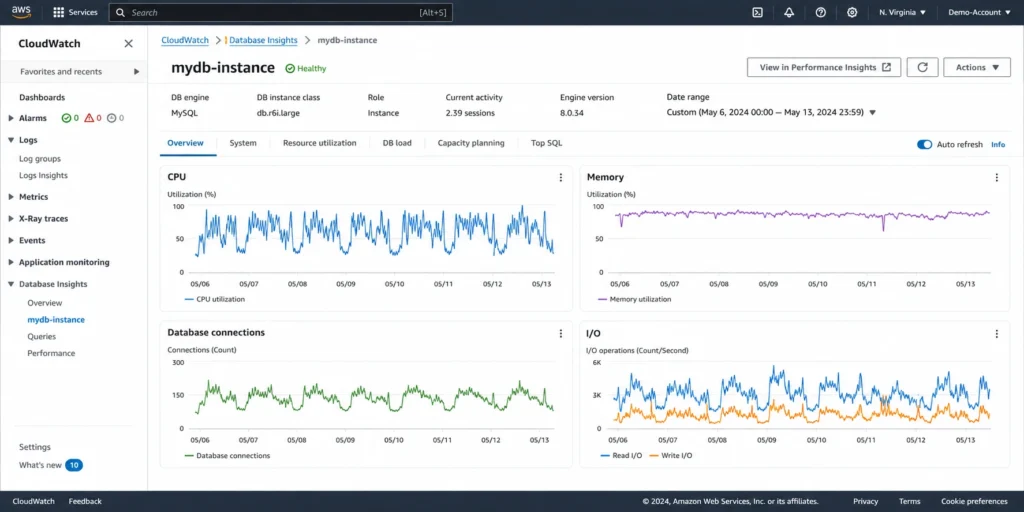
Four CloudWatch metrics in the AWS/RDS namespace provide the signals needed to determine the correct MySQL instance size. Pull 30 days of data for each metric. Evaluate at P50 (median), P90 (typical peak), and P99 (maximum) to understand both the baseline and the peak behavior.
Metric 1: CPUUtilization
CPUUtilization measures the percentage of CPU capacity consumed by the database instance. AWS CloudWatch captures this at the hypervisor level, not the MySQL process level, so it includes all CPU used by the OS and the database engine together.
Right-sizing signal: If your P90 CPUUtilization is below 20% over 30 days, the instance is almost certainly over-provisioned on compute. If P99 (the highest usage in the 30-day period) is below 40%, downsizing vCPUs is safe. The AWS right-sizing whitepaper identifies instances with maximum CPU below 40% over 4 weeks as candidates for downsizing. Sustained P50 CPU above 60% indicates the instance may need to scale up or requires query optimization before right-sizing.
MySQL-specific note: MySQL uses CPU for query execution, connection management, sorting, and InnoDB background processes. A sudden CPU spike is often a query plan change or a batch job, not a sizing signal. Do not right-size based on a single high-CPU event. Evaluate the pattern over 30 days.
Metric 2: FreeableMemory
FreeableMemory measures available RAM on the instance in bytes. MySQL uses memory primarily for the InnoDB buffer pool (caching data pages), the query cache (if enabled), connection overhead, and temporary tables for sort operations. Low FreeableMemory means either the instance is undersized for the dataset or the InnoDB buffer pool is correctly configured and working as intended.
Right-sizing signal: FreeableMemory consistently above 4 GB on a 16 GB RAM instance indicates the instance has 25% unused memory — a strong signal for potential downsizing. FreeableMemory consistently below 10% of total RAM (1.6 GB on a 16 GB instance) combined with SwapUsage above 0 indicates memory pressure and a possible under-sizing problem.
AWS re:Post guidance: It is best practice to keep memory pressure levels below 95%. If FreeableMemory is below 5% of total RAM and SwapUsage is positive, scale up the instance class. Source: AWS re:Post knowledge center, December 2025.
MySQL-specific calculation: the InnoDB buffer pool is configurable via the innodb_buffer_pool_size parameter. On RDS, it defaults to approximately 75% of instance RAM. A db.r8g.large with 16 GB RAM has approximately 12 GB allocated to the InnoDB buffer pool by default. If your active dataset is 8-10 GB, the r8g.large buffer pool is sufficient and FreeableMemory will show the remaining 4 GB as available. If FreeableMemory is consistently above 6 GB on a 16 GB instance, the buffer pool is larger than the working dataset and the instance has more RAM than necessary.
Metric 3: DatabaseConnections
DatabaseConnections measures the number of active client connections to the MySQL instance. On RDS MySQL, each connection consumes memory and a worker thread. The maximum allowed connections are calculated from instance memory using the formula: max_connections = DBInstanceClassMemory / 12582880.
This formula is confirmed by AWS re:Post and AWS documentation. DBInstanceClassMemory is the total instance RAM in bytes. For a db.r8g.large with 16 GB (16 x 1,073,741,824 = 17,179,869,184 bytes): max_connections = 17,179,869,184 / 12,582,880 = approximately 1,365 max connections.
Right-sizing signal: if your peak DatabaseConnections are below 30% of the max_connections ceiling, connection overhead is not constraining the instance and connections are not a blocker to downsizing. If peak connections exceed 70% of max_connections, downsizing RAM would reduce the max_connections ceiling and may cause connection errors. Resolve connection pooling (using RDS Proxy or ProxySQL) before downsizing if you are near the connection ceiling.

Metric 4: BufferCacheHitRatio
BufferCacheHitRatio measures the percentage of read requests served from the InnoDB buffer pool in memory versus reads that required disk access. A high BufferCacheHitRatio means your working dataset fits in memory. A low ratio means the instance is reading from disk frequently.
Right-sizing signal: BufferCacheHitRatio consistently above 99% means your working dataset fits comfortably in the current buffer pool. This indicates memory is not the constraint and downsizing RAM (to a smaller R-family instance or switching to an M-family instance with less RAM per vCPU) is safe. If BufferCacheHitRatio drops below 95% after a proposed downsize, the working set no longer fits in the buffer pool and performance will degrade significantly. A production MySQL database should maintain a buffer cache hit ratio above 95%. Below 90% typically indicates the instance needs more RAM.
How to pull this metric: BufferCacheHitRatio is in the AWS/RDS namespace in CloudWatch. In the RDS console, navigate to Monitoring for the instance. Select BufferCacheHitRatio from the metric list. Pull a 30-day period with 1-day granularity to see the trend.
Also read: RDS Encryption: Does Encrypting Your Database Add Cost?
What Is the MySQL-Specific Max Connections Ceiling and Why It Gates Downsizing?
The max_connections parameter is automatically set by RDS MySQL based on the instance’s available memory. The formula confirmed by AWS re:Post: max_connections = DBInstanceClassMemory / 12582880 (where 12582880 bytes = 12 MB per connection allocation).
This formula is the single most important MySQL-specific check before any instance downsize. Many teams discover only after downsizing that their connection count now regularly exceeds the new ceiling, causing ‘Too many connections’ errors in production.
Max Connections by Instance Size
The following max_connections values are calculated from the formula above using instance RAM from Vantage.sh (May 2026). Verify current instance RAM at aws.amazon.com/rds/instance-types — instance specs change.
| Instance | RAM (GB) | RAM (bytes) | max_connections (formula) | Notes |
| db.t4g.micro | 1 GB | 1,073,741,824 | ~85 | Very limited; dev/test only |
| db.t4g.large | 8 GB | 8,589,934,592 | ~683 | Adequate for low-concurrency apps |
| db.m7g.large | 8 GB | 8,589,934,592 | ~683 | Same ceiling as t4g.large |
| db.r8g.large | 16 GB | 17,179,869,184 | ~1,365 | Adequate for most mid-size apps |
| db.r8g.xlarge | 32 GB | 34,359,738,368 | ~2,730 | High-concurrency production workloads |
| db.r8g.2xlarge | 64 GB | 68,719,476,736 | ~5,461 | Very high concurrency |
Formula: max_connections = DBInstanceClassMemory (bytes) / 12582880. Source: AWS re:Post knowledge center (December 2025), confirmed from AWS documentation. RAM values from Vantage.sh May 2026. Before downsizing, verify your peak DatabaseConnections stays below 70% of the new max_connections ceiling.
If your peak DatabaseConnections is 800 and you are considering downsizing from db.r8g.xlarge (max 2,730 connections) to db.r8g.large (max 1,365 connections), your peak will exceed the new ceiling. Either implement connection pooling (RDS Proxy or ProxySQL) to reduce active connections before the downsize, or choose a different target size with a sufficient connections ceiling.
How Do You Choose Between R-Family and M-Family for MySQL?
The choice between memory-optimized R-family (1:8 vCPU-to-RAM) and general-purpose M-family (1:4 vCPU-to-RAM) instances is the most consequential right-sizing decision for MySQL. Getting this wrong in either direction is expensive.
When R-Family Is Necessary
Use R-family when your InnoDB buffer pool must be large to maintain a BufferCacheHitRatio above 95%. The InnoDB buffer pool defaults to 75% of available RAM on RDS. An R-family instance provides twice the RAM per vCPU compared to M-family, allowing a larger buffer pool at the same CPU capacity.
Practical threshold: if your active dataset (the portion of your database regularly accessed by queries) exceeds 50% of the RAM available on the equivalent M-family instance, choose R-family. Example: if your active dataset is 10 GB and the equivalent M-family instance at the same vCPU count has 8 GB RAM, the M-family buffer pool would be too small. The R-family equivalent with 16 GB RAM provides adequate buffer pool at the same vCPU count.
When M-Family Is Sufficient
Use M-family when your active dataset fits comfortably within the M-family buffer pool at the target vCPU count, and your workload is more CPU-intensive than memory-intensive (analytical queries, complex joins, high-frequency write operations with small working sets). M-family instances cost approximately 30-40% less per hour than R-family at the same vCPU count because they have half the RAM.
Verify with BufferCacheHitRatio: if your current R-family instance consistently shows a buffer cache hit ratio above 99% and FreeableMemory above 30% of total RAM, your working set fits well within the current buffer pool. This means you could potentially move to the M-family equivalent at the same vCPU count with a smaller buffer pool and maintain a comparable hit ratio — provided the M-family RAM is at least 1.5x your active dataset size.
The Practical Test: Simulate a Buffer Pool Reduction
Before switching from R-family to M-family, simulate the reduced buffer pool on the current instance. In the RDS parameter group, temporarily reduce innodb_buffer_pool_size to 75% of the M-family target’s RAM. Monitor BufferCacheHitRatio for 24-48 hours. If the hit ratio stays above 98%, the M-family target can accommodate your working set. If the hit ratio drops below 95%, stay on R-family. This test can be done without any downtime or instance change.

What Is the Step-by-Step Right-Sizing Process for RDS MySQL?
Here is the complete process for determining the correct MySQL instance size before purchasing a reserved instance.
Step 1: Pull 30 Days of CloudWatch Metrics
In the AWS console, navigate to CloudWatch > Metrics > AWS/RDS. Select the target DB instance. Pull the following metrics for the last 30 days with 1-day period and the following statistics: CPUUtilization (Maximum, Average, p90). FreeableMemory (Minimum, Average). DatabaseConnections (Maximum). BufferCacheHitRatio (Minimum, Average). SwapUsage (Maximum). Export to CSV for analysis.
Alternatively, use the AWS CLI to pull all metrics in one command: aws cloudwatch get-metric-statistics –namespace AWS/RDS –metric-name CPUUtilization –dimensions Name=DBInstanceIdentifier,Value=your-db-id –start-time [30-days-ago] –end-time [now] –period 86400 –statistics Maximum Average.
Step 2: Apply the Four-Signal Decision Tree
Signal 1 — CPU (CPUUtilization): If P99 CPUUtilization over 30 days is below 40%, compute is over-provisioned. Target: fewer vCPUs or a smaller instance. If P90 is above 60%, the current instance may be compute-constrained — investigate before sizing down.
Signal 2 — Memory (FreeableMemory + SwapUsage): If FreeableMemory is consistently above 25% of total RAM and SwapUsage is zero, memory is over-provisioned. If FreeableMemory is below 5% or SwapUsage is positive, memory is constrained. Do not downsize.
Signal 3 — Connections (DatabaseConnections): Calculate max_connections for the proposed target: DBInstanceClassMemory (bytes) / 12582880. If your peak DatabaseConnections exceeds 70% of the proposed max_connections, implement connection pooling before downsizing.
Signal 4 — Buffer Cache (BufferCacheHitRatio): If consistently above 99% with FreeableMemory above 30% of RAM, the buffer pool is larger than needed. The working dataset fits in a smaller buffer pool and a downsize is safe from a memory caching perspective. If below 95%, do not reduce RAM.
Step 3: Check the IOPS Ceiling
Instance class also determines the maximum IOPS throughput the instance can sustain. Verify that your current IOPS usage (ReadIOPS + WriteIOPS combined) does not approach the IOPS ceiling for the proposed smaller instance. Each instance type has documented maximum IOPS; verify at aws.amazon.com/rds/instance-types. If your current P99 combined IOPS is above 70% of the proposed target’s IOPS ceiling, the downsize may cause I/O throttling under peak load.
Step 4: Model the Cost Difference
Calculate the annual cost difference between the current instance with an RI and the right-sized instance with an RI. Use confirmed rates from Vantage.sh or the AWS pricing calculator. The difference is the annual savings from right-sizing before reserving. For most over-provisioned instances, the right-sizing savings exceed the RI savings — making right-sizing the higher-ROI action.
Step 5: Execute the Instance Class Change
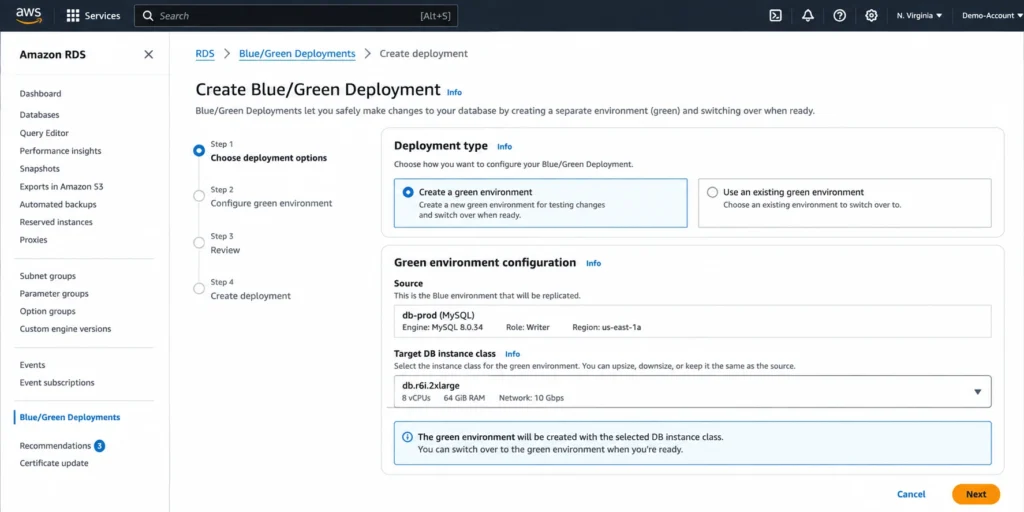
In the RDS console, select Modify on the target instance. Change the DB instance class to the right-sized target. Select Apply during the next scheduled maintenance window for low-risk changes, or Apply immediately for planned maintenance periods. Multi-AZ deployments execute the change on the standby instance first, then perform a failover — effective application downtime is approximately 60-120 seconds (source: cloudchipr March 2026, consistent with AWS documentation). Single-AZ changes require a full restart and may take longer depending on instance size. Monitor CloudWatch metrics for 48-72 hours post-change.

Also read: RDS Reserved Instances: Engine-by-Engine Pricing and Commitment Guide
How Does RDS MySQL Size Flexibility Work After You Reserve?
Once you have right-sized your MySQL instance and purchased a reserved instance, understanding how size flexibility works protects you from unexpected costs if the instance is resized again.
How Normalization Units Work
RDS MySQL reserved instances use a normalization unit system for size flexibility. The values are fixed across all MySQL instance families: db.micro = 0.5 units. db.small = 1 unit. db.medium = 2 units. db.large = 4 units. db.xlarge = 8 units. db.2xlarge = 16 units. db.4xlarge = 32 units. db.8xlarge = 64 units. db.16xlarge = 128 units.
A reservation for a db.r8g.large (4 normalization units) automatically covers: 8 db.r8g.micro instances (8 x 0.5 = 4 units), 4 db.r8g.small (4 x 1 = 4 units), 2 db.r8g.medium (2 x 2 = 4 units), 1 db.r8g.xlarge at 50% coverage (4 units out of 8), or any proportional combination of the above.
Size Flexibility Does Not Cross Instance Families
A db.r8g reservation does not cover db.m7g instances. A db.r7g reservation does not cover db.r8g instances. If you right-size from r8g to m7g (switching families), your existing r8g reservation no longer applies. The reservation continues billing until expiration and will apply to any other r8g instances in the same account and region. Plan family migrations around RI expiration dates to avoid paying for a reservation that no longer matches any running instance.
What Happens if You Downsize After Buying an RI
If you purchase a 1-year db.r8g.xlarge RI and then downsize to db.r8g.large within the same family: your xlarge reservation (8 normalization units) now covers two db.r8g.large instances (4 units each). If you only have one r8g.large running, the reservation covers it fully at the reserved rate and the remaining 4 normalization units of coverage are available for any other r8g instance in the account. No waste if another qualifying instance is running. If no other r8g instances are running, the uncovered units of the RI continue billing without covering anything useful — effectively wasted until the term expires or a new r8g instance is launched.
What Are the Common Right-Sizing Mistakes for MySQL RIs?
Mistake 1: Right-Sizing Based on Average CPU Instead of P90
A MySQL instance with average CPU of 10% can have P99 CPU spikes to 95% during end-of-month reporting, nightly batch jobs, or index rebuilds. If you downsize based on average CPU, the instance may be adequate for normal traffic but will be CPU-constrained during peaks. Always evaluate P90 and P99 CPUUtilization before downsizing vCPUs. Target: P90 CPU below 40% at the proposed new instance size.
Mistake 2: Ignoring the Connection Ceiling When Switching to M-Family
Switching from db.r8g.xlarge (32 GB RAM, max ~2,730 connections) to db.m7g.xlarge (16 GB RAM, max ~1,365 connections) cuts the max_connections ceiling in half. If your application uses persistent connection pools with 800 pooled connections and scales to 1,200 under peak load, you will exceed the new ceiling under peak load. This mistake is common because the connection count usually looks acceptable at the current instance size but becomes critical at the target.
Mistake 3: Right-Sizing Dev Instances and Reserving Them
Development and staging databases that stop during off-hours or weekends run at 30-50% actual utilization. A reservation on a 50%-utilized instance pays the full RI charge for hours the instance is not running. Right-size and convert dev/staging instances to Single-AZ (if incorrectly running as Multi-AZ) before evaluating whether they should be reserved at all. Instances with low utilization patterns should generally remain on-demand unless they run 24/7 continuously.
Mistake 4: Not Rechecking Metrics After a Major Application Change
A MySQL instance that was right-sized six months ago may no longer reflect the current workload if the application has grown, new features have been added, or data volume has increased significantly. The right-sizing analysis should be repeated any time a major application release occurs, before a reserved instance renewal, or if CPUUtilization or FreeableMemory trend meaningfully over 90 days.
How Does AWS Compute Optimizer Help with MySQL Right-Sizing?
AWS Compute Optimizer analyzes CloudWatch metrics for RDS instances and generates instance right-sizing recommendations, similar to what it does for EC2. For RDS MySQL, Compute Optimizer evaluates CPUUtilization and considers the optimal instance type to reduce cost without performance degradation.
Enable Compute Optimizer at the account or organization level. After 14 days of observation, recommendations appear in the Compute Optimizer console under RDS findings. Recommendations show the current instance type, the recommended instance type, and the projected monthly savings.
Compute Optimizer limitations for MySQL: it does not account for DatabaseConnections when recommending downsizes, and it does not factor BufferCacheHitRatio or InnoDB buffer pool requirements into its recommendations. A Compute Optimizer recommendation to move from db.r8g.xlarge to db.r8g.large based on CPU patterns alone may be incorrect if your MySQL connection pool is near the max_connections ceiling of the smaller instance. Always validate Compute Optimizer recommendations against the DatabaseConnections metric and BufferCacheHitRatio before executing a downsize.
How Does Usage.ai Approach Right-Sizing Before Reserved Instance Purchasing?
Usage.ai Flex Reserved Instances does not purchase commitments on instances with active right-sizing signals. The platform evaluates CPUUtilization, FreeableMemory, and utilization stability patterns before recommending or purchasing a reserved instance. An instance showing signs of over-provisioning — consistently low CPU, high FreeableMemory, stable low-load patterns — is flagged as a right-sizing candidate first, not a reservation candidate.
The platform surfaces right-sizing opportunities with the projected savings from right-sizing alongside the projected RI savings, so the FinOps team can see the combined opportunity. The correct sequence — right-size, then reserve — is built into the recommendation workflow. An instance that the platform has flagged for right-sizing will not receive an automated RI purchase until the right-sizing signal clears or the team overrides the flag.
For MySQL instances specifically, the 24-hour analysis refresh ensures that post-right-sizing utilization is re-evaluated quickly and the correct reservation is purchased against the new, right-sized baseline. If a reserved instance becomes underutilized because the instance was downsized after purchase, Usage.ai provides cashback and credits on the unused portion. The fee is a percentage of realized savings only.
See how Usage.ai right-sizes and reserves your RDS MySQL fleet
Frequently Asked Questions
1. What are RDS reserved instances?
RDS reserved instances are billing commitments that discount your RDS compute rate by 29-69% in exchange for a 1-year or 3-year term. The discount applies automatically to any running RDS instance matching the reserved engine, instance family, and deployment type. Reserved instances do not affect how the instance runs — only how it is billed. Size flexibility allows a single reservation to cover proportionally across different sizes within the same instance family.
2. What is right-sizing instances in AWS?
Right-sizing is the process of matching the instance type and size to the actual workload requirements. An over-provisioned instance runs at a fraction of its capacity and pays for resources it does not use. An under-provisioned instance constrains performance. For RDS MySQL, right-sizing uses four CloudWatch signals: CPUUtilization (compute), FreeableMemory (RAM), DatabaseConnections (connection ceiling), and BufferCacheHitRatio (buffer pool fit).
3. How do you right-size an RDS MySQL instance?
Pull 30 days of CloudWatch metrics for CPUUtilization (P90 and P99), FreeableMemory (minimum), DatabaseConnections (maximum), and BufferCacheHitRatio (minimum). If P99 CPU is below 40%, FreeableMemory consistently above 25% of RAM, DatabaseConnections below 70% of max_connections at the proposed smaller size, and BufferCacheHitRatio above 99%, the instance can be safely downsized.
4. How do you change an AWS RDS instance size?
In the RDS console, select the DB instance, click Modify, change the DB instance class to the new size, and choose whether to apply during the next maintenance window or immediately. Multi-AZ deployments apply the change to the standby first then fail over, resulting in approximately 60-120 seconds of effective downtime. Single-AZ changes require a full restart. Use the CLI: aws rds modify-db-instance –db-instance-identifier [id] –db-instance-class [new-class] –apply-immediately.
5. What is the max connections formula for RDS MySQL?
max_connections = DBInstanceClassMemory (bytes) / 12582880. For db.r8g.large (16 GB = 17,179,869,184 bytes): max_connections = approximately 1,365. For db.r8g.xlarge (32 GB): approximately 2,730. Source: AWS re:Post knowledge center. Verify at AWS documentation — this parameter can also be overridden manually in the RDS parameter group.
6. Does right-sizing affect my existing reserved instance?
If you downsize within the same instance family (e.g., r8g.xlarge to r8g.large), your existing reservation continues applying via size flexibility — the reservation now covers the smaller instance and any remaining normalization units cover other instances in the family. If you change families (e.g., r8g to m7g), the reservation no longer applies to the new instance and will either waste until expiration or apply to other r8g instances in the account.
7. When should you not right-size before reserving?
Do not right-size before reserving if the instance was recently sized up (less than 30 days ago), if the workload has a predictable seasonal peak coming within 90 days that would require the current size, if a major application release is planned that may increase resource consumption, or if CloudWatch data shows P99 CPU above 60% or FreeableMemory below 10% — signals of potential under-provisioning at the current size.
8. Does AWS Compute Optimizer account for MySQL connection limits?
No. AWS Compute Optimizer recommends RDS right-sizing based on CPU and network metrics but does not factor in DatabaseConnections or BufferCacheHitRatio in its recommendations. Always validate Compute Optimizer suggestions against the max_connections formula and buffer cache hit ratio before executing a MySQL instance downsize.