
 AWS
AWS Microsoft Azure
 Google Cloud

The Three DynamoDB Encryption Options and Their Costs
DynamoDB encrypts every table at rest. The incremental cost depends on key type and metered KMS usage, not a fixed ratio of DynamoDB reads or writes. AWS-owned keys have no extra key or usage charge. For managed keys in your account, estimate the separately billed KMS requests.
Pricing checked October 15, 2026, DynamoDB supports three server-side encryption (SSE) key types (verify at aws.amazon.com/dynamodb/pricing and aws.amazon.com/kms/pricing rates change):
| Key Type | Monthly Key Fee | API Request Fee | Key Visibility | Key Control |
|---|---|---|---|---|
| AWS-Owned Keys (default) | $0 | $0 | Not visible in your account | None — AWS manages entirely |
| AWS Managed Keys (aws/dynamodb) | $0 | $0.03 per 10,000 requests | Visible in AWS KMS console | Limited — AWS rotates automatically |
| Customer-Managed Keys (CMK) | $1.00 base per key-month; rotation charges may apply | $0.03 per 10,000 requests | Full visibility and audit trail | Full — you control rotation, policy, deletion |
The default option: AWS-Owned Keys, carries zero cost and zero configuration. Most teams should stop there unless a specific compliance or audit requirement drives them to one of the other two options.
Is DynamoDB Encrypted by Default?
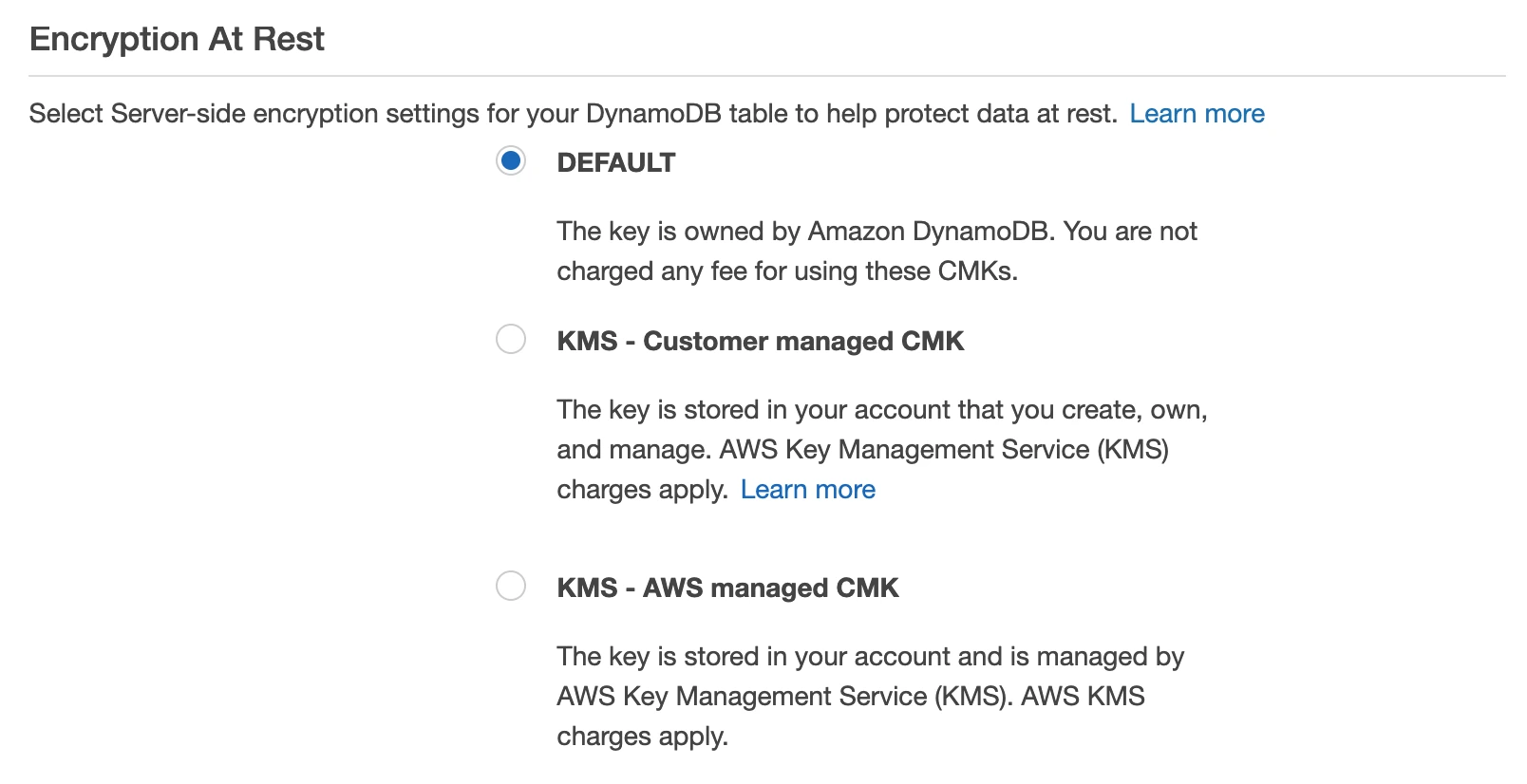
Yes. AWS encrypts all DynamoDB data at rest by default using AWS-Owned Keys. This encryption is active on every new table without any configuration step, and it cannot be disabled. The encryption uses 256-bit AES, and the keys are owned and managed entirely by AWS within a shared key infrastructure that is not visible to your account.
When teams ask, “Is DynamoDB encrypted by default?” The answer is an unqualified yes, but the key is not in your account, not auditable by you, and not rotatable by you. That distinction matters only if your compliance framework says it matters.
What Is the Difference Between AWS-Owned, AWS Managed, and Customer-Managed KMS Keys for DynamoDB?
AWS-Owned Keys: These are multi-tenant keys owned by AWS and used across multiple customer accounts. They do not appear in your AWS KMS console. You cannot view them, audit their usage in CloudTrail, or rotate them on your schedule. They are free. Choose key controls based on your documented security requirements and applicable obligations.
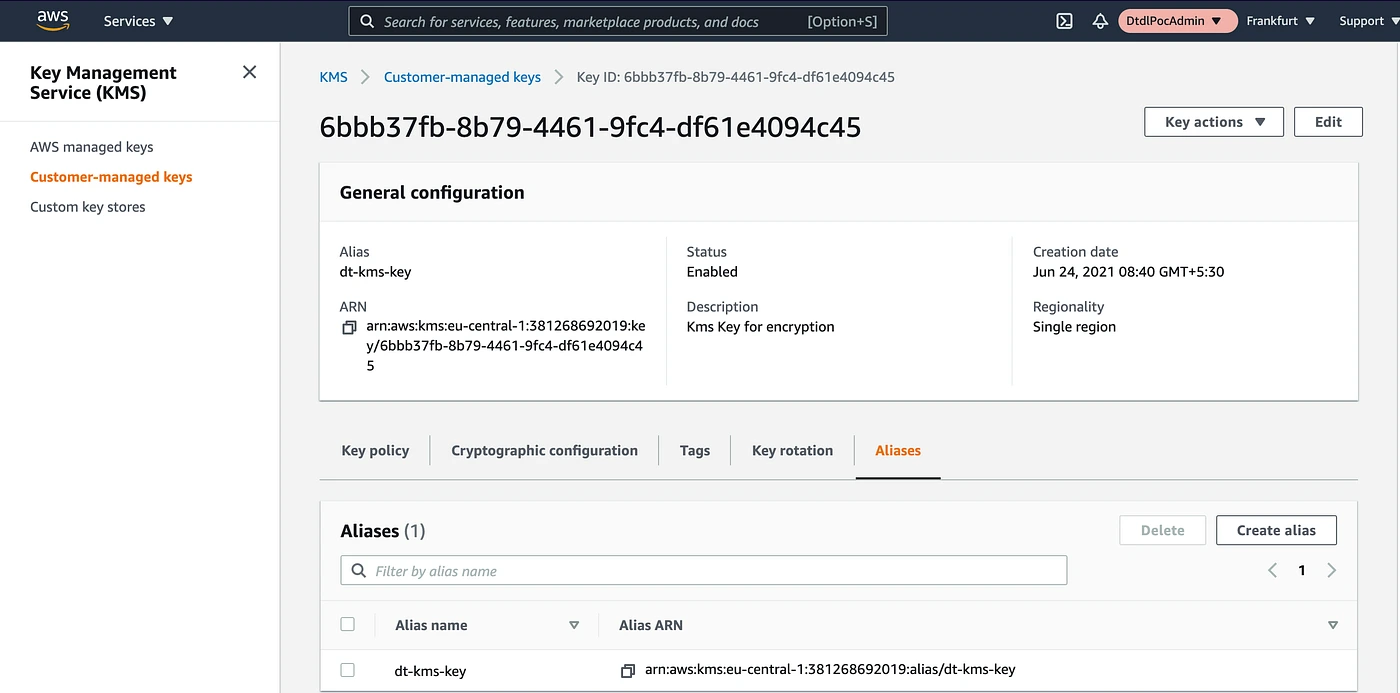
AWS Managed Keys (alias: aws/dynamodb): AWS creates and manages this key in your account. It is visible in your KMS console. CloudTrail logs all encryption and decryption calls. AWS automatically rotates this key annually. There is no monthly storage fee. DynamoDB caches key material; it does not make a KMS call for every read or write. Eligible symmetric KMS API requests cost $0.03 per 10,000 after the shared free allowance.
Also read: AWS Savings Plan Buying Strategy: Layering, Timing & Right-Sizing Commitment
Customer-Managed Keys (CMK): You create and manage this key. You control the key policy, which IAM principals can use it, whether automatic rotation is enabled, and you can disable or delete it at will. You get a full CloudTrail audit trail. The base fee is $1.00 per customer-managed key-month plus eligible KMS API requests. The first two rotations each add $1.00/month; later rotations add no further key-storage charge. Key fees are prorated hourly. The $1/month fee is pro-rated hourly, so a key used for one day costs approximately $0.033.
How Much Do KMS API Calls Cost at DynamoDB Scale?
Measure KMS requests rather than converting provisioned WCU/RCU capacity into an assumed request count. AWS documents a new KMS decrypt request after five minutes of inactivity for a caller’s cached table key; connection reuse also affects caching. No fixed “one KMS call per 50,000–100,000 DynamoDB operations” estimate is supported.
Illustrative monthly cost = key-storage fees + max(eligible metered requests − remaining free allowance, 0) × $0.03 / 10,000. The examples below assume one unrotated customer-managed key, the full 20,000-request monthly KMS allowance remains available, and all requests are eligible symmetric operations. The allowance is shared across Regions and other KMS workloads; it is not renewed for each table or key.
| Metered eligible KMS requests/month | Billable requests after 20,000 free | API charge | One unrotated key | Total/month |
|---|---|---|---|---|
| 10,000 | 0 | $0.00 | $1.00 | $1.00 |
| 100,000 | 80,000 | $0.24 | $1.00 | $1.24 |
| 1,000,000 | 980,000 | $2.94 | $1.00 | $3.94 |
| 10,000,000 | 9,980,000 | $29.94 | $1.00 | $30.94 |
These examples describe KMS request volumes, not DynamoDB throughput levels. AWS-managed keys have no monthly key-storage fee; AWS-owned keys add no KMS usage bill. Add any rotation, regional key-replica and logging charges that apply. Sources: AWS KMS pricing and DynamoDB encryption and key caching, checked October 15, 2026.
AWS-Owned Keys vs Customer-Managed KMS Keys: Full Comparison
| Dimension | AWS-Owned Keys | AWS Managed Keys (aws/dynamodb) | Customer-Managed Keys (CMK) |
|---|---|---|---|
| Monthly key fee | $0 | $0 | $1.00 base per key-month; rotation charges may apply |
| API call fee | $0 | $0.03 / 10K calls | $0.03 / 10K calls |
| Visible in KMS console | No | Yes | Yes |
| CloudTrail audit logs | No | Yes | Yes |
| Key rotation control | None | Annual (AWS-managed) | Configurable (90-day minimum for auto-rotation) |
| Key deletion | Cannot delete | Cannot delete | Can disable and schedule deletion |
| Cross-account use | No | No | Yes, via key policy |
| Key policy customization | No | Limited | Full |
| Supports key grants | No | No | Yes |
| Compliance: HIPAA | Validate applicable controls and scope | Validate applicable controls and scope | Use when customer key control is required |
| Compliance: PCI-DSS | Validate applicable controls and scope | Validate applicable controls and scope | Use when customer key control is required |
| Compliance: FedRAMP High | Validate applicable controls and scope | Validate applicable controls and scope | Use when customer key control is required |
| Compliance: SOC 2 Type II | Validate applicable controls and scope | Validate applicable controls and scope | Use when customer key control is required |
When Does DynamoDB Encrypt Data At Rest?
DynamoDB encrypts data at rest from the moment a table is created. There is no delay and no manual step required. All data, including items, indexes, global secondary indexes (GSIs), local secondary indexes (LSIs), DynamoDB Streams data, and on-demand backups, is encrypted at rest under whichever key type you selected at table creation.
When table data is encrypted, encryption and decryption happen transparently at the storage layer. There is no performance penalty for standard encryption. Applications read and write items through the DynamoDB API exactly as they would with no encryption option; the encryption is invisible to the application layer.
Data in transit is separately secured via TLS on all DynamoDB connections. These are independent systems: at-rest encryption covers stored data; in-transit encryption covers network transport. Both are always active.
How to Check If Your DynamoDB Table Is Encrypted
Every DynamoDB table is encrypted. The question is which key type is in use.
Via AWS Console:
- Navigate to the DynamoDB console.
- Select a table.
- Go to the “Additional settings” tab.
- Scroll to the “Encryption” section.
- The SSE type field will show “AWS owned key (default),” “AWS managed key,” or the ARN of your CMK.
Via AWS CLI:
A response of {} or null indicates the default AWS-Owned Key. A response including “SSEType”: “KMS” and a “KMSMasterKeyArn” indicates either an AWS Managed Key or a CMK.
Via AWS Config Rule: The managed Config rule dynamodb-table-encrypted-kms checks whether DynamoDB tables are using KMS encryption (either AWS Managed or CMK). This rule returns NON_COMPLIANT for tables using AWS-Owned Keys, useful only if your compliance standard specifically requires KMS-managed encryption. Most SOC 2 and ISO 27001 frameworks do not require this.
Also read: DynamoDB Reserved Capacity: Pricing for Read & Write Throughput
How to Enable DynamoDB Encryption with a Customer-Managed KMS Key
Prerequisites:
- An existing KMS Customer-Managed Key in the same AWS Region as your DynamoDB table
- IAM permissions: kms:CreateGrant, kms:DescribeKey on the key; dynamodb:UpdateTable on the table
- The selecting IAM user or role must be authorized to use the key through DynamoDB, with the required KMS operations and grants.
Step 1: Create a KMS Customer-Managed Key (if not already done)
–description “DynamoDB encryption key for production tables” \
–key-usage ENCRYPT_DECRYPT \
–origin AWS_KMS
Copy the KeyId from the response (format: xxxxxxxx-xxxx-xxxx-xxxx-xxxxxxxxxxxx).
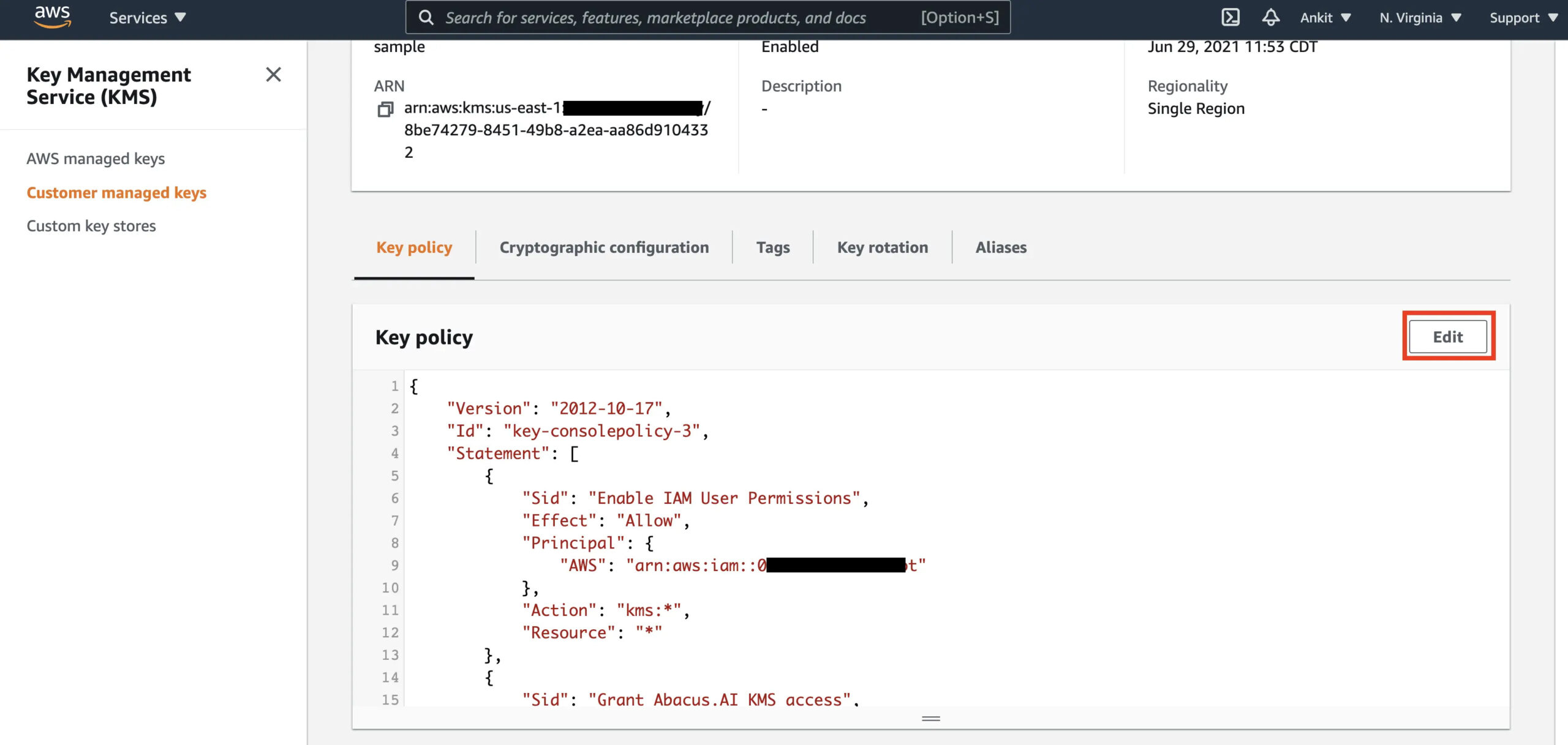
Step 2: Update the KMS key policy to allow DynamoDB access
The selecting IAM principal needs the required KMS cryptographic, DescribeKey, and CreateGrant permissions. DynamoDB uses the key on that principal’s behalf and creates table-specific grants. Follow AWS’s customer-managed key policy example, replacing example principals and preserving administrator access. A broad service-principal statement alone is not a complete setup.
Step 3: Update the DynamoDB table to use the CMK
For an existing table:
–table-name YOUR_TABLE_NAME \
–sse-specification Enabled=true,SSEType=KMS,KMSMasterKeyId=YOUR_KEY_ARN
For a new table, specify SSE at creation:
–table-name YOUR_TABLE_NAME \
–attribute-definitions AttributeName=pk,AttributeType=S \
–key-schema AttributeName=pk,KeyType=HASH \
–billing-mode PAY_PER_REQUEST \
–sse-specification Enabled=true,SSEType=KMS,KMSMasterKeyId=YOUR_KEY_ARN
Step 4: Verify the key change was applied
–query “Table.SSEDescription”
Expected output:
“Status”: “ENABLED”,
“SSEType”: “KMS”,
“KMSMasterKeyArn”: “arn:aws:kms:us-east-1:123456789012:key/YOUR_KEY_ID”
}
The update is typically applied within a few minutes. DynamoDB performs the re-encryption in the background without downtime or performance impact.
What to do if the update fails:
The most common error is KMSAccessDeniedException indicates an authorization failure. Check the caller’s effective IAM and key permissions, explicit denies, key state, and required grants against AWS’s documented setup; missing CreateGrant permission is one possible cause.
How to Migrate a KMS-Encrypted DynamoDB Table to Another Region
Moving a KMS-encrypted DynamoDB table to another region requires that a corresponding CMK exist in the target region. AWS-Owned Keys and AWS Managed Keys are region-specific: they cannot be transferred. CMKs are also region-specific, but you can create a separate CMK in the target region and reference it during the migration.
Migration path using DynamoDB Export to S3:
- Export the source table to S3 using DynamoDB’s Point-in-Time Recovery (PITR) export (verify: the source table must have PITR enabled).
- Copy or replicate the exported S3 data to the target region’s S3 bucket.
- Import the S3 data into a new DynamoDB table in the target region using DynamoDB’s S3 import feature.
- Specify the target region’s CMK ARN in the new table’s SSE configuration.
For ongoing cross-region replication with encryption, use DynamoDB Global Tables. Each region in a Global Tables setup maintains its own encryption configuration, you can use different CMKs per region. Global Tables replication encrypts data in transit using TLS and applies the destination table’s at-rest encryption upon write in each region.
Note: KMS costs apply independently in each region where a CMK-encrypted table exists. For example, one unrotated customer-managed key in each of three Regions has a $3/month base key fee, plus applicable requests. Rotation can add key-storage charges, and the free request allowance is shared across Regions.
Also read: DynamoDB Reserved Capacity: 1-Year vs 3-Year Pricing Compared
Does DynamoDB Encryption Affect Performance?
No measurable latency impact exists for standard workloads using any of the three key types. Encryption and decryption at the DynamoDB storage layer are hardware-accelerated and operate below the service’s latency floor.
The one documented exception: if you have a CMK and the KMS service in your region experiences elevated latency or an availability event, DynamoDB reads and writes that require KMS calls can experience increased latency. This is documented by AWS in the DynamoDB Developer Guide. AWS-Owned Key tables do not call the KMS API and therefore have no dependency on KMS availability.
For workloads where P99 latency is critical and where compliance does not mandate CMKs, AWS-Owned Keys are the lower-risk option.
Which Compliance Frameworks Require Customer-Managed KMS Keys for DynamoDB?
This is the central decision point. The key question is not “which option is more secure”; all three provide strong AES-256 encryption. The question is what your compliance obligations actually state.
FedRAMP, HIPAA, PCI DSS, SOC 2, and ISO 27001: A key type alone does not establish compliance, and a framework name does not justify a blanket claim that a customer-managed key is always required or always sufficient. Confirm the applicable control baseline, data scope, contracts, and assessor requirements. Customer-managed keys provide additional policy and lifecycle control when those controls are required. See AWS’s DynamoDB security and shared-responsibility guidance.
Choose AWS-Owned Keys When… Choose Customer-Managed Keys When…
Choose AWS-Owned Keys (default) when:
- No regulatory framework mandates customer-controlled key material
- You want zero added cost and zero KMS operational overhead
- Latency sensitivity is high and you want no dependency on KMS availability
- Your security team’s concern is data confidentiality, not key auditability
Choose AWS Managed Keys (aws/dynamodb) when:
- Your audit or compliance team requires visibility into key usage via CloudTrail
- You need the key to appear in your KMS console for inventory or documentation purposes
- Your security framework requires annual automatic key rotation
- You want a middle ground between zero overhead and full control, at zero monthly key fee (only API call costs apply)
Choose Customer-Managed Keys when:
- Your approved control implementation requires customer control of key policy or lifecycle
- Your PCI QSA requires customer-controlled key material for cardholder data tables
- You need custom key rotation schedules (shorter than annual, such as 90-day rotation)
- Cross-account access to encrypted table data is required (CMK key policies can allow cross-account access; AWS Managed Keys cannot)
- You need the ability to disable or delete the key as a data destruction mechanism (key deletion can make dependent data and backups unrecoverable; verify retention and recovery requirements before using cryptographic erasure)
- You need a separate key per table for fine-grained audit isolation
How Does DynamoDB Reserved Capacity Interact with Encryption Costs?
DynamoDB Reserved Capacity (now DynamoDB Reserved Instances via Usage.ai’s platform) reduces the per-hour cost of provisioned read and write capacity units by 30 to 40% depending on the reservation term. Encryption costs are entirely separate from throughput costs and are not covered by Reserved Capacity commitments.
When you commit to Reserved Capacity for a DynamoDB table, you are committing to the WCU/RCU throughput pricing. The KMS API call costs that CMK and AWS Managed Key tables incur are billed separately through the KMS service and are not eligible for Reserved Capacity discounts.
Practically, this means the incremental cost of switching from AWS-Owned Keys to a CMK on a Reserved Capacity table is the same as on an on-demand table: $1/month base per key plus applicable rotation and KMS API request fees. The Reserved Capacity discount does not offset or eliminate this additional charge.
Review the actual KMS line items in Cost Explorer or billing exports. Provisioned throughput alone cannot substantiate a $78–$157 monthly encryption estimate, and a capacity reservation does not discount KMS charges. Retain the key controls required by your verified security and compliance requirements when evaluating cost.
Usage.ai’s DynamoDB Reserved Instances coverage automates the capacity commitment purchasing decision and cashback-insures underutilized commitments. If your DynamoDB spend is above $5,000 per month and you are not on reserved capacity, that is a higher-priority cost action than the encryption key decision. Eligible Usage.ai Flex commitments have agreement-specific fees and Cashback protection; the underlying AWS commitment remains binding. Savings depend on current rates and matching utilization. See DynamoDB Reserved Capacity: Pricing for Read and Write Throughput for the capacity cost analysis.




