.png)



For single-Region configurations, AWS says writer downtime during switchover is typically five seconds or less (AWS supported engines) . Standard RDS Blue/Green supports MySQL, MariaDB, and PostgreSQL, not Oracle or SQL Server.
The rest of this guide is built around the RDS Blue/Green Deployment cost question. Before you create a deployment, three variables decide whether the spend is worth it: how long blue and green overlap, how much of the green compute is uncovered by a Reserved Instance, and how long you keep the old-blue environment running after switchover. Everything below helps you calculate those three.
What RDS Blue/Green actually does
Replication varies by engine and change. For supported PostgreSQL source versions, major version upgrades use logical replication, while minor upgrades or no engine upgrade use physical replication. Physical-replication green environments are strictly read-only. MySQL and MariaDB use binary log replication.
At switchover, AWS renames endpoints so applications can keep using the production endpoint. AWS’s January 2026 update says writer downtime is typically five seconds or less for single-Region configurations. Treat that as a typical target, not a guarantee.
Major upgrades are a strong use case, especially when an older engine version is also creating RDS Extended Support costs.
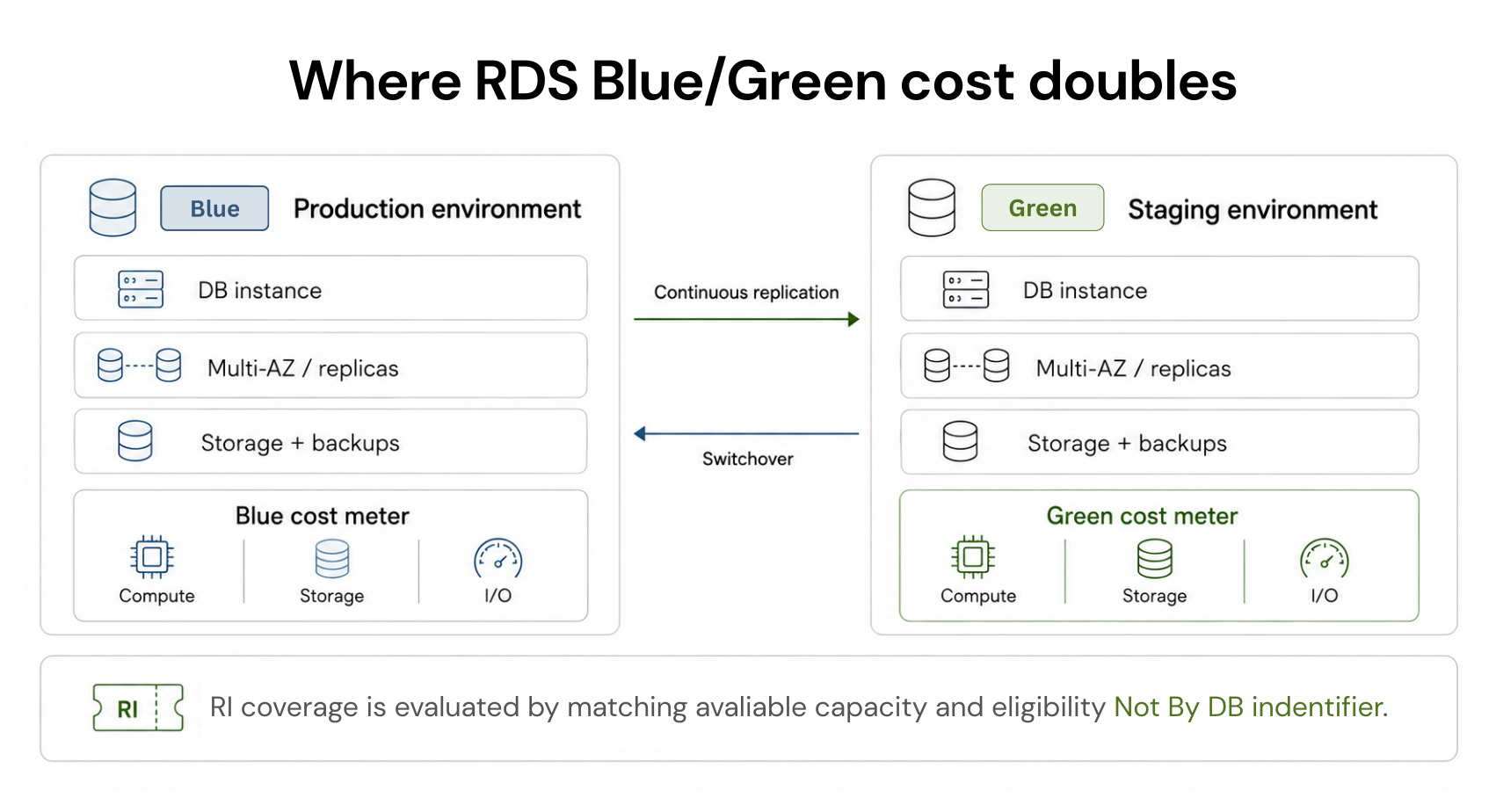
What the overlap really costs, by phase
Readers budget three periods differently, so it helps to price them separately rather than lumping them into one number.
Phase 1 Pre-switchover overlap (blue and green both live):
Phase 2 Switchover day:
Phase 3 Post-switchover retention (old blue kept as fallback):
Total temporary cost:
Pre-creation cost and coverage checklist
Inventory blue topology instance class, Multi-AZ, read replicas, storage, and I/O.
Estimate green topology the resources AWS will create to mirror blue, adjusting for any resize or storage change.
Inspect unused eligible RI capacity check whether matching Reserved Instance capacity remains after blue consumes its share (see the RI section below).
Calculate uncovered compute hours the green compute hours that will bill On-Demand because no matching RI capacity covers them.
Assign a deletion owner and deadline name who deletes old blue and when, so the temporary cost stays temporary.
Should you use Blue/Green?
| Option | Best for | Main tradeoff |
|---|---|---|
| Resource-based CUD | Stable, predictable Compute Engine usage | Long-term financial commitment |
| Spot VM | Interruption-tolerant workloads | Capacity can be preempted |
| Flex-start VM | Short-duration workloads that can tolerate delayed capacity | Flexible start and a maximum seven-day runtime |
Eligibility and preflight checklist
MySQL, MariaDB, or PostgreSQL (not Oracle or SQL Server). Source and target version eligibility: confirm both versions are supported for your Region and engine.
know whether your change uses logical or physical replication, and that physical-replication green is read-only.
account for Multi-AZ, read replicas, encryption changes, Secrets Manager password management, external replication restrictions, and cross-Region read replicas.
Blue/Green is single-Region and single-account; cross-Region or cross-account is not supported.
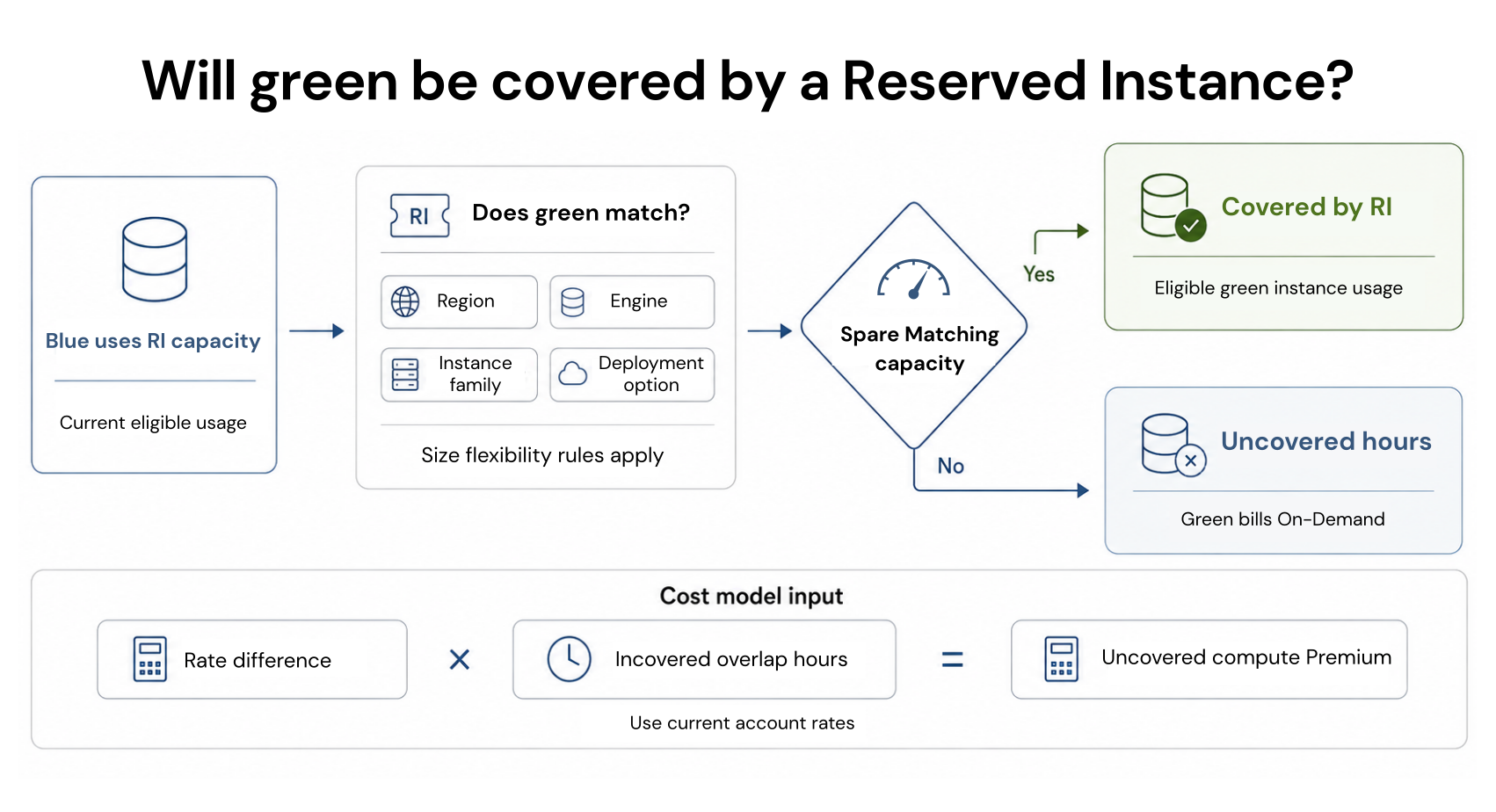
The reserved instance gap, correctly
Reserved Instances also discount instance usage only if they do not cover storage, backups, or I/O.
If matching RI capacity is fully consumed by blue, the new green usage can spill to On-Demand pricing. If unused matching RI capacity exists and green is eligible, it can apply to green usage. Do not assume a new green identifier automatically loses RI coverage, and do not assume spare reservation capacity exists.
How to check RI coverage before creating green
List your active RDS Reserved Instances and their attributes (Region, engine, instance class/family, size-flexibility scope, deployment option).
Compare those attributes against the green topology you plan to create.
From current billing, check how much matching RI capacity blue already consumes.
Subtract blue's consumption from the reservation's normalized capacity to see what, if anything, remains for green.
Treat any green hours beyond the remaining matching capacity as uncovered On-Demand hours.
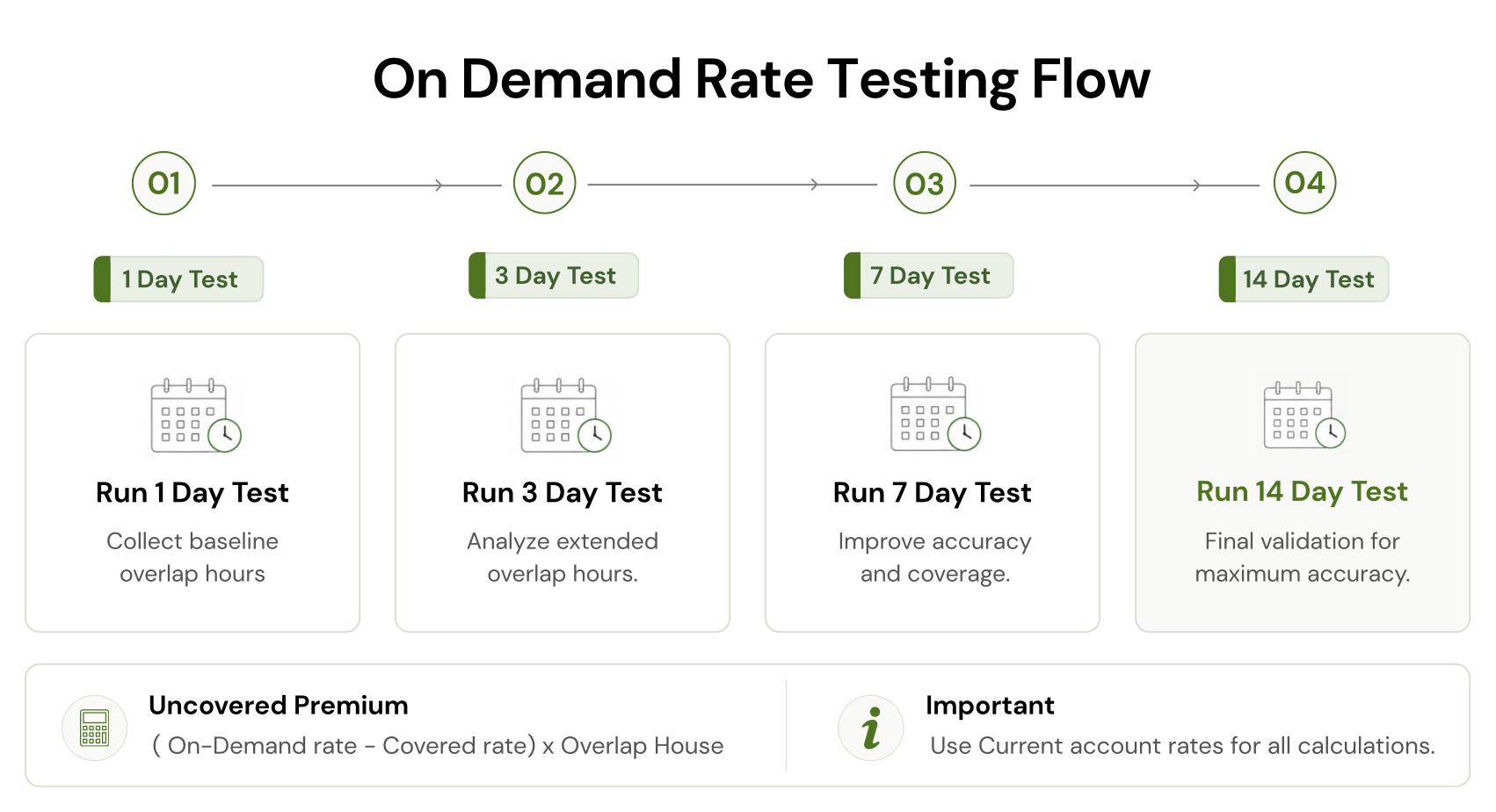
Illustrative RI-gap formula:
Storage shrink can change the ROI
AWS documents this minimum:
Illustrative ROI
for a reduction from 1,000 GiB to 200 GiB:
Engine constraints that affect testing
MySQL and MariaDB use binary logging. Green is read-only by default, and enabling writes can create replication conflicts, so treat green writes as an exception with a deliberate test plan.
RDS Proxy is compatible with Blue/Green for supported engines and can reduce connection disruption by detecting the topology change. It does not eliminate application retry and reconnect handling, though: existing proxy connections are dropped after green becomes the writer, and applications must re-establish them.
Test connection-pool recovery and write-error behavior during switchover. If Proxy affects your cost model, use the Switchover readiness and application recovery checklist.
A short AWS-reported downtime target does not replace operational preparation. Before you switch:
Rollback planning
- Before switchover: Keep blue as production and delete the deployment if green fails testing.
- Failed switchover: AWS can roll back the switchover operation if it cannot complete within the configured timeout (30 to 3,600 seconds, default 300) (AWS: switching a blue/green deployment).
- After successful switchover: Old blue is retained, but AWS does not provide a one-click reverse Blue/Green switchover that reconciles new production writes. Reversal needs a recovery and data-reconciliation plan. Retained old-blue resources continue to incur charges until removed.
When Blue/Green is worth it
Question it when a minor change can use a normal maintenance window or green may sit unused for weeks. Set an owner, target switchover date, and deletion date before creation. Those controls stop a bounded migration cost from becoming a persistent second environment.
How we fit after switchover
Our Flex Commitment program analyzes cloud usage and provides commitment recommendations. After approval, it can purchase and manage eligible commitments through cloud provider APIs.
Our documentation explains our cashback protection for eligible Flex Commitment losses, subject to applicable program terms. That means you can unlock up to 57% off On-Demand rates without owning a 1- or 3-year commitment, because we carry the commitment and refund any unused capacity as cashback or cloud credits.
Review your post-migration usage, commitment coverage, and savings opportunity before you recommit.
Frequently asked questions
Does RDS Blue/Green Deployment double cost?
It creates a second set of billable RDS resources, so "double cost" is useful shorthand. The exact increase depends on green configuration, storage, replicas, I/O, and eligible discounts. Charges also continue for retained old-blue resources until deletion.
Which RDS engines support Blue/Green Deployments?
Standard RDS Blue/Green supports MySQL, MariaDB, and PostgreSQL. RDS for Oracle and RDS for SQL Server are not supported. Aurora has separate Blue/Green documentation and constraints.
Can an RDS Reserved Instance cover green?
Yes, if green is eligible and matching RI capacity is available after AWS evaluates Region, engine, instance family, size-flexibility rules, and deployment configuration. The discount is not tied to the DB identifier, and it covers instance usage rather than storage, backups, or I/O. If blue already consumes matching capacity, additional green usage can be billed On-Demand.
Can Blue/Green reduce RDS storage?
Yes, for supported configurations. AWS requires the target to remain at least 20 percent above current apparent storage usage using its documented utilization calculation. Standard modification of an existing RDS volume cannot reduce allocated storage.
Can you roll back after switchover?
Do not assume a managed reverse switchover exists. AWS retains old blue after a successful switchover, but new writes occur in the new production environment. Reverting later requires a recovery plan that accounts for those writes and any schema or engine changes.