AWS
AWS Microsoft Azure
 Google Cloud


The buying decision is more specific than simply asking how much Blob Storage you use.
Microsoft currently offers Azure Storage reserved capacity in 100 TiB and 1 PiB units for one- or three-year terms. Buyers select attributes such as region, access tier, and redundancy. Microsoft explains these matching and purchase requirements in its Blob Storage reserved-capacity guidance.
How much matching Blob capacity are we confident we will continue to use, and does reserving it make economic sense compared with pay-as-you-go pricing?
For the broader reservation model across Azure services, see our Azure Reserved Capacity guide.
What Azure Blob Storage Reserved Capacity covers
Azure Storage reserved capacity provides a billing discount for qualifying Block Blob and Azure Data Lake Storage Gen2 capacity in supported standard storage accounts.Microsoft documents support for GPv2 and Blob storage accounts and excludes premium storage accounts, GPv1 accounts, page blobs, Queue Storage, and Table Storage.
Hot, Cool, and Archive tiers are supported. Azure also has a Cold tier, but Microsoft does not currently list Cold as a supported Blob reserved-capacity tier.
The reservation is a billing benefit. It does not provision storage or change the underlying resource.
It also does not discount the entire Blob Storage bill. Microsoft states that the reservation discount applies to storage capacity, while request and bandwidth charges remain pay-as-you-go.
Before you buy, validate the reservation in this order: eligibility, matching configuration, durable capacity, economics, term, and scope.
1. Start with eligible capacity, not total storage
Do not use total Azure storage as your reservation baseline.First, isolate storage that can actually receive the discount.
Review:
account type
Block Blob or ADLS Gen2 usage
access tier
Azure region
redundancy
lifecycle policies
expected retention
This gives you eligible capacity, but not yet the amount stable enough to commit.
2. Split capacity by region, tier, and redundancy
Blob reserved capacity is configuration-specific.Microsoft requires buyers to select the region, access tier, and redundancy option when purchasing eligible reserved capacity. The benefit applies only to storage that matches those attributes.
For example, keep these capacity pools separate:
East US + Cool + LRS
East US + Hot + GRS
West US + Hot + LRS
Identify capacity likely to remain in the same matching configuration throughout the commitment.
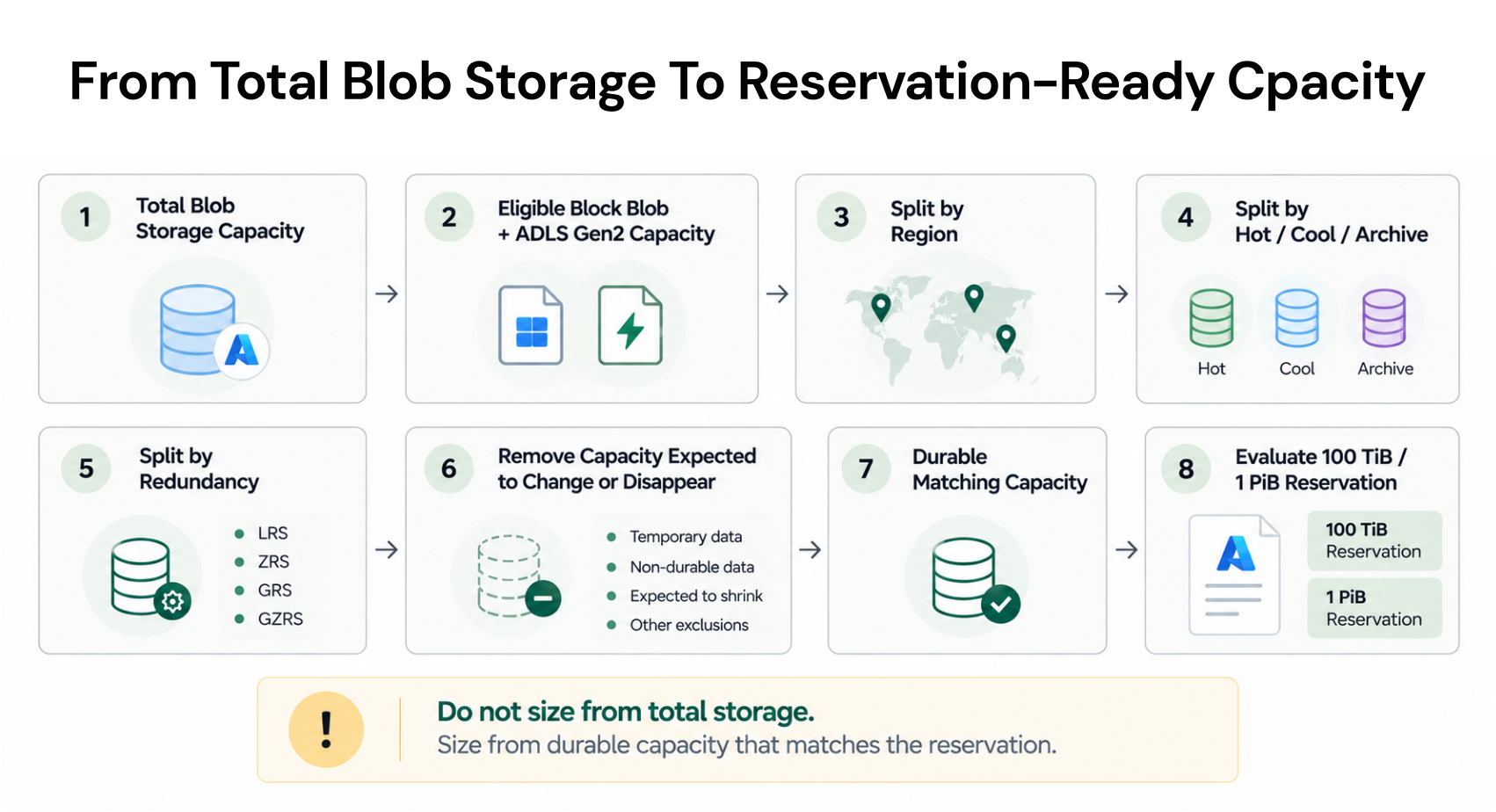
3. Find the durable capacity floor
Azure applies eligible storage reservation discounts hourly.Microsoft explains that if you purchase 100 TiB of reserved capacity and use only 80 TiB of matching capacity during an hour, the remaining 20 TiB is unused for that hour and does not carry forward. If matching usage exceeds the reserved amount, the excess is charged at pay-as-you-go rates.
See Microsoft’s Azure Storage reservation discount guidance for current billing examples.
That makes monthly average storage an incomplete sizing signal.
Before committing, adjust historical usage for known changes such as:
scheduled data deletion
application retirement
region migration
redundancy changes
lifecycle transitions
retention changes
storage consolidation
Use those recommendations as an input, not the final purchase decision. Historical usage cannot account for a future migration, deletion, or architecture change that has not happened yet.
4. Check whether the reservation economics work
Microsoft currently documents Blob reserved capacity in 100 TiB and 1 PiB units.You do not necessarily need 100% utilization for a reservation to cost less than pay-as-you-go pricing. Microsoft’s Blob cost examples show that break-even can occur below full block utilization.
The exact result depends on your current Azure pricing, tier, region, redundancy, term, and commercial agreement.
Do we use the full 100 TiB?
Ask instead:
Will our durable matching capacity remain high enough for the reservation to cost less than keeping that capacity on pay-as-you-go pricing?
Use your current Azure rates rather than Microsoft’s illustrative sample prices.
Reservation-sizing worksheet
For a conservative, approval-ready sizing pass, evaluate one matching configuration at a time.Record the hourly matching-capacity baseline in TiB.
Subtract capacity expected to disappear or change configuration because of lifecycle rules, migrations, redundancy changes, or deletions.
Treat the result as the durable matching-capacity floor.
Select a 100 TiB or 1 PiB reservation quantity that does not exceed that floor.
Compare the reservation’s total term cost with the equivalent pay-as-you-go cost for the same durable capacity.
This worksheet is deliberately conservative. A reservation can still reach break-even below full utilization, but enterprise approval should be based on the capacity you expect to remain available, not the most optimistic forecast.
5. Choose the term and review your exit options
A three-year commitment requires more confidence in future storage usage than a one-year commitment.Before choosing a term, review application lifespan, expected growth or decline, lifecycle policies, region plans, redundancy changes, and planned migrations.
Also understand what happens if those assumptions change.
Azure reservations can be exchanged or refunded, subject to Microsoft’s current eligibility rules and limits. These policies can change, so review Microsoft’s current exchange and refund guidance before treating cancellation as protection against overcommitment.
6. Confirm scope and purchase prerequisites
Reservation scope controls which matching Azure Storage usage can consume the benefit.A broader scope can give matching usage more opportunity to consume the reservation, but it does not override region, tier, or redundancy requirements.
For broader Azure scope concepts, see our Azure Reservations guide.
Before purchase, confirm who is authorized to buy and manage the reservation. Microsoft documents purchase permissions and billing requirements in its Azure reservation purchase guidance.
Azure reservations can generally be paid upfront or monthly, depending on the applicable agreement and purchase conditions.
7. Keep non-capacity charges outside the savings case
A Blob reservation discounts qualifying storage capacity, not the complete Blob bill.Keep applicable charges such as these separate:
requests and operations
bandwidth
data transfer
data retrieval
early-deletion charges
The business case should therefore compare eligible capacity costs rather than assume the same discount applies to every Blob Storage charge.
Azure Blob Storage Reserved Capacity purchase checklist
Before approving the purchase, confirm:The storage is eligible Block Blob or ADLS Gen2 capacity.
Capacity is separated by region, access tier, and redundancy.
Cold-tier capacity is excluded unless current Azure purchasing confirms eligibility.
Planned deletions, migrations, lifecycle transitions, and architecture changes are reflected.
Durable matching capacity supports the reservation economically.
The one- or three-year term matches expected workload stability.
Scope gives matching storage enough opportunity to consume the benefit.
Non-capacity charges remain outside the savings estimate.
Current Azure pricing, exchange, and refund terms have been reviewed.
Purchase permissions and billing frequency are confirmed.
What should you do?
Reserve now: Capacity is eligible, durable, configuration-stable, and the economics remain positive under a realistic forecast.Reduce the quantity: The storage pattern is stable, but only part of the footprint is durable enough to justify a reservation.
Choose one year: Capacity appears durable, but the three-year forecast contains meaningful uncertainty.
Defer: A migration, deletion, lifecycle change, or architecture decision could materially alter matching capacity.
Where Usage.ai fits
For teams deciding how much Azure Blob capacity is safe to reserve, we start with usage and billing data rather than changing storage resources. A read-only Savings Test connects through a dedicated Azure service principal and lets us analyze savings opportunities before any commitment-purchase permissions are enabled.Blob Storage is included in our broader Azure optimization coverage, so the analysis can help teams understand where storage spend and commitment opportunities sit within the wider Azure estate.
With Flex Insured Commitments, teams can get the up to 65% savings associated with an eligible three-year Azure compute Savings Plan with none of the commitment risk.
Eligible Flex Commitments receive cashback protection when the commitment costs more than equivalent on-demand usage. Cashback is paid 90 days after it accrues, while existing customer-owned commitments remain separate from Flex Commitments unless they qualify under the program.
Customers using Flex pay an agreed percentage of realized savings, billed monthly in arrears after Azure finalizes the relevant billing data.
Review storage, capacity, configuration, and costs before committing.
Frequently asked questions
What is the minimum Azure Blob Storage reserved-capacity purchase?
Microsoft currently documents Blob reserved capacity in 100 TiB and 1 PiB increments.
Does Blob reserved capacity cover operations and bandwidth?
No. The reservation discounts qualifying storage capacity. Operations, bandwidth, and other applicable non-capacity charges remain separate.
Do I need to use the full 100 TiB for a reservation to make sense?
Not necessarily. The relevant question is whether the reservation costs less than pay-as-you-go pricing for the durable matching capacity you expect to maintain.
Can one reservation cover different regions or access tiers?
Storage must match the reservation’s applicable attributes. A broader scope can increase the pool of matching usage, but it does not make different configurations interchangeable.
What happens if usage falls below the reserved capacity?
Unused reserved capacity for that hour does not carry forward. If matching usage exceeds the reservation, the excess remains pay-as-you-go.