.png)
 AWS
AWS Microsoft Azure
 Google Cloud


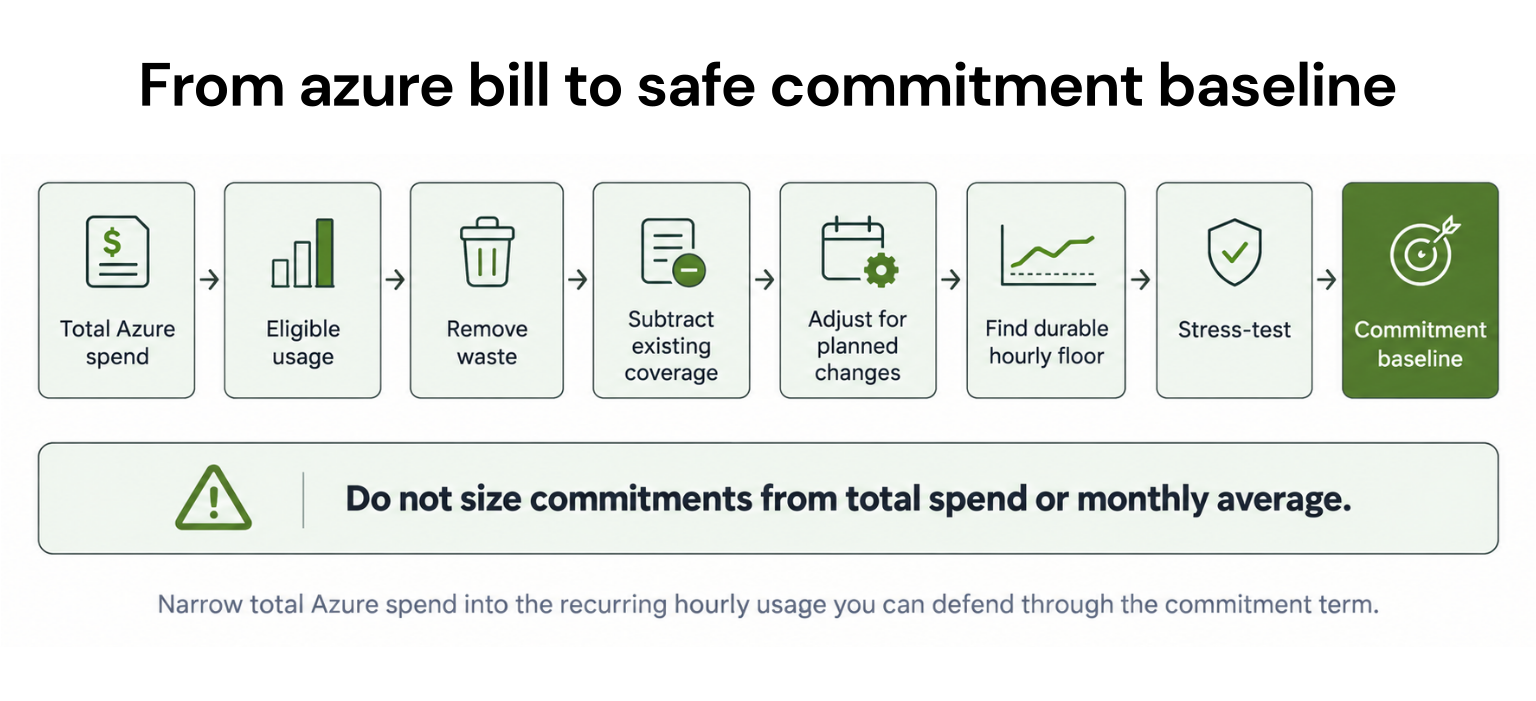
Start with eligible hourly usage you expect to persist. Subtract existing commitment coverage, remove demand expected to disappear, account for high-confidence workload changes, and stress-test what remains.
A useful planning framework is:
This is a decision framework, not a Microsoft formula.
Savings Plan recommendations are separate. Azure analyzes eligible hourly pay-as-you-go usage and cost, then simulates candidate hourly commitments. The recommendation API supports 7-, 30-, and 60-day lookbacks, while Azure Advisor and portal recommendations currently use 30 days. See Microsoft’s Savings Plan recommendation methodology.
The principle is simple:
Commit the durable floor, not the average.
To turn that framework into a purchase decision, start by narrowing your Azure bill to the usage that can actually benefit from a commitment.
Step 1: Find commitment-eligible usage
A $1 million Azure bill does not mean $1 million can or should be committed.Narrow it down:
Microsoft’s current Savings Plan pricing page confirms that compute plans support one- or three-year terms, while database plans use one year.
Before sizing, gather:
eligible hourly pay-as-you-go spend
current Reservations and Savings Plans
benefit scope
relevant resource family and region
planned migrations, rightsizing, and retirements
one- versus three-year term options
a named owner for utilization and coverage
Then compare your model with current Azure Advisor and Azure portal recommendations for the selected scope and term.
Step 2: Remove waste before committing
Do not lock unnecessary consumption into a cheaper rate.Before adding commitment coverage, account for:
idle or oversized resources
scheduled shutdowns
approved decommissions
migrations
architecture changes
existing underutilized commitments
A discount lowers the rate. It does not remove waste.
Step 3: Find your recurring hourly floor
Monthly averages can hide commitment risk.Most Reservations are applied hourly, and unused Reserved capacity does not carry into the next hour. Savings Plans also operate hourly, with unused commitment expiring rather than rolling forward.
Two workloads could each cost $100,000 per month.
One might run steadily 24/7. The other may spike during business hours and fall sharply overnight.
Their monthly averages may look similar, but their durable hourly floors do not.
Step 4: Adjust history for what is changing
Historical usage tells you what happened. A commitment must hold up against what happens next.Account for planned:
migrations
modernization
region or SKU changes
Kubernetes changes
workload retirement
rightsizing
product growth or contraction
Your internal forecast should include confirmed changes that billing history cannot yet show.
Step 5: Decide where Reservations and Savings Plans fit
| Workload characteristic | Evaluate |
|---|---|
| Stable configuration and region | Reservation |
| Persistent compute spend with changing mix | Savings Plan |
| Usage expected to disappear | Keep outside long-term commitment |
| Uncertain migration | Wait or size conservatively |
| Stable floor plus variable demand | Layer commitments with PAYG |
Step 6: Work through a $1M example
Assume monthly Azure spend is $1,000,000.| Input | Illustrative amount |
|---|---|
| Total Azure spend | $1,000,000 |
| Commitment-eligible usage | $620,000 |
| Existing commitment coverage | −$200,000 |
| Planned optimization/decommissions | −$95,000 |
| Temporary or uncertain usage | −$75,000 |
| High-confidence additions | +$30,000 |
| Candidate recurring baseline | $280,000 |
And $280,000 is not automatically the amount to purchase.
You still need to evaluate usage hourly, separate Reservation and Savings Plan candidates, select scope and term, apply current Azure rates, and compare the result with Azure’s recommendations.
Step 7: Compare commitment scenarios
These percentages are planning examples, not Azure benchmarks.| Scenario | Share of validated floor modeled | Modeled utilization (illustrative) | Downside exposure |
|---|---|---|---|
| Conservative | 70% | Highest expected | Lowest |
| Baseline | 85% | Strong expected | Moderate |
| Higher coverage | 95% | More sensitive | Highest |
Azure’s Savings Plan methodology shows why: increasing commitment can eventually reduce projected savings when utilization falls.
Step 8: Stress-test before purchase
Test the proposed commitment against:10% lower eligible usage
20% lower eligible usage
30% lower eligible usage
an early migration
a major workload retirement
Pre-purchase checklist
Before approval, confirm:Eligible usage is separated from total Azure spend.
Waste and planned reductions are removed.
Existing commitments are deducted.
Engineering has reviewed upcoming changes.
Hourly usage has been analyzed.
Benefit scope and ownership are defined.
Downside scenarios have been tested.
The model has been compared with Azure recommendations.
Monitor commitments after purchase
Review utilization, coverage, forecast changes, and expiring commitments at least monthly and after any material migration, rightsizing program, architecture change, or ownership change.Before increasing, renewing, or replacing coverage, compare the updated model with current Azure recommendations again.
Why maximum coverage is the wrong goal
Track four variables together:Coverage: How much eligible usage receives commitment pricing?
Utilization: How much purchased commitment is consumed?
Realized savings: What financial benefit remains?
Downside exposure: What happens when usage falls?
The objective is:
Highest defensible realized savings, not the highest possible commitment coverage.
Commitment flexibility should affect sizing
Savings Plans cannot be modified or canceled once the commitment is made. Microsoft’s Savings Plan documentation outlines the commitment terms.Reservations have different rules. Subject to eligibility, Microsoft caps canceled commitment at $50,000 in a rolling 12-month period per applicable billing scope. Refunds use the lower of the purchase price or current Reservation price, and Microsoft says it may introduce a 12% early-termination fee in the future. See Microsoft’s Reservation exchange and refund policy.
Starting February 1, 2027, Reservations purchased after that date generally cannot be exchanged when the corresponding service is supported by Savings Plans. Reservations purchased before February 1, 2027 remain exchangeable under the current policy through January 31, 2027.
After that date, those earlier Reservations retain one final exchange under Microsoft’s stated policy. Microsoft’s Reservation exchange-policy update explains the transition.
Post-purchase flexibility should therefore inform the sizing decision.
Where Usage.ai fits
At Usage.ai, we analyze Azure usage, model the commitment mix, and manage supported commitments directly in your Azure account as usage changes. Our Azure commitment optimization workflow is designed to keep commitment coverage from becoming a once-a-year forecasting exercise.With Flex Insured Commitments, teams can get the Up to 65% savings of a 1- or 3-year commitment with none of the commitment risk.
If an eligible Flex Commitment costs more than equivalent pay-as-you-go usage, we provide cashback protection to help cover the difference. See our cashback documentation for details.
Our goal is to help manage the commitment layer after you have established an appropriate Azure compute baseline, particularly when usage is stable enough to benefit from commitment pricing but may change over time.
See how our Azure commitment optimization approach works across analysis, purchasing, management, and eligible downside protection.
Final takeaway
The right Azure commitment level is not the largest amount your current bill can support.It is the portion of future eligible usage you can defend with enough confidence that the economics still work as workloads and demand change.
Review Azure usage, coverage, and baseline before increasing commitment exposure.
Frequently asked questions
What percentage of Azure spend should you commit?
There is no universal percentage. Start with recurring eligible hourly usage, subtract existing coverage, incorporate known future changes, and stress-test the remaining baseline.
Should Azure commitments use average monthly spend?
Not by itself. Hourly usage patterns matter because Reservations and Savings Plans apply benefits at hourly granularity.
How does Azure calculate commitment recommendations?
Reservation recommendations evaluate hourly usage and simulate quantities. Savings Plan recommendations analyze eligible hourly pay-as-you-go usage and simulate candidate hourly commitment amounts.
Should I choose Reservations or Savings Plans?
Reservations generally fit predictable workloads. Savings Plans provide broader flexibility when eligible compute demand persists but the resource mix may change.
Can Azure Savings Plans be canceled if usage drops?
No. Microsoft states that the hourly commitment cannot be modified or canceled after purchase.