.png)
 AWS
AWS Microsoft Azure
 Google Cloud


Now there is another constraint. The service itself is retiring.
Microsoft recommends moving Azure Cache for Redis workloads to Azure Managed Redis rather than waiting until retirement. That means reservation expiry, migration timing, retirement, and matching usage elsewhere in your Azure estate all need to be considered before renewal.
Microsoft’s Azure Cache for Redis retirement FAQ provides the current retirement timelines and migration guidance.
Start with the retirement date
The retirement date depends on your current tier.| Azure Cache for Redis tier | Retirement date |
|---|---|
| Basic | September 30, 2028 |
| Standard | September 30, 2028 |
| Premium | September 30, 2028 |
| Enterprise | March 31, 2027 |
| Enterprise Flash | March 31, 2027 |
That makes Enterprise and Enterprise Flash renewals particularly time-sensitive.
Confirm that your tier supports reservations
Basic and Standard do not support Azure Cache for Redis reservations.Microsoft currently documents reservation support for:
Premium
Enterprise
Enterprise Flash
For broader topics such as reservation scope, hourly matching, utilization, and commitment strategy, see our Azure Reservations guide.
Compare three dates before renewing
Start with three dates:Current reservation expiration
Planned Azure Managed Redis migration
Azure Cache for Redis retirement
Azure Cache for Redis reservations are not assigned exclusively to one cache instance. Microsoft says matching existing or new caches can receive the reservation benefit when they meet the applicable reservation attributes and fall within the configured scope.
So:
Portfolio-level usable commitment may continue beyond one cache’s migration if other caches in the reservation scope still match the reserved region and tier.
Before treating the remaining reservation as stranded, check the complete pool of matching cache usage.
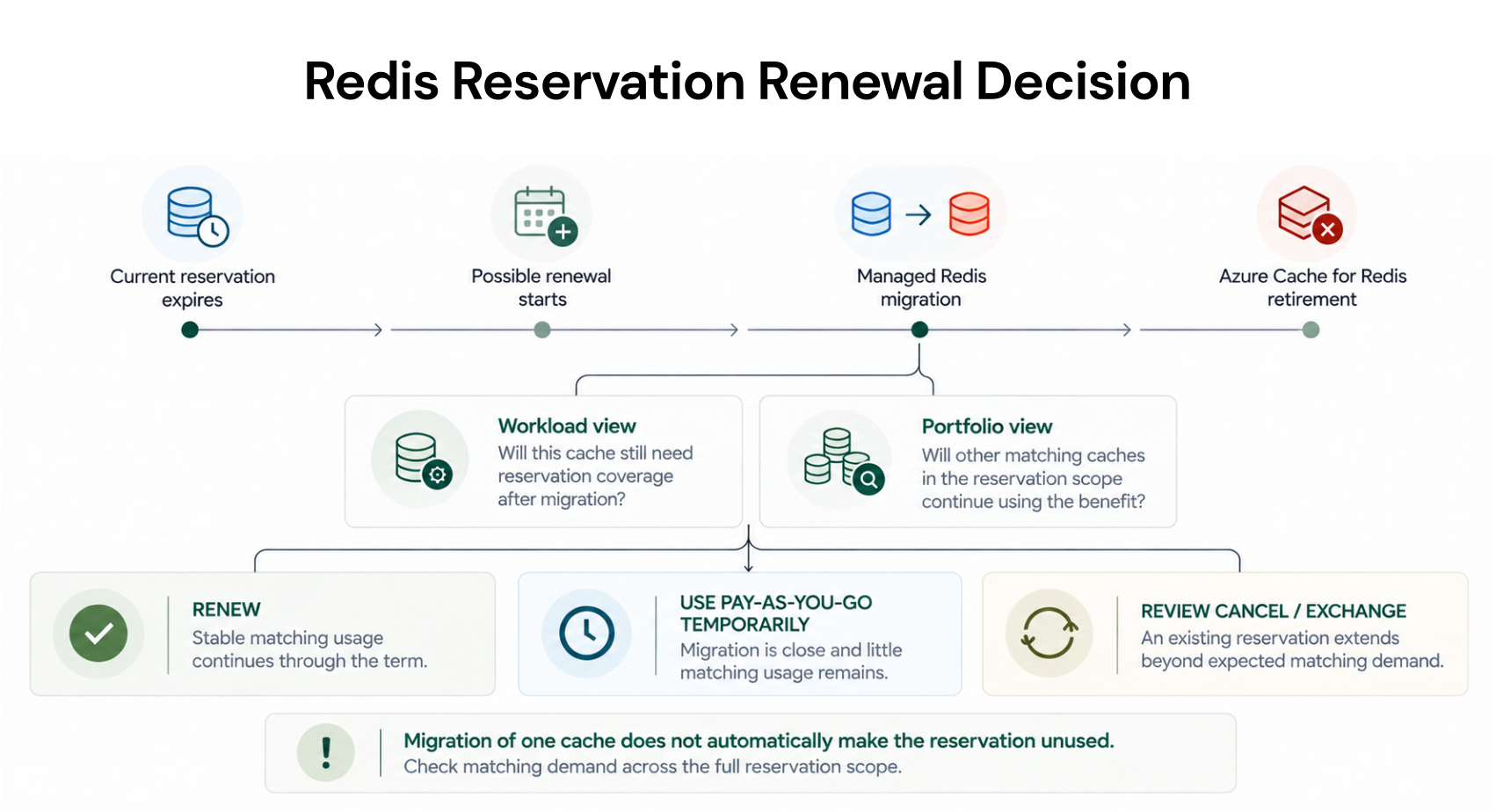
Use this renewal decision matrix
| Situation | What to evaluate |
|---|---|
| Stable matching usage remains through the proposed term | Model renewal economics |
| Migration is close and little matching usage remains elsewhere | Compare temporary pay-as-you-go with renewal |
| Existing reservation extends beyond migration | Review matching usage plus cancellation or exchange options |
| Managed Redis sizing is not finalized | Do not assume the future reservation quantity |
| Other matching caches remain in scope | Include their demand before estimating unused reservation exposure |
Check auto-renew before migration
Microsoft’s reservation guidance says auto-renew can be enabled for reservations and should be reviewed before the current term expires. Renewal creates a replacement reservation rather than extending the original reservation.If a reservation expires without renewal, the cache itself does not stop because the reservation ended. Matching usage returns to pay-as-you-go pricing.
For a workload expected to migrate soon, a temporary pay-as-you-go period may therefore be worth comparing with another long-term commitment.
Include cancellation and exchange in the analysis
Migration does not necessarily leave you with only two choices: renew or keep the reservation until expiration.Microsoft’s retirement FAQ says existing Azure Cache for Redis reservations can be canceled or exchanged earlier, subject to Azure reservation policies.
Microsoft’s reservation exchange and refund policy currently limits eligible cancellation refunds to USD 50,000 in a rolling 12-month period for a billing scope, such as an Enterprise Agreement enrollment, Microsoft Customer Agreement billing profile, or Microsoft Partner Agreement customer.
Microsoft currently does not charge its documented potential early termination fee, although its policy says that may change.
Exchange rules also have conditions. Do not assume that a specific Azure Cache for Redis reservation can be exchanged directly into a specific Azure Managed Redis reservation. Validate the available transaction path before including exchange in the financial model.
Treat Managed Redis as a new reservation decision
Microsoft does not document an automatic unchanged transfer of an Azure Cache for Redis reservation to Azure Managed Redis.Azure Managed Redis has its own one- and three-year reservation offering. Microsoft documents reservation matching using attributes such as:
region
Redis tier
term
node quantity
Do not simply copy the old cache’s reserved quantity. Migration can change the target tier, architecture, node count, capacity requirements, and performance profile.
Check target-tier eligibility first
Managed Redis reservation availability varies by tier and region.Microsoft’s current Azure Managed Redis reservation documentation shows reservation availability by region and tier.
Memory Optimized and Compute Optimized are supported in many regions, while Balanced has regional differences. Flash Optimized is currently shown as not reservation-supported in Microsoft’s published availability table.
Verify the target tier and region before including reserved pricing in the migration business case.
Include migration overlap in the economics
Migration itself can temporarily change the cost baseline.Microsoft’s recommended self-service migration process involves creating the target Azure Managed Redis instance, moving data, updating applications, validating the new environment, and then removing the legacy cache.
Depending on the migration approach, both environments can operate in parallel during testing and cutover. Microsoft’s Redis migration guidance should therefore be considered when estimating transition costs.
That overlap can affect both cost and capacity planning.
Model the transition in two stages
Stage 1: Before migration
Compare:Stage 2: After migration
Compare:Use your actual Azure rates rather than a generic Azure reservation maximum savings percentage. The relevant economics depend on the target region, tier, quantity, term, agreement, and actual usage.
Reservation renewal checklist
Before approving another reservation, confirm:Current Redis tier and applicable retirement date
Existing reservation expiration and renewal settings
Planned migration date
Other matching caches within the reservation scope
Proposed one- or three-year reservation term
Cancellation or exchange options for existing commitments
Target Azure Managed Redis region and tier
Managed Redis reservation eligibility
Target node quantity before purchasing another reservation
How Usage.ai frames the commitment decision
For this Redis lifecycle decision, the commitment should follow the migration plan, not the other way around.Start by confirming how long the current cache will remain in service, whether other matching caches can continue using the reservation benefit, when the workload is expected to move to Azure Managed Redis, and what the target configuration will look like.
Once those inputs are clear, compare the economics of renewal, pay-as-you-go through the transition, and available cancellation or exchange options before making another commitment.
With Flex Insured Commitments, teams can get the up to 65% savings associated with an eligible three-year Azure compute Savings Plan with none of the commitment risk.
Eligible Flex Commitments receive cashback protection when the commitment costs more than equivalent on-demand usage. Cashback is paid 90 days after it accrues, while existing customer-owned commitments remain separate from Flex Commitments unless they qualify under the program.
Make the renewal decision around future usage
Historical utilization still matters, but it cannot answer this decision by itself.A cache may have run consistently for years and still be a poor candidate for a new long-term reservation if migration is only months away. At the same time, migrating one cache does not automatically make an existing reservation unusable if other matching caches remain within scope.
The practical sequence is:
Review reservations, cache usage, migration timeline, and target configuration before committing more.
Frequently asked questions
When does Azure Cache for Redis retire?
Enterprise and Enterprise Flash retire on March 31, 2027. Basic, Standard, and Premium retire on September 30, 2028.
Can an Azure Cache for Redis reservation automatically transfer to Azure Managed Redis?
Microsoft does not document an automatic unchanged transfer. Existing Azure Cache for Redis reservations may be canceled or exchanged under applicable Azure reservation policies, while Azure Managed Redis has its own reservation model.
Can another cache use my reservation after the original cache migrates?
Potentially, yes. Matching existing or new caches can receive the reservation benefit when they satisfy the relevant reservation attributes and fall within the configured scope.
Does Azure Managed Redis support reservations?
Yes, for eligible region and tier combinations. Microsoft offers one- and three-year Azure Managed Redis reservations, but availability varies by target tier and region.
Should I renew for three years because the discount is larger?
Do not decide from the discount percentage alone. Compare the reservation term with migration timing, retirement, portfolio-level matching usage, cancellation or exchange options, and the expected target Managed Redis configuration first.