.png)



At this stage, the questions get more specific. Can the vendor prove its savings claims? Are the permissions appropriate? Can Finance reconcile the reporting? Are the commercial terms clear enough to defend internally?
This guide gives a practical framework to evaluate those questions before you sign. You will get the criteria to score, the evidence to request, and the red flags to watch for.
What should you verify before buying a FinOps platform?
A strong enterprise evaluation should cover seven areas:Capability and deployment scope
Required cloud access and permissions
Security and compliance evidence
Reporting requirements
Commercial terms and economics
Proof of value using your own environment
Stakeholder approval
Before you start scoring vendors, decide which requirements are open to trade-offs and which are not.
First, separate blockers from scored requirements
Not every requirement needs a score.Some are simply non-negotiable.
Your organization might require SSO, specific data residency, support for a particular cloud provider, restrictions on write access, specific compliance evidence, or the ability to export financial data.
If a vendor cannot meet one of those requirements, additional points for reporting or user experience should not change the decision.
A practical way to structure the evaluation is:
Pass or fail: Mandatory for approval
Weighted: Important criteria that can be compared across vendors
Nice to have: Valuable, but not decision-critical
Not applicable: Outside the scope of this purchase
Once you have separated the non-negotiables from the criteria you can score, the next step is to make sure everyone is evaluating the same kind of purchase.
1. Confirm what role the platform will play in your FinOps stack
Before comparing vendors, get clear on the specific gap you want the platform to fill.- Are you replacing a broad FinOps platform?
- Adding commitment optimization to an existing stack?
- Improving allocation or forecasting?
- Introducing more automation into cost optimization?
The FinOps Framework spans areas such as allocation, forecasting, reporting, optimization, governance, and automation, while also reflecting the growing scope of FinOps across public cloud, AI, SaaS, data platforms, licensing, private cloud, and data centers.
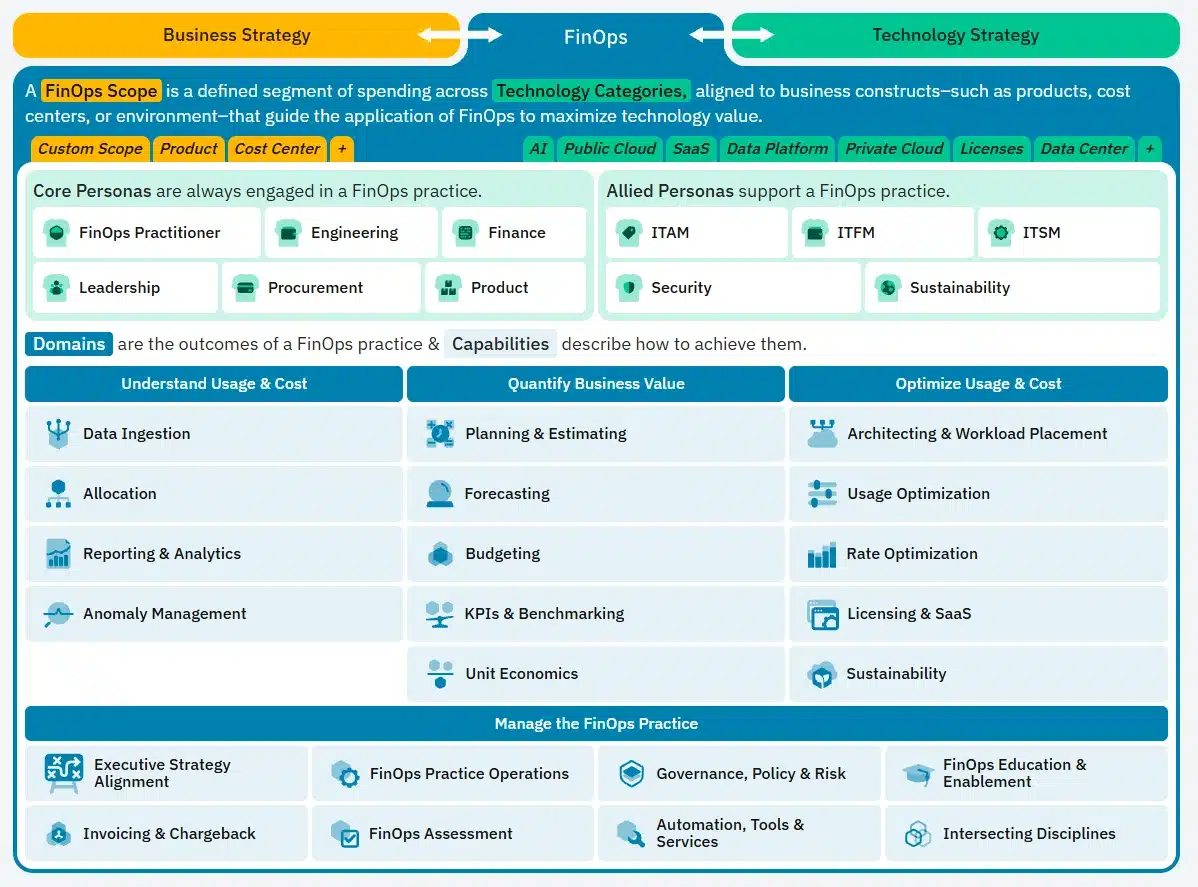
That breadth is useful, but it also makes role clarity important. Your shortlist should be based on the capabilities you actually need to improve, not on which vendor can claim the longest feature list.
At Usage.ai, for example, we specialize in cloud commitment optimization. We help teams evaluate, purchase, and manage commitments more effectively as part of their broader FinOps strategy.
That is the lens we would recommend using across the shortlist: define the role first, then compare vendors on how well they perform that role.
Evidence to request
| Requirement | Evidence to ask for |
|---|---|
| Cloud coverage | Demonstration using the cloud providers in your scope |
| Required FinOps capabilities | Written mapping of the capabilities included |
| Technology coverage | Supported services, billing sources, and datasets |
| Automation | Clear description of the actions the platform can take |
| Known limitations | Written confirmation of any relevant gaps |
2. Document deployment scope and required access
Before Security signs off, your team should have a clear picture of what gets connected, what data the platform can read, and what actions it can take.Start with the basics:
Which accounts, subscriptions, projects, or billing scopes need to be connected?
Does the platform require an agent or additional infrastructure?
Is billing access enough, or does it also need resource metadata or performance telemetry?
Which IAM roles or permissions are required?
Which permissions are read-only, and which allow changes?
Can access be limited by account, feature, or environment?
Can the evaluation begin with read-only access before broader permissions are granted?
| Access level | What it enables |
|---|---|
| Billing read | Reads billing and cost data |
| Resource read | Reads infrastructure metadata or configuration |
| Telemetry read | Uses performance or observability data |
| Workflow write | Creates tickets, notifications, or workflow actions |
| Cloud write | Changes cloud resources or configuration |
| Purchasing authority | Purchases or modifies cloud commitments |
The FinOps Foundation guidance on tools and services recommends evaluating application security, access models, integration requirements, data protection, and other non-functional requirements before selecting tooling.
3. Ask for security evidence, not just a compliance badge
A SOC 2 report or ISO certification can support the review, but it should not be the end of it.Depending on your internal requirements, ask for evidence such as:
SOC 2 Type II report
ISO 27001 status
penetration-test summary
architecture and data-flow diagram
IAM policies or role definitions
SSO or SAML capabilities
SCIM support
RBAC model
Audit logging
Encryption controls
Data residency options
Retention and deletion policies
Subprocessor list
Incident-response documentation
Vulnerability-management process
Disaster recovery and business continuity documentation
AI or model data-use policy, if relevant
What customer data leaves our environment?
Where is it stored?
Which cloud APIs can the platform call?
Which permissions are read-only?
Which actions can change our environment?
Can permissions be reduced if we do not enable certain features?
Can we audit what the platform did?
4. Validate reporting with the people who will use it
“Custom dashboards” sounds good in a demo, but the more useful test is whether the platform can answer the questions your teams already need answered.The FinOps Reporting and Analytics capability emphasizes reporting that supports different personas, from Finance and Engineering to FinOps and leadership.
During the evaluation, ask the vendor to demonstrate a few real reporting workflows using your requirements, not just prebuilt dashboards.
Finance
Can they:
Reconcile reported spend with provider billing
Compare actuals against budget
Understand forecast variance
See amortized commitment costs
Export data into existing finance workflows
Engineering
Can they:
identify which workload or resource is driving cost
see who owns it
understand the recommended action
evaluate the expected impact
track whether the recommendation was implemented
FinOps and leadership
Can they clearly explain:
the main drivers behind spend changes
optimization progress
realized savings
commitment coverage and utilization
material cost risks
changes in unit economics
The important thing is clarity on where each workflow lives, rather than expecting one platform to own every financial process.
5. Review commercial terms and the actual economics
The quoted platform price is only one part of the decision.FinOps vendors can price in very different ways. Some use subscriptions, some charge against managed cloud spend, and others tie fees to the savings they generate.
That is why Procurement should compare the total economics of the engagement, not just the headline platform fee.
Review:
Subscription or platform fees
Managed-spend pricing
Savings-share percentages
Annual minimums
Implementation fees
Professional services
Premium modules
API charges
User or seat fees
Overages
Support tiers
Renewal increases
Termination terms
Marketplace procurement options, where relevant
Ask the vendor to show:
The savings baseline
How gross and realized savings are defined
How vendor fees are calculated
How existing discounts and commitments are treated
How unused commitment exposure is handled
Which assumptions depend on future usage
What implementation effort is expected from your team
A savings percentage is far more useful when Finance can trace the assumptions behind it and understand what remains after fees and other costs.
At Usage.ai, our pricing model is tied to realized savings generated through eligible Flex Insured Commitments. For that reason, we believe the more useful comparison is the net economic outcome after the fee, rather than comparing platform prices in isolation.
Also read: How to Verify Cloud Savings Before Signing a Contract
6. Validate the platform with your own data
A polished demo shows what the platform can do under controlled conditions. A proof of value shows whether it works with your billing data, workflows, permissions, and operating model.Agree on the tests before the evaluation starts so every shortlisted vendor is measured against the same standard.
| Test | What should be proven |
|---|---|
| Billing reconciliation | Material differences from provider billing can be explained |
| Allocation | A real shared-cost example can be handled correctly |
| Reporting | Required stakeholder outputs can be produced |
| Forecasting | Historical forecasts can be compared with actuals where practical |
| Optimization | Sample recommendations hold up under engineering review |
| Automation | Approval controls and audit logs work as expected |
| Commitments | Existing commitments and utilization are correctly reflected |
| Security | Requested access matches the functionality being evaluated |
| Integration | A real workflow can be completed end to end |
| Savings | Your team can reproduce the proposed economics |
| Export | Data can be retrieved in a usable format |
The current FOCUS 1.4 specification includes stronger support for invoice reconciliation and commitment-related data. Its invoice reconciliation guidance is particularly useful if Finance needs to trace normalized cost data back to provider invoices.
FOCUS does not need to be a mandatory requirement for every evaluation. Make it one only if interoperability, portability, or standardized billing data matters to your FinOps environment.
Confirm the implementation effort
A platform can perform well in the evaluation and still require more internal effort than the business case assumes.Before signing, get clear on:
Who configures the platform
Who owns reporting and allocation rules
Who builds integrations
How much historical data needs to be imported
How much Engineering or FinOps time is required
Who handles user onboarding and training
What the vendor considers implementation complete
What support is included after launch
Once the platform has passed the technical, security, commercial, and proof-of-value checks, the final step is getting the right people comfortable with the decision.
7. Get stakeholder sign-off before Procurement closes the contract
FinOps is cross-functional by design. The FinOps personas framework includes FinOps, Engineering, Finance, Leadership, Procurement, and Product as core participants, with Security and other disciplines contributing to the practice.Your approval path will depend on your organization, but a typical enterprise review might look like this:
| Stakeholder | What they approve | Sign-off |
|---|---|---|
| FinOps | Capability fit, methodology, operating model | ☐ |
| Engineering / Platform | Recommendation quality and operational impact | ☐ |
| Finance | Reporting, reconciliation, forecasting, economics | ☐ |
| Security | Architecture, IAM, access, data handling | ☐ |
| Procurement | Pricing, renewal, commercial terms | ☐ |
| Legal / Privacy | Contract, DPA, liability, privacy requirements | ☐ |
| Executive sponsor | Business case and expected outcome | ☐ |
Also: How Much Does Cloud Cost Optimization Software Cost in 2026?
FinOps platform procurement scorecard
Use the scorecard to compare shortlisted vendors against the same criteria.A simple 0 to 4 scale works well:
1 = Major gaps
2 = Partially meets requirement
3 = Meets requirement
4 = Exceeds requirement
| Procurement criterion | Example weight | Score | Evidence verified |
|---|---|---|---|
| Required capability fit | 15% | ☐ | |
| Billing data and reconciliation | 10% | ☐ | |
| Reporting requirements | 10% | ☐ | |
| Deployment and access | 10% | ☐ | |
| Security and compliance | 15% | ☐ | |
| Automation and governance | 10% | ☐ | |
| Integrations | 5% | ☐ | |
| Commercial economics | 10% | ☐ | |
| Implementation and support | 5% | ☐ | |
| Contract and portability | 5% | ☐ | |
| Proof-of-value results | 5% | ☐ |
Use:
If commitment optimization is the main reason for the purchase, you may want to give more weight to commitment management, rate optimization, automation controls, and downside exposure.
If Finance is leading the deployment, reporting, allocation, reconciliation, and forecasting may carry more weight.
15 questions to ask every shortlisted FinOps vendor
Once you have the scorecard in place, use the same core questions with every shortlisted vendor. Consistency matters here because it makes the answers much easier to compare.Which of our required capabilities are native to the platform, which depend on integrations, and which are not supported today?
What data do you need from our environment, and why is each data source required?
What permissions are required during evaluation, and what changes once the platform moves into production?
Which actions can the platform take without human approval?
Can recommendations, approvals, and execution be controlled separately?
How do your reported costs reconcile to the underlying cloud-provider billing data?
Which reports can our teams create and modify without relying on vendor support?
How do we export our data if we decide to leave the platform?
Which integrations are included in the quoted package, and which require additional fees or services?
How do you calculate projected savings, realized savings, and any fees tied to those outcomes?
What work is required from our FinOps, Engineering, Finance, and Security teams during implementation?
What should we expect to pay in year one, and how can that change at renewal?
What happens to our data, integrations, and any managed commitments if the contract ends?
Which product, savings, and automation claims can we validate using our own environment before signing?
What technical, security, financial, and commercial evidence can you provide during the evaluation?
Procurement red flags worth slowing down for
The vendor answers should also make it easier to spot where the evaluation needs more scrutiny.Take a closer look if:
The savings claim is clear, but the methodology behind it is not
The platform requests broader write access than the stated use case appears to need
Capabilities shown in the demo are not included in your proposed package
“Multi-cloud” means broad visibility, but materially different functionality by provider
Finance cannot reconcile reported costs with provider billing
Data export or termination terms become vague once you ask what happens if you leave
Commitment recommendations do not clearly account for your existing portfolio
A decision-critical capability exists only on the roadmap
Implementation ownership is still unclear at contract stage
Key product, automation, or savings claims cannot be tested in your own environment
See what commitment optimization could look like in your environment
The best way to evaluate commitment optimization is not through a generic demo. It is to see how the strategy would work against your own usage, existing commitments, and savings potential.That is what we do with the Usage.ai Savings Test. Using read-only access, we review your current commitment position, identify eligible uncovered usage, and show where additional savings may be available before any purchasing authority is enabled.
If you decide to move forward, we can then help automate eligible commitment purchases through your cloud provider’s API and manage them through our Flex Insured Commitment Program.
Our pricing model is tied to realized savings, and eligible commitments can include cashback protection under the applicable program terms.
That gives your team a more concrete basis for deciding whether our approach fits your environment, your economics, and your risk tolerance.
Request our enterprise evaluation materials →
Review requirements, vendor fit, commitment economics, and risk before choosing a platform.
Frequently asked questions
What is a FinOps platform procurement checklist?
A FinOps platform procurement checklist is a structured set of functional, technical, security, financial, and contractual criteria used to determine whether a FinOps platform is suitable for enterprise deployment.
Who should be involved in buying a FinOps platform?
The evaluation commonly involves FinOps, Finance, Engineering or Platform, Security, Procurement, and the executive sponsor. Legal and Privacy may also need to participate depending on the platform, contract, and data involved.
What security evidence should a FinOps vendor provide?
Requirements vary by organization. But common evidence includes security certifications, architecture and data-flow documentation, IAM requirements, penetration-testing evidence, encryption controls, identity and access controls, retention policies, subprocessors, incident-response documentation, and audit logging.
Should enterprises run a proof of value before purchasing a FinOps platform?
For a material enterprise deployment, a proof of value can help validate billing accuracy, reporting, recommendations, permissions, integrations, implementation effort, and financial outcomes using representative data from your environment.
How should FinOps platforms be scored?
Use pass or fail gates for mandatory requirements and weighted scoring where trade-offs are acceptable. Require evidence for material vendor claims, and keep stakeholder approval separate from the numerical score.