.png)


Before making the switch, take stock of what you already have, review any active Archera products, compare the economics, and decide when purchasing authority should move.
This guide walks you through the process, from baseline and evaluation to cutover, verification, and cleanup.
When Is It Worth Migrating From Archera to Usage.ai?
Archera may remain the right choice if its native commitment-management capabilities, customer-controlled purchasing model, optional Insured Commitments, and commercial structure fit your requirements.Migration is worth evaluating when your requirements have changed. For example, you want a different commercial model, purchasing workflow, automation approach, or way to manage commitment downside.
The fairest test is to compare both approaches against:
- the same cloud usage,
- commitment inventory,
- account scope,
- pricing assumptions,
- growth expectations,
- downside scenario.
Migration at a Glance
| Phase | What you do | Output |
|---|---|---|
| Baseline | Normalize usage and commitment data | Comparable baseline |
| Inventory | Record native and protected commitments | Commitment register |
| Commercial review | Review premiums and applicable terms | Current obligations |
| Portfolio review | Classify commitments as keep, reassess, or investigate | Treatment plan |
| Usage.ai evaluation | Run the read-only Savings Test | Opportunity assessment |
| Economics | Compare base, downside, and growth scenarios | Go/no-go case |
| Operating model | Define approval and purchasing authority | Governance model |
| Handoff | Freeze changes and switch purchasing authority | Cutover plan |
| Verification | Monitor savings, utilization, billing, and purchases | Acceptance decision |
| Cleanup | Remove obsolete access and retain records | Completed migration |
Before you migrate: establish your baseline
Don’t disconnect Archera and then try to reconstruct historical performance. Start by capturing the current state of your cloud commitment portfolio and the assumptions behind it.A 60–90 day period is a practical starting point for a migration comparison. If your workloads are seasonal or undergoing a major transformation, use a longer period that better represents expected usage.
AWS Reserved Instances and Savings Plans, or equivalent Azure and Google Cloud commitments;
commitment coverage and utilization;
remaining terms and expiration dates;
monthly savings;
native versus protected commitments;
applicable Archera premiums;
accounts, subscriptions, projects, and services in scope;
material workload changes;
historical cloud usage supporting the commitments.
Define the comparison denominator
Before comparing savings, agree on what counts.At minimum, document:
the cloud-provider list price or other agreed pricing baseline;
the usage period;
accounts and services included;
existing commitments;
gross cloud savings;
vendor fees or premiums;
rebates or cashback;
credits and discounts that are outside the commitment decision;
taxes, where relevant to the financial comparison.
Inventory Native and Insured Commitments
Before evaluating a replacement, identify exactly what Archera is managing today.Archera’s Commitment Manager provides planning, purchasing, lifecycle management, utilization tracking, and automation for native cloud commitments. Archera says its native commitment-management platform is available at no platform fee.
Its optional Insured Commitments add protection and flexibility under separate product terms.
Create a commitment register with:
| Field | Record |
|---|---|
| Cloud provider | AWS / Azure / Google Cloud |
| Account scope | Account, subscription, or project |
| Service | Covered service |
| Commitment type | RI / Savings Plan / equivalent |
| Purchase source | Cloud provider / Archera / other |
| Purchase date | Date |
| Expiration | Date |
| Remaining term | Duration |
| Utilization | Current level |
| Savings | Current economic benefit |
| Protected? | Yes / No |
| Premium | Applicable amount |
| Protection | Applicable guarantee/mechanism |
| Owner | Internal owner |
| Treatment | Keep / reassess / investigate |
Native Commitments
Native commitments are ordinary cloud-provider commitments managed through Archera.For each one, evaluate:
- utilization;
- remaining term;
- expiration;
- savings generated;
- expected workload stability;
- whether the commitment still fits the workload.
Insured Commitments
Archera’s Insured Commitments are separate from its free native-management layer.Archera currently describes Guaranteed Savings Plans and Guaranteed Reserved Instances for AWS and Azure, and Guaranteed Committed Use Discounts for Google Cloud.
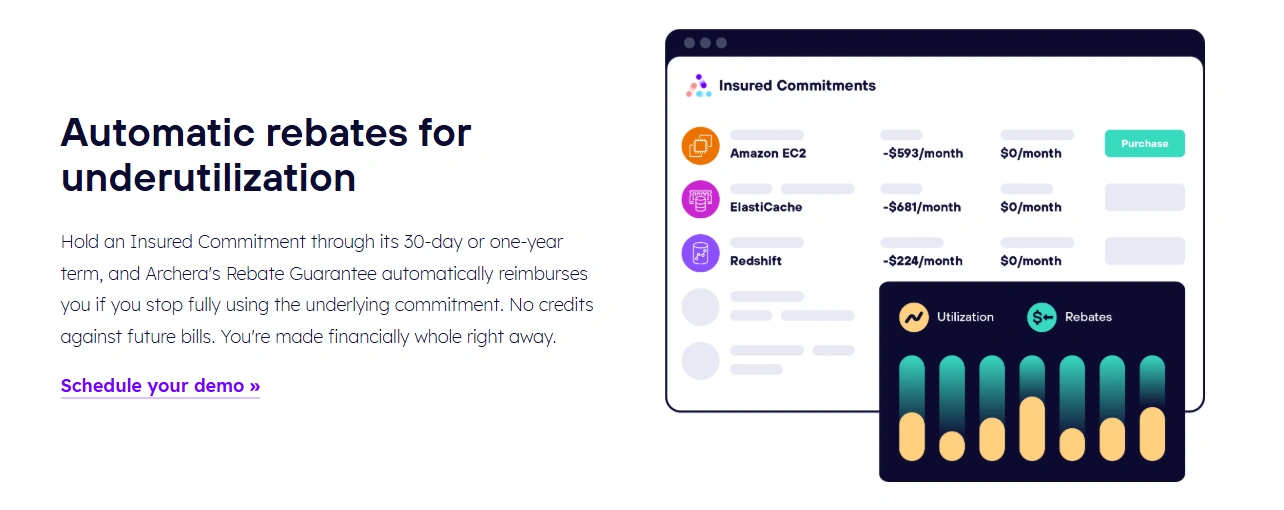
Its public materials describe terms as short as 30 days, Rebate Guarantees for qualifying underutilization, and Release Guarantees that allow eligible commitments to be sold back early.
So don’t model your current Archera cost as simply “Archera’s platform fee.”
Model the actual economics of the commitments you use, including:
- applicable premium;
- remaining term;
- protection mechanism;
- eligibility conditions;
- applicable loss or underutilization definition;
- release mechanics;
- outstanding obligations.
Confirm Archera’s Obligations
This is one of the most important pre-cutover controls.Archera’s Cloud Commitment Management page states that customers can offboard at any time without fees or contractual timelines. Its pricing page likewise says there is no platform fee or contract.
That statement should not be interpreted as automatically terminating every active paid product.
Before the handoff, confirm:
Which Archera services are active?
Which commitments have an associated protection product?
Are there outstanding transactions or obligations?
What terms govern each active Insured Commitment?
What reporting or access is still required?
When can Archera access safely be removed?
For customer-specific decisions, the applicable Archera terms and conditions, ordering documents, and commitment-specific terms control.
Classify the Existing Portfolio
Divide commitments into three practical groups.- the current commitment economics;
- expected future usage;
- Archera’s available options;
- Usage.ai’s proposed approach;
- downside exposure;
- applicable fees and protection.
The objective is to preserve commitments that are already working while reassessing future purchasing decisions.
Run a Read-Only Usage.ai Savings Test
Don’t hand over purchasing authority before you’ve established that the new approach is economically relevant.Our read-only Savings Test lets you evaluate potential savings without giving us purchasing access. Compare your current coverage, utilization, existing commitments, proposed commitments, savings, and downside assumptions.
The test shows what could change under Usage.ai; it isn’t a guarantee of future savings.
We also distinguish your existing commitments from Flex Insured Commitments managed through our program. Once you approve a recommendation, we can purchase the eligible commitment through the relevant cloud-provider API.
For the broader comparison, see Usage.ai vs. Archera.
Compare Like-for-Like Net Economics
Now compare staying with Archera against migrating to Usage.ai.If you decide to stay with Archera
Model:savings from existing native commitments;
applicable Insured Commitment premiums;
remaining commitment terms;
expected utilization;
value and conditions of applicable protection;
expected workload growth or contraction;
upcoming expirations.
If you decide to move to Usage.ai
Model:existing cloud commitment costs;
Usage.ai fees;
savings from new eligible commitments;
applicable Flex Commitment protection;
expected workload changes;
downside exposure.
Because Archera and Usage.ai use different commercial models, comparing fee percentages alone can be misleading. The better comparison is what you retain after applicable fees, premiums, and protection are accounted for.
Run Three Scenarios
| Scenario | Assumption | What to Measure |
|---|---|---|
| Base | Usage remains broadly consistent | Expected net savings |
| Downside | Committed usage falls materially | Residual cost and protection |
| Growth | Usage grows faster than expected | Incremental coverage and savings |
Compare:
- what loss qualifies;
- what is excluded;
- how the loss is calculated;
- when the benefit accrues;
- when it is paid;
- how fees interact with the benefit;
- whether early release is available;
- what happens if the commitment is terminated or expires.
For more commercial context, see our Archera pricing guide.
Approve the Operating Model
Once the economics are validated, decide how you want Usage.ai to manage future commitment purchases.You can use an approval-based workflow (co-pilot) for human oversight or an automated workflow (auto-pilot) where your governance model allows it.
Before enabling purchasing, define the scope, permissions, approval requirements, and who can pause new purchases.
Plan the Handoff
Once you’re ready to switch, keep the handoff simple and controlled. Treat it as an operational change, not just a platform connection.Establish One Purchasing Authority
Before enabling Usage.ai purchasing:Confirm any remaining Archera purchasing permissions.
Define Usage.ai's purchasing scope and authority.
Set a cutover time and let the relevant teams know.
Pause non-essential commitment purchases during the transition.
Define Stop Conditions
Have a clear reason to pause if commitment data doesn’t reconcile, purchasing authority is unclear, unexpected purchases occur, or billing differs materially from your approved case.Cut Over and Verify
After the switch, keep an eye on coverage, utilization, new purchases, realized savings, fees, cashback, and cloud-provider billing.Use our reporting and visibility to track commitment-level results.
Set a short observation period and agree on what good looks like before cutover. If results fall outside those expectations, pause new purchases and investigate.
Have a Rollback Plan
Rollback doesn’t mean reversing cloud commitments. If something doesn’t look right, pause new Usage.ai purchases, preserve your migration records, and restore the previous approval process where feasible. You need to investigate before moving forward.Remove Obsolete Access and Retain Records
Once the cutover is working as expected, clean up the old access.Before removing Archera permissions, confirm there are no remaining needs for commitment management, reporting, protected commitments, outstanding transactions, or other contracted services.
Then remove obsolete access through your normal IAM process and keep the key migration records, including your baseline, commitment inventory, economics, approvals, purchase history, and verification results.
This gives your team a clear audit trail and a useful reference for future commitment decisions.
What Actually Changes When You Move From Archera to Usage.ai?
Your existing cloud commitments don’t move when you change platforms. What changes is how future commitments are evaluated, purchased, and managed.| Archera | Usage.ai |
|---|---|
| Free native commitment management | Performance-based pricing |
| Optional Insured Commitments | Flex Commitments |
| Savings-based premiums for applicable protection products | Percentage of realized savings |
| Rebate and Release Guarantees for qualifying products | Cashback for eligible Flex Commitments |
| Customer-controlled purchasing with configurable automation | Approval-based or automated workflows |
Also read: Archera Reviews: Is It Worth It in 2026?
Should You Migrate From Archera to Usage.ai?
Not automatically.Staying with Archera can make sense if:
- its native commitment-management capabilities meet your requirements;
- your team prefers its customer-controlled purchasing model;
- its Insured Commitment economics work for your workloads;
- its protection and flexibility meet your risk requirements;
- its operating model fits your governance structure.
- you want a different commercial model;
- you prefer a different approach to commitment downside;
- you want managed commitment purchasing;
- you want a different approval or automation model;
- upcoming commitments are approaching renewal;
- your current strategy isn’t producing the desired risk-adjusted economics.
Bring your current commitment inventory, historical usage data, applicable Archera premiums, remaining commitment terms, and one realistic downside scenario.
We’ll model the economics of staying versus migrating, identify what should remain untouched, and show where the difference comes from.
Talk to an Expert
Run a free, read-only savings analysis and see the exact commitments we would recommend, execute, and protect.
Frequently asked questions
Do I have to replace my existing Archera commitments when I move to Usage.ai?
No. Changing management platforms does not automatically replace existing AWS, Azure, or Google Cloud commitments. Evaluate each commitment based on utilization, remaining term, provider economics, and any vendor-specific terms.
Does Archera charge an exit fee?
Archera's public materials state that customers can offboard its core platform without fees or contractual timelines. This does not necessarily terminate active Insured Commitments or other paid products, which remain subject to their applicable terms.
What happens to Archera Insured Commitments?
They remain subject to the applicable Archera product and commitment terms. Before changing the workflow, review the premium, remaining term, protection mechanics, eligibility conditions, and any applicable release provisions.
Can I evaluate Usage.ai before giving it purchasing access?
Yes. We provide a read-only Savings Test so you can evaluate the potential opportunity before changing purchasing authority. The read-only configuration does not give us the ability to purchase Reserved Instances or Savings Plans during the evaluation.
How do I prevent Archera and Usage.ai from making overlapping purchases?
Establish one purchasing authority before enabling the new workflow. Use a short purchase freeze during the transition, document the cutover time, and confirm which system is authorized to make new commitment purchases.