AWS
AWS Microsoft Azure
 Google Cloud

ProsperOps remains a viable cloud commitment-management platform. Flexera acquired ProsperOps in January 2026, and ProsperOps said it would continue as a standalone brand within Flexera’s broader FinOps strategy. The acquisition itself isn’t a reason to leave.
A migration becomes worth evaluating when your requirements have changed, for example, your approach to commitment risk, purchasing control, vendor economics, or broader FinOps strategy.
The migration itself is also less complicated than a workload migration. Your workloads don’t move, and your existing AWS commitments don’t transfer between vendors. You’re changing who manages future commitment decisions.
Migration at a glance
| Phase | What you do | Output |
|---|---|---|
| Baseline | Export ProsperOps data and record current performance | Comparable starting point |
| Exit review | Check your agreement and applicable charges | Migration cost |
| Portfolio review | Classify existing commitments | Keep/reassess list |
| Usage.ai evaluation | Run the read-only Savings Test | New optimization opportunity |
| Economics | Compare stay vs. migrate under multiple scenarios | Go/no-go decision |
| Handoff | Establish one purchasing authority | Cutover plan |
| Enablement | Choose the appropriate Usage.ai operating mode | New operating model |
| Verification | Monitor results against your baseline | Validated migration |
| Cleanup | Remove unnecessary access and retain records | Completed handoff |
Before you migrate: establish your baseline
Don’t disconnect ProsperOps and then try to reconstruct your historical performance.ProsperOps’ AWS Data Export publishes updates to an S3 bucket every 24 hours. Its documentation also distinguishes RI/SP Only data from All Discounts, allowing customers to isolate Reserved Instance and Savings Plan savings from other optimization mechanisms.
Review the ProsperOps AWS Savings Data Export documentation before you begin.
RI and Savings Plan inventory
Coverage and utilization
Remaining terms and expiration dates
Monthly savings
ProsperOps Savings Share
Historical portfolio performance
Accounts and services included in the analysis
The objective is to know what you’re getting today before deciding whether the new model is better.
Calculate your ProsperOps exit economics
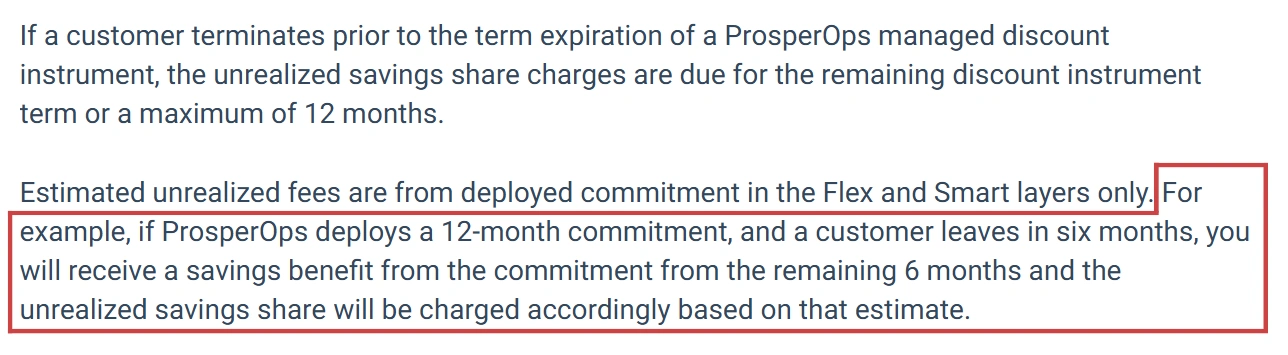
Before you cancel, review your actual ProsperOps agreement and calculate the cost of leaving.ProsperOps publicly documents that cancellation can result in a current-month Savings Share charge. It also documents unrealized Savings Share for certain ProsperOps-managed discount instruments when customers terminate before the applicable term ends.
Its documentation describes a maximum 12-month period for applicable unrealized fees. See ProsperOps’ explanation of unrealized fees for the documented mechanics.
If you stay
Current ProsperOps Savings Share: Establish what you're paying today.
Expected future savings:Estimate what your existing portfolio should generate over its remaining terms.
Existing commitment exposure: Identify commitments that could become less economical if usage changes.
Expected usage changes: Account for growth, reductions, migrations, or workload changes.
If you migrate
Current-month ProsperOps charge: Include any Savings Share due when you cancel.
Applicable unrealized Savings Share: Include charges that apply under your agreement.
Existing AWS commitment costs: Keep commitments that remain active in the model.
Usage.ai fees: Include applicable fees under the new model.
Expected new savings: Model savings from new commitments based on actual usage.
Applicable cashback: Include cashback only for eligible Flex Commitments under the applicable terms.
| Scenario | Question |
|---|---|
| Base | What if usage remains broadly consistent? |
| Downside | What if committed usage falls materially? |
| Growth | What if usage grows faster than expected? |
Classify your existing commitments
Your existing portfolio shouldn’t be treated as a blank slate.Divide it into three groups.
Healthy commitments
Well-utilized commitments with meaningful time remaining can generally continue operating. Changing management vendors doesn’t automatically make a healthy AWS commitment uneconomic.Commitments nearing expiration
These are natural reassessment points. Compare the economics of renewal under your current approach with the opportunities identified through Usage.ai.Underutilized commitments
These require individual analysis. Changing vendors doesn’t remove an existing AWS commitment, so understand the remaining exposure before making another purchase.The objective isn’t to replace everything. Separate commitments that are already working from future purchasing decisions that need to be reassessed.
Evaluate Usage.ai before changing purchasing authority
This is where we’d recommend starting.Our read-only Savings Test lets you evaluate potential savings without giving us the ability to purchase Reserved Instances or Savings Plans. See our security and compliance documentation for details on the access model.
Use your ProsperOps baseline as the reference point.
Coverage: Where are the current gaps?
Existing commitments: Which commitments are already performing well?
Proposed commitments: What new purchases does our analysis identify?
Expected savings: What savings are projected against the same baseline?
Utilization assumptions: What usage supports each recommendation?
Vendor fees: What do you retain after applicable charges?
Downside exposure: What happens if committed usage falls?
Eligible cashback: What protection applies to qualifying Flex Insured Commitments?
For the broader differences between the two approaches, see Usage.ai vs. ProsperOps.
How to migrate from ProsperOps to Usage.ai
Once the economics support the move, keep the operational handoff controlled.1. Lock the baseline
Export your ProsperOps data and save the inventory, savings, coverage, utilization, and historical performance used in your analysis.2. Confirm your exit economics
Review your ProsperOps agreement and calculate applicable cancellation and unrealized Savings Share before terminating the service.3. Classify your existing portfolio
Mark commitments as healthy, expiring, or underutilized. Decide what stays in place and what needs reassessment.4. Run the Usage.ai Savings Test
Connect us in read-only mode and evaluate the opportunity without immediately granting purchasing authority.This lets you validate our recommendations against your existing ProsperOps baseline before changing the operating model.
5. Validate the economics
Compare the stay and migration scenarios using the same baseline, pricing assumptions, and base, downside, and growth cases. We’ve covered the pricing mechanics in more detail in our ProsperOps pricing guide.6. Establish one purchasing authority
Before enabling a new purchasing workflow, clearly define which system is authorized to make new commitment purchases.This matters during the handoff. ProsperOps advises customers against making RI or Savings Plan purchases outside ProsperOps while its automated management is enabled because external transactions can affect its optimization.
See ProsperOps’ guidance on external RI/SP purchases.
Avoid a period where two systems can independently make commitment decisions against the same portfolio. Define the handoff point before enabling new purchasing authority.
7. Choose your Usage.ai operating mode
For a controlled migration, you can start with CoPilot if your team wants to review and approve recommendations before purchases execute.If your operating model calls for autonomous purchasing, Autopilot can provide a more automated commitment-management workflow.
This lets you choose the level of purchasing control that fits your organization’s governance requirements.
8. Define the cutover controls
Before the handoff, assign an owner and define the change window.Record the final ProsperOps portfolio state, confirm which system has purchasing authority, and decide what would cause you to pause new purchases.
Keep the relevant exports, approvals, and purchase records so the transition can be audited afterward.
9. Verify the cutover
Don’t consider the migration complete simply because the integration is enabled.Monitor:
- Coverage
- Utilization
- Realized savings
- New commitment purchases
- Usage.ai fees
- Applicable cashback
- Billing results against your baseline
If results materially differ from the approved migration case, pause new purchasing decisions and investigate before expanding the new strategy.
10. Remove unnecessary access
Once the handoff has been verified, remove ProsperOps permissions that are no longer required under your normal IAM and change-control process.Keep the ProsperOps exports, calculations, approvals, and purchase records. They provide the baseline you’ll need to evaluate the new operating model over time.
Also read: 6 Best ProsperOps Alternatives in 2026
What changes when you move to Usage.ai?
The biggest difference is how eligible new commitments are handled.Your existing commitments remain yours. We don’t automatically replace or insure them.
For eligible commitments managed through our Flex Insured Commitment Program, we provide cashback protection under the applicable program terms when a qualifying Flex Commitment becomes more expensive than equivalent on-demand usage.
Our pricing is tied to realized savings generated through the Flex Commitment Program. You can see the details in how Usage.ai pricing works.
Should you migrate from ProsperOps?
Not automatically.If ProsperOps is delivering strong net savings, your commitments are well utilized, and its operating model fits your governance requirements, staying may be the right decision.
A migration is worth pursuing when your analysis shows a specific improvement, such as:
- A different approach to commitment downside
- Greater control over new purchasing decisions
- A better fit with your vendor economics
- A need to reassess commitments approaching expiration
- A desire to evaluate an alternative before granting purchasing authority
Bring your current commitment inventory, historical usage data, ProsperOps Savings Share, remaining commitment terms, and one realistic downside scenario.
We’ll model the economics of staying versus migrating and show you where the difference comes from.
Talk to an Expert
Run a free, read-only savings analysis and see the exact commitments we would recommend, execute, and protect.
Frequently asked questions
Do I have to replace my existing ProsperOps commitments when I move to Usage.ai?
No. Your existing AWS Reserved Instances and Savings Plans remain in your AWS account. Changing management providers does not require you to replace healthy commitments.
What does it cost to leave ProsperOps?
It depends on your agreement and managed commitments. ProsperOps documents a current-month Savings Share charge and potential unrealized Savings Share for certain managed discount instruments. Your agreement controls the charges that apply to your account.
Can I evaluate Usage.ai before giving it purchasing access?
Yes. Our read-only Savings Test lets you evaluate potential savings without giving us permission to purchase Reserved Instances or Savings Plans.
What happens to my existing commitments after I migrate?
They remain your existing AWS commitments. We don't automatically replace or insure them. We evaluate the portfolio and focus on future opportunities that make economic sense.
What happens if an eligible Usage.ai Flex Commitment becomes underutilized?
For eligible Flex Commitments, applicable cashback protection can address qualifying underutilization under the program's terms. See our Cashback Protection documentation for the current eligibility and payment mechanics.
If you notice any material information that is incorrect, outdated, or no longer applicable, please contact us at [email protected]. We’ll review the information and update the article where appropriate.