.png)
 AWS
AWS Microsoft Azure
 Google Cloud


We put this guide together to make that evaluation easier. It walks through how ProsperOps pricing works, the costs buyers should consider, and the contract terms worth reviewing before signing. It also draws on ProsperOps’ published documentation and independent customer feedback to give you a balanced view of the pricing model.
The goal isn’t to tell you whether ProsperOps is right or wrong for your business. It’s to give you a clear picture of how the pricing works so you can decide whether its model makes sense for your cloud environment and operating needs.
ProsperOps pricing at a glance
ProsperOps currently separates its pricing into two main models.- Autonomous Discount Management (ADM) uses a share-of-savings model
- Autonomous Resource Management (ARM) charges a flat fee per managed resource per month.
| Pricing component | How it works |
|---|---|
| Autonomous Discount Management | Percentage of realized savings |
| Autonomous Resource Management | Flat fee per managed resource/month |
| Exact ADM rate | Defined by the applicable commercial terms |
| Subscription | Monthly by default |
| Longer-term plan | Available on request |
| Cancellation | Can create additional Savings Share charges |
| Cloud commitments | Separate underlying cloud financial exposure |
Does ProsperOps publish its exact price?
Not as a single public rate card. ProsperOps describes ADM as a percentage of realized savings and says the Savings Share is calculated using rates applied to defined savings categories. Its public pricing page does not give prospective customers one universal percentage that applies to every customer.How does ProsperOps Savings Share work?
ProsperOps calls its ADM charge Savings Share. Rather than charging a percentage of cloud spend, ProsperOps calculates the charge based on the dollar value of eligible savings. Its billing documentation explains how different savings categories are used in that calculation.For AWS, ProsperOps’ pricing page identifies Inherited Savings, Base Savings, and Smart Savings as savings categories, while its Help Center also references Flex Savings.
Because the categories and terminology aren’t presented identically across ProsperOps’ public pricing and Help Center materials, it’s worth confirming which categories apply to your account and what rate applies to each before signing.
It’s also worth understanding how those savings are measured. ProsperOps says AWS is the authoritative system of record for RI and Savings Plan savings, with savings calculated based on the difference between RI/SP spend and the equivalent on-demand cost.
What should you factor into the total cost?
The Savings Share is the main component of ProsperOps’ ADM pricing, but it’s not the only factor that can affect the overall economics. Here’s what to look at when estimating your total cost.1. Your actual Savings Share rate
ProsperOps explains its Savings Share model publicly, but it does not publish one universal ADM percentage for every customer. The rate that applies to your account is determined by your specific commercial terms.Before signing, make sure you understand the exact rate in your agreement and what savings it applies
2. Which savings are subject to the fee
The next thing to understand is what ProsperOps considers eligible savings. Its billing documentation says Savings Share is calculated using different rates applied to categories such as Inherited Savings, Base Savings, Flex Savings, and Smart Savings.For AWS, for example, Base Savings can include savings from Savings Plans and certain Reserved Instances, while Flex Savings relates to Convertible Reserved Instances that ProsperOps has purchased or optimized.
So the important question isn’t only “What is my Savings Share rate?” but also “Which savings does that rate apply to?” If you already have customer-procured Savings Plans or Reserved Instances, this distinction is particularly worth clarifying before you sign.
3. ARM uses a different pricing model
If you’re also considering Autonomous Resource Management (ARM), its pricing works differently from ADM. ProsperOps describes ARM as a flat fee per managed resource per month, rather than a percentage of savings. See ProsperOps pricing.So if you’re evaluating both products, look at their costs separately rather than assuming the ADM Savings Share covers everything.
4. AWS commitment spending is separate from the ProsperOps fee
It’s also important to separate ProsperOps’ service fees from the cost of the AWS commitments it manages. ProsperOps can manage discount instruments on a customer’s behalf, and its pricing documentation describes customer-approved budgets for certain prepayment deployments. See ProsperOps pricing and budget FAQ.That prepayment is not a ProsperOps fee. It’s an underlying AWS commitment cost, but it still matters when you’re assessing your overall cash requirements and the economics of the arrangement.
5. ProsperOps may bill separately from AWS
By default, ProsperOps says its charges appear on a separate ProsperOps bill, while the AWS bill reflects the lower compute costs. Customers can instead purchase through AWS Marketplace so the ProsperOps charge appears on the AWS bill. ProsperOps billing and AWS Marketplace explanation.For finance teams, this is worth accounting for when reconciling cloud savings against vendor costs.
What happens if you cancel ProsperOps?
ProsperOps allows customers to cancel their subscription at any time. However, cancellation does not necessarily mean the financial relationship ends with the next monthly invoice.ProsperOps says customers are billed for the Savings Share accrued during the current month, along with a final Savings Share charge for future-to-be-realized savings associated with ProsperOps-managed commitments.
That makes the cancellation terms worth reviewing alongside the ongoing Savings Share when evaluating the overall cost of the service. See ProsperOps cancellation policy.
Unrealized Savings Share
ProsperOps explains that when a customer leaves before certain ProsperOps-managed discount instruments reach the end of their term, unrealized Savings Share charges can apply to the remaining term, up to a maximum of 12 months.ProsperOps gives the example of a 12-month commitment where a customer leaves after six months; the remaining six months of estimated savings can be used to calculate an unrealized Savings Share charge. See ProsperOps’ explanation of unrealized fees.
What happens to the cloud commitments?
Leaving ProsperOps also doesn’t make the underlying AWS commitments disappear. ProsperOps’ documentation explains what happens to the Reserved Instance portfolio when a customer leaves, while its cancellation terms address the associated Savings Share obligations. See ProsperOps’ cancellation and portfolio documentation.For procurement teams, the practical question is:
“If we terminated today, what would our total financial exposure be?”
It’s worth asking ProsperOps for that estimate before signing, particularly if the service will manage a meaningful commitment portfolio.
Is ProsperOps pricing transparent?
The answer depends on what you mean by transparent.ProsperOps publicly documents its pricing model, billing approach, cancellation mechanics, Savings Share methodology, and relevant contract terms.
What is less transparent from the public website is the exact Savings Share percentage a prospective customer will pay. The commercial rate is tied to the customer’s Plan or Order rather than presented as one universal public number.
Independent customer feedback is broadly positive. G2 currently lists ProsperOps at 4.7/5 from 21 reviews, with reviewers frequently praising its automation and savings impact. See ProsperOps reviews on G2.
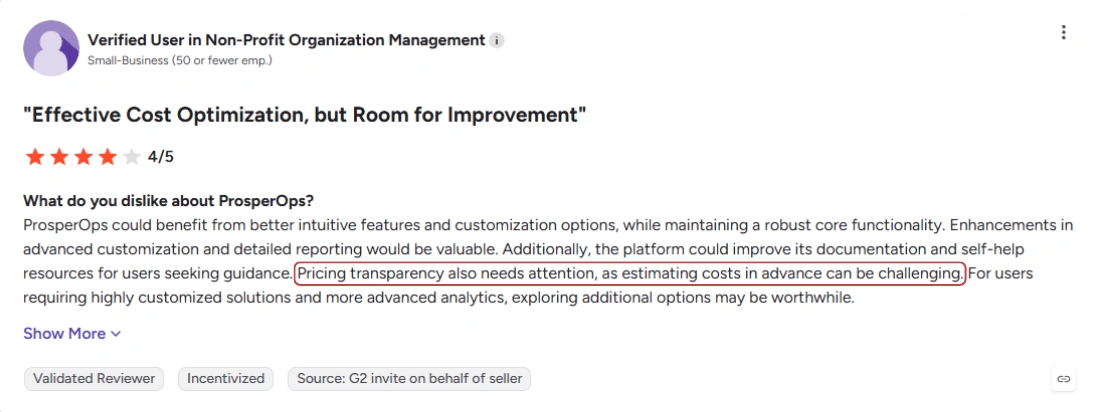
There is, however, at least one relevant criticism: a G2 reviewer said pricing transparency could be improved because estimating costs in advance can be challenging. Another reviewer described the product as “not cheap,” while also calling it reasonably priced.
7 questions to ask before signing ProsperOps
Before accepting a ProsperOps proposal, ask:What exact Savings Share percentage applies to our account?
Which savings categories are subject to Savings Share?
Are our existing/customer-procured commitments included in the fee calculation?
What would our unrealized Savings Share be if we terminated today?
Does our Order include an early termination provision or other term-specific charge?
What cloud commitment spending can ProsperOps deploy on our behalf, and what budget controls apply?
What additional fees apply if we use ARM or other ProsperOps services?
How does ProsperOps pricing compare with alternatives?
If you’re comparing ProsperOps with alternatives, look at the net economics under the same usage scenario:| What to compare | Why it matters |
|---|---|
| Savings generated | Shows the gross benefit before vendor fees |
| Vendor fees | Shows what you pay for the optimization service |
| Commitment exposure | Shows how much usage you need to maintain |
| Downside protection | Shows what happens if usage falls |
| Exit economics | Shows whether costs continue after cancellation |
| Customer control | Shows who controls commitment purchases and limits |
A platform with a lower headline fee isn’t necessarily cheaper if its model leaves you with greater commitment exposure.
Also read: 6 Best ProsperOps Alternatives in 2026
Where Usage.ai takes a different approach
Usage.ai uses a different model for Flex Insured Commitments. Rather than treating underutilization only as a commitment-management problem, we provide cashback protection when an eligible Flex Commitment costs more than the equivalent on-demand usage.The underlying commitment still exists in the customer’s AWS account. The difference is how downside is handled.
When the eligible protection conditions are met, the excess cost is returned as cashback rather than leaving the customer to absorb the full gap. Learn how cashback works
That makes the comparison less about which vendor has the lowest fee and more about which risk model fits your usage profile and FinOps controls.
Who is ProsperOps pricing a good fit for?
ProsperOps pricing can fit if you:- want automated commitment management and are comfortable with a Savings Share model;
- value a mature autonomous approach to discount management;
- have relatively predictable usage and can operate within the commitment strategy agreed with ProsperOps;
- are comfortable reviewing the commercial terms around Savings Share and cancellation before signing.
- have highly variable or uncertain cloud usage;
- want explicit protection against eligible commitment underutilization;
- need greater predictability around vendor fees;
- want to compare the financial impact of different commitment-risk models before committing to a longer term.
Connect in 15 minutes. No contracts, no infrastructure changes. See your savings before committing.
Frequently asked questions
How does ProsperOps charge customers?
ProsperOps' Autonomous Discount Management (ADM) uses a Savings Share model, where the fee is based on eligible realized savings rather than total cloud spend. The applicable rate is determined by the customer's commercial terms.
Does ProsperOps publish its Savings Share rate?
ProsperOps explains its pricing model publicly but does not publish one universal Savings Share percentage for all customers. The applicable rate and savings categories are defined in the customer's agreement.
Does ProsperOps charge a fee if I cancel?
Potentially. ProsperOps says customers are responsible for Savings Share accrued during the current billing period and may also owe unrealized Savings Share associated with eligible managed commitments after cancellation. The applicable contract determines the actual amount.
Is Autonomous Resource Management (ARM) included in the Savings Share?
No. ProsperOps describes ARM as a separate pricing model, charging a flat fee per managed resource per month. If you're evaluating both ADM and ARM, consider their costs separately.
What should I compare when evaluating ProsperOps alternatives?
Don't compare vendors on their headline fee alone. Look at gross savings, vendor fees, commitment exposure, downside protection, and exit economics under the same usage assumptions. This gives you a better picture of expected net savings and risk.
If you notice any material information that is incorrect, outdated, or no longer applicable, please contact us at [email protected]. We’ll review the information and update the article where appropriate.