AWS
AWS Microsoft Azure
 Google Cloud
For many teams, the real goal is narrower: move AWS Savings Plan and Reserved Instance management to Usage.ai while keeping the reporting, allocation, budgeting, governance, or other Flexera workflows that still work well.
That being said, the biggest migration risk that customers face is usually not downtime. It is overlapping purchasing authority, losing track of existing commitments, or overlooking costs that survive the switch.
A good migration should therefore look like a controlled transfer of commitment-management authority.
What changes: commitment analysis, purchasing authority, approval or automation controls, and portfolio management.
What does not automatically change: your workloads, active AWS commitments, broader Flexera workflows, or existing provider obligations.
The migration in six steps
| Step | What to do | Why it matters |
|---|---|---|
| 1. Identify | Confirm which Flexera product manages commitments | Products can have different workflows and exit terms |
| 2. Preserve | Export commitment, billing, approval, and reporting history | Creates your comparison baseline |
| 3. Inventory | Record every active RI and Savings Plan | Existing AWS obligations can survive the tool change |
| 4. Evaluate | Run Usage.ai read-only | Lets you compare before changing purchasing authority |
| 5. Cut over | Freeze incumbent purchases, then enable Usage.ai | Prevents overlapping purchasing |
| 6. Verify | Reconcile AWS, Usage.ai, billing, and permissions | Confirms the handoff worked |
1. Identify which Flexera product you use
Before you migrate, confirm which part of Flexera you are actually replacing. Today, Flexera’s FinOps offering has two relevant layers for this guide.If you use Flexera One Cloud Cost Optimization, commitment management may be only one part of a broader FinOps setup. Moving commitments to Usage.ai does not automatically replace your allocation, budgets, anomaly management, rightsizing, or reporting workflows.
If you use Spot Eco or Flexera One Cloud Commitment Management, this guide is closer to your migration path. Flexera transitioned Spot Eco into Flexera One Cloud Commitment Management in 2025.
Flexera also acquired ProsperOps in January 2026, and its current Cloud Commitment Management offering prominently features ProsperOps.
ProsperOps separately publishes guidance for customers moving from Spot Eco or Flexera One Cloud Commitment Management.
2. Decide what is actually moving
Define the migration boundary before touching permissions.You might move Savings Plan and RI management to us while keeping Flexera for allocation, budgeting, anomaly management, or executive reporting.
That is a valid operating model.
List the workflows Flexera currently supports and assign each one an owner after migration. This avoids a situation where commitment purchasing moves successfully but finance or engineering later discovers that a report, approval process, or governance workflow disappeared.
A commitment-management migration does not need to become a full FinOps-platform migration.
Also read: Flexera Reviews: Is the Platform Worth It in 2026?
3. Preserve your baseline and inventory every commitment
Do not disconnect Flexera first.Preserve your active commitment inventory, expiration schedule, coverage and utilization history, historical savings, vendor fees, purchasing history, approvals, connected AWS accounts, reports, and relevant IAM configuration.
Then inventory every active Savings Plan and Reserved Instance, including commitments purchased directly and those placed or managed through Flexera, Spot Eco, ProsperOps, or another process.
AWS notes in its Savings Plans purchasing documentation that the purchasing AWS account remains responsible for the commitment even if another account pays the bill.
For each commitment, capture:
AWS purchasing account
commitment type and scope
start and expiration dates
current utilization
current manager
vendor fee treatment
treatment under your exit terms
4. Calculate exit economics before comparing savings
Before asking whether we can improve the outcome, calculate what leaving the incumbent costs.This is especially important for ProsperOps.
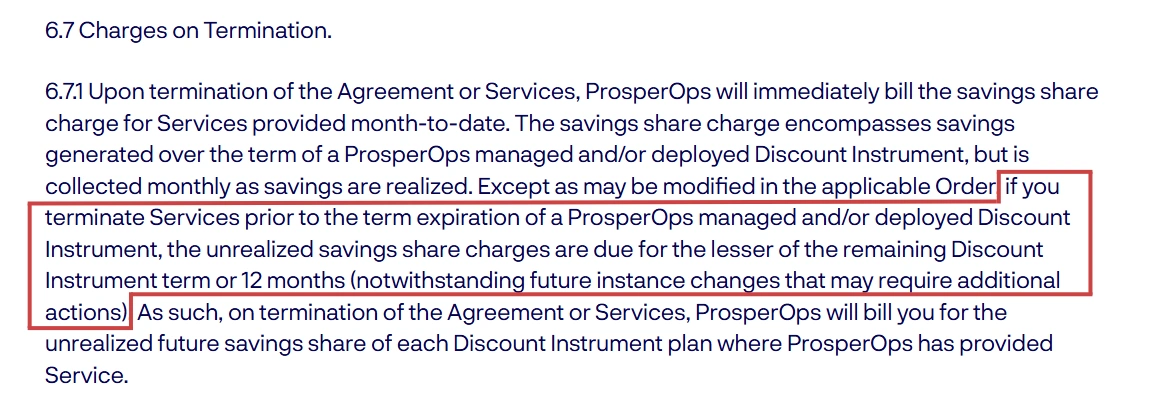
Its public guidance on cancelling the service describes month-to-date Savings Share and, in some situations, a final charge related to future savings from ProsperOps-managed commitments.
Its published service terms also describe potential unrealized Savings Share charges, subject to the customer’s Order.
If you use legacy Flexera One Cloud Commitment Management or Spot Eco, use the agreement for that service rather than assuming ProsperOps terms apply.
Model:
Also read: Flexera Pricing: Fees, Metrics, and Contract Costs
5. Evaluate Usage.ai read-only first
You can test Usage.ai before giving us permission to purchase commitments.Our Savings Test can run with read-only AWS permissions. In that state, we can analyze the environment but cannot purchase RIs or Savings Plans.
Keep your existing Flexera process active, connect Usage.ai read-only, and compare both using the same AWS accounts, commitment inventory, and representative usage period.
A practical rule is:
6. Compare operating outcomes, not feature lists
Flexera already offers automated commitment management, so automation alone is not a strong reason to switch.Its current Cloud Commitment Management page describes continuous monitoring, portfolio adjustment, commitment laddering, guardrails, and outcomes-based pricing.
Compare what affects the actual result:
Coverage and utilization
Net realized savings
Commitment amount
Vendor fees
Treatment of existing commitments
Approval and automation controls
Underutilization exposure
Exit economics
Auditability
AWS explains how Savings Plans recommendations are calculated and how Purchase Analyzer calculations can vary with account scope and discount sharing.
Think of it this way:
- AWS billing and inventory: what exists and what was charged.
- AWS recommendations: a provider-native historical reference.
- Flexera and Usage.ai: different optimization and management models.
7. Stress-test Usage.ai protection
Our Flex Commitment Program is designed to reduce the downside risk of committing to cloud usage that later changes.If an eligible Flex Commitment becomes underutilized because actual usage falls below expectations, the program can provide a contractual Non-Usage Rebate for qualifying losses. This gives customers an additional layer of protection beyond simply trying to size commitments perfectly upfront.
Our cashback documentation explains how qualifying losses are calculated and when cashback is paid. The more detailed Flex Commitment Program Terms cover eligibility, exclusions, payment timing, fee offsets, and termination.
When you model the migration, it is still useful to test two downside cases:
- Usage drops and the commitment qualifies for protection. Include the applicable rebate in the model.
- Usage drops and it does not qualify. Measure the remaining commitment exposure without assuming protection.
Also read: Usage.ai vs Flexera: Cloud Cost, Commitments, and Risk
8. Confirm responsibility before cutover
Before Usage.ai receives production purchasing access, make sure the commercial responsibilities are clear to the teams approving the migration.Finance and procurement should understand which commitments will fall under the Usage.ai program, how financial responsibility is handled, whether any buyback provisions apply, and what commercial terms govern an eventual exit.
This is also the right point to reconcile the product setup with the agreement your organization is signing. The operational team may be focused on AWS accounts, permissions, and purchasing controls, while procurement is focused on fees, liability, and termination. Both views need to match before cutover.
Usage.ai’s public documentation explains the standard Flex Commitment workflow and program model, while your applicable agreement contains the terms specific to your organization.
Getting that alignment upfront makes the handoff easier to approve, gives finance a clear record of the arrangement, and reduces the chance of commercial questions surfacing after purchasing has already started.
9. Set your controls and execute the cutover
Once the economics and terms make sense, decide where you want human approval and where, if appropriate, Autopilot can operate.Before enabling purchasing, define the accounts, regions, services, commitment types, limits, approval rules, pause authority, and audit owner.
Then set an exact cutover window.
Cutover-day controls
| Control | Required action |
|---|---|
| AWS Savings Plans inventory | Save the final pre-cutover state |
| AWS RI inventory | Save the final pre-cutover state |
| Flexera/ProsperOps portfolio | Export the final commitment view |
| Pending incumbent actions | Complete, cancel, or document them |
| Incumbent purchasing automation | Disable before handoff |
| Incumbent write permissions | Remove or restrict as appropriate |
| Usage.ai authorized scope | Verify against approved controls |
| Cutover timestamp | Record it |
| First Usage.ai action | Review against the approved scope |
10. Verify before removing the old access
Do not consider the migration complete just because Usage.ai is connected.Compare AWS Savings Plans and RI inventories against the final incumbent export and the first Usage.ai activity after cutover.
Confirm active commitments, recent purchases, AWS billing activity, Usage.ai records, IAM permissions, and expected coverage or utilization.
The three views should make sense together:
- what AWS says exists,
- what we say we manage, and
- what your migration plan expected to happen.
Keep historical invoices, reports, approvals, and change records for finance, procurement, security, and audit.
What happens if you later leave Usage.ai?
Model our exit terms with the same discipline you used for Flexera.Under the current public Flex Commitment Program Terms, termination ends participation in the program and eligibility for Non-Usage Rebates, including for underutilization that occurred during the term. The terms also describe rebate timing and the application of rebates against Usage.ai fees.
Separately, our current public product materials discuss cancellation and commitment buyback. Before production use, confirm how those provisions apply to your organization, including treatment of active commitments, financial responsibility, accrued benefits, remaining fees, and any applicable buyback mechanism.
When moving commitment management may make sense
There are three reasonable outcomes.- Move if our read-only analysis shows stronger net economics, the control model fits your team, and the applicable commitment-risk terms meet your requirements.
- Stay if Flexera is already producing strong economics and its broader integration remains valuable.
- Coexist if Usage.ai manages commitments while Flexera continues to handle other FinOps workflows.
For teams that prefer to procure software through AWS, Usage.ai is also available on AWS Marketplace.
Start with a read-only view of your current AWS commitments and savings opportunity.
We can help you compare the economics before you change how commitments are managed.
Talk to a Usage.ai expert
Connect in 15 minutes. No contracts, no infrastructure changes. See your savings before committing.
Frequently asked questions
Do we need to replace all of Flexera to move to Usage.ai?
No. You can move AWS Savings Plan and Reserved Instance management to Usage.ai while continuing to use Flexera for broader FinOps workflows such as allocation, budgeting, anomaly management, rightsizing, or reporting.
What happens to our existing AWS commitments when we leave Flexera?
They do not automatically disappear. Existing Savings Plans and Reserved Instances remain subject to AWS terms, so inventory them before cutover and decide how each one will be managed going forward.
Can we evaluate Usage.ai before giving it purchasing access?
Yes. You can run a read-only Usage.ai Savings Test against your AWS environment before enabling commitment-purchasing permissions.
Can Flexera and Usage.ai run at the same time during migration?
Yes for analysis. During the comparison period, keep only one platform authorized to purchase commitments. This reduces the risk of duplicate purchases and makes the cutover easier to audit.
What should we compare before deciding to migrate?
Compare net realized savings, commitment coverage and utilization, vendor fees, existing commitment treatment, underutilization protection, approval and automation controls, and exit economics. The goal is to compare the full operating model, not just headline savings or pricing.
If you notice any material information that is incorrect, outdated, or no longer applicable, please contact us at [email protected]. We’ll review the information and update the article where appropriate.