
 AWS
 Microsoft Azure
 Google Cloud


10 Best Kubernetes Rightsizing and Autoscaling Tools Compared
| Tool | Primary function | Best for | Pricing |
|---|---|---|---|
| CAST AI | Workload and node optimization | Automated infrastructure efficiency | Commercial plans, quote-based |
| ScaleOps | Continuous resource optimization | Production workload automation | Custom quote |
| StormForge | ML-based rightsizing | CPU and memory tuning | Custom quote |
| Kubernetes VPA | Pod resource recommendations and updates | Native rightsizing | Free, open source |
| Goldilocks | VPA-based recommendations | Visual resource analysis | Free, open source |
| Robusta KRR | Prometheus-based recommendations | Resource audits | Free, open source |
| Karpenter | Dynamic node provisioning | Flexible node autoscaling | Free, open source |
| KEDA | Event-driven replica scaling | Queues and asynchronous workloads | Free, open source |
| Kubernetes HPA | Metrics-based replica scaling | Variable application traffic | Included with Kubernetes |
| Cluster Autoscaler | Node group scaling | Existing node group architectures | Free, open source |
| Usage.ai (Complementary) | AWS rightsizing recommendations and cloud commitment optimization | Reducing eligible infrastructure and commitment costs | Savings-based pricing |
Important: These tools are not all alternatives. HPA and Karpenter, for example, commonly work together. HPA changes pod replicas, while Karpenter provisions nodes when additional capacity is required.
Kubernetes Rightsizing vs Autoscaling: What Actually Changes?
Kubernetes resource optimization happens at three main layers.| Layer | What changes | Tools |
|---|---|---|
| Pod rightsizing | CPU and memory requests or limits | VPA, Goldilocks, KRR, StormForge |
| Replica autoscaling | Number of running pods | HPA, KEDA |
| Node autoscaling | Worker-node capacity | Karpenter, Cluster Autoscaler |
For example, reducing a pod’s CPU request from 2 vCPUs to 1 vCPU may improve scheduling efficiency, but it does not automatically reduce your bill. Savings usually occur when that efficiency allows fewer nodes, smaller instances, or lower billable consumption.
How We Evaluated These Tools
We compared rightsizing capabilities, autoscaling methods, supported environments, automation controls, implementation requirements, and pricing to help teams choose tools for different Kubernetes workloads.CAST AI: Best for Automated Kubernetes Infrastructure Optimization
Key features
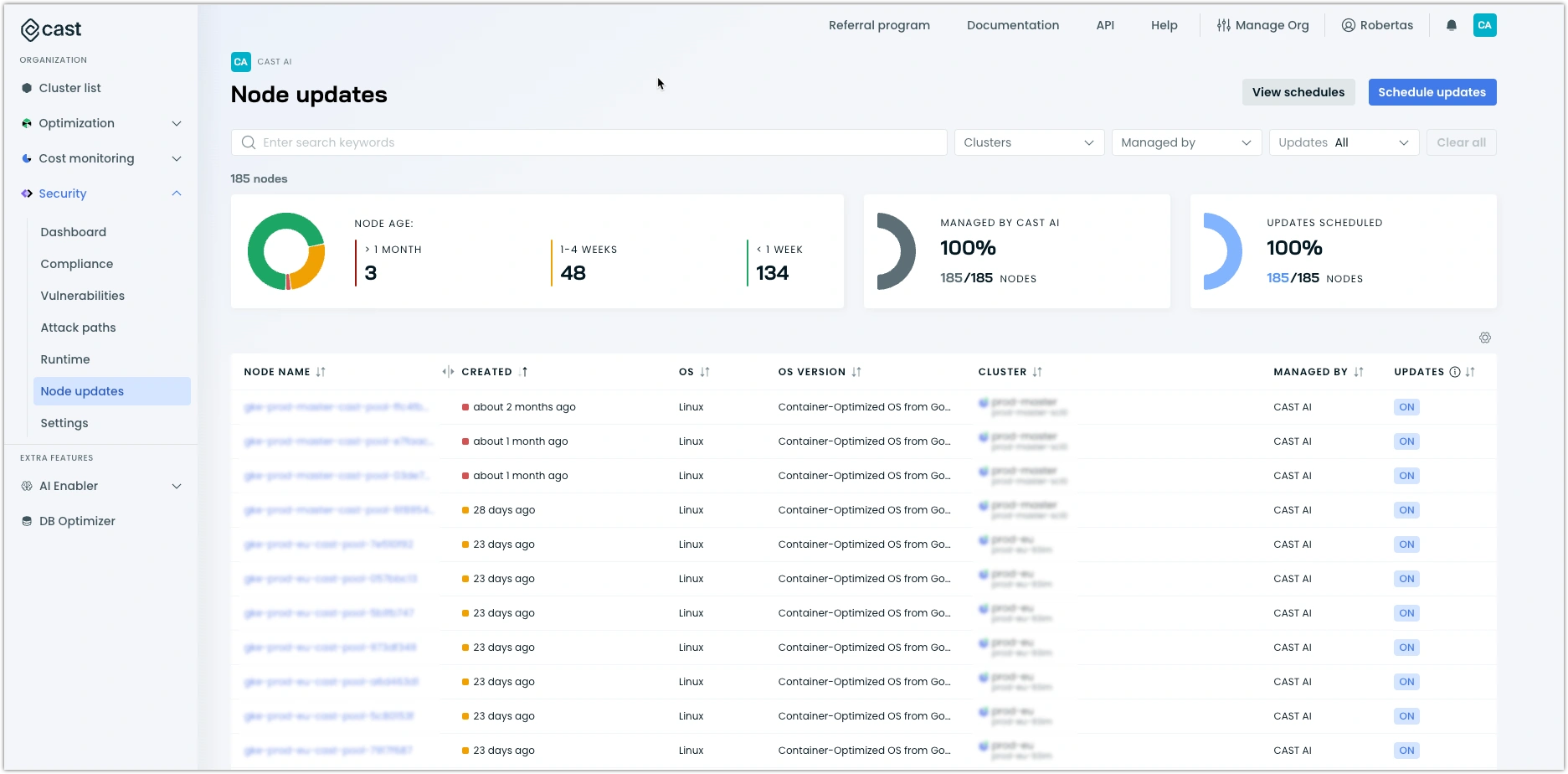
Workload optimization: Adjusts CPU and memory allocations using workload data.
Node provisioning: Selects compatible compute capacity for pending workloads.
Consolidation: Replaces or removes inefficient node capacity.
Spot optimization: Supports Spot capacity strategies with availability controls.
- ✅ Combines workload and node optimization.
- ✅ Reduces manual capacity planning.
- ✅ Useful for large or frequently changing clusters.
- ❌ Requires careful disruption and availability policies.
- ❌ Adds a commercial platform to the Kubernetes stack.
Best for: Teams wanting broad Kubernetes optimization through one platform.
ScaleOps: Best for Continuous Workload Optimization
Key features
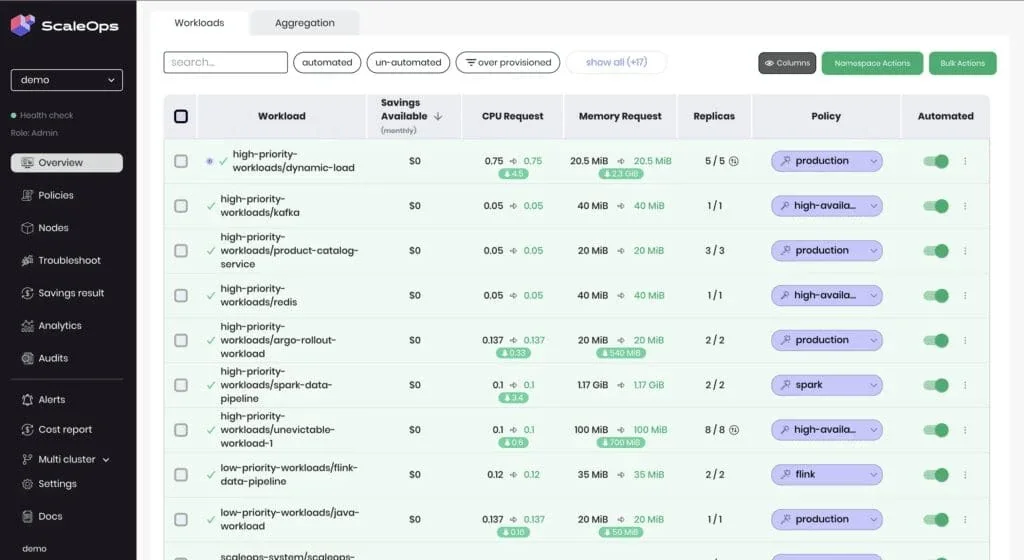
Continuous rightsizing: Tunes CPU and memory allocation as demand changes.
Workload-aware optimization: Considers resource usage and application behavior.
Automation policies: Controls how optimization changes are applied.
Infrastructure efficiency: Helps improve workload placement and node utilization.
- ✅ Reduces repetitive resource tuning.
- ✅ Supports changing production workloads.
- ✅ Combines recommendations with automation.
- ❌ Requires policy and integration setup.
- ❌ Pricing requires a commercial quote.
Best for: Platform teams managing resource-intensive production clusters.
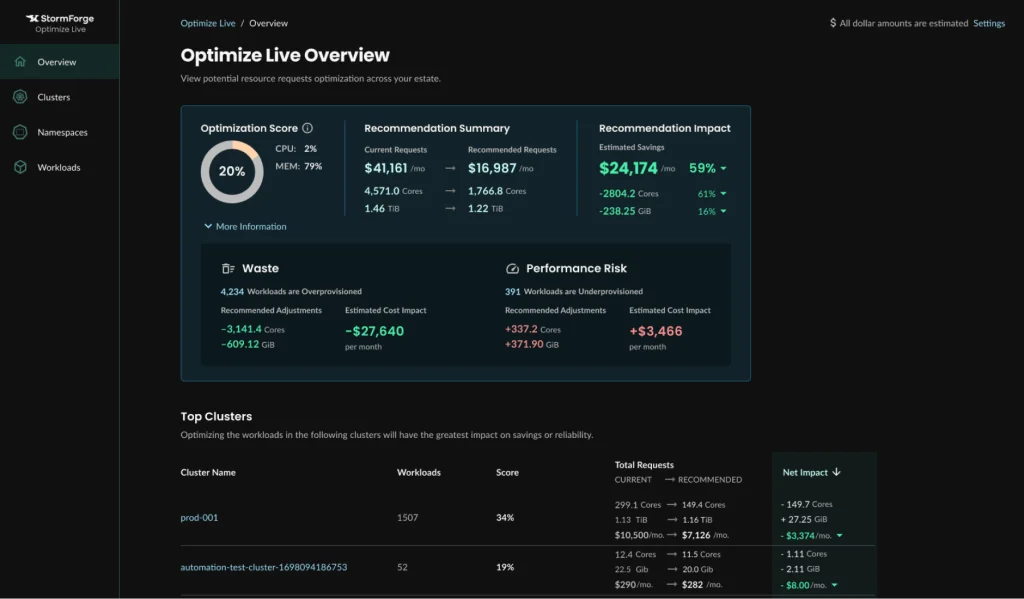
StormForge: Best for Data-Driven Pod Rightsizing
Key features
ML-based recommendations: Uses historical workload metrics.
CPU and memory tuning: Recommends resource requests and limits.
Controlled automation: Supports applying recommendations through configured workflows.
Monitoring integration: Works with supported metrics sources.
- ✅ Data-driven resource recommendations.
- ✅ Supports review and controlled application.
- ✅ Focuses on workload efficiency.
- ❌ Recommendation quality depends on representative metrics.
- ❌ Changes still require performance validation.
Best for: Teams seeking intelligent rightsizing with operational controls.
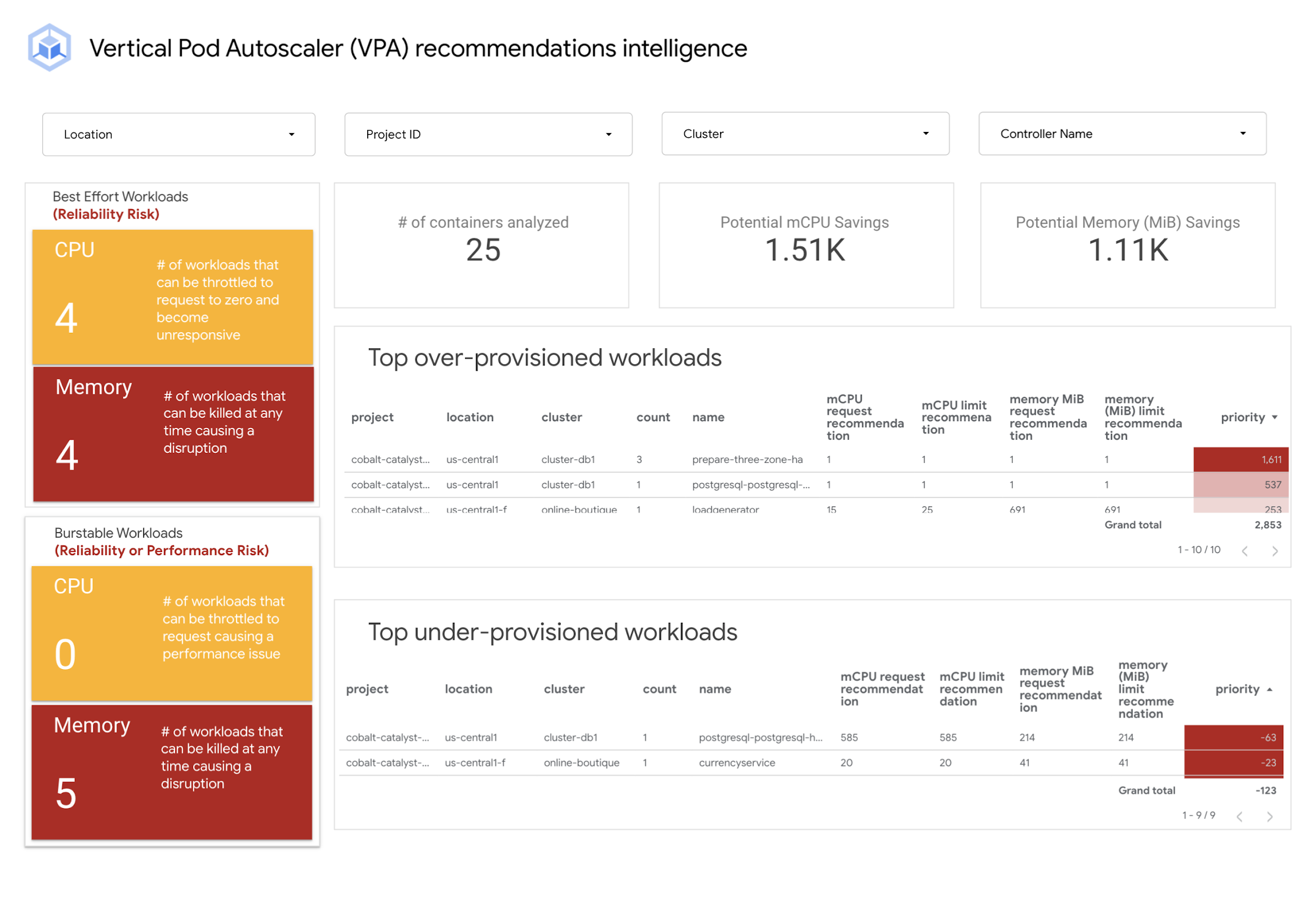
Kubernetes Vertical Pod Autoscaler (VPA): Best Native Pod Rightsizing Tool
Key features
Recommendation mode: Provides resource targets without modifying workloads.
Automatic updates: Adjusts resource requests through supported update modes.
Resource analysis: Uses historical CPU and memory consumption.
Kubernetes integration: Works through Kubernetes controllers.
- ✅ Free and open source.
- ✅ No commercial optimization subscription.
- ✅ Supports recommendations and automated updates.
- ❌ Some changes may recreate or evict pods.
- ❌ Can conflict with HPA when both control the same resource metric.
Best for: Teams wanting Kubernetes-native resource rightsizing.
Goldilocks: Best for Visual Rightsizing Recommendations
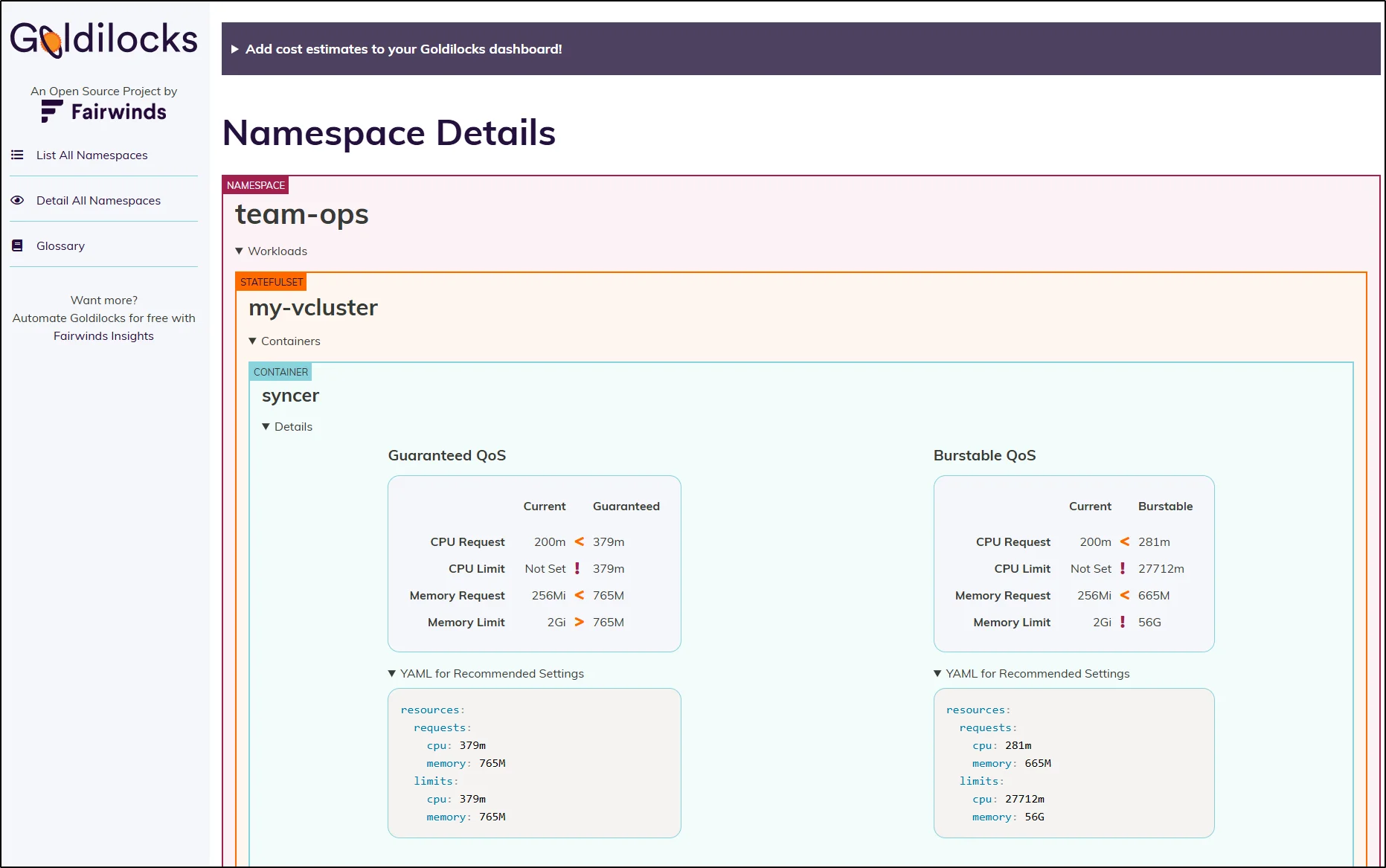
Unlike automated optimization platforms, Goldilocks focuses on helping engineers review resource configurations before making changes.
Key features
VPA-based recommendations: Shows suggested CPU and memory values.
Web dashboard: Makes recommendations easier to inspect.
Namespace controls: Enables analysis for selected namespaces.
Non-enforcing workflow: Does not automatically apply resource changes.
- ✅ Free and open source.
- ✅ Useful for teams new to rightsizing.
- ✅ Keeps changes under engineering control.
- ❌ Engineers must implement recommendations.
- ❌ Requires VPA components and suitable metrics.
Best for: Teams wanting an accessible Kubernetes rightsizing dashboard.
Robusta KRR: Best for Prometheus-Based Resource Audits
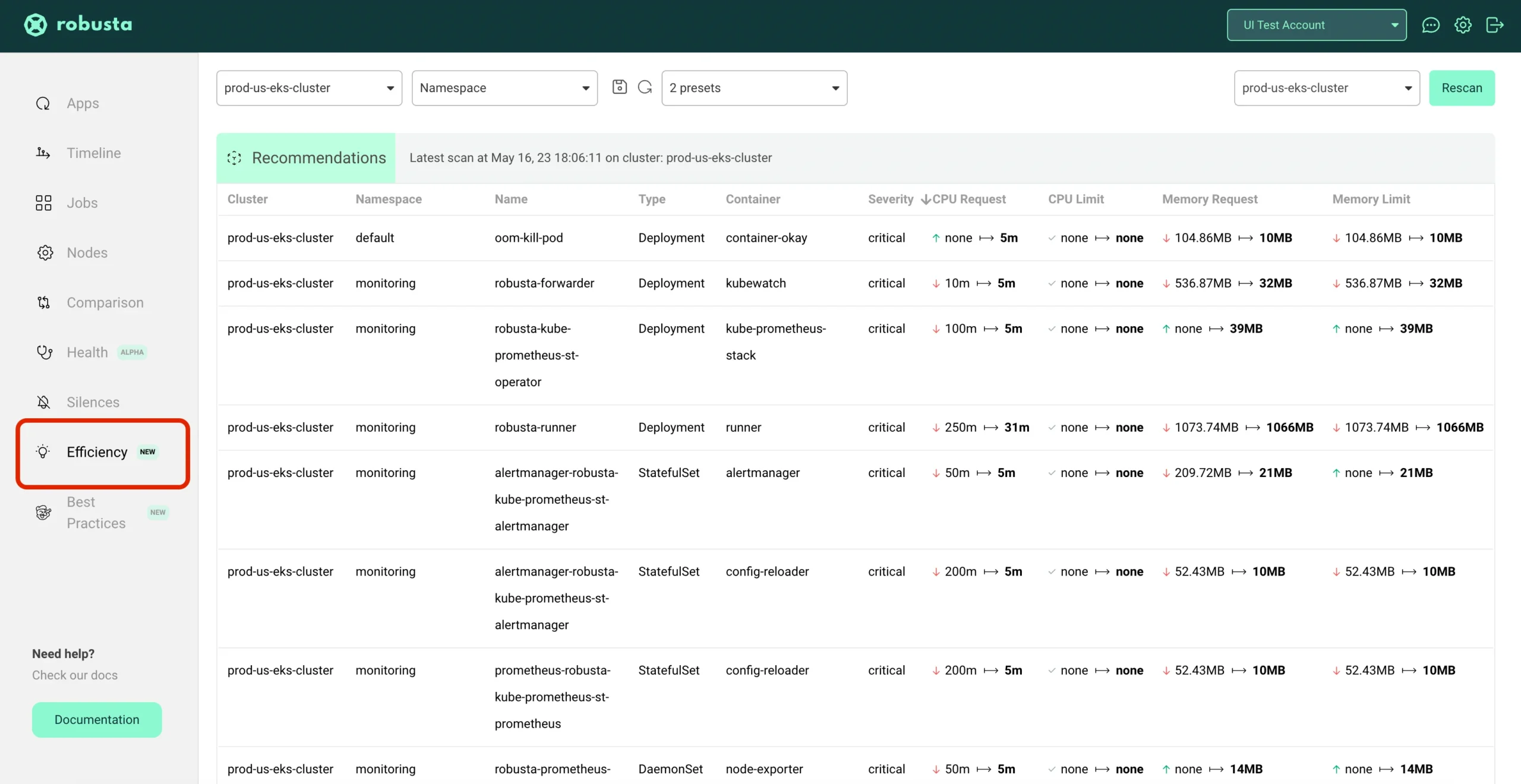
Its CLI-based workflow is useful for teams already collecting resource metrics and wanting repeatable rightsizing reports.
Key features
Prometheus analysis: Uses historical resource metrics.
CPU and memory recommendations: Identifies potentially oversized requests.
CLI workflow: Supports local and scheduled analysis.
Optional enforcement: Separate components can apply recommendations.
- ✅ Free and open source.
- ✅ Useful with existing Prometheus monitoring.
- ✅ Can run recommendation analysis without installing a full optimization platform in the cluster.
- ❌ Requires sufficient metrics history.
- ❌ Basic KRR recommendations are not automatically applied.
Best for: Teams wanting lightweight, repeatable Kubernetes rightsizing audits.
Karpenter: Best for Flexible Node Autoscaling
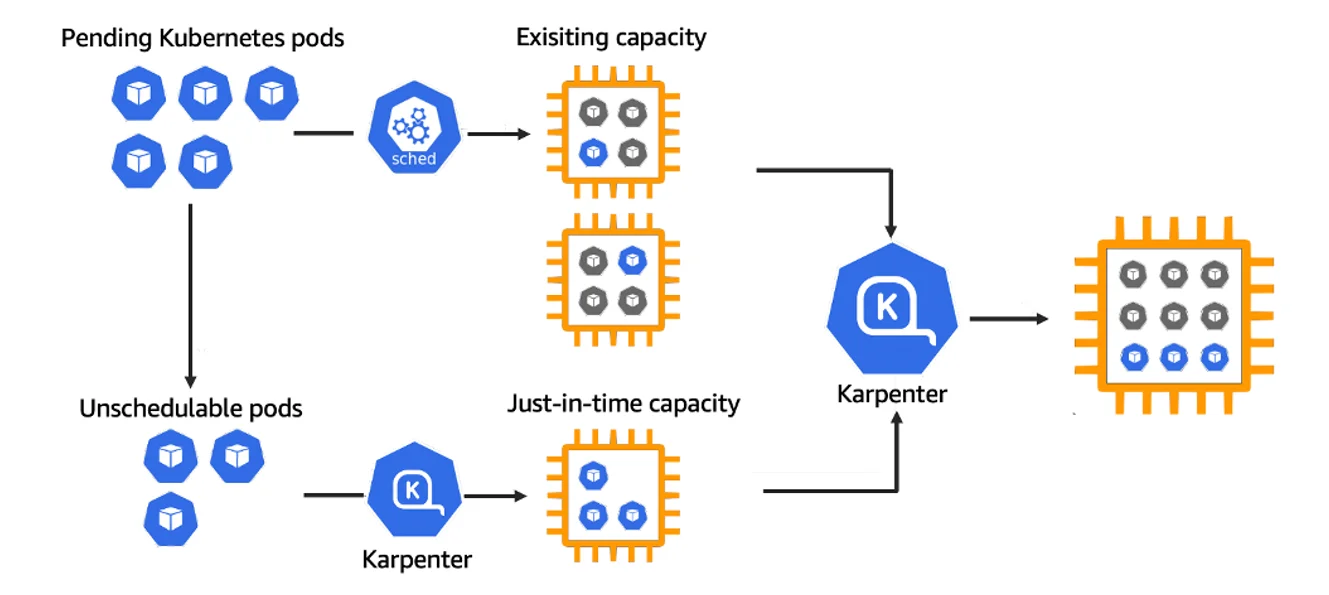
Karpenter is especially relevant to Amazon EKS. Azure’s AKS Node Auto Provisioning is also built on Karpenter, while other providers need separate compatibility checks.
Key features
Dynamic provisioning: Creates nodes for unscheduled workloads.
Instance selection: Chooses suitable instance types.
Node consolidation: Removes or replaces unnecessary capacity.
Scheduling awareness: Considers resource requests and placement constraints.
- ✅ Flexible infrastructure provisioning.
- ✅ Can improve node utilization.
- ✅ Free and open source.
- ❌ Does not rightsize pod resource requests.
- ❌ Provider compatibility and disruption settings need attention.
Best for: EKS teams seeking flexible node provisioning and consolidation.
KEDA: Best for Event-Driven Autoscaling
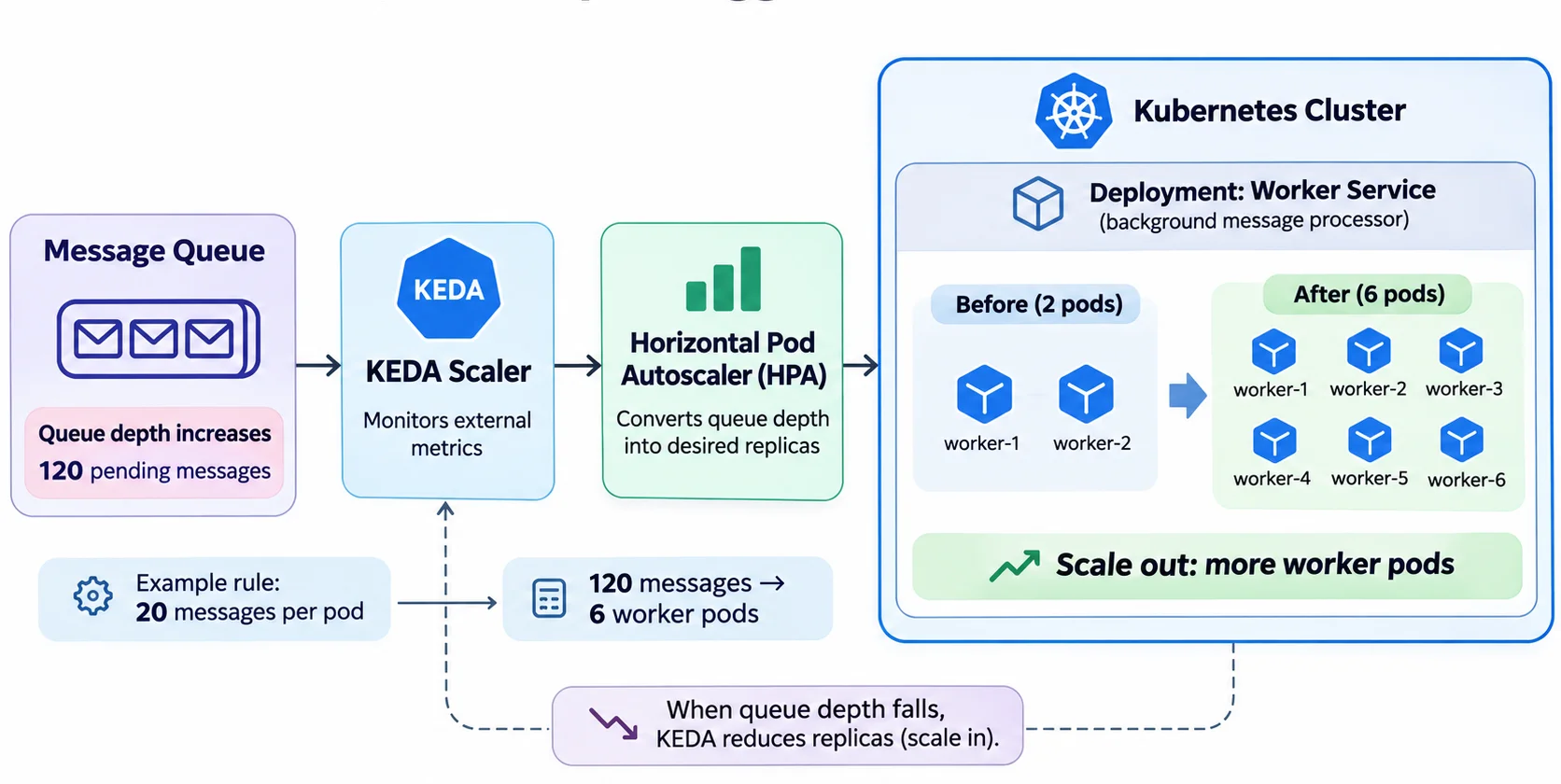
It can scale compatible workloads to zero when idle, making it particularly useful for asynchronous processing.
Key features
Event triggers: Scales based on queues and external metrics.
Scale to zero: Stops eligible idle workloads.
Scaler integrations: Supports numerous event sources.
HPA integration: Uses Kubernetes horizontal scaling mechanisms.
- ✅ Excellent for event-driven applications.
- ✅ Supports scale-to-zero workloads.
- ✅ Free and open source.
- ❌ Does not rightsize CPU or memory requests.
- ❌ Incorrect trigger thresholds can cause inefficient scaling.
Best for: Queue workers, background processing, and event-driven services.
Kubernetes Horizontal Pod Autoscaler (HPA): Best for Native Replica Scaling
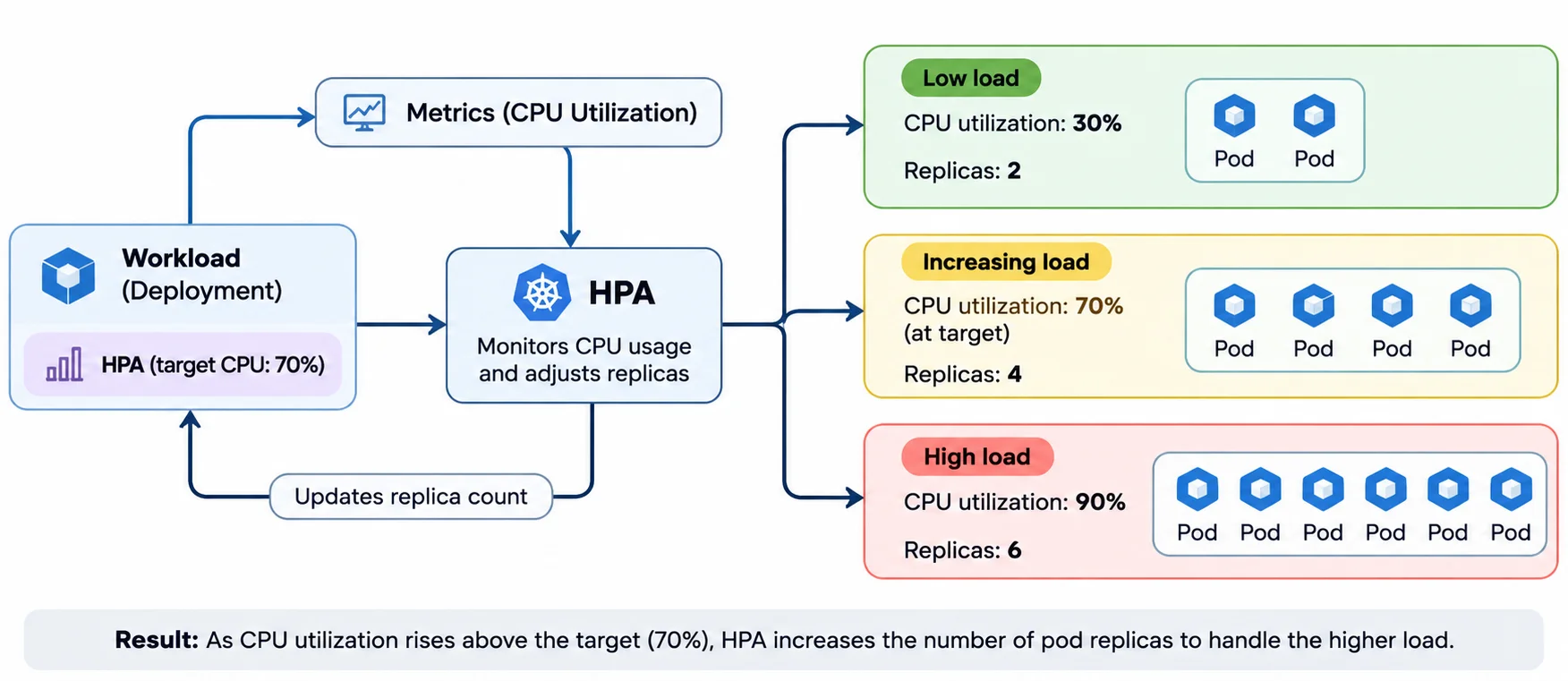
For example, an application may run three replicas during normal traffic and increase to eight when demand rises.
Key features
Replica scaling: Adjusts pod counts automatically.
CPU and memory metrics: Supports resource-based targets.
Custom metrics: Supports application-specific scaling.
Scaling behavior: Configures stabilization and scaling policies.
- ✅ Built into Kubernetes.
- ✅ No commercial autoscaling subscription.
- ✅ Works with node autoscalers.
- ❌ Does not change pod resource requests.
- ❌ Requires appropriate metrics and scaling targets.
Best for: Applications with variable traffic and measurable scaling signals.
Cluster Autoscaler: Best for Existing Node Group Architectures
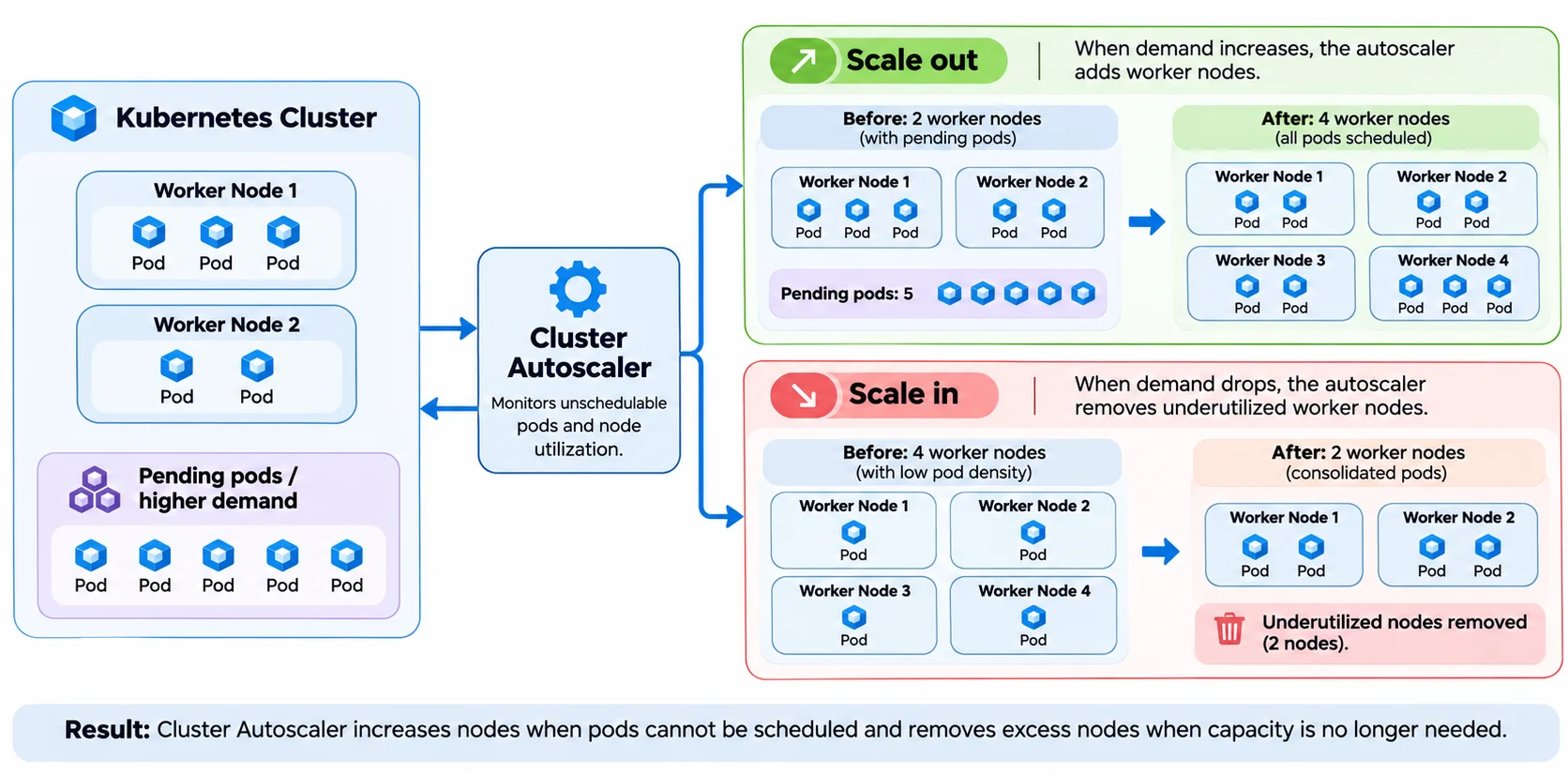
Unlike Karpenter’s more flexible provisioning approach, Cluster Autoscaler typically works within configured node groups.
Key features
Node group scaling: Adds or removes worker nodes.
Pending pod detection: Responds to unschedulable workloads.
Scale-down evaluation: Identifies removable nodes.
Cloud integration: Supports compatible provider node groups.
- ✅ Mature open-source autoscaler.
- ✅ Works with established node group architectures.
- ✅ Supports common managed Kubernetes environments.
- ❌ Usually depends on predefined node groups.
- ❌ Does not rightsize CPU or memory requests.
Best for: Teams already using managed Kubernetes node groups.
Which Kubernetes Tools Should You Use Together?
Kubernetes optimization usually works best as a stack rather than a single product.| Scenario | Suggested stack | Why it works |
|---|---|---|
| Small EKS team | KRR + HPA + Karpenter | Rightsizing recommendations, replica scaling, and node provisioning |
| Event-driven applications | KEDA + Karpenter | Event-based replicas and dynamic node capacity |
| Conservative production setup | Goldilocks + HPA + Cluster Autoscaler | Manual rightsizing review with automated capacity scaling |
| Fully managed optimization | CAST AI or ScaleOps | Broader optimization through a commercial platform |
| Stable eligible compute baseline | Rightsizing stack + Usage.ai | Infrastructure efficiency plus commitment savings |
For more options, explore our cloud infrastructure optimization tools comparison.
The Kubernetes Optimization Order: Rightsize, Scale, Consolidate, Commit
A useful way to approach Kubernetes optimization is to address resource efficiency before purchasing additional long-term capacity commitments.Rightsize pods. Use VPA, Goldilocks, KRR, or a commercial optimizer to identify oversized CPU and memory requests.
Scale replicas. Use HPA or KEDA to adjust workload capacity as traffic changes.
Consolidate nodes. Use Karpenter or Cluster Autoscaler to reduce unnecessary worker-node capacity where workloads permit.
Optimize commitments. Evaluate the stable, eligible portion of remaining cloud usage for Savings Plans, Reserved Instances, or other supported discounts.
The goal is to avoid purchasing commitments based on temporary peaks. However, existing commitments, expected growth, and workload volatility must be considered before changing coverage.
Usage.ai: Commitment Savings for Your Remaining Cloud Baseline
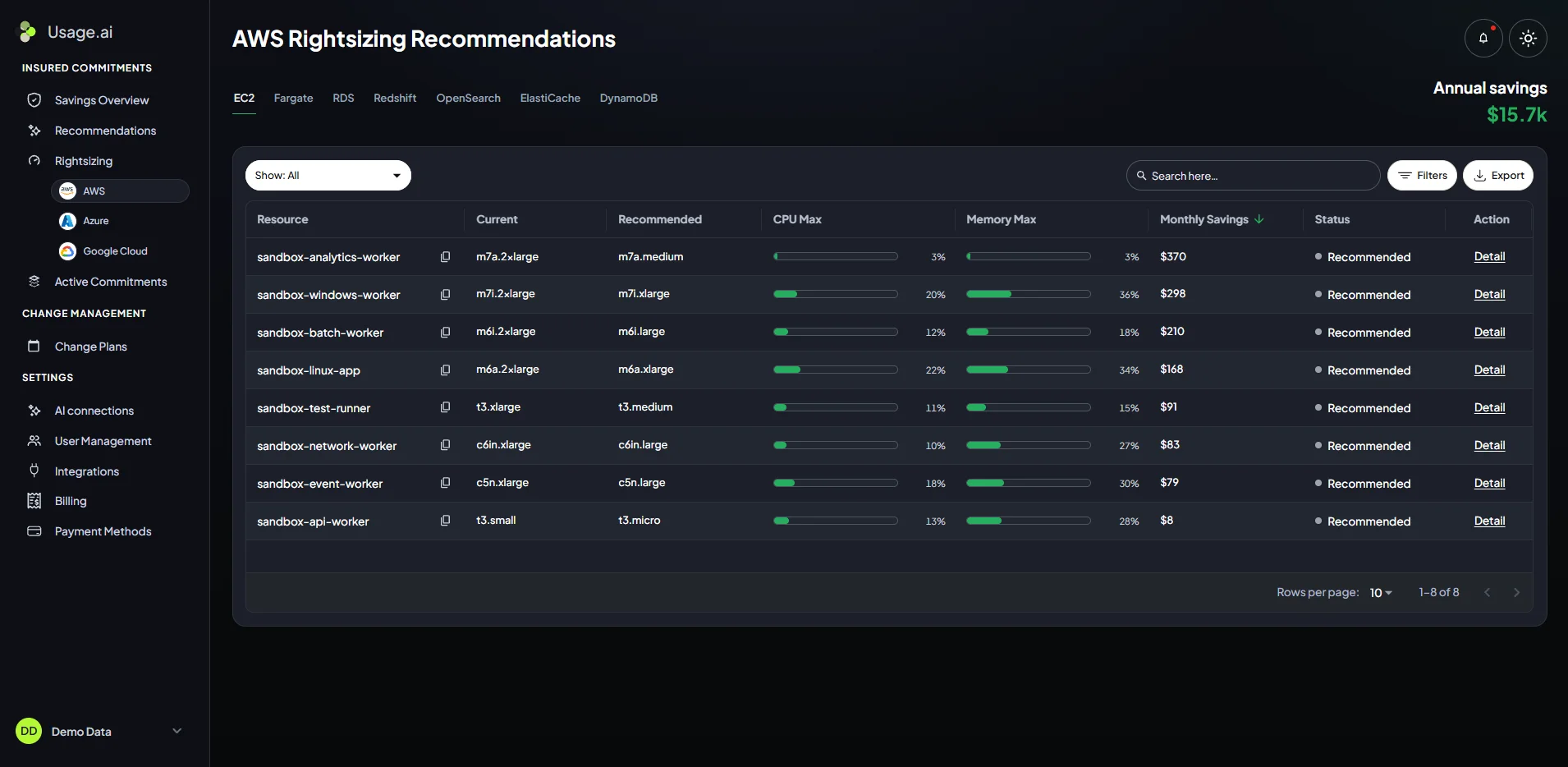
Key features
AWS Rightsizing Recommendations: Identifies potentially oversized instances and estimates savings.
Autopilot: Automates eligible commitment management within configured controls.
CoPilot: Supports approval-based commitment recommendations.
Read-only Savings Test: Evaluates savings opportunities without modifying production workloads.
Best for: Teams with a stable compute baseline after Kubernetes optimization who want to reduce its effective price.
Learn more about Usage.ai pricing.
Find additional Kubernetes savings with a read-only test. No app changes; purchases require separate authorization.
Kubernetes Cost Example: Rightsizing Plus Commitment Discounts
Suppose a Kubernetes environment runs 20 worker nodes at an illustrative On-Demand cost of $150 per node monthly.Rightsizing and consolidation allow five nodes to be removed. The remaining compute may then qualify for additional commitment discounts
| Metric | Before | After rightsizing | After rightsizing + commitments |
|---|---|---|---|
| Worker nodes | 20 | 15 | 15 |
| Monthly compute cost | $3,000 | $2,250 | $1,912.50 |
| Monthly savings vs original | — | $750 | $1,087.50 |
| Annualized savings vs original | — | $9,000 | $13,050 |
The important point is that rightsizing reduces the infrastructure required, while commitments can reduce the effective price of eligible remaining usage.
See our cloud cost optimization best practices for additional savings approaches.
How to Safely Automate Kubernetes Rightsizing
Optimization should reduce waste without creating performance problems.Measure baseline performance: Monitor CPU, memory, latency, and errors.
Validate recommendations: Test resource changes before broad rollout.
Protect critical workloads: Configure availability and disruption controls.
Coordinate autoscalers: Avoid conflicting VPA, HPA, or commercial automation policies.
Verify savings: Compare actual cloud bills, not only resource utilization.
Final Verdict: Which Kubernetes Optimization Tools Are Best?
For workload rightsizing, consider StormForge, VPA, Goldilocks, or Robusta KRR. CAST AI and ScaleOps provide broader commercial automation.For autoscaling, use HPA or KEDA to manage replicas and Karpenter or Cluster Autoscaler to manage node capacity.
Once the environment is efficiently sized, Usage.ai can help evaluate eligible commitment savings on the remaining cloud baseline.
The best approach is usually a compatible combination of tools, not a single winner.
Frequently asked questions
What are the best Kubernetes rightsizing and autoscaling tools?
Leading options include CAST AI, ScaleOps, StormForge, VPA, Goldilocks, Robusta KRR, Karpenter, KEDA, HPA, and Cluster Autoscaler. Each addresses different workload or infrastructure optimization needs.
Can Kubernetes rightsizing and autoscaling tools work together?
Yes. Rightsizing tools adjust resource requests, HPA or KEDA manages replicas, and Karpenter or Cluster Autoscaler manages node capacity. Compatibility and automation policies must be checked.
What are the best free Kubernetes rightsizing tools?
Goldilocks, Robusta KRR, and VPA are open-source options. Goldilocks and KRR primarily provide recommendations, while VPA supports resource updates in configured modes.
Is Karpenter better than Cluster Autoscaler?
Karpenter provides flexible node provisioning in supported environments, while Cluster Autoscaler works with established node groups. The better option depends on cloud compatibility and cluster architecture.
Does Kubernetes rightsizing automatically reduce cloud costs?
No. Reducing resource requests alone does not guarantee savings. Costs typically decrease when optimization reduces billable infrastructure, improves instance selection, or enables other pricing efficiencies.