AWS
AWS Microsoft Azure
 Google Cloud

Azure Pricing at a Glance
| Azure service | How pricing works | Official pricing |
|---|---|---|
| Virtual Machines | Hourly compute rates based on VM size, OS and region | Azure VM pricing |
| Blob Storage | Stored GB, access tier, operations and redundancy | Blob Storage pricing |
| Azure SQL Database | Compute tier, storage and backup configuration | Azure SQL pricing |
| Azure Functions | Hosting-plan-specific compute and execution charges | Azure Functions pricing |
| Bandwidth | Applicable outbound data transfer and routing charges | Azure Bandwidth pricing |
How Does Azure Pricing Work?
Microsoft Azure uses service-specific pricing rather than charging a single monthly subscription for all infrastructure.Your bill is determined by the resources you deploy, how they are configured, and how much you consume.
For example, running a virtual machine can produce separate charges for compute, managed disks, outbound data transfer, and monitoring. A managed database uses its own pricing model.
The main factors affecting Azure cloud pricing are:
| Factor | How it affects your bill |
|---|---|
| Azure service | Each product has different billing meters |
| Region | Rates vary by geographic location |
| Resource size | More CPU, memory, or capacity generally costs more |
| Usage | Running hours, storage, requests, or transferred data |
| Payment model | Pay-as-you-go or eligible discounted pricing |
| Licenses | Windows Server, SQL Server, and other software |
| Data movement | Internet egress and applicable regional transfers |
Azure Pricing by Service
There is no universal Azure price. Compute, storage, databases, and networking use different billing units.The following table explains the main components.
| Azure service | Main pricing basis | Additional costs to check |
|---|---|---|
| Virtual Machines | VM size and running time | Disks, licensing, networking |
| Blob Storage | Stored capacity and tier | Operations, retrieval, replication |
| Azure SQL Database | Compute and storage configuration | Backup, redundancy, additional features |
| App Service | App Service plan and capacity | Networking, monitoring, databases |
| Azure Functions | Plan-specific compute or executions | Memory, hosting, related services |
| AKS | Cluster management tier and underlying resources | Worker nodes, disks, networking |
| Azure OpenAI | Model-specific token or capacity pricing | Deployment model and related services |
1. Azure Virtual Machine Pricing
Azure Virtual Machines provide configurable compute for Windows and Linux workloads.Pricing depends on:
VM family and size
Region
Operating system and licensing
Running time
Purchase option
Managed disks, public IP addresses, bandwidth, and other resources may increase the final bill.
A VM that is stopped but still allocated can continue generating compute charges. Deallocating releases its compute allocation, although managed disks and some associated resources may still incur charges.
Check Azure Linux VM pricing for current configurations and rates.
For workload sizing and discount decisions, see our Azure VM cost optimization guide.
2. Azure Storage Pricing
Azure Storage pricing depends on stored capacity, redundancy, access frequency, and operations.Azure Blob Storage offers multiple access tiers, including Hot, Cool, Cold, and Archive, depending on the account type and regional availability.
| Tier | Typical use |
|---|---|
| Hot | Frequently accessed data |
| Cool | Less frequently accessed data |
| Cold | Infrequently accessed data retained longer |
| Archive | Long-term data that can tolerate rehydration delays |
The cost of storing 1,000 GB in Azure Blob Storage depends on the selected access tier, redundancy option, and region.
For example, estimate 1,000 GB of Hot Blob Storage with locally redundant storage (LRS) in East US using Microsoft’s official Blob Storage pricing.
3. Azure SQL Database Pricing
Azure SQL Database pricing varies by deployment configuration, service tier, compute model, and storage requirements.Common considerations include provisioned versus serverless compute where supported, vCore capacity, storage, backup retention, and redundancy.
Azure SQL Database offers two purchasing models: vCore-based and DTU-based. The vCore model provides more control over compute and storage configurations, while the DTU model bundles CPU, memory, and I/O into predefined performance levels.
A provisioned database may have ongoing compute charges, while serverless options can adjust compute consumption based on workload activity and configuration.
Compare the total cost of compute, storage, backups, and applicable licensing benefits.
For a reproducible example, choose an East US, General Purpose, provisioned vCore database, then record the vCore count and provisioned storage.
4. Azure Networking Pricing
Networking is another important component of Azure pricing.Depending on the architecture, charges may include:
Internet outbound data transfer
Cross-region or cross-zone traffic
NAT Gateway processing and hourly charges
VPN Gateway or ExpressRoute
Load Balancer resources and rules
Public IP addresses
Use the Azure bandwidth pricing page to evaluate applicable transfer rates.
Azure Pricing Models Compared
Azure provides several purchasing options. Each changes either the unit price, commitment requirement, or workload flexibility.| Pricing model | Best suited for | Main trade-off |
|---|---|---|
| Pay-as-you-go | New or unpredictable workloads | No commitment discount |
| Reservations | Stable, predictable eligible usage | Commitment and matching constraints |
| Savings Plans | Consistent eligible spend with changing compute needs | Fixed hourly commitment |
| Spot VMs | Interruptible workloads | Eviction risk |
| Azure Hybrid Benefit | Qualifying Windows or SQL licenses | Licensing eligibility requirements |
Pay-as-you-go
Pay-as-you-go charges for eligible resource usage without requiring a long-term pricing commitment.It is useful for experimentation, short-lived environments, and workloads whose future demand remains uncertain.
Azure Reservations
Azure Reservations offer discounted pricing for eligible resources purchased for an applicable commitment term.Microsoft advertises up to 72% savings on qualifying Reserved VM Instances compared with pay-as-you-go. Actual discounts depend on the configuration and offer.
Reservations are better suited to predictable workloads with stable attributes.
Learn about eligibility, scope, and limitations in our Azure Reservations guide.
Azure Savings Plans
Azure Savings Plans reduce eligible usage costs in exchange for a defined spending commitment.A compute Savings Plan generally uses a one-year or three-year term and commits to an hourly amount.
Microsoft advertises savings of up to 65% on select compute services and up to 35% on select database services through the applicable Azure savings plans. Actual discounts depend on eligibility and configuration.
Unused hourly commitment does not roll over to a later hour. A Savings Plan also does not discount every charge on an Azure bill.
Read our Azure Savings Plans guide for eligibility and sizing.
Azure Spot Virtual Machines
Spot VMs use available Azure capacity at discounted rates, but Azure can reclaim that capacity.They are appropriate for fault-tolerant batch workloads, testing, and processing that can restart safely.
Learn more in our Azure Spot VMs pricing guide.
How to Calculate Azure Pricing
The Azure Pricing Calculator is Microsoft’s official tool for estimating deployment costs.Follow these steps:
Select your Azure services. Add Virtual Machines, Storage, SQL Database, or other products needed for your workload.
Choose the region and configuration. Enter VM sizes, capacity, performance tiers, and deployment requirements.
Set expected usage. Include running hours, stored data, transactions, and other billable consumption.
Add related services. Include networking, backups, managed disks, and monitoring where applicable.
Compare purchasing options. Evaluate pay-as-you-go against eligible Reservations, Savings Plans, or licensing benefits.
Review the monthly estimate. Check which costs are included and which services need additional estimates.
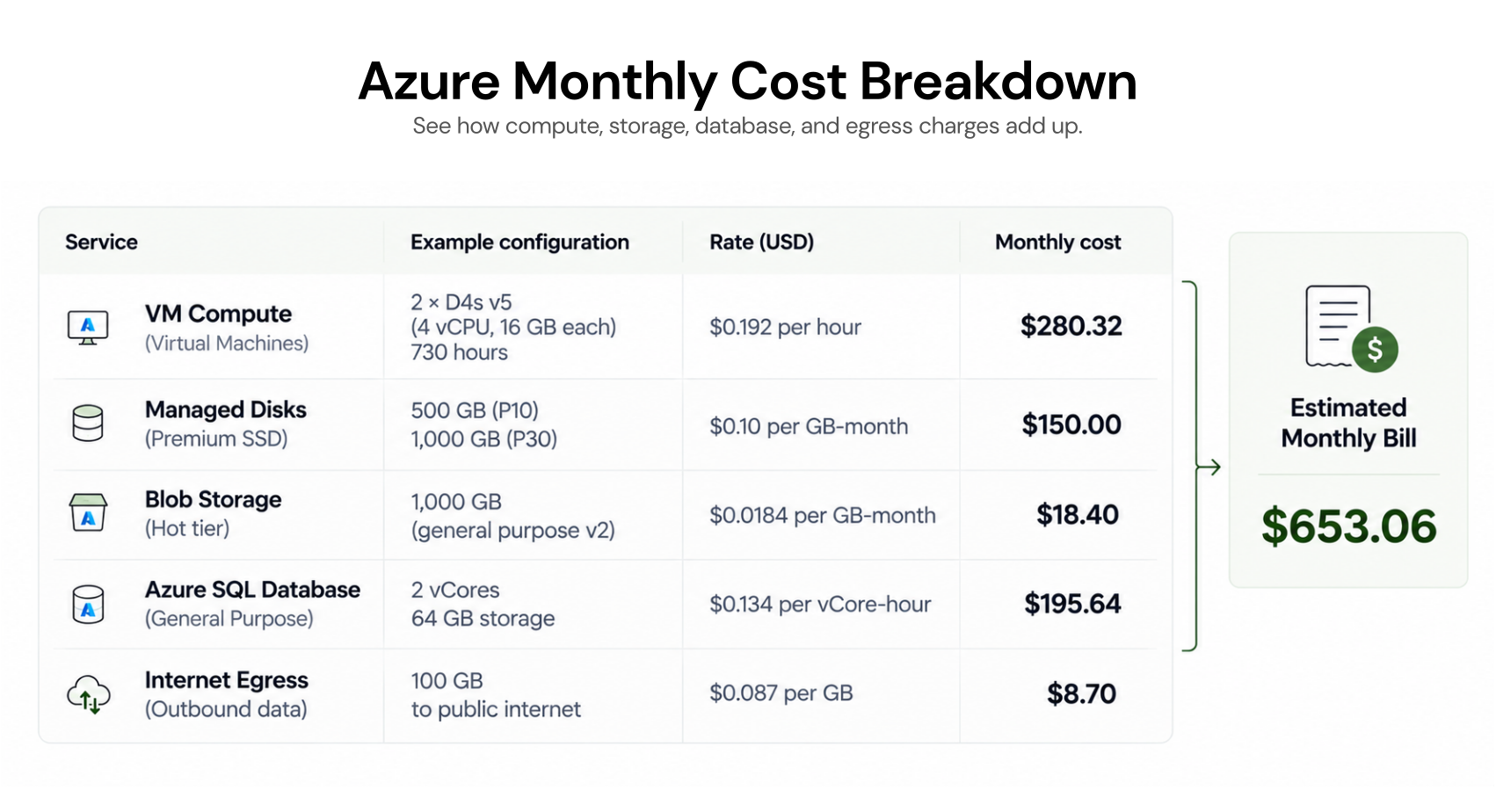
Example: Calculate a Monthly Azure Bill
Consider a small application in East US using one Linux VM, managed disks, Hot Blob Storage, an Azure SQL Database, and outbound internet traffic. The table below is a reproducible estimate worksheet, not an invented retail-price quote.| Component | Example configuration | How to calculate monthly cost |
|---|---|---|
| Linux VM | Standard_D2s_v5, Linux, 730 hours | Published pay-as-you-go hourly rate × 730 |
| Managed disk | Select a specific disk SKU and capacity | Published monthly disk price, plus applicable extras |
| Blob Storage | 500 GB, Hot, LRS, East US | Published GB-month rate × 500, plus operations |
| SQL Database | General Purpose, provisioned vCore | Selected compute, storage, and backup charges |
| Internet egress | 100 GB of qualifying standard internet outbound transfer | $0 for this traffic component if the first-100-GB monthly free allowance applies and is unused |
| Total | All selected resources | Sum the verified component estimates |
To turn the worksheet into a dollar total, enter the same configuration in the Azure Pricing Calculator. Record the returned prices and the date checked. A numeric total is deliberately not shown because live VM, disk, storage, and database rates have not been independently verified for this exact configuration.
How We Verify Azure Pricing Estimates
Use the same region, currency, purchase model, and usage assumptions across every service. Record the VM SKU, operating system, disk SKU, storage tier and redundancy, SQL tier and vCores, bandwidth type, and estimate date.Microsoft’s Azure Retail Prices API can also be used to look up retail rates by SKU and region. Published retail prices may differ from a customer’s negotiated rates or final invoice.
Why Your Azure Bill May Be Higher Than Expected
A pricing estimate can differ from the actual bill when the deployed architecture consumes more resources than expected.Common causes include:
VMs running longer than planned
Larger disks or database capacity
Increased outbound bandwidth
Extra backups and monitoring data
Higher redundancy requirements
Unused but still billable resources
Reservations or Savings Plans that do not fully match usage
For an ongoing cost review process, see our Azure Cost Management best practices.
How to Reduce Azure Pricing Costs
Reducing your Azure bill usually involves improving resource utilization and selecting an appropriate purchase model.Start with these actions:
Rightsize resources. Review VM and database utilization before increasing capacity or purchasing commitments.
Remove unnecessary resources. Identify idle VMs, unattached disks, and obsolete services.
Optimize storage. Select access tiers and redundancy based on real usage patterns.
Use eligible pricing discounts. Compare Reservations and Savings Plans after establishing a stable usage baseline.
Track actual savings. Monitor commitment utilization, uncovered spend, and changing workload requirements.
How Usage.ai Helps Manage Azure Commitment Costs
Azure pricing can become harder to manage when compute usage changes after purchasing long-term commitments. Unused commitments can reduce the savings you expected to achieve.At Usage.ai, we help organizations identify eligible savings opportunities, evaluate commitment coverage, and manage cloud commitments as usage changes.
Our platform supports two approaches:
CoPilot: Review commitment recommendations before approving purchases.
Autopilot: Automate eligible commitment purchases within approved permissions.
For eligible customers, our Flex Insured Commitments can help reduce financial exposure when covered usage declines, subject to program terms and eligibility requirements.
You can also explore our security and compliance documentation to understand our read-only assessment approach.
Usage.ai charges a percentage of realized savings generated through its Flex Commitment Program. Learn more about our savings based pricing model.
Final Thoughts
Understanding Azure pricing starts with separating compute, storage, databases, and networking into their individual billing components.Build a realistic monthly estimate, compare payment models, and account for operational changes before buying a long-term commitment.
For organizations with significant eligible compute spending, reviewing commitment coverage and realized savings can be a useful next step.
Discover eligible savings opportunities, optimize Azure commitments, and reduce financial exposure as your cloud usage changes.
Frequently asked questions
How much does Microsoft Azure cost per month?
Microsoft Azure has no single monthly infrastructure price. A bill depends on resource types, regions, configurations, usage, and discounts. Estimate compute, storage, databases, networking, and related charges using the Azure Pricing Calculator.
Is Microsoft Azure free?
Azure offers free services and eligible introductory offers with specified usage limits and conditions. Charges apply when workloads use billable services or exceed applicable allowances. Check Azure's current free offers before deployment.
How much does an Azure virtual machine cost?
Azure VM pricing varies by size, region, operating system, running time, and payment model. Multiply the applicable compute rate by billable hours, then add disks, networking, licensing, and other resources.
Which Azure pricing model is cheapest?
No pricing model is cheapest for every workload. Reservations may provide attractive discounts for predictable eligible usage, Savings Plans support more flexible eligible compute consumption, and Spot VMs offer discounted interruptible capacity.
How accurate is the Azure Pricing Calculator?
The calculator estimates spending based on selected configurations, usage assumptions, and available rates. Actual bills can differ due to workload changes, additional resources, negotiated prices, currencies, and unanticipated consumption.