 AWS
 Microsoft Azure
 Google Cloud

The approaching cutoff makes that adjustment less forgiving. The useful starting point is your reservation inventory: what still matches, what renews next and what engineering already knows will move.
What changes and what stays
Microsoft’s July 2026 announcement identifies these affected reservations:- Compute: Azure Virtual Machines, Azure Dedicated Host and Azure App Service.
- Databases: Azure SQL Database, SQL Managed Instance, PostgreSQL, MySQL, Cosmos DB and DocumentDB.
You do not need to own a savings plan to be affected. The deciding factor is whether the service supports one.
Microsoft excludes services without savings-plan coverage, such as Azure VMware Solution, products deprecated and approaching end of life, and cloud environments without savings-plan support. Excluded reservations keep their existing rules, including any exchange restrictions.
What continues matters just as much. Reservations remain available where offered, matching usage still receives its discount, and workloads keep running. VM instance size flexibility, cancellation rules and eligible savings-plan trade-ins remain unchanged.
Microsoft says the change aligns reservation exchange policy with the flexibility savings plans already offer. That explains their role here: they provide broader benefit coverage for changing workloads, while reservations continue to suit stable matching usage.
How Azure reservation exchanges work
A reservation is a billing benefit applied to matching usage. Microsoft’s exchange and refund rules treat an ordinary exchange as cancellation of the original reservation, an appropriate refund and a replacement purchase.The replacement must stay within the same permitted product family as the original reservation. Its total lifetime commitment must equal or exceed the original’s remaining commitment. Changing region, size or series ordinarily starts a new term.
For example, a hypothetical three-year reservation costing USD 100 a month has this commitment remaining after 18 payments:
A special swap between corresponding premium/nonpremium VM sizes within the same region does not reset the term. That swap is still covered by the policy change.
Your purchase and renewal checklist
Classify each purchase or renewal
For affected reservations, use the transaction date to check exchange rights below. Any final exchange must be used while the reservation remains active.| Purchase or renewal situation | Exchange treatment | What to review |
|---|---|---|
| Active reservation bought before February 1, 2027 | Unlimited exchanges under existing rules before cutoff; one final exchange afterward | Matching usage and replacement timing |
| Renewal purchased before February 1, 2027 | Same rights as other pre-cutoff purchases | Demand for another term |
| Purchase or renewal on or after February 1, 2027 | No reservation-to-reservation exchange | Configuration, region, quantity and demand throughout the term |
| Exchange replacement bought before February 1, 2027 | One final exchange after cutoff | Workload fit and replacement term |
| Replacement from the final post-cutoff exchange | Cannot be exchanged again | Matching demand and full payment obligation |
Renewal creates a new purchase when the old reservation expires. Enabling auto-renewal in December does not preserve old rights for a replacement purchased in March.
Record and act on each decision
Give every affected reservation an owner and a short review record:- Establish its history. Record purchase and exchange dates, quantity, expiry and actual renewal date. A displayed start date alone may not establish the complete history.
- Check the match. Record the configuration, region, scope and recent utilization. Scope determines which resources can receive the benefit. Broader scope or compatible VM size flexibility may resolve underuse without an exchange.
- Bring in the workload roadmap. Confirm planned migrations, resizing and retirements with engineering before choosing the replacement quantity or term.
- Record the action and permissions. Decide what to retain, change or investigate, and review auto-renewal settings. Exchange/refund actions require Owner or Reservation administrator access on the reservation order. Cloud Solution Provider customers must ask their partner to process them.
Also read our Azure reservation renewal strategy when the review involves another commitment term.
Choose an option that fits
Once the dates are clear, choose the response based on what happened to the workload.| Situation | Option to evaluate | Obligation or limit |
|---|---|---|
| Matching usage outside scope | Adjust scope | Matching rules and commitment remain |
| Stable replacement workload | Exchange, where permitted | Total commitment ≥ remaining value; usually a new term |
| Steady covered spend, changing setup | Savings-plan trade-in, if eligible | Total commitment ≥ remaining value; no cancellation/exchange |
| Workload gone | Cancellation/refund, if eligible | Shared rolling cancellation cap |
| Uncertain demand or near expiry | Defer purchase or let reservation expire | Obligations remain until expiry; check renewals |
For monthly payments, canceled future payments count toward the cap too. A small cash refund does not necessarily mean a small canceled commitment.
Under Microsoft’s reservation trade-in guidance, eligible compute and database reservations move into their corresponding savings-plan types. Both offer one- or three-year terms.
The portal’s default trade-in commitment may not cover all usage previously covered by the reservation. Compare the coverage before accepting the amount.
A savings plan commits you to an hourly amount across eligible usage. It helps when covered spend persists despite infrastructure changes, but unused hourly commitment expires. You still pay for the commitment if that usage disappears.
Both products can coexist. Account for matching reservations first, then size any savings plan against the eligible usage remaining. Compare complete costs and expected utilization rather than choosing by the largest advertised discount.
Our Azure reservation coverage guide explains how to identify usage that can support another commitment.
Match exchanges to migration timing
Consider an illustrative one-year VM reservation bought in October 2026. It covers East US usage, but the application will move to West Europe in April 2027. Assume an eligible replacement is available there and no matching West Europe usage exists before April.Exchanging into West Europe in January could leave the replacement unused while East US usage needs other coverage or on-demand billing. Keeping the existing match lets the team evaluate its final exchange when the move occurs.
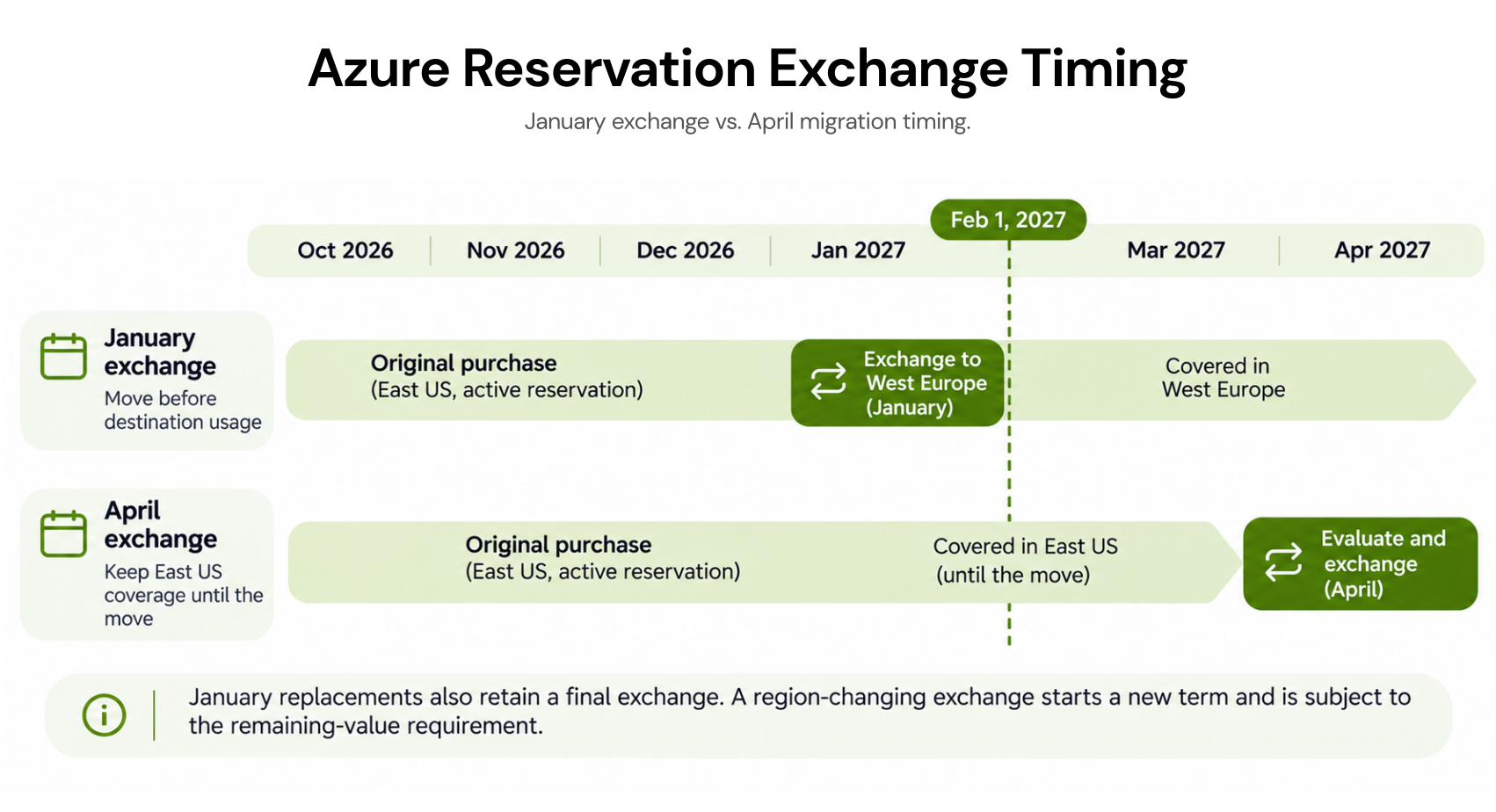
The practical conclusion is to review before the deadline and act when the replacement fits. Confirm the transaction date, future matching demand and full obligation, then record the decision. There is no need to buy an unwanted commitment or use an exchange simply because the calendar is approaching February.
How Usage.ai supports commitment decisions
With fewer exchange options, future Azure purchases need to match the workloads you expect to keep.At Usage.ai, we review usage and existing commitments through a read-only Savings Test, then reassess future purchases as usage changes and commitments expire. Purchases need separate permission. You can approve recommendations or authorize automation within your controls.
For eligible Flex Commitments we manage, Cashback may provide a rebate for qualifying unused capacity, subject to program terms. It does not cancel the underlying provider commitment or automatically cover commitments you purchased separately.
We charge an agreed percentage of realized savings we generate, excluding savings from commitments you already had.
To see how we assess Azure coverage and manage approved future purchases, book a demo.
See our assessment and purchasing controls. No cloud access is required for the demo.
Frequently asked questions
Are all Azure reservation exchanges ending on February 1, 2027?
No. New affected purchases lose exchangeability, while qualifying earlier active purchases retain a final exchange. Services and clouds excluded from the change continue under their existing product rules. The deadline does not retire Azure reservations.
Can I exchange a reservation bought before February 1, 2027 after the deadline?
Yes, while an affected reservation remains active, it retains one final exchange afterward. The replacement cannot be exchanged again. Original quantities you have not exchanged keep their individual final exchange rights.
Will auto-renewal preserve my reservation’s exchange rights?
No. The renewal’s purchase date determines its treatment. An affected replacement purchased on or after February 1, 2027 cannot be exchanged, even when auto-renewal was enabled earlier.
How can I exchange Azure reservations?
For an eligible reservation, open Azure portal → Reservations, select the reservation and choose Exchange. Select a replacement within the same permitted product family, review quantities and costs, then confirm. Required reservation-order permissions apply; CSP customers use their partner.
Can I still trade a reservation for a savings plan after February 1, 2027?
Yes. The trade-in policy remains in place. Eligible compute and database reservations move into corresponding savings plans, whose lifetime commitment must at least equal the returned reservation’s remaining commitment.