
 AWS
 Microsoft Azure
 Google Cloud

AKS pricing tiers
Azure Kubernetes Service (AKS) manages the Kubernetes control plane. In the AKS Standard experience, also called the Base SKU, you select a management tier and pay separately for worker-node resources.| Management tier | Reference cluster-hour rate | Main difference | Typical use |
|---|---|---|---|
| Free | $0 | No financially backed API-server uptime SLA | Development and testing |
| Standard | $0.10 | Financially backed API-server uptime SLA | Production clusters |
| Premium | $0.60 | SLA plus up to 24 months of Kubernetes long-term support | Extended version support |
At these rates, a 730-hour month results in $0, $73, or $438 in cluster-management charges before worker-node costs. Microsoft documents a 99.9% API-server uptime SLA without availability zones and 99.95% with availability zones, subject to its pricing-tier conditions. This does not guarantee application uptime.
AKS Standard/Base and AKS Automatic are different cluster experiences, not additional management tiers. Base clusters can use Free, Standard, or Premium. AKS Automatic includes Standard-tier SLA coverage but has a separate pricing model and infrastructure-management responsibilities.
AKS worker-node costs
System pools run Kubernetes components, while user pools generally run applications. Both use billable VMs in Standard/Base clusters. Microsoft requires at least two system nodes and recommends three for production.An East US Linux Standard_D4s_v5 VM provides four vCPUs and 16 GiB of RAM. Its published reference rate is $0.192/hour, or $140.16 for 730 hours. Rates vary by region, OS, size, and agreement. For more details, see our Azure Virtual Machine pricing guide.
A running node remains billable even when pods are idle. Do not manually deallocate AKS VMs through underlying VM APIs. Instead, use supported AKS stop/start or scale eligible user pools to zero. System pools cannot be scaled directly to zero while the cluster is running. Disks and public IPs may still incur charges.
Calculate AKS spending
- Region, currency, and agreement: Azure rates vary by location and purchasing contract.
- Cluster experience and tier: Standard/Base versus Automatic; Free, Standard, or Premium where available.
- VM SKU and OS: Count system and user nodes separately, and check minimum pool sizes.
- Runtime: Record baseline node-hours and peak-only hours, not just maximum node counts.
- Disks: Include OS disks, persistent-volume sizes and types, and applicable operations.
- Traffic: Estimate internet egress, inter-region transfers, and load-balancer use.
- Monitoring: Estimate log ingestion, retention, and enabled insights.
- Extras: Add registries, gateways, security, backups, and databases where used.
AKS pricing examples
These scenarios assume East US, USD, Linux D4s_v5 at $0.192/hour, pay-as-you-go VMs without discounts, and illustrative Standard management at $0.10/hour. A 730-hour month is a typical budgeting assumption, not a universal billing minimum.Example 1: Part-time development
A Free-tier cluster uses two D4s_v5 system nodes for 160 billable hours, then stops through a supported AKS operation.- System compute: 2 × 160 × $0.192 = $61.44
- Free management: $0
- Compute-plus-management subtotal: $61.44
Example 2: Production deployment
A Standard-tier Base cluster has three system nodes and two user nodes, all D4s_v5, running 730 hours. This example assumes one 128-GiB P10 Premium SSD LRS managed OS disk per node, 500 GB of qualifying internet egress, and planning allowances for load balancing and monitoring.| Monthly item | Calculation | Cost | Pricing basis |
|---|---|---|---|
| Management | 730 × $0.10 | $73.00 | Standard tier reference rate |
| System VMs | 3 × 730 × $0.192 | $420.48 | Published VM reference |
| User VMs | 2 × 730 × $0.192 | $280.32 | Published VM reference |
| P10 disks | 5 × $19.71 | $98.55 | East US P10 LRS reference rate |
| Internet egress | (500 − 100) × $0.087 | $34.80 | Published rate, conditional allowance |
| Load balancing | Planning allowance | $20.00 | Estimated |
| Monitoring | Planning allowance | $30.00 | Estimated |
| Illustrative total | All lines | $957.15 | Not a provider quote |
This is not a validated high-availability reference architecture. Availability zones, additional replicas, and redundancy requirements can increase infrastructure costs.
What does AKS cost per provisioned vCPU?
The five D4s_v5 nodes provide 20 vCPUs in total. Their $700.80 monthly VM compute cost equals $35.04 per provisioned vCPU for a 730-hour month.
Including cluster management and estimated infrastructure charges, the $957.15 total works out to approximately $47.86 per provisioned vCPU per month.
This is a blended budgeting metric, not an Azure billing rate. It includes system-node capacity and does not represent the CPU available exclusively to applications.
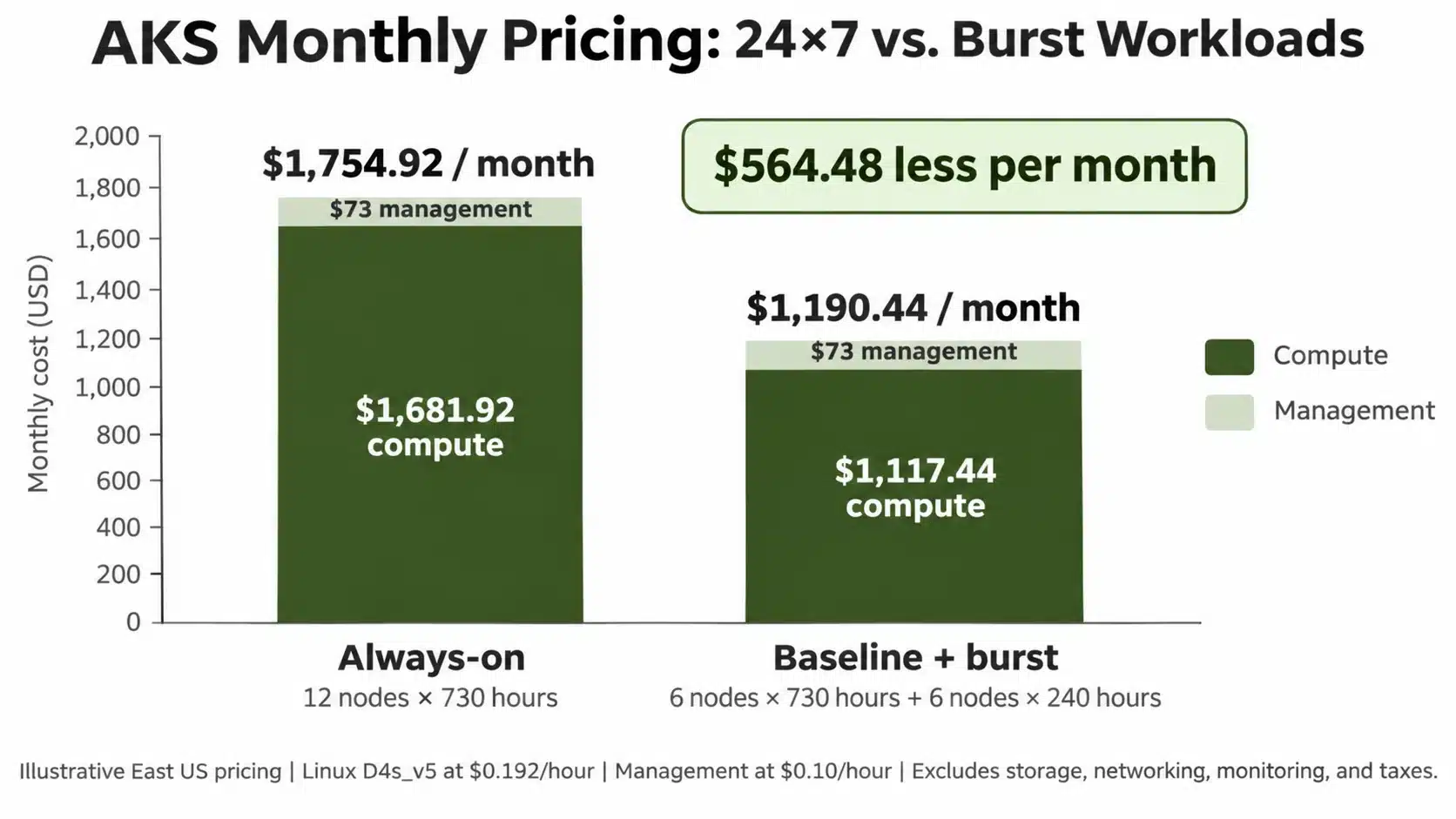
Example 3: Always-on versus burst
Six baseline D4s_v5 nodes run for 730 hours, while six additional user nodes run for just 240 hours during demand peaks. The Standard management tier remains active.- Baseline VMs: 6 × 730 × $0.192 = $840.96
- Burst VMs: 6 × 240 × $0.192 = $276.48
- Management: 730 × $0.10 = $73.00
| Operating pattern | Compute plus management |
|---|---|
| All 12 nodes running 730 hours | $1,754.92 |
| Six baseline nodes (730 hours) plus six burst nodes (240 hours) | $1,190.44 |
| Illustrative difference | $564.48 |
Additional AKS charges
An accurate bill includes resources beyond the control plane and worker VMs:- Storage: Managed OS disks, persistent volumes, disk capacity, and eligible transactions.
- Networking: Public IPs, load balancers, gateways, and billable outbound or inter-region data.
- Observability: Azure Monitor, Log Analytics ingestion and retention, and enabled insights.
- Optional services: Container Registry, security products, backup, and databases.
AKS compute discounts
Azure Reserved VM Instances can reduce qualifying VM rates for a term. Azure Savings Plan for Compute applies an hourly spending commitment to eligible compute.Azure Savings Plans for Compute can provide up to 65% savings, while Azure Reserved VM Instances can offer up to 72% savings compared with pay-as-you-go pricing for qualifying virtual machines. Actual savings depend on VM type, region, term, and eligible usage. These discounts do not automatically apply to AKS cluster-management fees.
Spot VMs suit interruption-tolerant user workloads, and Azure Hybrid Benefit may apply to eligible Windows licensing. Neither automatically discounts management, disks, networking, or monitoring. For rightsizing and scaling tactics, see our AKS cost optimization guide.
Autoscaling and Automatic
Cluster autoscaling changes node counts. Node Auto Provisioning can also select different VM types, affecting the applicable hourly rate.AKS Automatic is not a fourth management tier. It is a separately billed managed experience with Standard-tier SLA coverage. Its pricing includes an Automatic hosted-component charge and applicable workload compute charges, which should be estimated separately from AKS Base clusters.
New AKS Automatic clusters use managed system node pools by default. Microsoft states that the VMs running in these managed system pools are not billed to customer subscriptions. Migration for eligible existing Automatic clusters remains in preview.
Workload nodes and other deployed services can still generate charges.
Check actual costs
Compare estimates with Azure Cost Management. On supported Standard or Premium clusters, AKS Cost Analysis can allocate costs by cluster and namespace, including idle and system capacity.It is unavailable on Free-tier clusters, has regional and Azure-offer restrictions, and can require up to 24 hours after enablement to collect initial data. Reconcile billed node-hours, disks, traffic, and logs before deciding whether to change capacity or buy commitments.
If your cost analysis identifies steady compute usage, explore our Azure cost optimization solutions to understand how eligible Azure commitments can be managed before making a purchasing decision.
How Usage.ai optimizes AKS commitments
At Usage.ai, we help teams reduce eligible AKS worker-node costs through automated Azure Savings Plan and Reservation management. Our Flex Insured Commitment Program simplifies the process through:- Usage analysis: We examine cloud consumption patterns and existing coverage to identify potential savings opportunities.
- Automated purchasing: CoPilot requires your approval before execution, while Autopilot handles purchases within configured controls.
- Ongoing optimization: We track performance, adapt purchasing decisions as workloads change, and provide monthly savings reports across connected accounts.
Our Flex Insured Commitments also provide Cashback protection for qualifying unused capacity purchased through us, subject to program terms.
We charge an agreed percentage of realized savings, so fees apply only when verified savings are generated.
Our goal is to help manage the commitment layer after you have established an appropriate Azure compute baseline, particularly when usage is stable enough to benefit from commitment pricing but may change over time.
Review VM usage, existing commitments, and qualifying savings opportunities before choosing a purchasing strategy.
Frequently asked questions
Why does AKS Free still cost money?
AKS Free removes the cluster-management fee, not infrastructure costs. Worker-node VMs, managed disks, networking, and monitoring remain billable. Even idle clusters can generate charges when their nodes and supporting resources remain provisioned.
Is AKS Standard always $73 per month?
No. $73 assumes 730 billable hours at the $0.10 per cluster-hour Standard reference rate. Actual charges depend on cluster runtime and applicable pricing. Worker-node compute, storage, networking, and monitoring are charged separately.
Are Windows AKS nodes more expensive than Linux nodes?
Windows AKS nodes can cost more because Windows Server licensing affects VM pricing. For example, an East US D4s_v5 VM has reference rates of $0.192/hour for Linux and $0.376/hour for Windows. Eligible Azure Hybrid Benefit licensing can reduce Windows VM costs.
Does stopping an AKS cluster stop all billing?
No. Supported AKS stop/start operations can suspend worker-node compute charges, but managed disks, public IPs, and other retained resources may continue generating costs. Manually deallocating underlying AKS VMs is unsupported.
Can Azure Savings Plans and Reservations reduce AKS costs?
Yes. Azure Savings Plans for Compute can provide up to 65% savings, while Azure Reserved VM Instances can offer up to 72% on qualifying VM compute compared with pay-as-you-go pricing. Actual savings vary by eligibility and commitment terms. These discounts do not automatically cover AKS management, storage, networking, or monitoring.