 AWS
 Microsoft Azure
 Google Cloud


Azure Blob Storage pricing at a glance
Azure Blob Storage is Microsoft’s object storage service for unstructured data such as images, application files, logs, and backups.Azure charges for stored capacity and additional usage-based activities.
| Pricing component | How Azure charges |
|---|---|
| Storage capacity | GB stored per month |
| Transactions | Read, write, list, and other operations |
| Data retrieval | Applicable data retrieved from cooler tiers |
| Redundancy | Selected replication configuration |
| Data transfer | Internet egress and certain regional transfers |
| Additional features | Snapshots, versioning, SFTP, and more |
Storage charges are prorated over time. The calculations below use 1 TiB = 1,024 GiB.
Azure Blob Storage pricing by access tier
Azure provides four main access tiers for standard block blobs. The following table shows East US, LRS, pay-as-you-go capacity rates, checked November, 2026.
| Access tier | Price per GB-month | Best for | Minimum retention |
|---|---|---|---|
| Hot | $0.0208 | Frequently accessed data | None |
| Cool | $0.0152 | Occasional access and backups | 30 days |
| Cold | $0.0036 | Rare access with immediate availability | 90 days |
| Archive | $0.00099 | Long-term archives | 180 days |
For example, storing 1 TiB for a full month costs approximately $21.30 in Hot, $15.56 in Cool, $3.69 in Cold, or $1.01 in Archive, before additional charges.
Hot, Cool, and Cold are online tiers. Archive requires rehydration before normal access, which can take hours.
Microsoft’s Blob Storage access tier documentation explains eligibility, availability, and retention rules.
Azure also offers Smart tier, which automatically moves eligible block blobs from Hot to Cool after 30 days of inactivity and then to Cold after 90 days. It requires a supported GPv2 account with zone redundancy (ZRS, GZRS, or RA-GZRS). Monitoring charges apply to managed objects larger than 128 KiB.
Which Azure Blob Storage tier is cheapest for your workload?
The cheapest capacity rate isn’t always the cheapest overall option.Hot: Best when applications frequently read or modify data.
Cool or Cold: Suitable when data is accessed less often but must remain immediately available.
Archive: Suitable for long-term storage when retrieval delays of several hours are acceptable.
Consider access frequency, retention duration, and retrieval speed before choosing.
What happens when you change storage tiers?
Moving data to a cooler tier generally incurs write-operation charges. Moving it to a warmer tier can incur read-operation and retrieval charges.For applicable GPv2 block blobs, deleting, overwriting, or changing tiers before the minimum retention period ends may trigger prorated early deletion charges.
These rules differ for legacy Blob Storage accounts and Smart tier, so verify the applicable configuration before estimating costs.
Azure Blob Storage pricing by region
The same stored data can cost more or less depending on the Azure region, access tier, and redundancy.Here are example LRS pay-as-you-go capacity rates.
| Region | Hot | Cool | Cold | Archive |
|---|---|---|---|---|
| East US | $0.0208 | $0.0152 | $0.0036 | $0.00099 |
| East US 2 | $0.0184 | $0.0100 | $0.0036 | $0.00200 |
| West US 2 | $0.0184 | $0.0100 | $0.0036 | $0.00099 |
For example, Hot capacity costs less in East US 2 than East US, while Archive capacity costs more in East US 2.
Explore our Azure Blob Storage pricing by region to compare configurations. Confirm rates against Microsoft’s official Blob Storage pricing before budgeting.
What additional charges affect Azure Blob Storage pricing?
Storage transactions and retrieval
Azure charges for applicable read, write, and list operations, commonly per 10,000 requests.Example East US LRS retail rates:
| Charge | Hot | Cool | Cold | Archive |
|---|---|---|---|---|
| Write operations per 10,000 | $0.05 | $0.10 | $0.18 | $0.10 |
| Read operations per 10,000 | $0.004 | $0.01 | $0.10 | $5.00 |
| Data retrieval per GB | Free | $0.01 | $0.03 | $0.02 |
Replication and redundancy
Redundancy determines how Azure protects stored data.| Option | Protection |
|---|---|
| LRS | Copies within one datacenter |
| ZRS | Copies across availability zones |
| GRS | Local and geographically separate replication |
| RA-GRS | GRS with secondary-region read access |
| GZRS | Zone redundancy plus geographic replication |
| RA-GZRS | GZRS with secondary-region read access |
Data transfer and additional features
Inbound data transfer is generally free under standard Azure bandwidth pricing.For internet egress over Microsoft’s premium global network from North America, the first 100 GB per month is free, followed by $0.087/GB for the next 10 TB.
Retrieval and internet egress are separate charges. Review Azure bandwidth pricing for other regions.
Snapshots, versioning, and optional features may also increase costs.
Azure Blob Storage pricing examples: Three monthly bills
These examples use indicative regional retail rates, LRS, USD, and pay-as-you-go pricing without negotiated discounts.They are illustrative estimates, not actual invoices. Each represents a separate billing context with an unused qualifying 100-GB monthly internet egress allowance.
Before estimating your workload, collect these six inputs:
Azure region and applicable pricing.
Redundancy configuration.
Average stored capacity in GiB.
Read, write, and list operations.
Data retrieved from each access tier.
Expected internet egress.
Example 1: Small application using Hot storage
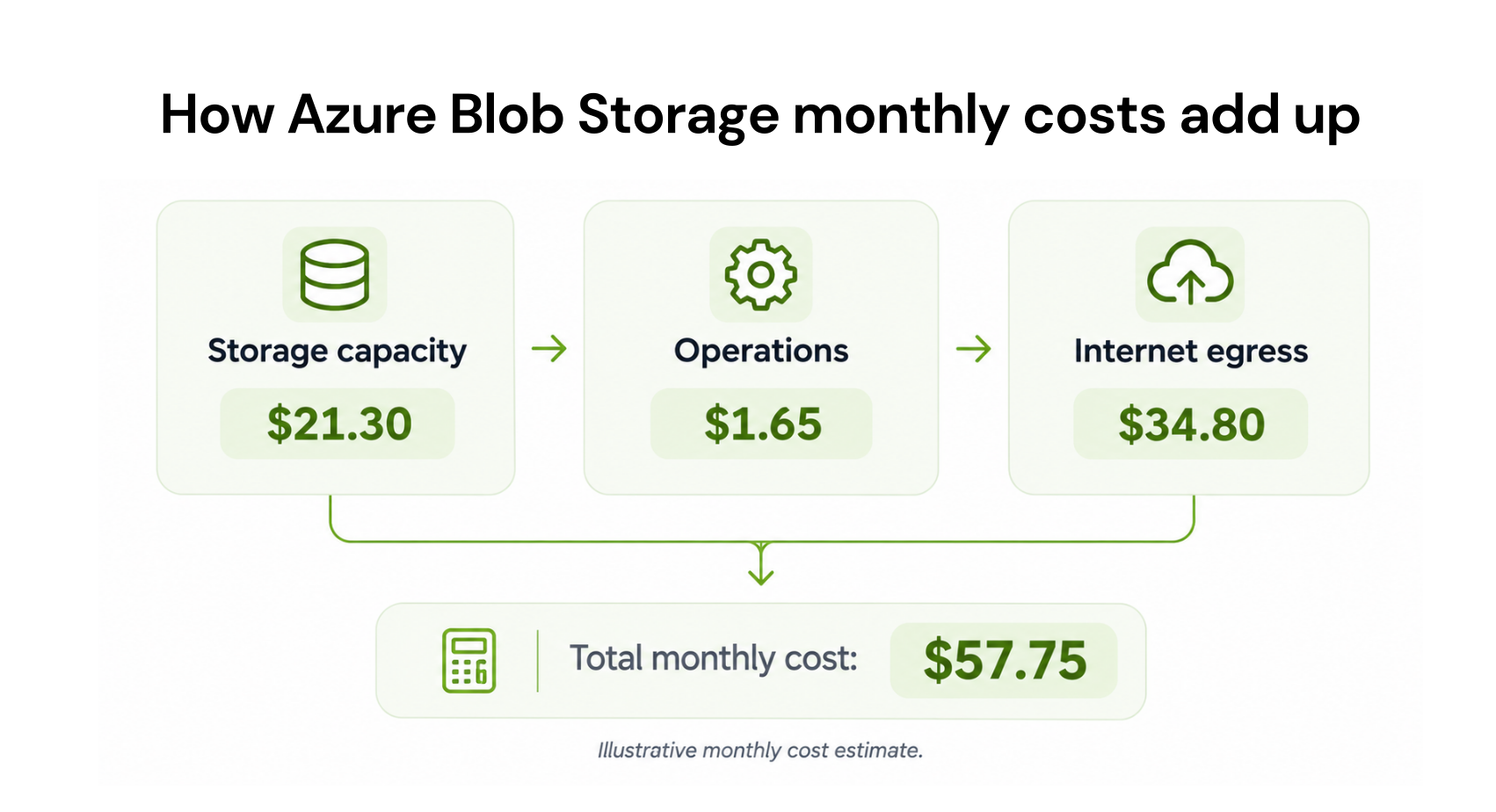
An application stores 1 TiB of images in East US, generating 200,000 writes, one million reads, 50,000 list operations, and 500 GB of internet egress.| Cost component | Calculation | Monthly cost |
|---|---|---|
| Hot storage | 1,024 × $0.0208 | $21.30 |
| Write operations | 20 × $0.05 | $1.00 |
| Read operations | 100 × $0.004 | $0.40 |
| List operations | 5 × $0.05 | $0.25 |
| Data retrieval | No Hot retrieval fee | $0.00 |
| Internet egress | 400 × $0.087 | $34.80 |
| Total | $57.75 |
Example 2: Business using Cool storage
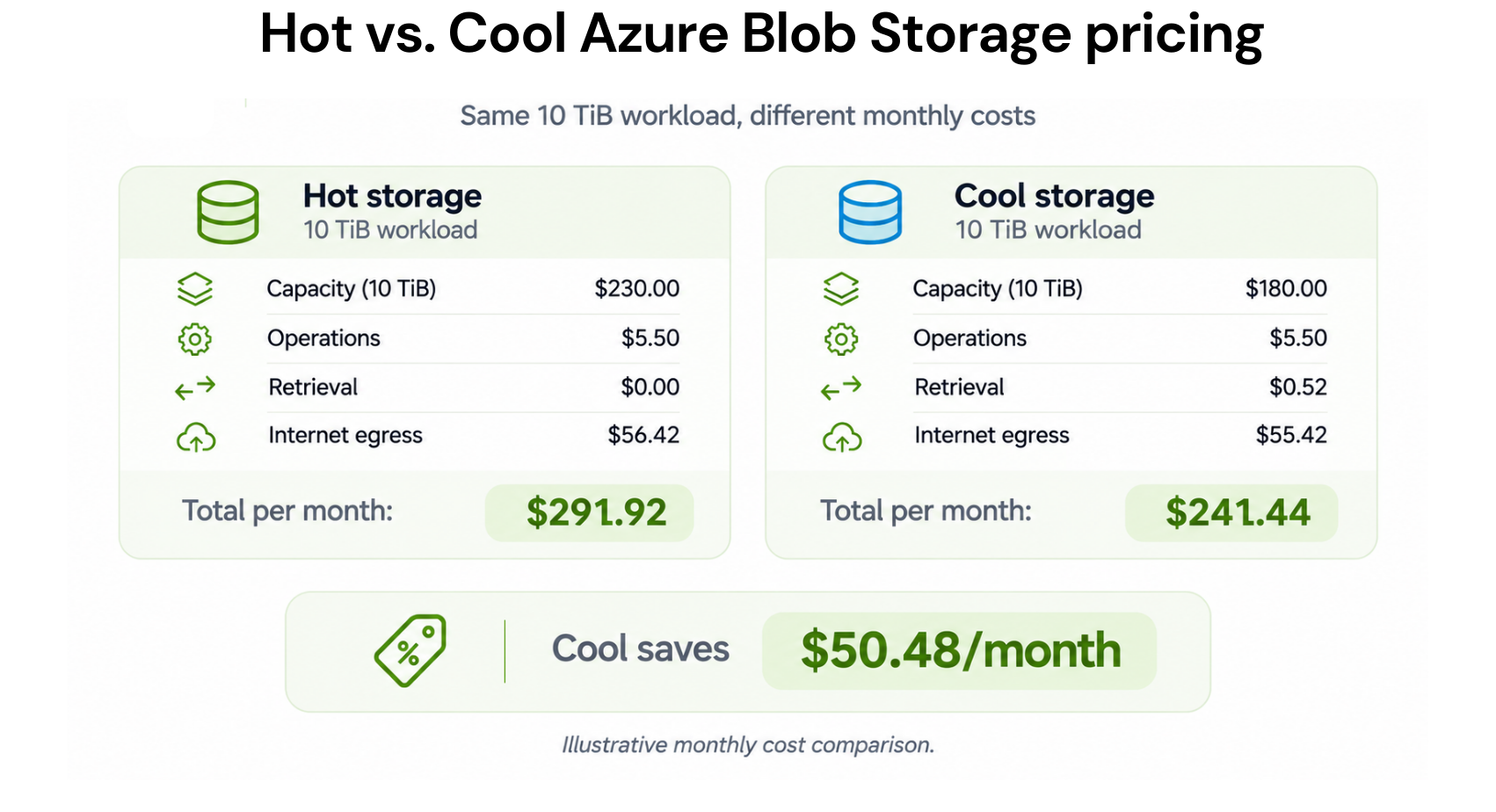
A business stores 10 TiB of documents in East US 2, generating five million writes, 500,000 reads, 1 TiB retrieved, and 1,000 GB of internet egress.| Cost component | Calculation | Monthly cost |
|---|---|---|
| Cool storage | 10,240 × $0.01 | $102.40 |
| Write operations | 500 × $0.10 | $50.00 |
| Read operations | 50 × $0.01 | $0.50 |
| Data retrieval | 1,024 × $0.01 | $10.24 |
| Internet egress | 900 × $0.087 | $78.30 |
| Total | $241.44 |
Choosing Cool saves $50.48 monthly, assuming minimum retention requirements are met. Higher read or retrieval volumes could eliminate those savings.
Example 3: Enterprise archival workload
An enterprise starts with 100 TiB in Archive storage in West US 2.During a 30-day month, it uses Set Blob Tier with standard-priority rehydration to move 2 TiB, comprising 2,000 blobs, into Hot storage. Rehydration finishes halfway through the month, and the restored data stays in Hot for 15 days.
The enterprise then downloads 2,000 GB externally. The blobs have already satisfied Archive’s 180-day minimum retention period.
Example 3: Enterprise archival workload
An enterprise starts with 100 TiB in Archive storage in West US 2.During a 30-day month, it uses Set Blob Tier with standard-priority rehydration to move 2 TiB, comprising 2,000 blobs, into Hot storage. Rehydration finishes halfway through the month, and the restored data stays in Hot for 15 days.
The enterprise then downloads 2,000 GB externally. The blobs have already satisfied Archive’s 180-day minimum retention period.
| Cost component | Calculation | Monthly cost |
|---|---|---|
| Average Archive capacity | 101,376 × $0.00099 | $100.36 |
| Average Hot capacity | 1,024 × $0.0184 (2 TiB × 15/30 days = 1 TiB-month) | $18.84 |
| Standard Archive read operations | 2,000 ÷ 10,000 × $5 | $1.00 |
| Data retrieval | 2,048 × $0.02 | $40.96 |
| Subsequent Hot reads | 2,000 ÷ 10,000 × $0.004 | Less than $0.01 |
| Internet egress | 1,900 × $0.087 | $165.30 |
| Approximate total | $326.46 |
What drives the bill? Archive capacity is inexpensive, but restoration and outbound transfers can significantly increase costs.
This example uses Set Blob Tier rather than Copy Blob. The two methods have different billing implications, as explained in Microsoft’s Archive rehydration guidance.
These simplified examples exclude taxes, optional features, Archive metadata, and unmodeled operations. Actual invoices may differ.
How to estimate current Azure Blob Storage costs
Use the Azure Pricing Calculator to estimate your configuration.Enter your region, access tier, redundancy, stored capacity, operations, retrieval requirements, and expected data transfers.
Compare the estimate with actual charges in Microsoft Cost Management before committing to a budget.
How to reduce Azure Blob Storage costs
Choose the right access tier. Compare lower storage rates against retrieval and transaction costs.
Use lifecycle management. Move aging data when access patterns justify cooler tiers.
Remove unnecessary copies. Review unused snapshots, versions, and obsolete files.
Review redundancy. Match the protection level to business requirements.
Reduce outbound transfers. Identify repeated downloads and avoidable traffic.
Monitor spending. Track unexpected capacity, transaction, and bandwidth charges.
Does Azure reserved capacity reduce Blob Storage costs?
Yes. Azure offers one-year and three-year reserved capacity for qualifying Hot, Cool, and Archive storage, generally in 100-TiB and 1-PiB purchase units.According to Microsoft’s official Azure reservations pricing page, organizations can save up to 38% on Azure Blob Storage capacity. Microsoft’s example uses a three-year reservation for 1 PB of Hot-tier block blob storage with LRS, compared with pay-as-you-go pricing.
Actual reservation savings vary by region, access tier, redundancy, purchase size, and commitment term. Confirm current pricing for your configuration in the Azure portal or Azure Pricing Calculator before purchasing.
This is a Microsoft Azure reservation discount, not a discount on the entire Blob Storage bill.
Reservations don’t cover transactions, retrieval, bandwidth, or other non-capacity charges.
When is Azure Blob Storage reserved capacity worth it?
Before purchasing, check:Stable capacity: Do you consistently store enough eligible data to use the reservation?
Matching configuration: Does your storage match the chosen region, access tier, and redundancy?
Commitment duration: Will the workload remain predictable for one or three years?
Actual savings: Does the reservation cost less than paying on demand for your expected eligible capacity?
Our Azure Blob Storage reserved capacity checklist explains the purchasing requirements.
How we help evaluate Azure commitment savings
At Usage.ai, we analyze cloud spending and existing commitments to uncover savings opportunities across supported Azure services. We help businesses maintain commitment coverage as their cloud requirements evolve.Our read-only Savings Test reviews billing data, existing commitments, and potential savings before purchases are enabled.
Teams can choose how purchases are managed:
CoPilot: Review recommendations and approve eligible commitment purchases.
Autopilot: Automate eligible purchases within approved permissions.
Our Flex Insured Commitments provide Cashback Protection for the qualifying difference when an eligible commitment costs more than equivalent pay-as-you-go usage, subject to program terms.
We charge an agreed percentage of realized savings, billed monthly after Azure billing data is finalized. If you don’t save, you don’t pay.
Final thoughts
Azure Blob Storage pricing involves more than capacity alone. Access tiers, transactions, retrieval, redundancy, and outbound transfers can significantly affect monthly spending.To avoid unexpected costs, estimate your complete workload, compare current rates, and select storage tiers based on actual usage patterns.
Understanding your Blob Storage costs is the first step. We can help you identify additional savings opportunities across eligible Azure commitments.
Explore how we help evaluate and manage qualifying Azure commitments with savings-based pricing and purchasing controls.
Frequently asked questions
How much does Azure Blob Storage cost per GB?
In East US with LRS, Hot storage starts at $0.0208/GB-month, Cool at $0.0152, Cold at $0.0036, and Archive at $0.00099. Additional usage charges apply.
How much does 1 TB of Azure Blob Storage cost?
Rates are indicative USD retail prices checked November 6, 2026, against the stated regional pricing sources. Actual costs depend on region, redundancy, usage, capacity band, and commercial agreements. Verify current pricing on Microsoft's Azure Blob Storage pricing page.
Is Azure Blob Storage free?
Eligible Azure free offers may include limited storage allowances. Beyond those allowances, standard pay-as-you-go charges apply.
What is the difference between Hot and Cool pricing?
Hot has higher capacity rates but lower access charges. Cool offers cheaper capacity with higher transaction and retrieval costs.
Which Azure Blob Storage tier is cheapest?
Archive generally has the lowest capacity rate, but retrieval delays, access charges, and minimum retention requirements make it unsuitable for frequently accessed data.