
 AWS
 Microsoft Azure
 Google Cloud

Azure App Service Pricing at a Glance
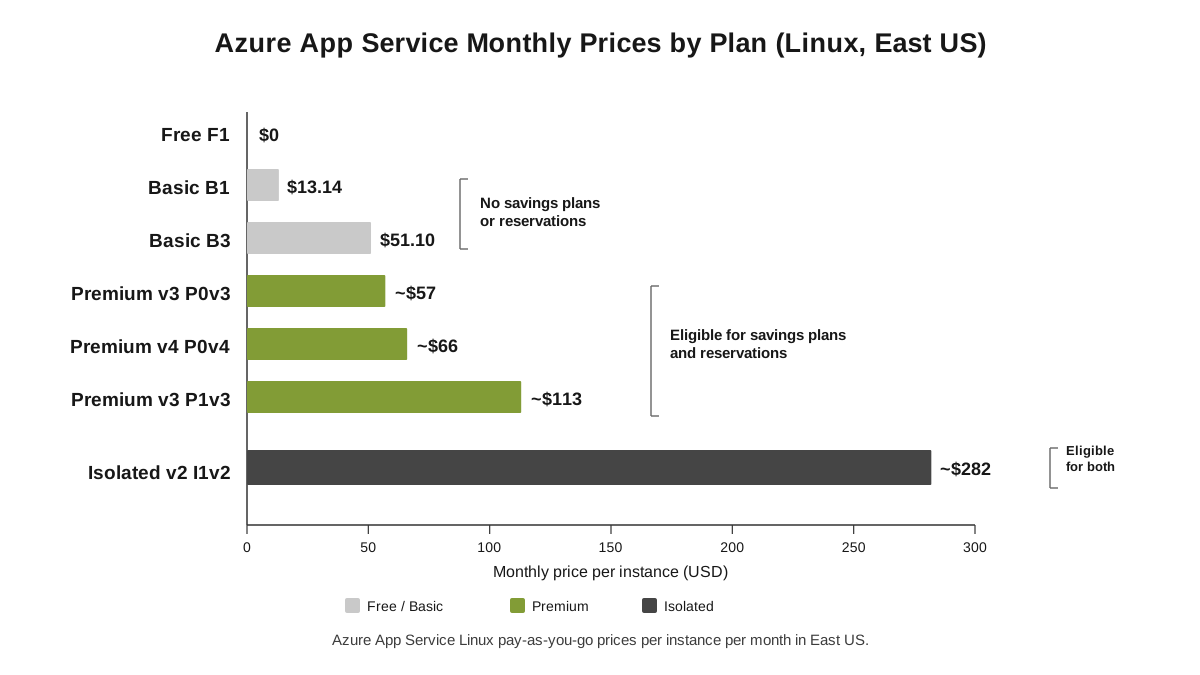
The table below shows Azure App Service pricing for Linux plans in East US at pay-as-you-go rates. Monthly prices assume one instance running 730 hours. For other Azure services, see our Azure pricing guide.| Plan (SKU) | vCPU | RAM | Storage | Linux price per month | Best for |
|---|---|---|---|---|---|
| Free (F1) | Shared | 1 GB | 1 GB | $0 | Learning and quick tests |
| Basic (B1) | 1 | 1.75 GB | 10 GB | $13.14 | Small, low-traffic sites |
| Basic (B2) | 2 | 3.5 GB | 10 GB | $25.55 | Busier sites, several small apps |
| Basic (B3) | 4 | 7 GB | 10 GB | $51.10 | Heavier apps without autoscale |
| Premium v3 (P0v3) | 1 | 4 GB | 250 GB | ~$57 | Entry-level production |
| Premium v3 (P1v3) | 2 | 8 GB | 250 GB | ~$113 | Production APIs and web apps |
| Premium v3 (P2v3) | 4 | 16 GB | 250 GB | ~$226 | High-traffic production |
| Premium v4 (P0v4) | 1 | 4 GB | 250 GB | ~$66 | Newest hardware, production |
| Isolated v2 (I1v2) | 2 | 8 GB | 1 TB | ~$282 | Private, single-tenant environments |
Azure App Service Pricing: Linux vs Windows
Windows plans include the Windows Server license, so they cost more for the same hardware. The gap is small on the legacy Standard tier but roughly doubles on Basic and Premium.| Plan | Linux per month | Windows per month | Windows premium |
|---|---|---|---|
| Basic B1 | $13.14 | ~$55 | About 4x |
| Standard S2 (legacy) | ~$139 | ~$146 | About 5% |
| Premium v3 P1v3 | ~$113 | ~$230 | About 2x |
How Azure App Service Pricing Works
Azure App Service bills the App Service plan, which is the set of virtual machine instances your apps run on. The apps themselves are free. Ten small apps on one B1 plan cost the same $13.14 as one app on that plan.The basic formula is:
Four things set the instance price: the tier (Basic, Premium v3, and so on), the size within the tier (P0v3, P1v3), the operating system (Linux or Windows), and the region. If you’d rather manage your own servers, compare these rates with Azure virtual machine pricing.
What Keeps Charging
Stopped apps: Stopping an app doesn't stop its plan. You keep paying for every instance until you scale the plan to Free or delete it.
Autoscaled instances: Extra instances added by autoscale are billed for the time they run, at the same hourly rate.
Deployment slots: Staging slots run on the same plan instances, so they add no compute charge. They do use the plan's CPU and memory.
Empty App Service Environments: An empty App Service Environment v3 is billed as one Windows I1v2 instance. A zone-redundant one has a minimum charge of 18 cores, or nine I1v2 instances. See Microsoft's App Service Environment overview for details.
Azure App Service Plans Explained
Each tier adds features as well as hardware. Pick the tier for the features you need first, then the size.Free and Shared
The Free F1 plan gives each app 60 CPU minutes per day, 1 GB of memory, and 1 GB of storage. It has no SLA, no custom domains, and Microsoft doesn’t support it for production. The Shared tier (Windows only) adds custom domains but still runs on shared hardware.Basic (B1 to B3)
Basic is the cheapest dedicated tier. You get your own instances, custom domains with SSL, and manual scaling up to three instances. There’s no autoscale, no deployment slots, and no access to savings plans or reservations, so you always pay the list price.Premium v3 (P0v3 to P5mv3)
Premium v3 is the main production tier. It adds autoscale up to 30 instances, deployment slots, virtual network integration, and faster hardware. It’s eligible for savings plans and reservations, and Linux Premium v3 also offers discounted Dev/Test rates.Premium v4 (P0v4 to P5mv4)
Premium v4 is the newest generation. It supports code apps on Windows and both code and custom containers on Linux, but not Windows containers. It isn’t available in every region or deployment yet. You can check with az appservice list-locations –linux-workers-enabled –sku P1V4, as shown in Microsoft’s Premium v4 configuration guide.Isolated v2 (I1v2 to I6v2)
Isolated v2 runs inside an App Service Environment v3, a single-tenant deployment in your own virtual network. It’s built for compliance-heavy or high-scale workloads, with up to 100 instances per plan. Pricing is per instance, and there’s no separate stamp fee.What Happened to Standard?
New customers no longer see the Standard tier on the main pricing page. It’s still available on a legacy page for existing plans. On Linux, a P0v3 (about $57) now costs less than an S1 (about $69) and comes with 4 GB of memory instead of 1.75 GB. Standard also can’t use savings plans or reservations.Linux vs Windows: Which Is Cheaper?
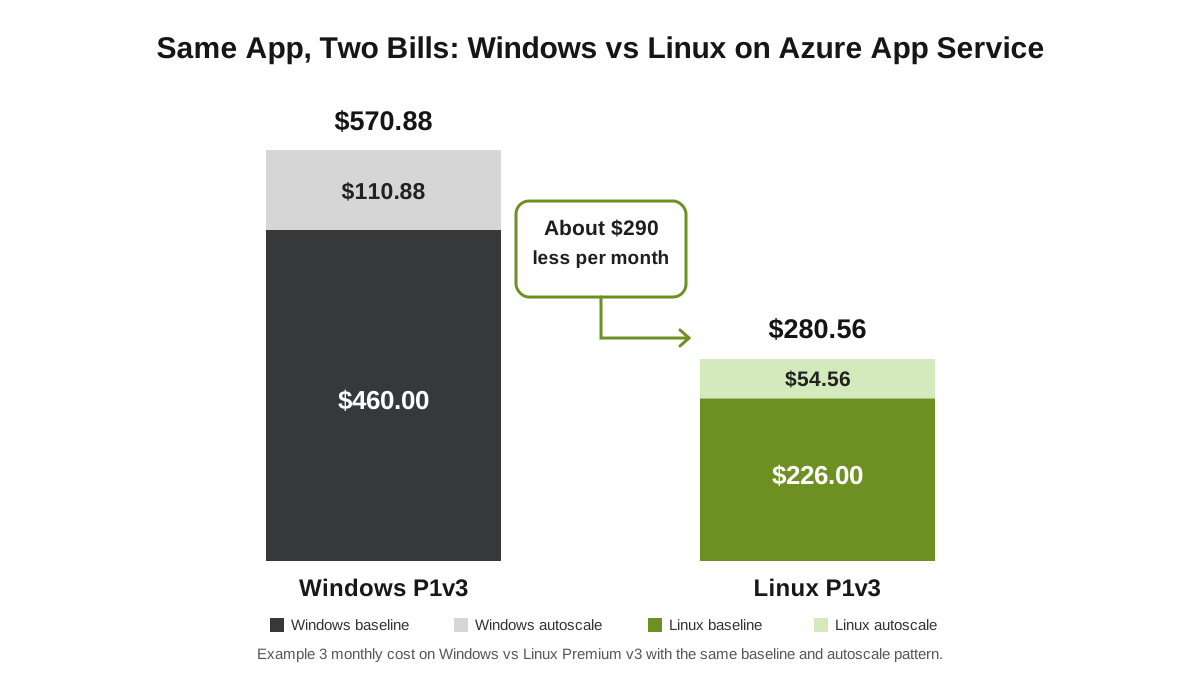
Linux is cheaper on every current tier. Choose Windows only when your app needs it, such as for .NET Framework apps, IIS-specific features, or Windows containers. Modern .NET, Node.js, Python, Java, and PHP apps all run on Linux.One Windows P1v3 instance (about $230) costs the same as two Linux P1v3 instances. For a team running ten instances, that difference is over $14,000 a year.
What’s Not Included in the Plan Price
The plan covers compute only. These items are billed separately:| Item | Typical price |
|---|---|
| Outbound data (internet) | First 100 GB per month free, then about $0.087/GB from North America and Europe |
| App Service Domain | $11.99 per year |
| App Service Certificate | Free managed certificates; paid standard $69.99/year, wildcard $299.99/year |
| Databases | Billed separately, see Azure SQL Database pricing and Cosmos DB pricing |
| Monitoring | Application Insights and Log Analytics billed per GB ingested |
| CDN or Front Door | Billed separately when you offload static content |
Azure App Service Pricing Examples: 3 Monthly Bills
These examples use East US list prices and 730 hours per month. You can reproduce each one in the Azure pricing calculator. They are illustrative estimates, not invoices.Example 1: A Small Business Website on Basic B1 (Linux)
A local business runs its website and a small booking API on one Linux B1 instance. It uses an App Service Domain, a free managed certificate, and about 40 GB of outbound traffic a month.| Monthly charge | Calculation | Cost |
|---|---|---|
| B1 Linux plan | 1 instance × $13.14 | $13.14 |
| App Service Domain | $11.99 ÷ 12 | $1.00 |
| Managed certificate | Free | $0.00 |
| Outbound data | 40 GB, within 100 GB free | $0.00 |
| Estimated total | $14.14 |
Example 2: A Production API on Premium v3 (Linux)
A SaaS company runs its API on two Linux P1v3 instances, 24/7, for redundancy. It sends about 300 GB of data to users each month.| Monthly charge | Pay-as-you-go | With 1-year reservation |
|---|---|---|
| 2 × P1v3 Linux | 2 × $113 = $226.00 | 2 × ~$74 = $148.00 |
| Outbound data | 200 GB × $0.087 = $17.40 | $17.40 |
| Estimated total | $243.40 | $165.40 |
Example 3: A Windows .NET App with Autoscale (Premium v3)
An internal .NET Framework app must run on Windows. It keeps two P1v3 instances running 24/7 and autoscales to four instances for 8 busy hours on each of 22 working days.The hourly rate is about $230 ÷ 730 = $0.315 per instance. Autoscale adds 2 instances × 8 hours × 22 days = 352 instance-hours.
| Monthly charge | Windows P1v3 | Same app on Linux P1v3 |
|---|---|---|
| Baseline (2 instances, 730 hours) | $460.00 | $226.00 |
| Autoscale (352 instance-hours) | 352 × $0.315 = $110.88 | 352 × $0.155 = $54.56 |
| Estimated total | $570.88 | $280.56 |
How to Get Azure App Service Discounts
Azure offers three ways to pay less than the list price for App Service. Two need a one-year or three-year commitment.| Discount | How it works | Eligible plans |
|---|---|---|
| Reservations | Commit to a specific plan size in a region for 1 or 3 years | Premium v3, Premium v4, Isolated v2 |
| Savings plan for compute | Commit to a fixed hourly spend, applied across eligible compute services and regions | Premium v3, Premium v4, Isolated v2 |
| Dev/Test pricing | Lower rates for non-production use in Dev/Test subscriptions | Linux Premium v3 |
How Much Can You Save?
| Plan (Linux unless noted) | Pay-as-you-go | With commitment | Saving |
|---|---|---|---|
| P1v3, 1-year reservation | ~$113/month | ~$74/month | About 35% |
| P1v3 Windows, 3-year reservation | ~$230/month | ~$141/month | About 39% |
| P0v4, 3-year reservation | ~$66/month | ~$25/month | About 62% |
When Commitments Make Sense
Commit only to the instances you’re sure will run all year. In Example 3 above, the two baseline instances are a good fit, while the autoscaled hours are not. Unused commitment is still billed, so start with your steady minimum and add more later. Our guide on how much Azure spend you should commit shows how to size that minimum, and committing with unpredictable workloads covers apps with spiky traffic.For App Service specifically, read our App Service savings plan optimization guide. For the full mechanics, see our Azure savings plans guide, our complete guide to Azure Reservations, and our compute savings plans guide, which covers which App Service tiers qualify. If several teams share commitments, subscription vs shared savings plan scope explains how to set it up.
Azure App Service Cost Optimization: 7 Ways to Cut Your Bill
Run on Linux when you can. On Premium v3, Linux costs about half as much as Windows for the same instance.
Move Standard plans to Premium v3. On Linux, P0v3 and P1v3 cost less than S1 and S2, give you more memory, and unlock reservations.
Pack apps onto fewer plans. Several low-traffic apps can share one plan at no extra cost. Five apps on one P1v3 is far cheaper than five separate plans. Our guide to cloud rightsizing explains how to find the right size.
Delete or downscale idle plans. Stopping an app doesn't stop billing. Scale unused dev and test plans to Free, or delete them. Idle plans are a classic source of cloud waste.
Keep the baseline small and let autoscale handle peaks. Pay for the minimum instances you need all day, and add capacity only during busy hours.
Commit to your steady baseline. Reservations or a savings plan on always-on Premium instances cut that part of the bill by 35% or more.
Offload static files. Serve images, scripts, and downloads from a CDN or Azure Static Web Apps so your plan handles less traffic.
How Usage.ai Helps Lower Azure App Service Costs
Right-sizing your plans is the first step. Committing to the baseline that’s left is where the bigger savings come from, and it’s also where teams hesitate, because unused commitment is still billed.Usage.ai buys and manages Azure reservations and savings plans for eligible compute, including Premium v3, Premium v4, and Isolated v2 App Service plans. Recommendations refresh daily as your usage changes. If a commitment we purchase goes underused, our Cashback protection returns the value, so you get the discount without carrying the risk.
You can start with a read-only Savings Test before any purchasing is authorized. Setup takes a few minutes, as shown in our Azure savings setup guide.
We charge a percentage of the savings we actually deliver. See how Usage.ai pricing works and learn more about our Azure cost optimization.
Find eligible Azure savings with automated reservations, savings plans, and Cashback protection.
Frequently asked questions
Is Azure App Service free?
Yes, the Free F1 plan costs $0 and gives each app 60 CPU minutes per day, 1 GB of memory, and 1 GB of storage. It has no SLA and isn't supported for production. Paid plans start at $13.14 per month for Basic B1 on Linux in East US.
How much does Azure App Service cost per month?
A single Linux instance costs $13.14 on Basic B1, about $57 on Premium v3 P0v3, and about $113 on Premium v3 P1v3 in East US. Your total is the instance price multiplied by the number of instances, plus extras like outbound data.
Is Azure App Service charged per app or per plan?
Per plan. You pay for each instance in the App Service plan, and every app on that plan shares those instances at no extra cost.
Do I pay for a stopped Azure App Service app?
Yes. Stopping an app doesn't stop its plan from billing. To stop charges, scale the plan to Free or delete it.
Why is Windows App Service more expensive than Linux?
Windows plans include the Windows Server license in the hourly rate. On Premium v3, that makes Windows roughly twice the price of Linux for the same instance size.