 AWS
 Microsoft Azure
 Google Cloud


What Is AWS Cost Optimization?
AWS cost optimization is the process of reducing unnecessary cloud spending while maintaining application performance, reliability, and scalability. It involves identifying unused resources, improving infrastructure efficiency, choosing suitable pricing options, and monitoring spending to avoid unexpected costs.Why Is AWS Cost Optimization Important?
AWS makes it easy to launch infrastructure and scale applications, but that flexibility can also increase spending.Instances may be larger than necessary, development environments can run when nobody is using them, and workloads may continue paying On-Demand rates despite having predictable usage.
AWS cost optimization helps organizations:
- Reduce waste: Identify idle resources and unnecessary infrastructure.
- Improve efficiency: Match resource capacity to actual workload requirements.
- Control budgets: Detect unexpected spending before it becomes a larger problem.
- Capture discounts: Use suitable AWS pricing options for predictable workloads.
- Improve accountability: Understand which teams, applications, and services drive spending.
6 Free AWS Cost Optimization Tools
AWS provides several native tools to understand spending, identify optimization opportunities, and prevent unexpected charges.The following six are useful starting points. Some have paid features or usage-based charges, which are noted below.
1. AWS Cost Explorer
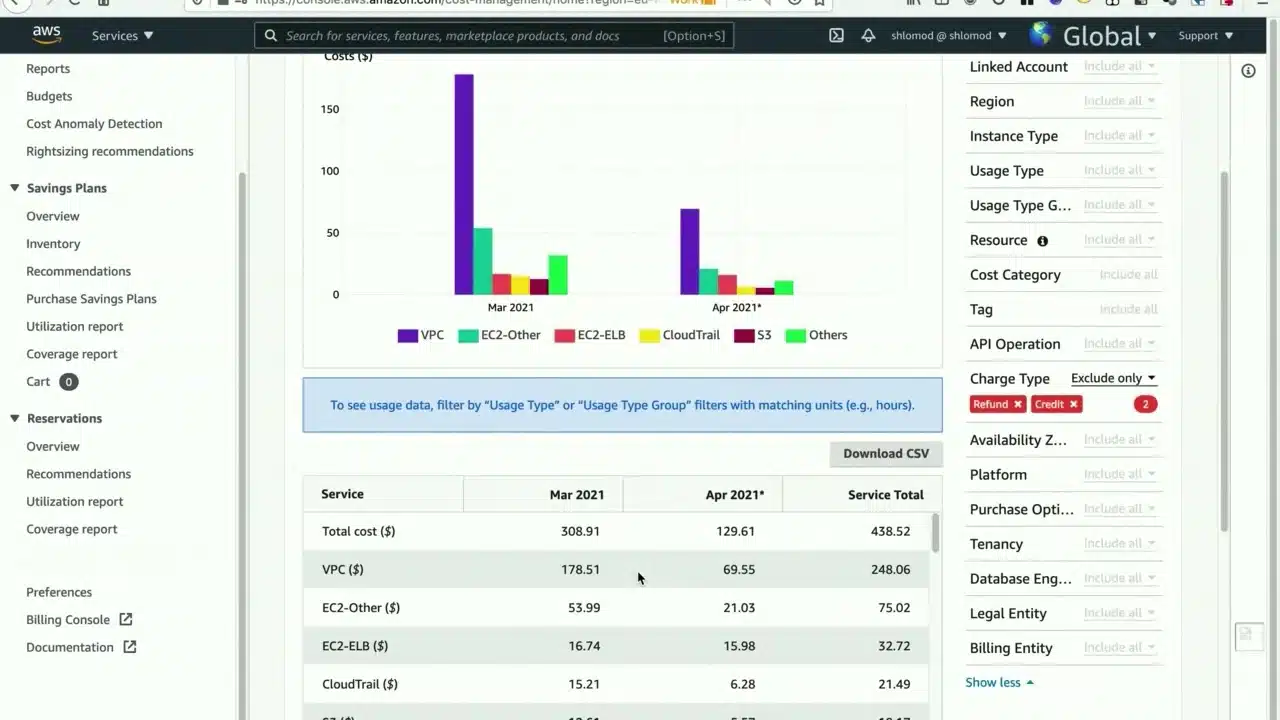
AWS Cost Explorer helps analyze spending across services, accounts, Regions, and usage types.
You can use it to:
- Compare monthly AWS spending.
- Identify services responsible for cost increases.
- Review historical spending patterns.
- Forecast future costs.
- Analyze Savings Plans and Reserved Instance coverage.
When to use it: Start here when you don’t know which AWS services are consuming most of your budget.
2. AWS Budgets
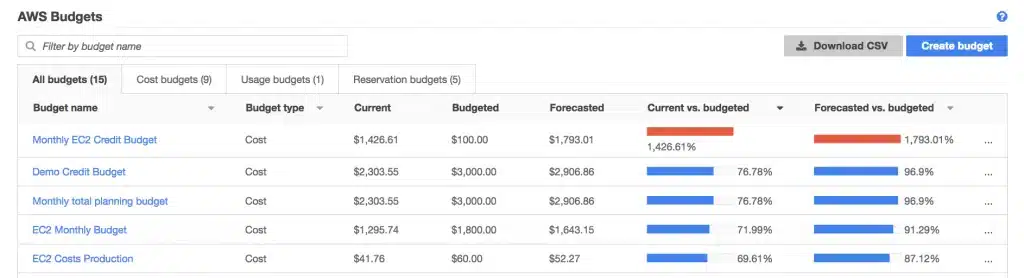
AWS Budgets lets you create budgets for specific accounts, services, cost categories, and usage types.
You can configure alerts when actual or forecasted spending reaches a defined threshold.
For example, if your monthly EC2 budget is $5,000, you can configure notifications when spending reaches $4,000.
AWS lists two free budgets with actions per account. Additional budget configurations may incur charges.
When to use it: Use Budgets when you want teams to receive early warnings before exceeding their allocated spending.
3. Cost Anomaly Detection
AWS Cost Anomaly Detection uses machine learning to identify unusual spending patterns.
It can monitor costs across AWS services, linked accounts, cost allocation tags, and cost categories.
When an anomaly is detected, AWS can send notifications containing information about affected services and spending changes.
The service is available at no additional charge.
When to use it: Set it up to identify unexpected increases caused by unusual resource usage, new deployments, or configuration changes.
4. Cost Optimization Hub
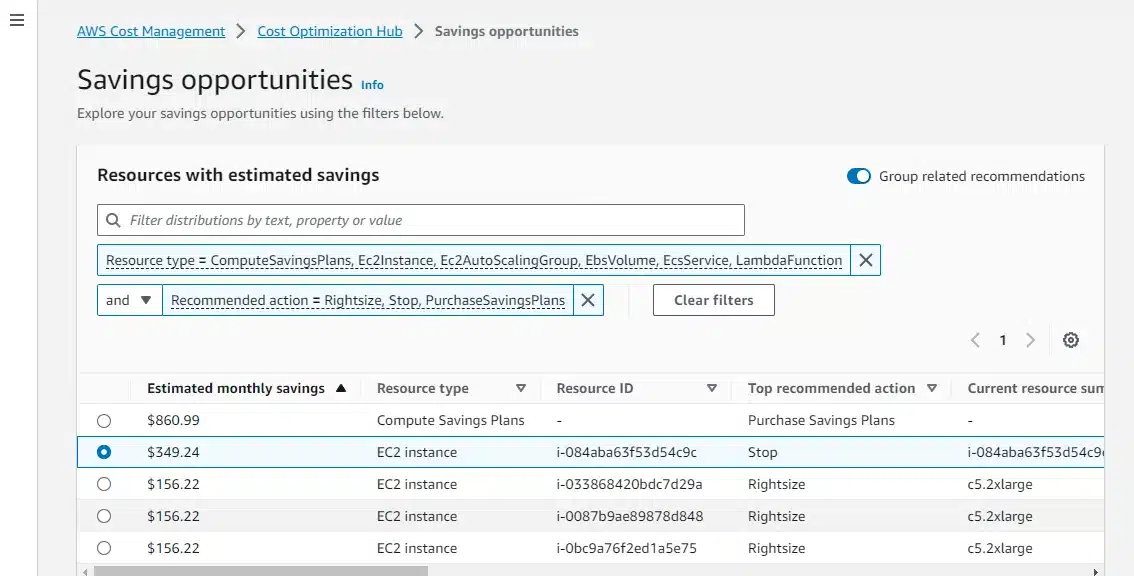
AWS Cost Optimization Hub brings together optimization recommendations across AWS accounts and Regions.
It consolidates more than 18 types of recommendations, including:
- EC2 rightsizing
- Idle resource detection
- Graviton migration
- RDS and Aurora recommendations
- Savings Plans and Reserved Instance opportunities
AWS offers Cost Optimization Hub at no additional charge in supported commercial Regions.
When to use it: Use it when you want one place to review and prioritize AWS optimization recommendations.
5. AWS Compute Optimizer
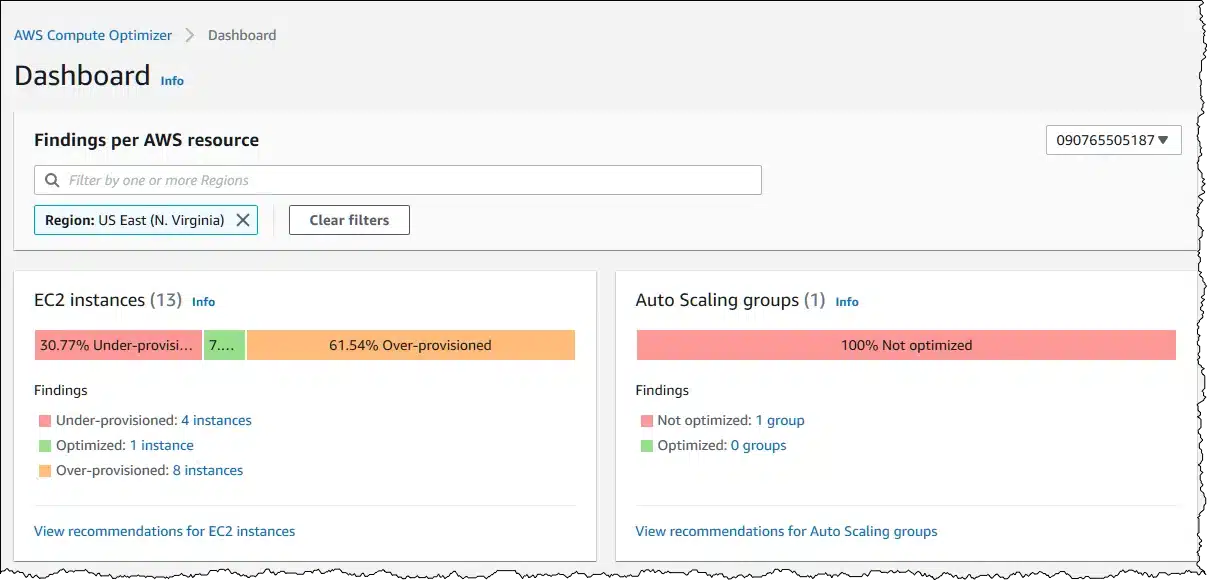
AWS Compute Optimizer analyzes historical resource utilization and provides recommendations for supported services.
It can recommend changes for:
- EC2 instances
- Auto Scaling groups
- EBS volumes
- Lambda functions
- ECS services on Fargate
- RDS resources
When to use it: Use Compute Optimizer before resizing instances or changing resource configurations.
6. AWS Pricing Calculator
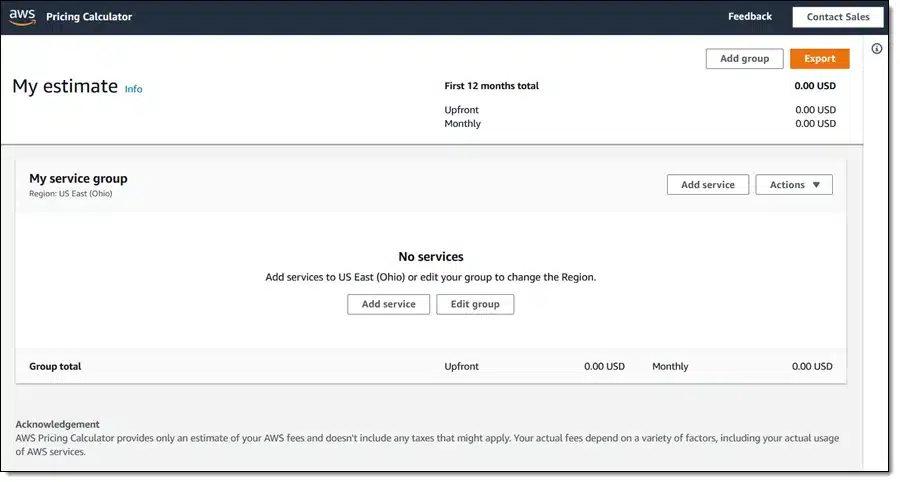
The AWS Pricing Calculator helps estimate the cost of a proposed architecture before deployment.
You can configure services such as EC2, RDS, S3, and Lambda, then estimate monthly and annual spending.
It is useful for comparing instance types, estimating storage costs, planning infrastructure budgets, and evaluating different architectures.
The calculator is free to use, but estimates depend on the configurations and usage assumptions you enter.
When to use it: Use it before launching new infrastructure or changing an existing architecture.
8 AWS Cost Optimization Hacks
Free tools help identify opportunities. The next step is implementing changes that reduce actual spending.1. Apply Cost Allocation Tags
Start by organizing resources with consistent tags such as:- Environment: Production, staging, development
- Team: Engineering, marketing, data
- Project: Application or product name
- Owner: Responsible team or individual
This makes it easier to identify which teams and applications are driving spending.
2. Right-Size EC2 Instances
Oversized EC2 instances are a common source of unnecessary costs.For example, an application running on an m7i.2xlarge instance may not need that much CPU and memory capacity if utilization remains consistently low.
Review CPU, memory, network, and application performance before selecting a smaller instance.
Use Compute Optimizer to identify potential changes, then test recommendations before applying them to production.
For more detail, read our Amazon EC2 pricing and cost optimization guide.
3. Schedule Non-Production Resources
Development and testing environments often run outside working hours even when nobody is using them.Create schedules to stop eligible non-production EC2 instances during nights, weekends, and holidays.
AWS Instance Scheduler or EventBridge with Lambda can automate these schedules.
For example, an instance running 24 hours a day can be scheduled to operate only during an eight-hour workday.
Remember that stopping an EC2 instance does not remove every associated charge. EBS storage and certain networking resources may continue billing.
4. Configure Auto Scaling
Avoid maintaining enough infrastructure for peak traffic throughout the day.Use EC2 Auto Scaling to increase or decrease instance capacity based on workload demand.
For example, an application receiving higher traffic during business hours can scale out when demand increases and scale in during quieter periods.
Configure minimum and maximum capacity carefully so scaling does not affect availability or application performance.
5. Use Spot and Graviton
AWS Spot Instances provide access to spare EC2 capacity at discounted rates compared with On-Demand pricing.They work well for interruption-tolerant workloads such as:
- Batch processing
- Data analysis
- CI/CD jobs
- Development environments
Also evaluate AWS Graviton instances for compatible workloads. They can offer better price-performance than comparable x86 instances, depending on the application.
Test compatibility and actual performance before migrating.
6. Optimize S3 and EBS Storage
Storage costs can grow when data and volumes remain allocated unnecessarily.For S3:
- Use Standard for frequently accessed data.
- Move infrequently accessed data to suitable storage classes.
- Use Glacier classes for archival workloads.
- Configure lifecycle policies to automate transitions and expiration.
- Remove incomplete multipart uploads.
- Identify unattached volumes.
- Review unused snapshots.
- Resize oversized volumes.
- Evaluate gp3 instead of older gp2 configurations where appropriate.
7. Reduce Data Transfer Costs
Networking expenses can increase significantly when applications exchange large amounts of data.Review:
- Cross-Region traffic
- Cross-Availability Zone transfers
- NAT Gateway processing
- Public IPv4 addresses
- Unnecessary transfers between services
Consider S3 and DynamoDB gateway endpoints where appropriate, and evaluate caching or CloudFront to reduce repeated origin traffic.
Don’t move workloads to a cheaper Region without considering latency, compliance, availability, and data transfer charges.
8. Use AWS Savings Plans
Savings Plans reduce eligible compute rates in exchange for a one- or three-year hourly spending commitment.AWS offers two main types:
| Plan | Coverage | Best For |
|---|---|---|
| Compute Savings Plans | Eligible EC2, Fargate, and Lambda usage | Greater flexibility |
| EC2 Instance Savings Plans | Eligible EC2 usage within a selected instance family and Region | Stable EC2 workloads |
Then calculate the stable usage baseline you expect to maintain.
Monitor commitment coverage and utilization after purchasing. High coverage is not useful if a significant portion of your commitment remains unused.
For more detail, see our AWS Savings Plans guide.
What Should You Optimize First?
Not every optimization opportunity has the same impact or implementation effort.Use this sequence to prioritize work:
| Priority | Action | Why |
|---|---|---|
| 1 | Remove validated idle resources | Stops unnecessary spending |
| 2 | Right-size infrastructure | Reduces resource requirements |
| 3 | Schedule non-production workloads | Avoids paying for unused capacity |
| 4 | Optimize storage and networking | Reduces supporting infrastructure costs |
| 5 | Evaluate Spot and Graviton | Improves compute price-performance |
| 6 | Purchase suitable commitments | Reduces rates on stable eligible usage |
Where Usage.ai Fits
Native AWS tools help identify spending patterns, resource waste, and potential savings. However, managing commitment purchases across changing workloads requires ongoing analysis.At Usage.ai, we help organizations optimize eligible AWS, Azure, and Google Cloud commitments.
Our platform offers:
- Autopilot: Automates eligible commitment purchases within approved controls.
- CoPilot: Lets teams review and approve recommendations.
- Flex Insured Commitments: Provides conditional Cashback protection for qualifying eligible underutilization, subject to program terms.
Explore how Usage.ai works to understand how commitment management fits into your AWS cost optimization strategy.
Final Thoughts
AWS cost optimization requires more than finding unused instances or purchasing discounted capacity. Start with cost visibility, remove unnecessary infrastructure, improve resource utilization, and optimize storage and networking. Once workloads have a stable baseline, evaluate Savings Plans for additional savings on eligible usage.Review existing commitments, eligible usage, and potential additional savings before your next commitment decision.
Frequently asked questions
What is AWS cost optimization?
AWS cost optimization is the process of reducing unnecessary cloud spending while maintaining performance, availability, and reliability. It includes rightsizing, storage optimization, automation, and choosing appropriate pricing models.
What are the best free AWS cost optimization tools?
AWS Cost Explorer, AWS Budgets, Cost Anomaly Detection, Cost Optimization Hub, Compute Optimizer, and AWS Pricing Calculator are useful starting points. Some features and API usage may incur additional charges.
How can I reduce my AWS bill?
Start by identifying idle resources, right-sizing EC2 instances, scheduling development environments, and reviewing S3 and networking costs. Then evaluate Spot Instances and Savings Plans for suitable workloads.
Are AWS Savings Plans worth it?
They can reduce costs on predictable, eligible compute usage. However, evaluate your stable baseline and expected utilization before committing.
How often should I review AWS costs?
Review spending anomalies continuously, check resource utilization weekly, and perform a broader cost optimization review monthly. Revisit commitment decisions as workloads change.