.png)
 AWS
AWS Microsoft Azure
 Google Cloud


That makes the cost question more complicated than simply comparing hourly instance prices.
For teams evaluating a Multi-AZ DB Cluster, three questions matter most:
- Do you need readable standby capacity for read scaling?
- Can the three-node cluster replace a separate standby and read-replica architecture?
- Are your engine, Region, instance class, and required features supported?
How Multi-AZ DB Clusters work
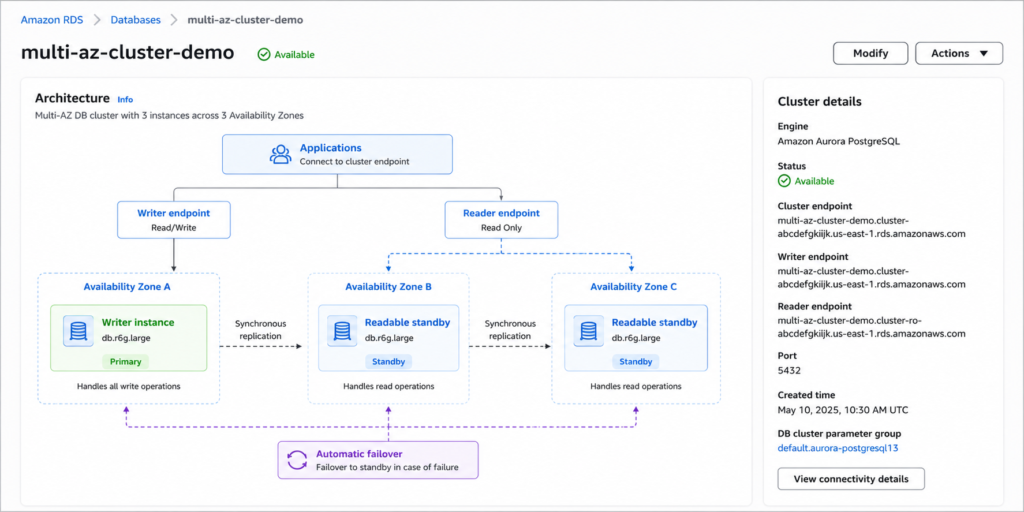
A Multi-AZ DB Cluster consists of three DB instances distributed across three Availability Zones.The architecture includes:
- Semisynchronous replication between the instances, with acknowledgement from at least one reader instance required before a change commits
- Automatic failover if the writer becomes unavailable
- Read scaling through reader endpoints
That changes both the architecture and the cost model.
A standard Multi-AZ deployment generally provides a primary and standby configuration for high availability, while read replicas can be added separately when read scaling is required.
With a Multi-AZ DB Cluster, the two standby instances are already part of the cluster.
For the architecture details and current supported configurations, see AWS Multi-AZ DB cluster deployment guidance.
How RDS Multi-AZ pricing works
AWS RDS pricing is primarily based on the resources provisioned for the database.For a Multi-AZ DB Cluster, the major cost inputs include:
- DB instance-hours for all three instances
- Storage capacity
- Storage type
- Provisioned IOPS, where applicable
- Backup storage
- Data transfer
- Extended Support, when applicable
For example, if three instances each cost $X per hour, the basic compute component is:
3 × $X per hour
However, the actual monthly bill can differ depending on instance class, Region, engine, storage configuration, data transfer, and other applicable charges.
For a broader view of database cost drivers, see our RDS pricing and cost optimization guide.
For current AWS pricing, use the applicable Amazon RDS pricing documentation for your engine and Region.
Why three nodes can still make financial sense
A three-node Multi-AZ DB Cluster has a higher compute footprint than a basic single-instance deployment.That does not automatically make it more expensive from a workload perspective.
The important question is what architecture the cluster replaces.
Suppose a workload currently requires:
- One primary DB instance
- One Multi-AZ standby
- Two read replicas
A Multi-AZ DB Cluster provides:
- One writer
- Two readable standbys
Like-for-like example only
For a like-for-like compute comparison in which all four instances use the same engine, Region, instance class, and pricing model:| Architecture | DB instances | Compute model |
|---|---|---|
| Multi-AZ + two read replicas | 4 | 4 × instance rate |
| Multi-AZ DB Cluster | 3 | 3 × instance rate |
However, this is not a universal pricing rule.
Recalculate the comparison if:
- Replica sizes differ
- Instance families differ
- Regions differ
- Engines differ
- Licensing differs
- Storage configurations differ
- Data transfer changes
- Backup requirements change
The financial advantage depends on whether the three-node architecture replaces other capacity that the workload already needs.
For broader database optimization considerations, see our RDS Reserved Instances guide.
What about storage and backups?
For Multi-AZ DB Clusters, supported storage types are gp3, io1, and io2, and storage settings should be modeled at the cluster level.Storage is separate from DB instance compute, so a complete cost comparison should account for both.
Backup handling is also different from a standard DB instance deployment.
AWS describes a Multi-AZ DB Cluster backup as a storage-volume snapshot of the entire cluster. This means backup requirements should be considered when comparing architectures rather than assuming that compute pricing represents the full cost.
See the current AWS Multi-AZ DB Cluster creation guidance when validating storage and backup configuration.
How Reserved Instances cover the cluster
AWS documents both approaches for obtaining the maximum applicable RI discount for the cluster when the reservations match the eligible engine, Region, instance-class requirements, and deployment coverage. See AWS Reserved DB instances guidance.The exact RI economics still depend on the engine, Region, instance size, payment option, term, and available AWS offering.
For a broader overview of RDS commitment planning, see our RDS Reserved Instances guide.
Option 1: Three Single-AZ RIs
You can use three matching Single-AZ Reserved Instances.| Reservation | Cluster coverage |
|---|---|
| 3 × Single-AZ RI | Covers the three eligible DB instances |
Option 2: One Multi-AZ RI + one Single-AZ RI
Another approach is:| Reservation | Cluster coverage |
|---|---|
| 1 × Multi-AZ RI | Covers the writer and one standby |
| 1 × Single-AZ RI | Covers the remaining standby |
The exact RI economics still depend on the engine, Region, instance size, payment option, term, and available AWS offering.
When deciding between commitment terms, also consider how your workload baseline may change over the commitment period. A longer commitment can offer stronger economics but increases the importance of accurate demand forecasting.
What happens during failover?
Failover is one of the main reasons teams choose a Multi-AZ architecture.If the writer becomes unavailable, RDS can promote one of the standby instances to become the new writer.
The application should not assume that an existing database connection will remain valid throughout the event.
AWS recommends application designs that can reconnect following a Multi-AZ failover. DNS caching can also affect how quickly applications recognize the new endpoint.
For production workloads, validate:
- Writer endpoint usage
- Reader endpoint usage
- Connection retry behavior
- Connection timeout settings
- DNS caching behavior
- Connection pool recovery
- Failover runbooks
- Application behavior during a forced failover test
See the AWS Multi-AZ DB Cluster failover guidance when testing application behavior.
Validate before migrating or reserving
Before moving an existing RDS workload to a Multi-AZ DB Cluster or purchasing a long-term RI commitment validate these five areas.1. Engine support
Confirm that your workload uses a supported engine, such as an eligible version of MySQL or PostgreSQL.2. Engine version
Check the exact engine version against current Multi-AZ DB Cluster support.Do not assume that because an engine is supported, every version is automatically supported.
3. Region availability
Confirm that Multi-AZ DB Clusters are available for your specific AWS Region.Regional availability can affect both architecture and pricing.
4. Instance class
Verify that your selected DB instance class is supported for Multi-AZ DB Clusters.Instance-class availability can differ from what is available for standard RDS deployments.
5. Required features
Review the current Multi-AZ DB Cluster limitations before migrating.A workload that depends on an unsupported capability may not be a suitable candidate even if the cluster appears financially attractive.
Check AWS-supported Regions and DB engines for Multi-AZ DB Clusters before making a deployment decision.
Migration blockers to check
Some Multi-AZ DB Cluster limitations can become hard blockers during architecture planning.Before migration, specifically validate whether your workload depends on:
- Storage autoscaling
- Stop/start functionality
- IPv6 connections
- Cross-Region automated backups
- Snapshot copying
- Port modification
- Other capabilities listed in the current AWS Multi-AZ DB Cluster limitations
A commitment should follow architecture validation not replace it.
Review the current AWS Multi-AZ DB Cluster limitations before scheduling a conversion or purchasing long-term coverage.
When does the cluster save money?
The cluster can become financially attractive when it replaces infrastructure that would otherwise require additional DB instances.Consider a workload that needs:
- High availability
- Read scaling
- Multiple database instances
A Multi-AZ DB Cluster combines high availability and readable standby capacity into the same three-node architecture.
The economic question is therefore:
How much capacity would you need to deliver the same availability and read-scaling requirements without the cluster?
If the answer is four or more comparable DB instances, the three-node architecture can have a compute advantage.
If the alternative requires only two instances, or if the cluster requires significantly larger instances, that advantage may disappear.
Build the full cost model
Compute is only one part of the decision.A realistic Multi-AZ DB Cluster comparison should include:
| Cost input | What to evaluate |
|---|---|
| DB compute | Instance class, quantity, Region, engine |
| Storage | Capacity and storage type |
| IOPS | Provisioned IOPS where applicable |
| Backups | Backup retention and storage requirements |
| Data transfer | Traffic between components and Regions |
| Extended Support | Engine version and applicable support charges |
| Replicas | Size and Region of replicas being replaced |
| RIs | Term, payment option, eligibility, and coverage |
For teams evaluating the commitment side of the equation, our RDS Reserved Instances resources can provide additional context on RDS commitment planning.
Extended Support can multiply the exposure
Engine lifecycle is particularly important when multiple database instances are running.For an engine version that is eligible for RDS Extended Support, AWS charges Extended Support for the writer and both readable standby instances in a Multi-AZ deployment with two readable standbys.
For example, AWS lists a Year 3 MySQL 5.7 Extended Support rate of $0.200 per vCPU-hour in US East (Ohio) beginning March 1, 2026.
That means an older engine version can create additional costs across multiple nodes.
Teams should therefore evaluate:
- Current engine version
- Extended Support eligibility
- Number of vCPUs per node
- Number of nodes
- Planned upgrade date
- Regional pricing
For current rates and engine lifecycle information, check AWS RDS pricing and Extended Support information.
Standard Multi-AZ vs. Multi-AZ DB Cluster
The right choice depends on the workload’s requirements.| Requirement | Standard Multi-AZ | Multi-AZ DB Cluster |
|---|---|---|
| High availability | Yes | Yes |
| Readable standby capacity | No | Yes |
| Read scaling | Requires read replicas | Built into architecture |
| Number of core instances | Typically lower | Three |
| Failover capability | Yes | Yes |
| Architecture complexity | Lower | Higher |
| Potential compute efficiency | Depends on replicas | Can improve when replacing additional replicas |
For a workload that only needs high availability and does not need additional read capacity, a standard Multi-AZ deployment may be more appropriate.
How we help with the RI decision
Once you have validated that a Multi-AZ DB Cluster fits the workload, we can help you evaluate eligible AWS commitment opportunities before you make a long-term reservation decision.The objective is to evaluate the commitment against the workload baseline rather than purchasing based only on current usage.
This becomes particularly useful when your cluster nodes, read replicas, instance families, and engine versions are changing at different times.
We also help teams evaluate commitment exposure alongside potential savings so that a lower effective rate does not come at the cost of unnecessary long-term capacity.
With our AWS Flex Commitments, eligible teams can access up to 57% savings associated with a three-year AWS commitment without taking on the same long-term commitment exposure.
If a qualifying commitment becomes more expensive than equivalent On-Demand usage, we provide cashback protection to help cover the difference, subject to current program eligibility and terms.
Final decision framework
A Multi-AZ DB Cluster is not automatically the cheapest RDS architecture.It can become financially attractive when three conditions line up:
- The workload needs high availability and readable standby capacity.
- The cluster can replace additional DB instances or read replicas.
- The workload is stable enough and eligible for appropriate commitment coverage.
Then compare the cluster against the actual architecture it would replace.
That is the difference between optimizing the price of an RDS deployment and optimizing the cost of the workload itself.
See where your RDS workloads have stable commitment opportunities before you buy.
Frequently asked questions
What is an RDS Multi-AZ DB Cluster?
It is a three-instance RDS deployment with one writer and two readable reader instances distributed across three Availability Zones. It provides high availability and read capacity and typically fails over in under 35 seconds.
Is Multi-AZ DB Cluster available for all RDS engines?
No. AWS currently supports Multi-AZ DB Clusters for RDS for MySQL and RDS for PostgreSQL. Db2, MariaDB, Oracle, and SQL Server are not supported. Availability also varies by Region and engine version.
How many Reserved Instances cover a Multi-AZ DB Cluster?
AWS supports either three Single-AZ Reserved Instances or one Multi-AZ Reserved Instance plus one Single-AZ Reserved Instance for equivalent maximum coverage.
Does the cluster's reader serve application reads?
Yes. The reader instances can serve read-only workloads through the reader endpoint. AWS recommends using the cluster's writer and reader endpoints for high-availability application connections.
Is a Multi-AZ DB Cluster always cheaper?
No. Its three-instance compute footprint makes it more expensive than standard Multi-AZ when you only need failover. Its cost advantage appears when it can replace a larger architecture, such as a standard Multi-AZ deployment combined with multiple read replicas.




