
 AWS
 Microsoft Azure
 Google Cloud


This guide compares their costs, performance characteristics, CPU-credit behavior, workload fit, and migration path using Linux/Unix prices in US East (N. Virginia).
The Short Answer
For most compatible workloads, T3 is the better choice because it costs about 9–10% less at matching named sizes and provides newer processors, Nitro, enhanced networking, and stronger peak I/O capabilities. T2 remains relevant mainly where an existing configuration cannot move to Nitro or a migration is not yet justified.Do not decide from the listed hourly rate alone because T3 generally launches in Unlimited mode and can incur surplus CPU-credit charges. Confirm sustained CPU demand, application compatibility, and migration requirements before switching.
T2 vs T3: Pricing, Features, Performance
T2 vs T3 pricing
The following rates are current AWS Linux/Unix On-Demand prices for US East (N. Virginia). Monthly estimates assume 730 running hours and exclude EBS, data transfer, public IPv4, licensing, monitoring, and surplus CPU-credit charges.| Size | T2 vCPU / RAM | T2/hour | T2/month | T3 vCPU / RAM | T3/hour | T3/month | T3 reduction |
|---|---|---|---|---|---|---|---|
| nano | 1 / 0.5 GiB | $0.0058 | $4.23 | 2 / 0.5 GiB | $0.0052 | $3.80 | 10.3% |
| micro | 1 / 1 GiB | $0.0116 | $8.47 | 2 / 1 GiB | $0.0104 | $7.59 | 10.3% |
| small | 1 / 2 GiB | $0.0230 | $16.79 | 2 / 2 GiB | $0.0208 | $15.18 | 9.6% |
| medium | 2 / 4 GiB | $0.0464 | $33.87 | 2 / 4 GiB | $0.0416 | $30.37 | 10.3% |
| large | 2 / 8 GiB | $0.0928 | $67.74 | 2 / 8 GiB | $0.0832 | $60.74 | 10.3% |
| xlarge | 4 / 16 GiB | $0.1856 | $135.49 | 4 / 16 GiB | $0.1664 | $121.47 | 10.3% |
| 2xlarge | 8 / 32 GiB | $0.3712 | $270.98 | 8 / 32 GiB | $0.3328 | $242.94 | 10.3% |
Rates checked against the AWS public price catalog on October 15, 2026.
T2 vs T3 features and performance
| Dimension | T2 | T3 | Practical effect |
|---|---|---|---|
| Generation | Previous-generation burstable family | Newer burstable family | T3 is the newer option |
| Processor | Intel Xeon; processor varies by size | Intel Xeon Platinum 8000 series | T3 supports AVX-512; AWS cites up to 30% better price performance than T2 |
| Hypervisor | Xen | AWS Nitro System | T3 gains Nitro-based networking and storage architecture |
| vCPUs | 1–8 | 2–8 | T3 nano, micro, and small have twice the vCPU count of T2 equivalents |
| Network | Low to moderate, depending on size | Baseline varies; bursts up to 5 Gbps | T3 offers higher peak network capacity |
| EBS | Not EBS optimized | EBS optimized by default; bursts up to 2,780 Mbps | T3 provides dedicated, size-dependent EBS bandwidth |
| AVX-512 | No | Yes | T3 can suit software that benefits from supported vector instructions |
| Default credit mode | Standard | Unlimited, with a Dedicated Host exception | T2 normally throttles at credit exhaustion; T3 may use billable surplus credits |
| Credits after stop | Lost | Preserved for seven days | T3 can retain an accrued balance across a short stop/start cycle |
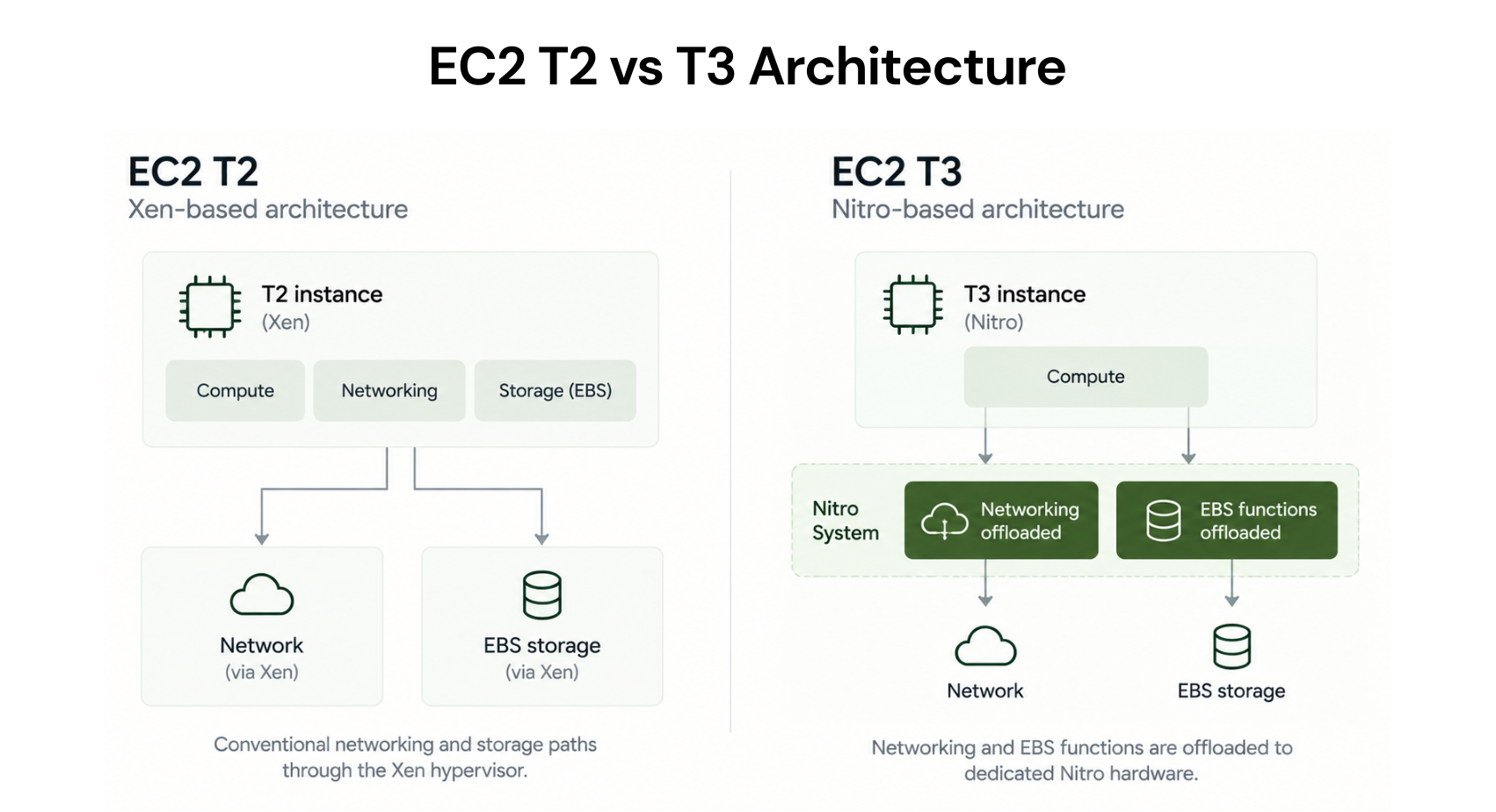
How CPU Credits Differ Between T2 and T3
Both families earn CPU credits continuously and spend them when CPU utilization rises above the instance baseline. As documented in AWS CPU credit concepts, one credit represents one vCPU running at 100% utilization for one minute.| Size | T2 credits/hour and baseline | T3 credits/hour and baseline |
|---|---|---|
| nano | 3 credits; 5% | 6 credits; 5% |
| micro | 6 credits; 10% | 12 credits; 10% |
| small | 12 credits; 20% | 24 credits; 20% |
| medium | 24 credits; 20% | 24 credits; 20% |
| large | 36 credits; 30% | 36 credits; 30% |
| xlarge | 54 credits; 22.5% | 96 credits; 40% |
| 2xlarge | 81.6 credits; 17% | 192 credits; 40% |
T2 launches in Standard mode by default. After its accrued balance is depleted, CPU utilization is gradually lowered to the baseline until the instance earns more credits. T2 can also be configured for Unlimited mode.
T3, T3a, and T4g generally launch in Unlimited mode. T3 on a Dedicated Host is the exception: it launches in Standard mode, and Unlimited mode is not supported. In Unlimited mode, an instance can spend surplus credits after exhausting its accrued balance.
If average CPU use exceeds the baseline over the applicable rolling 24-hour period, AWS charges Linux T2, T3, and T3a surplus usage at $0.05 per vCPU-hour.
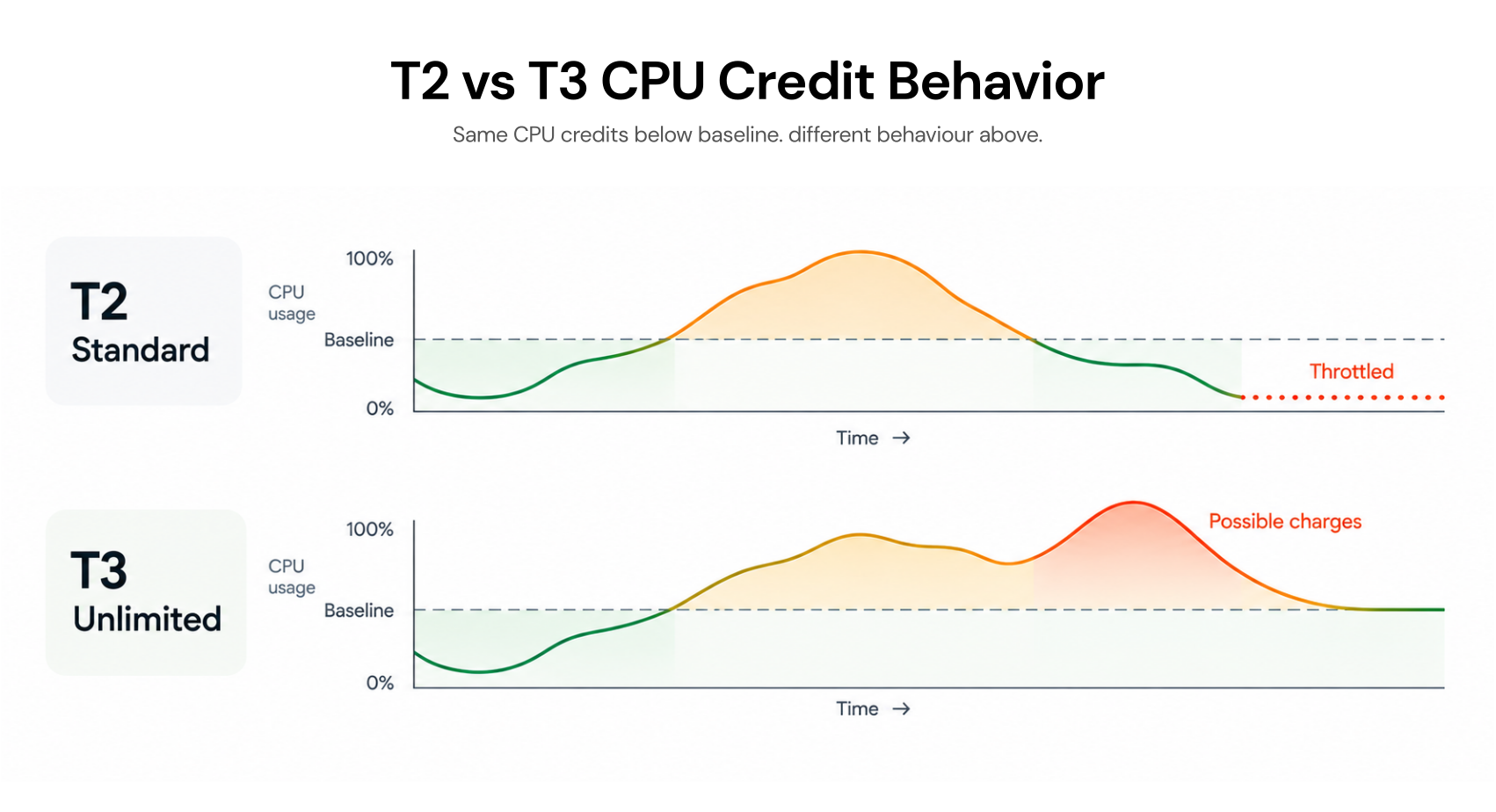
Consider a t3.medium averaging 60% CPU continuously for 730 hours with no accrued credits available to offset the surplus. Its 20% baseline leaves 40 percentage points of excess use across two vCPUs: 0.8 surplus vCPU-hours each hour.
That produces about $29.20 in surplus charges, taking the current $30.37 base estimate to approximately $59.57 for the month.
This is a steady-state illustration, not a universal bill. Quieter periods may cover spikes with earned credits, while sustained CPU-intensive workloads may fit a non-burstable M, C, or R family better. Monitor CPUCreditBalance, CPUSurplusCreditBalance, and CPUSurplusCreditsCharged in CloudWatch.
T2 or T3: How to Decide
Choose T3 for a compatible deployment that benefits from lower base pricing, Nitro, enhanced networking, or stronger peak EBS performance. Keeping T2 can be reasonable when the configuration is incompatible with Nitro, migration outweighs the benefit, or a controlled dependency requires Xen.
| Situation | Better starting point | Why |
|---|---|---|
| New variable x86 workload | T3 | Lower listed price and newer infrastructure |
| Predictable cost with acceptable throttling | T3 in Standard mode | Retains T3 base pricing without surplus-credit charges |
| Existing compatible T2 workload | Test a move to T3 | Captures the generation and price improvement after validation |
| Sustained CPU above baseline | M or C family | Avoids relying on burst credits for continuous demand |
| Legacy Xen or driver dependency | Keep T2 temporarily | Migration requires remediation or replacement planning |
| Memory-heavy sustained workload | R family | Matches the resource profile better than a burstable family |
Should you consider T3a?
T3a uses AMD EPYC 7000 series processors and AWS lists it at about 10% less than T3. It is the lower-cost x86 burstable option for compatible workloads, but it does not provide T3’s AVX-512 support.Benchmark T3a when software licensing and native dependencies support AMD; do not assume equal application performance from matching vCPU and memory alone.
For broader purchasing-model decisions after selecting an instance family, see the complete EC2 pricing guide and the Compute versus EC2 Instance Savings Plans comparison.
How to Migrate From T2 to T3
An in-place change requires an EBS-backed instance with a T3-compatible configuration. AWS does not allow the instance type of a Spot Instance to be changed. Because the move crosses from Xen to Nitro, review the AWS compatibility requirements before scheduling downtime.What to check first
Confirm the AMI uses HVM virtualization and the x86_64 architecture. A 32-bit T2 instance cannot be resized directly to T3.
Confirm the operating system includes ENA networking and NVMe storage drivers. Nitro exposes EBS volumes as NVMe devices.
On Linux, use UUIDs or labels rather than device names in /etc/fstab so renamed NVMe devices still mount.
Check volume limits, static networking, software licensing, and processor-specific dependencies.
If the instance belongs to an Auto Scaling group, suspend the relevant processes or use a controlled replacement strategy.
Plan for the non-Elastic public IPv4 address to change after stop/start, and create a backup and rollback path.
Migration path
Stop the instance, choose Actions > Instance settings > Change instance type, select the intended T3 size, and start the instance again. AWS notes that stopping and changing the type can take a few minutes, while application startup time varies; plan measured downtime rather than assuming a fixed completion window.If T3 is unavailable in the change-type list, the existing configuration is incompatible. Launch a new compatible instance and migrate the application instead. AWS also provides the AWSSupport-MigrateXenToNitroLinux Systems Manager runbook for compatible Linux migrations and separate driver guidance for Windows.
After startup, validate status checks, application health, mounts, networking, and performance. Monitor CPU-credit metrics through a representative workload cycle and compare the complete bill with the T2 baseline.
Where Usage.ai Fits Your EC2 Strategy
Once you’ve selected the right EC2 instance family and confirmed that your workload is a good fit, the next step is to evaluate how to reduce its ongoing cost.We analyze AWS billing data at the billing layer and recommend qualifying commitments for approval; after approval, we purchase them through the provider API and manage them as Flex Commitments.
With Flex Insured Commitments, eligible teams can access up to 57% savings associated with a three-year AWS commitment with Cashback protection for qualifying losses under the applicable agreement.
If qualifying committed usage costs more than the On-Demand rate for the same usage, we provide conditional cashback protection on the covered difference, subject to program terms.
Our fee is a percentage of realized savings. If we do not save you money, you do not pay anything.
Usage.ai is a multicloud cost optimization platform for AWS, Microsoft Azure and Google Cloud. Commitments are purchased in customer cloud accounts and remain customer-owned; provider terms and payment obligations continue. Usage.ai manages eligible purchases and renewals within approved controls. Read-only assessment is separate from authorized purchasing, and daily analysis does not require daily purchases. Cashback applies only to qualifying losses on eligible Flex Commitments under the applicable agreement, including eligibility, exclusions, notice, credits or offsets, payout timing and service-exit treatment. Ending managed service does not cancel native commitments or automatically refund unused value. Provider charges are separate from Usage.ai fees.
Review eligible EC2 usage, commitment coverage, and exposure before purchasing a long-term commitment.
Frequently asked questions
Is T2 or T3 cheaper?
For the listed Linux/Unix us-east-1 On-Demand rates, T3 is approximately 9–10% cheaper at matching named sizes. Prices vary by Region, operating system, and purchasing model.
What is the main difference between T2 and T3?
T2 uses Xen and Standard credit mode by default, while T3 uses Nitro and generally defaults to Unlimited mode. T3 also provides newer processors and higher peak network and EBS capabilities.
Should I migrate from T2 to T3?
Usually, if the workload is compatible and the savings justify the change. Validate Nitro drivers, architecture, storage mounts, networking, application behavior, and rollback procedures first.
Can T3 avoid Unlimited-mode charges?
Yes. Configure an eligible T3 instance in Standard mode if throttling at credit exhaustion is preferable to surplus-credit charges.
Do Compute Savings Plans cover T2 and T3?
Yes. Compute Savings Plans apply to eligible EC2 usage regardless of instance family, size, Region, operating system, or tenancy, up to the hourly commitment.