.png)
 AWS
AWS Microsoft Azure
 Google Cloud


This comparison explains how plan scope, actual rates, application order, and workload stability determine whether a Compute Savings Plan, an EC2 Instance Savings Plan, or a blended strategy best fits your usage.
The Short Answer
Choose a Compute Savings Plan when workloads may change instance families or Regions, or move among EC2, Fargate, and Lambda. Its broader coverage generally makes it the safer option for changing or mixed-service architectures.Choose an EC2 Instance Savings Plan when you have durable EC2 usage in one family and Region and actual pricing analysis shows that its higher discount outweighs the lock-in exposure. The decision must use your eligible hourly usage and applicable rates, not the advertised maximum discounts alone.
Compute vs EC2 Instance: Key Differences
A Compute Savings Plan is a dollar-per-hour commitment that automatically applies to eligible EC2, Fargate, and Lambda usage. For EC2, it remains flexible across instance families, sizes, Availability Zones, Regions, operating systems, and tenancy.An EC2 Instance Savings Plan is a dollar-per-hour commitment to an instance family in a selected Region, such as M5 in US East (N. Virginia). Within that family and Region, the discount can follow changes in instance size, Availability Zone, operating system, and tenancy.
| Dimension | Compute Savings Plan | EC2 Instance Savings Plan |
|---|---|---|
| Maximum advertised savings | Up to 66% | Up to 72% |
| Eligible services | EC2, Fargate, Lambda | EC2 only |
| Region flexibility | Across Regions | One selected Region |
| Instance family flexibility | Across families | One selected family |
| Size, OS, and tenancy | Flexible | Flexible within the family and Region |
| Term | 1 or 3 years | 1 or 3 years |
| Payment options | No, Partial, or All Upfront | No, Partial, or All Upfront |
| Best starting point | Changing or mixed compute | Stable family-and-Region EC2 usage |
Break-Even and Realized Savings
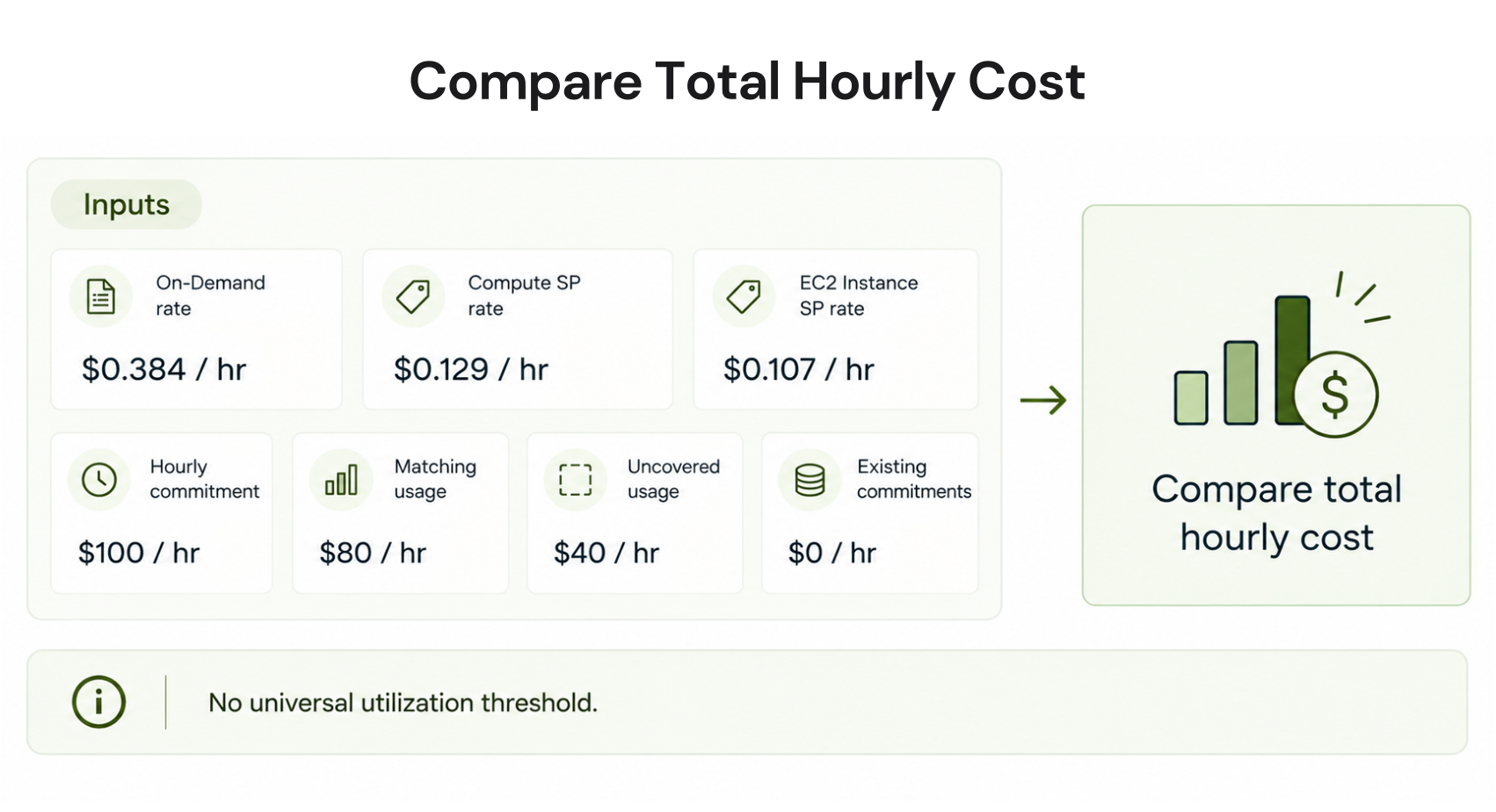
The higher maximum discount of an EC2 Instance Savings Plan does not create a universal break-even threshold. AWS utilization is the percentage of the discounted hourly commitment consumed by eligible usage, so multiplying a headline discount by utilization does not calculate realized savings correctly.Model the two plans using the same hourly workload and these inputs:
On-Demand rates for the eligible usage
The applicable rate under each Savings Plan
The hourly commitment being evaluated
Expected usage that will continue matching the EC2 family and Region
Usage that would become On-Demand after a migration or scale-down
Existing Reserved Instances, Savings Plans, and organization sharing settings
Family and Region Lock-In Risk
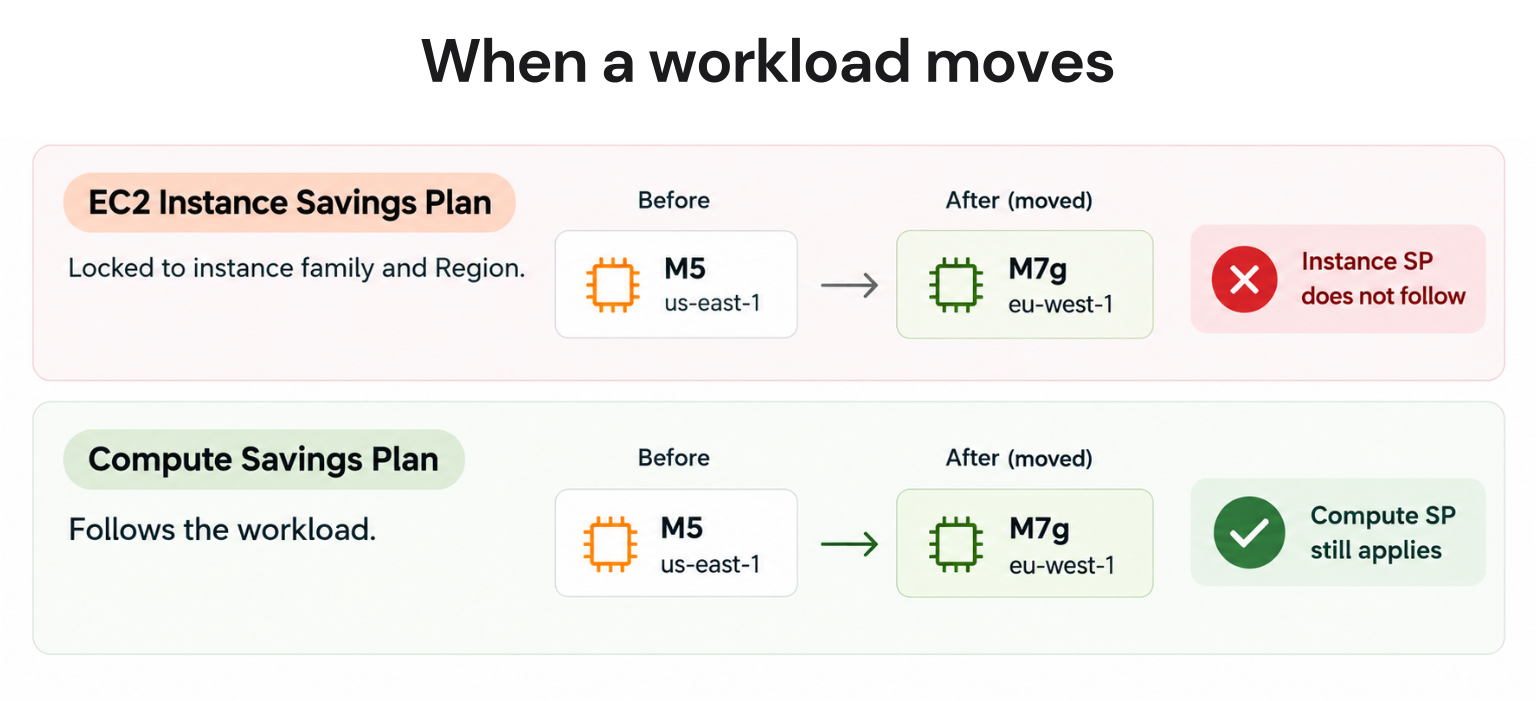
An EC2 Instance Savings Plan keeps applying when you resize within its selected family, but it does not transfer to another family or Region. For example, a plan for M5 usage in us-east-1 will not cover M6i, M7g, or M5 usage in another Region.If matching usage disappears, AWS continues charging the hourly commitment after the limited return window. Replacement usage outside the plan’s scope is billed at On-Demand rates unless another applicable commitment covers it.
EC2, Fargate, and Lambda Coverage
Compute Savings Plans cover eligible EC2 instance usage across families and Regions. They also cover eligible Fargate vCPU and memory usage and eligible Lambda compute charges, including duration-related usage; Lambda request charges are not discounted.EC2 Instance Savings Plans apply only to EC2 usage in the selected family and Region. They do not follow workloads moved to standard Fargate or Lambda billing.
Coverage is charge-specific, particularly for serverless and container workloads. See the detailed Compute Savings Plan coverage guide for Lambda and Fargate before sizing a mixed-service commitment.
AWS Savings Plan Application Order
AWS applies eligible EC2 Reserved Instance discounts before Savings Plans. It then applies EC2 Instance Savings Plans before Compute Savings Plans because Compute Savings Plans have broader applicability.Within eligible usage, AWS calculates the potential savings percentage and applies Savings Plans to the usage producing the highest percentage first. It continues until eligible usage or the hourly commitment is exhausted; remaining usage is charged at On-Demand rates.
The AWS application-order documentation includes billing examples.
How to Choose the Right Plan
Use this table only after checking your actual Savings Plan rates and stable hourly baseline; then compare the architecture you expect to operate throughout the term.| Your situation | Better starting point |
|---|---|
| EC2, Fargate, and Lambda are used together | Compute Savings Plan |
| A family, processor, or service migration is planned | Compute Savings Plan |
| Workloads operate across Regions | Compute Savings Plan |
| Architecture or demand remains uncertain | Compute Savings Plan or more On-Demand usage |
| EC2 usage is stable in one family and Region | EC2 Instance Savings Plan |
| The family and Region should remain unchanged for the term | EC2 Instance Savings Plan |
| Actual rate modeling confirms the narrower plan saves more | EC2 Instance Savings Plan |
Do not treat one plan as the default solely because its maximum discount is higher. Workload stability, service mix, regional plans, existing commitments, and confidence in the hourly baseline determine whether that discount can be realized.
Term length magnifies the decision. A three-year plan can offer a lower rate, but it also gives migrations, scaling changes, and application retirements more time to reduce matching usage. For more purchasing risks, see the guide to common EC2 Savings Plan mistakes.
Utilization and Commitment Sizing
AWS defines Savings Plan utilization as the percentage of the monetary commitment used by eligible usage at Savings Plan rates. If a $10-per-hour commitment has $9.80 of applicable usage at Savings Plan rates during an hour, utilization is 98%.Coverage answers a different question: what percentage of eligible On-Demand spend received Savings Plan pricing? A plan can be fully utilized while leaving substantial usage uncovered, so review both reports.
Before buying, examine hourly, not only monthly eligible usage and identify the stable floor. Exclude temporary projects and expected migrations, account for existing commitments and sharing, then model several commitment amounts.
There is no universal 85% or 90% coverage rule; the appropriate buffer depends on workload variability and risk tolerance.
Before you buy: Savings Plans do not reserve EC2 capacity, do not apply to Spot usage, and do not apply to usage already covered by Reserved Instances. Use On-Demand Capacity Reservations or zonal Reserved Instances when capacity assurance is required. AWS allows a narrow return exception for qualifying recently purchased plans; outside that window, unused hourly commitment remains billable and does not roll forward, making conservative sizing more important than maximizing headline coverage.
See AWS Savings Plans monitoring and the step-by-step Compute Savings Plan guide for deeper operational guidance.
Savings Plans vs Reserved Instances
Savings Plans are monetary commitments; EC2 Reserved Instances are configuration-based billing discounts. Regional RIs do not reserve capacity, while zonal RIs include a capacity reservation in a specified Availability Zone. RIs apply before Savings Plans, but the discounts do not both apply to the same usage.AWS also offers other Savings Plan types and service-specific reservation products.
This distinction matters when inventory contains several commitment types. See the complete AWS Savings Plans vs Reserved Instances comparison for configuration flexibility, capacity behavior, and service eligibility.
The Bottom Line
Choose an EC2 Instance Savings Plan when EC2 usage is reliably concentrated in one family and Region and rate-specific modeling confirms that its lower price offsets the lock-in risk. Choose a Compute Savings Plan when workloads may change family, Region, or compute service during the term.Reduce Commitment Risk With Usage.ai
Choosing the right plan can reduce flexibility risk, but it does not remove the underlying hourly commitment. Both Compute and EC2 Instance Savings Plans require a fixed hourly spending commitment for one or three years, while workload scale, instance families, Regions, and service usage can change.We analyze your AWS billing data through billing-layer access only and recommend qualifying commitments.
With Flex Insured Commitments, eligible teams can access up to 57% savings associated with a three-year AWS commitment with none of the commitment risk.
If eligible usage drops and a qualifying Flex Commitment costs more than the On-Demand rate for the same usage, we provide cashback protection on the difference, subject to program terms.
Our fee is a percentage of realized savings only. If we do not save you money, you do not pay anything.
Get a read-only analysis of your AWS usage, projected savings, coverage, and commitment exposure before purchasing.
Frequently asked questions
What happens if I switch families after buying an EC2 Instance Savings Plan?
The plan stops applying to usage in the new family but continues charging its hourly commitment. The new-family usage is billed On-Demand unless another eligible discount covers it.
Does a Compute Savings Plan cover Fargate and Lambda?
Yes, but coverage is charge-specific. It covers eligible Fargate vCPU and memory and eligible Lambda compute usage, while charges such as Lambda requests remain undiscounted.
How is Savings Plan utilization calculated?
Utilization is the percentage of the monetary commitment consumed by eligible usage at Savings Plan rates. It is not instance utilization, commitment hours used, or the percentage of total eligible spend covered.
Can an AWS Savings Plan be cancelled?
AWS permits an eligible return when the hourly commitment is $100 or less, the purchase occurred within the previous seven days, and the return happens in the same calendar month, provided AWS’s return limit has not been reached and its other return restrictions are met. Otherwise, the plan runs for its full term.
Do Savings Plans work across AWS accounts?
By default, eligible Savings Plan benefits can be shared across accounts in an AWS Organizations consolidated billing family. Benefits apply to the owner account first, and the management account can configure or restrict sharing.