.png)
 AWS
AWS Microsoft Azure
 Google Cloud


The short answer
A Compute Savings Plan is a billing commitment: commit to a set hourly compute spend for one or three years, and AWS or Azure cuts your rates in return up to 66% on AWS, 65% on Azure. The discount applies automatically across instance families, regions, and operating systems.
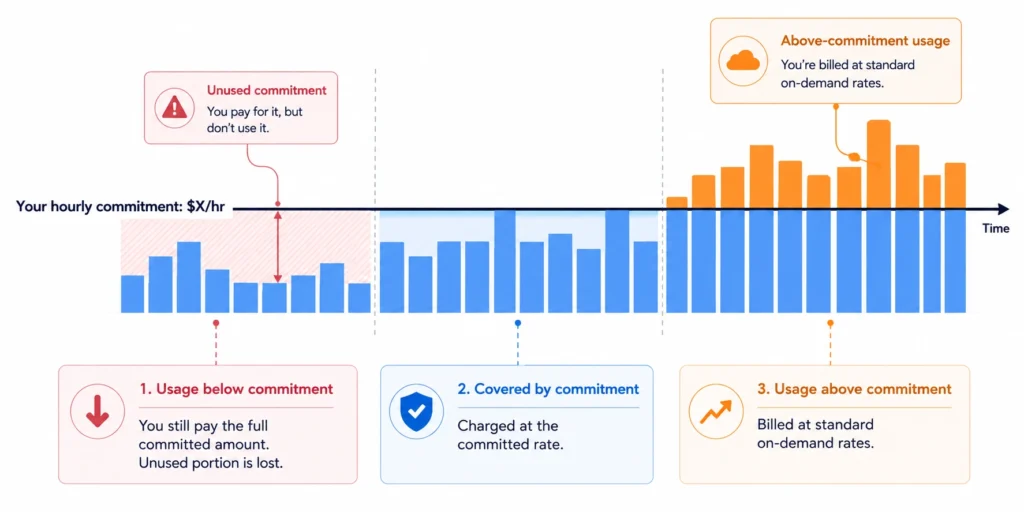
You pay that commitment every hour whether you use it or not, and unused amounts do not roll over. So the savings depend on sizing it to your stable baseline, not your peak.
How Does a Compute
Savings Plan Work?
Usage above the floor bills at standard on-demand rates. Usage below it saves you nothing; you pay the full committed amount for that hour regardless, and the unused portion expires. There is no rollover between hours.
That single rule makes sizing the commitment the whole game. Set it at your peak and you generate waste in every quiet hour; set it too low and you leave savings uncaptured.
Also read: How Compute Savings Plans work, step by step
What Does a Compute
Savings Plan Cover?
Plus Fargate vCPU and memory charges, and Lambda duration charges.
Azure Savings Plan for Compute. Azure VMs across all series except BareMetal Infrastructure and the Av1 series, plus:
- AKS node pool VMs
- Container Instances
- Dedicated Host
- App Service Premium v3 and Isolated v2
- Azure Functions Premium
- Container Apps
- Azure Spring Apps for Enterprise
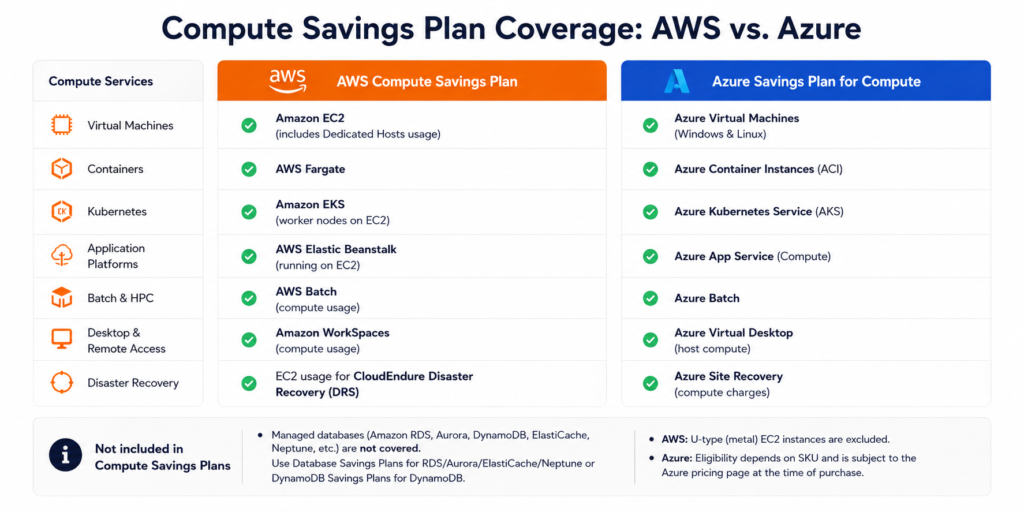
- On AWS, RDS, Aurora, DynamoDB, ElastiCache, OpenSearch and others fall under Database Savings Plans, launched in December 2025 as a one-year, no-upfront commitment covering Generation 7 and newer instances; Redshift still needs Reserved Instances.
- On Azure, SQL Database, Cosmos DB, PostgreSQL and MySQL are covered by the separate Azure savings plan for databases, leaving only Redis Cache reservation-only.
Software licences, storage, and networking are excluded everywhere. Fargate OS licence fees and Lambda request charges are also outside the plan see the full charge-level breakdown for Lambda and Fargate.
Compute Savings Plans are one of four AWS Savings Plan types; the others cover EC2 instances specifically, databases, and SageMaker. Google Cloud’s closest equivalent is the compute flexible committed use discount.
How Much Can You Save?
The headline ceilings up to 66% on AWS, up to 65% on Azure describe three-year terms. On AWS the maximum also depends on the payment option and applies to EC2 specifically.
On Azure the discount depends on the eligible product and term, and monthly and upfront payments cost the same in total. Fargate tops out around 52% and Lambda duration around 17%.
Term length is the next biggest lever: one-year commitments discount materially less than three-year ones on both clouds.
Beyond that, your actual rate depends on which instances you run, in which region, on which operating system. Microsoft publishes a range of 11% to 65% across its savings plan catalogue for exactly this reason.
Rates change often. Verify current numbers on the AWS Savings Plans pricing page and Microsoft’s Azure savings plan page before modelling anything.
Connect in 15 minutes to uncover your eligible spend, estimated savings, and a safely sized commitment before you purchase.
Advantages of a Compute
Savings Plan
- The discount is automatic. Nothing to configure, tag, or match. The provider applies it to eligible usage every hour, working down from your highest-discount usage.
- It survives architectural change. Change instance family, resize, switch region, adopt Graviton, or move a workload from VMs into containers coverage follows. This matters most for teams whose architecture is still moving.
- One commitment spans several services. On AWS a single plan covers EC2, Fargate, and Lambda, so teams running a mix of virtual machines, containers, and serverless make one decision instead of three.
- There is a zero-capital entry point. A one-year No Upfront plan starts saving immediately with nothing paid in advance, the lowest-friction way into commitment discounts.
- It layers. Reserved Instances apply first, then Savings Plans, so you can reserve a stable core and let a Compute Savings Plan cover everything dynamic. You can also stack additional plans on top as usage grows.
Compute Savings Plan vs
Reserved Instances
Compute Savings Plans and EC2 Instance Savings Plans are both Savings Plans, differing only in what they lock. Reserved Instances are a different commitment model you commit to a specific instance configuration rather than to spend.
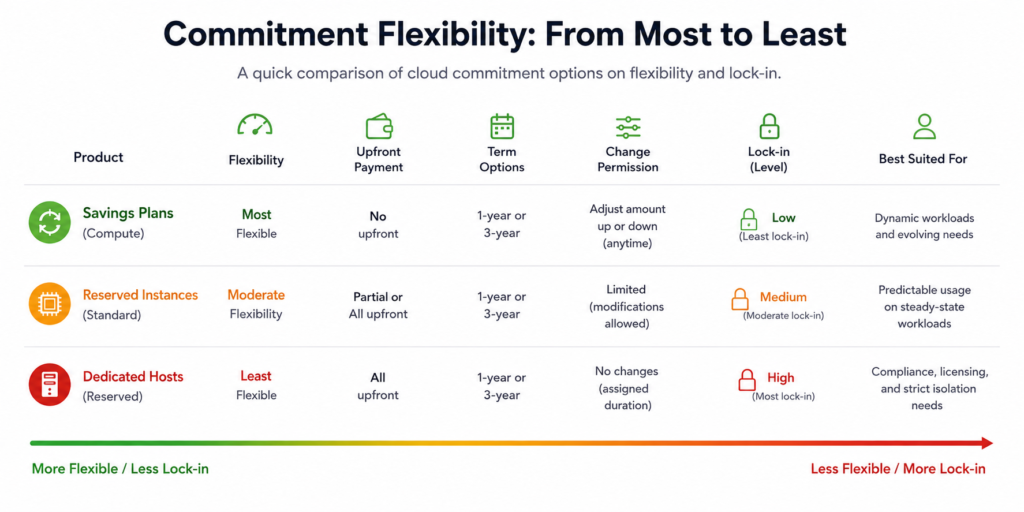
Reading down that table, flexibility falls as the maximum discount rises. The trade is roughly six percentage points.
Reserved Instances are also less rigid than they are often described. Standard RIs permit changes to Availability Zone, instance size within a family, and networking type, and Convertible RIs can be exchanged for equal or greater value at a lower ceiling of around 66%, the same as a Compute Savings Plan.
For most teams the flexibility is worth the gap. For a genuinely static EC2 fleet, Reserved Instances or an EC2 Instance Savings Plan capture more.
The full Savings Plans vs Reserved Instances comparison
Which savings plan type to buy: Compute vs EC2 Instance
Compute Savings Plan Limitations
and Risks
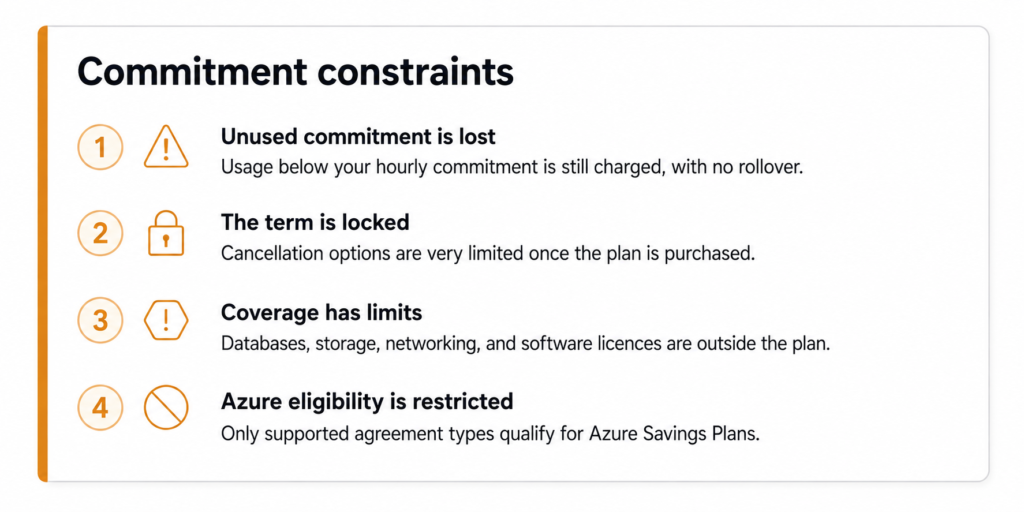
The term cannot be shortened. AWS permits a return only if the commitment is $100 per hour or less, was purchased within the past 7 days, and falls in the same calendar month. Azure savings plans cannot be cancelled or refunded at all.
Not every service is covered. Databases, software licences, storage, and networking sit outside the plan, and Lambda request charges are never discounted.
Azure has an eligibility requirement. Savings plans are available only to Enterprise Agreement, Microsoft Customer Agreement, and Microsoft Partner Agreement customers.
How to Buy a Compute
Savings Plan
On Azure: Cost Management + Billing → Savings Plans → Add. Choose the term and hourly commitment, and whether the benefit applies to a single subscription or the whole billing account. Azure offers monthly payments or all upfront at the same total cost, there is no Partial Upfront option.
Why teams use Usage.ai
Usage.ai’s Flex Commitment Program buys and manages these commitments for you, with nothing paid upfront, no infrastructure change, and a fee charged only as a percentage of realised savings.
The underlying plan is still a real AWS or Azure commitment, so the term does not change, what changes is who absorbs the downside.
Each month Usage.ai assesses qualifying rebates for commitments that were not fully used during that month. Per the program terms, rebates are applied first against outstanding and future fees, and any remaining amount is refunded 90 days after it accrues. Coverage spans AWS, Azure, and GCP, and nothing is purchased without your approval.
Frequently asked questions
Is a Compute Savings Plan worth it?
For any workload running consistently longer than six to eight months, usually yes, a one-year No Upfront plan starts saving with no capital outlay. It is a poor fit for short-lived projects, or for usage so variable that you cannot reliably reach a committed hourly floor.
Can I cancel a Compute Savings Plan?
Only in a narrow case. AWS allows a return if the plan's hourly commitment is $100 or less, it was purchased within the past 7 days, and it falls within the same calendar month; upfront charges are refunded in full. Azure savings plans cannot be cancelled or refunded. Otherwise the term runs to completion.
What does an AWS Compute Savings Plan not cover?
Database services, which fall under Database Savings Plans or Reserved Instances. Lambda request charges, Fargate OS licence fees, EC2 Spot, U-type metal instances, and Dedicated Instance fees. EBS storage, data transfer, and S3 sit outside every Savings Plan type.