.png)
 AWS
AWS Microsoft Azure
 Google Cloud


For Lambda, they cover Duration, Provisioned Concurrency, and Provisioned Concurrency Duration, with savings up to 17%. Lambda requests receive no discount, although request spend can still draw down unused Savings Plan commitment.
That difference can materially change your expected savings.
The short answer
[AWS Compute Savings Plans Explained: The Hidden Risk #aws #finops.]
AWS Compute Savings Plan Lambda and Fargate coverage by charge
| Charge type | Coverage | Discount guidance | Key limitation |
|---|---|---|---|
| Fargate vCPU | Covered | Up to 50% | Standard Fargate compute |
| Fargate memory | Covered | Up to 50% | Standard Fargate compute |
| Fargate Windows OS fee | Not discounted | 0% | Separate OS pricing dimension |
| Fargate storage above 20 GB | Not discounted | 0% | Separate storage charge |
| Fargate Linux/ARM compute | Covered | Savings Plan rates | ARM currently available for ECS only |
| Lambda Duration | Covered | Up to 17% | Compute duration only |
| Lambda Provisioned Concurrency and duration | Covered | Up to 17% | Eligible Lambda usage |
| Lambda requests | No discount | 0% | Can draw down remaining commitment |
| EC2 instance usage | Covered | Up to 66% | Flexible across family, size, Region, OS, tenancy |
| EC2 Spot | Not covered | 0% | Spot pricing is separate |
What Fargate coverage really means
Windows containers add a separate OS license charge that the Compute Savings Plan does not discount. Additional ephemeral storage is billed separately after the 20 GB included with each task or pod.
ARM-based Fargate can reduce the underlying On-Demand compute price before a commitment is considered. AWS currently lists ARM for ECS Fargate, while EKS Fargate is x86 only. Compare architecture cost first, then evaluate commitment coverage.
For a broader infrastructure decision, compare EC2 and Fargate cost tradeoffs before treating commitment discounts as the first optimization lever.
What Lambda coverage really means
Compute Savings Plans can reduce eligible Lambda Duration, Provisioned Concurrency, and Provisioned Concurrency Duration charges by up to 17%, per AWS Lambda pricing. Requests receive no discount.
AWS also states that request spend can draw down Savings Plan commitment, so request-heavy functions may improve utilization without creating request savings.
Illustrative example (US East base x86 pricing, before Lambda duration tiers, excluding the free tier, and excluding Provisioned Concurrency):
- 100 million monthly invocations
- 500 ms average duration
- 512 MB memory
- Duration: 25,000,000 GB-seconds, about $416.67
- Requests: about $20
- Total before Savings Plan: about $436.67
- 17% saving on duration: about $70.83
- Effective discount on the full bill: about 16.2%
See how Compute Savings Plans work for the hour-by-hour mechanics.
Which plan type fits your workload
| Workload pattern | Better starting point |
|---|---|
| EC2 only, stable family and Region | EC2 Instance Savings Plan |
| Fargate or Lambda present | Compute Savings Plan |
| EC2 plus Fargate or Lambda | Compute Savings Plan |
| Planned EC2 to container or serverless migration | Compute Savings Plan |
| Uncertain baseline | Keep more usage On-Demand and commit conservatively |
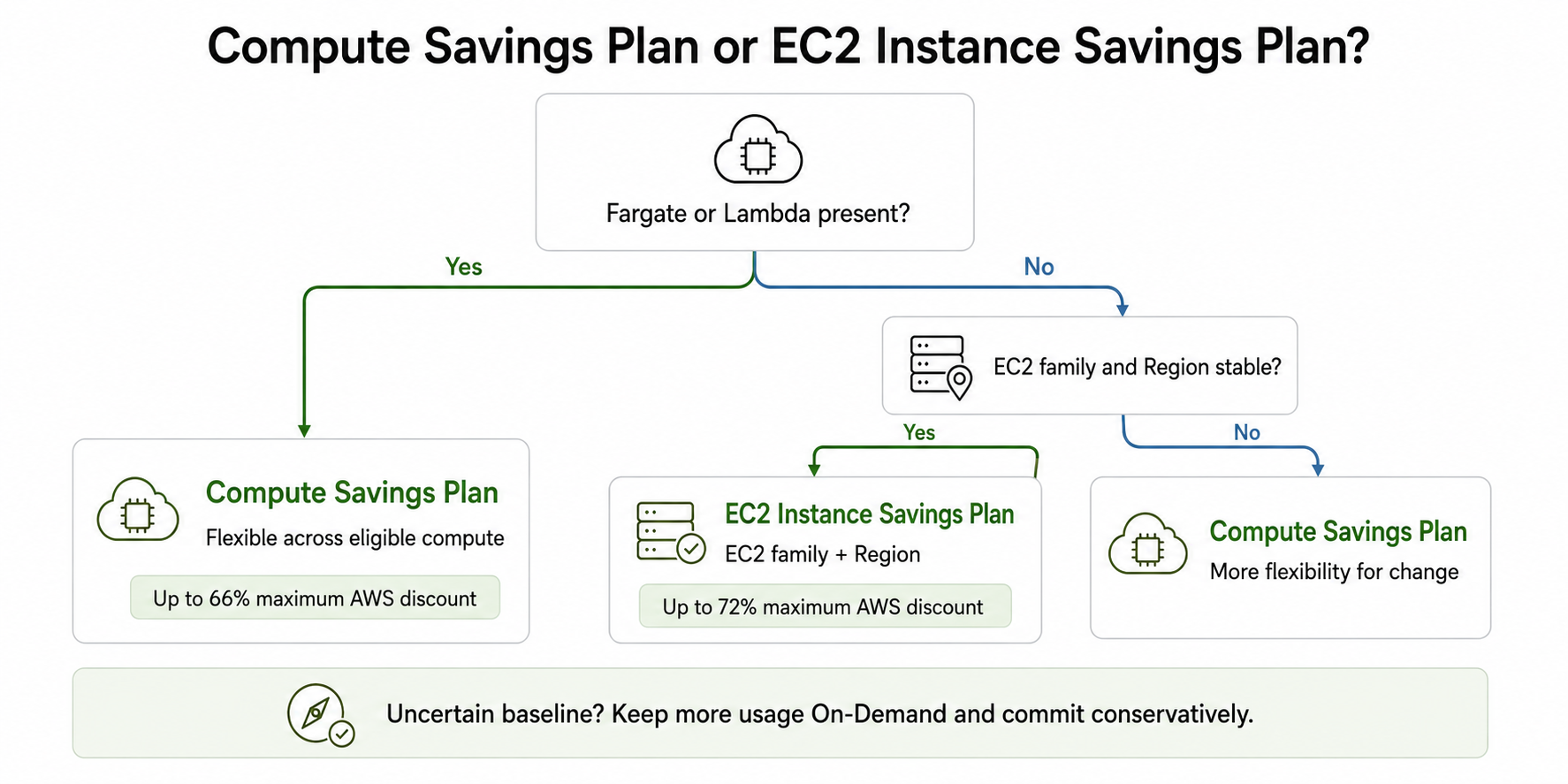
Use the Compute vs EC2 Instance Savings Plans comparison for a deeper plan-type decision.
Related: for a broader infrastructure decision, compare EC2 and Fargate cost tradeoffs before treating commitment discounts as the first optimization lever.
Terms and payment options: Savings Plans are available for one- or three-year terms with No Upfront, Partial Upfront, or All Upfront payment. The coverage rules above do not change by payment option; only pricing and cash-flow tradeoffs do.
How AWS applies the commitment
The practical order of application is:
Reserved Instances apply first.
EC2 Instance Savings Plans apply next, because their scope is narrower.
Compute Savings Plans apply to remaining eligible usage.
Within eligible usage, Savings Plans apply to the highest potential savings percentage first, until the hourly commitment is exhausted.
If you already have Reserved Instances, EC2 Instance Savings Plans, or consolidated billing with discount sharing enabled, allocation can differ across accounts and existing commitments. Factor these in before sizing new coverage.
Use the AWS Cost Explorer guide for FinOps teams with the native Coverage and Utilization reports to verify application after purchase.
How to validate coverage in AWS billing data
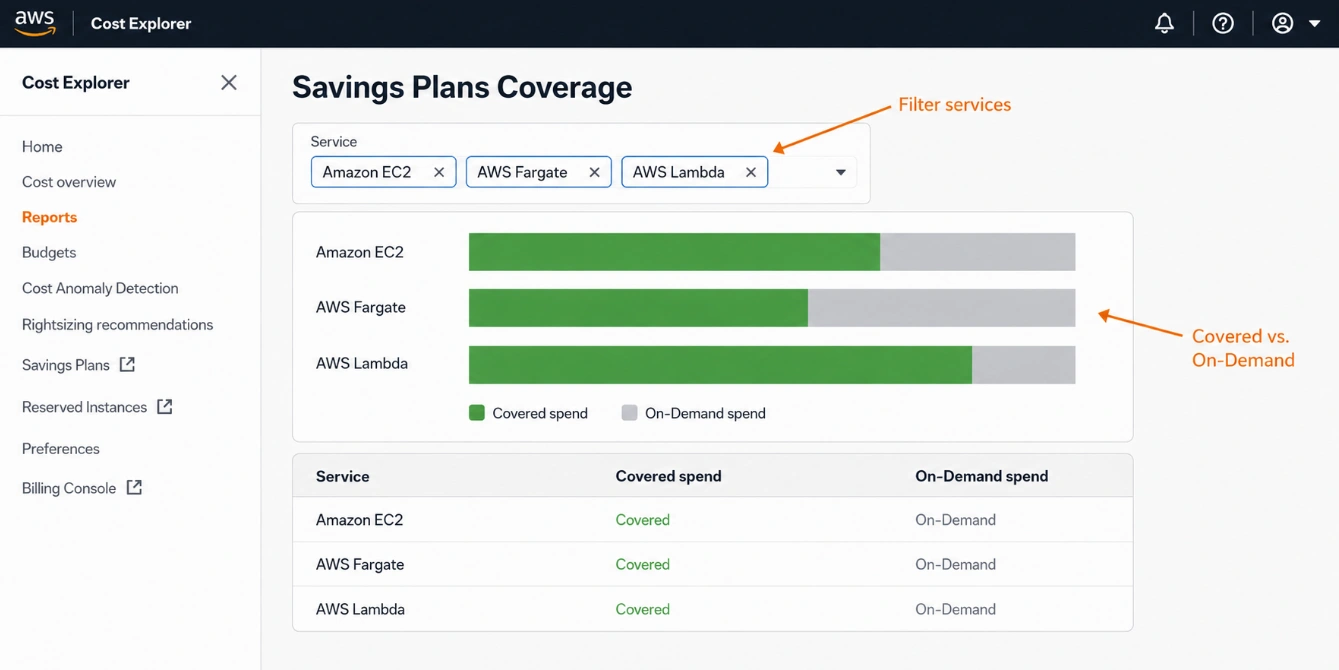
- Open Cost Explorer and select the Savings Plans Coverage and Utilization reports.
- Filter by service (EC2, Fargate, Lambda) and by usage type.
- Analyze at hourly granularity to see how commitment is applied across the day.
- Confirm covered versus On-Demand spend against Cost and Usage Report line items where needed.
Size mixed workloads carefully
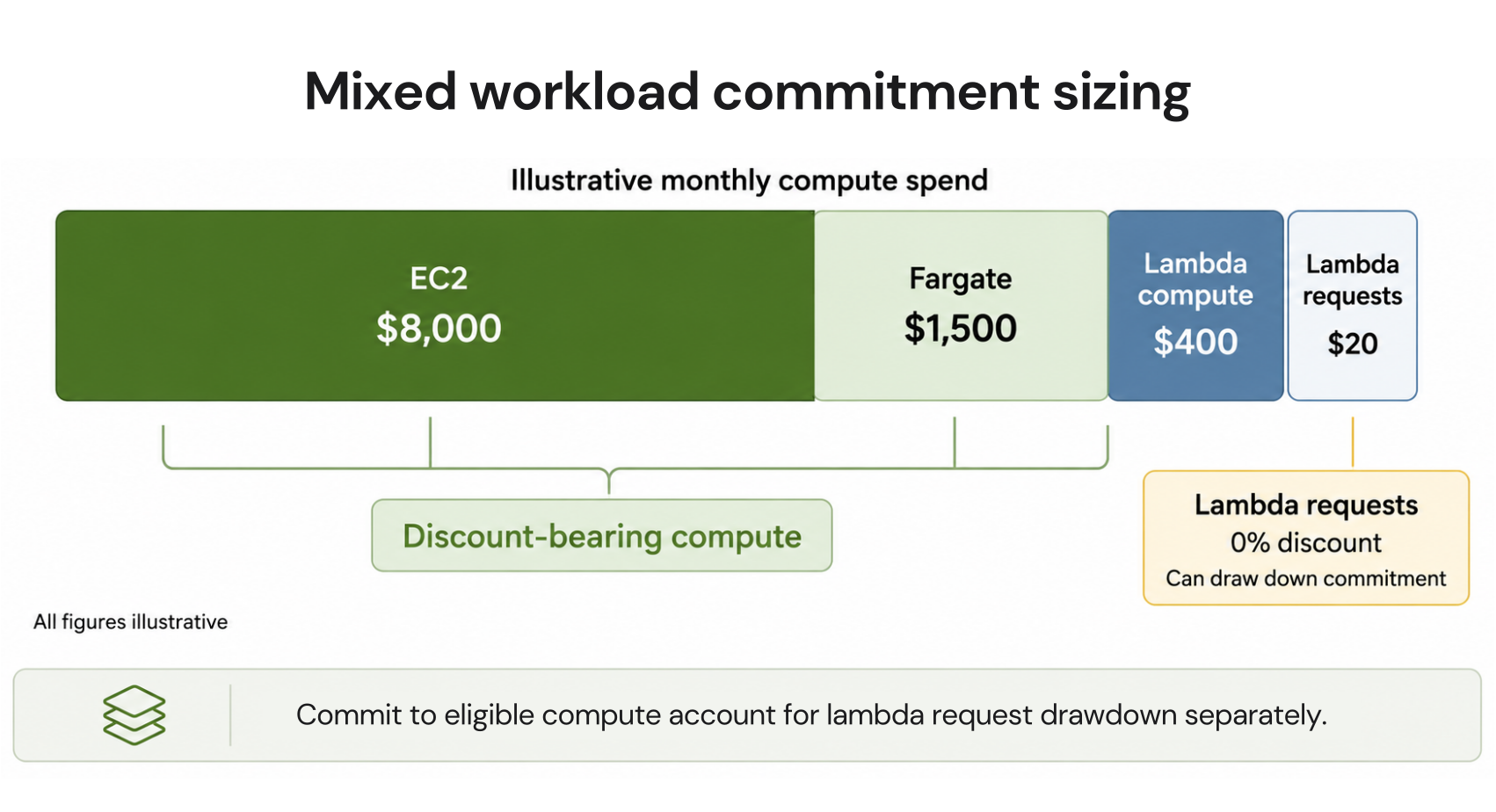
Real results depend on more than service-level monthly spend. Model these inputs explicitly: Region, OS, architecture, usage type, current RIs and Savings Plans, organization discount sharing, term, payment option, and any planned migrations.
Illustrative monthly workload:
- EC2 On-Demand-equivalent spend: $8,000
- Fargate vCPU and memory: $1,500
- Lambda discount-bearing compute: $400
- Lambda requests: $20, no discount
Do not automatically enter $13.56 as your Savings Plan commitment. AWS defines the hourly commitment at Savings Plan rates, not On-Demand rates. Use AWS recommendations or the Purchase Analyzer to translate your stable usage into the actual commitment.
A conservative workflow is:
Export hourly EC2, Fargate, and Lambda usage.
Separate discounted dimensions from zero-discount charges.
Find the stable hourly floor, not the average or peak..
Validate the floor against existing RIs and Savings Plans, discount-sharing settings, and AWS's hourly Purchase Analyzer simulation; historical recommendations do not forecast future demand.
Choose the portion of that floor you can confidently commit to.
Validate the resulting $/hour commitment in AWS.
Review Coverage and Utilization after purchase.
How Usage.ai handle Lambda and Fargate in Savings Plan sizing
In practice, we read your usage, propose commitment levels scoped to stable, coverable spend Fargate vCPU and memory and eligible Lambda compute, never requests or Fargate OS and storage and, once you approve (or automatically, on Autopilot), buy and manage each Flex Commitment from your dashboard. None of this bends AWS’s eligibility rules; it works inside them. See what the Flex-Commit Program covers.
The result is the savings level of a three-year AWS commitment up to 57% without committing to the three years yourself. If a commitment ever runs more expensive than the same usage would on On-Demand, our cashback protection helps offset the difference, and because our pricing is performance-based, you pay only a share of the savings we actually deliver.
Review your EC2, Fargate, and Lambda baseline, uncovered spend, and commitment risk.
Frequently asked questions
Does an AWS Compute Savings Plan cover Fargate?
Yes. It covers eligible Fargate vCPU and memory usage for ECS and EKS. AWS currently advertises up to 50% savings on Fargate. Windows OS and additional storage are separate charges.
Does an AWS Compute Savings Plan cover Lambda?
Partially. It covers eligible Duration, Provisioned Concurrency, and Provisioned Concurrency Duration usage, with savings up to 17%. Lambda requests are not discounted.
Do Lambda requests use Savings Plan commitment?
Yes. AWS states that request spend can draw down Savings Plan commitment even though the request discount is 0%.
Does an EC2 Instance Savings Plan cover Fargate or Lambda?
No. It applies only to EC2 usage in the committed instance family and Region. Fargate and Lambda require a Compute Savings Plan for Savings Plan coverage.
Do Savings Plans cover Spot usage?
No. AWS states that Savings Plans do not apply to Spot usage, and Spot spend does not consume Compute Savings Plan commitment.


