
 AWS
AWS Microsoft Azure
 Google Cloud

The Short Answer
A 1-year term is the more natural fit when a cluster is young, RG hasn’t been evaluated yet, or a resize is on the roadmap. A 3-year term is the more natural fit when the same node type and count have run stable for 12 months and no architecture changes are planned.That is a starting point, not a verdict. The break-even math, the payment options, and how much a stranded reservation actually costs can shift the answer, and each is worked through below.
Redshift Reserved Node Discounts by Term
Reserved node discounts are quoted as a percentage off on-demand pricing and depend on node type, region, term, and payment option. AWS’s reserved node documentation publishes the comparative savings by payment option:| Payment option | 1-year term | 3-year term | Upfront payment |
|---|---|---|---|
| No Upfront | 30.0% | 56.5%* | None |
| Partial Upfront | 33.0% | 60.5% | Partial |
| All Upfront | 34.0% | 62.5% | Full |
ra3.4xlarge, US East (N. Virginia), AWS public catalog checked October 15, 2026. Discounts include amortized upfront fees. *The public catalog lists three-year No Upfront at $1.4181/hour; AWS documentation differs, so confirm the purchasable offering in your console.
The table uses ra3.4xlarge in N. Virginia and assumes every reserved hour matches running usage. Its one-year versus three-year All Upfront discount gap is 28.5 percentage points. Actual rates and eligible upgrade paths depend on the offering.
When 3-Year All Upfront Breaks Even
For two nodes, three-year All Upfront costs $64,254. One-year No Upfront costs 2 × $2.282 × 730 = $3,331.72/month. The cash-paid crossover is $64,254 ÷ $3,331.72 = 19.29 months, assuming unchanged renewal pricing.
Cash paid is different from committed liability. A one-year purchase obligates the full year; renewing it commits another year. If the workload ends, unused committed hours remain payable. Compare whole-term obligations as well as cash flow, and include the cost of capital.
Worked example: two ra3.4xlarge nodes, 730 hours/month and 8,760 hours/year, N. Virginia. On-Demand is $3.26/node-hour. Rates checked October 15, 2026; node compute only, excluding managed storage, backup, transfer, tax and other services.
| Option | Upfront | Monthly | Total at 36 months |
|---|---|---|---|
| 1-year No Upfront (renew ×3 at unchanged rates) | $0 | $3,331.72 | $119,941.92 |
| 3-year Partial Upfront | $33,840 | $940.00 recurring | $67,680.02 |
| 3-year All Upfront | $64,254 | $0 recurring | $64,254 |
The three-year Partial Upfront recurring rate is $0.643836/node-hour. Totals use unrounded hourly charges. All Upfront amortizes to $1,784.83/month for two nodes; it is paid at purchase.
What to notice: The table compares cash paid over time. Realized savings also require eligible usage to consume the reservation. Include whole-term obligations, unused hours, eligible upgrade paths and the cost of capital before choosing a term.
Reservation Constraints That Change the Math
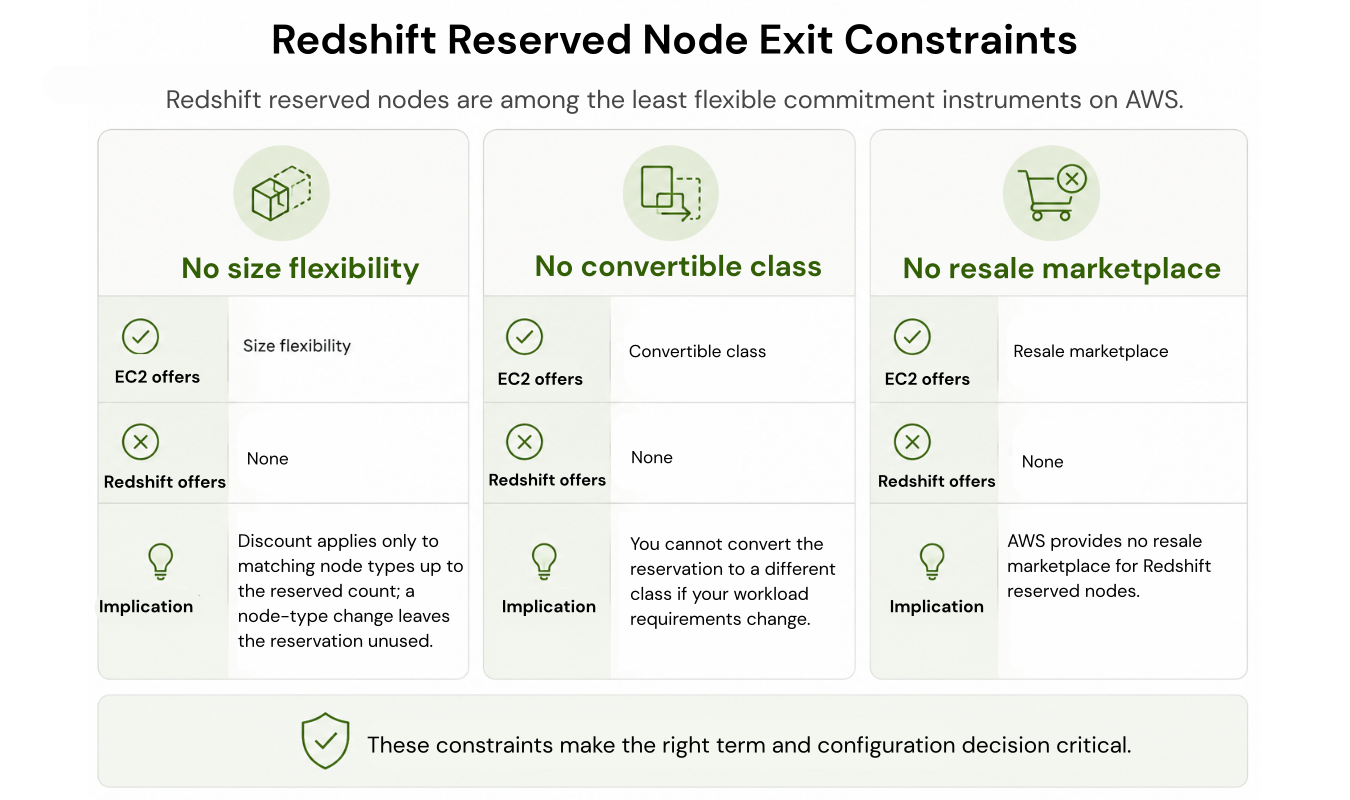
A reservation generally discounts matching node type and Region usage, up to its quantity. It is not automatically size-flexible, and Redshift has no EC2-style Convertible RI class or resale marketplace.
There are documented exceptions to a blanket “no changes” rule. AWS supports eligible reserved-node upgrades to RG or RA3 through supported resize or snapshot-restore workflows. Check the offered exchange, node ratio, remaining term and payment implications before assuming an existing reservation must be stranded. See AWS resizing and reserved-node upgrade guidance.
Other changes can leave a reservation unused, and cancellation is not generally available. Compare the remaining financial obligation under each option rather than assuming AWS Support will approve an exception.
Matching the Term to Your Cluster
| Condition | 1-Year | 3-Year |
|---|---|---|
| Cluster age | Under 12 months | 12+ months of stable utilization |
| Node type decision | RG evaluation not yet done | RG evaluated; node family final |
| Workload pattern | Seasonal, scheduled, or non-24/7 | Continuous, 24/7, predictable |
| Architecture roadmap | Migration or consolidation in progress | No major changes for 36 months |
| Payment flexibility | Capital preservation required | Upfront capital available |
| FinOps maturity | No formal commitment tracking | Expiry alerts 90 days out |
| Risk tolerance | Any meaningful resize probability | High confidence for 36 months |
What to notice: One or more 1-Year signals should trigger a utilization, roadmap, and pricing review before a longer commitment is approved.
Two rows deserve a word. If the workload is non-24/7, on-demand with Pause and Resume may beat any reservation, paused clusters bill only backup storage, while reserved nodes bill continuously regardless of cluster state.
And if a Redshift Serverless migration is on the roadmap, a provisioned reservation is a commitment in the opposite direction; Serverless has its own reservation mechanism worth evaluating separately.
At expiry, a reservation moves to retired status and matching nodes revert to on-demand billing unless another reservation covers them which is why the 90-day expiry alert matters.
Evaluate RG Before Any Multi-Year Commitment
AWS now recommends RG nodes for new clusters: up to 2.2x as fast as RA3 for data warehouse workloads and up to 2.4x for data lake workloads, at 30% lower price per vCPU, with a built-in data lake query engine that removes Redshift Spectrum charges for supported formats.
A three-year RA3 purchase creates a long financial obligation. Evaluate RG and any eligible reservation-upgrade path before committing. Run the comparison first the full RG vs RA3 breakdown covers migration paths and node details.
The Recommended Sequencing Strategy
- Start with 1-year No Upfront. For any cluster under 12 months old, not yet evaluated against RG, or without a full workload cycle of utilization data, the ra3.4xlarge example above captures 30.0% savings at full utilization with no upfront payment while limiting the commitment term to one year.
- At renewal, run the extension check.
Before extending to 3-year
Configuration held for 12 months: same node type and count, no resizes, for the full 1-year term.
RG evaluated: the RA3-vs-RG comparison is done and the node family decision is final.
Roadmap clear for 36 months: no consolidation, Serverless migration, or major workload change planned.
- Extend to 3-year Partial Upfront. If all three checks pass, Partial Upfront delivers most of the multi-year discount with a smaller upfront payment, backed by 12 months of evidence rather than a forecast. For multi-node clusters, staggering reservations across expiration dates avoids a single renewal cliff.
How Usage.ai Handles the Term Decision
Manual term analysis works for a single cluster. It gets harder when Redshift sits alongside EC2, RDS, and ElastiCache commitments and the architecture keeps evolving.We analyze your Redshift utilization and recommend qualifying commitments only after the node type and count have held stable through a full observation window.
With Flex Insured Commitments, teams can get the up to 42% savings of a 1-year Redshift reserved node commitment with none of the commitment risk.
If a qualifying Flex Commitment ever costs more than the equivalent on-demand usage, we provide cashback protection on that difference, subject to program terms.
Our fee is a percentage of realized savings only. If we don’t save you money, you don’t pay anything.
See how much you can save on Redshift with Usage.ai.
Fee is a percentage of realized savings only. No savings, no fee. 30-minute setup, billing-layer access only.
Review your Redshift utilization baseline, node stability, and commitment risk before you sign a term.
Frequently asked questions
Is a 3-year Redshift reserved node always cheaper than 1-year?
Not necessarily. Compare the full committed costs with how long matching usage will remain; the example’s cash-paid crossover is about 19.29 months, while annual renewal obligations create separate decision points. A resize, migration, or decommission before term-end can make the stranded 3-year reservation cost more than the 1-year path.
For most first-time buyers or clusters under 12 months old, 1-year No Upfront is the right starting point 30.0% savings for the fully utilized ra3.4xlarge example, no upfront payment, and a year of utilization data to inform the extension decision.
Can I switch from a 1-year to a 3-year reservation mid-term?
No. A 3-year reservation would be a new purchase running alongside the remaining 1-year term, creating overlap. Make the 3-year decision at the 1-year renewal point.
Is No Upfront available on 3-year Redshift terms?
AWS's documentation is inconsistent: the Management Guide lists No Upfront for one- or three-year terms, and RG reserved instances are sold with 3-year No Upfront, while the pricing page describes No Upfront as a 1-year option. Check the reserved node offerings in the console for your specific node type before assuming either way.
What happens if I resize my cluster while a reservation is active?
If you change to a different node type, the original reservation can become unused while the new node type bills on demand until separately covered. If you add matching nodes, the reservation still covers its existing quantity and only the excess bills on demand. AWS supports eligible reserved-node upgrades to RG or RA3 in specific workflows. Check the available exchange before assuming the original reservation becomes stranded; other changes can still leave unused commitments.




