
 AWS
AWS Microsoft Azure
 Google Cloud

Redshift is expensive to run on on-demand pricing, and meaningfully cheaper on reserved nodes. That much everyone knows.
What gets glossed over is that Redshift reserved nodes are also considerably less forgiving than reserved instances for most other AWS services. There is no size flexibility, no convertible offering class, and no marketplace to sell reservations you no longer need.
Before you commit tens of thousands of dollars to a 3-year term on a specific node type, those three constraints deserve more than a footnote.
This guide covers Redshift’s current node families, how reserved node pricing actually works, the payment option math, and the specific things you should validate before committing to anything. By the end, you will have a clear picture of both the savings opportunity and the risk you are accepting when you buy into it.
The Node Families: RG, RA3, DC2 — and Which One to Actually Use in 2026
Redshift has gone through a few generations of node types, and the recommendations have shifted materially in recent years. Understanding which family you should be building on matters both for the performance you get and for what reserved node options are actually available to you.
RG: the new recommended family
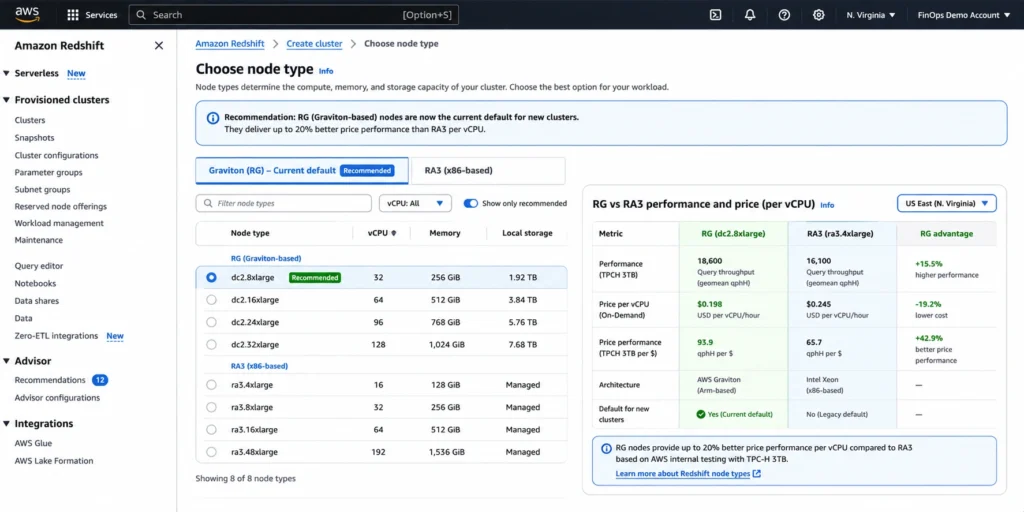
RG nodes are Graviton-powered and represent the current recommended generation. AWS’s own documentation is direct about this: RG is the node family AWS recommends for new clusters. Compared to RA3 nodes, RG runs data warehouse and data lake workloads up to 2.4x faster, driven by more compute cores, higher memory bandwidth, and lower memory latency. The price per vCPU is 30% lower than RA3.
RG nodes also include an integrated data lake query engine that queries Apache Iceberg tables and other formats directly in Amazon S3, using the cluster’s own compute resources. RA3 clusters use Redshift Spectrum for data lake queries, which is a separate service. For teams doing significant data lake querying, this difference has cost implications — RG eliminates Spectrum per-terabyte scan charges for supported formats.
Reserved nodes are supported for RG. If you are building a new Redshift deployment or planning a migration from RA3, RG should be your starting point.
RA3: still widely deployed, still fully supported for reservations
RA3 was the previous recommended generation before RG, and it remains fully supported with reserved node pricing. RA3 nodes separate compute from storage: compute is what you reserve, and Redshift Managed Storage is billed separately based on actual data stored, regardless of the number of compute nodes provisioned. The managed storage model uses high-performance SSDs for hot data and Amazon S3 for cold data, with automatic tiering.
RA3 sizes include ra3.large, ra3.xlplus, ra3.4xlarge, and ra3.16xlarge. Confirm the current reserved offering for the selected size and Region. If you are running an existing RA3 cluster and considering a reserved commitment, the process is the same as for RG — but factor in whether a migration to RG before committing might deliver better price-performance over the reservation term.
DC2: legacy, limited reserved options
DC2 (Dense Compute) nodes use local SSD storage and are the older generation. AWS recommends DC2 only for datasets under 1 TB compressed where you need compute-intensive performance with local storage. Dense Storage (DS2) nodes are no longer available. For any new deployment or migration, AWS’s guidance points to RG or RA3. Reserved node support for DC2 is more limited than for RG and RA3. If you are still on DC2, Elastic Resize can upgrade your cluster to RA3 without requiring a full rebuild.
Serverless: a newer reservation option
Redshift Serverless lets you run queries without managing a provisioned cluster. AWS added a reserved purchasing option for Serverless as well. Serverless reservations can be purchased at a payer account or linked account level, with multiple linked accounts or serverless workgroups consuming the purchased RPUs (Redshift Processing Units).
The savings structure is similar in concept to provisioned reserved nodes, committing to a usage level in exchange for a discount versus on-demand Serverless rates. This guide focuses primarily on provisioned clusters, but if your team is on Serverless and running consistent workloads, the Serverless reservation option deserves a separate cost evaluation.
Also read: RDS Reserved Instances: the complete guide to commitment mechanics across all RDS engines
How Redshift Reserved Node Pricing Works
The basic concept is familiar if you have used reserved instances on EC2 or RDS: you commit to paying for a specific node type for 1 or 3 years, and in exchange you get a lower hourly rate than on-demand pricing. But the specifics of how Redshift implements this differ from other services in ways that matter.
What you are actually buying
When you purchase a Redshift reserved node, you are buying a pricing discount for a specific node type in a specific region. You are not pre-provisioning a cluster or reserving capacity in the traditional sense. The reservation applies to any running compute node of the matching type in the matching region, up to the number of nodes reserved. If you run more nodes than you have reserved, the excess runs at on-demand rates.
The leader node is always free in Redshift. You never reserve or pay for the leader node. Only compute nodes count for billing and reservation purposes. A two-node cluster has one leader node (free) and two compute nodes (billed and reservable).
On-demand pricing as the baseline
In US East (N. Virginia), ra3.4xlarge On-Demand compute is $3.26 per node-hour, or $2,379.80 over 730 hours. A two-compute-node cluster is $4,759.60 before managed storage and other charges. Pausing stops On-Demand compute billing, but backup/storage and existing reservation obligations may continue. Rates checked October 15, 2026 against the AWS public price list.
The three payment options
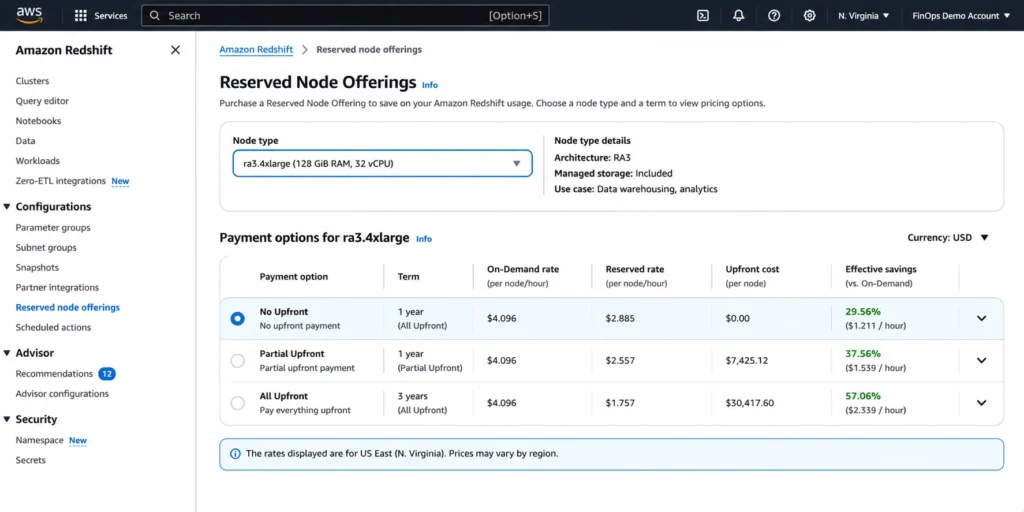
Compare payments over the same complete term. The following ra3.4xlarge N. Virginia quotes include upfront fees amortized over 8,760 hours per year. They assume full matching usage and exclude storage, tax and ancillary charges.
| Term and payment | Upfront per node | Recurring hourly | Effective hourly | Compute discount vs On-Demand |
|---|---|---|---|---|
| 1 year No Upfront | $0.00 | $2.282000 | $2.282000 | 30.0% |
| 1 year Partial Upfront | $9566.50 | $1.092066 | $2.184132 | 33.0% |
| 1 year All Upfront | $18848.00 | $0.000000 | $2.151598 | 34.0% |
| 3 year Partial Upfront | $16920.00 | $0.643836 | $1.287672 | 60.5% |
| 3 year All Upfront | $32127.00 | $0.000000 | $1.222489 | 62.5% |
AWS’s general pricing page describes No Upfront as a one-year option. The current public catalog also contains a three-year No Upfront row ($1.4181/hr) for this node; because that conflicts with the general guidance, confirm the purchasable offering in your account rather than assuming availability. The table uses the unambiguous listed options.
The one-year All Upfront quote totals $18,848 versus $19,989.12 for one-year No Upfront: $1,141.12 less per node over the same year, a 4-percentage-point increase in savings versus On-Demand. Compare this cash benefit with the financing and commitment risks. Sources: AWS Redshift pricing and the public price list.
3-year vs 1-year terms
For this ra3.4xlarge quote, one-year All Upfront saves about 34% versus On-Demand, while three-year All Upfront saves 62.5%. That is a material difference, not merely a few percentage points, but it requires a much longer obligation. Three-year All Upfront costs $32,127 per node for the full term. Choose the horizon using expected architecture and matching usage, not just the advertised maximum discount.
The Constraints That Make Redshift Reservations Higher-Stakes Than Most
If you have bought reserved instances for EC2 or RDS before, you are probably used to having at least some flexibility in how the discount applies. Redshift is different, and the differences are not minor.
No instance size flexibility
Redshift reservations do not automatically follow arbitrary size changes as size-flexible RDS discounts do. A reservation normally matches its purchased node type and Region. Specific AWS upgrade/exchange paths may be available during eligible migrations; confirm those before resizing or purchasing.
This makes right-sizing before purchasing a reserved node considerably more important than it is for EC2 or RDS. You need to be confident in the specific node type and size before committing, not just the family.
No convertible offering class
Redshift has no general EC2-style Convertible offering. However, AWS supports specific reserved-node upgrade/exchange paths during eligible migrations to RG or RA3. A blanket claim that no exchange is ever possible is incorrect. Check the exchange offerings for your actual reservation before assuming either portability or stranded value. Source: AWS resizing and reserved-node upgrade guidance.
No AWS Reserved Instance Marketplace
For EC2, if you have reserved capacity you no longer need, you can list it on the AWS Reserved Instance Marketplace and potentially recover some of the remaining value. Redshift reserved nodes are explicitly excluded from the marketplace. If you over-provision Redshift reservations or your architecture changes in a way that makes them redundant, there is no resale path. The only option is to wait out the term while paying for capacity that is not being used productively.
The combination of no size flexibility, no convertible class, and no marketplace makes Redshift reserved nodes among the least forgiving commitment instruments in AWS. The upside is real — up to 75% off is meaningful for expensive nodes. The downside is that a miscalculated purchase can cost tens of thousands of dollars in wasted committed spend over a 3-year term with no practical exit. That is the core argument for purchasing conservatively at a shorter term initially, validating that the node type and size hold steady, and then committing more aggressively only after your architecture has proved stable.
Consolidated billing applies
If you have AWS Consolidated Billing enabled, Redshift reserved node discounts apply across all running nodes in your linked accounts, up to the number of nodes reserved. This means if you purchase reservations at the payer account level, the discount applies to matching node types running in any linked account, not just the account where the reservation was purchased. For organizations with multiple AWS accounts running Redshift, this shared discount mechanism is an advantage and can improve effective utilization of a reservation portfolio.
Also read: AWS Database Savings Plans: the flexible alternative to per-engine reserved instances
What Storage Costs Look Like Separately
For RG and RA3 nodes, storage is always billed separately from the compute reservation. When you buy reserved nodes, you are buying a discount on compute hours only. The Redshift Managed Storage (RMS) charges accrue based on the actual amount of data stored, measured hourly and billed per GB-month. This is true whether or not the compute nodes are reserved.
The benefit of the RG and RA3 architecture is that you can size your compute cluster for the query performance you need and scale storage independently as your data grows. You do not have to add compute nodes just because you have more data. The cost implication is that your Redshift bill has two components even after you purchase reserved nodes: the discounted compute rate plus the current data volume multiplied by the managed storage rate for your region.
Backup storage is billed separately. For RA3 clusters, manual snapshot storage is charged at the applicable rate; automated snapshots have their own included treatment. Do not apply a blanket free allowance equal to provisioned capacity to every node family and snapshot type. Verify snapshot storage in the billing data and current AWS pricing.
For DC2 nodes, storage is included in the compute charge — DC2 uses local SSD storage priced within the node hourly rate rather than the separate managed storage model. If you are comparing a DC2 reservation against a RG or RA3 reservation, factor this difference into the cost model.
Concurrency Scaling: The Variable Charge Reserved Nodes Don’t Cover
Concurrency Scaling is Redshift’s mechanism for handling traffic spikes without provisioning additional permanent nodes. When query queue depth grows, Redshift can automatically add transient compute capacity to maintain performance. Each cluster earns up to one hour of free Concurrency Scaling credits per day. AWS documentation notes this is sufficient for 97% of customers. Beyond the free tier, you pay the per-second on-demand rate for Concurrency Scaling usage.
Reserved nodes do not cover Concurrency Scaling charges. The reservation applies to your base provisioned cluster. If your workload regularly exhausts the one-hour daily credit and incurs additional Concurrency Scaling charges, those are billed separately at on-demand rates regardless of your reserved node coverage.
For most teams, Concurrency Scaling charges are a minor or zero line item. But if your workload has pronounced peaks that frequently exceed the free tier, modeling Concurrency Scaling charges separately from your reserved node cost is worth doing before assuming the reservation covers your full Redshift bill.
The Process for Getting a Redshift Reserved Purchase Right
Given how unforgiving Redshift reservations are, the pre-purchase process matters more here than for almost any other AWS commitment. The sequence that works:
Optimize first, commit second
This is the same principle that applies to EC2 and RDS right-sizing, but it is even more important for Redshift because there is no size flexibility to bail you out. Before purchasing reserved nodes, ensure your queries are optimized, your workload management configuration is tuned, and your cluster size has stabilized. A cluster that is still being actively tuned is not a good candidate for a long-term commitment.
The specific metrics to validate: CPU utilization, disk I/O, network throughput, and query queue depth over a meaningful observation window — at least 30 days, ideally 60-90 days that includes your peak workload periods. If you have seasonal peaks, make sure the observation window captures them. The node type you reserve should be able to handle your expected workload over the full reservation term without requiring a resize.
Start with 1-year No Upfront if uncertain
If this is your first Redshift reserved purchase, or if you have recently changed node types, a 1-year No Upfront reservation gives you meaningful savings from day one without requiring upfront cash and without locking in a 3-year commitment to a potentially wrong configuration. If the cluster runs stably for a year at the same node type and size, you have 12 months of evidence to support a more aggressive 3-year All Upfront commitment at renewal.
The extra discount from a longer term can be substantial: this example moves from about 34% to 62.5% for All Upfront. Balance that benefit against the risk of unused or mismatched capacity across three years.
Account for the RG migration question
If you are currently on RA3 and evaluating whether to reserve RA3 nodes or migrate to RG first, the migration question should be answered before the reservation is purchased, not after. RG delivers up to 2.4x the performance of RA3 at 30% lower price per vCPU. If your cluster is a good candidate for RG, committing to 3 years of RA3 reserved nodes before completing that evaluation may lock you into a more expensive, lower-performance configuration for longer than necessary.
The migration from RA3 to RG uses the same snapshot and restore process as other Redshift migrations. AWS provides migration wizards in the console and supports Elastic Resize for minimal-downtime transitions. For teams on RA3 who have not yet evaluated RG, running the comparison before making any reservation commitment is time well spent.
How Usage.ai Handles Redshift Reserved Nodes
Redshift is one of the services where the commitment risk is high enough that getting the recommendation wrong is genuinely expensive. Usage.ai approaches Redshift reserved node purchasing with the same framework it applies to all commitment instruments, but with a few Redshift-specific additions.
Node type and size validation: before generating a Redshift reserved node recommendation, Usage.ai verifies that the running cluster has maintained the same node type, node count, and configuration for a minimum observation window. A cluster that has been modified recently — resized, retyped, or migrated — does not receive a reservation recommendation until the new configuration has stabilized. This prevents recommending a reservation for a configuration that is still changing.
RG migration check: for clusters currently running on RA3, Usage.ai surfaces the RG migration opportunity alongside any reservation recommendation. The pricing data for RG reserved nodes is compared against RA3 reserved nodes to show whether migrating before committing would improve the effective savings rate over the term.
Conservative sizing: Redshift reserved node recommendations are sized to the stable floor of compute usage, not the average and not the peak. Given that there is no size flexibility to absorb an over-commitment, the recommendation is designed to have a high probability of being fully utilized throughout the term rather than optimizing for the theoretical maximum savings.
Protection should be evaluated alongside AWS’s limited migration options. Redshift has no EC2 RI Marketplace resale, but eligible upgrade or exchange paths can be available. Check the actual reservation offering before assuming there is no recovery path.
Eligible Usage.ai Flex reserved commitments may receive cashback under the applicable agreement when commitment cost exceeds equivalent On-Demand cost for the same usage. This is not a refund of every unused dollar or cancellation of the AWS reservation. Published payout timing is 90 days after accrual. Check Redshift eligibility and your agreement before relying on protection. Cashback documentation.
$91M+ in savings delivered to 300+ enterprise customers across AWS, Azure, and GCP. Fee is a percentage of realized savings only. No savings, no fee. 30-minute setup, billing-layer access only.
Frequently Asked Questions
1. How much can Redshift reserved nodes save?
Savings depend on the exact quote. In the checked N. Virginia ra3.4xlarge example, one-year No Upfront saves 30%, one-year All Upfront about 34%, and three-year All Upfront 62.5% versus On-Demand compute, assuming full matching usage. Storage and other charges remain separate.
2. Do Redshift reserved nodes include storage?
RG and RA3 managed storage is separate from the compute reservation. Snapshot charges depend on node family and snapshot type; manual RA3 snapshots can be billed separately. DC2 local SSD storage is included in its node price.
3. What is the difference between RG and RA3 reserved nodes?
RG nodes are the new Graviton-powered generation that AWS now recommends for new deployments. Compared to RA3, RG runs workloads up to 2.4x faster and costs 30% less per vCPU. RG nodes include an integrated data lake query engine that eliminates Redshift Spectrum charges for supported formats. RA3 nodes remain fully supported with reserved pricing and are the right choice for teams not yet ready to migrate. If you are evaluating a new reservation purchase and have not yet evaluated RG, doing the comparison before committing is worthwhile.
4. Can I change my Redshift node type during a reserved term?
Changing the cluster does not automatically change a reservation. Redshift lacks general size flexibility and an EC2-style Convertible class, but specific upgrade/exchange paths to RG or RA3 can be available. Check the exchange offering for your reservation before migrating. There is no EC2 RI Marketplace resale for Redshift.
5. Is No Upfront or All Upfront better for Redshift reserved nodes?
Use total payments over the same term. For the checked ra3.4xlarge one-year quotes, All Upfront is $18,848 and No Upfront totals $19,989.12 at 8,760 hours, a $1,141.12 difference per node. Decide whether that saving compensates for paying earlier and the commitment risk; it is not universally better or worse.
6. Does Redshift have a Reserved Instance Marketplace?
No. Unlike EC2 Reserved Instances, Redshift reserved nodes cannot be listed or sold on the AWS Reserved Instance Marketplace. If you no longer need a Redshift reservation you have purchased, there is no mechanism to recover the remaining value by selling it to another AWS customer. This is a meaningful distinction from EC2 and makes the accuracy of your initial purchase more consequential.




