.png)
 AWS
AWS Microsoft Azure
 Google Cloud


The decision comes down to how much qualifying compute will persist, what existing commitments cover, and whether other eligible database usage can sustain a Savings Plan when Flexible Servers change.
Short Answer
Reserve PostgreSQL vCores when you can identify a durable matching compute floor and the reservation price beats the alternatives at realistic utilization. Consider an Azure Savings Plan for databases for eligible hourly spend left after reservations, especially when supported database usage can move across configurations or services.Neither option automatically covers the full Flexible Server bill. Keep uncertain usage on pay-as-you-go until you have checked actual meters, low-usage hours, planned engineering changes, and the terms available to your billing account.
What Part of Your PostgreSQL Bill Can a Commitment Cover?
Start with the charge, not the resource name. Microsoft’s Flexible Server pricing explanation bills compute by vCore-hour and lists provisioned storage and backup storage separately. Its PostgreSQL reserved-capacity documentation states that the reservation discounts matching compute, not storage or networking.| Charge on the bill | How to treat it before buying | Evidence to check |
|---|---|---|
| Primary-server compute | Candidate for matching reserved vCores or a qualifying database-plan rate | Region, tier, hardware, vCore-hours, meter |
| HA standby compute | Count the billed vCores; verify how their meters receive benefits | HA schedule and cost details |
| Read-replica compute | Evaluate each replica’s qualifying hours and configuration | Replica inventory and meters |
| Storage, backup, networking | Keep separate from the compute commitment calculation | Individual charge lines and price sheet |
The standby is not simply an “HA fee” to exclude, and buying eight reserved vCores does not discount the accompanying storage. Check the actual meter and rate before counting any charge toward a database Savings Plan.
The Savings Plan price sheet is the practical eligibility check. PostgreSQL appears on Microsoft’s included-services list, but that does not establish the discounted rate for every PostgreSQL charge or SKU in your agreement.
Reserved vCores or a Database Savings Plan: Which Fits the Workload?
A PostgreSQL reservation buys a quantity of compute for a specified region, deployment type, performance tier, scope, and term. It is not tied to a named server: matching servers can consume the benefit, and Microsoft documents vCore size flexibility within the same tier and region. It cannot follow a move to any arbitrary region or tier.An Azure Savings Plan for databases instead commits you to a fixed hourly amount. Qualifying usage within its benefit scope consumes that amount at the applicable plan rate; unused hourly commitment expires.
Its flexibility comes from eligible spend across supported database services and regions, not from the ability to stop paying when demand falls.
| Decision factor | PostgreSQL reserved capacity | Database Savings Plan |
|---|---|---|
| Commitment | Matching vCore quantity | Fixed hourly spend |
| Strongest fit | Stable configuration and region | Durable eligible spend despite configuration changes |
| Main risk | Too few matching vCore-hours | Too little qualifying spend in an hour |
| Coverage after another benefit | Used first where it matches | Applies to eligible usage still uncovered |
Compare the two using your available rates and expected utilization, not the largest advertised discount.
For plan-wide purchase and hourly sizing mechanics, see our Azure database Savings Plan guide. This checklist focuses on the PostgreSQL footprint that general guidance cannot size for you.
The Pre-Purchase Checklist
- Reconcile the meters.
- Subtract existing coverage.
- Confirm the engineering baseline.
- Stress-test planned changes.
The reservation does not disappear just because that compute charge does. For reservations purchased after February 1, 2027, Microsoft restricts exchanges, so do not assume you can exchange later.
- Test the reservation quantity.
- Test residual database-plan spend by hour.
The scope rules determine which subscriptions can consume the benefit; a wider scope cannot create usage that is not there. Our Azure Savings Plan scope guide provides a broader scope comparison.
- Approve the purchase case, not just a recommendation.
Microsoft advises allowing recommendation systems to reflect one commitment purchase before considering the other.
A Worked Decision: Flexible Server With HA and Changing Usage
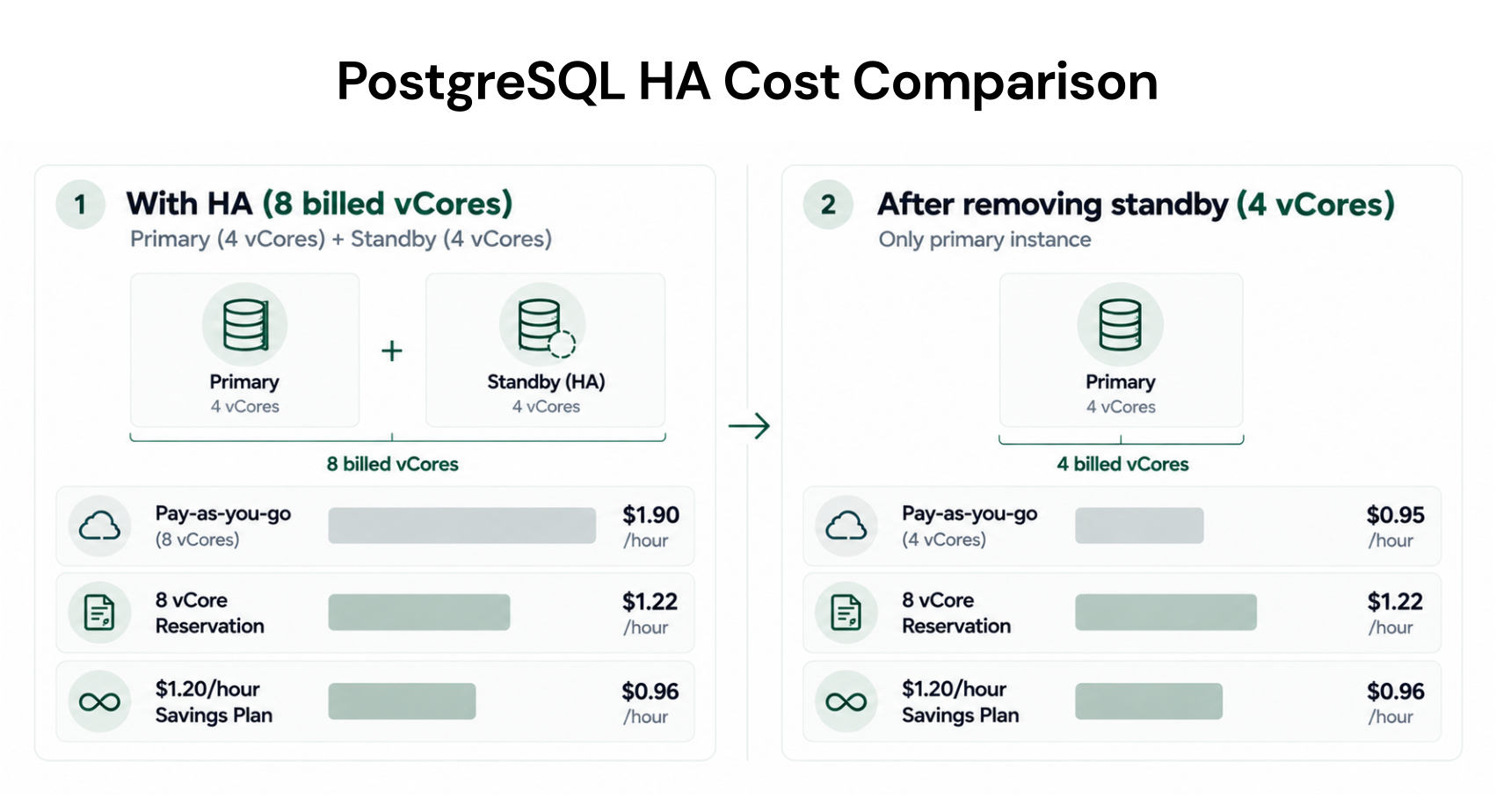
Suppose a General Purpose Flexible Server has a 4-vCore primary and a 4-vCore HA standby in the same region. Both run continuously, producing eight billed vCore-hours each hour, while storage is evaluated separately.This follows Microsoft’s HA billing example; the rates below are hypothetical teaching inputs, not Azure quotes. Assume pay-as-you-go compute costs $0.20 per vCore-hour, the amortized reservation costs $0.12 per reserved vCore-hour, and the applicable database-plan usage rate is $0.15 per vCore-hour.
With all eight vCores running, the hourly compute comparison is:
$1.60 pay-as-you-go
$0.96 for eight reserved vCores
$1.20 for a fully used $1.20/hour plan
Now suppose engineering removes HA and only the 4-vCore primary remains:
An eight-vCore reservation still costs $0.96 per hour, although only four vCores match.
The $1.20 plan still costs $1.20, with only $0.60 of discounted PostgreSQL cost at the illustrative plan rate.
Pay-as-you-go compute would be $0.80.
A four-vCore reservation would cost $0.48 per hour in this illustration. While HA remains on, the other four vCores would cost $0.80 at pay-as-you-go rates, for $1.28 total; after HA is removed, the $0.48 reservation would still be fully used.
How long each configuration will run matters more than the largest discount at a single point in time. An eight-vCore reservation looks strongest under sustained HA, but neither eight-vCore commitment looks attractive for the reduced PostgreSQL footprint alone. Use your own price sheet and hourly data before choosing a size or term.
What to Monitor After Purchase
Keep the original purchase case alongside Azure’s actual-cost and amortized-cost views. Each month, inspect reservation utilization and matching usage, Savings Plan hourly utilization, eligible spend still billed on demand, and changes to HA, replicas, tiers, or regions. Review approaching expirations before a discounted workload returns to pay-as-you-go pricing.If utilization slips, investigate the workload change before buying more coverage elsewhere; moving a plan’s scope can help only when qualifying usage exists in that scope.
Where Usage.ai Fits in the Commitment Review
As you monitor reservation utilization and uncovered database spend, we can help assess whether another commitment makes sense. We analyze usage at the billing layer and offer a read-only Savings Test for supported opportunities. For those recommendations, your team approves a purchase before we call Azure’s API; the resulting Flex Commitment appears in Active Commitments.With Flex Insured Commitments, teams can access up to 64% savings through an eligible three-year Azure Database for PostgreSQL reservation with none of the commitment risk.
If an eligible Flex Commitment costs more than equivalent on-demand usage, cashback covers the qualifying difference under program terms. Cashback does not cancel the Azure commitment or automatically protect commitments you purchased independently. We cannot start, stop, or resize production resources.
Our fee is an agreed percentage of realized savings, and it is billed monthly in arrears after provider billing data is finalized.
Final Verdict: Commit to the Usage You Can Defend
Buy reserved vCores for compute likely to keep matching throughout the term when the actual rate and utilization justify the purchase. Consider a database Savings Plan for a durable, qualifying hourly remainder across the selected scope. If the meters, engineering forecast, or available rates are unclear, keep that portion uncommitted until the case is sound.Review qualifying compute and existing coverage before deciding what to commit.
Frequently asked questions
Does paying monthly make the commitment cancellable?
No. Monthly payment spreads the purchase cost; it does not turn a Savings Plan into pay-as-you-go. Microsoft says total upfront and monthly plan costs are the same, and Savings Plan purchases cannot be canceled or refunded. Check the applicable reservation refund and exchange rules separately.
Can I trade an existing PostgreSQL reservation for a database Savings Plan?
Microsoft permits eligible database reservation trade-ins toward a new database Savings Plan, subject to ownership, purchasing permissions, and a new commitment at least equal to the returned reservation’s remaining value. Confirm that your PostgreSQL reservation is eligible in the Azure portal; a trade-in does not erase unused spend.
Are all PostgreSQL compute tiers covered by the database Savings Plan?
Do not infer tier-level eligibility from the service name. Check the Savings Plan price sheet for your billing agreement and exact PostgreSQL meter before sizing an hourly commitment; public pricing tables do not replace your account’s rates.