.png)


The cloud has reshaped how modern businesses build and scale. It powers everything from data storage to real-time analytics, and it lets teams work from anywhere. Adoption is accelerating, too. Gartner predicts that by 2025, over 95% of new digital workloads will run on cloud-native platforms, up from just 30% in 2021.
With that growth comes a familiar challenge. The cloud is flexible, sometimes too flexible. As teams spin up new services and workloads expand, costs rise quickly. One unexpected traffic spike, or one forgotten test environment can jump your monthly bill without warning. It’s no surprise many companies describe their cloud invoice as “confusing” or “mysterious.”
That’s where cloud cost analysis makes a difference. It helps you understand what you’re paying for, and where optimization opportunities exist.
In this guide, we’ll walk through the essential steps, best practices, and tools that help teams analyze cloud spend with confidence.
Let’s get started.
%204%20(4).svg)
What Is Cloud Cost Analysis?
Cloud cost analysis is the process of examining how your organization uses cloud resources and how those resources translate into spend. It breaks down your bill into understandable pieces so you can see what’s driving costs, where waste is hiding, and which services or teams are consuming the most budget.
Think of it as a detailed financial report. Instead of guessing why costs went up, you can pinpoint exactly what changed and why. Cloud cost analysis typically includes:
- Tracking usage across compute, storage, networking, and managed services
- Segmenting spend by project, team, or environment
- Identifying inefficient or idle resources
- Measuring performance against key KPIs
- Evaluating opportunities for savings, including commitments
Why Is Cloud Cost Analysis Important?
As cloud adoption keeps growing, so does the complexity around it. Many organizations start with the best intentions. A few instances here. A new managed service there. Maybe a temporary test environment.
But over time, these small additions stack up. Teams scale workloads. Developers add resources to speed up delivery. Data pipelines expand quietly in the background. Before long, the cloud bill becomes one of the fastest-growing line items in the entire IT budget.
This is where cloud cost analysis becomes essential as it gives you visibility into how your spend is changing and why.
- Which services are driving cost growth?
- Which workloads are predictable?
- Where is waste hiding?
- How do we budget better next quarter?
For finance leaders, it improves cost predictability, while for engineering teams, it removes the guesswork and helps them build more efficiently.
Also read: Multi-Cloud Cost Optimization Guide for AWS, Azure, GCP Savings
Cloud Cost Analysis vs. Cloud Cost Optimization
Cloud cost analysis is the starting point. It focuses on understanding what you’re spending, where that spend is coming from, and which resources are underutilized. It highlights patterns, inefficiencies, and opportunities for improvement. So, analysis gives you the map.
Cloud cost optimization acts on that map. It turns insights into real savings. This includes rightsizing workloads, eliminating waste, automating shutdown schedules, and increasing commitment coverage with options like Savings Plans, Reserved Instances, or Flex Commitments. Optimization is the implementation phase where costs actually go down.
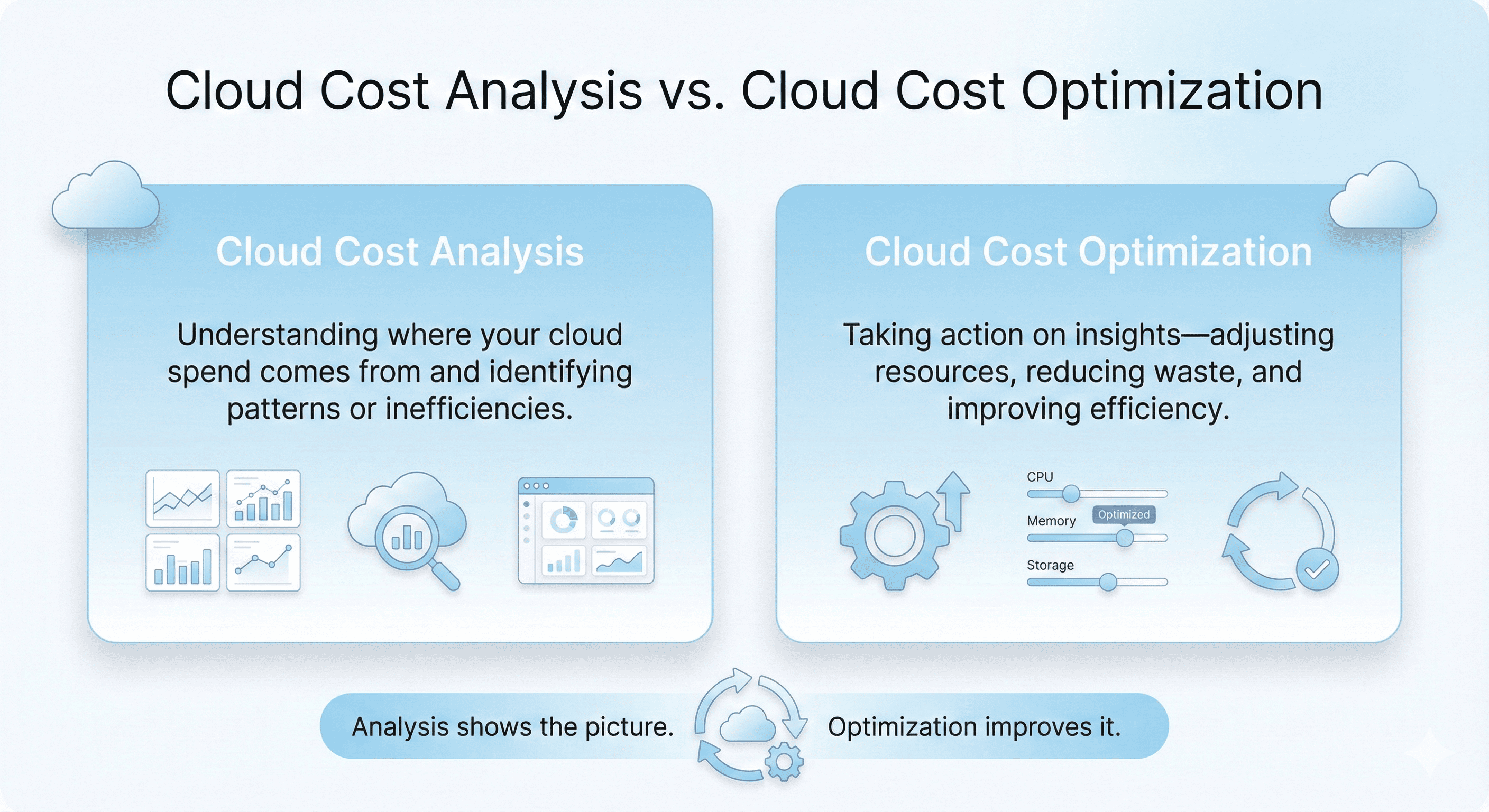
Together, they form a continuous cycle. Analysis provides the data. Optimization uses that data to drive ongoing improvements in cloud efficiency. When both are done well, teams get predictable cloud bills, better resource utilization, and a clearer understanding of how cloud spend supports business goals.
Cloud Cost Analysis Components
A comprehensive cloud cost analysis breaks your spend into clear categories. Each category tells you something different about how your workloads behave, why costs rise, and where optimization opportunities exist. The core components typically include:
Infrastructure Costs
Infrastructure is usually the biggest part of the cloud bill. It includes virtual machines, containers, orchestration platforms like ECS or EKS, and serverless services such as Lambda.
You’re charged based on real usage, like CPU hours, memory allocation, IOPS, request volume, and execution time. These numbers change constantly as workloads scale up or down.
Provisioning also plays a big role. Oversized instances, idle containers, or aggressive autoscaling settings can push costs up quickly. For many organizations, this is where most savings opportunities begin.
Data Transfer Costs
Data transfer is one of the most unpredictable parts of cloud spend. You are billed whenever data moves between Availability Zones, across regions, or out to the internet. These prices can vary based on:
- How much data you move
- Where it travels
- Which service or path handles the traffic
Some common examples include inter-region replication, analytics jobs shuffling large datasets, and APIs that send traffic externally. Even internal service-to-service communication can add up as systems grow. So, without a streamlined visibility, these fees can catch teams off guard.
Licensing Costs
Cloud workloads often rely on licensed software which can include operating systems like Windows Server, database engines such as SQL Server, or third-party tools from the cloud marketplace.
As a result, pricing models also differ. They could be per hour, per core, per user, or based on resource consumption. Because licensing fees build slowly over time, they’re easy to underestimate unless monitored consistently.
Storage Costs
Storage appears affordable upfront, but it scales silently as data grows. It includes object storage (like S3), block storage (like EBS), and file storage (like EFS), along with associated access and archival tiers. Each one carries its own pricing structure based on:
- Capacity
- Redundancy
- Access frequency
- Geographic location
Extra features like replication, snapshots, or cross-region backups can increase storage costs if they’re not reviewed regularly. Unused volumes and old logs often account for a significant portion of waste.
Additional Services Costs
Modern applications depend on a growing ecosystem of managed services. These accelerate development but introduce new cost layers. These costs usually comes from:
- Backup and disaster recovery services
- Managed databases
- Machine learning pipelines
- Analytics platforms
- Serverless workflows
- Monitoring and logging tools
Security and compliance features also contribute, such as encryption keys, firewall rules, threat detection, and long-term audit logs.
Individually, these services may look small. But across multiple accounts or teams, they can become a meaningful share of total cloud spend.
Essential KPIs & Cloud Cost Metrics
Before we get into KPIs and cost metrics, let’s understand how cloud pricing actually works. Cloud providers follow a usage-based cost model, which means you pay only for what you consume, whether that’s compute power, storage, networking, or managed services. This removes the need for upfront hardware investments, but it also means costs can increase quickly if workloads are not monitored closely.
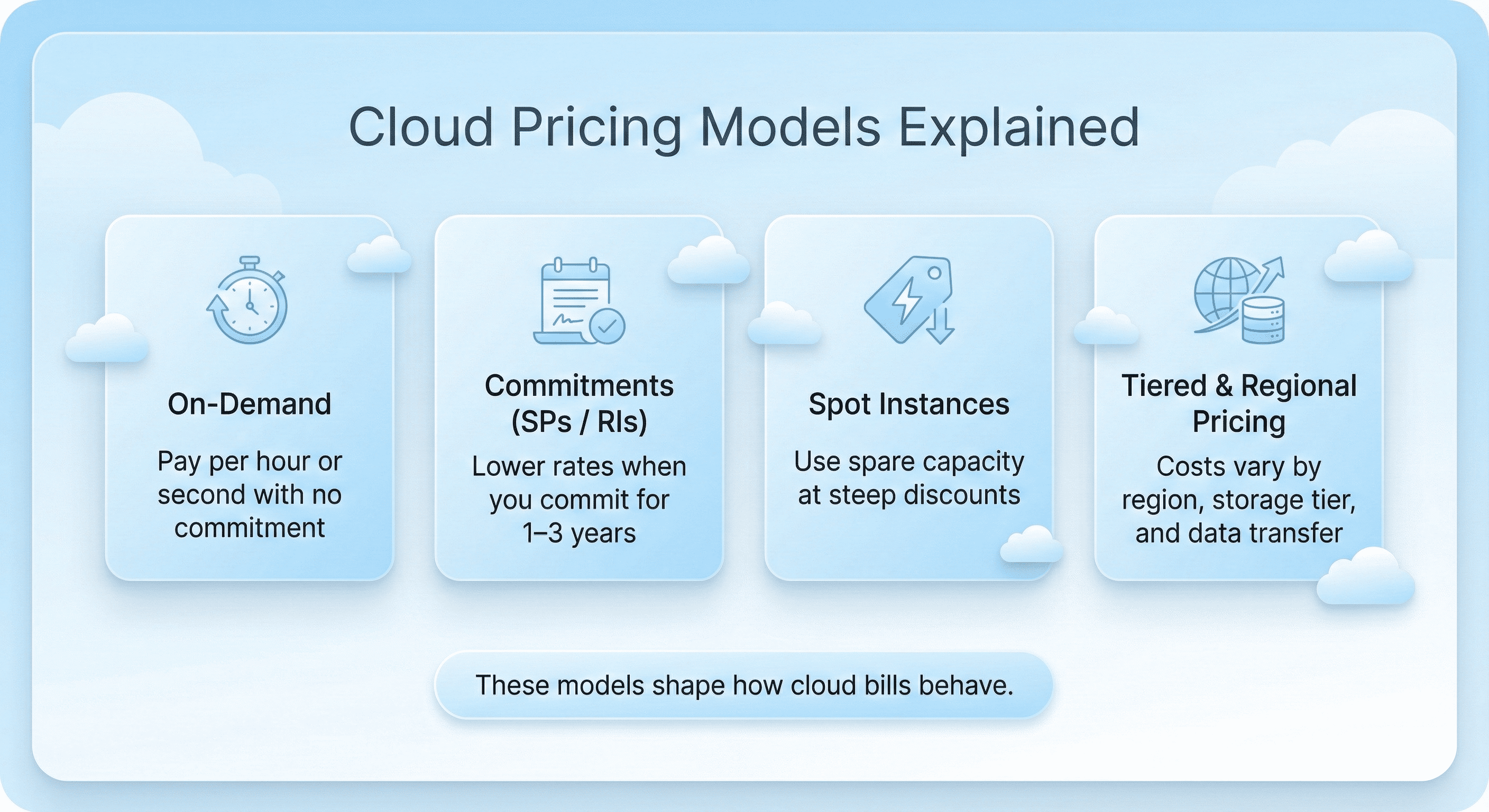
Most cloud bills are shaped by several pricing models.
- On-demand pricing lets you pay per hour or per second with no long-term commitment, which is helpful for short-lived or unpredictable workloads.
- Commitment-based discounts, such as Savings Plans or Reserved Instances, offer significant savings when you commit to a certain level of usage for one or three years.
- Spot instances allow you to purchase unused capacity at a steep discount, making them ideal for flexible or interruptible jobs.
- Tiered pricing and region-based variability where prices differ depending on data center region, storage tier (standard, infrequent access, archive), and data transfer volumes.
Also read: How to Choose Between 1-Year and 3-Year AWS Commitments
By tracking the right metrics, teams gain a clear view of how resources are being used, and which optimization opportunities will have the greatest impact. Below are the major KPIs companies use for cloud cost analysis.
1. Total Cloud Spend
Total cloud spend shows how much your organization pays each month across all services and accounts. It provides a high-level view of cloud investment and helps finance and engineering teams identify when deeper investigation is needed.
2. Cost by Service
Breaking spend down by service, such as EC2, RDS, S3, or Lambda highlights which parts of the environment consume the most budget. This metric makes it easier to pinpoint cost growth, evaluate architectural decisions, and prioritize optimization efforts.
3. Cost by Team, Application, or Environment
This KPI relies heavily on good tagging. It shows which teams, applications, or environments are responsible for specific portions of the bill. It also supports chargeback or showback models, helping organizations create accountability for cloud usage.
4. Unit Cost Metrics
Unit costs connect cloud spending to business outcomes. Examples include the cost per customer, cost per transaction, or cost per gigabyte processed. These metrics help teams understand whether cloud usage is scaling efficiently as the business grows, and they create a shared language between engineering and finance.
5. Resource Utilization
Utilization metrics show how efficiently resources are being used. Common KPIs include CPU utilization, memory usage, IOPS consumption, and idle time. Low utilization often points to overprovisioning, which remains one of the biggest drivers of wasted cloud spend.
6. Commitment Coverage
Commitment coverage measures the percentage of compute usage covered by discount programs such as Savings Plans, Reserved Instances, or flexible commitment models. Higher coverage usually results in lower effective rates, but it requires careful planning to avoid overcommitting. This KPI helps teams find the right balance.
7. Commitment Utilization
Commitment utilization shows how effectively your existing commitments are being used. Underutilized commitments can signal fluctuating workloads or inaccurate forecasts. Tracking this KPI ensures that commitment purchases continue to deliver value over time.
8. Effective Savings Rate
The effective savings rate calculates overall savings compared to on-demand pricing. It considers rightsizing, spot usage, commitment discounts, and tiered pricing. This metric provides a clear picture of how efficiently the cloud environment is operating.
9. Anomaly Detection Metrics
Anomaly metrics detect sudden spikes or drops in cloud spend. They help teams catch runaway processes, misconfigurations, or unplanned scaling events before costs escalate. Daily anomaly monitoring is considered a FinOps best practice.
10. Forecast Accuracy
Forecast accuracy measures how closely predicted cloud spending matches actual spending. Accurate forecasts improve budgeting, support long-term planning, and reduce financial surprises. Poor forecasts, on the other hand, can lead to overcommitment or unexpected cost overruns.
11. Unallocated or Untagged Spend
Unallocated spend represents the portion of the cloud bill that cannot be tied to a team, application, or workload. High levels of untagged spend make it harder to drive accountability and obscure the true cost of running individual services.
Best Practices for Cloud Cost Analysis
Cloud cost analysis becomes far more effective when teams follow consistent, repeatable practices. The goal is to understand how your cloud environment behaves. You need to ensure that your spending aligns with your business value and are able to create a workflow that prevents surprises. The best practices highlighted below form the foundation of a healthy cost management process.
1. Get a Clear View of Your Cloud Bill
A cloud bill contains thousands of individual cost entries. Each one represents a specific combination of service, usage type, region, and pricing model. Without a structured way to read this data, it’s easy to miss the signals that matter.
Start by reviewing the basics:
- What resources were used
- How long they ran
- Which pricing rate applied
- Where the resource lived (region/AZ)
- Which team or project used it
- Any tags or metadata describing ownership
2. Focus on Value, Not Just Cost
Cloud cost analysis is also about ensuring every dollar supports real outcomes. High spend isn’t necessarily bad; unexplained or low-value spend is.
Ask questions like:
- What business value does this workload deliver?
- How does cloud usage contribute to revenue, customer experience, or internal productivity?
- Are we getting the most value per unit of compute, storage, or data transferred?
3. Use Commitment Discounts Wisely
Commitment-based pricing (Savings Plans, Reserved Instances, or flexible commitment models) offers some of the largest possible savings. But it also introduces risk. Committing too much, or too early can lock you into costs you can’t fully utilize.
Some best practices include:
- Commit only for workloads with stable, predictable usage
- Avoid locking in long-term capacity you’re unsure about
- Start with lower coverage and increase gradually as patterns become clearer
- Centralize commitment management so unused capacity can be shared across teams
Also read: AWS Savings Plans vs Reserved Instances: A Practical Guide to Buying Commitments
4. Right-Size Continuously
Workloads do evolve. What was correctly sized last quarter might be oversized today. Continuous rightsizing is one of the most reliable ways to control spend without sacrificing performance.
You can look for:
- Instances running far below CPU or memory thresholds
- Containers with overly generous resource limits
- Databases sized for yesterday’s traffic
- Storage volumes that could move to cheaper tiers
5. Use Scheduling for Non-Production Environments
Not every environment needs to run around the clock. Development, QA, staging, and sandbox workloads often sit idle during nights, weekends, and holidays.
Creating schedules for these resources ensures they only run when needed. This one practice alone can cut a significant portion of monthly compute spend in engineering-heavy organizations.
6. Establish a Strong Tagging and Ownership Model
Good tagging is essential for effective cloud cost analysis. When you can see your own costs, your usage habits will improve naturally. Without it, attribution becomes guesswork, and optimization becomes harder.
A strong tagging model includes:
- Clear naming conventions
- Required tags for owner, environment, application, and cost center
- Automated enforcement to maintain consistency over time
- Dashboards that highlight untagged or mis-tagged resources
7. Manage Storage Thoughtfully
Storage seems simple, but it’s often one of the fastest-growing parts of the cloud bill. Unused snapshots, high-redundancy configurations, or rarely accessed data in expensive tiers can quietly inflate costs. A small amount of governance here prevents unnecessary long-term accumulation.
A few best practices include:
- Regularly reviewing unused or aged snapshots
- Matching storage tiers to access patterns
- Deleting abandoned or zombie volumes
- Monitoring growth trends in logs and analytics datasets
8. Optimize Data Transfer Early
Data transfer charges often surprise teams because they are based on movement, and not consumption. The architectural design of your workloads affects these charges more than anything else.
To control data transfer costs:
- Keep traffic within the same Availability Zone or region where possible
- Review analytics and ETL pipelines for unnecessary shuffles
- Consider CDNs for high-traffic applications
- Analyze service-to-service communication patterns
9. Use Spot Capacity Where Practical
Spot instances can reduce compute costs dramatically for flexible workloads. Not every application can tolerate interruptions, but many can batch jobs, do background processing, large-scale data transformations, or complete ML training tasks.
When used strategically, Spot capacity becomes a powerful cost-reduction lever that works alongside commitments.
10. Review and Analyze Costs Regularly
Do not treat cloud cost analysis as a quarterly activity. Teams that review costs daily or weekly catch issues early, optimize faster, and make better commitment decisions.
A regular review cycle typically includes:
- Checking anomalies
- Reviewing KPI trends
- Identifying new optimization opportunities
- Evaluating coverage and utilization of commitments
- Sharing insights with engineering and finance stakeholders
Practitioner Playbook: How to Run Cloud Cost Analysis
Cloud cost analysis becomes much easier when you follow a consistent, step-by-step workflow. This playbook outlines a practical process teams can use to measure, monitor, and improve cloud spend without getting overwhelmed.
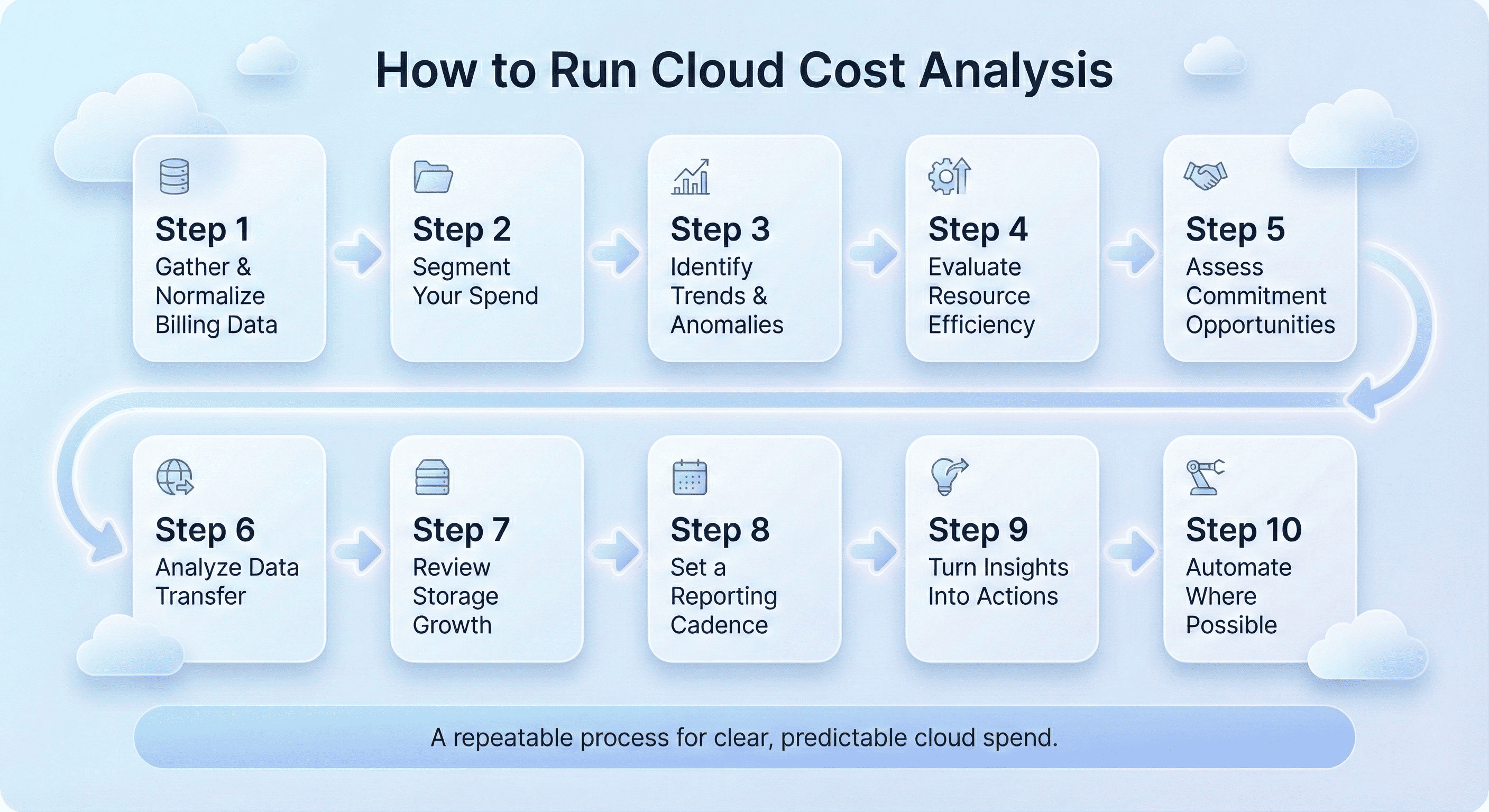
1. Gather and Normalize Your Billing Data
Start by pulling in your billing and usage data from the cloud provider. This may come from a billing export (like CUR), a cost management dashboard, or an external tool.
At this stage, your goal is simple. Create one reliable source of truth by consistently checking for:
- Missing or incomplete records
- Inconsistent timeframes
- Duplicate or outdated data
- Region-specific differences
2. Segment Spend Into Meaningful Groups
Break your total cloud spend into categories that reflect how your organization operates. It also gives engineering teams ownership of their costs. You can include common segments like:
- Teams or business units
- Applications or microservices
- Environments (prod, dev, staging)
- Cloud services (compute, storage, network)
- Regions or accounts
3. Identify Trends, Spikes, and Anomalies
Next, evaluate how your spend changes over time. Daily or weekly anomaly detection can help you catch issues early, before they turn into billing surprises. You can look for the following signs:
- Unusual spikes in compute
- Unexpected data transfer increases
- Higher-than-normal storage growth
- Workloads that scale without clear business reasons
4. Evaluate Resource Efficiency
Once you understand where spend is happening, examine how efficiently your resources are being used. Rightsizing often produces immediate savings, especially in environments with inconsistent usage habits. You can ask the following questions:
- Is compute sized correctly for its workload?
- Are we paying for idle resources?
- Are storage tiers aligned with access patterns?
- Are databases provisioned too large?
5. Assess Commitment Opportunities
When you have your usage patterns handy, you can easily determine which workloads are stable enough for commitment-based savings models. This is also where automated commitment engines shine. Daily updates and accurate forecasting reduce the risk of overcommitment and help teams capture more savings. Here’s what you should evaluate:
- Long-running service
- Predictable traffic patterns
- Underutilized commitments
- Coverage gaps
6. Analyze Data Transfer Behavior
Data transfer costs can be difficult to understand without visualization or detailed logs. But, once identified, these patterns can be optimized through architectural improvements, caching layers, or CDN usage. Here’s what you should be looking out for:
- Cross-region traffic
- Traffic between Availability Zones
- Egress to the internet
- Large ETL or analytics pipelines
7. Review Storage Growth and Retention
Storage tends to grow quietly, which is why it is essential to monitor them regularly. You can move lesser used accessed data to cheaper tiers. Also, look for stale snapshots, unused volumes, logs or datasets stored at expensive tiers, and logs or datasets stored at expensive tiers.
8. Build a Regular Reporting Cadence
Cloud cost analysis should not be a one-time project. Create a recurring process that keeps everyone aligned. A strong cadence should include:
- Weekly KPI reviews
- Monthly budget alignment
- Quarterly efficiency roadmaps
- Alerts for anomalies and usage spikes
9. Translate Insights Into Action
Every analysis should end with clear, actionable steps. These may include:
- Rightsizing certain workloads
- Improving tagging accuracy
- Buying or adjusting commitments
- Tweaking autoscaling policies
- Optimizing storage classes
- Reducing high-cost data movement
10. Automate Wherever Possible
Manual analysis works at the beginning, but it doesn’t scale. Automation brings consistency, speed, and greater accuracy. Teams often automate:
- Instance scheduling
- Rightsizing recommendations
- Snapshot cleanup
- Commitment buying
- Monthly reporting
Security, Permissions & Implementation
When you introduce cloud cost analysis into your workflow, it’s important to make sure the process is supported by the right security and permission controls. The goal is to give teams the visibility they need without exposing your infrastructure to unnecessary risk. In most cases, this means relying on read-only, least-privilege access. With this approach, you can analyze spend, view usage patterns, and understand resource ownership, all without granting the ability to change or deploy anything.
A good implementation starts by connecting your billing and usage data through secure, limited-scope roles. Once the data is flowing, you’ll want to confirm that it’s complete, up to date, and mapped correctly to your accounts, teams, and environments. This ensures that every insight you generate is grounded in accurate information.
As your analysis matures, you’ll likely evaluate opportunities to optimize spend, including commitment-based savings. Because these decisions influence financial outcomes, it’s important to have a clear approval process. Automated recommendations are helpful, but human oversight ensures that every commitment aligns with budget priorities and workload stability.
In practice, securing cloud cost analysis is about giving the right people the right access at the right time. With thoughtful permissions and a predictable implementation process, you can analyze cloud spend confidently while maintaining full control of your environment.
How Usage.ai Supercharges Cloud Cost Analysis
Usage.ai is an automated cloud savings platform designed to reduce AWS, Azure, and GCP costs by 30–60% with minimal manual effort. It delivers end-to-end intelligence to every optimization strategy discussed in this guide, from continuous analysis, real-time forecasting, safe commitment automation, to unified financial visibility.
That means you get a platform that continuously analyzes your cloud usage, identifies stable workloads, models the safest commitment levels, and updates its recommendations every 24 hours. Instead of relying on static forecasts or annual reviews, you gain dynamic, real-time visibility into how your cloud behaves and where your biggest savings opportunities exist.
Usage.ai also automates commitment purchasing with financial protection. Every commitment recommendation is backed by cashback coverage if utilization dips, which dramatically reduces the risk of overcommitment. This allows organizations to safely increase coverage, unlock deeper savings, and achieve more predictable cloud spend. You get the benefits of Savings Plans and Reserved Instances without the downside of unused commitments.
Beyond commitments, Usage.ai provides a complete analytics layer that helps you understand cost drivers. Finance teams get clear unit economics and forecast accuracy. Engineering teams get workload insights that support rightsizing and architectural tuning. Leadership gets predictability and transparency across the entire cloud estate.
What makes this especially powerful is Usage.ai’s pricing model. Fees apply only to realized savings. There are no markups on cloud bills, no spend-based charges, and no cost penalties for growth. The platform earns only when you save, making it a fully aligned partner in your optimization strategy.
Sign up now to connect your AWS account and see how much you can save in just 10 minutes.
%2013%20(16).svg)
Frequently Asked Questions
1. What is cloud cost analysis?
Cloud cost analysis is the process of examining cloud usage, spend patterns, and pricing models to understand where money is going and how efficiently resources are being used. It helps teams identify waste, improve forecasting, and uncover opportunities for cloud cost optimization.
2. Why is cloud cost analysis important?
It ensures your cloud spend aligns with business value. Without ongoing analysis, costs rise unpredictably, workloads drift, commitments underutilize, and organizations struggle to forecast budgets. Cloud cost analysis gives teams clarity, control, and a path to predictable savings.
3. What should a cloud cost analysis include?
A complete analysis examines compute, storage, data transfer, licensing, managed services, utilization metrics, commitment coverage, and unit costs. It also includes workload segmentation, anomaly detection, and forecasting insights.
4. What KPIs matter most in cloud cost analysis?
Key KPIs include total cloud spend, cost by service, unit costs, utilization rates, commitment coverage, commitment utilization, anomaly patterns, and forecast accuracy. These metrics show how efficiently your cloud resources are being used.
5. How do Savings Plans and Reserved Instances affect cloud cost analysis?
They significantly reduce compute costs but require accurate workload forecasting. Cloud cost analysis helps determine which workloads are stable enough for commitments and ensures existing commitments are fully utilized.
6. How do I identify waste in my cloud environment?
Check for idle resources, oversized compute, unused storage volumes, cross-region data transfer patterns, and low commitment utilization. These areas typically produce the most avoidable costs.
7. How can I make cloud costs more predictable?
Increase commitment coverage based on workload stability, improve forecast accuracy, implement tagging for better allocation, and automate anomaly detection.
8. What is the most effective cloud cost optimization method?
Commitment-based savings (Savings Plans, RIs) deliver the largest discounts, especially when supported by automated modeling and utilization protection.