.png)


For most teams running workloads on Google Cloud Platform (GCP), cost optimization starts with a familiar checklist of rightsizing virtual machines, turning off idle resources, cleaning up unused storage, and setting budgets or alerts. These steps are widely documented, and almost universally recommended. Yet despite following these “best practices,” many organizations still find that their GCP spend continues to grow faster than expected as usage scales.
This happens because most GCP cost optimization guidance is only designed for early-stage efficiency. Best practices focus on eliminating obvious waste, but they rarely address how cloud costs behave once environments stabilize and production workloads dominate the bill.
As GCP usage grows, demand fluctuates, roadmaps change, and infrastructure decisions made once can have financial consequences for years. Optimization stops being a one-time cleanup exercise and becomes an ongoing financial challenge.
Understanding why this shift happens and where traditional best practices fall short is the first step toward optimizing GCP costs in a way that actually scales.
What Is GCP Cost Optimization?
GCP cost optimization is the practice of reducing and controlling cloud spend in Google Cloud by eliminating unnecessary usage, selecting lower-cost pricing models, and continuously aligning infrastructure consumption with actual business demand.
It has three core components:
- Waste reduction – identifying and removing unused or oversized resources, such as idle virtual machines, unattached disks, or overprovisioned services.
- Pricing optimization – ensuring workloads run on the most cost-effective pricing options available, including on-demand rates, automatic discounts, and long-term commitments.
- Ongoing monitoring and adjustment – tracking spend over time and responding as usage patterns change, rather than treating optimization as a one-time task.
What’s often misunderstood is where the biggest savings come from. While waste reduction is essential, it usually delivers finite and front-loaded gains. Once obvious inefficiencies are removed, the dominant factor in GCP spend becomes how much you pay per unit of compute or service over time. That shift, from configuration-level fixes to pricing and commitment decisions is where cost optimization moves from basic hygiene to a true financial discipline.
Also read: Multi-Cloud Cost Optimization Guide for AWS, Azure, GCP Savings
What Traditional GCP Cost Optimization Best Practices Look Like
Traditional GCP cost optimization best practices are largely focused on improving efficiency at the infrastructure level. Most guidance centers on reducing obvious waste and tightening resource usage within Google Cloud environments.
These best practices typically include the following categories:
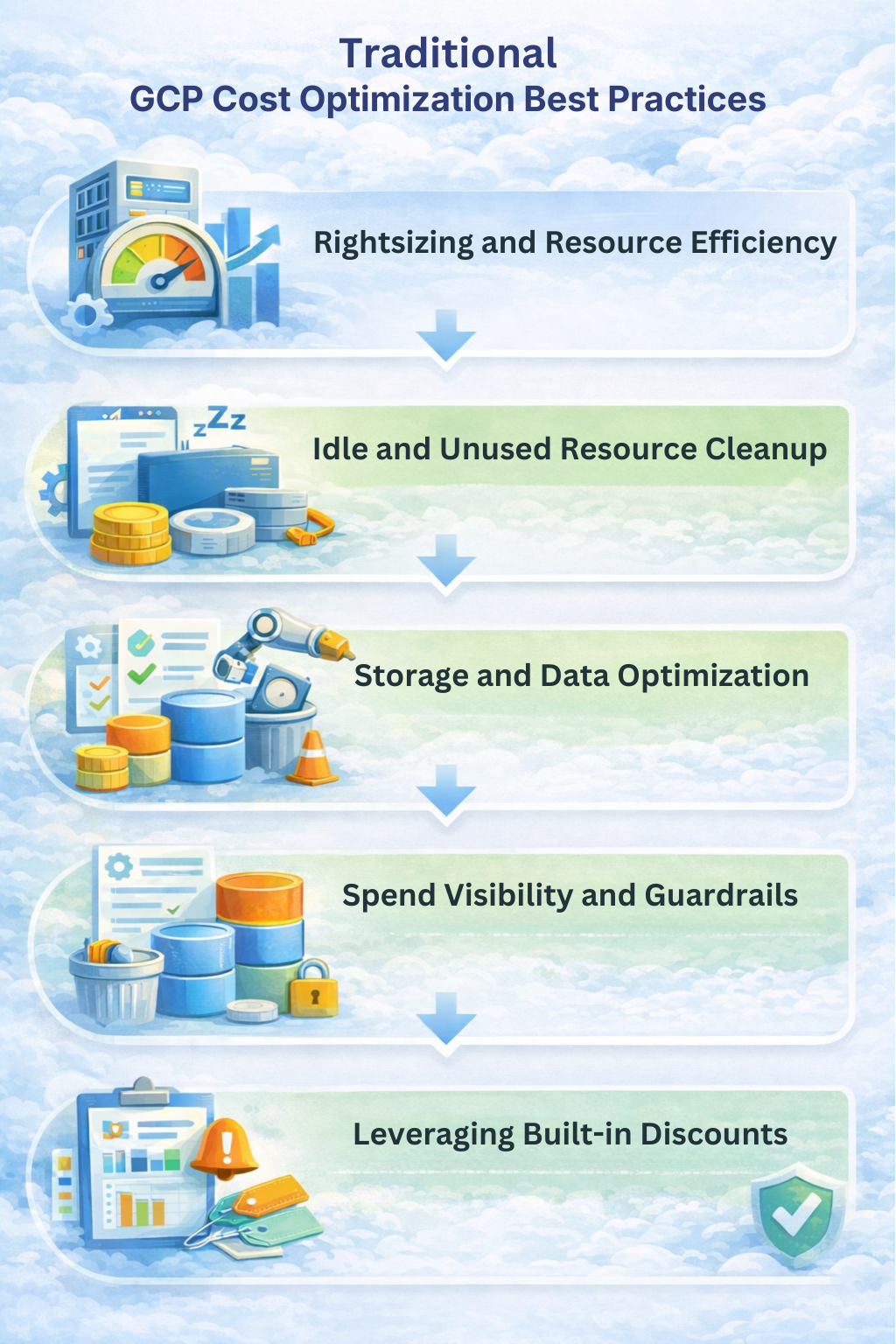
Rightsizing and Resource Efficiency
Teams are encouraged to analyze CPU, memory, and disk utilization to identify oversized virtual machines or services. The goal is straightforward: reduce allocated capacity so it more closely matches actual usage. Autoscaling is often paired with rightsizing to ensure workloads can scale up during peak demand and scale down when traffic drops.
Idle and Unused Resource Cleanup
Another common focus is identifying resources that are running but not actively used. This includes idle VMs, unattached persistent disks, orphaned load balancers, and legacy resources left behind after migrations or experiments. Scheduling non-production environments to shut down during off-hours is also a standard recommendation.
Storage and Data Optimization
Traditional best practices also emphasize controlling storage costs through lifecycle policies, retention limits, and tiering data into lower-cost storage classes. This helps prevent long-lived data from silently accumulating in high-cost tiers.
Spend Visibility and Guardrails
Budgets, alerts, labels, and cost allocation reports are used to improve visibility and accountability. The assumption is that better visibility leads to better behavior: teams see their spend, receive alerts when budgets are exceeded, and adjust usage accordingly.
Leveraging Built-in Discounts
Finally, traditional guidance points teams toward Google Cloud’s built-in discount mechanisms, such as automatic usage-based discounts and long-term commitments to reduce per-unit costs where possible.
Collectively, these practices aim to make cloud usage more efficient and predictable. They are low-risk, largely reversible, and effective at eliminating waste. However, they are also fundamentally operational optimizations. They focus on how resources are configured and consumed, not on how long-term pricing decisions and demand uncertainty affect total spend as environments scale.
Breaking Down Traditional GCP Cost Optimization Best Practices
The most common GCP cost optimization best practices are the backbone of most optimization playbooks and are often the first actions teams take when cloud spend starts to rise. So, let’s understand where they work, where they stall, and why they fail to scale on their own.
Best Practice #1: Rightsizing and Autoscaling (And Why It Plateaus)
Before looking at pricing models or long-term commitments, most GCP cost optimization efforts start with rightsizing and autoscaling. This makes sense because these practices are relatively easy to implement, carry minimal financial risk, and often produce quick wins. For many teams, they provide the first concrete evidence that cloud costs can be controlled.
Rightsizing focuses on matching resource capacity, i.e., CPU, memory, and storage to actual workload demand. By analyzing utilization metrics, teams reduce oversized virtual machines or move workloads to smaller instance types that better reflect real usage. Autoscaling builds on this approach by dynamically adjusting capacity based on traffic or load, ensuring resources scale up during peak demand and scale down when demand falls.
In early-stage or rapidly changing environments, these techniques can produce meaningful savings. They eliminate obvious inefficiencies and prevent teams from paying for capacity that is rarely used. From an operational standpoint, rightsizing and autoscaling are essential.
The limitation appears as environments mature. Once production workloads stabilize and resources are reasonably sized, there is far less excess capacity left to remove. Additional rounds of rightsizing yield smaller and smaller gains, even as overall spend continues to increase.
Crucially, these techniques do not change the price paid per unit of compute. They optimize how much is consumed, not how much each unit costs. At scale, that distinction becomes the difference between short-term efficiency and sustainable GCP cost optimization.
Best Practice #2: Turning Off Idle Resources (And Why It’s Not a Strategy)
Another cornerstone of traditional GCP cost optimization is identifying and shutting down idle or unused resources. This includes virtual machines running with little to no traffic, development and test environments left on overnight, and legacy resources that were never fully decommissioned after migrations or experiments. For many teams, this step delivers fast, visible savings with minimal technical complexity.
Common techniques include scheduling non-production workloads to shut down outside business hours, deleting orphaned disks or snapshots, and enforcing cleanup policies for short-lived environments. These actions are undeniably valuable. They eliminate spend that delivers no business value and help establish basic cost hygiene across teams.
The limitation is that idle resource cleanup is inherently finite. Once unused infrastructure has been identified and removed, there is little left to optimize in this category. More importantly, idle resources typically represent a shrinking share of total spend as environments mature. In most production-heavy GCP environments, the majority of costs come from workloads that must run continuously, like customer-facing services, data pipelines, and core platforms that cannot simply be turned off.
This creates a false sense of progress. Teams may see early savings from cleanup efforts and assume they are “optimizing,” even as the bulk of their GCP bill remains unchanged. Turning off idle resources is a necessary step, but it does not address the economics of always-on production usage. Once cleanup is complete, further cost reductions depend far less on deleting resources and far more on how ongoing usage is priced. That’s why idle resource management, while essential, cannot serve as a long-term strategy for scalable GCP cost optimization.
Also read: How to Identify Idle & Underutilized AWS Resources
Best Practice #3: Storage and Data Tiering (Helpful, but Incremental)
Storage optimization is another commonly recommended GCP cost optimization best practice, and it is often framed as an easy way to reduce spend without touching compute. The guidance usually focuses on applying lifecycle policies, enforcing retention limits, and moving infrequently accessed data into lower-cost storage tiers.
In Google Cloud, this typically means tiering data from Standard storage into Nearline, Coldline, or Archive classes, deleting obsolete backups, and setting expiration rules for logs or temporary datasets. When storage usage has grown organically over time, these actions can recover unnecessary spend and prevent costs from accumulating unnoticed.
The limitation is one of impact, not correctness. Even in data-heavy environments, storage often represents a smaller and more predictable portion of total cloud spend compared to compute. Once lifecycle rules and retention policies are in place, storage costs tend to stabilize. Further optimization produces marginal savings rather than step-change reductions.
More importantly, storage optimization does not address the primary driver of cost growth in most mature GCP environments: continuously running production workloads. While data tiering improves cost hygiene and should be part of any baseline optimization effort, it does little to influence the long-term cost trajectory of compute-heavy systems. As with other traditional best practices, it is necessary, but insufficient when GCP cost optimization needs to scale beyond incremental gains.
Best Practice #4: Using GCP Discounts (Where Optimization Becomes Risky)
After teams exhaust cleanup and efficiency-focused optimizations, attention usually turns to discounted pricing models in Google Cloud. This is where the largest potential savings exist and where GCP cost optimization begins to shift from operational tuning to financial decision-making.
Google Cloud offers two primary discount mechanisms for many services:
- Sustained Use Discounts (SUDs) apply automatically when workloads run consistently over the course of a month. They require no upfront commitment and carry no downside risk. While helpful, SUDs have a built-in ceiling: once a workload is already running steadily, there is little additional optimization available beyond what GCP applies by default.
- Committed Use Discounts (CUDs) are different. They offer deeper discounts in exchange for committing to a fixed level of usage for a one-year or three-year term. In theory, this is where teams can materially lower their effective cost per unit of compute. In practice, this is also where many optimization efforts stall.
The reason is risk. A CUD only delivers savings if actual usage remains at or above the committed level. If demand drops, architectures change, or services are retired, the discount no longer offsets the commitment cost. From a financial perspective, the unused portion of a commitment becomes sunk spend. This creates a clear trade-off: higher discounts come with higher exposure to forecast error.
As a result, many teams intentionally under-commit. They choose conservative CUD coverage to avoid the possibility of overpaying, even if that means leaving substantial savings unrealized. This behavior is rational, but it exposes a key limitation of traditional GCP cost optimization best practices. They acknowledge discounts as a lever, yet provide little guidance on how to manage the downside risk that comes with using them at scale. Once optimization reaches this point, the challenge is no longer technical, but becomes financial.
Why GCP Cost Optimization Best Practices Don’t Scale
Once foundational optimizations are in place, GCP cost optimization stops being constrained by inefficiency and starts being constrained by decision uncertainty.
The core tension is between long-lived pricing decisions and short-lived infrastructure reality. Modern GCP environments evolve continuously as services are re-architected, traffic shifts across regions, new products are launched, and older workloads are retired. Even when overall spend grows steadily, the shape of that spend changes underneath. Traditional optimization methods are not designed to adapt to this kind of structural drift.
This is where cost optimization becomes less about identifying savings opportunities and more about managing exposure. Decisions around pricing and capacity inherently rely on forecasts, but forecasts degrade as variability increases. The larger and more complex an environment becomes, the more expensive forecast errors become, especially when commitments are involved.
As a result, teams optimize cautiously and that caution has a measurable cost. By prioritizing flexibility over efficiency, organizations systematically pay higher effective rates for the same underlying usage.
Traditional GCP cost optimization best practices were built to reduce waste in relatively stable systems. They are not designed to absorb uncertainty, re-evaluate decisions continuously, or protect teams from being wrong.
At this stage, scaling savings requires a shift in mindset. Optimization is no longer about cleanup or tuning. Rather it has become a question of how pricing decisions are made, how often they are revisited, and how much downside risk the organization is willing (or able) to carry as its GCP footprint grows.
Also read: Why Cloud Cost Management Keeps Failing
What Scalable GCP Cost Optimization Actually Looks Like
Scalable GCP cost optimization has a few defining characteristics.
It treats pricing decisions as a continuous cycle
Traditional approaches often revisit optimization quarterly or annually, which assumes the environment remains stable between reviews. In reality, meaningful changes in usage can happen week to week. A scalable approach continuously reassesses how workloads are priced relative to current demand, rather than locking decisions in for long intervals and hoping forecasts remain accurate.
It separates decision-making from risk ownership
In most organizations, the teams responsible for approving long-term pricing decisions are also the ones exposed if those decisions turn out to be wrong. That dynamic naturally leads to conservative behavior. Scalable optimization recognizes that maximizing savings requires higher coverage of discounted pricing, but also acknowledges that higher coverage increases exposure if usage declines. Without a way to manage that downside, optimization stalls by design.
It focuses on effective rate, not just total spend
Two environments with identical usage can have materially different costs depending on how much of that usage is covered by discounted pricing. Improving the blended rate paid for ongoing workloads compounds over time, whereas one-time efficiency gains do not. This reframes optimization as a financial outcome (lower cost per unit of usage) rather than a series of isolated technical actions.
In practice, this is where newer models of cost optimization emerge. Instead of relying solely on static commitments and manual reviews, some teams adopt systems that automatically evaluate discounted pricing opportunities, refresh recommendations frequently, and introduce mechanisms to reduce the financial impact if usage shifts unexpectedly.
Platforms such as Usage.ai represent this shift by combining automated commitment optimization with explicit downside protection, allowing teams to increase discounted coverage without taking on unbounded risk.
How Usage.ai Enables Scalable GCP Cost Optimization (and Why the Benefits Compound)
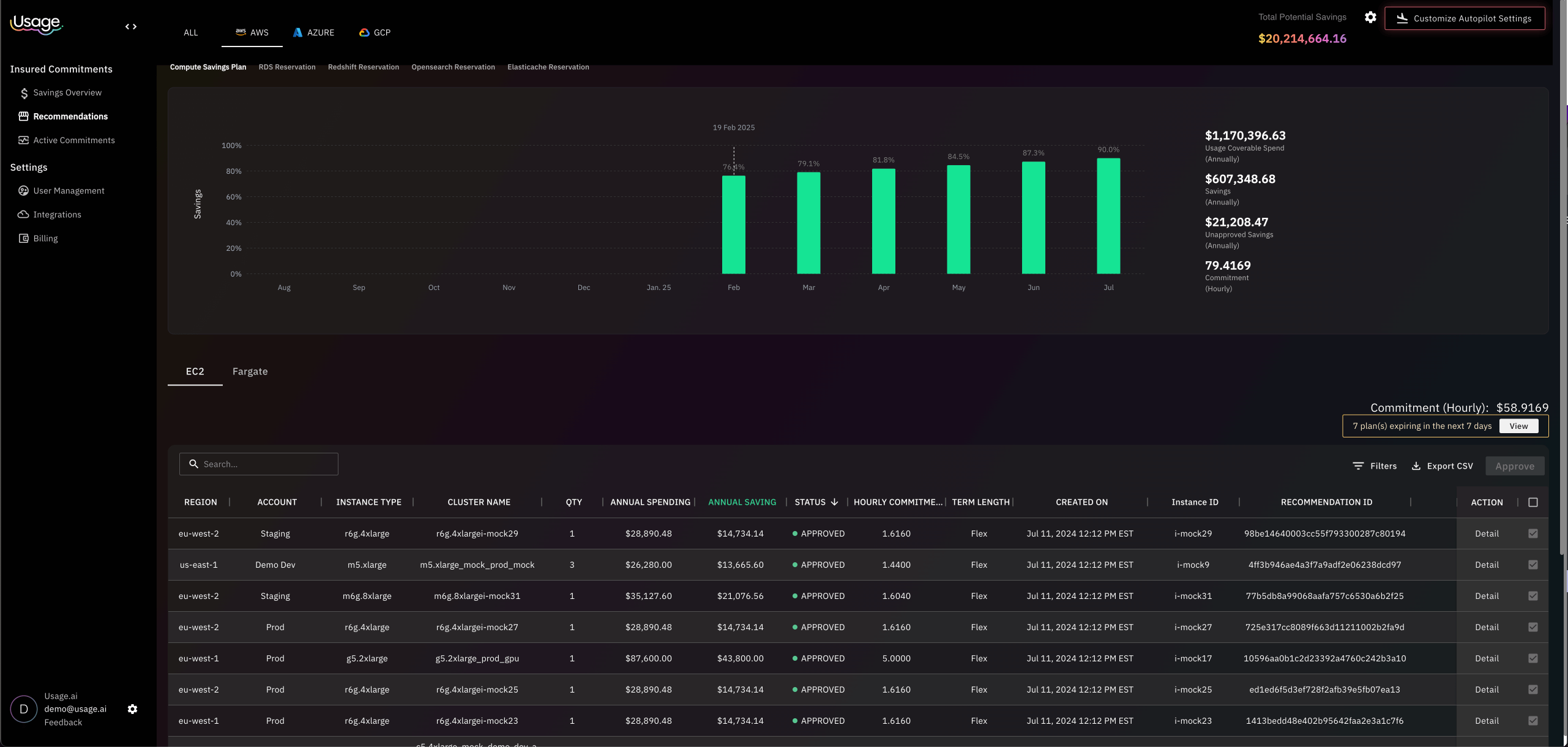
The core benefit Usage.ai provides is risk-managed optimization. Instead of forcing teams to choose between flexibility and savings, Usage.ai introduces a model where higher discounted coverage is possible without exposing the organization to unlimited downside if usage changes. This directly addresses the behavioral bottleneck that prevents most FinOps teams from fully optimizing GCP costs.
1. Risk Is Explicitly Modeled, Not Assumed
In traditional GCP cost optimization, commitment decisions rely on forecasts that are rarely revisited once made. The financial risk of being wrong, such as committing to more usage than materializes falls entirely on the customer. As a result, teams rationally under-commit.
Usage.ai changes this dynamic by explicitly accounting for downside risk in the optimization model. Instead of treating under-utilization as an unavoidable failure mode, it is handled as a managed outcome. Cashback protection ensures that when committed usage is not fully realized under agreed terms, the financial impact is partially offset with real cash. This transforms commitment optimization from a binary “right or wrong” decision into a risk-adjusted financial strategy.
2. Higher Discounted Coverage Lowers the Effective Blended Rate
At scale, total GCP spend is dominated by workloads that run continuously. For these workloads, the most important metric is not absolute usage, but the effective blended rate paid over time.
By enabling higher commitment coverage without proportional increases in risk, Usage.ai helps reduce the blended rate across steady-state usage. Even small improvements in effective rate compound month over month, because they apply to the same always-on workloads that drive the majority of spend.
This is fundamentally different from one-time efficiency gains:
- Cleanup and rightsizing produce finite savings
- Rate optimization produces recurring savings
Usage.ai’s model allows teams to access the second category without accepting unbounded downside.
Learn more: What is Usage AI’sFlex-Commit Program
3. Continuous Re-Evaluation Reduces Forecast Dependency
A major failure mode in traditional cost optimization is decision latency. Commitments are often evaluated quarterly or annually, while usage can shift materially within weeks. This gap increases forecast error and amplifies risk.
Usage.ai mitigates this by continuously refreshing recommendations based on recent usage data. Instead of relying on a single long-term forecast, pricing decisions are revisited frequently and adjusted as conditions change. This shortens the feedback loop between infrastructure reality and financial commitments.
Technically, this reduces:
- The duration of exposure to incorrect assumptions
- The magnitude of under- or over-commitment over time
4. Cashback Protection Converts Breakage Into Recoverable Spend
In standard commitment models, unused committed capacity is effectively written off. The cost is real, but the value is gone. Usage.ai’s cashback program alters this outcome by returning real money, not credits, when utilization falls below committed levels under contract terms.
This distinction is critical:
- Credits lock value back into the same provider
- Cashbacks directly reduce net cloud spend
For finance teams, this improves savings recognition and accounting clarity. For FinOps teams, it lowers the perceived penalty of being wrong, which in turn enables more rational optimization behavior.
5. Incentives Are Aligned Around Realized Savings
Finally, Usage.ai’s fee structure of charging only a percentage of realized savings aligns incentives across stakeholders. The platform benefits only when customers actually save money, and customers are protected when assumptions don’t hold.
This alignment matters at scale, where trust and accountability determine whether optimization decisions are approved at all. By tying upside and downside together, Usage.ai removes a key organizational barrier to more aggressive, but still responsible GCP cost optimization.
Why the benefits compound
Each of these mechanisms reinforces the others. While higher coverage lowers effective rates, continuous re-evaluation limits exposure, and cashback protection reduces the cost of error. Over time, this creates a compounding effect where savings grow predictably, without requiring perfect forecasts or risk tolerance to increase in parallel.
Conclusion
The takeaway is simple. GCP cost optimization best practices only get you to baseline efficiency. Sustainable savings at scale come from lowering the effective rate you pay for always-on usage, while acknowledging that change is inevitable. Teams that optimize for expected value, rather than fear of being wrong, are the ones that ultimately pay less for the same cloud.
Frequently Asked Questions (FAQ)
1. What is GCP cost optimization?
GCP cost optimization is the practice of controlling and reducing cloud spend in Google Cloud by eliminating unnecessary usage, selecting lower-cost pricing options, and continuously aligning infrastructure consumption with real business demand.
2. What are some traditional GCP cost optimization best practices?
Traditional best practices typically include rightsizing and autoscaling compute resources, turning off idle or unused infrastructure, optimizing storage with lifecycle policies, improving spend visibility with budgets and alerts, and using built-in discounts such as Sustained Use Discounts and Committed Use Discounts. These practices establish cost hygiene but are limited in how much they can reduce spend at scale.
3. Why don’t traditional GCP cost optimization best practices scale?
They don’t scale because they assume relatively stable and predictable usage. As environments grow, usage becomes more variable and production workloads dominate spend. At that point, efficiency gains flatten, and the biggest cost driver becomes long-term pricing decisions, particularly commitments which introduce financial risk that traditional best practices are not designed to manage.
4. Are Committed Use Discounts (CUDs) worth it on GCP?
Committed Use Discounts can significantly reduce per-unit costs, but only when usage remains at or above the committed level. For many teams, the risk of over-committing leads to conservative coverage and unrealized savings. Whether CUDs are “worth it” depends less on the discount itself and more on how well the organization can manage the downside risk if usage changes.
5. What happens if my GCP usage drops after I commit?
In standard GCP commitment models, unused committed capacity becomes sunk cost. The organization still pays for the commitment even if workloads are reduced, re-architected, or retired. This potential outcome is the primary reason many teams under-commit despite stable baseline usage.