.png)



Amazon DocumentDB charges across four dimensions. Understanding all four — and how they interact — is the only way to accurately estimate your monthly bill. The instance line is the most obvious, but I/O is often the largest cost surprise: for a write-heavy document workload, I/O under Standard storage frequently exceeds the instance cost. This guide covers every billing dimension with exact rates, the Standard vs I/O-Optimized decision, the AWS official worked example, and the Extended Support trap for version 3.6 users.
See exactly what you’re overpaying in under 60 seconds. Try the Calculator for free →
The Four Billing Dimensions
All rates: US East (N. Virginia), June 2026. Source: AWS official DocumentDB pricing page. Verify at aws.amazon.com/documentdb/pricing/ — rates change.
| Billing Dimension | Rate | Notes |
| On-demand instances | Per second, 10-min min | Primary and all replica instances billed at the same per-second rate. 10-minute minimum after any billable status change. |
| Database I/O (Standard only) | $0.20/million I/O requests | Read: 8K pages = 1 I/O. Write: 4K transaction log units = 1 I/O. Not charged under I/O-Optimized. |
| Database storage | $0.10/GB-month | Includes 3-AZ replication. You pay for one logical copy. Auto-scales. Covers data, indexes, change stream data. |
| Backup storage (above free tier) | $0.02/GB-month | Free up to 100% of cluster storage. For a 50 GB cluster: first 50 GB of backup is free. |
| T3/T4g CPU credit overage | $0.09/vCPU-hr | Only when 24-hr rolling average CPU exceeds instance baseline. Same rate all T3/T4 sizes and regions. |
| Inter-AZ cluster data transfer | $0.00 | Data transferred between primary and replica instances across AZs is free. |
| Encryption, monitoring (CloudWatch) | $0.00 | KMS encryption at rest, TLS in transit, CloudWatch monitoring all included at no charge. |
| Database Savings Plans | Eligible | Up to 35% savings on 1-year commitment. Source: AWS official pricing page. |
Source: AWS official DocumentDB pricing page (aws.amazon.com/documentdb/pricing/), June 2026.
Dimension 1: Instance Pricing
DocumentDB instances are billed per second from the moment an instance enters Available state until it is stopped or deleted. The billing applies to both the primary (writer) instance and every read replica in the cluster. A two-instance cluster (one primary, one replica) is billed at twice the per-instance rate. A three-instance cluster (one primary, two replicas) is billed at three times the per-instance rate. Source: AWS official pricing page.
The 10-minute minimum applies after any billable status change: creating, modifying, or deleting an instance. This prevents the per-second billing from creating economics favorable to rapid instance cycling.
Selected on-demand rates for common instance types (US East, June 2026):
db.r5.large (2 vCPU, 16 GB) — $0.277/hr. Source: AWS official: ‘$0.277 per hour’ for db.r5.large.
db.r6g.large (2 vCPU, 16 GB, Graviton2) — approximately $0.225/hr. Source: Vantage.sh citing AWS official. Graviton2 delivers the same memory footprint at approximately 19% lower cost versus r5.
db.r6g.xlarge (4 vCPU, 32 GB, Graviton2) — approximately $0.450/hr. Source: Vantage.sh citing AWS official.
For the full current instance price list: verify at aws.amazon.com/documentdb/pricing/ — rates change.
T3/T4g burstable instances run in Unlimited mode. If your average CPU utilization over a rolling 24-hour period exceeds the baseline of the instance (for example, 20% baseline on a t3.medium), you are charged $0.09/vCPU-hr for the excess CPU credit consumption. For development clusters with occasional bursts, t3/t4g instances are cost-effective. For any production cluster with consistent CPU above baseline, the credit overage charges erode the cost savings versus an r-family instance. Source: AWS official pricing page.
Dimension 2: Database I/O (Standard Storage Only)
I/O is the billing dimension that surprises teams most. Under Standard storage, every read and write operation against the storage volume is billed at $0.20 per million I/O requests. This can exceed your instance cost for write-heavy document workloads. Source: AWS official pricing page.
Read I/O Mechanics
Read operations are charged at 8K page granularity: one I/O per 8K page read from storage. Once a page has been read from storage and loaded into memory, subsequent reads of the same data do not incur additional I/Os. The implication: a properly sized instance where the working set (frequently accessed documents and indexes) fits entirely in memory generates very few read I/Os. An undersized instance where the working set constantly evicts from memory generates high read I/Os as documents are re-read from storage on every access cycle. Right-sizing the instance is the primary lever for reducing read I/O costs. Source: AWS official pricing page.
Write I/O Mechanics
Write I/Os are billed in 4K transaction log units. A transaction log record of 1,024 bytes counts as one I/O. A record of 4,097 bytes counts as two I/Os. Concurrent write operations with transaction logs under 4K can be batched by the DocumentDB engine, reducing write I/O consumption. DocumentDB never pushes modified document pages to storage (unlike traditional database engines that write both the log and the modified page), which reduces write I/O compared to conventional RDBMS systems. Source: AWS official pricing page.
Garbage Collection I/O
DocumentDB uses MVCC (multi-version concurrency control) and creates a new versioned document for every update operation. When old document versions are no longer needed by active queries, a garbage collector reclaims them — generating read I/Os to load old versions into memory and write I/Os to delete them. For workloads with high update rates on the same documents, garbage collection I/O can be a significant share of total I/O. The mitigation: remove unused indexes (each unused index extends the time old versions must be retained and increases GC work) and ensure the instance is large enough that indexes fit in memory. Source: AWS official pricing page.
Standard vs I/O-Optimized: The Configuration That Shapes Your Bill
DocumentDB offers two storage configurations. The choice determines whether I/O appears as a separate, variable cost or is absorbed into higher instance and storage rates.
Standard (Pay-Per-Use I/O)
Storage: $0.10/GB-month. I/O: $0.20/million requests, billed separately. Use Standard when you expect I/O costs to be less than 25% of total cluster spend. For memory-resident workloads where the working set fits in instance memory, read I/Os are minimal. Standard gives you the lower instance rate and keeps I/O as a variable, workload-dependent cost. Source: AWS official: ‘If you expect your I/O costs to be less than 25% of your database cluster spend, this configuration might be ideal.’
I/O-Optimized (I/O Included)
Higher instance and storage rates, but I/O charges are eliminated entirely. Use I/O-Optimized when you expect I/O costs to exceed 25% of total cluster spend, or when you need cost predictability regardless of I/O patterns. Write-heavy document workloads (logging pipelines, event stores, audit trails), workloads with large documents that generate significant read I/O, and workloads with high update rates (triggering garbage collection I/O) all benefit from I/O-Optimized. Source: AWS official: ‘If you expect your I/O costs to exceed 25% of your database cluster spend, this configuration offers enhanced price performance.’
Quick check: pull ReadIOPS and WriteIOPS from CloudWatch for 30 days. Multiply by 2,628,000 seconds/month to get approximate monthly I/O requests. Multiply by $0.20/million. If that number exceeds 25% of your instance cost, switch to I/O-Optimized. You can change the storage configuration of an existing DocumentDB cluster.
Also read: DynamoDB Serverless: A Complete Guide
Dimension 3: Database Storage
DocumentDB storage is billed at $0.10/GB-month for Standard configuration. Source: AWS official: ‘storage as low as $0.10 GB/month.’ Billable storage includes all data in your cluster volume: document data, indexes, and change stream data.
Key storage facts from AWS official pricing page: (1) Replication across three Availability Zones is included in the storage price — you pay for one logical copy, not three. (2) Storage scales automatically in 10 GB increments as your data grows. You are billed for consumed storage, not allocated storage. (3) You do not need to pre-provision storage capacity.
Storage costs scale linearly with data volume. A 100 GB cluster stores $10/month. A 1 TB cluster: $102.40/month. A 10 TB cluster: $1,024/month. Storage is not usually the dominant cost for active production clusters — instance and I/O costs are larger. For archival or read-heavy clusters with large datasets and low write rates, storage becomes a larger share of total spend. Source: derived from AWS official storage rate.
Dimension 4: Backup Storage
DocumentDB automated backup storage is free up to 100% of your total cluster storage. A cluster storing 50 GB of data gets 50 GB of backup storage at no charge. If your backup storage exceeds the cluster data size — because of long retention windows or frequent snapshots — the excess is charged at $0.02/GB-month. Source: AWS official pricing page.
For most standard backup retention configurations (7-day automated backup window), backup storage stays within or close to the 100% free threshold. For clusters with 30-day retention, backup storage can grow to 3-5x the cluster data size. At $0.02/GB-month: 200 GB of excess backup storage on a 50 GB cluster with 30-day retention = $4/month additional. Source: AWS official example: ‘if your cluster has 10 TB of stored data, you get 10 TB of backup for free. Additional backup storage beyond the free allotment is priced as low as $0.02 per GB/month.’
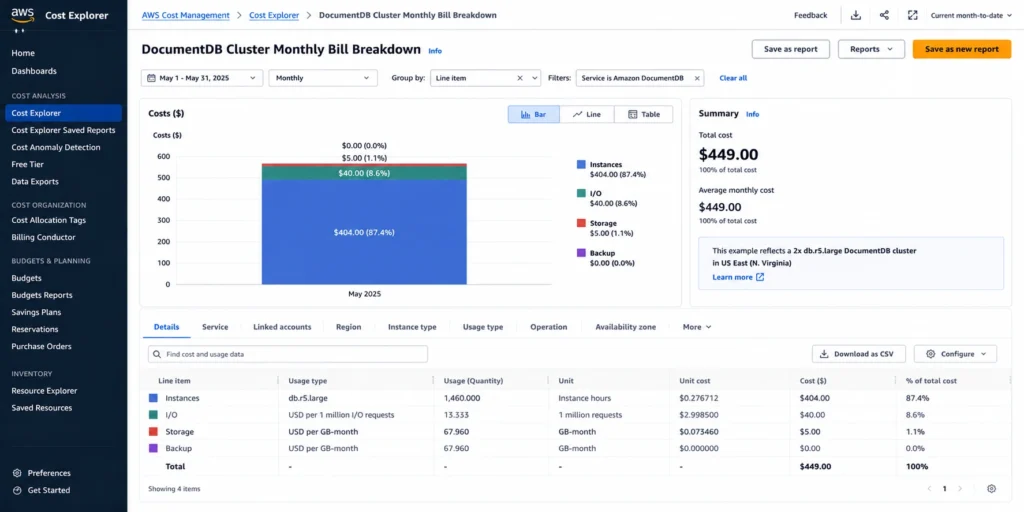
AWS Official Worked Example: Full Bill Calculation
Source: AWS official DocumentDB pricing page (aws.amazon.com/documentdb/pricing/), Standard storage configuration, US East (N. Virginia), June 2026.
Scenario: two-instance db.r5.large cluster (one primary, one replica), on-demand pricing. 50 GB of data stored. 50 GB backup (within free tier). 200 million I/O operations per month.
| Cost component | Calculation | Monthly cost |
| Instances (2x db.r5.large, on-demand) | $0.277/hr x 730 hrs x 2 instances | $404.42 |
| Storage (Standard, 50 GB) | $0.10/GB-month x 50 GB | $5.00 |
| Database I/O (200M requests) | $0.20/million x 200 million | $40.00 |
| Backup storage (50 GB — within free tier) | 50 GB backup = 50 GB cluster storage (100% free) | $0.00 |
| Total monthly | $404.42 + $5.00 + $40.00 + $0.00 | $449.42 |
Source: AWS official DocumentDB pricing page. Exact figures reproduced from the AWS official worked example. I/O cost ($40) represents 8.9% of total spend — well below the 25% threshold where I/O-Optimized would apply. Source: aws.amazon.com/documentdb/pricing/.
I/O-Optimized comparison for the same workload: if I/O were 10x higher (2 billion I/Os = $400/month), I/O would represent 49% of total spend — well above the 25% threshold. Switching to I/O-Optimized would eliminate the $400 I/O charge at the cost of higher instance and storage rates. The I/O-Optimized break-even for a 2x db.r5.large cluster with 50 GB: I/O charges would need to exceed approximately $90/month (25% of the $360 remaining Standard cost) before I/O-Optimized becomes cheaper. That translates to approximately 450 million I/Os/month. Source: math from AWS official rates.
Extended Support for DocumentDB Version 3.6: Billing Starts July 1, 2026
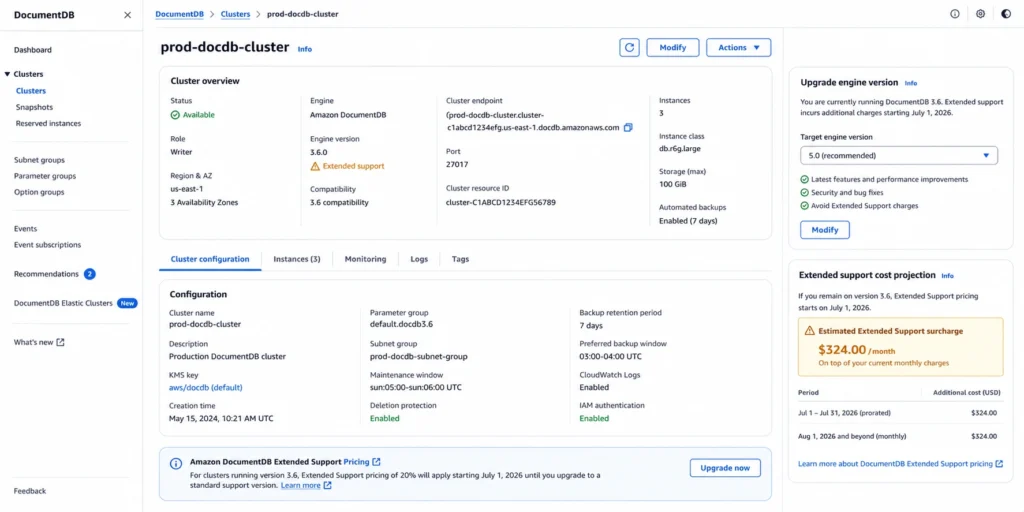
Extended Support billing for DocumentDB version 3.6 starts July 1, 2026 — 19 days from today. This is the most urgent cost action for any team running version 3.6.
Extended Support adds a surcharge on top of the standard per-instance-hour rate, calculated per vCPU. For version 3.6:
July 1, 2026 to March 31, 2028 (Year 1-2): $0.111/vCPU-hr surcharge. For a db.r5.large (2 vCPUs) at $0.277/hr: surcharge = $0.111 x 2 = $0.222/hr. Effective rate: $0.499/hr — an 80% increase.
April 1, 2028 to March 31, 2029 (Year 3): $0.222/vCPU-hr surcharge. For db.r5.large: surcharge = $0.444/hr. Effective rate: $0.721/hr — a 160% increase versus the base on-demand rate.
Source: AWS official DocumentDB pricing page — exact figures reproduced: ‘July 1, 2026 to March 31, 2028: $0.222 per hour ($0.111 per vCPU-hour x 2 vCPUs). April 1, 2028 to March 31, 2029: $0.444 per hour ($0.222 per vCPU-hour x 2 vCPUs).’
Immediate action: upgrade to a supported DocumentDB version before July 1, 2026. For a two-instance db.r5.large cluster, the Extended Support surcharge starting July 1 is $0.444/hr = $324.12/month additional per cluster. On top of the $404.42 standard instance cost, the total monthly instance bill becomes $728.54/month. A one-time version upgrade avoids this permanently. Source: AWS official pricing page.
Database Savings Plans for DocumentDB
Database Savings Plans are listed as a cost optimization feature on the AWS DocumentDB pricing page. They provide up to 35% savings on DocumentDB instance costs on a 1-year commitment. Source: AWS official pricing page: ‘Database Savings Plans: A flexible pricing model that offers savings in exchange for a commitment to a specific amount of usage (measured in $/hour) over a 1-year term.’
The commitment is a dollar-per-hour spend level, not tied to specific instance types. For the worked example above ($404.42/month in instance costs = $0.554/hr): a DSP commitment at the full instance spend level delivers 35% savings = $141.55/month = $1,698.60/year. The storage, I/O, and backup dimensions are not covered by DSP — only instance compute.
Usage.ai added native Database Savings Plans support in January 2026. The platform analyzes historical DocumentDB instance spend and identifies the consistent floor spend level for DSP commitment sizing. For clusters with stable instance configurations, the DSP commitment is the primary available discount lever.
AWS Database Savings Plans: The Complete Guide
How to Reduce Your DocumentDB Bill
Right-size instances to keep the working set in memory
The single most effective I/O cost reduction: ensure your instance has enough memory to hold your working set (frequently accessed documents and indexes). When documents are read from memory rather than storage, read I/Os drop to near zero. Pull CloudWatch FreeableMemory and ReadIOPS metrics for 30 days. If FreeableMemory is consistently above 40% of total instance memory, the working set fits comfortably and reads are memory-resident. If ReadIOPS is high and FreeableMemory is low, an instance upgrade eliminates the I/O charges.
Migrate to Graviton2 (r6g) instances
The db.r6g family (Graviton2) is priced approximately 19% lower than the equivalent db.r5 for the same memory and vCPU configuration. A two-instance db.r6g.large cluster costs approximately $328.50/month in instances versus $404.42 for db.r5.large — saving $75.92/month with zero change to DocumentDB behavior. Migrate by modifying the instance type in the DocumentDB console.
Evaluate I/O-Optimized if I/O exceeds 25% of total spend
Pull WriteIOPS and ReadIOPS from CloudWatch. Estimate monthly I/O: ((average IOPS) x 2,628,000 seconds/month) / 1,000,000 x $0.20. If this exceeds 25% of your total cluster spend, switch to I/O-Optimized. The storage configuration switch takes effect without instance restart.
Apply Database Savings Plans to stable instance spend
For clusters with a confirmed instance configuration that has been stable for 60+ days, DSP delivers up to 35% savings on instance costs. The no-upfront 1-year DSP removes financial risk while still capturing meaningful savings. For teams running multiple DocumentDB clusters, a single DSP covering the combined instance spend floor is more practical than cluster-by-cluster evaluation.
Upgrade from version 3.6 before July 1, 2026
Extended Support billing for 3.6 starts July 1, 2026. The 80% surcharge in Year 1-2 makes this the most urgent cost action for any affected cluster. Plan the version upgrade for this week.
How Usage.ai Handles DocumentDB Costs
Usage.ai monitors DocumentDB instance spend from the AWS Cost and Usage Report and identifies three primary optimization signals: clusters on db.r5 instances where migrating to db.r6g Graviton2 would reduce instance costs by approximately 19%; clusters with I/O above the 25% threshold where I/O-Optimized would reduce total spend; and Database Savings Plans commitment opportunities for stable instance spend floors.
See exactly what you’re overpaying in under 60 seconds. Try the Calculator for free →
For DocumentDB version 3.6 clusters, Usage.ai flags the Extended Support billing start (July 1, 2026) with the exact monthly surcharge calculation. The 24-hour recommendation refresh ensures this flag surfaces immediately for newly discovered 3.6 clusters, not on a monthly review cycle.
If any DSP commitment becomes underutilized — because a cluster is decommissioned or migrated to Serverless — Usage.ai provides cashback on the unused commitment in real money. Fee: percentage of realized savings only.
Start your free DocumentDB savings analysis with Usage.ai
Frequently Asked Questions
1. How much does Amazon DocumentDB cost?
Four billing dimensions: (1) instances: db.r5.large $0.277/hr, db.r6g.large ~$0.225/hr, billed per second with 10-minute minimum, primary and all replicas at the same rate; (2) I/O: $0.20/million requests under Standard (read = 8K pages, write = 4K log units); (3) storage: $0.10/GB-month, 3-AZ replication included; (4) backup: free to 100% of cluster storage, $0.02/GB-month above. AWS official example: 2x db.r5.large, 50 GB, 200M I/Os = $449.42/month. Verify at aws.amazon.com/documentdb/pricing/.
2. What is the difference between DocumentDB Standard and I/O-Optimized?
Standard: $0.10/GB-month storage, I/O at $0.20/million billed separately. I/O-Optimized: higher storage and instance rates, no I/O charges. Choose Standard when I/O is less than 25% of total cluster spend. Choose I/O-Optimized when I/O exceeds 25% or you need predictable billing regardless of I/O volume. Source: AWS official pricing page.
3. How does DocumentDB I/O work?
Read I/O: 8K storage pages = 1 I/O. Once a page is in memory, repeat reads cost nothing. Write I/O: 4K transaction log units = 1 I/O. DocumentDB never writes modified document pages to storage (only the transaction log), reducing write I/O vs traditional databases. MVCC garbage collection generates additional I/Os for updating versioned documents. Right-size instances so the working set fits in memory to minimize read I/O. Source: AWS official pricing page.
4. What is DocumentDB Extended Support for version 3.6?
Extended Support allows continuing to run version 3.6 after its March 31, 2026 community end-of-life. Billing starts July 1, 2026: $0.111/vCPU-hr surcharge (Year 1-2), $0.222/vCPU-hr (Year 3). For a 2-vCPU db.r5.large at $0.277/hr: surcharge adds $0.222/hr in Year 1-2 = $162.06/month per instance. Upgrade to a supported version before July 1, 2026 to avoid this entirely. Source: AWS official pricing page.
5. Do Database Savings Plans cover DocumentDB?
Yes. Database Savings Plans cover DocumentDB instance costs and are listed on the AWS DocumentDB pricing page as a cost optimization feature. They provide up to 35% savings on a 1-year commitment at a dollar-per-hour spend level. I/O, storage, and backup dimensions are not covered by DSP. Source: AWS official pricing page.
6. Is inter-AZ data transfer free for DocumentDB?
Yes. Data transferred between cluster instances across Availability Zones is free. This covers replication traffic between the primary instance and read replicas in different AZs. Data transfer between your application (EC2 instances) and DocumentDB across AZs uses standard AWS regional data transfer rates ($0.01/GB). Source: AWS official pricing page.