
 AWS
AWS Microsoft Azure
 Google Cloud

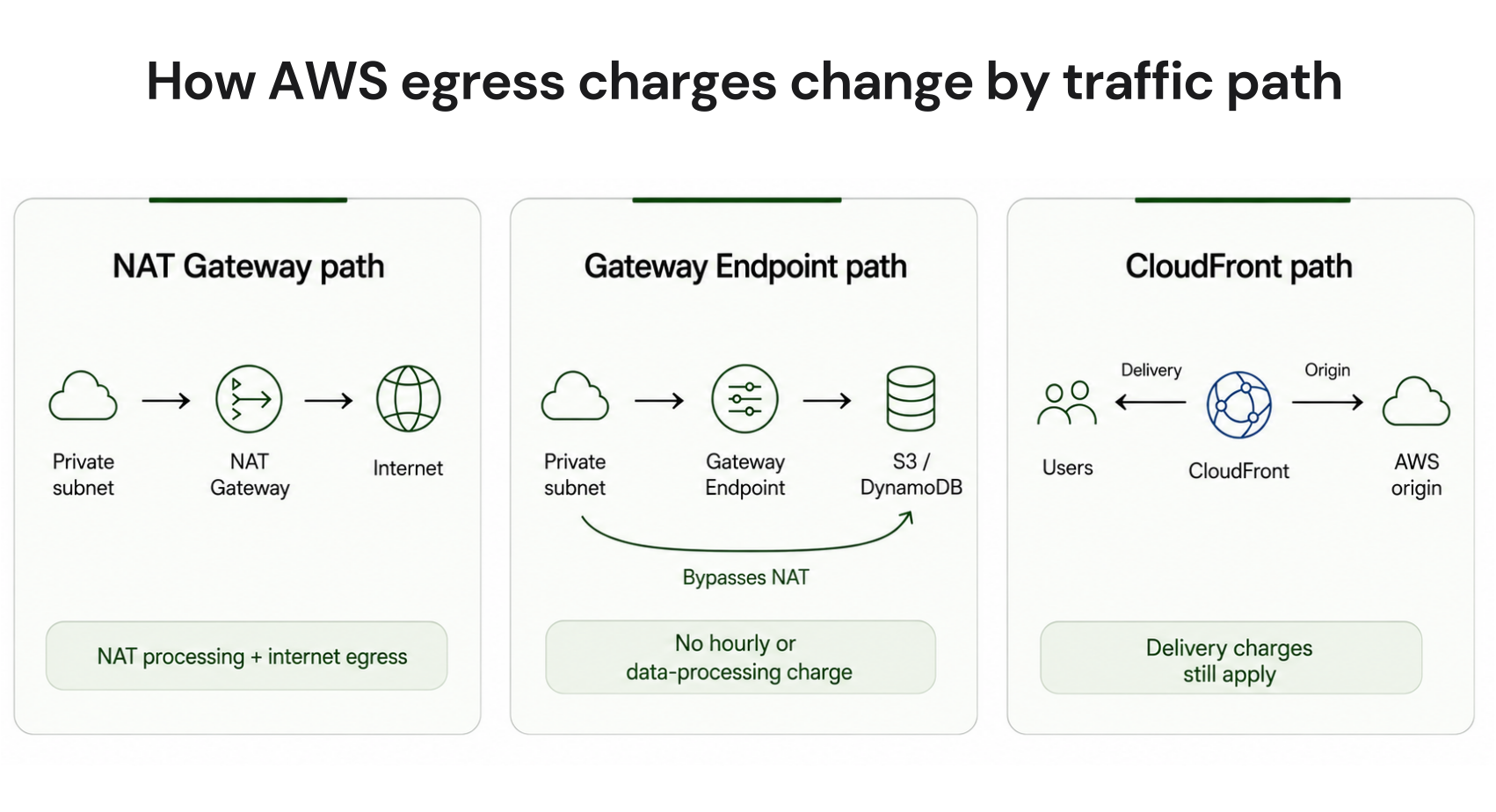
The good news is that several egress optimizations are configuration or architecture changes rather than long-term purchasing decisions. The highest-ROI fix depends on the traffic path, so this guide starts by identifying where the charge is created and then matching it to the right mitigation.
Short answer
To reduce AWS egress costs, first identify whether your largest network charges come from NAT Gateway processing, cross-AZ transfer, or internet data transfer. Then match the fix to that path: Gateway Endpoints for S3 and DynamoDB, Interface Endpoints for eligible high-volume AWS service calls, Service Traffic Distribution for suitable Kubernetes workloads, CloudFront for suitable user-facing content, and Direct Connect for sustained hybrid traffic.Which fix is right for your workload?
Use this matrix to prioritize the highest-ROI fix for your traffic profile first.| Traffic type | Highest-ROI fix | Expected effect | Effort |
|---|---|---|---|
| Private subnet to S3 or DynamoDB through NAT | Gateway VPC Endpoint | Removes NAT processing from that traffic | Low |
| Private subnet to other supported AWS services through NAT | Interface VPC Endpoint | Can replace NAT processing with PrivateLink pricing | Low |
| Public web content served from an AWS origin | CloudFront | Changes delivery economics and reduces origin load | Medium |
| Kubernetes service traffic crossing AZs | Service Traffic Distribution | Prefers closer endpoints and can reduce cross-AZ traffic | Low |
| AWS to on-premises or colocation | Direct Connect | Can lower DTO rates after break-even | High |
Step 1: Add Gateway Endpoints for S3 and DynamoDB
Gateway Endpoints are one of the highest-ROI actions on this list. For S3 and DynamoDB, AWS does not charge an additional hourly or data-processing fee for the Gateway Endpoint itself.A Gateway Endpoint creates a private route between your VPC and the supported service over the AWS network, allowing eligible traffic to bypass NAT Gateway. Traffic that previously incurred NAT Gateway data-processing charges can therefore avoid that processing path.
See AWS VPC pricing and the AWS Gateway Endpoint documentation for current details.
In the AWS console, navigate to VPC, select Endpoints, create the required S3 or DynamoDB Gateway Endpoint, and associate it with the relevant route tables.
For an illustrative workload sending 1 TB per month to S3 through NAT Gateway, a $0.045 per-GB NAT processing rate represents roughly $46.08 in monthly processing charges when 1 TB is modeled as 1,024 GB.
Step 2: Put CloudFront in front of suitable content
CloudFront can be useful for user-facing content, but it should not automatically be treated as an egress-cost fix for every workload. Cacheability, request volume, audience location, origin type, and the amount of personalized or dynamic content all affect the result.Before using CloudFront primarily for cost optimization, confirm that the workload has cacheable objects, appropriate cache-control behavior, meaningful repeated requests, and a delivery pattern that benefits from edge caching.
Highly personalized, uncacheable, or request-heavy applications require a fuller cost model
Don’t just ask about the cancellation notice period. Ask for a clear exit scenario showing which commitments remain, who manages them, and what your AWS costs look like after Zesty stops optimizing them.
Worked example: 10 TB per month of user-facing content
| Cost component | S3 direct | Via CloudFront |
|---|---|---|
| Egress to users | 10 TB (10,240 GB) × $0.09 = $921.60 | 10 TB (10,240 GB) × $0.085 = $870.40 |
| S3-to-CloudFront origin transfer | n/a | $0 |
| Monthly total | $921.60 | $870.40 |
| Saving | n/a | $51.20, about 5.6% before any remaining AWS free data-transfer allowances and CloudFront request charges |
CloudFront also supports compression for eligible content, including gzip and Brotli, which can reduce bytes delivered for compressible formats.
Step 3: Prefer Service Traffic Distribution for Kubernetes workloads
Cross-AZ traffic can build quickly in Kubernetes clusters spread across multiple Availability Zones because a request from a pod in one zone can otherwise be sent to an endpoint in another zone.For Kubernetes versions that support it, use Service Traffic Distribution with PreferClose when same-zone preference is appropriate. AWS recommends it over topology-aware routing because it provides more predictable behavior.
Monitor cross-AZ costs, endpoint health, and per-zone resource utilization after rollout, and maintain a rollback path if locality overloads a zone.
Topology-aware routing remains an option for workloads that can sustain balanced endpoint allocation, but it can skip or alter hints when zone capacity is imbalanced.
Step 4: Add Interface Endpoints for high-volume calls
Gateway Endpoints cover S3 and DynamoDB. For other supported AWS services, Interface Endpoints provide private connectivity using AWS PrivateLink.Unlike Gateway Endpoints, Interface Endpoints have hourly and data-processing charges. That means the decision should be based on actual traffic volume, the number of Availability Zones where endpoints are deployed, and the NAT processing charge being replaced.
High-volume traffic such as container image pulls, logging, or frequent service API calls may justify the endpoint more quickly than low-volume service traffic.
Endpoint decision checklist
Is the target service S3 or DynamoDB? Evaluate a Gateway Endpoint first.
For other supported services, how much traffic currently passes through NAT Gateway?
How many Availability Zones need Interface Endpoints and therefore hourly endpoint charges?
Does the workload require Private DNS behavior for the endpoint?
Do you need endpoint policies to restrict which principals or resources can use the connection?
Compare current NAT data-processing cost with the Interface Endpoint's hourly and per-GB charges before deployment.
Step 5: Avoid cross-AZ NAT paths
For AZ-specific NAT Gateways, route each private subnet to a NAT Gateway in the same Availability Zone whenever significant traffic uses that path. A single zonal NAT Gateway can create cross-AZ transfer charges for workloads in other AZs and can also reduce resilience if its Availability Zone fails.AWS also offers Regional NAT Gateway, which can operate across the Availability Zones where it is enabled.
When using its manual configuration mode, enable it in every AZ that contains workloads to avoid cross-AZ paths.
Model the decision with your actual NAT Gateway-hours, public IPv4 charges, cross-AZ transfer charges, and traffic volumes rather than relying on a universal break-even point.
Step 6: Evaluate Direct Connect for sustained egress
AWS Direct Connect provides a dedicated private connection between your data center or colocation facility and AWS.For a 1 Gbps dedicated connection outside Japan, AWS lists a $0.30 per-hour port rate, or about $219 per 730-hour month.
For data transferred from the contiguous United States to a Direct Connect location in the contiguous United States, Canada, or Europe, AWS lists $0.02 per GB of Direct Connect data transfer out.
Compared with $0.09 per GB of internet data transfer out, that produces a port-only screening break-even of about 3.1 TB per month before partner, cross-connect, virtual-interface, and implementation costs.
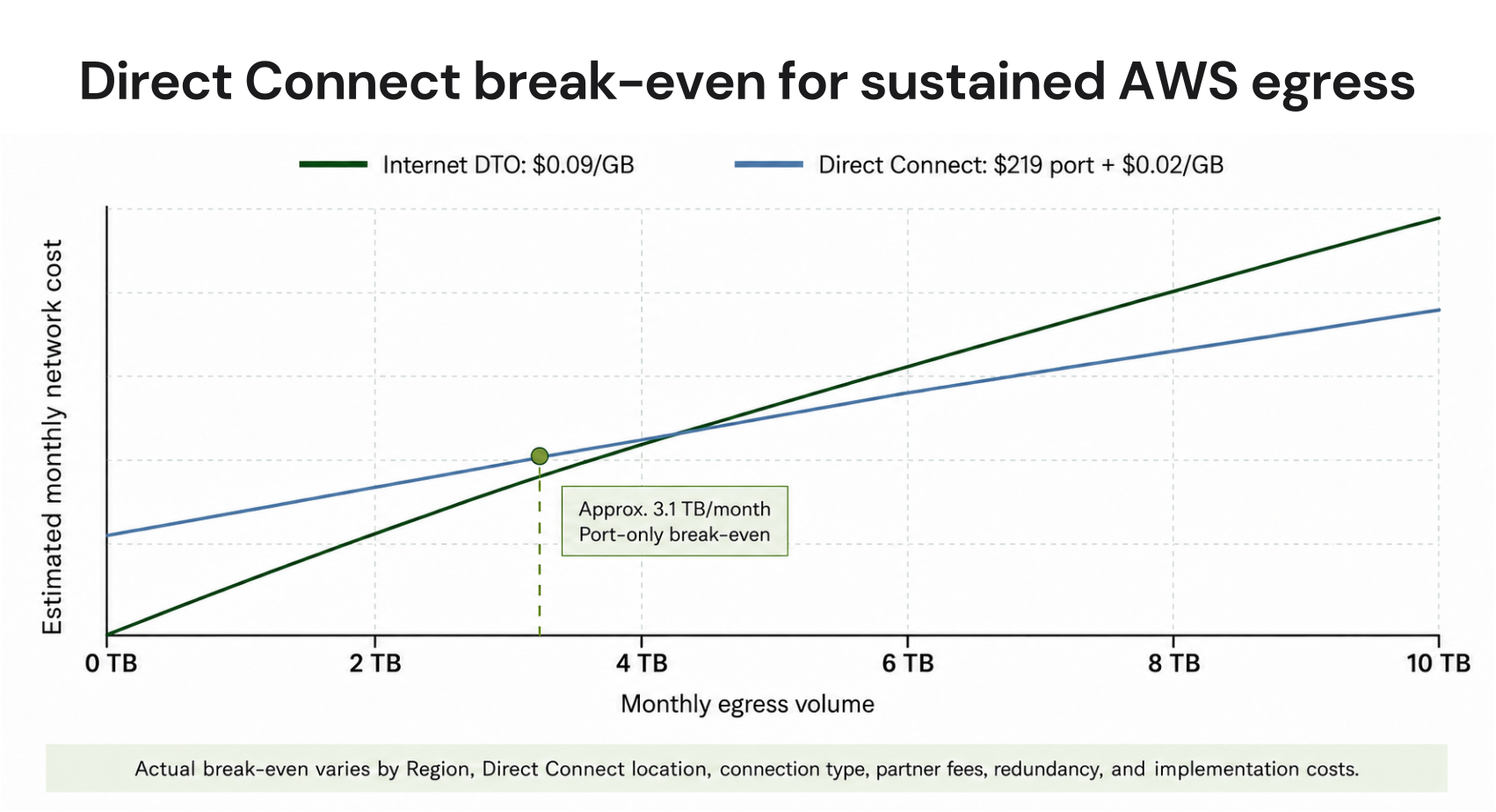
The actual model should account for source Region, Direct Connect location, dedicated versus hosted connection, redundancy requirements, and partner pricing.
Verify current figures in AWS Direct Connect pricing.
Find your largest egress sources in Cost Explorer
Before optimizing, identify where your egress money is actually going.In AWS Cost Explorer, set the date range to the last 30 days, group by Usage Type, and sort by cost descending.
Look for usage types associated with internet data transfer, regional transfer, and NAT Gateway processing. The highest-cost entries help identify which optimization step to investigate first.
For a broader explanation of these billing paths, see AWS data transfer costs.
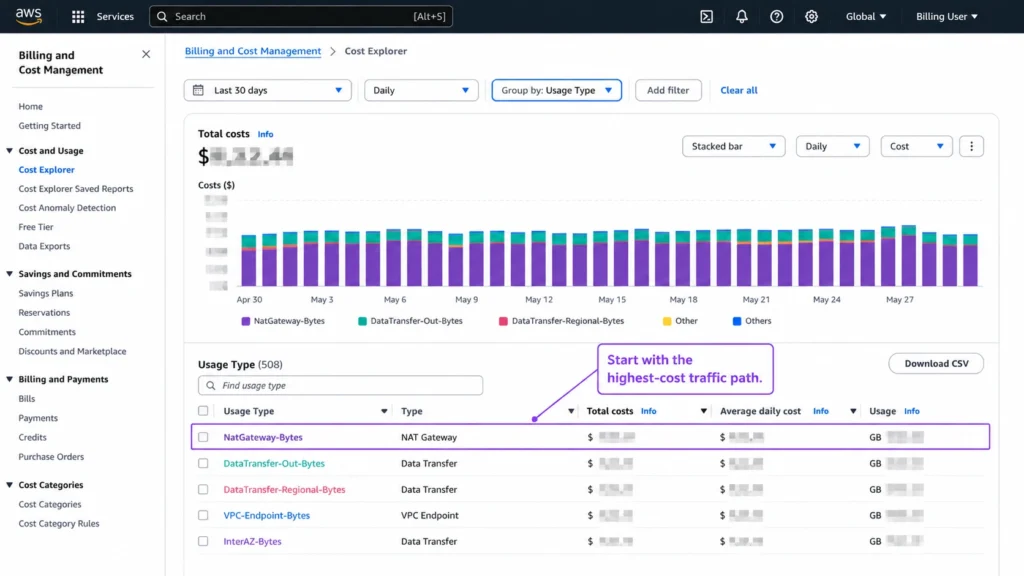
Do not deploy every networking optimization at once. Rank transfer-related usage by cost, trace the largest traffic path, and apply the lowest-effort relevant fix first.
Then compare the next billing period against the same workload baseline. This makes the financial effect easier to isolate and explain.
Egress optimization does not replace commitment discounts
Egress optimization is the right lever for network costs. Savings Plans and Reserved Instances address eligible compute and database pricing. Neither replaces the other.Gateway Endpoints do not reduce EC2 instance-hour charges. A Compute Savings Plan does not reduce NAT Gateway data-processing charges.
Teams should therefore evaluate network architecture and commitment coverage as separate cost layers.
For more on the commitment side, see our guide to Compute Savings Plans.
Where Usage.ai fits
Reducing AWS egress costs starts with fixing inefficient traffic paths, but networking is only one part of the AWS bill. Once NAT Gateway, cross-AZ, and internet transfer costs are optimized, the next opportunity is often the pricing layer for predictable compute and database usage. That is where Usage.ai fits.We focus on the commitment layer. We identify eligible AWS commitment opportunities and, once you approve a recommendation, automatically initiate the commitment purchase. The commitment is then managed through our Flex Commitment Program. Learn more about Flex Commitment eligibility
With Flex Commitments, teams can access up to 57% savings associated with a 3-year AWS commitment without taking on the long-term commitment risk. If a commitment becomes more expensive than the equivalent On-Demand usage, Usage.ai provides cashback protection to help cover the difference.
This work complements, rather than replaces, the engineering changes used to reduce NAT Gateway, cross-AZ, and internet data-transfer charges.
Use our Savings Test alongside this egress audit to identify networking and compute optimization opportunities.
Frequently asked questions
How do I find egress costs in AWS Cost Explorer?
Group costs by Usage Type and inspect the data-transfer and NAT-related entries. This helps separate internet DTO, regional or cross-AZ transfer, and NAT Gateway processing.
Does AWS charge for egress between services in the same Region?
It depends on the network path. Crossing Availability Zone boundaries and routing traffic through chargeable networking services can create additional transfer or processing charges.
What is the true cost of NAT Gateway traffic to the internet?
More than one charge can apply. NAT Gateway data processing and internet data transfer out are separate billing components, and the NAT Gateway hourly charge applies in addition to traffic-based charges.
When should I use a Gateway Endpoint instead of an Interface Endpoint?
Use Gateway Endpoints for supported S3 and DynamoDB traffic when they meet your routing requirements.
For other supported AWS services, evaluate Interface Endpoints based on traffic volume, AZ count, Private DNS requirements, endpoint policies, and the NAT processing cost being replaced.
When does IPv6 eliminate NAT Gateway processing?
For workloads that can operate over IPv6 end to end, an Egress-Only Internet Gateway can avoid the need for NAT Gateway processing for outbound IPv6 traffic.
Applicable internet data-transfer charges can still remain, and IPv4 dependencies may still require NAT.




