
 AWS
AWS Microsoft Azure
 Google Cloud

DynamoDB import from S3 costs $0.15 per GB of uncompressed source data and consumes zero write capacity units during the load. For a 100 GB dataset in US East (N. Virginia), the import fee is $15.00.
For an illustrative dataset with 100 GB of uncompressed import source files and 100 million items of up to 1 KB each, BatchWriteItem costs $62.50 at $0.625 per million WRU, the rate in effect since AWS cut on-demand throughput pricing by 50% in November 2024. That makes the import fee 76% lower than base-table write charges in this example. Source-file size and item count are separate inputs: format overhead, item sizes and indexes can change the comparison.
The AWS DynamoDB import from S3 feature supports CSV, DynamoDB JSON, and Amazon Ion formats. It also populates any Global Secondary Indexes defined at creation time at no extra cost.
The Short Answer
Native import from S3 is the right path when you are creating a new table and want to minimize loading cost, because it bills on the size of your source data rather than on write throughput. BatchWriteItem is a common path when the table already exists, because the import feature cannot load into one.
That settles the method, not the budget. Item size, total volume, and whether your S3 bucket sits in the same region as the target table all move the final number, so the sections below price each path at three data volumes before landing on a recommendation.
How Much Does DynamoDB Import from S3 Cost?
The pricing model has three components: the DynamoDB import fee, the S3 access costs, and (optionally) cross-region data transfer. Here is the complete cost breakdown.
| Cost Component | Rate (US East) | Scope | Notes |
|---|---|---|---|
| DynamoDB Import Fee | $0.15/GB | Uncompressed source data size | Includes failed records |
| GSI Population | $0.00 additional | GSIs defined at table creation | No extra charge during import |
| S3 Storage | $0.023/GB-month (Standard) | Source data in S3 | Charged until you delete source files |
| S3 GET Requests | $0.0004 per 1,000 GET | DynamoDB reads from your S3 bucket | Typically negligible |
| Cross-Region Transfer (if applicable) | Typically $0.02/GB (varies by region pair) | S3 bucket in a different region from target table | Avoid by co-locating S3 and DynamoDB |
For a 100 GB import in US East (N. Virginia), the DynamoDB import charge is $15.00. If the source files remain in S3 Standard for a full month, storage adds about $2.30 before applicable request, transfer, and free-tier effects. Keep the bucket and destination table in the same Region to avoid applicable inter-Region transfer charges
Subtotal: $17.30 before GET requests and transfer. For example, 1,000 S3 GET requests add $0.0004. At an assumed $0.02/GB inter-Region rate, transferring 100 GB adds $2.00, for $19.30 before requests; verify the actual Region-pair rate.
Import from S3 vs BatchWriteItem Costs
Here is how the import compares to writing through the API at three data volumes.
| Data Size | S3 Import Cost | On-Demand WRU Cost | Import Savings vs On-Demand |
|---|---|---|---|
| 10 GB source; assume 10M items ≤1 KB | $1.50 | $6.25 | 76% |
| 100 GB source; assume 100M items ≤1 KB | $15.00 | $62.50 | 76% |
| 1 TB (1,024 GB) source; assume 1.024B items ≤1 KB | $153.60 | $640.00 | 76% |
These are paired modeling assumptions, not a conversion from source GB to billable writes. Compare your measured uncompressed source bytes with actual item counts and rounded write sizes. The table excludes S3 storage, requests, transfer and ongoing table storage; the write comparison assumes no GSI writes.
Compare a provisioned-capacity load separately: its incremental cost depends on the capacity already available, the write rate, and the time the extra capacity is provisioned.
Also read: DynamoDB DAX Pricing: In-Memory Cache Cost vs Performance Gain
Can You Import to an Existing Table?
No, DynamoDB import from S3 to an existing table is not supported. The import process creates a brand-new table during the job; you cannot load into an existing table, empty or populated. Import-created tables can include Global Secondary Indexes but not Local Secondary Indexes, so this workaround cannot preserve a table that requires LSIs.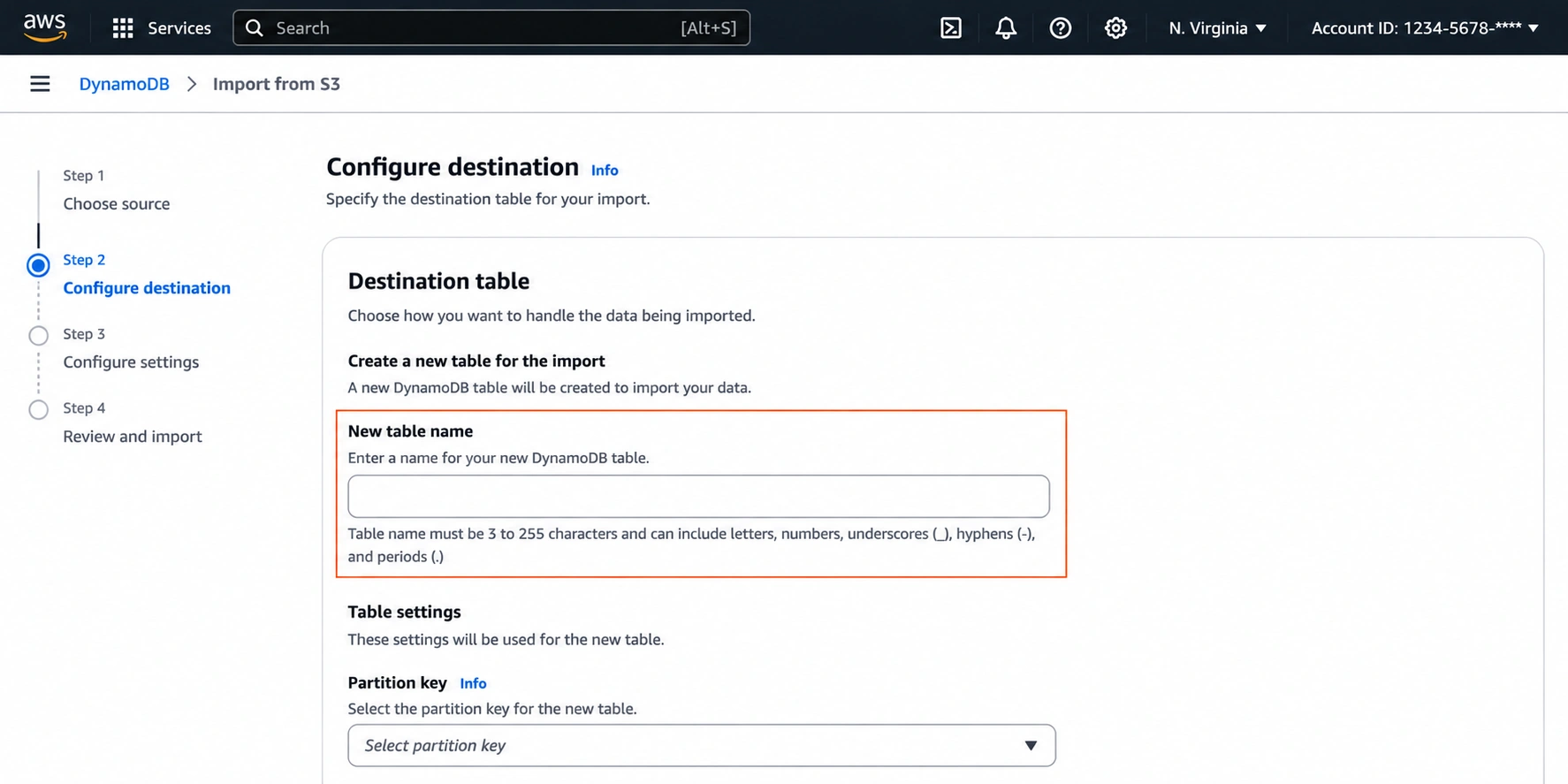
Workaround: Import to a New Table and Swap
The most common workaround has four steps:Export the existing table to S3 using DynamoDB Export to S3 ($0.10/GB; requires PITR full export economics in the linked guide).
Merge or transform the exported data with the new data in S3, using Athena, Glue, or a simple script.
Import the merged dataset from S3 as a new table ($0.15/GB).
Update your application's table references to the new table, or swap via CloudFormation/CDK.
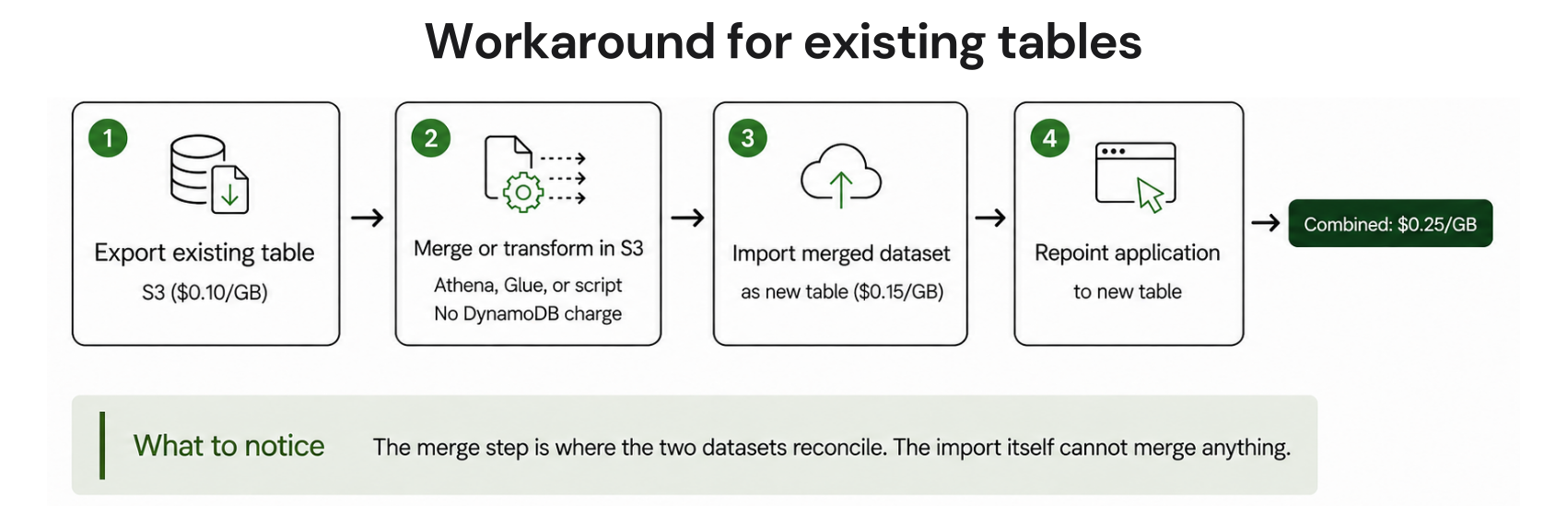
Export and import meter different datasets. If both the existing table export and the final uncompressed import input are 100 GB, their fees total $10 + $15 = $25, before PITR, S3, transformation and transfer charges. Added data or format overhead changes the import size.
BatchWriteItem for Existing Tables
If you must load data into an existing table without creating a new one, BatchWriteItem is a common native option for bulk puts and deletes. Each call handles up to 25 items or 16 MB per request.
At on-demand rates, each 1 KB write costs $0.625 per million WRU, so a small backfill under 1 GB runs well under $1 with a single Lambda function or local script.
For larger backfills, use AWS Glue or a multi-threaded writer with exponential backoff to avoid throttling. If the table uses provisioned capacity, temporarily increase WCU for the backfill window and reduce it afterward.
There is no universal 100 GB break-even. Compare exporting the whole existing table and importing the complete merged dataset with writing only the new or changed items. A small backfill into a large table can favor BatchWriteItem even when the backfill exceeds 100 GB.
DynamoDB Import from S3: Quotas and Limits
AWS imposes specific quotas on the import feature that vary by region.
| Quota | Major Regions (us-east-1, us-west-2, eu-west-1) | All Other Regions |
|---|---|---|
| Max concurrent import jobs | 50 | 50 |
| Max total source object size (concurrent) | 15 TB | 1 TB |
| Max S3 objects per import job | 50,000 | 50,000 |
| Supported input formats | CSV, DynamoDB JSON, Amazon Ion | CSV, DynamoDB JSON, Amazon Ion |
| Compression support | GZIP, ZSTD, or None | GZIP, ZSTD, or None |
| Import target | New tables only | New tables only |
Source: Import format quotas and validation, AWS DynamoDB Developer Guide.
Imports support Global Secondary Indexes defined at table creation, but local secondary indexes are not supported.
If your total concurrent import data exceeds 1 TB and your target region is outside the three major regions, you have two options:
- Request a quota increase through AWS Support.
- Split the data into multiple import jobs run sequentially, keeping the concurrent total under the regional limit.
How Imports Handle Errors and Failed Records
During the import, DynamoDB validates each record against the table schema. Records that fail validation (a missing partition key, a wrong attribute type, or malformed data) are logged to Amazon CloudWatch Logs under the /aws-dynamodb/imports log group.
Failed records are still billed as part of the import. DynamoDB emits CloudWatch logs for import errors and retains a total error count; review the import status and logs after the job completes.
Also note: items that share the same primary key overwrite each other in random order until one remains. Duplicates are not counted as errors, so the processed-item count can exceed the final item count in the table.
Best practice: test on a small subset (1,000–10,000 records) first to catch schema mismatches, encoding issues, and format errors early. A 1 GB test costs $0.15; a failed import that processes the full 1 TB (1,024 GB) still incurs $153.60 in import charges; a job that stops earlier is billed for the data processed.
Test import run
Validate on a small subset first; failed records bill at the full rate.
Format and compression uniform
Every object under the prefix must share one format and one compression type.
Primary key present in every item
Missing keys fail item validation; sort key is optional.
Regional quota checked
Concurrent imports share a 15 TB total in us-east-1, us-west-2, and eu-west-1; a 1 TB total elsewhere.
Indexes decided upfront
GSIs must be defined at table creation; LSIs are not supported.
Best Import Method for Each Use Case
| Scenario | Method | Cost basis |
|---|---|---|
| New table (migration or initial load) | Native import from S3 | $0.15/GB, zero WCU, GSIs populated free |
| Existing table, small backfill (under 1 GB) | BatchWriteItem via SDK | ~$0.625 per million 1 KB writes |
| Existing table, large backfill | Export-merge-reimport, or Glue | $0.10 × exported GB + $0.15 × imported GB, plus other charges |
| Cross-account or cross-region table copy | Export to S3, copy, then import | $0.10 × exported GB + $0.15 × imported GB, plus transfer if cross-region |
Capacity Mode and Reserved Capacity After Import
The import process consumes no write capacity on the target table, so your capacity mode selection on-demand or provisioned only matters for production traffic after the load completes.That makes the import the cheapest phase of a DynamoDB table’s lifecycle. The ongoing production read and write capacity is where the real cost optimization happens.
For tables that sustain steady traffic after the initial load, AWS reserved provisioned capacity offers up to 54% savings on a 1-year term and up to 77% on a 3-year term, per Amazon DynamoDB pricing.
How Usage.ai Optimizes DynamoDB Costs
The import itself needs no optimization, it is a flat $0.15/GB. The provisioned throughput your table consumes once production traffic begins is the line item worth managing.We analyze your usage data and recommend qualifying commitments sized to stable eligible throughput.
With Flex Insured Commitments, teams can get the 30–40% savings of a 1-year commitment with none of the commitment risk.
If eligible usage drops and a qualifying DynamoDB Flex Commitment ends up costing more than the on-demand rate for that usage, we provide cashback protection on that difference, subject to program terms.
Our fee is a percentage of realized savings only. If we don’t save you money, you don’t pay anything.
Review your read and write capacity baseline, uncovered spend, and commitment risk.
Frequently asked questions
How much does DynamoDB import from S3 cost?
DynamoDB import from S3 costs $0.15 per GB of uncompressed source data in US East (N. Virginia). GSI population incurs no additional charge. For 100 GB, the import fee is $15.00. Keeping 100 GB in S3 Standard for one month adds $2.30, for $17.30 before GET requests, transfer and applicable allowances.
Can you import from S3 to an existing DynamoDB table?
No. The feature only loads data into a new table created during the import. The workaround is to export the existing table to S3 ($0.10/GB), merge the datasets, reimport into a new table ($0.15/GB), then swap application references to the new table.
How do I import data from S3 to DynamoDB?
- Open the DynamoDB console and choose Imports from S3.
- Select your source S3 bucket and prefix.
- Choose the input format (CSV, DynamoDB JSON, or Amazon Ion).
- Define the target table schema and capacity mode.
- Start the import. No code required; the AWS CLI and SDK expose the same operation via the ImportTable API.
What formats does DynamoDB import from S3 support?
CSV, DynamoDB JSON, and Amazon Ion. All S3 objects under the specified prefix must use the same format. Compression is supported via GZIP or ZSTD. Objects don't need matching file extensions, the format specified in the ImportTable call takes precedence.
How long does a DynamoDB import from S3 take?
Import duration depends on data volume, item count, key distribution, and the number of GSIs being populated. AWS does not publish throughput benchmarks. Run a test import on a representative subset to estimate duration for your specific dataset.




