.png)



Modern applications often need to update multiple database records as a single business operation. Whether you’re processing an online payment, reserving inventory, or transferring funds, partial updates can leave data inconsistent and create difficult-to-recover failures.
Amazon DynamoDB addresses this challenge with transaction APIs that provide ACID (Atomicity, Consistency, Isolation, and Durability) guarantees across multiple items and even multiple tables within the same AWS account and AWS Region.
Instead of managing rollback logic in application code, developers can rely on DynamoDB to ensure that every operation in a transaction either succeeds together or fails together.
In this guide, you’ll learn how DynamoDB transactions work, why they consume more capacity, how pricing differs between on-demand and provisioned capacity modes, and when transactions are the right architectural choice.
The Short Answer
DynamoDB transactional writes consume twice the write capacity of equivalent standard writes. Transactional reads consume twice the capacity of strongly consistent reads, which means they consume four times the capacity of eventually consistent reads.
An eventually consistent read requires only half the read capacity of a strongly consistent read for the same item size.
For items up to 1 KB (writes) and 4 KB (reads):
| Operation | Standard | Transactional |
|---|---|---|
| Eventually consistent read | 0.5 RRU (or RCU) | 2 RRUs (or RCUs) |
| Strongly consistent read | 1 RRU (or RCU) | 2 RRUs (or RCUs) |
| Write | 1 WRU (or WCU) | 2 WRUs (or WCUs) |
For larger items, DynamoDB rounds writes in 1 KB increments and reads in 4 KB increments, so capacity consumption increases proportionally.
The exact cost depends on your AWS Region, capacity mode, item size, and workload. See the official Amazon DynamoDB pricing page for current regional pricing.
Understanding DynamoDB Capacity Units
On-Demand Capacity Mode
- Read Request Units (RRUs) measure billed read requests.
- Write Request Units (WRUs) measure billed write requests.
Also read: The DynamoDB Gospel: Everything About On-Demand Pricing
Provisioned Capacity Mode
- Read Capacity Units (RCUs) define available read throughput per second.
- Write Capacity Units (WCUs) define available write throughput per second.
Although the terminology differs, transactional operations consume the equivalent of twice the underlying read or write capacity required by comparable non-transactional operations. The billing mechanism changes between capacity modes, but the underlying capacity multiplier remains the same.
To understand the differences between capacity modes, see the AWS documentation on DynamoDB capacity modes.
What Are DynamoDB Transactions?
AWS introduced transactions to simplify the development of applications that require strong consistency without forcing developers to implement complex rollback or compensation logic.
The supported APIs: TransactWriteItems and TransactGetItems coordinate multiple operations so that partial updates never become visible to applications. Learn more in the DynamoDB transaction APIs documentation. Transactions are commonly used for business-critical workflows such as:
- Processing e-commerce orders
- Transferring funds between accounts
- Reserving inventory
- Redeeming loyalty points
- Booking tickets or appointments
- Creating related user records across multiple tables
How Do DynamoDB Transactions Work?
| API | Purpose | Limits |
|---|---|---|
| TransactWriteItems | Performs multiple write operations atomically | Up to 100 unique items and 4 MB of aggregate data |
| TransactGetItems | Retrieves multiple items with transactional consistency | Up to 100 items and 4 MB of aggregate data |
- Put
- Update
- Delete
- ConditionCheck
- A ConditionExpression evaluates to false.
- Another transaction modifies the same item concurrently.
- Provisioned capacity is exceeded.
- Validation errors occur.
- The transaction exceeds DynamoDB limits.
Learn more in the AWS documentation for DynamoDB transaction APIs and the TransactWriteItems API Reference.
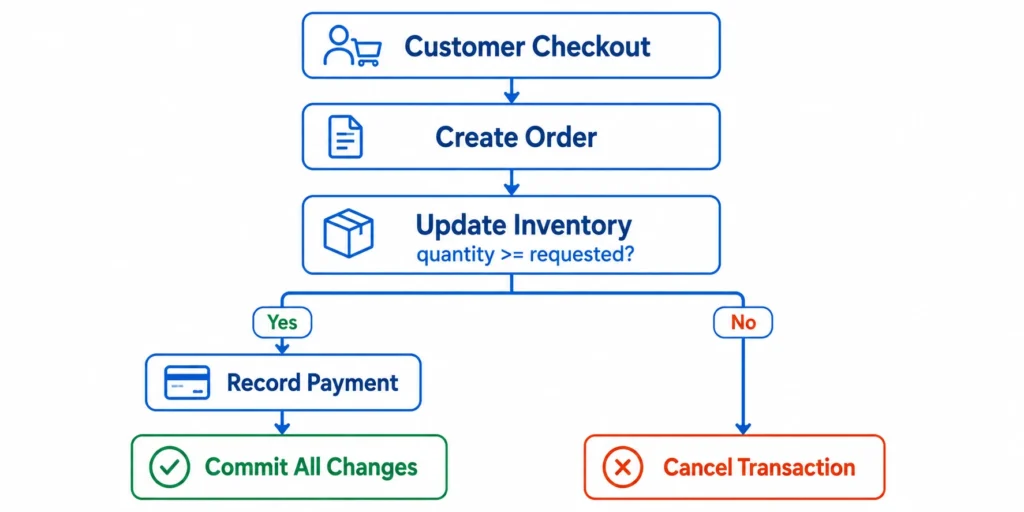
Example: Online Order Processing
Instead of executing three independent write operations, the application groups them into a single transaction.
| Operation | Purpose |
|---|---|
| Create order record | Creates the order |
| Update inventory | Deducts purchased quantity |
| Record payment status | Stores successful payment |
If the requested quantity isn’t available, DynamoDB cancels the entire transaction. As a result:
- The order isn’t created.
- Inventory remains unchanged.
- The payment record isn’t written.
For more information, see the AWS documentation on Condition Expressions in DynamoDB.
Why Do DynamoDB Transactions Consume More Capacity?
The capacity multiplier differs slightly for reads and writes.
- Transactional writes consume twice the write capacity of an equivalent standard write.
- Transactional reads consume twice the capacity of a strongly consistent read.
- Since an eventually consistent read requires only half the capacity of a strongly consistent read, a transactional read consumes four times the capacity of an eventually consistent read.
For items up to 1 KB (writes) and 4 KB (reads):
| Operation | Standard | Transactional |
|---|---|---|
| Eventually consistent read | 0.5 RRU (or RCU) | 2 RRUs (or RCUs) |
| Strongly consistent read | 1 RRU (or RCU) | 2 RRUs (or RCUs) |
| Write | 1 WRU (or WCU) | 2 WRUs (or WCUs) |
Refer to the official Amazon DynamoDB pricing page for complete pricing details.
Pricing Example
The cost impact of transactions depends on the capacity mode your table uses.
On-Demand Capacity Mode
- 20 million transactional writes per month
- 20 million transactional strongly consistent reads per month
| Request Type | Standard | Transactional |
|---|---|---|
| Writes | 20 million WRUs | 40 million WRUs |
| Reads | 20 million RRUs | 40 million RRUs |
To estimate request charges, multiply the total RRUs and WRUs by your Region’s pricing listed on the Amazon DynamoDB pricing page.
Provisioned Capacity Mode
Provisioned tables aren’t billed per request. Instead, AWS charges for the configured RCUs and WCUs per hour, regardless of actual request volume (up to the provisioned throughput limit).
Because transactional operations consume more underlying capacity, workloads using transactions often require higher configured throughput to avoid throttling, increasing monthly provisioned capacity costs.
Remember that item size also affects capacity consumption. Reads are rounded in 4 KB increments, while writes are rounded in 1 KB increments, regardless of whether the operation is transactional.
Cost of Failed Transactions
and Retries
A canceled transaction isn’t free.
Even if a transaction fails because of a failed ConditionExpression, a transaction conflict, or another retryable error, DynamoDB still consumes request capacity for the work already performed.
Automatic SDK retries and application-level retries can therefore increase real-world capacity consumption beyond simple success-path estimates.
For example, if an application attempts 1 million transactions each month and 5% are canceled because of conflicts or failed condition checks, the retried requests consume additional read and write capacity beyond the original workload.
Over time, this can noticeably increase DynamoDB costs for high-volume systems.
To better understand production behavior, monitor transaction cancellation reasons and CloudWatch metrics such as TransactionConflict, along with retry rates and consumed capacity.
The AWS guide on Transaction Conflict Handling and Capacity Management provides additional guidance.
When Should You Use
DynamoDB Transactions?
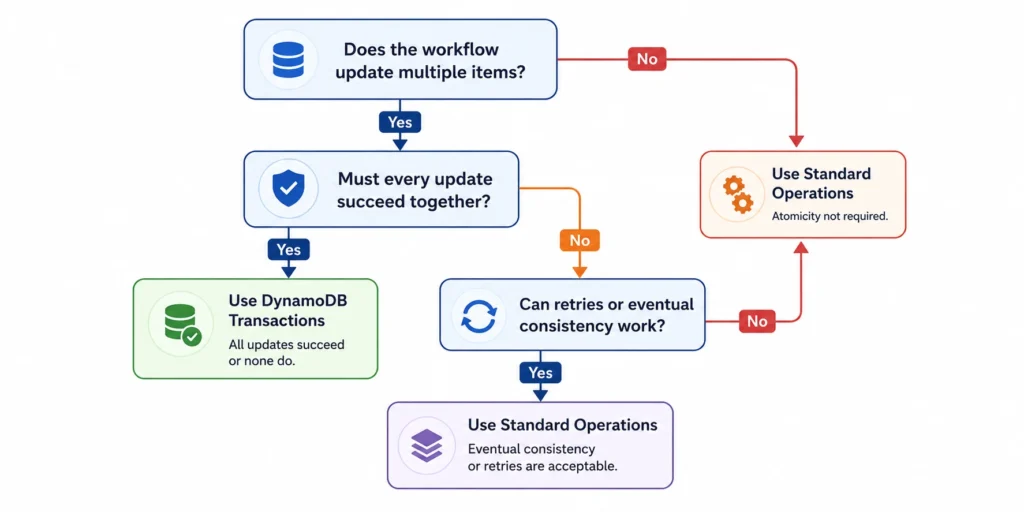
Although DynamoDB transactions provide strong consistency guarantees, they shouldn’t be the default choice for every workload.
Because transactional operations consume more capacity than standard operations, use them only when the business value of maintaining strict consistency outweighs the additional cost.
A simple question can help guide the decision: Would inconsistent or partially completed data create operational, financial, or customer-facing problems?
If the answer is yes, transactions are usually the right solution.
Use DynamoDB Transactions When Atomicity Is Essential
| Use Case | Why Transactions Help |
|---|---|
| E-commerce checkout |
Ensures the order, inventory update, and payment record succeed or fail
together. Use a ConditionExpression (for example,
quantity >= :requested) to prevent overselling.
|
| Banking or fund transfers | Prevents money from being debited without being credited to the destination account. |
| Inventory management | Combines inventory validation and stock deduction into one atomic operation, preventing race conditions. |
| Loyalty and rewards | Ensures points are deducted only if the redemption record is successfully created. |
| Booking systems | Prevents duplicate reservations while ensuring seat or room allocation is committed atomically. |
| User provisioning | Creates related records across multiple tables without leaving incomplete user profiles. |
These are the types of workloads the DynamoDB transaction APIs were designed to support.
Alternatives to DynamoDB Transactions
Condition Expressions
It lets DynamoDB perform a write only if specified conditions are met (for example, ensuring quantity >= :requested before updating an item). They help enforce business rules for single-item operations but don’t provide atomicity across multiple items or tables.
Optimistic locking
BatchWriteItem and BatchGetItem
Choose transactions only when your application requires ACID guarantees across multiple items or tables.
Also read: DynamoDB vs Aurora: When to Choose NoSQL vs Relational on AWS
Transaction Limits to Consider
- Maximum 100 unique items per transaction.
- Maximum 4 MB of aggregate data.
- All items must be in the same AWS account.
- All items must be in the same AWS Region.
- A transaction cannot perform multiple operations on the same item.
Advanced Considerations
A few implementation details are worth understanding before deploying transactional workloads at scale.
DynamoDB Global Tables
If you’re using Multi-Region Eventual Consistency (MREC) Global Tables, the transaction commits atomically in the source Region before changes are replicated asynchronously to replica Regions.
However, Multi-Region Strong Consistency (MRSC) Global Tables don’t support TransactWriteItems or TransactGetItems. Attempting to use transaction APIs against MRSC tables returns an error.
See the AWS documentation for Global Tables and Transaction Behavior.
DynamoDB Accelerator (DAX)
Although DAX can reduce read latency, these background operations may increase overall read-capacity consumption when estimating DynamoDB costs.
Learn more in the AWS documentation for Amazon DynamoDB Accelerator (DAX).
Best Practices for Using
DynamoDB Transactions
- Reserve transactions for business-critical workflows. Avoid making every database operation transactional.
- Keep transactions as small as possible. Smaller transactions reduce execution time, conflict probability, and capacity consumption.
- Design for retries. Implement exponential backoff and use ClientRequestToken with TransactWriteItems to make retries idempotent.
- Monitor transaction metrics. Use Amazon CloudWatch to track consumed capacity, retry rates, TransactionConflict events, and cancellation reasons to identify unnecessary transactional workloads.
How Usage.ai Helps Optimize
AWS Commitment Costs
Usage.ai continuously analyzes AWS usage across your cloud environment to identify commitment opportunities and optimize coverage as workloads evolve.
With Flex Insured Commitments, teams can capture up to 57% savings available through AWS commitment programs without taking on the full risk of long-term commitments.
If a commitment ever costs more than the equivalent on-demand usage, Cashback Protection covers the difference, helping organizations maximize savings while retaining the flexibility to adapt as infrastructure changes.
Frequently asked questions
Are DynamoDB transactions always 2× the cost of standard operations?
Not exactly. Transactional writes use 2× the write capacity of standard writes. Transactional reads use 2× strongly consistent read capacity, which works out to 4× eventually consistent reads. Your actual bill also depends on item size, storage, backups, Streams, Global Tables, region, and capacity mode. See Amazon DynamoDB pricing.
Do transactions work across multiple tables?
Yes, as long as all tables are in the same account and region. DynamoDB guarantees all-or-nothing execution across them.
TransactWriteItems vs. BatchWriteItem: What's the difference?
TransactWriteItems is atomic and ACID-compliant: if any operation fails, the whole transaction is canceled and nothing commits. It supports Put, Update, Delete, and ConditionCheck, and costs more capacity. BatchWriteItem is not atomic as successful operations stay committed even if others fail. It supports only Put and Delete, doesn't support condition checks, and costs less capacity. Use transactions when operations must succeed or fail together; use batch writes when throughput matters more than atomicity.
When should I avoid transactions?
Skip them for single-item updates, when eventual consistency is fine, or when condition expressions/optimistic locking already cover your needs. Common cases: logging, metrics, clickstream data, session storage, caching, IoT telemetry.
Can transactions fail?
Yes, from failed condition checks, concurrent item conflicts, capacity limits, or validation errors. Capacity is still consumed even on cancellation, so retries can add cost. Use exponential backoff.
Do transactions affect storage costs?
No, only request capacity. Storage, backups, Streams, and replication are billed separately as usual.
Do transactions work with Global Tables?
Depends on the version. MREC tables support transactions in the source region, with async replication after commit. MRSC tables don't support TransactWriteItems or TransactGetItems at all.