.png)


The most expensive SQL Server edition decision you can make on Amazon RDS is not choosing between 1-year and 3-year Reserved Instances. It is running Enterprise Edition when Standard Edition would support your workload at a fraction of the licensing cost. The gap between the two editions is significant, and AWS Prescriptive Guidance documents a consistent organizational pattern: Enterprise Edition deployed as default on workloads that never use any of its additional features.
This guide covers the exact feature differences between Standard and Enterprise on RDS, the diagnostic to determine whether your specific database needs Enterprise, the pricing models that reduce cost even when Enterprise is necessary, and the Reserved Instance strategy for both editions.
The Core Premise: Both Editions Share a Common Code Base
A critical starting point from AWS Prescriptive Guidance: both Enterprise edition and Standard edition share a common code base, so technically they offer the same SQL Server database functionalities. The actual differences are a set of specific features that are gated to Enterprise edition.
For the vast majority of SQL Server database operations — transactions, queries, stored procedures, triggers, views, replication, backups, point-in-time recovery, Multi-AZ failover, monitoring — Standard Edition behaves identically to Enterprise Edition.
AWS Prescriptive Guidance notes a systemic pattern across its customer base: in many organizations, SQL Server Enterprise edition is the default deployment option for production workloads. This might be due to a common misconception that a SQL Server Standard edition database is not capable of supporting enterprise-class applications.
The consequence of this default deployment pattern: organizations are paying significantly higher SQL Server licensing costs for workloads that never exercise any Enterprise-specific capability. The first step in SQL Server edition cost optimization is determining which of your databases actually use Enterprise-specific features, not assuming they do.
Features That Require Enterprise Edition on RDS
The following features require Enterprise Edition and are not available in Standard Edition on RDS SQL Server. If your workload requires any of these, Enterprise Edition is the correct choice. If none of these apply, Standard Edition delivers the same database functionality at significantly lower cost.
Always On Availability Groups with readable secondary replicas
Always On Availability Groups (AGs) at the Enterprise level support readable secondary replicas — standby instances that can accept read traffic from reporting queries, analytics, or read-scale workloads while the primary handles write traffic. This allows you to offload read-intensive workloads from the primary instance.
RDS for SQL Server supports Multi-AZ deployments using both SQL Server Database Mirroring (DBM) and Always On Availability Groups. Enterprise Edition uses AGs with the full feature set. Standard Edition uses DBM for Multi-AZ. The Multi-AZ standby in both cases provides automatic failover, but only Enterprise Edition AGs support readable secondaries. If your architecture requires a readable standby for reporting workloads, Enterprise Edition is required.
Standard Edition supports Multi-AZ deployment with automatic failover. The standby is not readable. Failover is automatic. For applications that require high availability and automatic failover but do not need to read from the standby, Standard Edition Multi-AZ is functionally equivalent to Enterprise Edition Multi-AZ for HA purposes.
Columnstore indexes
Columnstore indexes are a storage and query processing technology designed for analytical workloads — data warehousing, reporting against large tables, aggregation queries that scan millions of rows. Columnstore indexes store data column-by-column rather than row-by-row, which dramatically improves performance for analytic scan workloads but does not benefit OLTP workloads that operate on individual rows.
If your workload is OLTP — insert-heavy, update-heavy, single-row lookups — you are not using columnstore indexes and you do not need Enterprise Edition for this feature. If your workload includes analytics or reporting queries that scan large portions of a table and aggregate data across millions of rows, columnstore indexes are a genuine Enterprise Edition advantage.
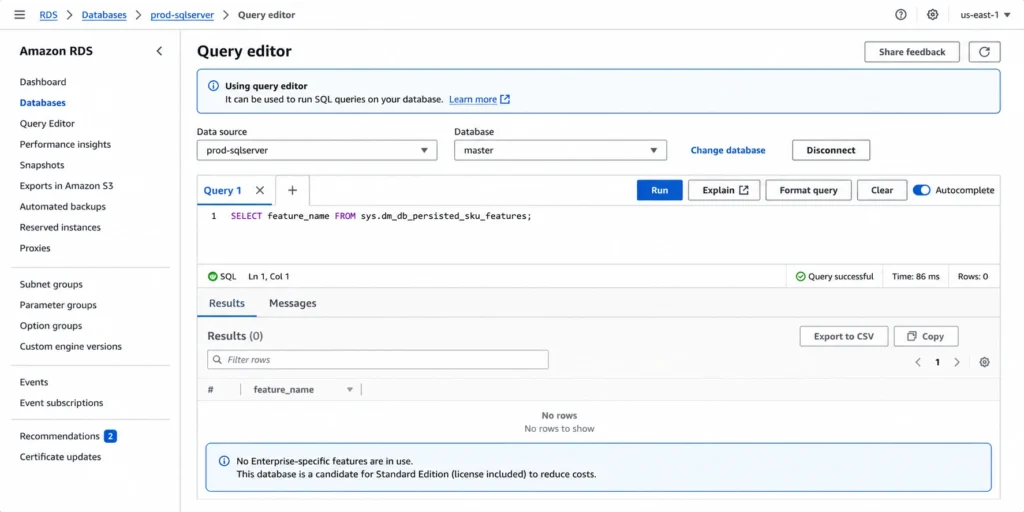
The diagnostic: run SELECT feature_name FROM sys.dm_db_persisted_sku_features against each database. If COLUMNSTORE INDEXES appears in the result, the database has columnstore indexes enabled and is using an Enterprise-specific feature.
Also read: AWS Database Savings Plans: A Quick Guide
In-memory OLTP
In-memory OLTP (historically called Hekaton) stores tables and indexes in memory-optimized format for extremely high-throughput transaction processing. It is designed for workloads with very high transaction rates where locking and disk I/O are the bottleneck — financial systems processing thousands of transactions per second, real-time inventory management, session management tables under extreme concurrency.
Most OLTP applications on SQL Server do not use in-memory optimized tables. The feature requires explicit application design decisions — memory-optimized tables are created differently from standard disk tables, stored procedures accessing them must be compiled natively, and not all T-SQL is supported in natively compiled procedures. Unless a database was explicitly designed or migrated to use in-memory OLTP, it is not using this feature.
The diagnostic: SELECT feature_name FROM sys.dm_db_persisted_sku_features will return ADVANCED NO WAIT or IN_MEMORY_OLTP if these features are in use.
Advanced auditing
Enterprise Edition provides SQL Server Audit at the server level in addition to the database level. Standard Edition supports database-level auditing. For most compliance and logging requirements, database-level auditing in Standard Edition is sufficient. For workloads requiring server-level audit trails that capture events across all databases on the instance simultaneously, Enterprise Edition provides broader audit scope.
Unlimited memory and CPU utilization for the database engine
Standard Edition has maximum resource utilization limits for the database engine: the database engine process is limited to the lesser of 4 processor sockets and 24 cores (as of SQL Server 2016 SP1, though limits vary by version). Enterprise Edition has no such limit.
For RDS instances within Standard Edition’s core limits, this distinction is irrelevant. For very large instances with high core counts where the workload genuinely needs all cores for database processing, Enterprise Edition removes the ceiling. For most mid-range production workloads running on db.r8g.xlarge (4 vCPU) or db.r8g.2xlarge (8 vCPU), Standard Edition’s resource limits do not constrain workload performance.
The Diagnostic: Does Your Database Actually Use Enterprise Features?
AWS Prescriptive Guidance provides a specific SQL query to determine whether a running RDS SQL Server database is using any Enterprise-specific features that would prevent downgrade to Standard Edition:
SELECT feature_name FROM sys.dm_db_persisted_sku_features;
GO
Run this query in the context of each database on the instance (not in the master database context). The query reads from sys.dm_db_persisted_sku_features, a dynamic management view that tracks Enterprise-specific database features that have been persisted to the database files.
Interpreting the results
Empty result set: the database has no Enterprise-specific features persisted. It is a downgrade candidate. You can assess migration to Standard Edition without feature impact.
Non-empty result set: the database is using one or more Enterprise-specific features listed by name. Review each feature to determine whether it is actively used or was created historically and can be removed. A feature that appears in the result set was at some point enabled or created — it does not necessarily mean the application actively uses it in current queries.
Common features that appear: COLUMNSTORE INDEXES (columnstore indexes exist on one or more tables), ADVANCED NO WAIT (in-memory OLTP or memory-optimized tables exist), PARTITION (table partitioning, which is Standard Edition-eligible in SQL Server 2016 SP1 and later).
Note: table partitioning appeared as Enterprise-only in earlier SQL Server versions. SQL Server 2016 SP1 made partitioning available in Standard Edition. If sys.dm_db_persisted_sku_features returns only PARTITION and your instance is running SQL Server 2016 SP1 or later, this alone does not prevent downgrade to Standard Edition. Verify the specific features and their Standard Edition availability against the version of SQL Server your instance is running. Source: AWS Prescriptive Guidance.
Fleet-wide assessment approach
For organizations running multiple RDS SQL Server Enterprise Edition instances, run this assessment across all instances before making any RI purchase decisions. A single script connecting to each instance and running the query against every user database can be completed in hours and provides a complete picture of which instances are candidates for downgrade versus which genuinely require Enterprise capabilities.
The business case for this assessment: if a 4-vCPU Enterprise Edition instance returns an empty feature set on all its databases, it is paying an Enterprise license premium for every hour it runs. Downgrading to Standard Edition before purchasing the next RI term eliminates that premium for the full commitment period.
What Standard Edition Supports on RDS
Standard Edition on RDS is not a stripped-down alternative to Enterprise. AWS Prescriptive Guidance describes it directly: SQL Server Standard edition on Amazon RDS delivers enterprise-class features and performance with options such as Multi-AZ deployment for high availability, Performance Insights for performance tuning, and Amazon CloudWatch for monitoring.
Standard Edition on RDS supports the following production capabilities:
- Multi-AZ deployment with automatic failover using SQL Server Database Mirroring
- Automated daily backups with point-in-time recovery
- Performance Insights for query-level performance analysis
- Enhanced Monitoring and CloudWatch integration
- Automated OS security patching and engine minor version updates
- Storage auto-scaling
- Blue/Green Deployments for near-zero-downtime major version upgrades
- All standard T-SQL operations, stored procedures, triggers, views
- Row-level security
- Transparent Data Encryption (TDE)
- SQL Server Agent
- Up to 100 databases per instance
- Read replicas for Standard and Enterprise editions
The common assumption that Standard Edition requires compromise on reliability, availability, or maintainability is inaccurate for most production workloads on RDS. The differences that matter are the specific Enterprise-only features described in the previous section.
The Cost Gap: Why Edition Choice Matters More Than Instance Sizing
The SQL Server license cost is a per-vCPU charge embedded in the RDS instance rate. For Enterprise Edition, that per-vCPU license charge is significantly higher than Standard Edition. The exact rates vary by instance family and region — verify the current rates for your specific configuration at aws.amazon.com/rds/sqlserver/pricing/ using the AWS Pricing Calculator at calculator.aws/#/createCalculator/RDSSQLServer.
AWS Prescriptive Guidance quantifies the cost difference directly: downgrading to Standard edition reduces the total cost of running your applications. The cost savings on SQL Server licensing fees are the primary business outcome of an edition downgrade assessment.
The cost gap is not a one-time saving. It compounds with every RI term. If you purchase a 3-year All Upfront Reserved Instance for an Enterprise Edition instance that does not require any Enterprise-specific features, you are locking in 3 years of the higher Enterprise license rate. The RI discount applies to the Enterprise Edition on-demand rate, not to a Standard Edition rate. Before any multi-year RI purchase, run the edition downgrade diagnostic.
| Still paying for SQL Server Enterprise?
Usage.ai identifies Enterprise instances that may qualify for Standard Edition and estimates your potential savings. |
The Unbundled Pricing Model: Reducing Enterprise Edition Costs
For teams that genuinely need Enterprise Edition, the unbundled pricing model available on newer instance families provides meaningful cost reduction levers that the bundled pricing model does not.
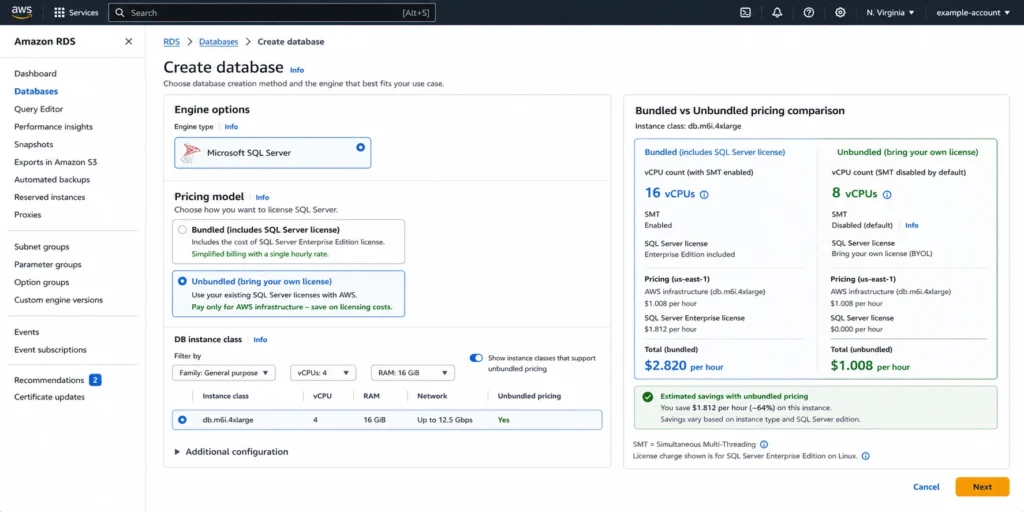
Under bundled pricing — the traditional RDS SQL Server pricing model — database costs are calculated with a single combined charge for instance compute and SQL Server licensing together. The license component is invisible; it is folded into one hourly rate.
Under unbundled pricing on eligible instance families, database costs are calculated with separate charges: one for instance compute (priced per CPU hour) and one for SQL Server licensing (priced per vCPU hour). This separation creates two specific optimization mechanisms.
Simultaneous multithreading (SMT) on Intel instances
For Intel instances 2xlarge and larger under unbundled pricing, simultaneous multithreading is disabled by default. This reduces the vCPU count by 50% while maintaining the same physical core count. Microsoft licenses SQL Server per vCPU — fewer vCPUs means lower license charges. The compute capacity (physical cores) remains unchanged; only the hyperthreaded logical CPU count is reduced.
For Intel instances xlarge and smaller — those with 4 vCPUs or fewer — simultaneous multithreading is enabled by default and cannot be disabled. This is because Microsoft charges for a minimum of 4 vCPUs for SQL Server licenses, so reducing below 4 vCPUs is not possible and provides no licensing benefit.
AWS states that unbundled instance pricing offers up to 39% lower total prices compared to bundled instance pricing for the same workload.
AMD instances under unbundled pricing
For AMD instances, each vCPU corresponds to a physical CPU core. For AMD instances 2xlarge and larger, Amazon RDS disables 50% of the CPU cores by default under unbundled pricing. As with Intel, this reduces the SQL Server license cost while maintaining instance compute. The instance price remains the same regardless of core configuration — only the vCPU-based license charge changes. You can customize the vCPU count using the Optimize CPU feature to balance performance requirements against licensing costs.
For AMD instances xlarge and smaller, 100% of cores are enabled by default and cannot be reduced, again because of the Microsoft 4-vCPU minimum licensing floor.
When to evaluate unbundled pricing
Unbundled pricing is most beneficial for teams running large Enterprise Edition instances with high vCPU counts where the SQL Server license component represents a large fraction of the total instance cost. For a 16-vCPU Enterprise Edition instance on an Intel family under bundled pricing, switching to an unbundled equivalent and allowing SMT to be disabled effectively reduces the billed vCPU count to 8 for licensing purposes, cutting the SQL Server license charge proportionally.
To identify which instance families support unbundled pricing in your region, refer to the AWS RDS SQL Server pricing page. The unbundled pricing tab lists the eligible instance families and both the default (SMT disabled) and full (SMT enabled) configurations. Verify current availability at aws.amazon.com/rds/sqlserver/pricing/.
T3 Instances: The CPU Credit Trap for SQL Server
SQL Server instances on T3 families run in Unlimited mode by default. Under Unlimited mode, the instance can burst CPU above its baseline indefinitely. If the average CPU utilization over a rolling 24-hour period exceeds the instance’s CPU baseline, CPU credit charges apply.
For RDS SQL Server, the CPU credit charge is $0.144 per vCPU-Hour. This is the same for all T3 instance sizes across all regions and is not covered by Reserved Instances. A Reserved Instance on a T3 SQL Server instance discounts the base instance compute rate, but any CPU credit charges from bursting above the baseline continue to bill at $0.144 per vCPU-Hour on top.
For a db.t3.xlarge running Enterprise Edition SQL Server, if the 4-vCPU instance runs above its CPU baseline for 3 hours on a given day: 4 vCPUs x 3 hours x $0.144 = $1.73 in CPU credit charges for that day. Over a month with 15 such days: $25.92 in credits on top of the standard instance rate.
T3 instances are appropriate for SQL Server databases with consistently low average CPU utilization that occasionally spike — genuine burstable workloads. For databases with sustained CPU load, M or R family instances on unbundled pricing will typically be more cost-effective because the burstable nature of T3 has limited benefit when average utilization is consistently high.
Before purchasing a Reserved Instance for a T3 SQL Server instance, audit CPU utilization patterns. Pull 30 days of CPUUtilization from CloudWatch and calculate the percentage of hours where CPU exceeded the T3 baseline. If more than 30% of hours are above baseline, the combination of T3 CPU credit charges plus the T3 instance rate may exceed the cost of an equivalent non-burstable M or R instance at the same memory capacity. Unbundled pricing on M or R families may be cheaper for consistently active SQL Server workloads. Source: derived from AWS official T3 CPU credit documentation.
| Before you buy another SQL Server RI…
Verify you’re committing to the right edition. Usage.ai helps uncover downgrade opportunities and optimize commitments. |
Reserved Instances for Standard vs Enterprise: The Commitment Decision
Reserved Instances for RDS SQL Server follow the same mechanics described in the parent SQL Server RI guide: no size flexibility, multi-AZ has separate reservation options, RI prices do not cover storage or I/O, and No Upfront is available only for 1-year terms.
For the edition-specific RI decision:
If running Enterprise Edition and completing the downgrade assessment first
Do not purchase a multi-year Enterprise Edition RI before running sys.dm_db_persisted_sku_features on all databases. A 3-year All Upfront RI on an Enterprise Edition instance that later downgrades to Standard Edition creates a mismatch: the RI covers Enterprise Edition and does not automatically transfer to a Standard Edition instance. The RI is stranded until the term expires.
The correct sequence: run the downgrade diagnostic, confirm whether Enterprise is needed, then purchase the RI for the correct edition. If the assessment takes 30-60 days before the current On-Demand instance warrants a RI purchase, the 1-year No Upfront option allows commitment as soon as the edition decision is confirmed without risking a long-term commitment on the wrong edition.
If Enterprise Edition is confirmed necessary
For instances where the assessment confirms Enterprise-specific features are in active use, purchase the Enterprise Edition RI at the appropriate term and payment option. Consider whether the instance is on a bundled or unbundled pricing model before purchasing the RI: an RI on a bundled Enterprise instance at higher hourly rates vs an RI on an unbundled Enterprise instance at lower hourly rates represent different effective savings and different total committed costs.
Unbundled pricing is available for On-Demand and RI instances on eligible families. If switching from bundled to unbundled pricing before purchasing the RI, ensure the RI is purchased for the unbundled instance configuration.
Also read: RDS SQL Server Reserved Instances: Full Guide to Licensing, Editions, and RI Mechanics
If downgrading from Enterprise to Standard
The downgrade process on RDS requires creating a new RDS SQL Server Standard Edition instance and migrating data, rather than modifying an existing Enterprise Edition instance in place. RDS does not support in-place edition downgrades. The migration path: create a new Standard Edition instance, restore from a snapshot or backup, update application connection strings, and decommission the Enterprise Edition instance.
AWS Prescriptive Guidance provides a full guide for this process. The guide covers pre-migration assessment, the actual migration procedure, and post-migration validation. After the migration, purchase Standard Edition Reserved Instances for the new instances rather than carrying Enterprise Edition RIs forward.
Storage: What the RI Does Not Cover
Reserved Instance prices do not cover storage or I/O costs. This applies to both Standard and Enterprise Edition RIs on RDS SQL Server. Storage costs are identical between Standard and Enterprise Edition for the same instance and storage configuration — the edition choice affects only the instance compute and license rate, not the storage rate.
RDS SQL Server supports up to 64 TiB of associated storage capacity for the primary data set. You can add up to three additional storage volumes on top of the primary volume for a maximum total of 256 TiB. Additional storage volumes are supported for gp3 and io2 volume types only.
For the backup storage free tier: automated backup storage equal to 100% of provisioned DB storage size is included at no additional charge. Additional backup retention beyond the free tier is billed at the standard backup storage rate. Verify current backup storage rates at aws.amazon.com/rds/sqlserver/pricing/.
Versions: Standard and Enterprise Across SQL Server 2016-2022
RDS for SQL Server supports versions 2016, 2017, 2019, and 2022. Standard and Enterprise editions are available for all supported versions. The specific features available in each edition may vary slightly between versions — Microsoft has expanded Standard Edition’s feature set over time (table partitioning in 2016 SP1, for example). Always verify the feature comparison against the specific SQL Server version running on your instance.
When running the sys.dm_db_persisted_sku_features diagnostic, the interpretation of results depends on the SQL Server version. Features that required Enterprise in SQL Server 2014 may be available in Standard in SQL Server 2016 SP1 and later. The diagnostic result shows features that were Enterprise-specific when they were created — newer versions may have made some of those features available in Standard. Verify against the Microsoft feature comparison for your specific version before concluding a feature prevents downgrade.
The Decision Framework: When to Choose Each Edition
Choose Standard Edition when:
- The sys.dm_db_persisted_sku_features query returns an empty result set on all databases
- The workload is OLTP (row-by-row operations, individual transaction processing, application databases)
- Multi-AZ high availability with automatic failover is required but readable secondaries are not
- The instance vCPU count is within Standard Edition’s resource limits for the SQL Server version
- No reporting or analytics workloads require columnstore query performance
- The application was not explicitly architected for in-memory OLTP
Choose Enterprise Edition when:
- sys.dm_db_persisted_sku_features confirms active use of Enterprise-specific features
- The workload architecture requires readable secondary replicas via Always On AGs for read-scale or reporting
- Columnstore indexes are in use for analytical query performance
- In-memory OLTP (memory-optimized tables) was explicitly designed into the application
- The instance vCPU count exceeds Standard Edition’s engine resource limits
- Server-level audit capabilities are required for compliance
How Usage.ai Optimizes RDS SQL Server Edition Costs
Usage.ai identifies two categories of SQL Server edition cost savings for RDS fleets.
The first is Enterprise-to-Standard downgrade candidates. Usage.ai identifies RDS SQL Server instances running Enterprise Edition and flags them for edition downgrade assessment. The platform does not automatically run the sys.dm_db_persisted_sku_features diagnostic — that requires database-level query access that goes beyond billing-layer access. What Usage.ai does surface: the exact monthly cost delta between the current Enterprise Edition rate and Standard Edition rate for each flagged instance, so the financial case for running the assessment is immediately clear.
The second is RI purchasing on the correct edition. For teams that have completed the downgrade assessment and confirmed their edition choice, Usage.ai purchases RIs through billing-layer access with the correct edition specified — Standard or Enterprise — based on the instance configuration. The platform’s no-size-flexibility constraint handling for SQL Server ensures the RI is purchased at the correct instance class. Insured Flex Reserved Instances include a buyback guarantee: if the instance is decommissioned or the edition changes mid-term, the unused commitment is bought back and returned as cashback in real money.
For teams using unbundled pricing on newer instance families, Usage.ai evaluates both the bundled and unbundled RI rates before making a recommendation. The 39% total price reduction from unbundled pricing on eligible large instances changes the effective hourly rate, and the RI purchase should be against the unbundled rate to capture the full saving.
Fee: percentage of realized savings only. $0 if Usage.ai saves nothing. 30-minute setup, billing-layer access only. No infrastructure changes required.
Frequently Asked Questions
1. What is the difference between SQL Server Standard and Enterprise on RDS?
Both editions share a common SQL Server code base and support the same core relational database operations. Enterprise Edition adds a specific set of additional capabilities: Always On Availability Groups with readable secondary replicas, columnstore indexes for analytical workloads, in-memory OLTP for extreme transaction throughput, server-level auditing, and no resource limit on CPU cores and memory for the database engine. Standard Edition supports Multi-AZ with automatic failover (using Database Mirroring), all standard T-SQL operations, Performance Insights, and the full managed service features of RDS. For most OLTP production workloads, Standard Edition is functionally equivalent.
2. How do I know if my RDS SQL Server database needs Enterprise Edition?
Run this SQL query in the context of each user database on the instance: SELECT feature_name FROM sys.dm_db_persisted_sku_features; An empty result set means no Enterprise-specific features are persisted in that database and it is a downgrade candidate. A non-empty result set lists the specific Enterprise features in use. Source: AWS Prescriptive Guidance on evaluating SQL Server edition downgrade.
3. How much does Enterprise Edition cost compared to Standard on RDS?
Enterprise Edition licensing per vCPU is significantly higher than Standard Edition — typically 3-4x more per vCPU in licensing cost. The exact rates vary by instance family, region, and whether you are on bundled or unbundled pricing. Verify current Standard vs Enterprise per-vCPU rates at aws.amazon.com/rds/sqlserver/pricing/ using the AWS Pricing Calculator. For unbundled pricing on eligible instance families, AWS states up to 39% lower total prices compared to bundled pricing.
4. Can Standard Edition on RDS support Multi-AZ high availability?
Yes. Multi-AZ is available for Standard and Enterprise editions on RDS SQL Server. The Multi-AZ option is not available for Express or Web editions. Standard Edition Multi-AZ uses SQL Server Database Mirroring for synchronous replication and automatic failover. Enterprise Edition Multi-AZ uses Always On Availability Groups. Both provide automatic failover. The key difference: Standard Edition Multi-AZ standby instances cannot accept read traffic. Enterprise Edition AGs can provide readable secondary replicas for read-scale workloads.
5. What is the unbundled pricing model for RDS SQL Server?
Unbundled pricing separates the compute charge from the SQL Server license charge into two line items. On Intel instances 2xlarge and larger, simultaneous multithreading is disabled by default, reducing the vCPU count (and therefore SQL Server license charge) by 50% while maintaining physical core count. On AMD instances 2xlarge and larger, 50% of CPU cores are disabled by default for the same purpose. AWS states unbundled pricing provides up to 39% lower total prices versus bundled pricing. Unbundled pricing is available on newer instance families. Microsoft charges a minimum of 4 vCPUs — unbundled optimization is not available for xlarge and smaller instances. Source: AWS official SQL Server pricing page.
6. What are T3 CPU credits for RDS SQL Server?
T3 RDS SQL Server instances run in Unlimited mode. If average CPU utilization over a rolling 24-hour period exceeds the instance baseline, CPU credits are charged at $0.144 per vCPU-Hour. This rate is the same for all T3 instance sizes across all regions and is not covered by Reserved Instances. For SQL Server workloads with consistently elevated CPU (not just occasional bursts), a non-burstable M or R family instance may be more cost-effective than T3. Monitor 30-day CPUUtilization to determine whether T3 burstable pricing or non-burstable unbundled M/R pricing better matches your actual CPU consumption pattern.
7. How do I downgrade from Enterprise to Standard Edition on RDS?
RDS does not support in-place edition downgrades. The process requires: confirming no Enterprise-specific features are in use via sys.dm_db_persisted_sku_features, creating a new Standard Edition RDS instance, migrating databases from the Enterprise instance (via snapshot restore, backup/restore, or AWS DMS), updating application connection strings, validating application behavior on Standard, and decommissioning the Enterprise instance. AWS Prescriptive Guidance provides a detailed guide for this migration at docs.aws.amazon.com/prescriptive-guidance/latest/evaluate-downgrading-sql-server-edition/welcome.html.