.png)



Amazon RDS for SQL Server had only one licensing path for most of its history: License Included. AWS bundled the SQL Server software license into the hourly rate, and customers with existing Microsoft SQL Server licenses from on-premises or other environments could not apply them to managed RDS — they had to pay the LI rate regardless of what licenses they already held.
On June 8, 2026, AWS launched Bring Your Own Media (BYOM) for Amazon RDS for SQL Server. Customers can now bring existing SQL Server installation media and license rights to a fully managed RDS environment through Microsoft’s License Mobility through Software Assurance benefit. AWS no longer charges a SQL Server license fee for BYOM instances.
Every LI vs BYOL comparison guide written before June 2026 describes an outdated landscape. This guide covers both models with current accuracy.
The Historical Problem BYOM Solves
Before BYOM, customers with Software Assurance who wanted to use their existing SQL Server licenses on AWS had one option: deploy SQL Server on self-managed Amazon EC2. Microsoft’s License Mobility program allowed licenses to be brought to EC2 under SA, but it did not extend to fully managed RDS. Customers who wanted RDS’s managed service benefits — automated backups, patching, Multi-AZ failover, Performance Insights — had to pay for SQL Server licensing again through the LI model, effectively paying twice: once to Microsoft for the existing licenses they held under SA, and again to AWS for the LI rate.
This created a structural barrier to RDS adoption for organizations with existing SQL Server license portfolios. Many teams stayed on self-managed EC2 specifically to preserve their license investment, accepting the operational overhead of self-management to avoid the double-payment problem.
BYOM removes this barrier. AWS describes it directly: customers with existing SQL Server licenses no longer have to incur the cost of additional Microsoft SQL Server licenses, or wait for existing license agreements to expire, to adopt RDS.
License Included: How It Works
Under the License Included model, AWS holds the SQL Server database license. Pricing is inclusive of the SQL Server software, underlying hardware resources, and Amazon RDS management capabilities. You do not purchase SQL Server licenses separately. The license fee is embedded in the hourly RDS instance rate — when you look at the RDS hourly charge, you are paying for compute, managed service overhead, and the SQL Server license in one bundled amount.
License Included supports all four SQL Server editions available on RDS: Enterprise, Standard, Web, and Express. Web Edition and Express Edition are available exclusively under LI. Standard and Enterprise editions are available under both LI and BYOM.
The LI model is appropriate when: the team has no existing SQL Server licenses with active SA; the workload is short-term or unpredictable in duration; the simplicity of having AWS manage all licensing compliance is worth the license premium; or the edition required is Web or Express (BYOM is not available for those editions).
BYOM: How It Works
Under Bring Your Own Media, you supply your existing SQL Server installation media and license rights to RDS. AWS does not charge a SQL Server license fee. You pay for AWS infrastructure — compute, storage, I/O, and data transfer — and Windows OS license fees. Your existing Microsoft licenses cover the SQL Server component.
What BYOM requires
To use BYOM, you need three things from Microsoft:
- An active SQL Server license with Software Assurance coverage for the edition you want to deploy (Standard or Enterprise)
- License Mobility rights through the Software Assurance benefit, which allows those licenses to be deployed on qualified third-party shared servers (Amazon Web Services qualifies)
- The SQL Server Release to Manufacturing (RTM) installation media as an ISO file, downloadable from Microsoft through a Visual Studio subscription or the Microsoft 365 admin center via volume licensing
From AWS, you need:
- An S3 bucket in the same Region where your RDS instance will run, to store the SQL Server ISO file
- IAM permissions including AmazonRDSFullAccess and s3:GetObject, s3:CreateBucket, and s3:PutObject to create and access the S3 resources
The License Mobility Verification Form must be submitted to Microsoft within 10 days of deploying SQL Server on AWS through BYOM. AWS does not validate or enforce Microsoft licensing compliance — you are responsible for maintaining your licensing agreements and submitting the verification form on schedule.
The setup process
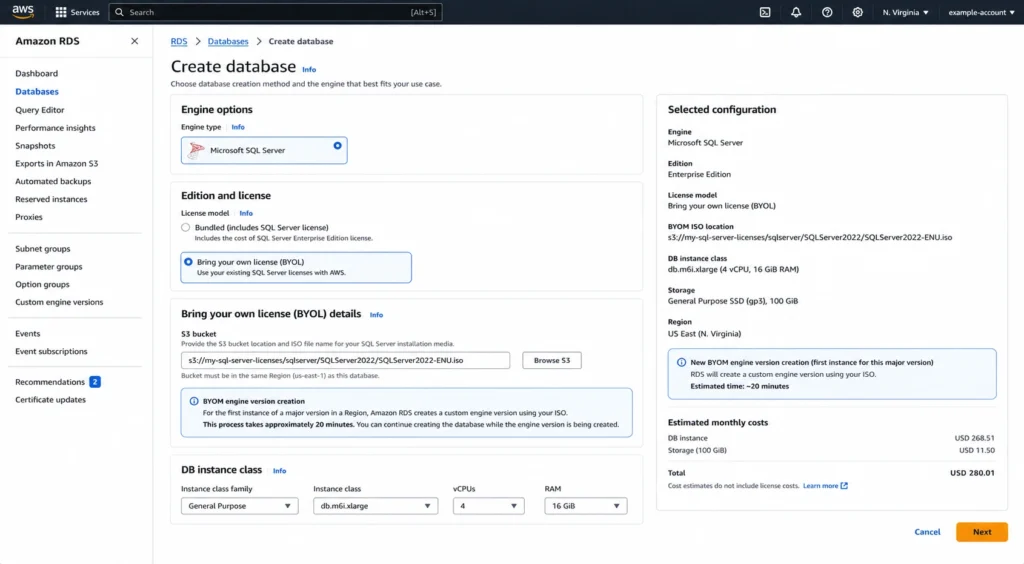
The BYOM setup requires a one-time effort per SQL Server major version and edition. The process: upload the SQL Server RTM ISO to an S3 bucket in the target region. Create a BYOM engine version through the RDS console or CLI — this takes approximately 20 minutes for the first instance of a given major version. Once the engine version is created, you create RDS instances against it just as you would against a standard engine version. For subsequent minor versions within the same major version, Amazon RDS automatically creates new BYOM engine versions when minor version upgrades become available, so you do not need to repeat the media upload for patches and minor updates.
Only English language SQL Server media is supported. The ISO file must match the engine version of the instance you are creating or converting.
Converting an Existing LI Instance to BYOM
One of the most important capabilities of the June 2026 BYOM launch is in-place conversion. Existing RDS for SQL Server instances running the License Included model can be converted to BYOM without database migration. No snapshot restore, no export/import, no downtime beyond the conversion window itself.
For Multi-AZ deployments, the conversion is performed as a rolling in-place update: the standby instance is converted first, then a failover is performed (typically 30-60 seconds), and then the old primary is updated. Applications experience the standard Multi-AZ failover window during conversion.
For Single-AZ deployments, the instance shuts down during the conversion and restarts when complete. Plan the conversion window accordingly.
A critical constraint: converting from BYOM back to License Included is not supported. This is a one-way conversion. Before converting an LI instance to BYOM, confirm the following: the team holds active SA for the SQL Server edition and version on the instance; the License Mobility Verification Form will be submitted to Microsoft within 10 days; the instance does not use SSRS or SSAS option groups (which are not compatible with BYOM); and the team has a plan for major version upgrades that works around the BYOM major version upgrade restriction.
The one-way conversion constraint is important for planning. Once you convert an RDS SQL Server LI instance to BYOM, you cannot convert it back. If your SA lapses, if the License Mobility verification expires, or if you decide to stop managing Microsoft licensing separately, the path back to LI requires creating a new LI instance and migrating your databases. Test your BYOM setup and compliance process thoroughly before converting production instances.
What BYOM Covers and What It Does Not
Full feature parity for supported configurations
BYOM instances support the same RDS for SQL Server feature set as License Included instances — automated backups, point-in-time recovery, Multi-AZ deployments, Performance Insights, Enhanced Monitoring, CloudWatch integration, automated minor version patching, and storage auto-scaling. The managed service layer is identical. The only difference is the SQL Server license source.
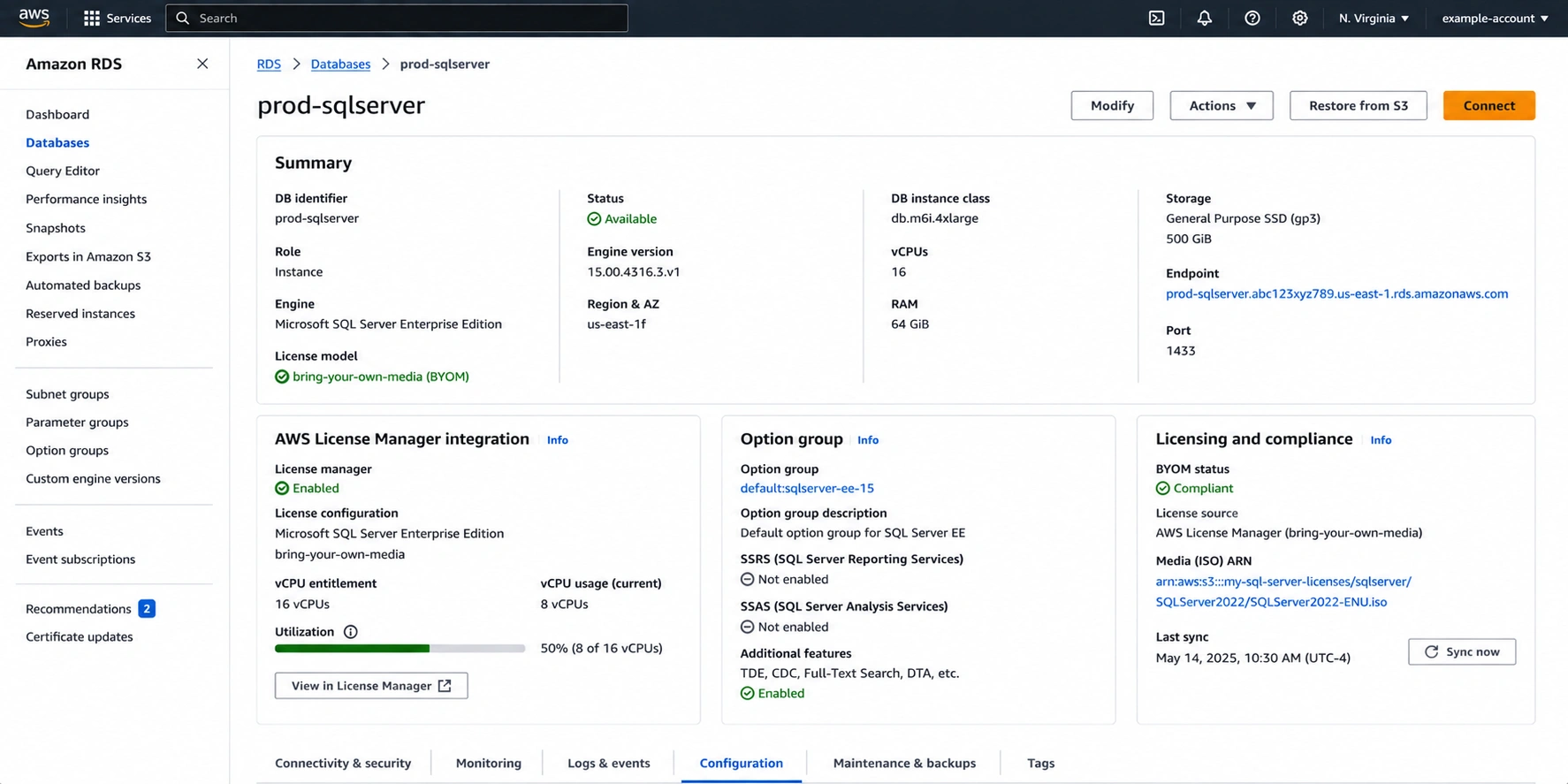
BYOM integrates with AWS License Manager. When configured, Amazon RDS automatically detects BYOM instances and reports vCPU usage to License Manager, providing visibility into SQL Server license consumption across all BYOM instances. This gives audit-ready reports for Microsoft license compliance. AWS License Manager has no additional charge.
Supported editions and versions
BYOM is supported for Standard and Enterprise editions on SQL Server 2019 and 2022. Web Edition is not supported for BYOM. Express Edition is not supported for BYOM. Developer Edition is available under BYOM for non-production use only and includes all Enterprise Edition features.
BYOM is not available for SQL Server 2016 or 2017 on RDS. If you are running LI instances on these older versions, BYOM is not an option until you upgrade the engine version to 2019 or 2022.
Limitations that do not exist for LI
SSRS and SSAS: option groups that include SQL Server Reporting Services (SSRS) or SQL Server Analysis Services (SSAS) are not supported with BYOM. If your RDS instance is configured with an SSRS or SSAS option group, you cannot convert to BYOM or create new BYOM instances with those services. Move reporting and analysis workloads to a separate service before considering BYOM conversion.
In-place major version upgrades: in-place major version upgrades are not supported for BYOM instances. You cannot upgrade a BYOM instance from SQL Server 2019 to SQL Server 2022 directly. To move to a newer major version under BYOM, create a new BYOM DB instance with the target version and migrate your data using native backup and restore. This is a material operational constraint for teams that rely on in-place major version upgrades.
Account and Region isolation: a BYOM engine version is specific to your AWS account and Region. You must create a separate BYOM engine version in each Region and account where you want to use BYOM. BYOM engine versions cannot be shared across Regions or AWS accounts. However, the installation media (ISO file) can be shared across accounts.
SSAS and SSRS compatibility check: before planning any BYOM conversion, confirm whether your RDS SQL Server instance uses an option group that includes SQL Server Analysis Services or Reporting Services. Run: SELECT name FROM sys.configurations WHERE name LIKE ‘%SSAS%’ or check your RDS Option Group in the console. If either service is configured, BYOM is not available for that instance without first removing those option groups and confirming the workload does not depend on them.
The Cost Difference: LI vs BYOM
The financial case for BYOM is straightforward: if you already have active Software Assurance covering SQL Server Standard or Enterprise licenses, BYOM eliminates the SQL Server license component from your RDS hourly rate. You pay AWS for compute, managed service overhead, Windows OS, storage, I/O, and data transfer — but not the SQL Server license itself.
The LI rate for RDS SQL Server includes the SQL Server license bundled into the hourly instance charge. Enterprise Edition LI rates are significantly higher than Standard Edition LI rates per vCPU because the Enterprise license is more expensive. Under BYOM, both Standard and Enterprise edition instances carry the same compute-only rate — the license cost is borne by your existing SA agreement rather than by AWS billing.
To determine the exact dollar saving for your configuration, compare the LI and BYOM rates in the AWS Pricing Calculator at calculator.aws/#/createCalculator/RDSSQLServer. The calculator shows both LI and BYOM rates for the same instance class, edition, and region side by side. The difference is the SQL Server license component that BYOM eliminates.
Important nuance: the cost benefit of BYOM requires that your Software Assurance coverage be active. SA has its own renewal cost. The true cost of BYOM is the BYOM RDS rate plus the ongoing cost of maintaining Software Assurance. For organizations that would be maintaining SA anyway for other Microsoft products or cloud use cases, this is not an incremental cost. For organizations that would need to purchase or renew SA specifically to enable BYOM, the SA cost must be factored into the comparison.
| Already paying for SQL Server licenses?
Usage.ai identifies RDS instances that may qualify for BYOM and estimates your potential monthly savings. |
The unbundled pricing interaction
The unbundled pricing model — which separates compute charges from SQL Server licensing charges and reduces vCPU billing on Intel 2xlarge and larger instances by disabling SMT by default — applies to LI instances. For BYOM instances, the license component is not charged by AWS at all, so the unbundled pricing benefit is realized differently: you are already paying zero to AWS for the SQL Server license. The compute rate for BYOM instances follows the standard RDS compute pricing for the instance family.
Verify the BYOM instance compute rates versus LI unbundled rates in the pricing calculator. For some instance families, the LI unbundled rate (with SMT disabled) may be closer to the BYOM rate than the LI bundled rate, which changes the relative attractiveness of BYOM for teams considering both options.
When to Choose License Included
LI is the correct choice when:
- The team has no existing SQL Server licenses with active Software Assurance
- The workload uses Web Edition or Express Edition (BYOM is not available for these)
- The instance runs SQL Server 2016 or 2017 (BYOM is only available for 2019 and 2022)
- The instance is configured with SSRS or SSAS option groups
- The team prefers AWS to own all licensing compliance responsibility
- The workload duration is short-term or unpredictable — short-lived instances do not recoup the BYOM setup overhead
- The team does not want to manage the License Mobility Verification Form submission and renewal
- The deployment is for development or testing using Express Edition (free, LI only)
When to Choose BYOM
BYOM is the correct choice when:
- The team holds active Software Assurance for SQL Server Standard or Enterprise Edition
- The workload runs on SQL Server 2019 or 2022
- The instance does not require SSRS or SSAS option groups
- The team has a major version upgrade plan that accommodates the BYOM restriction (create new instance, migrate data)
- The team can commit to submitting the License Mobility Verification Form to Microsoft within 10 days
- The team is prepared to maintain Microsoft licensing compliance independently (AWS does not enforce it)
- The workload is a long-running production deployment where the SA investment is already made
- The team is migrating from self-managed SQL Server on EC2 (where License Mobility was already in use) to fully managed RDS
| Planning an LI → BYOM migration?
Avoid stranded Reserved Instances. Usage.ai helps align commitments with your licensing model. |
Reserved Instances With LI and BYOM
Reserved Instances are available for both LI and BYOM RDS SQL Server instances. The RI mechanics are identical to those described in the parent SQL Server RI guide: no size flexibility, Multi-AZ has separate reservation options, RI prices do not cover storage or I/O, and No Upfront is available for 1-year terms only.
The key difference: an LI RI commits to a specific instance class, edition, licensing model (LI), Multi-AZ configuration, and region. A BYOM RI commits to the same attributes but with the BYOM licensing model. An LI RI does not cover a BYOM instance, and a BYOM RI does not cover an LI instance. If you convert an LI instance to BYOM mid-RI-term, the LI RI is no longer being consumed by that instance. You would need a separate BYOM RI.
Sequence recommendation: if planning to convert an existing LI instance to BYOM, do not purchase a new LI RI term immediately before the conversion. Wait until the LI RI expires, then purchase a BYOM RI for the converted instance. If the existing LI RI has significant remaining term, evaluate whether to hold the LI RI (it will be stranded if the instance converts to BYOM) or factor the remaining commitment value into the BYOM timing decision.
Also read: RDS SQL Server Reserved Instances: Licensing, Editions, and Cost
Database Savings Plans: Available for Both Models
RDS for SQL Server is eligible for Database Savings Plans under both the LI and BYOM licensing models. A Database Savings Plan commits to a consistent hourly spend amount across eligible managed database services. The flexibility of a Savings Plan versus a per-instance RI is particularly relevant for teams managing multiple SQL Server instances across different editions or considering a phased LI-to-BYOM conversion.
During a BYOM conversion period, when some instances are LI and others are BYOM, a Database Savings Plan applies to all eligible SQL Server spend regardless of licensing model. This avoids the RI stranding problem that occurs when an LI RI no longer matches a converted BYOM instance.
Developer Edition Under BYOM
SQL Server Developer Edition is available under BYOM for development and testing purposes only. Developer Edition includes all SQL Server Enterprise Edition features but is licensed for non-production use only and cannot be used in production environments. Under BYOM, there is no SQL Server license fee from AWS for Developer Edition — you pay only for compute, storage, I/O, and Windows OS.
Developer Edition BYOM is useful for development teams that need access to Enterprise Edition features (columnstore indexes, Always On, in-memory OLTP) during development and testing at lower cost than production Enterprise instances. The non-production restriction is a Microsoft licensing requirement, not a technical enforcement by AWS.
AWS License Manager Integration
BYOM on RDS integrates with AWS License Manager at no additional charge. When configured, License Manager automatically detects BYOM instances and reports vCPU usage, providing visibility into SQL Server license consumption across all BYOM instances in an AWS account. This enables audit-ready compliance reporting for Microsoft license audits and helps organizations track whether their SA coverage is sufficient for their deployed BYOM fleet.
License Manager reporting covers: visibility into SQL Server license consumption across all BYOM instances; tracking of which instances use BYOM versus LI; and audit-ready reports for Microsoft license compliance verification. If you do not configure License Manager, BYOM instances function normally, but you are responsible for independently monitoring license usage and maintaining compliance.
How Usage.ai Optimizes RDS SQL Server Licensing Costs
Usage.ai identifies two categories of SQL Server licensing cost opportunity across RDS fleets.
LI-to-BYOM conversion candidates: Usage.ai flags RDS SQL Server LI instances on SQL Server 2019 or 2022 running Standard or Enterprise edition that are candidates for BYOM conversion, based on the instance configuration checklist — edition, version, option groups, and estimated licensing cost difference. The platform does not verify Microsoft Software Assurance status (that requires external Microsoft licensing data), but it surfaces the set of instances where BYOM would be eligible if SA is active and quantifies the exact monthly saving per instance.
RI purchasing aligned to licensing model: for teams that have completed BYOM conversion, Usage.ai purchases Reserved Instances for the BYOM licensing model, not the LI model. The platform maintains awareness of the licensing model per instance to ensure RI purchases match the running configuration. An RI for a LI instance purchased against a now-BYOM instance would provide no coverage.
For teams mid-conversion (transitioning some instances from LI to BYOM while others remain LI), Usage.ai recommends Database Savings Plans during the transition period to avoid RI stranding from licensing model mismatches.
Insured Flex Reserved Instances: every RI purchased through Usage.ai includes a buyback guarantee. If a SQL Server instance is decommissioned, resized, or the licensing model changes during the RI term, the unused commitment is bought back and returned as cashback in real money. This directly addresses the RI stranding risk from LI-to-BYOM conversions.
Fee: percentage of realized savings only. $0 if Usage.ai saves nothing. 30-minute setup, billing-layer access only.
Frequently Asked Questions
1. What is the difference between License Included and BYOM for RDS SQL Server?
License Included: AWS provides and manages the SQL Server license. The license fee is bundled into the RDS hourly rate. Supported editions: Enterprise, Standard, Web, Express. No Microsoft licensing agreements required. Bring Your Own Media: you provide existing SQL Server Standard or Enterprise Edition licenses through Microsoft’s License Mobility through Software Assurance. AWS does not charge a SQL Server license fee. You pay for compute, storage, I/O, data transfer, and Windows OS. Requires active SA, License Mobility rights, and submitting the Verification Form to Microsoft within 10 days. BYOM supports Standard and Enterprise on SQL Server 2019 and 2022.
2. When did BYOM for RDS SQL Server launch?
BYOM for Amazon RDS for SQL Server launched on June 8, 2026. Before this date, customers with existing SQL Server licenses and Software Assurance had to deploy SQL Server on self-managed EC2 to use License Mobility. Fully managed RDS had no BYOL path. BYOM removes the requirement to pay for SQL Server licensing a second time when adopting managed RDS.
3. Can I convert an existing RDS SQL Server LI instance to BYOM?
Yes. Existing RDS for SQL Server License Included instances can be converted to BYOM in place without database migration. For Multi-AZ instances, the conversion is performed as a rolling update with a standby-first approach (approximately 30-60 seconds of failover time). For Single-AZ instances, the instance shuts down and restarts during conversion. Converting from BYOM back to LI is not supported — this is a one-way conversion.
4. What are the limitations of BYOM compared to License Included?
BYOM limitations: only Standard and Enterprise editions on SQL Server 2019 and 2022 are supported. SSRS and SSAS option groups are not compatible with BYOM. In-place major version upgrades are not supported (requires creating a new BYOM instance and migrating data). BYOM engine versions are specific to your AWS account and Region. The License Mobility Verification Form must be submitted to Microsoft within 10 days. You are responsible for maintaining Microsoft licensing compliance — AWS does not validate it.
5. Do I need Software Assurance for BYOM?
Yes. Software Assurance coverage on your SQL Server licenses is a requirement for BYOM. SA provides the License Mobility benefit that allows SQL Server licenses to be deployed on qualified third-party shared servers including Amazon RDS. Without active SA, BYOM is not available and License Included is the only path for fully managed RDS. For development and testing, SQL Server Developer Edition is available under BYOM without license fees but requires SA coverage on an eligible license.
6. Can BYOM instances use Reserved Instances?
Yes. Reserved Instances are available for BYOM RDS SQL Server instances. The RI must match the BYOM licensing model (not LI). An LI RI does not cover a BYOM instance and vice versa. If converting an existing LI instance to BYOM, be aware that an LI RI active on that instance will no longer be consumed after conversion. Plan RI purchases around the licensing model transition to avoid stranded commitments.
7. How is AWS License Manager used with BYOM?
AWS License Manager integrates with RDS SQL Server BYOM instances at no additional charge. When configured, it automatically detects BYOM instances and reports vCPU usage, providing audit-ready visibility into SQL Server license consumption across the AWS account. This helps organizations track whether SA coverage is sufficient for the deployed BYOM fleet and maintain compliance documentation for Microsoft licensing audits. Configuring License Manager is optional — BYOM instances function normally without it, but compliance tracking becomes a manual responsibility.