
New See exactly what you're overpaying AWS in under 60 seconds. Try the Calculator for free →

RDS SQL Server Reserved Instances: Licensing, Editions, and Cost in 2026

Updated June 23, 2026
25 min read
RDS SQL Server Reserved Instances: Licensing, Editions, and Cost in 2026
On this page

Amazon RDS for SQL Server has more pricing complexity than any other RDS engine. Unlike open-source engines where licensing is included in a flat managed-service rate, SQL Server billing depends on the edition chosen (Enterprise, Standard, Web, Express, or Developer), the licensing model (License Included or Bring Your Own Media), and several engine-specific constraints that do not exist for MySQL or PostgreSQL — most notably, the complete absence of size flexibility for Reserved Instances.

This guide covers every pricing dimension of RDS SQL Server from AWS official sources, explains the six facts the standard overviews miss, and provides the decision framework for choosing between licensing models and commitment structures.

All facts: from AWS official sources exclusively. All rates: US East (N. Virginia), June 2026. Verify at aws.amazon.com/rds/sqlserver/pricing/ — rates change.

See exactly what you’re overpaying on RDS SQL Server in under 60 seconds. Try the Calculator for free →

The Four Pricing Models for RDS SQL Server

RDS SQL Server is the only RDS engine with four distinct pricing models. Understanding all four is necessary before evaluating whether a Reserved Instance is the right commitment instrument.

On-Demand Instances: Bundled Pricing

The traditional RDS pricing model. The hourly rate includes compute, the SQL Server software license (for License Included editions), and AWS management capabilities. You pay for each hour the instance is running with no long-term commitment. The bundled rate packages everything into a single per-hour charge that scales with instance size and SQL Server edition. This is the model most teams start on before optimizing toward Reserved Instances.

On-Demand Instances: Unbundled Pricing

Available on newer instance families. Under unbundled pricing, the compute and the SQL Server license are billed as separate line items rather than as a single bundled hourly rate. This separation enables cost optimization levers that bundled pricing does not support — including the ability to modify vCPU counts independently of the license, potentially reducing the SQL Server license footprint while maintaining the same compute capacity. The AWS official SQL Server pricing page describes this as providing ‘better optimization (such as reducing excess vCPUs and avoiding licensing charges on Multi-AZ standbys).

Reserved Instances

Commit to a specific SQL Server DB instance configuration for 1 or 3 years and receive a discount compared to the On-Demand rate. Three payment options: No Upfront, Partial Upfront, and All Upfront. The No Upfront option is available only for 1-year terms — 3-year terms require Partial or All Upfront. The RI purchase must match the exact instance class, SQL Server edition, licensing model, Multi-AZ configuration, and region. Reserved Instance prices do not cover storage or I/O costs.

Database Savings Plans

RDS SQL Server is also eligible for Database Savings Plans. Rather than committing to a specific instance configuration, a Database Savings Plan commits to a consistent hourly spend amount across eligible managed database services. For teams running mixed SQL Server and other RDS engine fleets, a Database Savings Plan provides flexibility that per-engine RIs do not.

Also read: AWS Database Savings Plans: Flexible Commitment Discounts for SQL Server

SQL Server Editions on RDS: What Each One Costs and What It Allows

SQL Server edition is the primary driver of RDS SQL Server cost. Two editions available under License Included are roughly equivalent to paying a software license premium on top of compute.

Express Edition

Express Edition is available under the License Included model at no additional license cost. It is the only SQL Server edition available in the AWS Free Tier (750 hours/month on select single-AZ micro instances for qualifying accounts). Express Edition is appropriate for development workloads, testing, and small non-critical applications where the database size remains under the Express Edition limits. For production workloads that will grow beyond Express Edition limits, plan the migration path before selecting Express.

Web Edition

Web Edition is available under the License Included model at a lower per-hour rate than Standard Edition. It is designed for public-facing web pages, websites, web applications, and web services. The usage restriction is not optional: according to AWS documentation, ‘SQL Server Web Edition is designed for web hosting providers and web value-added providers (VAPs) to host public, internet-accessible web pages, websites, web applications, and web services. Microsoft’s licensing terms impose these usage restrictions via Section 10.5 of the AWS Service Terms.’

Web Edition compliance requirement: if you are running RDS SQL Server Web Edition for an internal application — an HR system, an internal reporting tool, a line-of-business application that is not publicly accessible via the internet — you are in violation of Microsoft’s licensing terms even though AWS does not technically block this configuration. The correct edition for internal applications is Standard Edition.

Standard Edition

Standard Edition under License Included is the recommended production edition for the majority of SQL Server workloads on RDS. It provides the core SQL Server database capabilities sufficient for most enterprise applications, OLTP workloads, and reporting systems. Standard Edition pricing is significantly higher per hour than Web Edition, reflecting the broader licensing rights — Standard Edition has no usage restriction to internet-facing workloads and can be used for any production application.

Enterprise Edition

Enterprise Edition is required for workloads that need advanced features not available in Standard Edition — Always On Availability Groups with readable secondaries, columnstore indexes for analytical queries, advanced analytics with R Services or Python Services, in-memory OLTP, unlimited virtualization rights, and advanced compression. Enterprise Edition per-hour rates are the highest of all SQL Server editions on RDS. For most production OLTP workloads, Standard Edition is sufficient and significantly cheaper.

Developer Edition (BYOM Only)

Developer Edition provides the full feature set of Enterprise Edition but is licensed for development and testing purposes only and cannot be used in production environments. It is available exclusively through the Bring Your Own Media (BYOM) model.

Developer Edition is valuable for development teams who need access to Enterprise Edition features (columnstore indexes, Always On, in-memory OLTP) during the development phase before deploying to a Standard or Enterprise production environment. Since it uses the BYOM model, you pay only for the underlying compute and storage — there is no SQL Server license charge from AWS for Developer Edition. However, it is strictly non-production.

License Included vs Bring Your Own Media: The Core Decision

Every RDS SQL Server instance runs on either the License Included (LI) model or the Bring Your Own Media (BYOM) model. This choice determines the per-hour rate, the RI pricing, and the ongoing license compliance responsibility.

License Included

Under LI, AWS licenses the SQL Server software and bundles it into the hourly instance rate. You do not purchase SQL Server licenses separately. AWS handles all license compliance for the software. The LI model supports Enterprise, Standard, Web, and Express editions.’Under the License Included model, pricing is inclusive of software, underlying hardware resources, and Amazon RDS management capabilities. SQL Server Database software has been licensed by AWS, so you do not need to purchase SQL Server licenses separately.’

LI is appropriate when: you do not have existing SQL Server licenses with Software Assurance, you want AWS to own all licensing compliance responsibility, or you are starting a new SQL Server workload on AWS with no prior license investment.

Important account limit: by default, customers are limited to 10 RDS SQL Server License Included instances per account. ‘Of those 40, up to 10 can be RDS for Oracle or RDS for SQL Server DB instances under the “License Included” model.’ If your planned SQL Server fleet exceeds 10 LI instances, contact AWS support to request a limit increase before purchasing RIs for the full planned fleet.

Bring Your Own Media (BYOM)

Under BYOM, you supply your existing SQL Server license (Standard or Enterprise Edition) and media (ISO file) from Microsoft. AWS charges for compute, storage, I/O, data transfer, and Windows OS fees, but not for the SQL Server license itself. You continue to manage your Microsoft license compliance.

BYOM requirements: (1) active SQL Server license with Software Assurance; (2) License Mobility rights via Microsoft’s License Mobility program; (3) License Mobility Verification Form submitted to Microsoft; (4) SQL Server RTM media (ISO) uploaded to an S3 bucket.

BYOM supports Enterprise and Standard editions in production, plus Developer Edition for non-production. The per-hour BYOM rate is lower than equivalent LI because you are providing the license. If you have existing SQL Server Enterprise or Standard Edition licenses with active Software Assurance, BYOM is the most cost-efficient path and eliminates the 10-instance LI account limit.

BYOM vs LI cost decision: if your organization holds active SQL Server Enterprise or Standard Edition licenses with Software Assurance covering sufficient cores for your planned RDS fleet, BYOM will be cheaper per hour than LI for the equivalent edition. The BYOM per-hour rate reflects compute plus Windows OS only — no SQL Server license bundled. The savings magnitude depends on the edition (higher for Enterprise) and the number of instances. If Software Assurance is not active or cannot be renewed cost-effectively, LI is the simpler and often cost-comparable path for Standard Edition workloads.

The Most Important RDS SQL Server RI Constraint: No Size Flexibility

Size flexibility is one of the most valuable features of Reserved Instances for open-source RDS engines. It means a single RI purchase automatically covers any size within the same instance family. A db.m5.xlarge MySQL RI covers two db.m5.large MySQL instances, or four db.m5.small instances, or one db.m5.xlarge — whichever combination of sizes is running in that family.

RDS SQL Server has no size flexibility. AWS official Reserved Instances documentation states this explicitly: ‘Size flexibility does not apply to Microsoft SQL Server and the License Included (LI) edition of Oracle.’

What this means in practice

Every RDS SQL Server RI purchase commits to a specific configuration: instance class (e.g., db.m5.xlarge), edition (e.g., Standard), licensing model (LI or BYOM), Multi-AZ or Single-AZ, and region. If any of these changes during the RI term, the RI no longer covers the running instance. You pay both the RI commitment and On-Demand rates for the new configuration.

Scenarios that strand a SQL Server RI: resizing from db.m5.xlarge to db.m5.2xlarge for performance (new RI needed for the larger size); upgrading from Standard to Enterprise for a new application feature (new RI needed for the new edition); switching from Single-AZ to Multi-AZ for a production promotion (Multi-AZ has separate reservation options — a Single-AZ RI does not cover Multi-AZ); changing from LI to BYOM after acquiring Software Assurance (different licensing model, new RI needed).

SQL Server RI sizing rule: because size flexibility does not apply, SQL Server RI purchases must match the exact running configuration for the full RI term. Do not purchase a 3-year SQL Server RI for an instance that has any planned resize, edition change, or Multi-AZ change within that term. For instances with uncertain 3-year stability, use 1-year No Upfront RIs or Database Savings Plans, which provide flexibility without size-locking.

Comparison: SQL Server vs open-source engine RI behavior

For MySQL and PostgreSQL: a db.r5.xlarge RI covers db.r5.large (2x coverage), db.r5.xlarge (1x), db.r5.2xlarge (0.5x), or any combination adding up to the xlarge equivalent. The RI applies based on normalized units across sizes within the family.

For SQL Server Standard Edition: a db.r5.xlarge Standard Edition RI covers only db.r5.xlarge Standard Edition. One-to-one matching required. No normalized unit equivalence. Any other configuration pays On-Demand rates even if the same instance family is running.

Multi-AZ for SQL Server: Separate Reservations and What AWS Uses

RDS SQL Server supports Multi-AZ deployments using three different underlying technologies, depending on the edition.

SQL Server Database Mirroring (DBM): available for Standard and Enterprise editions. DBM provides synchronous replication to a standby instance in a second Availability Zone with automatic failover.

Always On Availability Groups (AGs): available for Enterprise Edition. AGs provide synchronous multi-AZ replication with more advanced features than DBM, including the ability to have readable secondary replicas in some configurations.

Block-level replication: used for Web Edition Multi-AZ. Block-level replication provides physical block replication between instances.

Critically: there are no additional licensing requirements for Multi-AZ deployments.’There are no additional licensing requirements for Multi-AZ deployments.’ The standby instance is included in the Multi-AZ deployment without requiring additional SQL Server license seats.

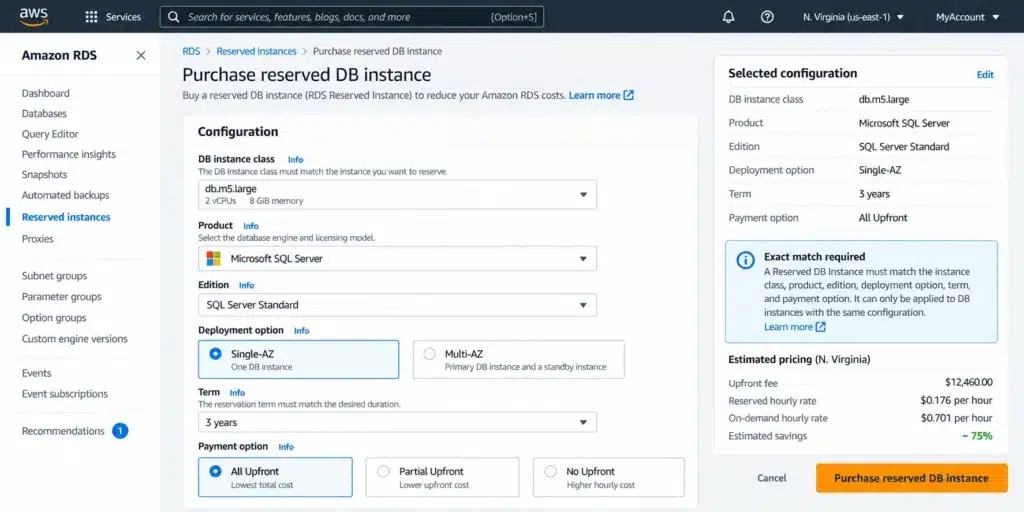
However: Multi-AZ has separate reservation options from Single-AZ. A Single-AZ RI does not cover a Multi-AZ deployment. When purchasing a SQL Server RI, you specify Single-AZ or Multi-AZ at purchase time, and the RI matches only that deployment type.

AWS RDS console Reserved Instance purchase screen for SQL Server Standard Edition with Multi-AZ selected, showing the separate Multi-AZ hourly reserved rate versus Single-AZ and a note on separate reservation options.

T3 Instances and CPU Credits: The Hidden Charge

SQL Server is available on T3 instance families (db.t3.small, db.t3.medium, db.t3.large, db.t3.xlarge, db.t3.2xlarge). T3 instances provide burstable CPU performance appropriate for workloads with low-to-moderate baseline CPU utilization that occasionally need to burst above that baseline.

T3 RDS instances run in Unlimited mode by default. Under Unlimited mode, the instance can burst CPU above its baseline for as long as needed. If the average CPU utilization over a rolling 24-hour period exceeds the instance’s CPU credit balance, CPU credits are charged.

The SQL Server CPU credit charge is $0.144 per vCPU-Hour. ‘Amazon RDS for SQL Server T3 DB instances run in Unlimited mode, which means that you will be charged if your average CPU utilization over a rolling 24-hour period exceeds the baseline of the instance. CPU Credits are charged at $0.144 per vCPU-Hour.’

$0.144 per vCPU-Hour for SQL Server T3 CPU credits is important context: the equivalent CPU credit charge for MySQL and PostgreSQL T3 instances is $0.075 per vCPU-Hour — less than half. The SQL Server rate reflects the SQL Server license component embedded in the LI model. If your T3 SQL Server instance is consistently running above its CPU baseline, the credit charges accumulate at this rate and are not covered by any Reserved Instance or Database Savings Plan. A db.t3.xlarge (4 vCPU) running 2 hours above baseline daily would accumulate approximately 4 vCPUs x 2 hours x $0.144 x 30 days = $34.56/month in CPU credit charges on top of the standard instance rate.

For SQL Server workloads with consistently elevated CPU (sustained above 50% on a t3.xlarge which has a 40% CPU baseline), the ongoing CPU credit charges at $0.144/vCPU-hr will often exceed the cost difference between the T3 instance and a non-burstable M or R family instance of equivalent memory. The AWS guidance for consistently CPU-heavy workloads is to use M or R family instances rather than T3.

The Complete SQL Server RI Editions and Versions Available

RDS supports four major SQL Server versions: 2016, 2017, 2019, and 2022. Source: aws.amazon.com/rds/sqlserver/. Reserved Instances are available for all supported SQL Server versions under both LI and BYOM models.

One key constraint from the AWS FAQs: ‘RDS for SQL Server has a limit of up to 100 databases on a single DB instance. ‘This is a meaningful capacity advantage over Oracle on RDS, which supports only 1 database per instance. A single SQL Server RDS instance can consolidate up to 100 databases, reducing the RI count required and lowering the total managed service overhead.

SQL Server 2016 is approaching end of Microsoft mainstream support but remains available on RDS. Before purchasing multi-year RIs on SQL Server 2016 instances, verify the upgrade timeline. Unlike MySQL 5.7 and PostgreSQL 11 which are subject to RDS Extended Support charges for AWS-managed security patches, SQL Server versions under BYOM require the customer to manage upgrade timing — AWS does not provide Extended Support in the same per-vCPU-hr model for commercial engines.

AWS RDS console engine selection showing SQL Server versions 2016, 2017, 2019, and 2022 available with Standard Edition and License Included model. Configuration summary shows the 100 databases per instance limit for SQL Server on RDS.

The One Table: SQL Server Edition Comparison

Source: all edition facts from AWS official SQL Server licensing documentation and pricing page. Rates are directional — verify exact current rates at aws.amazon.com/rds/sqlserver/pricing/ before purchasing.

Edition Available Under Production Use? Key Restrictions Relative Cost
Express LI only Yes Database size limits. Free Tier eligible. No full-featured BI workloads. Lowest (no license premium)
Web LI only Yes — with restriction Public internet-facing workloads only per Section 10.5 AWS Service Terms (Microsoft licensing requirement). Low
Standard LI or BYOM Yes No Always On readable secondaries, no columnstore. General enterprise OLTP. Medium (most common production choice)
Enterprise LI or BYOM Yes No restrictions. Columnstore, Always On AGs, in-memory OLTP, advanced analytics. Highest
Developer BYOM only No (dev/test only) Cannot be used in production. Full Enterprise features for dev/test. Non-production licensing only. No AWS license charge (BYOM only)

Source: AWS official SQL Server licensing documentation (docs.aws.amazon.com/AmazonRDS/latest/UserGuide/SQLServer.Concepts.General.Licensing.html) and AWS official SQL Server pricing page (aws.amazon.com/rds/sqlserver/pricing/). Verify all rates at aws.amazon.com/rds/sqlserver/pricing/ — rates change.

Purchasing RDS SQL Server Reserved Instances: The Four-Attribute Match

Because SQL Server RIs have no size flexibility, the RI purchase must match all four attributes of the running instance. If any attribute does not match, the RI discount does not apply and the instance pays On-Demand rates even while an RI commitment is active.’Simply purchase a DB instance reservation with the same DB instance class, DB engine, Multi-AZ option, and License Model within the same Region as the DB instance you are currently running and would like to reserve.’

The four attributes:

DB instance class: must match exactly. db.m5.xlarge Standard Edition LI RI covers only db.m5.xlarge Standard Edition LI. Not db.m5.large, not db.m5.2xlarge.

DB engine and edition: must match. SQL Server Standard Edition RI does not cover SQL Server Enterprise Edition and does not cover any other RDS engine (MySQL, PostgreSQL, etc.).

Multi-AZ option: must match. A Single-AZ RI does not cover a Multi-AZ deployment. Multi-AZ has separate reservation options.

License model: must match. A License Included RI does not cover a BYOM instance. If you switch from LI to BYOM (for example, after acquiring Software Assurance), you need a new BYOM RI and the LI RI becomes stranded until its term expires.

Additionally: the RI is region-specific. An RI in US East (N. Virginia) does not cover SQL Server instances in US West (Oregon).

See exactly what you’re overpaying on RDS SQL Server in under 60 seconds. Try the Calculator for free →

No Upfront vs Partial Upfront vs All Upfront: SQL Server RI Payment Options

RDS SQL Server Reserved Instances offer three payment options with different upfront commitments and effective hourly rates.

No Upfront: $0 upfront payment. The discounted hourly rate is higher than Partial or All Upfront. Available only for 1-year terms for SQL Server. ‘All Upfront and Partial Upfront Reserved Instances can be purchased for one or three year terms, while No Upfront Reserved Instances are only available for one year term.’

Partial Upfront: a portion of the total RI cost is paid at purchase, with a lower effective hourly rate than No Upfront. Available for both 1-year and 3-year terms.

All Upfront: the full RI cost is paid at purchase. This provides the lowest effective hourly rate across the term. Available for both 1-year and 3-year terms. Verify the exact effective hourly rates for your target instance class, edition, and term at aws.amazon.com/rds/sqlserver/pricing/ — the specific discount percentages are listed in the pricing table for each combination.

Reserved Instance prices do not cover storage or I/O costs. When modeling total monthly cost, add: RDS gp3 storage (charged per GB per month, verify at aws.amazon.com/rds/pricing/), any provisioned IOPS above the gp3 baseline, and backup storage above the 100% free tier.

Supported SQL Server Versions on RDS

Amazon RDS for SQL Server supports versions 2016, 2017, 2019, and 2022. Source: aws.amazon.com/rds/sqlserver/: ‘you can deploy multiple editions of SQL Server (2016, 2017, 2019, and 2022), including Enterprise, Standard, Web, Developer, and Express in minutes.’

Reserved Instances can be purchased for any supported SQL Server version. The RI commitment is to an instance class and edition — the SQL Server version within the RDS engine is not a separate RI attribute. An RI purchased for db.m5.xlarge Standard Edition LI applies regardless of whether the instance is running SQL Server 2019 or SQL Server 2022.

Before purchasing multi-year RIs for instances running SQL Server 2016, verify the AWS guidance for that version’s continued support lifecycle on RDS. AWS may extend or modify SQL Server version support independently of Microsoft’s mainstream/extended support timelines. For the latest supported version status, check the AWS RDS for SQL Server documentation.

Database Savings Plans as an Alternative to Per-Instance RIs

Database Savings Plans are available for RDS SQL Server alongside Reserved Instances. A Database Savings Plan commits to a consistent hourly spend amount (in $/hour) across eligible managed database services including SQL Server, RDS MySQL, PostgreSQL, Aurora, ElastiCache, DynamoDB, and others. Source: aws.amazon.com/rds/sqlserver/pricing/: ‘Amazon RDS for SQL Server has four pricing models: On-Demand instances bundled pricing, On-Demand instances unbundled pricing, Reserved Instances, and Database Savings Plans.’

When to use Database Savings Plans instead of RIs for SQL Server:

If instance configuration is likely to change within the commitment term: Database Savings Plans apply to any eligible spend regardless of instance class, edition, or Multi-AZ configuration change. An RI on SQL Server Standard db.m5.xlarge becomes stranded if you resize to db.m5.2xlarge or upgrade to Enterprise. A Database Savings Plan applies to all eligible SQL Server spend automatically.

If running a mixed SQL Server and open-source engine fleet: a single Database Savings Plan covers all eligible engines simultaneously without requiring separate per-engine RIs.

Trade-off: the discount from a Database Savings Plan is generally lower than the discount from a specific RI at the equivalent commitment level. For teams where SQL Server instance configuration is stable over the commitment term, the per-instance RI delivers a deeper discount. For teams with changing configurations, the Database Savings Plan’s flexibility outweighs the smaller discount.

Also read: AWS Database Savings Plans: The Complete Guide  

The RI Sizing Process for SQL Server

Because SQL Server RIs have no size flexibility, the sizing process requires more precision than for open-source engines. Five steps to size correctly:

Step 1: confirm the exact running configuration. Instance class (e.g., db.m5.xlarge), edition (Standard or Enterprise), licensing model (LI or BYOM), Multi-AZ or Single-AZ, and SQL Server version. All five must be stable for the duration of the RI term.

Step 2: right-size before committing. Pull CloudWatch CPUUtilization, FreeableMemory, and DatabaseConnections for the past 30 days. Identify whether the instance is over-provisioned. Unlike MySQL and PostgreSQL where an RI on a larger instance still provides coverage on smaller sizes (size flexibility), a SQL Server RI on an oversized instance locks in the over-provisioned rate for 1-3 years with no coverage spillover.

Step 3: confirm edition stability. If there is any chance the workload will require Enterprise Edition features (columnstore, Always On with readable secondaries, in-memory OLTP) within the RI term, purchase an Enterprise Edition RI — not Standard. Upgrading from Standard to Enterprise requires a new RI.

Step 4: confirm Multi-AZ stability. If the instance will be promoted to Multi-AZ (for example, when moving from staging to production), purchase a Multi-AZ RI. Multi-AZ has separate reservation options. A Single-AZ RI does not apply to the Multi-AZ deployment.

Step 5: choose term and payment. For instances with confirmed 3-year stability (no planned resizes, edition changes, or infrastructure changes), 3-year All Upfront provides the deepest discount. For instances where 3-year stability is uncertain, 1-year No Upfront provides meaningful savings with no upfront cost and limits exposure to a 12-month commitment.

How Usage.ai Handles RDS SQL Server Reserved Instances

Usage.ai manages RDS SQL Server RI purchases with the same Insured Flex commitment model applied to all RDS engines, with SQL Server-specific logic for the no-size-flexibility constraint.

For SQL Server RI recommendations: before surfacing a purchase recommendation, Usage.ai validates that the running instance has been in the same configuration (instance class, edition, licensing model, Multi-AZ, region) for at least 30 days without modification. Because SQL Server RIs have no size flexibility, an RI purchased on an instance that is about to be resized becomes stranded immediately. The 30-day stability check prevents this.

For edition validation: Usage.ai’s recommendation engine identifies whether the instance is running Standard or Enterprise Edition LI or BYOM and generates the corresponding RI purchase. A Standard Edition LI instance receives a Standard Edition LI RI recommendation — not a generic ‘db.m5.xlarge RI’ that would fail to match at purchase time.

For Multi-AZ validation: Single-AZ and Multi-AZ instances in the same instance family generate separate RI recommendations with the correct deployment type specified. A Single-AZ RI recommendation is not generated for a Multi-AZ instance even if they share the same instance class.

Buyback guarantee: Usage.ai Insured Flex Reserved Instances include a buyback guarantee. If a SQL Server instance is resized, the edition is upgraded, or the licensing model changes during the RI term, the unused RI commitment is bought back and the value returned as cashback in real money. This directly addresses the primary risk of SQL Server RI ownership: the no-size-flexibility constraint that strands commitments on instance configuration changes.

Extended Support for commercial engines: unlike MySQL 5.7 and PostgreSQL 11, SQL Server under BYOM does not accumulate RDS Extended Support charges from AWS. SQL Server version support lifecycle management remains the customer’s responsibility under BYOM. Under LI, AWS manages patching for supported versions. Usage.ai monitors LI SQL Server version currency and flags instances approaching SQL Server version end-of-lifecycle as relevant to RI renewal decisions.

Fee: percentage of realized savings only. $0 if Usage.ai saves nothing. 30-minute setup, billing-layer access only. No infrastructure changes required.

RDS Reserved Instances: complete guide to RI discounts for MySQL, PostgreSQL, and SQL Server (live)

RDS Pricing Calculator: MySQL, PostgreSQL, and SQL Server cost breakdown (live)

AWS Database Savings Plans: flexible alternative to per-engine RIs (live)

Start your free RDS SQL Server cost optimization analysis with Usage.ai


You’re Overpaying AWS. See by How Much in 60 Seconds.Upload your AWS bill and get your exact overspend number for free. No account access, or commitment required.FIND MY SAVINGS


Frequently Asked Questions

1. Does RDS SQL Server support Reserved Instances?

Yes. Amazon RDS for SQL Server supports Reserved Instances with 1-year or 3-year terms and three payment options (No Upfront, Partial Upfront, All Upfront). No Upfront is available only for 1-year terms. RDS SQL Server can save up to 65% compared to On-Demand rates with RIs.


2. What is the difference between License Included and BYOM for RDS SQL Server?

License Included (LI): AWS provides the SQL Server license bundled into the hourly rate. Editions: Express, Web, Standard, Enterprise. No Software Assurance required. AWS owns license compliance. Limited to 10 LI SQL Server instances per account by default. Source: aws.amazon.com/rds/sqlserver/pricing/ and aws.amazon.com/rds/faqs/. Bring Your Own Media (BYOM): you supply existing SQL Server licenses with Software Assurance and the SQL Server ISO file. Editions: Standard, Enterprise (production), Developer (non-production only). AWS charges compute and Windows OS only, not the SQL Server license. Requires License Mobility Verification Form submitted to Microsoft.


3. Can I use Web Edition for any application on RDS?

No. Web Edition is restricted to public internet-facing workloads by Microsoft’s licensing terms, enforced via Section 10.5 of the AWS Service Terms.

Internal line-of-business applications, internal tools, and any workload not publicly accessible via the internet must use Standard or Enterprise Edition. Using Web Edition for non-internet-facing applications is a licensing violation even though AWS does not technically block the configuration.


4. Why does SQL Server have no size flexibility for RIs?

Microsoft SQL Server licensing is based on vCPU count — the license cost scales with the number of vCPUs licensed. An RI for a specific SQL Server instance class bundles a specific number of SQL Server vCPU licenses into the commitment. Applying that RI to a smaller instance would mean paying for more SQL Server vCPU licenses than are running. AWS cannot automatically provide size flexibility for SQL Server the way it can for open-source engines (MySQL, PostgreSQL, MariaDB) where the license cost is flat.


5. What is the T3 CPU credit charge for SQL Server?

RDS SQL Server T3 instances run in Unlimited mode by default. If average CPU utilization over a rolling 24-hour period exceeds the instance’s CPU credit balance, CPU credits are charged at $0.144 per vCPU-Hour. This rate is nearly double the equivalent charge for MySQL and PostgreSQL T3 instances ($0.075/vCPU-hr) because the SQL Server LI rate includes the SQL Server license component. CPU credit charges are not covered by Reserved Instances.


6. How many RDS SQL Server License Included instances can I run per account?

By default, up to 10 RDS SQL Server License Included (LI) instances per account. This is part of the broader 40 DB instance account limit: ‘Of those 40, up to 10 can be RDS for Oracle or RDS for SQL Server DB instances under the License Included model.’ BYOM instances do not count against the 10-instance LI limit. To run more than 10 LI SQL Server instances, contact AWS support to request a limit increase.


7. What is Developer Edition on RDS SQL Server?

Developer Edition is available exclusively through the BYOM model. It includes full Enterprise Edition features but is licensed for development and testing purposes only and cannot be used in production environments. There is no SQL Server license charge from AWS for Developer Edition BYOM. Use it for development teams that need Enterprise Edition features (columnstore, Always On) in a non-production environment.

Cut cloud cost with automation
Latest from our blogs