.png)



BYOM closed a long-standing gap. Before June 2026, License Mobility extended only to self-managed EC2, so Software Assurance holders who wanted managed RDS paid for the license twice, once to Microsoft, again through the LI rate. BYOM removes that barrier.
The short answer
That is a starting point, not a verdict. SA renewal costs, SSRS/SSAS compatibility, upgrade plans, and RI timing can each change the answer.
LI vs BYOM at a Glance
| Decision Factor | License Included (LI) | Bring Your Own Media (BYOM) |
|---|---|---|
| Who pays for the SQL Server license? | AWS, bundled into the hourly rate | You, using existing licenses with active Software Assurance |
| Eligible editions | Enterprise, Standard, Web, Express | Enterprise, Standard (Developer for non-production only) |
| Software Assurance required? | No | Yes for Standard/Enterprise; not for Developer (non-production) |
| Setup complexity | None, select LI at instance creation | Medium: ISO to S3, Verification Form, BYOM engine version |
| Hourly compute cost | Higher, license included | Lower, infrastructure only |
| Account limit | 10 LI instances per SQL Server edition by default | No LI limit applies |
| Reserved Instance behavior | Exact-size only, no size flexibility | Exact-size only, no size flexibility |
| Multi-AZ licensing | AWS manages both nodes | Your licenses must cover both nodes’ vCPUs |
| In-place major version upgrade | Supported | Not supported, new instance and migration required |
| License compliance responsibility | AWS | Customer |
| AWS License Manager integration | Not applicable | Automatic vCPU tracking when configured |
| Best for | Teams without existing licenses, or prioritizing simplicity | Teams with active SA and stable, long-term workloads |
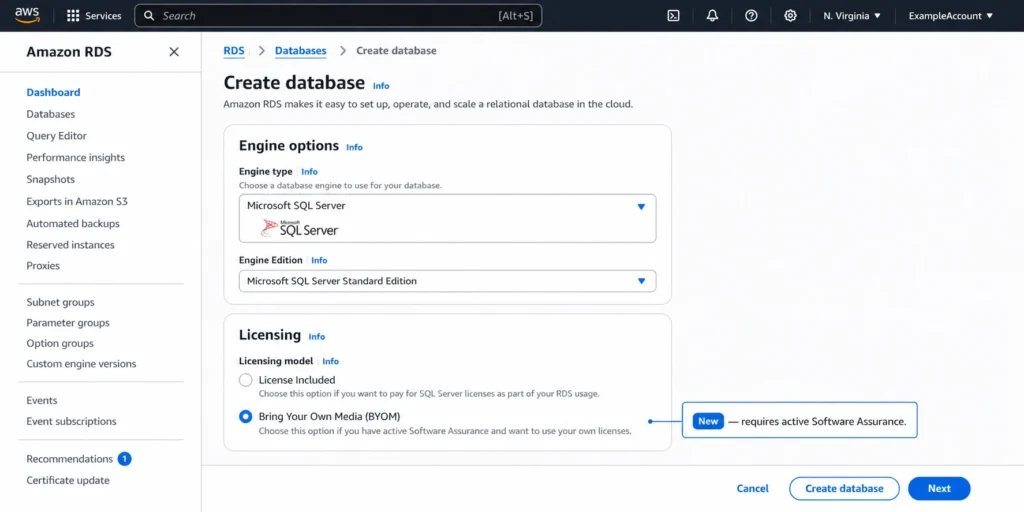
License Included: How It Works
LI supports all four editions on RDS: Enterprise, Standard, Web, and Express. Web and Express are available exclusively under LI. By default, accounts are limited to 10 LI instances per SQL Server edition; request an increase from AWS support if your fleet is larger.
BYOM: How It Works
What BYOM requires
- An active SQL Server license with Software Assurance on the edition you’re deploying (Standard or Enterprise)
- License Mobility rights through SA (AWS qualifies as a third-party shared server)
- The SQL Server RTM installation media as an ISO, via a Visual Studio subscription or the Microsoft 365 admin center
- An S3 bucket in the same Region as your RDS instance, to store the ISO
- IAM permissions covering AmazonRDSFullAccess plus s3:GetObject, s3:CreateBucket, and s3:PutObject
The setup process
- Upload the RTM ISO to an S3 bucket in the target Region.
- Create a BYOM engine version through the RDS console or CLI (roughly 20 minutes for the first instance of a given major version).
- Create RDS instances against that engine version, the same way you would against a standard engine version.
Converting LI to BYOM
For Single-AZ, the instance shuts down during conversion and restarts when complete. Read replicas must be removed before converting and recreated after; new replicas inherit BYOM.
Converting from BYOM back to LI is not supported, the only way back is creating a new LI instance and migrating your databases. Test your BYOM compliance process thoroughly before converting production instances.
Before you convert LI → BYOM.
Active Software Assurance covers the edition and version on this instance.
License Mobility form can be submitted to Microsoft within 10 days.
Instance has no Reporting or Analysis Services option groups.
Replicas are deleted before conversion and recreated after.
A major version upgrade path exists that works around the BYOM restriction.
Team understands there is no conversion back to LI without a new instance and data migration.
What BYOM Does and Doesn't Cover
BYOM also integrates with AWS License Manager at no charge: once configured, it detects BYOM instances, tracks vCPU usage, and produces audit-ready compliance reports. Skip it and BYOM still works, but license monitoring becomes manual.
Limitations that don’t exist for LI:
- Editions and versions: only Standard and Enterprise on SQL Server 2019 and 2022. Web, Express, and 2016/2017 require LI. Developer Edition is available under BYOM for non-production only full Enterprise features with no AWS license fee, and without the Software Assurance requirement.
- SSRS/SSAS: option groups with Reporting or Analysis Services aren’t supported. Check with SELECT name FROM sys.configurations WHERE name LIKE ‘%SSAS%’, or review your RDS Option Group, before planning a conversion.
- In-place major version upgrades aren’t supported moving from 2019 to 2022 means a new BYOM instance and data migration via native backup and restore.
- Account/Region isolation: a BYOM engine version is specific to your account and Region, though the ISO can be shared across accounts.
The Cost Difference: LI vs BYOM
Enterprise LI rates run significantly higher than Standard per vCPU; under BYOM, both editions carry the same compute-only rate.
Compare rates for your instance class, edition, and Region in the AWS Pricing Calculator the difference is the license component BYOM removes.
But SA has its own renewal cost, and that belongs in the math: if you already maintain SA for other Microsoft products, it’s not an incremental cost and BYOM savings are effectively free; if you’d renew SA specifically to enable BYOM, factor that cost into the comparison.
One pricing nuance: AWS’s unbundled model separates compute from licensing charges on Intel 2xlarge and larger LI instances (disabling SMT by default). Compare BYOM rates against LI unbundled rates too for some instance families, unbundled LI sits closer to BYOM than bundled LI does.
When to Choose License Included
- You have no existing SQL Server licenses with active SA
- You need Web or Express Edition, or you’re running SQL Server 2016/2017
- Your instance uses SSRS or SSAS option groups
- You’d rather have AWS own all licensing compliance
- The workload is short-term and wouldn’t recoup BYOM’s setup overhead
When to Choose BYOM
- You hold active SA for Standard or Enterprise on SQL Server 2019 or 2022
- Your instance doesn’t need SSRS or SSAS
- You can commit to the Verification Form and to managing compliance independently
- Your planned fleet exceeds the 10-instance-per-edition LI quota
- This is a long-running production workload where the SA investment is already made, or you’re migrating from EC2 where License Mobility was already in use
Reserved Instances With LI and BYOM
If you’re planning a conversion, don’t buy a new LI RI right before it; wait for the existing RI to expire, then buy a BYOM RI for the converted instance. Full RI mechanics (exact-size matching, Multi-AZ, payment options) are covered in the parent guide.
Also read: RDS SQL Server Reserved Instances: Licensing, Editions, and Cost
Database Savings Plans: Available for Both Models
Also read: AWS Database Savings Plans: flexible commitment discounts for SQL Server, RDS, Aurora, and other managed services
How Usage.ai Optimizes SQL Server Licensing Costs
Usage.ai flags LI instances on SQL Server 2019/2022 (Standard or Enterprise) that are BYOM conversion candidates based on edition, version, and option groups and quantifies the monthly saving per instance. It can’t verify Microsoft SA status directly.
For converted fleets, it purchases RIs matched to the correct licensing model and recommends Database Savings Plans during mixed-model transitions and both are backed by the Insured Flex buyback guarantee.
If a commitment purchased through Usage.ai ends up costing more than the equivalent on-demand usage, say an instance is decommissioned, resized, or changes licensing model mid-term the difference is paid back as cashback in real money.
Fee: a percentage of realized savings only $0 if Usage.ai saves nothing. 30-minute, billing-layer-only setup.
Don't let the switch strand your Reserved Instances — check your commitment exposure first.
Frequently asked questions
What is the difference between License Included and BYOM for RDS SQL Server?
LI: AWS manages the license, bundled into the hourly rate, across all four editions. BYOM: you supply existing Standard or Enterprise licenses via License Mobility and pay AWS for infrastructure only, it requires active SA and supports SQL Server 2019/2022. BYOM is AWS's SQL Server-specific equivalent of BYOL; unlike RDS for Oracle's BYOL model, SQL Server requires bringing the installation media itself, hence the name.
When did BYOM for RDS SQL Server launch?
BYOM launched on June 2, 2026. Before this, customers with SA had to run SQL Server on self-managed EC2 to use License Mobility, fully managed RDS had no BYOL path.
Can I convert an existing RDS SQL Server LI instance to BYOM?
Yes, in place, without database migration. Multi-AZ instances convert via a rolling update with a 30–60 second failover; Single-AZ instances restart during conversion. Converting back from BYOM to LI isn't supported.
What are the limitations of BYOM compared to License Included?
Only Standard and Enterprise on SQL Server 2019/2022; no SSRS/SSAS option groups; no in-place major version upgrades; engine versions are account- and Region-specific. You must submit the Verification Form within 10 days and manage compliance yourself.
Do I need Software Assurance for BYOM?
For Standard and Enterprise, yes, SA provides the License Mobility benefit required to deploy SQL Server licenses on AWS. The one exception is Developer Edition, available under BYOM for non-production use without SA.