.png)



The short answer
Monitor the platform and application, automate recovery, and test the plan. Microsoft notes that disaster recovery is not automatic in Azure.
The Azure resilience layers
| Resilience layer | Primary purpose | Common Azure capabilities | Main limitation |
|---|---|---|---|
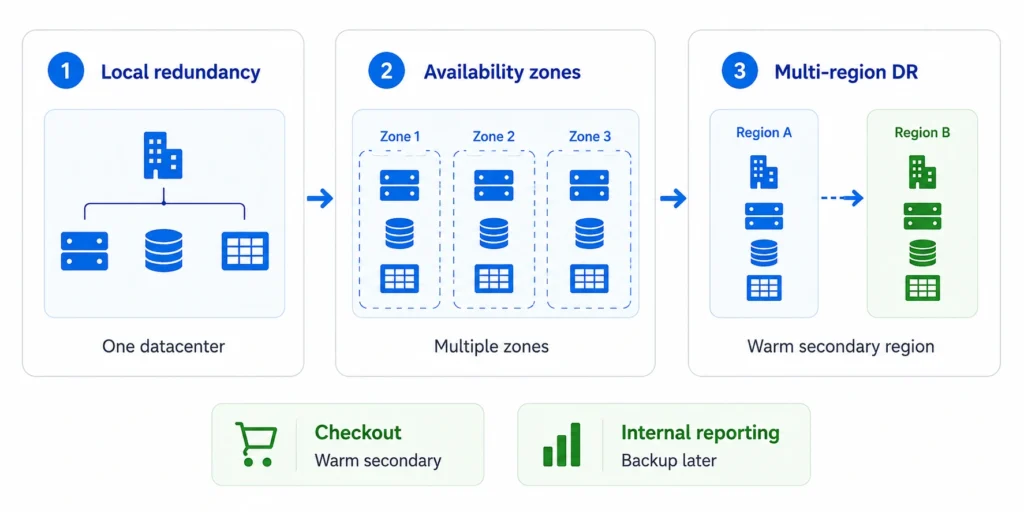
| Local redundancy | Protect against component failure | Multiple instances, load balancing, locally redundant storage | Does not protect against a datacenter outage |
| Zone redundancy | Continue through a zone failure | Availability Zones, zone-redundant services and storage | Does not cover a full regional outage |
| Multi-region recovery | Recover from regional disruption | Azure Front Door, Traffic Manager, geo-replication, Site Recovery | Adds cost, operational complexity, and replication lag |
| Data recovery | Recover deleted or corrupted data | Azure Backup, service-native backups, point-in-time restore | Restore time and backup frequency affect RTO and RPO |
| Detection and validation | Identify impact and prove recovery | Azure Monitor, Service Health, Resource Health, Chaos Studio | Alerts and tests require correct configuration |
A note on zone numbers: logical zone numbers are scoped to a subscription. “Zone 1” in one subscription may map to a different physical zone than “Zone 1” in another. Do not assume two subscriptions align their zones. Prefer zone-redundant services, and rely on physical zone alignment only where Azure explicitly exposes it.
Disclaimer:
Usage.ai provides cloud cost optimization and commitment management, not Azure availability or uptime guarantees. Validate architecture against current Microsoft documentation and workload requirements.
High availability and disaster
recovery are different
High availability handles faults such as a failed instance, hardware problem, or zone disruption. It uses redundancy, routing, retries, and graceful degradation.
Disaster recovery addresses larger events, including regional outages, data corruption, and major security incidents. It defines failover, data restoration, secondary operation, and failback.
Build resilience around business impact
Define RTO and RPO
Map every critical dependency
Select the recovery pattern
- Zone redundant: Best when zone failure protection meets the business requirement.
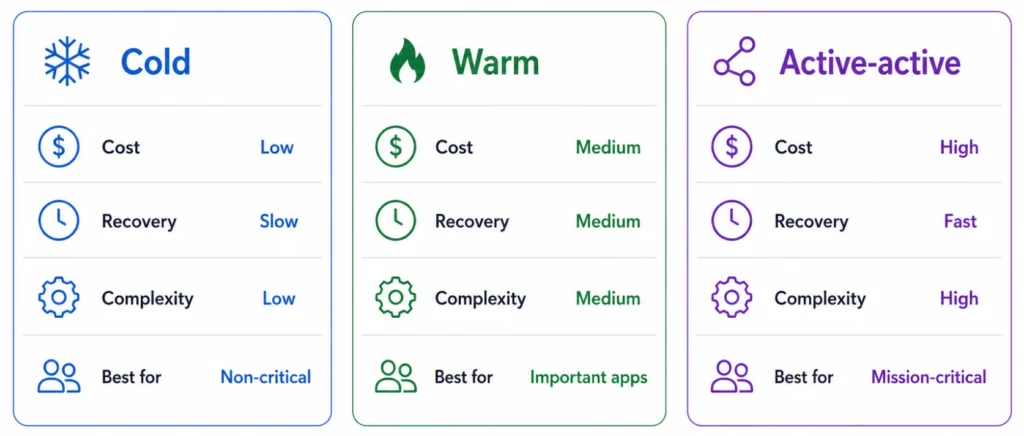
- Active-passive cold: Lower steady-state cost, but infrastructure or data may need restoration before use.
- Active-passive warm: Minimal services run in the secondary region and scale after failover.
- Active-active: Both regions serve traffic, offering faster continuity at higher cost and complexity.
How Azure supports outage recovery
Azure Site Recovery orchestrates recovery for supported VM workloads. Service-native replication often suits managed databases and storage.
Azure Service Health reports relevant platform events. Resource Health reports individual resource states. Neither replaces application monitoring through Azure Monitor and Application Insights.
Azure Chaos Studio introduces controlled faults to test resilience. Begin in non-production before carefully controlled production exercises.
Service-by-service recovery
behavior
Azure has no single recovery model. Each service replicates, fails over, and reconnects differently, so confirm the behavior of every service in a critical flow before assuming it is protected.
| Service | Cross-region recovery | Failover / RPO | Watch on failback |
|---|---|---|---|
| Azure SQL Database | Failover groups (async geo) | Auto or manual; seconds RPO | Reverse group; endpoint stable via listener |
| Cosmos DB | Multi-region, tunable consistency | Auto or manual; near-zero | Reconcile conflicts before returning writes |
| Storage (GRS/GZRS) | Async geo replication | Customer-initiated; last-sync RPO | Re-enable geo-redundancy first |
| PostgreSQL / MySQL Flexible | Read replicas / geo backup | Manual promotion; async lag | Endpoint changes; rebuild replication |
| AKS / App Service / VMs | Redeploy or Site Recovery | State lives in data tier, not compute | Redeploy from IaC; shift traffic gradually |
| Key Vault / ACR / App Config / APIM | Mostly customer-configured | Varies by service | Confirm secondary copies exist upfront |
Replication is not backup
Design both:
- Immutable or locked backups a compromised account cannot delete.
- Soft delete and multi-user authorization on backup vaults and storage.
- Cross-region restore so a regional outage does not block recovery.
- Backup encryption keys that do not depend solely on the failed region.
- Restore testing, not backup-job status a green job is not a proven restore.
- Separate the failure modes: infrastructure failure uses replication/failover, logical corruption uses point-in-time restore.
Plan for failover capacity
and quotas
- Check regional and VM-family vCPU quotas in the secondary region and raise them ahead of time.
- Confirm your SKUs are actually available in the secondary region.
- Use On-demand Capacity Reservations to guarantee compute for critical tiers.
- Leave autoscaling headroom above quota.
- Pre-create networking, subnets, and private endpoints so failover is not blocked on provisioning.
- Re-validate periodically that target capacity remains deployable.
Choose regions deliberately,
not just by pair
- Service and SKU availability
- Latency to users and between regions
- Data-residency and compliance requirements
- Capacity headroom
- Correlated environmental and network risk
- Replication support for your services
- Any service restriction on which secondary region is allowed
Design for data consistency
and prevent split-brain
- What happens to acknowledged writes that had not replicated when the primary failed.
- How replication lag is measured and what lag is acceptable.
- How the old primary is fenced before the secondary is promoted, so both cannot accept writes.
- Conflict-resolution rules for multi-region writes.
- Read-after-write expectations for users during and after failover.
- How data is reconciled after recovery.
- How failback avoids overwriting newer data written to the secondary.
Route traffic: Front Door
vs Traffic Manager
- Azure Front Door: Layer 7 HTTP/HTTPS routing, WAF, and edge TLS termination. Best for web apps and APIs.
- Traffic Manager: DNS-based routing with broader protocol support. Subject to DNS TTL and client-side caching, which delays failover.
- Set health-probe endpoints to validate real dependencies, and tune thresholds to avoid false failovers.
- Define single-origin-unhealthy and all-origins-unhealthy behavior.
- Account for private endpoints, private DNS, regional hubs, firewalls, and egress paths.
- Include ExpressRoute/VPN dependencies for hybrid systems.
Make the secondary region independent
- Key Vault secrets and certificates
- Container images and deployment artifacts (ACR)
- Microsoft Entra identities and managed identities
- App Configuration
- DNS and private DNS
- Monitoring workspaces
- CI/CD systems
- Firewall policies
- Encryption keys
- Any API or database hosted only in the primary region
A step-by-step Azure recovery workflow
- Detect the failure. Correlate platform, application, and user signals.
- Classify the event. Decide whether it is a transient fault, component failure, zone disruption, or disaster.
- Stabilize the workload. Pause risky changes, preserve evidence, and assign a decision owner.
- Fail over in dependency order. Validate data, identity, networking, applications, workers, and integrations.
- Verify service and data. Run transactions and integrity checks.
- Communicate status. Share impact, mitigation, recovery state, and the next update time.
- Fail back separately. Reconcile data, validate the primary environment, and shift traffic gradually.
- Review the incident. Compare recovery with RTO and RPO, then improve the plan.
Simulate loss of the primary region. Can an on-call engineer restore the critical flow within RTO, verify RPO, and reverse the failover safely?
Test each failure class separately
- Instance failure
- Availability-zone loss
- Dependency latency or failure
- Front Door / Traffic Manager failover
- Isolated Site Recovery test failover
- Backup restoration
- Secondary-region capacity validation
- Full regional traffic shift
- Failback to the original region
Model resilience cost before
deployment
This does not prove an $18,000 saving. Outage frequency and impact are uncertain. Compare options and validate assumptions through drills.
Go beyond single-point arithmetic
- Use a range of outage frequencies, not one number.
- Include lost revenue and productivity, SLA penalties and customer credits, churn and reputational damage, regulatory impact, recovery engineering time, and data-loss reconciliation cost.
- Value a degraded-service alternative separately from full failover.
- Compare cold, warm, and active-active over three to five years, not a single incident.
Keep cost optimization
recovery-aware
Separate stable usage from temporary recovery capacity. Use the Azure Reservations guide for fixed workloads and review Azure Savings Plan scope for flexible compute. Commitments should reflect normal eligible usage, not capacity used only during failover.
Include resilience spending in cloud budgeting so teams agree on the selected recovery tier.
Azure outage resilience checklist
Resilience is an operating capability
The best design is not the one with the most redundancy. It is the least complex design that can repeatedly meet the required RTO and RPO at an acceptable cost.
Compare redundancy spend, recovery capacity, and commitment coverage using your own Azure billing data.
Frequently asked questions
What is Azure outage resilience?
It is a workload's ability to remain available or recover within agreed limits when Azure components, zones, or regions fail.
Do availability zones protect against a regional outage?
No. Zones are separate datacenter locations within one region. Regional protection generally requires cross-region recovery or an accepted longer restoration path.
What is the difference between Azure Front Door and Site Recovery?
Front Door routes traffic across healthy origins. Site Recovery replicates and orchestrates recovery for supported VM workloads. They may be used together.
How often should Azure disaster recovery be tested?
Test after material changes and on a schedule based on risk and compliance. Microsoft suggests stakeholder review ideally every six months.
Does a higher Azure SLA guarantee application uptime?
No. A service SLA covers that service under specified conditions. Application availability also depends on architecture, configuration, dependencies, monitoring, and recovery.